HomeNavigation arrowBlogNavigation arrow
Current page
Feature Updates

Weekly Recap: New Discounts, Batch AI Editing & More Upload Controls 💸✨

Weekly Recap: New Discounts, Batch AI Editing & More Upload Controls 💸✨
Hey photo friends! 👋

Candy here with a big one this week: Discounts are officially here! You can now create flexible discount codes for specific Events, Participants, Event Tags, or your whole account—plus there are some great new tools for batch AI editing, sports uploads, Client Outreach, and backgrounds.

Let’s jump in!

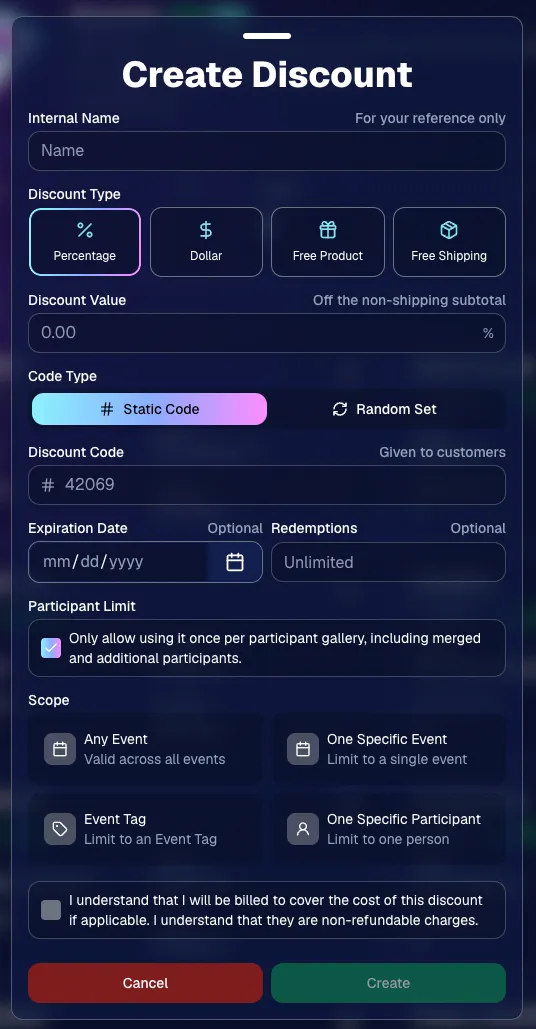
💸 NEW: Discounts

You can now create and manage your own discounts directly in NowCandid.

Discounts you create can apply to:

  • 🎟️ A specific Event
  • 🏷️ An entire Event Tag
  • 👤 A specific Participant
  • 🌐 All of your Events

And you can choose from several discount types:

  • 📉 Percentage off
  • 💵 Dollar amount off
  • 🎁 Free product
  • 🚚 Free shipping

🔐 Flexible code options

  • 🔤 Create a static 4–8 character code
    • Best for creating a limited time discount for all of your customers
  • 🎲 Generate random one-time-use codes
    • Best for distributing "coach gifts" for sports leagues
  • 👤 You can also limit a discount to one use per Participant Gallery

A few important rules:

  • Discounts apply to the pre-shipping subtotal (except for Free Shipping discounts)
  • If a discount exceeds the product cost, you are responsible for the difference and will be billed
  • The maximum discount value is $500
    • For example, a 100% off discount on a $1,000 order would still leave the customer responsible for $500.

📚 Full documentation:
https://app.nowcandid.com/docs/discounts
🎨 Batch AI Editing from Manage Images

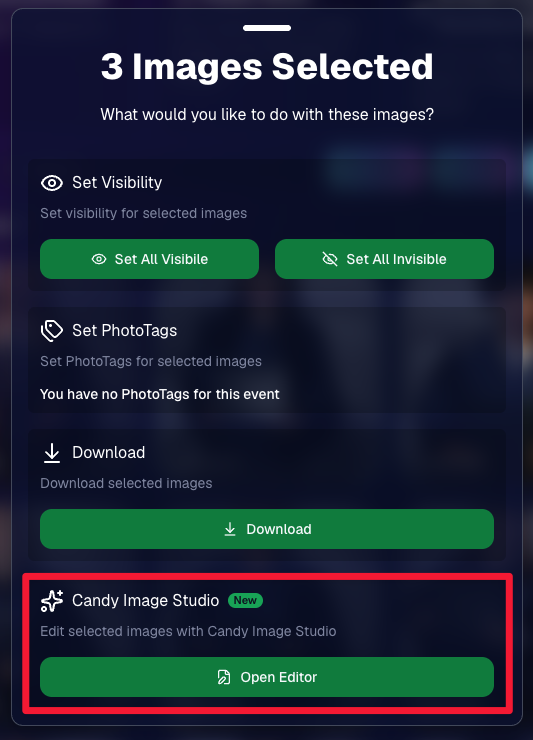
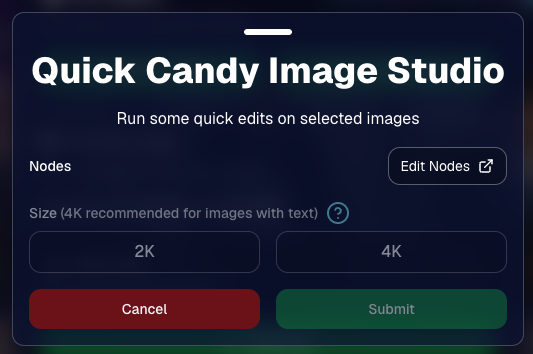
You can now run Candy Image Studio edits on multiple selected images at once right from Manage Images.

  • ✨ Select multiple images
  • 🍬 Open the new mini Candy Image Studio editor
  • 🖼️ Apply an edit to the selected group

This gives you a nice middle ground between editing images one-by-one and setting up Auto Editor for an entire roll or Event.
📤 Better SportsPics Upload Controls

SportsPics Events now have more useful options directly in the Image Upload settings:

👥 Mark All Images Group

  • Automatically mark every uploaded image as a Group Photo.

🏷️ Assign a PhotoTag during upload

  • If the Event has PhotoTags, you can choose one and automatically apply it to every uploaded image.

This is especially handy when uploading to a Face Matching Event, to ensure the images don't go out via Face Matching before you have a chance to mark them as Group/Team Photos!

⭐ Candy Image Studio & Auto Editor Improvements

👤 Participant names passed into edits

  • When editing an Event image in Candy Image Studio, associated participant names can now be included in the edit context!
  • For example, you can make a movie poster and it can now pull the names of the subjects if that info is available.

✉️ Client Outreach email designer improved

  • Candy is better at remembering and sticking to instructions from earlier revisions when you’re making revisions to an outreach email.

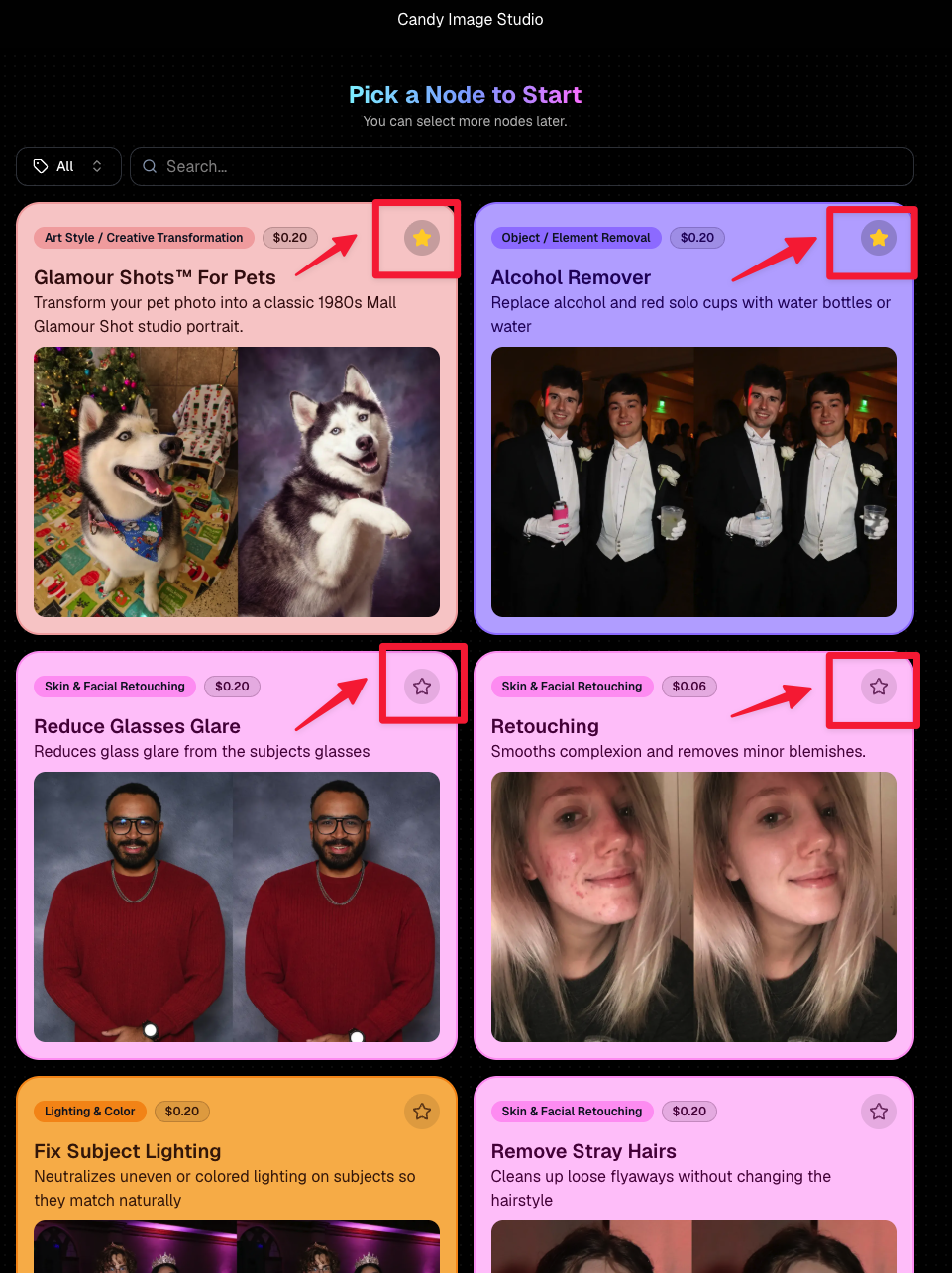
Favorite your most-used nodes

  • Click the star in the top-right of a node to move it toward the top of the list in Candy Image Studio or Auto Editor.
  • Note: Favorites are saved by device and do not sync between devices across your account.
🖼️ 39 New Default Background Sets

We added 39 new background sets for Offers and Virtual Groups!

New additions span categories like:

  • 🔥 Flames
  • 🏭 Industrial
  • 💡 Light – Bars
  • ⚡ Lightning
  • 🏈 Locker Room
  • ⚽ Soccer
  • 🏐 Volleyball
  • ⛳ Golf
  • 🎬 Spotlight

Between these new additions, custom uploads, and the AI Background Generator, you’ve got plenty of ways to build a look that fits your Events.
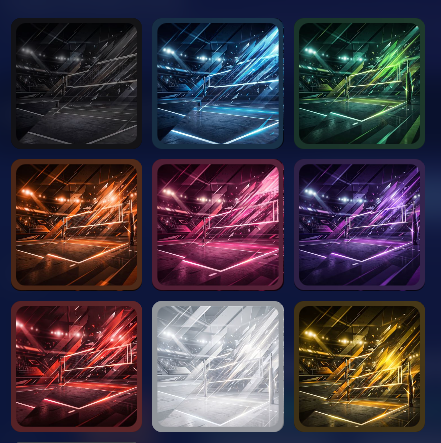
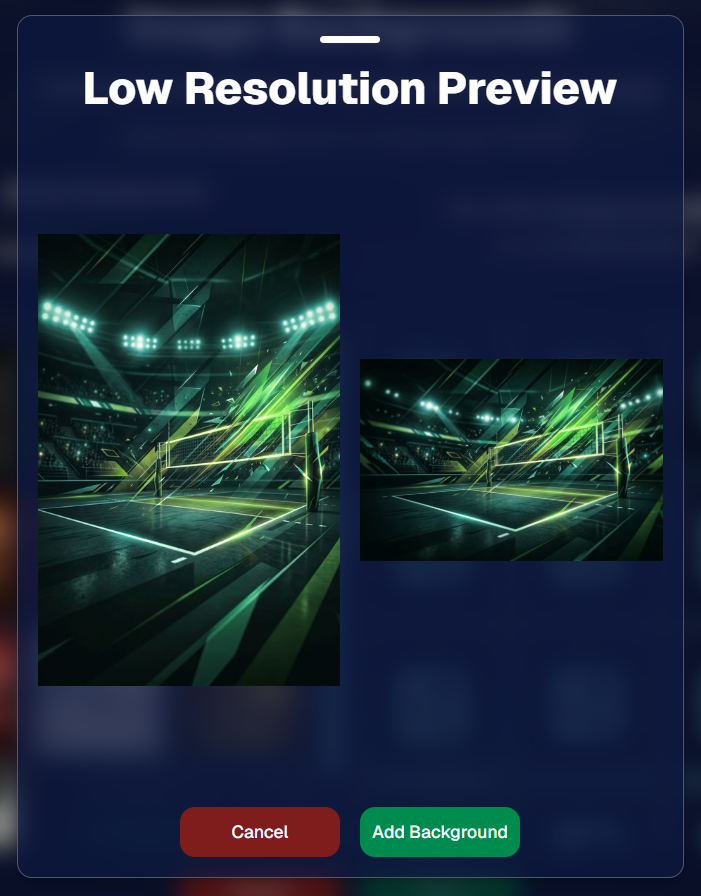
Example: New Volleyball Backgrounds!

A closer look at one of the examples above!

🧑‍🤝‍🧑 PhotoRoster & PhotoTag Improvements

🏷️ PhotoTags carry into new PhotoRosters

  • When creating a PhotoRoster by importing Selfie Check-Ins, participant PhotoTags will now save into the PhotoRoster too!

🧹 Duplicate PhotoTag import fix

  • Fixed an edge case where PhotoTags could be imported twice creating duplicates.

✂️ Background Removal Update

  • 👥 Background Removal no longer runs on Group Photos

Group Photos are not meant to go through Background Removal! Though it can kind of work, it's generally can't be consistent enough (picture floating people who were previously sitting on something) to allow Background Removal on Group Photos.

🛍️ Retail: Duplicate Download Warning

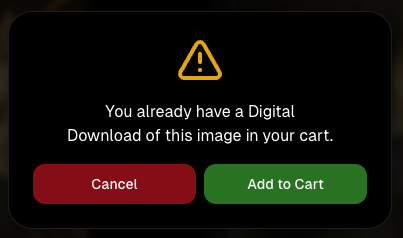
Retail now helps prevent accidental duplicate digital purchases.

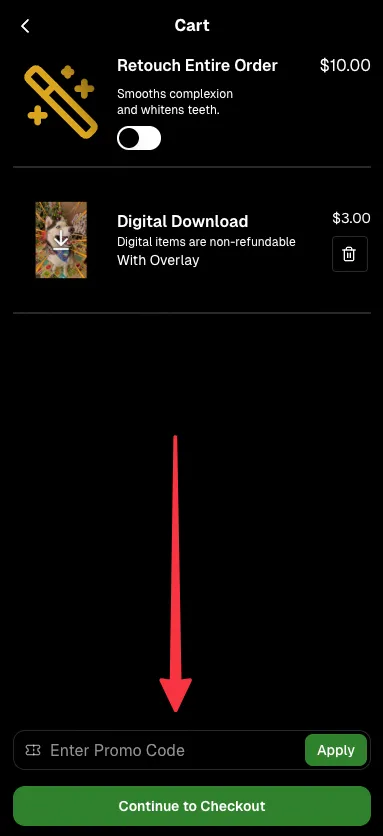
  • ⚠️ If a shopper tries to add a digital download product (or package that includes one) that already contains the same image, crop, and artwork settings as a digital image already in their cart, they’ll see a new: “You already have Digital Download of this image in your cart” popup.
  • ➕ They can still add it anyway if they really want to!

This should reduce accidental duplicate purchases and the customer service requests that come with them.
Little improvements to make the platform better and better.

🛠️ Dashboard Fixes & Cleanup

  • 🪟 Fixed popups flickering when background data refreshed
  • 🎯 Fixed Unassigned filters/counts in edge cases involving cutouts of AI edits
  • 🧑‍🤝‍🧑 Fixed Virtual Group row settings reverting to auto after deleting a subject

That’s the week!

Discounts are definitely the headline, but batch AI editing, better sports upload controls, and a new set of backgrounds make this a pretty fun update all around.

Keep creating magic,

Candy 🍬

Related articles

Grad Season Preparation: Schedule a Pre-Grad Chat with Jack!
GradPics
May 7, 2024

Grad Season Preparation: Schedule a Pre-Grad Chat with Jack!

7
 minutes read
As graduation season approaches, ensuring your photography services are streamlined and optimized can significantly impact your sales and client satisfaction.

At NowCandid, we're dedicated to helping you maximize your graduation ceremony photography with efficient tools and strategies. Let's dive into how you can enhance your approach this grad season.

Schedule Your Pre-Grad Strategy Session 📅

Kick off the season right by booking a pre-grad chat with Jack (https://calendly.com/nowcandid-training). In this meeting, we'll cover:

  • Event Setup: Make sure you setup your GradPics Now Event correctly, and know what to expect.
  • Equipment Review: Ensure you have all the necessary gear for what you want to accomplish.
  • Best Practices: Tips and tricks to boost your confidence and readiness.

This session is crucial for tackling your events with the expertise needed to capture every memorable moment.

Jack has even doubled his usual Calendly availability for grad season! Take advantage!

Mastering Selfie Check-In 🤳

Selfie Check-In revolutionizes how you capture and associate images with graduates:

  • Ensure Participation: Encourage every graduate to use the Selfie Check-In upon arrival. Consider assigning assistants to facilitate this process.
  • Visibility: Utilize multiple QR code placements—signs, lanyards, and handheld QR code signs (https://www.teamphotonetwork.com/QP...) to ensure no one misses out.
  • Extended Reach: Gather information not just from graduates, but also their families, expanding your marketing reach.

Benefits of Live-Uploading 🌐

Connect your camera to an iPhone, iPad, or Windows device for real-time image uploading and instant gallery updates:

  • Immediate Availability: Images are uploaded during the ceremony, speeding up delivery and increasing sales potential.
  • Seamless Integration: Use either direct camera tethering or post-event uploading through the NowCandid Web Dashboard for continuous marketing and matching.
  • Less Work: Once you and your photographers leave a ceremony, you're done! Walk away and watch the sales roll in.

Comprehensive Photo Coverage 📸

Go beyond the traditional shots to truly capture the spirit of graduation. More photos mean higher chances of sales. Capture a broad range of moments to provide ample choices for your clients.

  • Processionals
  • Buddy Shots
  • Pre-Stage Portraits
  • Post-Stage Portraits
  • Handshake Shots
  • Recessionals
  • Friends & Family Shots

Why Choose NowCandid for Graduations? 🎓

GradPics Now isn't just about taking photos; it's about enhancing the entire experience:

  • Background Removal: Currently free! Background removal can add a professional touch, allowing subjects to choose from selectable, default backgrounds.
  • Full Support: Our support team handles customer inquiries related to orders and ordering, so you can focus on shooting.
  • Cost-Effective: No subscriptions; we only profit when you do, only taking a small commission on orders, ensuring our goals align with your success.
  • User-Friendly: Designed for ease of use, robust against mistakes, and backed by reliable recovery options.
  • Residual Sales: We keep images hosted and online for at least 15 years, helping you get residual sales as the years go by.
  • Successful: Graduation photographers find it incredibly easy compared to their past workflows, and find themselves earning 20%+ more (or in some cases, much more than that!) than what they previously made in sales, with a fraction of the effort.

Ready to take your graduation photography to the next level?

Don't wait—schedule your session with Jack today (https://calendly.com/nowcandid-training) and ensure you're fully prepared to make this grad season your most successful yet!

Transforming Event Photography: How Rachel Sherman Elevated Her Business with NowCandid’s QuicPics
Success Stories
May 1, 2024

Transforming Event Photography: How Rachel Sherman Elevated Her Business with NowCandid’s QuicPics

5
 minutes read
Rachel Sherman, owner of TSS Photography of South Florida, discovered the game-changing benefits of NowCandid's QuicPics program through a networking opportunity that not only enhanced her business but also solidified new partnerships.

A Chance Meeting Leads to Opportunity

It all began at a Network Lead Exchange (NLX) meeting where Rachel met Mia, a member of NLX. A friendship quickly formed, catalyzed by shared professional values and a mutual dedication to community service. Rachel knew she could lean on NowCandid when she received a last-minute request to cover a “Galantine’s Day Lunch Celebration” through Mia’s referral.

Despite the tight schedule, Rachel rearranged her commitments to cover the event, leveraging the QuicPics program to deliver high-quality, timely photos.

Instant Gratification and Enhanced Visibility

The event was a win-win for all involved. Rachel provided timely and professional photography services, greatly enhancing the experience for attendees who were thrilled to receive instant access to their images. This instant delivery allowed them to share their photos on social media right away, amplifying the event's reach and engagement online.

Meanwhile, the host appreciated the immediate availability of high-quality images which could be leveraged for further marketing efforts.

This efficient service not only helped Rachel cement her reputation as a top-tier photographer but also showcased her ability to add significant value to events by boosting their visibility and attendee satisfaction.

Seizing the Moment with QuicPics

Seeing the QuicPics program in action, Mia was additionally impressed by the custom graphic banners Rachel created for each event, that include the event name and sponsor logos, which prompted her to secure Rachel’s services for the Weston Bar Association's networking luncheon.

Rachel attended the luncheon as a guest, providing a supportive presence while her team easily managed the Tap-A-Face workflow.

Exclusive Partnership Announcement

The collaboration was so successful that at the end of her speech, Mia announced TSS Photography as the Exclusive Photographer for the Weston Bar Association.

This partnership marked a significant milestone for Rachel, demonstrating the powerful impact of effective networking combined with the right technological tools like NowCandid's QuicPics.

A Model for Success

Rachel Sherman’s experience illustrates how integrating innovative tools like NowCandid’s QuicPics can transform a photography business from simply capturing moments to becoming an integral part of community engagement and business growth.

Her story is a testament to the potential that professional photographers can unleash when they combine skill with cutting-edge technology.

For those inspired by Rachel's story and interested in leveraging QuicPics for their own events...

Create your free NowCandid account to learn more about how this tool can elevate your photography business to new heights.

Learn How NowCandid Can Help You Remarket Your Pre-NowCandid Images🌟
Success Stories
April 22, 2024

Learn How NowCandid Can Help You Remarket Your Pre-NowCandid Images🌟

8
 minutes read

For those who are new to NowCandid, let me tell you that NowCandid does a lot to help you continue to make sales on the images that you put through our system!

Things such as:

  • Long-Term Hosting: We keep galleries online for at least 15 years.
  • Ongoing Marketing: Annual Event reminders & occasional consolidated Event marketing.
  • Sales Reinforcement: "Order More" QR codes on print products to encourage reorders.

So, if you're using NowCandid for your current and future Events, those Events are all set to generate plenty of residual sales as the years go by!

However, did you know that NowCandid can be used to easily remarket images from your past, pre-NowCandid Events?

As a photographer, you have probably used other software and sales solutions in the past. That's okay! NowCandid is not a jealous business partner, and we are just happy you're here for us to help you now.

So let's talk about how we can help you get more sales out of those past Events of yours.

The Power of Remarketing 🔄

First off, let me say that this will only work in situations where you have:

  • Pictures of Individuals: Such as headshots or portraits.
  • Corresponding Contact Information: You need to know which contact info goes with which image files.

If you have past Events with those two things readily available, then you can use our oft overlooked FaceMatch Import Workflow to create what we often call a FaceGroup in your NowCandid Dashboard.

You can then use that FaceGroup (pictures of individuals corresponding to an uploaded set of contact information) in any of your NowCandid Events!

Meaning... you could create a NowCandid Event, utilize a FaceGroup of some school picture headshots you did, and then upload to that Event that class's graduation pictures, school pictures, dance pictures, or anything else you'd like to remarket!

Once the "reference images" from your FaceGroup are in the Event as well as your past images of that same group of people - the images will match up using our Face Matching processes and begin a marketing campaign and sales effort that will help you generate some sales on those old images right now, as well as occasional residual sales over the years and years to come.

Your Portfolio, Forever Profitable 💼

As an example, a new NowCandid user performed the exact processes we described above to "remarket" graduation pictures from 4 of the graduations they photographed last year.

Within a month of remarketing those 2023 images, this user generated about $1300 in sales and shipping!

That $1300 will be in addition to the sales they will be able to make as the years go by, thanks to the residual sales tactics we mentioned earlier.

Unlocking New Sales with Old Memories 🔑

So, if you dear reader are in a position to utilize some of the portraits and contact info you've collected in the past, consider using NowCandid to remarket them! Doesn't matter if they're 1, 3, 5, or even 10+ years old.

NowCandid does not charge you any subscription or hosting fees, so even if you were to make $0 in sales, it won't cost you a thing.

We only make money when you do, and we only want to help you earn more and work less!

Get Started Now 🚀

Ready to give your vintage images a new lease on life? Schedule a walkthrough with our specialist, Darwin, and let's get those images working for you once more. Click here to book your session: NowCandid Training

NowCandid is committed to helping you earn more with less effort. Let’s turn those archived galleries into a flourishing sales channel, starting now!

Let’s get in touch

If you’re a photographer looking to add NowCandid services to your wheelhouse – set up a call by clicking the button below.

How to customize formatting for each rich text

How to customize formatting for each rich text

How to customize formatting for each rich text

How to customize formatting for each rich text

How to customize formatting for each rich text

What’s a Rich Text element?

The rich text element allows you to create and format headings, paragraphs, blockquotes, images, and video all in one place instead of having to add and format them individually. Just double-click and easily create content.

A rich text element can be used with static or dynamic content. For static content, just drop it into any page and begin editing. For dynamic content, add a rich text field to any collection and then connect a rich text element to that field in the settings panel. Voila!

Headings, paragraphs, blockquotes, figures, images, and figure captions can all be styled after a class is added to the rich text element using the "When inside of" nested selector system.

  • List One
  • List Two
  • List Three
  • List Four
  • List Five

This is a link

This is bold text