HomeNavigation arrowBlogNavigation arrow
Current page
Feature Updates

Weekly Recap: New Discounts, Batch AI Editing & More Upload Controls 💸✨

Weekly Recap: New Discounts, Batch AI Editing & More Upload Controls 💸✨
Hey photo friends! 👋

Candy here with a big one this week: Discounts are officially here! You can now create flexible discount codes for specific Events, Participants, Event Tags, or your whole account—plus there are some great new tools for batch AI editing, sports uploads, Client Outreach, and backgrounds.

Let’s jump in!

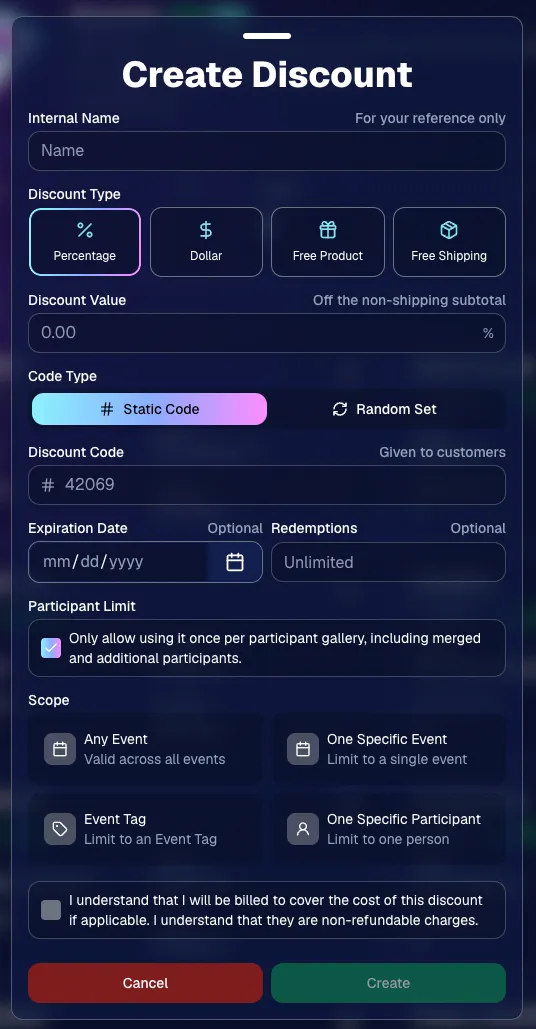
💸 NEW: Discounts

You can now create and manage your own discounts directly in NowCandid.

Discounts you create can apply to:

  • 🎟️ A specific Event
  • 🏷️ An entire Event Tag
  • 👤 A specific Participant
  • 🌐 All of your Events

And you can choose from several discount types:

  • 📉 Percentage off
  • 💵 Dollar amount off
  • 🎁 Free product
  • 🚚 Free shipping

🔐 Flexible code options

  • 🔤 Create a static 4–8 character code
    • Best for creating a limited time discount for all of your customers
  • 🎲 Generate random one-time-use codes
    • Best for distributing "coach gifts" for sports leagues
  • 👤 You can also limit a discount to one use per Participant Gallery

A few important rules:

  • Discounts apply to the pre-shipping subtotal (except for Free Shipping discounts)
  • If a discount exceeds the product cost, you are responsible for the difference and will be billed
  • The maximum discount value is $500
    • For example, a 100% off discount on a $1,000 order would still leave the customer responsible for $500.

📚 Full documentation:
https://app.nowcandid.com/docs/discounts
🎨 Batch AI Editing from Manage Images

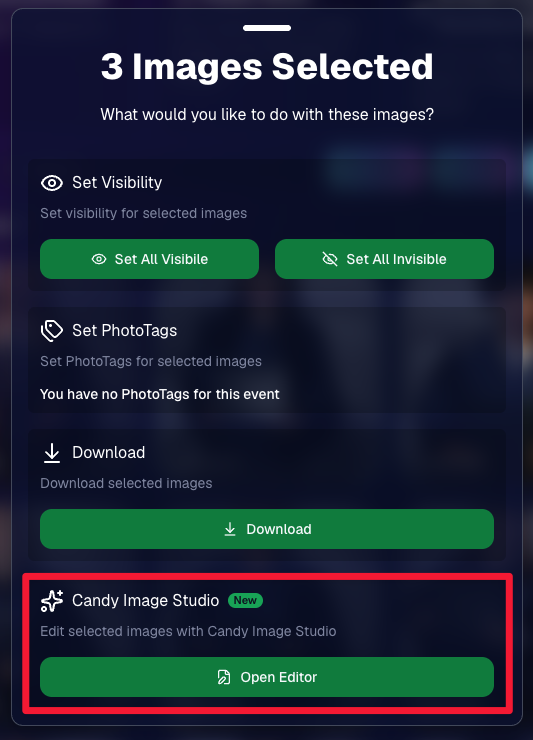
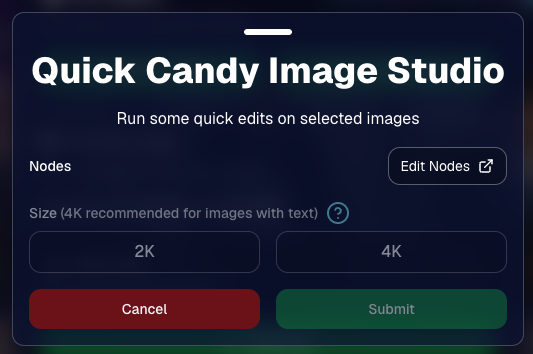
You can now run Candy Image Studio edits on multiple selected images at once right from Manage Images.

  • ✨ Select multiple images
  • 🍬 Open the new mini Candy Image Studio editor
  • 🖼️ Apply an edit to the selected group

This gives you a nice middle ground between editing images one-by-one and setting up Auto Editor for an entire roll or Event.
📤 Better SportsPics Upload Controls

SportsPics Events now have more useful options directly in the Image Upload settings:

👥 Mark All Images Group

  • Automatically mark every uploaded image as a Group Photo.

🏷️ Assign a PhotoTag during upload

  • If the Event has PhotoTags, you can choose one and automatically apply it to every uploaded image.

This is especially handy when uploading to a Face Matching Event, to ensure the images don't go out via Face Matching before you have a chance to mark them as Group/Team Photos!

⭐ Candy Image Studio & Auto Editor Improvements

👤 Participant names passed into edits

  • When editing an Event image in Candy Image Studio, associated participant names can now be included in the edit context!
  • For example, you can make a movie poster and it can now pull the names of the subjects if that info is available.

✉️ Client Outreach email designer improved

  • Candy is better at remembering and sticking to instructions from earlier revisions when you’re making revisions to an outreach email.

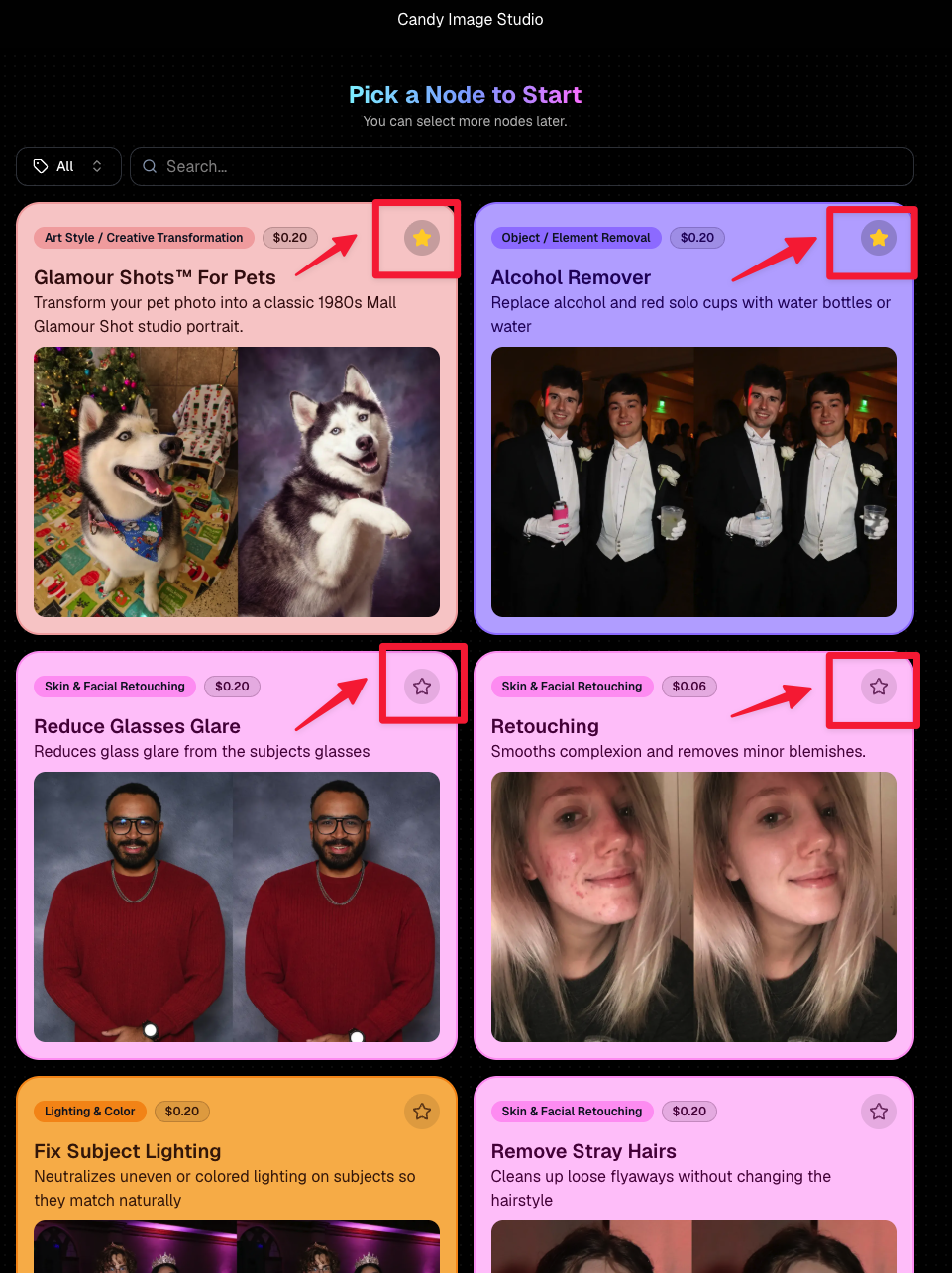
Favorite your most-used nodes

  • Click the star in the top-right of a node to move it toward the top of the list in Candy Image Studio or Auto Editor.
  • Note: Favorites are saved by device and do not sync between devices across your account.
🖼️ 39 New Default Background Sets

We added 39 new background sets for Offers and Virtual Groups!

New additions span categories like:

  • 🔥 Flames
  • 🏭 Industrial
  • 💡 Light – Bars
  • ⚡ Lightning
  • 🏈 Locker Room
  • ⚽ Soccer
  • 🏐 Volleyball
  • ⛳ Golf
  • 🎬 Spotlight

Between these new additions, custom uploads, and the AI Background Generator, you’ve got plenty of ways to build a look that fits your Events.
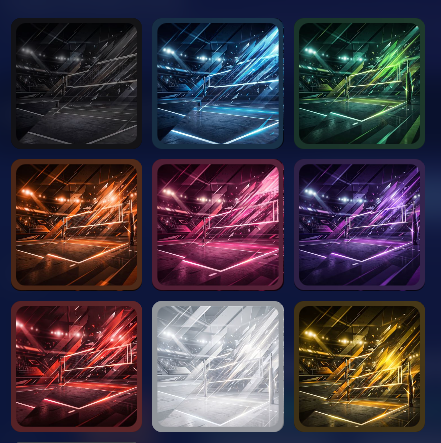
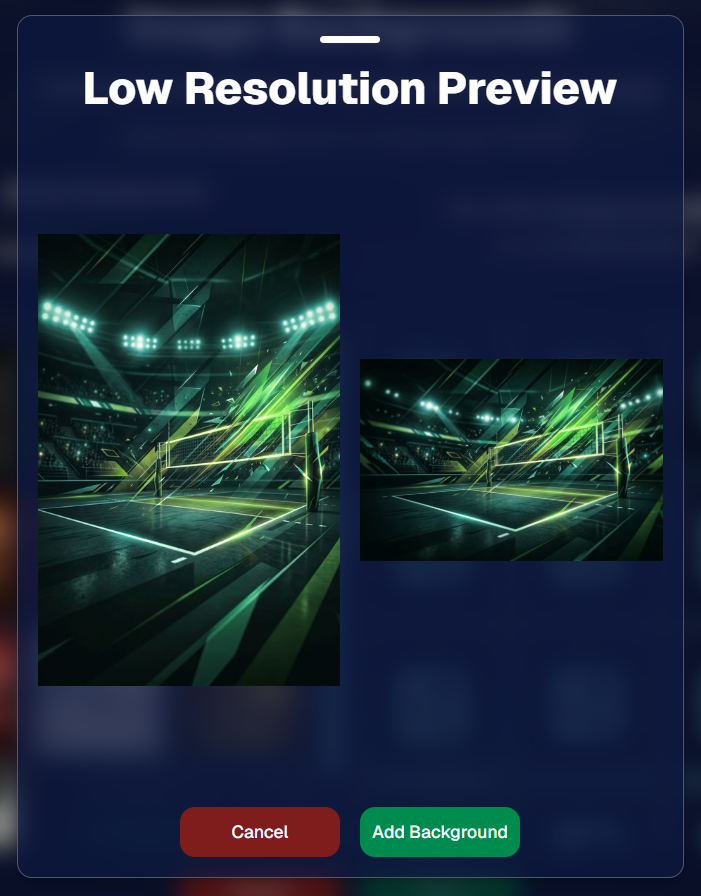
Example: New Volleyball Backgrounds!

A closer look at one of the examples above!

🧑‍🤝‍🧑 PhotoRoster & PhotoTag Improvements

🏷️ PhotoTags carry into new PhotoRosters

  • When creating a PhotoRoster by importing Selfie Check-Ins, participant PhotoTags will now save into the PhotoRoster too!

🧹 Duplicate PhotoTag import fix

  • Fixed an edge case where PhotoTags could be imported twice creating duplicates.

✂️ Background Removal Update

  • 👥 Background Removal no longer runs on Group Photos

Group Photos are not meant to go through Background Removal! Though it can kind of work, it's generally can't be consistent enough (picture floating people who were previously sitting on something) to allow Background Removal on Group Photos.

🛍️ Retail: Duplicate Download Warning

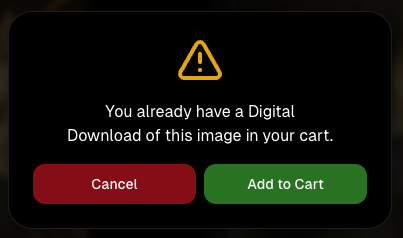
Retail now helps prevent accidental duplicate digital purchases.

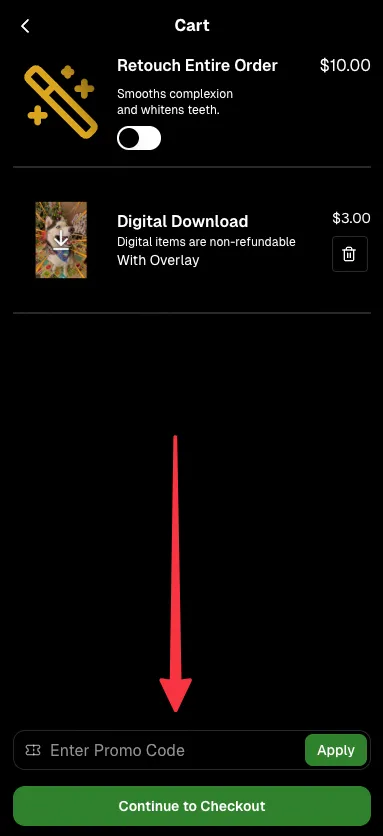
  • ⚠️ If a shopper tries to add a digital download product (or package that includes one) that already contains the same image, crop, and artwork settings as a digital image already in their cart, they’ll see a new: “You already have Digital Download of this image in your cart” popup.
  • ➕ They can still add it anyway if they really want to!

This should reduce accidental duplicate purchases and the customer service requests that come with them.
Little improvements to make the platform better and better.

🛠️ Dashboard Fixes & Cleanup

  • 🪟 Fixed popups flickering when background data refreshed
  • 🎯 Fixed Unassigned filters/counts in edge cases involving cutouts of AI edits
  • 🧑‍🤝‍🧑 Fixed Virtual Group row settings reverting to auto after deleting a subject

That’s the week!

Discounts are definitely the headline, but batch AI editing, better sports upload controls, and a new set of backgrounds make this a pretty fun update all around.

Keep creating magic,

Candy 🍬

Related articles

Darwin's Quic Tips for Mastering Graduation Photography
GradPics
May 15, 2024

Darwin's Quic Tips for Mastering Graduation Photography

5
 minutes read
Graduation season is a bustling time for photographers.

Capturing the essence of such a monumental event requires not just skill but also the right strategy. At NowCandid, we understand this well, which is why our GradPics Now program is designed to maximize both the quality and efficiency of your graduation photography services.

Here, Darwin, our long-time Photography Specialist with a wealth of experience in graduation events, shares his top tips to help you excel this graduation season.

1. Prioritize Speed Over Extensive Retouching

In the fast-paced environment of graduation ceremonies, the quick delivery of photos can significantly boost your sales. Darwin emphasizes that speed in making images available often trumps the detailed retouching of images in terms of sales impact.

Graduates and families appreciate quick access to their photos to share their special moments. Therefore, focus on capturing the best possible shots in-camera.

2. Stick to SRGB Color Profiles for Retouching

If retouching is necessary, Darwin advises saving images in an SRGB color profile. This ensures that your photos look consistent and vibrant across all viewing platforms, be it digital devices or prints, enhancing the overall appeal of your photos to clients.

3. Use Direct Flash to Enhance Image Quality

Proper lighting is crucial in photography, especially in the varied environments of graduation venues. Using direct flash can help mitigate common lighting issues such as facial shadows, ensuring your subjects are evenly lit and standout.

This simple technique can significantly improve the color and clarity of your photos, making them more appealing to your clients.

4. Be Prepared: Carry Extra Batteries and a Backup Camera

Always be prepared for the unexpected. Darwin recommends carrying extra batteries and a backup camera to all events. This ensures that you can continue shooting uninterrupted, even if your primary camera fails or batteries run out.

Being prepared is key to a smooth operation during busy events like graduations.

Darwin's Impressive Track Record

Darwin brings a vast amount of practical knowledge to the table, having managed the capture of over 35,152 graduation images in just the last two weeks of this season alone. His experience underscores the effectiveness of these tips in real-world settings.

Why Choose GradPics Now?

NowCandid's GradPics Now program is tailored to streamline the graduation photography process. By integrating Darwin's tips and our state-of-the-art technology, photographers can not only enhance their efficiency but also improve their sales potential.

The program supports instant uploading and sorting of images, enabling photographers to focus more on capturing great shots and less on post-event workflows.

Graduation season doesn't have to be overwhelming.

With the right tools and strategies, you can turn this busy time into a highly profitable and fulfilling part of your photography career. Embrace these tips, utilize GradPics Now, and capture the milestones with confidence and efficiency.

Ready to transform your graduation photography approach?

Join the many photographers who have already found success with NowCandid. Learn more about GradPics Now and schedule a session with Darwin to fine-tune your strategy. Let’s make this graduation season your best yet!

Capture & Upload App Update: Version 3.22
Feature Updates
May 10, 2024

Capture & Upload App Update: Version 3.22

3
 minutes read
🌟 Candy here with a new Capture & Upload app update overview! 🌟

Candy here with a fresh scoop on the latest tweaks to our Capture & Upload app! 📲 While this update might seem light on the surface, it's packed with all sorts of behind-the-scenes magic to boost performance and stability. ✨

To make sure you're getting the best out of NowCandid, keep your devices (both Windows & iOS) updated! 🔄

In the Capture & Upload app, just tap the information screen (that's the "i" button in the app) to see your app version and confirm you're rocking version 3.22. 🎉

iOS & Windows App Updates: 🛠️

  • Misc improvements & fixes to keep things running smoothly.
  • Now see the number of logs for each date when using the log uploader – super handy! 🗓️
  • New "Having trouble?" popup if 30 seconds pass on the take photo screen without any action. It's got helpful reminders in case something's amiss! 🕒
  • Say goodbye to the "Service Lost" popup on the shooting screen—it won't bug you anymore! 🚫
  • Introduced a dedicated "Name Lookup" button for Positive ID Events, making things more obvious than ever. 🔍
  • Misc UI tweaks & improvements to spruce things up!
  • Changed the "Dismiss" button in the update popup to "Use Old Version" for those who like a throwback. ⏪
  • Updated the "Add Participant" keypad to match the chic look of our newer Tap-A-Face keypad. 👯

iOS-App-Only Updates: 🍏

  • Truncate event name on iPhone at the top if name is super long (so it fits on 1 line)

Thanks for tuning in, and for being such amazing users of NowCandid! 🌈

See you again soon! And remember, if you've got questions or need a little help, just reach out. We're here for you! 💌

Cheers and sparkles,

Candy 🍬

Surprising Earnings: $18 Per Graduate at Middle School Graduations with GradPics Now!
GradPics
May 9, 2024

Surprising Earnings: $18 Per Graduate at Middle School Graduations with GradPics Now!

8
 minutes read

Breaking New Ground at Middle School Graduations 🎓

Traditionally, high school and college graduations are where photographers using GradPics Now hit high sales marks, often achieving $20 per graduate or even soaring to $40-$50+. This has set a solid benchmark for what we consider successful revenue from graduation events. However, middle school graduations, also known as moving up ceremonies, have typically seen much lower sales figures—until now.

A Surprising Success Story 🌟

A GradPics Now user recently shattered our modest expectations by earning over $18 per graduate at a middle school graduation ceremony. Covering this event with the same vigor and strategy as higher education graduations, including the use of our Selfie Check-In feature, this photographer managed to turn what is often considered a less lucrative opportunity into a significant success. With more than 400 graduates participating, the total sales exceeded $7,200 for just this one middle school event. Impressive, right?

The Power of Immediate Engagement 📸

This remarkable achievement highlights an important lesson: the potential of middle school graduations as viable and profitable photography events. The success at this particular ceremony suggests that GradPics Now, especially with the implementation of Selfie Check-In, is exceptionally effective at capturing the moment and leveraging the emotions of proud parents. This immediate engagement allows photographers to capitalize on the celebratory atmosphere right then and there, boosting sales significantly.

Expanding Your Horizons 🌍

This case study serves as a powerful testament to the capabilities of GradPics Now across different educational levels. If you've primarily focused on high school or college graduations, it might be time to consider the untapped potential of middle school ceremonies. The combination of efficient technology and emotional moments can clearly yield fantastic results.

Get Prepared with Pre-Grad Chats 💬

Interested in exploring how you can maximize your success with middle school graduations? Schedule a pre-grad chat with Jack (https://calendly.com/nowcandid-training) to refine your strategy and ensure you're fully equipped to make the most of every graduation ceremony this season. We salute all graduation photographers making memorable moments last. Good luck this grad season, and here's to raising the bar even higher!

Let’s get in touch

If you’re a photographer looking to add NowCandid services to your wheelhouse – set up a call by clicking the button below.

How to customize formatting for each rich text

How to customize formatting for each rich text

How to customize formatting for each rich text

How to customize formatting for each rich text

How to customize formatting for each rich text

What’s a Rich Text element?

The rich text element allows you to create and format headings, paragraphs, blockquotes, images, and video all in one place instead of having to add and format them individually. Just double-click and easily create content.

A rich text element can be used with static or dynamic content. For static content, just drop it into any page and begin editing. For dynamic content, add a rich text field to any collection and then connect a rich text element to that field in the settings panel. Voila!

Headings, paragraphs, blockquotes, figures, images, and figure captions can all be styled after a class is added to the rich text element using the "When inside of" nested selector system.

  • List One
  • List Two
  • List Three
  • List Four
  • List Five

This is a link

This is bold text