HomeNavigation arrowBlogNavigation arrow
Current page
Feature Updates

Weekly Recap: New Discounts, Batch AI Editing & More Upload Controls 💸✨

Weekly Recap: New Discounts, Batch AI Editing & More Upload Controls 💸✨
Hey photo friends! 👋

Candy here with a big one this week: Discounts are officially here! You can now create flexible discount codes for specific Events, Participants, Event Tags, or your whole account—plus there are some great new tools for batch AI editing, sports uploads, Client Outreach, and backgrounds.

Let’s jump in!

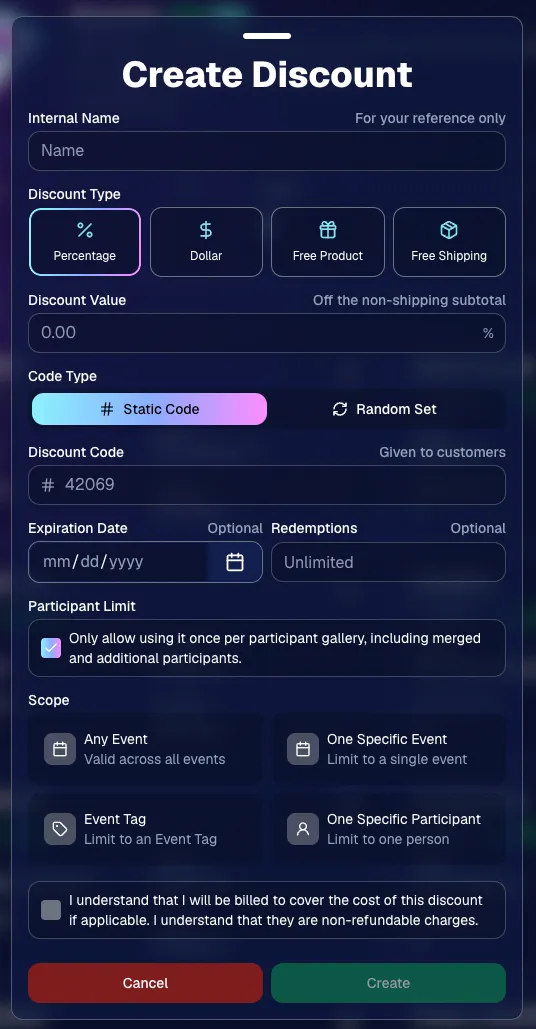
💸 NEW: Discounts

You can now create and manage your own discounts directly in NowCandid.

Discounts you create can apply to:

  • 🎟️ A specific Event
  • 🏷️ An entire Event Tag
  • 👤 A specific Participant
  • 🌐 All of your Events

And you can choose from several discount types:

  • 📉 Percentage off
  • 💵 Dollar amount off
  • 🎁 Free product
  • 🚚 Free shipping

🔐 Flexible code options

  • 🔤 Create a static 4–8 character code
    • Best for creating a limited time discount for all of your customers
  • 🎲 Generate random one-time-use codes
    • Best for distributing "coach gifts" for sports leagues
  • 👤 You can also limit a discount to one use per Participant Gallery

A few important rules:

  • Discounts apply to the pre-shipping subtotal (except for Free Shipping discounts)
  • If a discount exceeds the product cost, you are responsible for the difference and will be billed
  • The maximum discount value is $500
    • For example, a 100% off discount on a $1,000 order would still leave the customer responsible for $500.

📚 Full documentation:
https://app.nowcandid.com/docs/discounts
🎨 Batch AI Editing from Manage Images

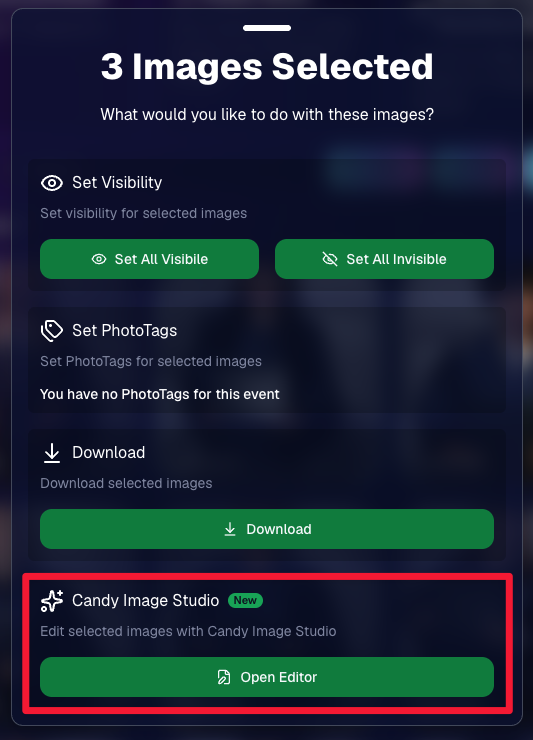
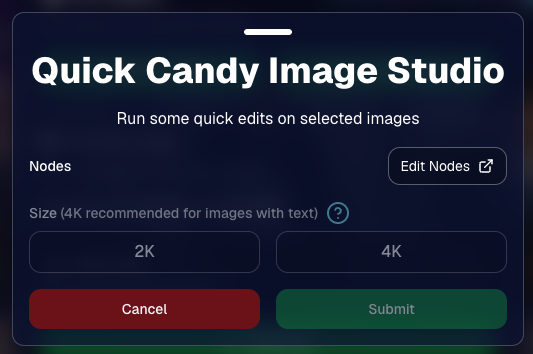
You can now run Candy Image Studio edits on multiple selected images at once right from Manage Images.

  • ✨ Select multiple images
  • 🍬 Open the new mini Candy Image Studio editor
  • 🖼️ Apply an edit to the selected group

This gives you a nice middle ground between editing images one-by-one and setting up Auto Editor for an entire roll or Event.
📤 Better SportsPics Upload Controls

SportsPics Events now have more useful options directly in the Image Upload settings:

👥 Mark All Images Group

  • Automatically mark every uploaded image as a Group Photo.

🏷️ Assign a PhotoTag during upload

  • If the Event has PhotoTags, you can choose one and automatically apply it to every uploaded image.

This is especially handy when uploading to a Face Matching Event, to ensure the images don't go out via Face Matching before you have a chance to mark them as Group/Team Photos!

⭐ Candy Image Studio & Auto Editor Improvements

👤 Participant names passed into edits

  • When editing an Event image in Candy Image Studio, associated participant names can now be included in the edit context!
  • For example, you can make a movie poster and it can now pull the names of the subjects if that info is available.

✉️ Client Outreach email designer improved

  • Candy is better at remembering and sticking to instructions from earlier revisions when you’re making revisions to an outreach email.

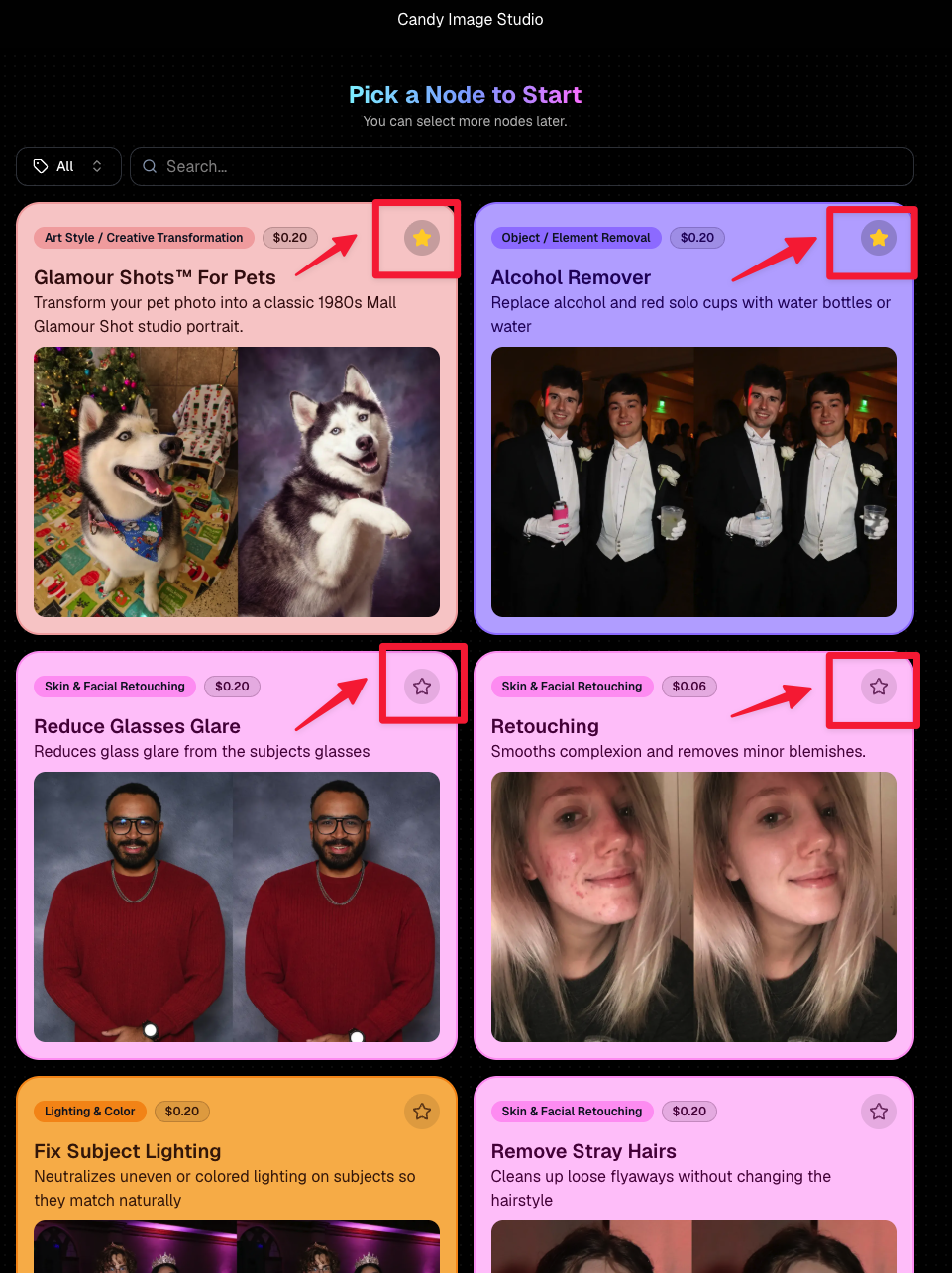
Favorite your most-used nodes

  • Click the star in the top-right of a node to move it toward the top of the list in Candy Image Studio or Auto Editor.
  • Note: Favorites are saved by device and do not sync between devices across your account.
🖼️ 39 New Default Background Sets

We added 39 new background sets for Offers and Virtual Groups!

New additions span categories like:

  • 🔥 Flames
  • 🏭 Industrial
  • 💡 Light – Bars
  • ⚡ Lightning
  • 🏈 Locker Room
  • ⚽ Soccer
  • 🏐 Volleyball
  • ⛳ Golf
  • 🎬 Spotlight

Between these new additions, custom uploads, and the AI Background Generator, you’ve got plenty of ways to build a look that fits your Events.
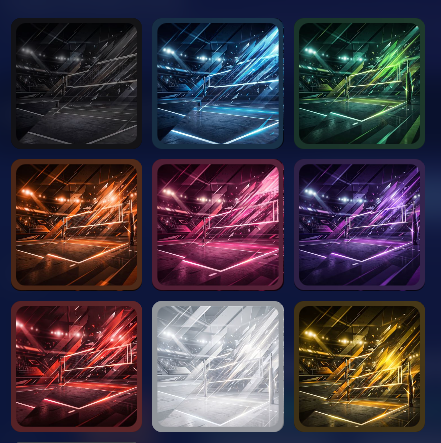
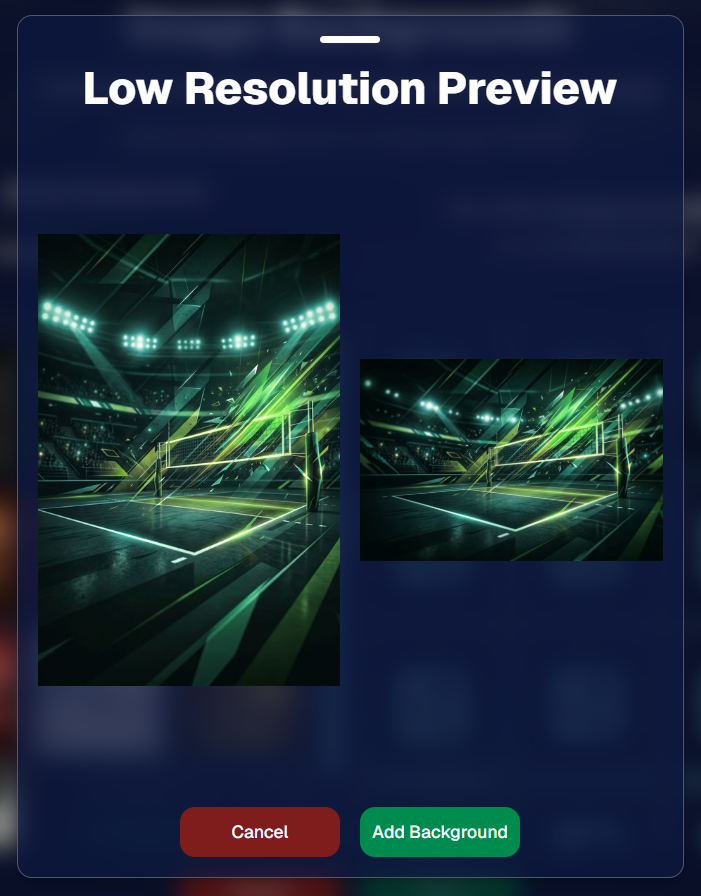
Example: New Volleyball Backgrounds!

A closer look at one of the examples above!

🧑‍🤝‍🧑 PhotoRoster & PhotoTag Improvements

🏷️ PhotoTags carry into new PhotoRosters

  • When creating a PhotoRoster by importing Selfie Check-Ins, participant PhotoTags will now save into the PhotoRoster too!

🧹 Duplicate PhotoTag import fix

  • Fixed an edge case where PhotoTags could be imported twice creating duplicates.

✂️ Background Removal Update

  • 👥 Background Removal no longer runs on Group Photos

Group Photos are not meant to go through Background Removal! Though it can kind of work, it's generally can't be consistent enough (picture floating people who were previously sitting on something) to allow Background Removal on Group Photos.

🛍️ Retail: Duplicate Download Warning

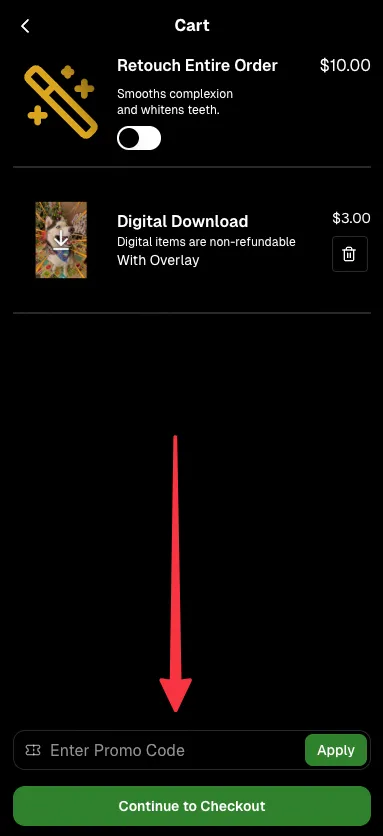
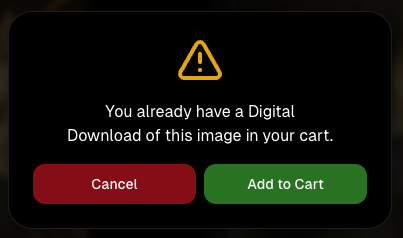
Retail now helps prevent accidental duplicate digital purchases.

  • ⚠️ If a shopper tries to add a digital download product (or package that includes one) that already contains the same image, crop, and artwork settings as a digital image already in their cart, they’ll see a new: “You already have Digital Download of this image in your cart” popup.
  • ➕ They can still add it anyway if they really want to!

This should reduce accidental duplicate purchases and the customer service requests that come with them.
Little improvements to make the platform better and better.

🛠️ Dashboard Fixes & Cleanup

  • 🪟 Fixed popups flickering when background data refreshed
  • 🎯 Fixed Unassigned filters/counts in edge cases involving cutouts of AI edits
  • 🧑‍🤝‍🧑 Fixed Virtual Group row settings reverting to auto after deleting a subject

That’s the week!

Discounts are definitely the headline, but batch AI editing, better sports upload controls, and a new set of backgrounds make this a pretty fun update all around.

Keep creating magic,

Candy 🍬

Related articles

Graduation Success: Candid Color Photography's Triumph at an Oklahoma Advancement Ceremony
Success Stories
April 17, 2024

Graduation Success: Candid Color Photography's Triumph at an Oklahoma Advancement Ceremony

7
 minutes read
Candid Color Photography (CCP) in Oklahoma City recently orchestrated a resounding success at a local medical school's advancement ceremony.

With only 100 graduates attending the ceremony, CCP generated an impressive average revenue of roughly $49 per person in just 31 days. This achievement underscores the potential of graduation photography when executed well!

While $49 per graduate is incredible, aiming for $20 per graduate is a more consistent target to aim for and achieve for both high school and college graduations. This benchmark is attainable with proper execution, although many events (such as CCP's) can surpass this figure!

Candid Color Photography has been a longtime user of NowCandid & GradPics Now, and is able to get the most out of the program thanks to their experience with the platform! But even in the beginning, they were able to see immediate improvements when switching to NowCandid for their graduations. In 2022, CCP transitioned 82 graduation ceremonies to the GradPics Now program, resulting in a significant 22% increase in sales per person on average, compared to their previous year's sales per person at those same ceremonies.

This switch not only boosted their sales, but it also led to an ~8% discount in their previous production & software costs. NowCandid's Workflows also saved them countless hours in post-event labor compared to their previous workflows.

While there are many factors that can impact your sales averages, here are some of the most important ones CCP keeps in mind at every graduation ceremony they photograph.

Key Strategies for Graduation Photography Success

Quality of Images:

Ensure each photo is properly lit and tightly cropped to create sellable images that appeal to your buyers.

Efficient Data Collection:

Utilizing Selfie Check-In with high participation rates ensures efficient data collection and marketing opportunities. Positioning staff with QR codes at strategic points, like check-in or holding areas, can streamline the process and enhance participant engagement.

Selfie Check-In in combination with using our Capture & Upload app will also allow you to sell to parents and graduates during the ceremony! In our experience and research, speed is one of the most underrated factors in increasing your sales.

Lastly, and perhaps most importantly, using Selfie Check-In facilitates the next item in our list in a huge way.

Volume of Images:

Using Selfie Check-In frees you from the shackles of sequencing, alignment, and keeping things in order. With it, you can be free to photograph graduates in any order, and add as many extra shots of your subjects as you can.

Beyond standard portraits and handshake moments, with Selfie Check-In enables capturing dynamic processional shots, candid buddy images before the ceremony, and family celebrations post-event.  Employing multiple photographers can facilitate comprehensive coverage.

These extra photos can significantly increase sales volume, as more photos translate to more sales opportunities. In addition to more sales opportunities, it also creates bigger personalized galleries to be marketed to your subjects! Bigger personalized galleries means bigger orders from your buyers.

Preparation is Key:

Having all necessary materials ready, such as your Event's Selfie Check-In QR code, charged batteries and backup equipment, and a clear plan for photo stations, handshake photo timings, and post-ceremony family shots, is essential. Coordination with educational institutions for logistical and promotional support can also yield better outcomes.

Graduation Success Stories from CCP

CCP’s methodical approach has been mirrored in the experiences of individuals like Jason J., Eric M., and Bruce H., whose stories of successful graduation photography projects highlight the effectiveness of these strategies.

Read more about their graduation success stories:

     -     Jason J. - Using Face Matching to its Fullest

     -     Eric M. - School’s Out, Earnings In: A Teacher's GradPics Now Success

     -     Bruce H. - How Bruce H. Used GradPics Now to Increase Sales

By adopting CCP’s proven methods, photographers can transform any graduation event into an even more lucrative opportunity.
Crowning Moments: Turning Prom Night into Profit with NowCandid
PartyPics
April 10, 2024

Crowning Moments: Turning Prom Night into Profit with NowCandid

5
 minutes read
Prom night is an iconic milestone in a high schooler’s life, brimming with fashion, friendships, and unforgettable memories.

While it's true that smartphones have made "everyone a photographer", professional prom photography remains a lucrative venture. Why? The answer lies in the quality that professional photos can offer, capturing prom night with a finesse that smartphones simply can't match.

The Profitability of Prom Photography

Prom photography can be highly profitable, with a target metric of $1.50 per image being a realistic benchmark for success. However, with the right approach, this figure can soar, as evidenced by a NowCandid's users Oklahoma City Prom, which achieved $2 per image across 3000 pictures taken, totaling $6000 in sales.

The key to serious profitability lies in having quantity, quality, and variety! An effective photographer using NowCandid has the ability to quickly deliver a professional, high-quality image gallery that will capture the attention of their subjects.

Why Proms are Still Profitable

  1. Social Media Influence: Today’s high schoolers live in a social media-centric world where the quality of a photo can greatly increase the quality of a post. Professional, well-lit, and expertly framed photos are in demand for their social media feeds, making them willing to purchase digital copies for their Instagram or Facebook profiles.
  2. Parental Investment: Parents are equally important customers in the prom photography market. They cherish these milestones and are often more than willing to purchase photos that capture their child’s special night. Using Selfie Check-In allows you to collect both the subject and the parents' contact info, marketing the subject's photos to both parties!
  3. Speedy Delivery: With the help of NowCandid, images can be available for purchase instantly. Selling images right away can benefit your overall sales thanks to impulse purchases people make when they are at their most excited about the Event.
  4. Unique Print Products: Unique print products alongside desirable images is always a combination that will generate extra sales! A variety of products be purchased, in addition to the usual prints and downloads. You can even upload an Event-specific custom banner to your Events to further make your product unique compared to the images subjects can take with their own phones - turning every photo into a memento!

Keys to Successful Prom Photography

  • Quality: While taking a substantial number of photos is important, ensuring the quality of your images increases their salability. Ensure each photo is well-lit and tightly cropped!
  • 2 Pics Per Minute: Aim for 2 pictures every minute, targeting 120+ per hour. These need to be unique images too - don't count duplicates! Utilize features like NowCandid’s LiveLoop to encourage guests to seek out photographers to get on the big screen.
  • Posing: Encourage a variety of poses to maximize the number of sellable images for any group you approach. After photographing a group of four, break the group into couples, ladies only, guys only, etc.
  • Photo Stations: Establish a dedicated photo area with an attractive backdrop suitable for individuals, couples, and groups, enhancing the variety and appeal of a subject's image gallery. Props are optional, but can be a fun addition. Also, a photo station is also a good place to station your less-social photographers, as guests will come to them!
  • Selfie Check-In Mastery: Achieving high participation in Selfie Check-In not only streamlines image delivery but also ensures a direct marketing channel to both students and their parents.
  • Strategic Staffing: Align the number of photographers with the expected guest count, aiming for one photographer per 100-150 guests to ensure comprehensive coverage of the event.
  • Strategic Compensation: Many successful social photographers pay their photographers based on how many unique (no duplicates) and sellable (good quality) images they take at a party. Consider paying $0.20 per sellable image with a minimum pay of $18 an hour, guaranteeing them decent pay but giving them room to take more images to make you both more money. (Example: 120 images an hour would be $24 an hour)

NowCandid: Your Partner in Capturing the Magic of Prom Night

NowCandid software is designed to streamline the photography process, from efficient image capture and upload to simplifying sales through intuitive galleries and easy online ordering.

With NowCandid, photographers can focus on what they do best—taking stunning photos—while the platform handles the logistics, making each prom a potential goldmine of photographic opportunities.

Success Stories to Inspire

Photographers like Tosha LaForest and Eric Miller have harnessed the power of NowCandid to amplify their school dance and event photography sales. Their experiences underscore the potential of well-executed prom and dance photography to significantly boost revenue and client satisfaction.

Prom photography, powered by NowCandid, offers a great option for photographers to expand their portfolios and profit margins. By focusing on quality, variety, and quantity, photographers can tap into the lucrative prom market, turning each dance into a profitable venture (and fun) venture.

Learn more, and join the ranks of successful prom photographers with NowCandid.

Visit our success stories to learn more and get inspired to capture the vibrant energy and timeless elegance of prom night.

Background Removal, NowCandid's Newest Feature!
Feature Updates
March 13, 2024

Background Removal, NowCandid's Newest Feature!

7
 minutes read
Hey there, photographers and NowCandid fam!

It’s Candy here, your cheerful guide through the NowCandid universe, and I’ve got some thrilling news!

Introducing Background Removal 🚀

What’s New?

We’ve rolled out a game-changing feature: Background Removal, available for all NowCandid Programs & Workflows!

How It Works:

Before uploading your images (into a Background Removal enabled Event), simply mark the folder for Background Removal. We'll then use top-notch AI to whisk away the background, leaving you with pristine cutouts as an additional option alongside the original image in your subject's gallery.

And, it happens live!

If you practice best business practices with NowCandid, you probably upload your images live as you take them with the help of our Capture & Upload app! Images live-uploaded to a Background Removal folder will be cutout in no time at all, adding themselves to the subject's gallery automatically and on-the-fly.

Note: Capture & Upload App Version 3.17 or newer will be needed to utilize background removal while live-uploading images.

Choose Your Backdrop 🌟

Variety Galore:

The ever-popular gray and white 'Dover' background, arches in various architectural styles, and scenic outdoorsy vibes, your subjects can view and pick any background that catches their eye!

Future Customization:

Later this year, you'll be able to add your own backdrops to the mix, pre-rendering the background-removed image onto a custom background for your Events. Stay tuned!

Get Certified & Dive In 📜

Certification Needed:

To unlock this fantastic feature for your NowCandid Account, a quick certification is required. Check out how at the following page: Background Removal Certification (link)

The Best Part? It's On Us! 💖

Absolutely Free (For Now):

For the time being, enjoy this feature at no extra charge.

We need some time to assess how often Background Removal will be used and how it will affect sales. So, for now, it's free! Think of this as our way of saying thanks for being part of the NowCandid family. We're excited to see how Background Removal can enhanceyour business!

Note: 📝

Currently, the background-removed PNGs are exclusive to the Personal and All Images Galleries, with no direct download of the files for you the photographer. So, your customers can buy them, but you can't currently use the service to generate image cut-outs for use outside the system!

We’re buzzing with excitement over here at NowCandid about the extra sellable images this feature can bring to your photography Events! 🐝

Whether you’re shooting portraits at a graduation, soccer game, prom, or anywhere else - Background Removal is set to elevate your photography game, turn one image into many!

Stay tuned, as we'll be rolling out more customization options as the year progresses. If you have any questions or need a hand getting started, just give us a shout. We’re here to help every snap of the way!

Sparkly wishes,
Candy 🌟

Let’s get in touch

If you’re a photographer looking to add NowCandid services to your wheelhouse – set up a call by clicking the button below.

How to customize formatting for each rich text

How to customize formatting for each rich text

How to customize formatting for each rich text

How to customize formatting for each rich text

How to customize formatting for each rich text

What’s a Rich Text element?

The rich text element allows you to create and format headings, paragraphs, blockquotes, images, and video all in one place instead of having to add and format them individually. Just double-click and easily create content.

A rich text element can be used with static or dynamic content. For static content, just drop it into any page and begin editing. For dynamic content, add a rich text field to any collection and then connect a rich text element to that field in the settings panel. Voila!

Headings, paragraphs, blockquotes, figures, images, and figure captions can all be styled after a class is added to the rich text element using the "When inside of" nested selector system.

  • List One
  • List Two
  • List Three
  • List Four
  • List Five

This is a link

This is bold text