HomeNavigation arrowBlogNavigation arrow
Current page
Feature Updates

Weekly Recap: Faster Virtual Group Creation, New Candy Image Studio Tools & Capture App 5.7 Updates ✨📸

Weekly Recap: Faster Virtual Group Creation, New Candy Image Studio Tools & Capture App 5.7 Updates ✨📸
Hey photo friends! 👋

‍

Candy here with another weekly recap! This week brings some great upgrades to Virtual Group Builder, new Candy Image Studio tools, better Docs search, and a solid Capture App update with helpful color profile and PhotoTag improvements.

‍

Let’s take a look!

‍

🧑‍🤝‍🧑 Virtual Group Builder Improvements

‍

Virtual Group Builder got a nice set of workflow upgrades this week:

‍

🏷️ Create Virtual Groups directly from PhotoTags‍

  • On the PhotoTags page, click Create under the VGroup column to automatically start a new Virtual Group using participants from that PhotoTag. You’ll also get a popup asking whether to use each participant’s first or last cutout.

‍

🚀 Save works-in-progress with placeholders‍

  • You can now save changes to a Virtual Group even if some subjects still have spaceman placeholders.
  • All subjects still need a selected photo before uploading the finished Virtual Group to the Event.

‍

🖼️ Overlay uploads can now be named‍

  • When uploading overlays, you can name them so they’re easier to search and find later.

‍

🔤 More control over subject name styling‍

  • Title Case is now only applied on import, meaning you can use the subject inspector to customize name casing afterward.

‍

📐 New text display option‍

  • There’s a new Display setting to disable justified text.

‍

🌫️ Bottom Vignette improvements‍

  • Bottom Vignette rendering has been reworked for better results.

‍

🔎 More flexible scaling‍

  • Max global scale is now 200%.

‍

🎨 Candy Image Studio: New Editing Nodes

‍

Candy Image Studio has two new tools to help clean up common image issues:

‍

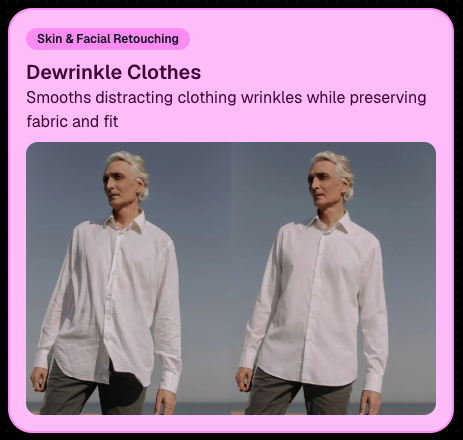
👔 Dewrinkle Clothes‍

  • Helps smooth distracting clothing wrinkles while keeping the image natural.

‍

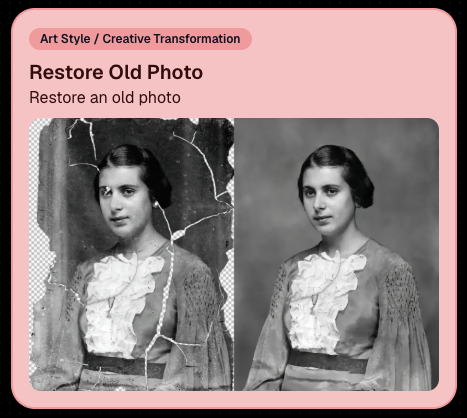
🖼️ Restore Old Photo‍

  • A new restoration-style node for improving older or damaged images.
‍

‍

‍

📱 Capture App 5.7 Updates

‍

App Store update released Monday, June 22

‍

Capture App 5.7 includes some meaningful workflow and compatibility improvements:

‍

🎨 Automatic sRGB conversion‍

  • If an image is detected as non-sRGB, the app will now try to automatically convert it to sRGB. If it can’t, you’ll still get the existing invalid color profile warning.
  • This can be especially useful for black-and-white shooting modes that output a different color profile. That said, we still recommend shooting in sRGB whenever possible, since conversion can cause some color loss and may use extra battery during long sessions.

‍

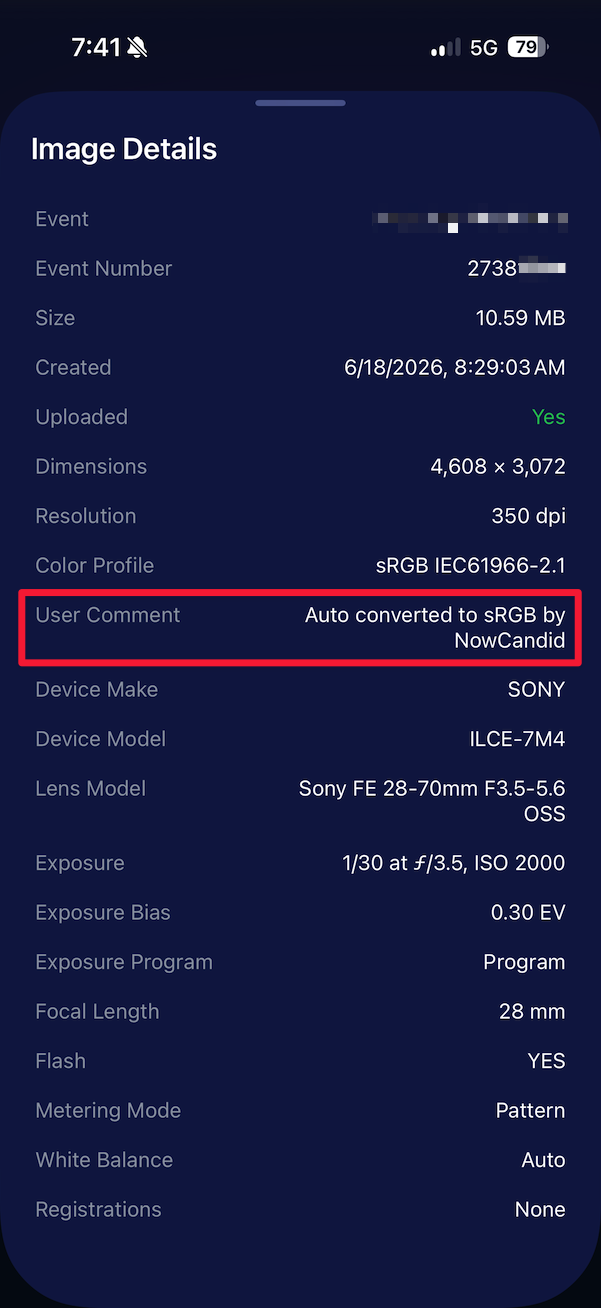
🧾 User Comment shown in EXIF details‍

  • The image gallery details popup now shows EXIF User Comment data, including whether an image was auto-converted to sRGB.
‍

‍

✂️ BGR visibility sync‍

  • Visibility changes in BGR folders now affect the cutout too. Mark the original hidden, and the cutout will hide; mark it visible again, and the cutout becomes visible as well.

‍

🏢 Business logo support‍

  • Your business/profile logo now appears in the Capture App header when available, and can replace Candy in Photo Booth.

‍

⚙️ Contact collection settings moved‍

  • Number, email, and name collection settings now live on the Event Overview instead of the Event login sheet, so you don’t need to re-log to change them.

‍

🏷️ Event picker shows PhotoTag attribute‍

  • If an Event has PhotoTags, the Event picker now makes that easier to spot.

‍

📱 Android UI fixes‍

  • Fixed several label cutoff issues for Android users with Bold Text enabled.

‍

🔁 Restore Session fix‍

  • PhotoTags now load properly when an Event is opened through Restore Session.

‍

🎨 Adobe RGB handling fixed on Android‍

  • Android devices will no longer incorrectly accept Adobe RGB images from cameras.

‍

🍎 iOS 27 support tested‍

  • iOS 27 has been tested, and no issues were found. The app also respects the latest Liquid Glass device settings.
  • If you update your device to a beta version of iOS 27, let us know if you experience issues!

‍

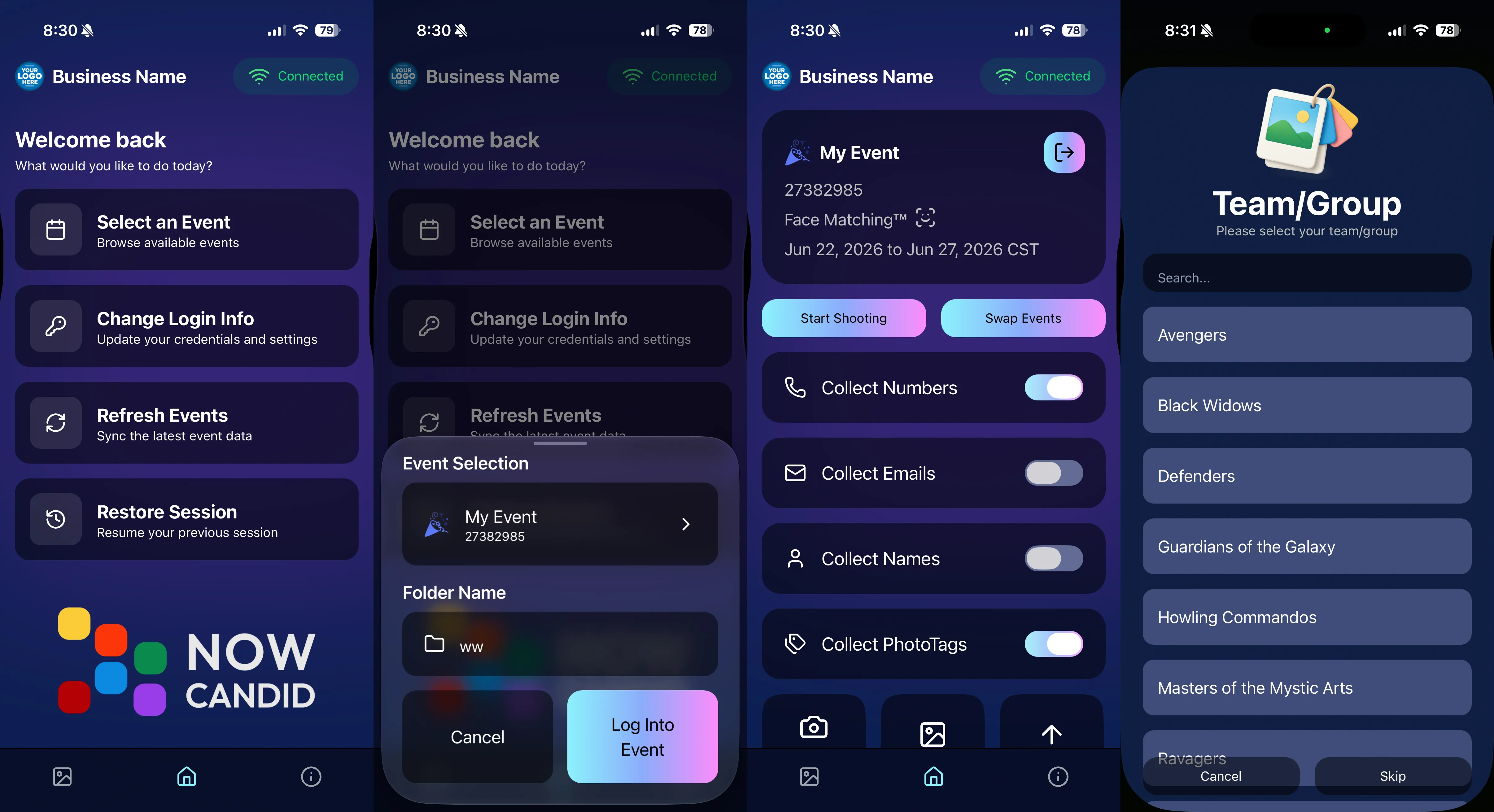
🏷️ Collect PhotoTags during check-in‍

  • Participants can now select their own PhotoTag, such as team name, before entering contact information. This option appears when the Event has PhotoTags.
  • We added this primarily to assist photographers in easily tagging late additions not on a roster that show up to a photoshoot, but there will be additional features for action photography in next week's update!
‍

‍

📱 Capture App 5.7.1

‍

OTA update released Friday, June 26

‍

🛠️ Miscellaneous UI fixes‍

  • A small OTA update with additional interface polish and cleanup.

‍

🖥️ Dashboard Improvements

‍

🔎 Docs Search is here‍

  • Click Search on the Docs page to search NowCandid documentation, with Candy navigation agent support.

‍

📂 PhotoRoster image name cleanup‍

  • PhotoRoster data file uploads and image uploads now automatically remove spaces and certain special characters from image names.

‍

🖼️ Full-frame overlay previews are downloadable‍

  • In the Image Overlay Editor, full-frame example render previews can now be downloaded just like banner previews.

‍

🛍️ Retail Update

‍

🪟 Better desktop popup behavior‍

  • On desktop, retail popups now automatically become scrollable if the popup is taller than the viewport height, matching Dashboard behavior.

‍

📣 Marketing Fix

‍

✉️ Email campaigns fixed for email-only PhotoRoster participants‍

  • Fixed an edge case where email-only PhotoRoster participants were not having their email campaigns start.

‍

That’s the week!

‍

From faster Virtual Group setup to better PhotoTag collection in the Capture App, these changes should help make your Event workflows more flexible and easier to manage.

‍

Keep creating magic,

Candy 🍬

Related articles

Capturing Success: How to Book Graduation Ceremony Photography Jobs Like a Pro
GradPics
April 4, 2023

Capturing Success: How to Book Graduation Ceremony Photography Jobs Like a Pro

4
 minutes read

Graduation ceremonies are a golden opportunity for photographers. With proud parents, beaming graduates, and memories to last a lifetime, these events are the perfect stage for capturing unforgettable moments. But how do you land these lucrative gigs? In this blog post, we'll share insider tips on how to book graduation ceremony photography jobs and create lasting success. And with NowCandid by your side, you'll have the support and tools you need to shine in the academic spotlight.

  1. Build a Stellar Portfolio:
    First things first, you need to showcase your skills as a graduation photographer. Create a specialized portfolio featuring your best work from past graduation ceremonies. If you're just starting out, consider offering your services for free or at a discounted rate to build your experience and gain valuable client testimonials. Or, try starting out with some smaller graduation ceremonies that are not as contested by competing photographers!
  2. Network with Schools and Universities:
    Build relationships with school administrators, counselors, and event coordinators. Attend school events, join local education associations, and engage in conversations on social media platforms. Establishing connections in the education community will help open doors to potential photography opportunities.
  3. Leverage Social Media and Online Marketing:
    Create a strong online presence to showcase your work and attract clients. Use social media platforms, SEO, and email marketing to promote your services and drive traffic to your website. Share captivating images from past graduation ceremonies, client testimonials, and behind-the-scenes content to engage your audience and demonstrate your expertise. 
  4. Partner with Local Businesses:
    Collaborate with local businesses that cater to graduates, such as cap & gown vendors, school ring vendors, or varsity jacket vendors as a couple examples. These partnerships can lead to valuable referrals and create a network of resources that benefits all parties involved.
  5. Provide Exceptional Customer Service:
    Go above and beyond to make your clients feel special. Be responsive, professional, and attentive to their needs. Offer personalized consultations, accommodate special requests, and deliver a memorable experience that will leave them singing your praises. NowCandid's platform can help you streamline your workflow and ensure a smooth customer experience from start to finish.
  6. Ask for Referrals and Testimonials:
    Word of mouth is a powerful marketing tool. Encourage satisfied clients to refer you to their friends and colleagues, and request testimonials for your website and marketing materials. A strong reputation will keep the bookings rolling in.

Booking graduation ceremony photography jobs can be both rewarding and profitable. By building a compelling portfolio, networking with schools and universities, and leveraging the power of NowCandid, you'll be well on your way to capturing success in the world of academic photography. So, put on your metaphorical cap and gown, and get ready to celebrate your achievements in the graduation photography business!

‍

New Reporting Feature
Feature Updates
March 7, 2023

New Reporting Feature

2
 minutes read
Recently, we rolled out a much-needed reporting tool for our NowCandid™ users!

‍

Two new reporting tools that will be able to give you a macro view into your business’s performance, as well as a lot of helpful data and analytics on your events!


Tool #1, the Sales Report:

‍

This report focuses on reporting all your sales within a date range! It’s filterable by which NowCandid™ program you’re using as well and can report your sales by day or your sales by month. Once you have your date range, filters, and date format set, you’ll get a reactive bar graph as well as a series of totals and averages for your sales performance within that date range! This report is great for quickly getting an idea of your overall income and margin.


Tool #2, the Events Report:

‍

This second report is where you can really dig into your various metrics. Instead of reporting on all sales during a date range, when you choose a date range, you’re selecting all the events that have a Start Date within that date range. Those events and their totals will be what’s included in this report! So residual sales on older events would not be included like they would be in the Sales Report. After you choose a date range, this report can also be filtered by NowCandid™ program!

‍

You can also choose whether to include $0 sale test events you may have made, so that you don’t drag down your averages on this report. If there are any non-$0 sale events you don’t want included, you can click the checkbox by the event to remove it from your total and averages as well! And lastly, once the information you are interested in is being displayed to you, you can export the data to preserve as a spreadsheet on your own device.


With several ways to look at your business’s performance, we believe these tools will be a great benefit to our users and help them make the most of their account with NowCandid™.

‍

Our users will no longer have to guess or run a separate spreadsheet to understand their business’ performance or their overall margins.

‍

Let us know if you have any questions or feedback!

Backprinting: The newest feature to promote your brand
Feature Updates
March 3, 2023

Backprinting: The newest feature to promote your brand

4
 minutes read

With NowCandid, we stress how we try to make everything as white-label as possible.

This week, we've officially implemented a new feature that promotes your brand and drives sales in yet another way: Backprinting! Going forward, your business name, your contact info and the retail support email address will be on the back of all standard print products ordered (with the ability to include your business logo coming soon). Plus, the back of the print includes a unique QR code that when scanned, directs back to that person's individual gallery from that event (even if scanned 10 years from now) so they can buy more prints and increase your residual sales long term! With this change, all NowCandid users will now be delivering an even higher quality product, promoting their brands more effectively than ever, booking more business, and bringing in more residual sales as the years go on.

We hope you are as excited as we are!

‍

Note: your business name will replace NowCandid in the example image.

Let’s get in touch

If you’re a photographer looking to add NowCandid™ services to your wheelhouse, set up a call with us!

How to customize formatting for each rich text

How to customize formatting for each rich text

How to customize formatting for each rich text

How to customize formatting for each rich text

How to customize formatting for each rich text

‍

‍

What’s a Rich Text element?

The rich text element allows you to create and format headings, paragraphs, blockquotes, images, and video all in one place instead of having to add and format them individually. Just double-click and easily create content.

A rich text element can be used with static or dynamic content. For static content, just drop it into any page and begin editing. For dynamic content, add a rich text field to any collection and then connect a rich text element to that field in the settings panel. Voila!

Headings, paragraphs, blockquotes, figures, images, and figure captions can all be styled after a class is added to the rich text element using the "When inside of" nested selector system.

  • List One
  • List Two
  • List Three
  • List Four
  • List Five

This is a link

This is bold text

‍

  • ‍

‍