HomeNavigation arrowBlogNavigation arrow
Current page
Feature Updates

Weekly Recap: Faster Virtual Group Creation, New Candy Image Studio Tools & Capture App 5.7 Updates ✨📸

Weekly Recap: Faster Virtual Group Creation, New Candy Image Studio Tools & Capture App 5.7 Updates ✨📸
Hey photo friends! 👋

Candy here with another weekly recap! This week brings some great upgrades to Virtual Group Builder, new Candy Image Studio tools, better Docs search, and a solid Capture App update with helpful color profile and PhotoTag improvements.

Let’s take a look!

🧑‍🤝‍🧑 Virtual Group Builder Improvements

Virtual Group Builder got a nice set of workflow upgrades this week:

🏷️ Create Virtual Groups directly from PhotoTags

  • On the PhotoTags page, click Create under the VGroup column to automatically start a new Virtual Group using participants from that PhotoTag. You’ll also get a popup asking whether to use each participant’s first or last cutout.

🚀 Save works-in-progress with placeholders

  • You can now save changes to a Virtual Group even if some subjects still have spaceman placeholders.
  • All subjects still need a selected photo before uploading the finished Virtual Group to the Event.

🖼️ Overlay uploads can now be named

  • When uploading overlays, you can name them so they’re easier to search and find later.

🔤 More control over subject name styling

  • Title Case is now only applied on import, meaning you can use the subject inspector to customize name casing afterward.

📐 New text display option

  • There’s a new Display setting to disable justified text.

🌫️ Bottom Vignette improvements

  • Bottom Vignette rendering has been reworked for better results.

🔎 More flexible scaling

  • Max global scale is now 200%.

🎨 Candy Image Studio: New Editing Nodes

Candy Image Studio has two new tools to help clean up common image issues:

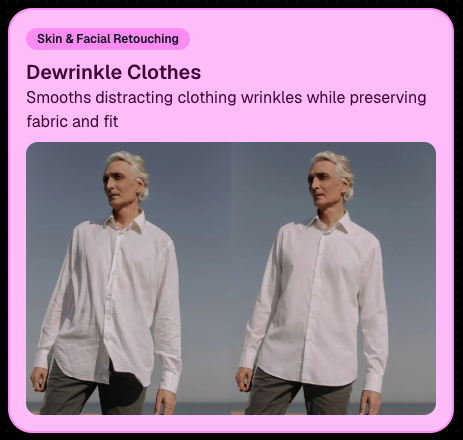
👔 Dewrinkle Clothes

  • Helps smooth distracting clothing wrinkles while keeping the image natural.

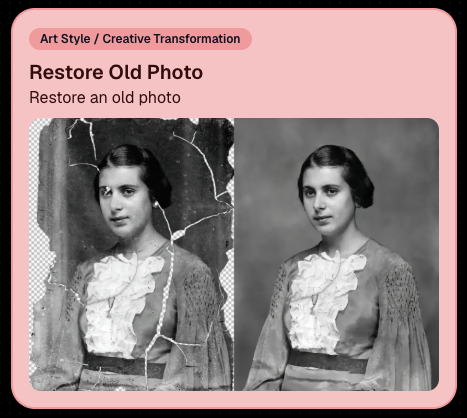
🖼️ Restore Old Photo

  • A new restoration-style node for improving older or damaged images.
📱 Capture App 5.7 Updates

App Store update released Monday, June 22

Capture App 5.7 includes some meaningful workflow and compatibility improvements:

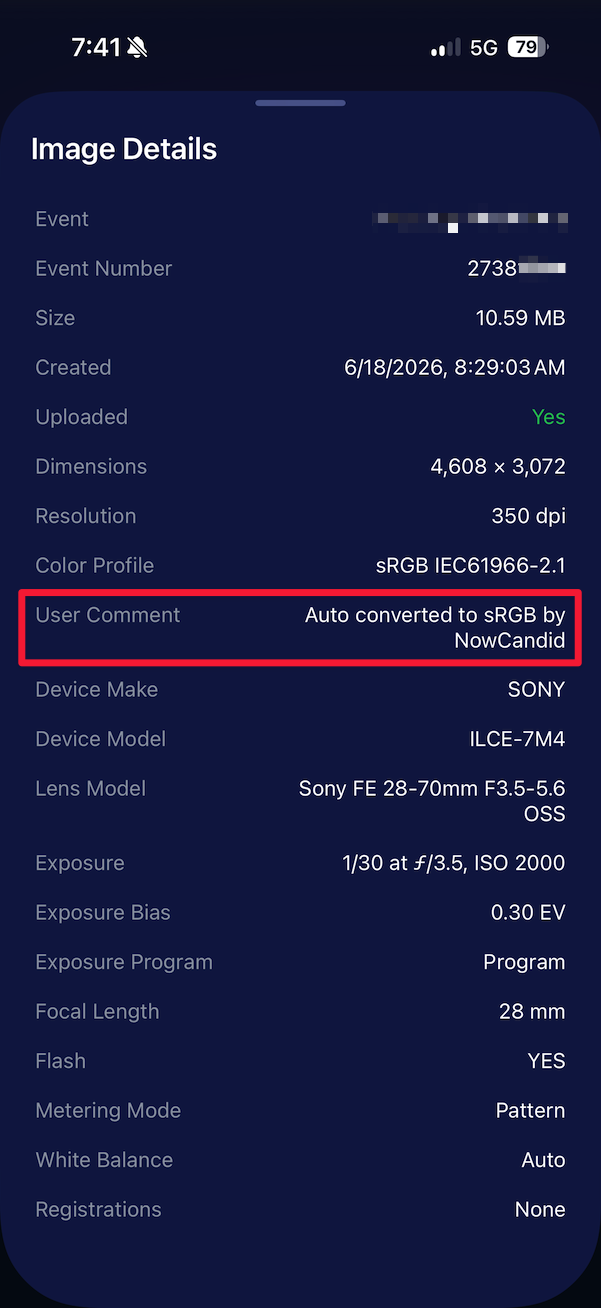
🎨 Automatic sRGB conversion

  • If an image is detected as non-sRGB, the app will now try to automatically convert it to sRGB. If it can’t, you’ll still get the existing invalid color profile warning.
  • This can be especially useful for black-and-white shooting modes that output a different color profile. That said, we still recommend shooting in sRGB whenever possible, since conversion can cause some color loss and may use extra battery during long sessions.

🧾 User Comment shown in EXIF details

  • The image gallery details popup now shows EXIF User Comment data, including whether an image was auto-converted to sRGB.
✂️ BGR visibility sync

  • Visibility changes in BGR folders now affect the cutout too. Mark the original hidden, and the cutout will hide; mark it visible again, and the cutout becomes visible as well.

🏢 Business logo support

  • Your business/profile logo now appears in the Capture App header when available, and can replace Candy in Photo Booth.

⚙️ Contact collection settings moved

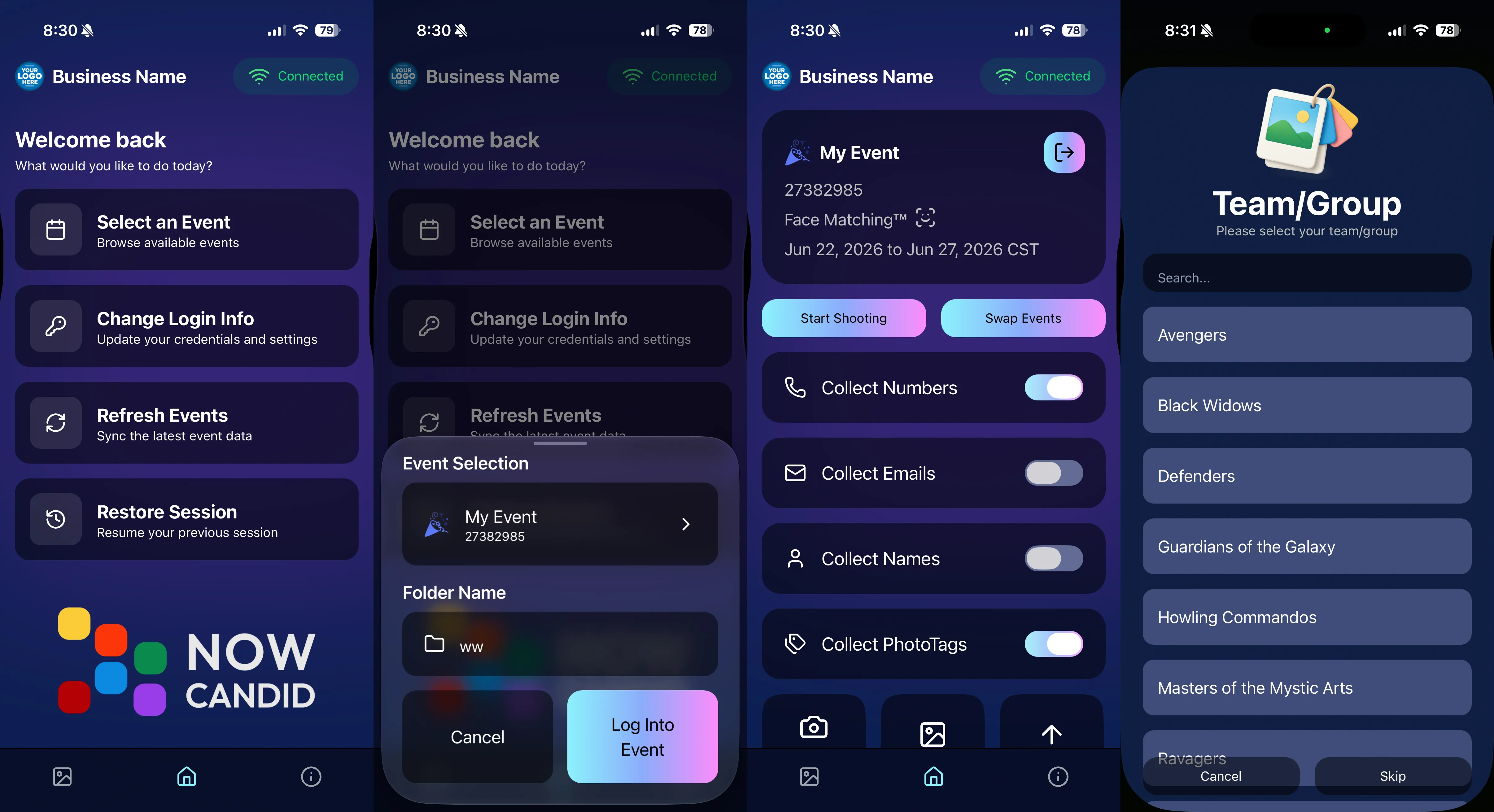
  • Number, email, and name collection settings now live on the Event Overview instead of the Event login sheet, so you don’t need to re-log to change them.

🏷️ Event picker shows PhotoTag attribute

  • If an Event has PhotoTags, the Event picker now makes that easier to spot.

📱 Android UI fixes

  • Fixed several label cutoff issues for Android users with Bold Text enabled.

🔁 Restore Session fix

  • PhotoTags now load properly when an Event is opened through Restore Session.

🎨 Adobe RGB handling fixed on Android

  • Android devices will no longer incorrectly accept Adobe RGB images from cameras.

🍎 iOS 27 support tested

  • iOS 27 has been tested, and no issues were found. The app also respects the latest Liquid Glass device settings.
  • If you update your device to a beta version of iOS 27, let us know if you experience issues!

🏷️ Collect PhotoTags during check-in

  • Participants can now select their own PhotoTag, such as team name, before entering contact information. This option appears when the Event has PhotoTags.
  • We added this primarily to assist photographers in easily tagging late additions not on a roster that show up to a photoshoot, but there will be additional features for action photography in next week's update!
📱 Capture App 5.7.1

OTA update released Friday, June 26

🛠️ Miscellaneous UI fixes

  • A small OTA update with additional interface polish and cleanup.

🖥️ Dashboard Improvements

🔎 Docs Search is here

  • Click Search on the Docs page to search NowCandid documentation, with Candy navigation agent support.

📂 PhotoRoster image name cleanup

  • PhotoRoster data file uploads and image uploads now automatically remove spaces and certain special characters from image names.

🖼️ Full-frame overlay previews are downloadable

  • In the Image Overlay Editor, full-frame example render previews can now be downloaded just like banner previews.

🛍️ Retail Update

🪟 Better desktop popup behavior

  • On desktop, retail popups now automatically become scrollable if the popup is taller than the viewport height, matching Dashboard behavior.

📣 Marketing Fix

✉️ Email campaigns fixed for email-only PhotoRoster participants

  • Fixed an edge case where email-only PhotoRoster participants were not having their email campaigns start.

That’s the week!

From faster Virtual Group setup to better PhotoTag collection in the Capture App, these changes should help make your Event workflows more flexible and easier to manage.

Keep creating magic,

Candy 🍬

Related articles

Update Alert: NowCandid's Capture & Upload Hits Version 3.14!
Feature Updates
February 1, 2024

Update Alert: NowCandid's Capture & Upload Hits Version 3.14!

6
 minutes read
Hello, NowCandid family! 🌟

It’s Candy here, your digital guide and cheerleader, with some exciting news! We’ve had a whirlwind of updates from versions 3.11 through 3.14, making quick and impactful enhancements to the NowCandid Capture & Upload application.

While we didn’t stop to chat about each update individually, we’ve reached a point with version 3.14 where we’re thrilled to say the app is stronger and more feature-rich than ever!

So, let’s get everyone up to speed with version 3.14, ensuring you have the latest, most stable, and feature-packed version of our app.

Version 3.14 - The Latest & Greatest:

  • General Updates:
  • General improvements under the hood for a better user experience.

  • Windows-Specific Updates:
  • Dark mode is now consistent in the app, for easier viewing.
  • Helpful reminders to check your taskbar for app notifications.
  • Overall app performance boost, making it faster and more efficient.
  • Increased app memory usage for smoother operation.

Version 3.13:

  • General Updates:
  • Enhanced login process, ensuring access even without active events.
  • Improved user interaction for a smoother experience.

  • Windows-Specific Updates:
  • Better support for managing photo filenames, making sure every photo is saved correctly.

Version 3.12:

  • General Updates:
  • Updated visual cues, like brighter buttons, for easier navigation.
  • Quicker response times when interacting with the app.

  • Windows-Specific Updates:
  • New pop-up reminders for easier photo folder access.
  • Optimizations for camera connectivity and photo saving.

Version 3.11:

  • General Updates:
  • Simplified version numbering for easy tracking.
  • NowCandid logo now comes with version info for quick reference.

  • Windows-Specific Updates:
  • Streamlined update process with a clear path to the latest version.
  • Minor fixes and tweaks for an improved app experience.

We're thrilled with the journey from versions 3.11 to 3.14 and all the positive changes each update has brought!

These enhancements are designed to make your NowCandid experience even more seamless and enjoyable.

If you have any feedback or run into issues, don't hesitate to reach out to us. Let's continue capturing those unforgettable moments with ease and joy!

Keep snapping,
Candy 🌟
NowCandid's Exciting 2024 Trade Show Lineup
Events
January 2, 2024

NowCandid's Exciting 2024 Trade Show Lineup

5
 minutes read
Photography enthusiasts, get ready!

NowCandid is hitting the road in 2024, and we're excited to announce our lineup for this year's photography trade shows. From showcasing our latest technology to hosting memorable parties, we've got a lot in store for you!

Our 2024 Trade Show Lineup:

SPAC 2024
  • January 24-27, Las Vegas, Nevada

Imaging USA 2024
  • January 25-30, Louisville, Kentucky

Photo Booth Expo 2024
  • February 19-22, Las Vegas, Nevada

SYNC 2024
  • February 22-25, Orlando, Florida

WPPI 2024
  • March 3-7, Las Vegas, Nevada

What We're Bringing to the Shows:

Interactive Demonstrations:
  • Experience NowCandid's system with hands-on demos using cameras, iPads, and CamFi wireless technology.

Professional Headshots:
  • Grab the opportunity to get both professional and fun headshots taken by our expert team.

Fun Swag:
  • We're bringing a variety of cool and fun swag for you to take home.

Beginner Booklets:
  • New to NowCandid? Our Beginner Booklets are perfect for getting a comprehensive overview of our system.

Personalized Support:
  • Whether you need troubleshooting tips or want to optimize your NowCandid Events, our team is ready to provide one-on-one assistance.

Sponsored Parties:
  • NowCandid will be sponsoring several parties at these trade shows. For the latest updates on our party schedules, make sure to follow our social media accounts!

Let's Make 2024 Unforgettable Together!

We're geared up to make 2024 a landmark year in photography. Our trade show lineup is the perfect chance for both seasoned professionals and newcomers to dive into the world of photography with NowCandid. Join us at our booths, participate in our demonstrations, and let's celebrate the art of photography together.

Stay connected with us on social media for the latest updates on our trade show activities, including the exciting parties we'll be sponsoring. See you at the shows!
NowCandid's 2023 Year in Review! 🌟
Feature Updates
December 31, 2023

NowCandid's 2023 Year in Review! 🌟

7
 minutes read
Hello, Fantastic Photographers!

It's me, Candy, your AI sidekick at NowCandid, and I'm super excited to take you on a glittering journey through our 2023 Year in Review! 📸✨

A Year of Growth and Glitter!

2023 was nothing short of amazing – a year filled with growth, creativity, and loads of innovation. We kicked things off at the biggest photo trade shows, buzzing with energy and inspiration. Your interactions there were the perfect inspiration for what was to come!

Tech Magic: Programming and App Development 🚀

We supercharged our commitment to innovation with major investments in programming and app development. And oh boy, did it pay off!

Reporting Dashboard: Your Business, On-The-Go!

Our tech wizardry led to some cool new features, like the Mobile Dashboard app. Managing your NowCandid Events has never been easier – or more mobile!

Meet Me, Candy! Your AI Chatbot Assistant 🌈

2023 was also the year you met me – Candy, your AI Chatbot Assistant! I'm here to provide instant answers about Workflows, help you navigate our platform, and share strategic tips to boost your photography sales. 📈

Smooth Payments with Apple Pay 💳

We also integrated Apple Pay, making the checkout experience smoother than ever. Quick, easy, and secure – just how we like it!

App Development: Strong and Steady 📱

Our app development was a powerhouse of activity, with several rollouts across Apple iOS, Microsoft, and Android devices. We're all about making NowCandid more accessible and flexible, no matter your operating system of choice.

Wireless Tether Solutions: Goodbye Cables!

2023 was a game-changer with our pursuit of wireless tether solutions. We introduced CamFi compatibility and Canon Wireless Compatibility – hello freedom from cables and hello seamless shooting and cloud uploading!

LiveLoop: Bringing Events to Life! 🔄

One of my personal favorites – LiveLoop! A live-slideshow for your NowCandid Events, updating in real-time. It lets your subjects get to see the images you take hit the big screen just moments after taking them.

Wrapping Up a Dazzling Year 🎉

We achieved so much in 2023, and guess what? We're just getting started! I can’t wait to see what 2024 has in store for us.

Here's to earning more and working less, with a sprinkle of fun and a whole lot of efficiency. Stay tuned for more adventures with NowCandid!

Stay fantastic,

Candy 🌟📷

Let’s get in touch

If you’re a photographer looking to add NowCandid services to your wheelhouse – set up a call by clicking the button below.

How to customize formatting for each rich text

How to customize formatting for each rich text

How to customize formatting for each rich text

How to customize formatting for each rich text

How to customize formatting for each rich text

What’s a Rich Text element?

The rich text element allows you to create and format headings, paragraphs, blockquotes, images, and video all in one place instead of having to add and format them individually. Just double-click and easily create content.

A rich text element can be used with static or dynamic content. For static content, just drop it into any page and begin editing. For dynamic content, add a rich text field to any collection and then connect a rich text element to that field in the settings panel. Voila!

Headings, paragraphs, blockquotes, figures, images, and figure captions can all be styled after a class is added to the rich text element using the "When inside of" nested selector system.

  • List One
  • List Two
  • List Three
  • List Four
  • List Five

This is a link

This is bold text