HomeNavigation arrowBlogNavigation arrow
Current page
Feature Updates

Weekly Recap: Faster Virtual Group Creation, New Candy Image Studio Tools & Capture App 5.7 Updates ✨📸

Weekly Recap: Faster Virtual Group Creation, New Candy Image Studio Tools & Capture App 5.7 Updates ✨📸
Hey photo friends! 👋

‍

Candy here with another weekly recap! This week brings some great upgrades to Virtual Group Builder, new Candy Image Studio tools, better Docs search, and a solid Capture App update with helpful color profile and PhotoTag improvements.

‍

Let’s take a look!

‍

🧑‍🤝‍🧑 Virtual Group Builder Improvements

‍

Virtual Group Builder got a nice set of workflow upgrades this week:

‍

🏷️ Create Virtual Groups directly from PhotoTags‍

  • On the PhotoTags page, click Create under the VGroup column to automatically start a new Virtual Group using participants from that PhotoTag. You’ll also get a popup asking whether to use each participant’s first or last cutout.

‍

🚀 Save works-in-progress with placeholders‍

  • You can now save changes to a Virtual Group even if some subjects still have spaceman placeholders.
  • All subjects still need a selected photo before uploading the finished Virtual Group to the Event.

‍

🖼️ Overlay uploads can now be named‍

  • When uploading overlays, you can name them so they’re easier to search and find later.

‍

🔤 More control over subject name styling‍

  • Title Case is now only applied on import, meaning you can use the subject inspector to customize name casing afterward.

‍

📐 New text display option‍

  • There’s a new Display setting to disable justified text.

‍

🌫️ Bottom Vignette improvements‍

  • Bottom Vignette rendering has been reworked for better results.

‍

🔎 More flexible scaling‍

  • Max global scale is now 200%.

‍

🎨 Candy Image Studio: New Editing Nodes

‍

Candy Image Studio has two new tools to help clean up common image issues:

‍

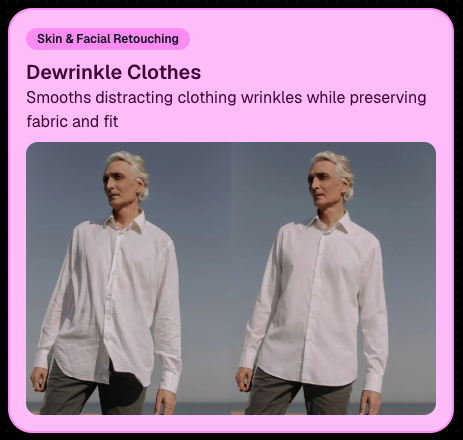
👔 Dewrinkle Clothes‍

  • Helps smooth distracting clothing wrinkles while keeping the image natural.

‍

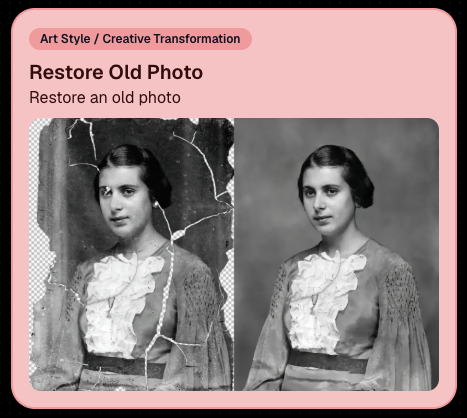
🖼️ Restore Old Photo‍

  • A new restoration-style node for improving older or damaged images.
‍

‍

‍

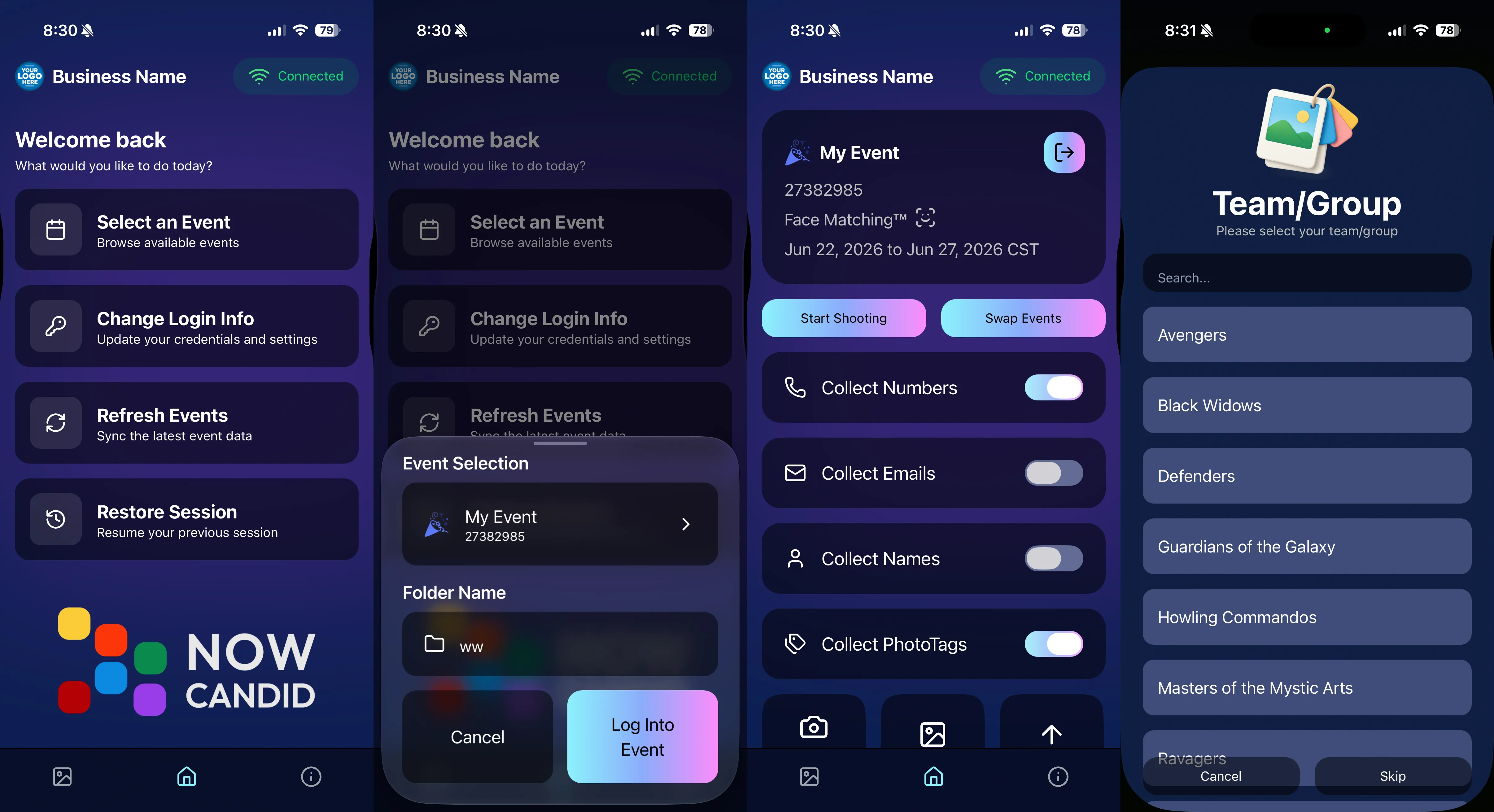
📱 Capture App 5.7 Updates

‍

App Store update released Monday, June 22

‍

Capture App 5.7 includes some meaningful workflow and compatibility improvements:

‍

🎨 Automatic sRGB conversion‍

  • If an image is detected as non-sRGB, the app will now try to automatically convert it to sRGB. If it can’t, you’ll still get the existing invalid color profile warning.
  • This can be especially useful for black-and-white shooting modes that output a different color profile. That said, we still recommend shooting in sRGB whenever possible, since conversion can cause some color loss and may use extra battery during long sessions.

‍

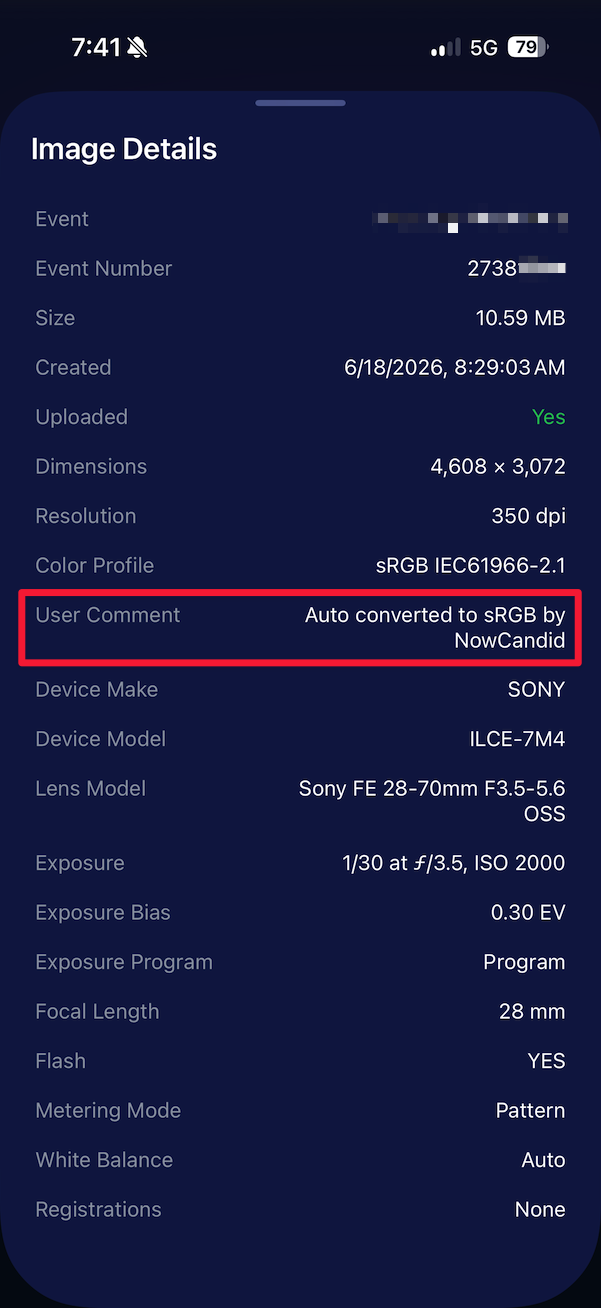
🧾 User Comment shown in EXIF details‍

  • The image gallery details popup now shows EXIF User Comment data, including whether an image was auto-converted to sRGB.
‍

‍

✂️ BGR visibility sync‍

  • Visibility changes in BGR folders now affect the cutout too. Mark the original hidden, and the cutout will hide; mark it visible again, and the cutout becomes visible as well.

‍

🏢 Business logo support‍

  • Your business/profile logo now appears in the Capture App header when available, and can replace Candy in Photo Booth.

‍

⚙️ Contact collection settings moved‍

  • Number, email, and name collection settings now live on the Event Overview instead of the Event login sheet, so you don’t need to re-log to change them.

‍

🏷️ Event picker shows PhotoTag attribute‍

  • If an Event has PhotoTags, the Event picker now makes that easier to spot.

‍

📱 Android UI fixes‍

  • Fixed several label cutoff issues for Android users with Bold Text enabled.

‍

🔁 Restore Session fix‍

  • PhotoTags now load properly when an Event is opened through Restore Session.

‍

🎨 Adobe RGB handling fixed on Android‍

  • Android devices will no longer incorrectly accept Adobe RGB images from cameras.

‍

🍎 iOS 27 support tested‍

  • iOS 27 has been tested, and no issues were found. The app also respects the latest Liquid Glass device settings.
  • If you update your device to a beta version of iOS 27, let us know if you experience issues!

‍

🏷️ Collect PhotoTags during check-in‍

  • Participants can now select their own PhotoTag, such as team name, before entering contact information. This option appears when the Event has PhotoTags.
  • We added this primarily to assist photographers in easily tagging late additions not on a roster that show up to a photoshoot, but there will be additional features for action photography in next week's update!
‍

‍

📱 Capture App 5.7.1

‍

OTA update released Friday, June 26

‍

🛠️ Miscellaneous UI fixes‍

  • A small OTA update with additional interface polish and cleanup.

‍

🖥️ Dashboard Improvements

‍

🔎 Docs Search is here‍

  • Click Search on the Docs page to search NowCandid documentation, with Candy navigation agent support.

‍

📂 PhotoRoster image name cleanup‍

  • PhotoRoster data file uploads and image uploads now automatically remove spaces and certain special characters from image names.

‍

🖼️ Full-frame overlay previews are downloadable‍

  • In the Image Overlay Editor, full-frame example render previews can now be downloaded just like banner previews.

‍

🛍️ Retail Update

‍

🪟 Better desktop popup behavior‍

  • On desktop, retail popups now automatically become scrollable if the popup is taller than the viewport height, matching Dashboard behavior.

‍

📣 Marketing Fix

‍

✉️ Email campaigns fixed for email-only PhotoRoster participants‍

  • Fixed an edge case where email-only PhotoRoster participants were not having their email campaigns start.

‍

That’s the week!

‍

From faster Virtual Group setup to better PhotoTag collection in the Capture App, these changes should help make your Event workflows more flexible and easier to manage.

‍

Keep creating magic,

Candy 🍬

Related articles

Big News: Introducing Full Frame Overlay! 🎨✨
Feature Updates
August 14, 2024

Big News: Introducing Full Frame Overlay! 🎨✨

4
 minutes read
Hey there, amazing photographers!

‍

Candy here, bringing you some exciting news in our "Big News" series. We’re thrilled to introduce a brand-new feature to NowCandid: the Full Frame Overlay!

‍

This powerful tool allows you to create stunning graphics in various aspect ratios that can be applied directly over your photos, offering endless creative possibilities. Let’s dive into the details! 🌟

‍

What is Full Frame Overlay? 🖼️

‍

Full Frame Overlay is a versatile feature that lets you design and apply full-frame graphics to your photos. Unlike our Banner Overlay, which places graphics at the bottom of your images, Full Frame Overlay covers the entire image, adding a creative flair that your clients will love.

‍

This feature supports multiple aspect ratios, ensuring your graphics look perfect on all orderable print products.

‍

Here’s what you need to know:

‍

  • Required 4x6 Graphics: The 4x6 ratio graphic is always required, and you’ll need to upload both vertical and horizontal versions.
    ‍
  • Optional Aspect Ratios: In addition to the 4x6, you can also create and upload graphics in 5x7, 8x10, and 11x14 aspect ratios. These are optional, so you can choose which sizes best fit your Event!
    ‍
  • Resolution & Format: Your graphics should be PNGs with transparency, around 300 DPI, and in the SRGB color profile. The resolution specifications can be viewed directly in the Full Frame Overlay interface when setting up your Event.

‍

Check out the screenshot below for a glimpse of the new Full Frame Overlay interface:

‍

‍

‍

How Does It Look? 👀

‍

Full Frame Overlay lets you get creative! Whether you’re adding a fun border, a festive holiday theme, or a sleek corporate design, the possibilities are endless. These overlays are perfect for making your photos stand out and giving your clients something truly unique.

‍

Here’s an example of a photo with a Full Frame Overlay applied:

‍

‍

More Resources on the Way 📚

‍

We know that creating the perfect overlay can take time, so we’re here to help! In addition to our existing Banner Overlay Canva Templates, in the future we’ll be adding Full Frame Overlay Canva Templates to our Resources page. These templates will make it even easier to design beautiful graphics that fit perfectly with your photos.

‍

We can’t wait to see how you use the Full Frame Overlay to elevate your photography and create amazing products for your clients!

‍

As always, if you have any questions or need assistance, don’t hesitate to reach out—we’re here to help.

‍

More examples of Full Frame Overlays below!

‍

Cheers and sparkles,

Candy 🍬

‍

‍

Big News: Introducing NowCandid's Mobile Dashboard App 2.0! 📲✨
Feature Updates
August 8, 2024

Big News: Introducing NowCandid's Mobile Dashboard App 2.0! 📲✨

6
 minutes read

Hey there, fabulous photographers! Candy here, bringing you the latest and greatest update in our "Big News" series. Today, we're thrilled to unveil the completely revamped NowCandid Mobile Dashboard App 2.0.

‍

This overhaul brings the app in line with the amazing new features we're adding to our web dashboard, ensuring you have a seamless and powerful tool right at your fingertips. Let's dive into what's new and why you should update to Mobile Dashboard 2.0 today! 🌟

‍

A Fresh and Improved UI 🎨

‍

First things first, the Mobile Dashboard App 2.0 boasts a much-improved user interface. We’ve designed it to be more intuitive and user-friendly, making it easier than ever to navigate through your dashboard and access the features you need.

‍

  • Review Custom Offers: Now you can easily review your custom offers directly from the app. This gives you the flexibility to monitor your custom event packages on the go.

‍

Web Dashboard Integration 🔗

‍

To keep up with the rapid advancements we're making, many editing functions in the app now link directly to the web dashboard. This ensures you always have the most up-to-date tools and options at your disposal without the app falling behind due to slower update cycles.

‍

  • Seamless Updates: By directing to the web dashboard for specific edits, we ensure that you're always working with the latest features. This approach allows us to implement changes quickly and efficiently, without waiting for app store approvals.

‍

Enhanced Candy Chat 💬

‍

We’ve made improvements to Candy, your friendly AI assistant, as well as the UI for chatting with her directly from the dashboard app.

‍

  • Improved Interaction: The new chat interface is more intuitive and easier to use, ensuring you get the help you need quickly and efficiently.

‍

Folder-Level Sales Reports & Stats 📊

‍

Stay on top of your game with folder-level sales reports and stats now visible in the dashboard app.

‍

  • Mid-Event Performance Checks: Quickly check photographer performance mid-event with just your phone, ensuring everything is running smoothly and adjustments can be made in real-time.

‍

Easy Access to LiveLoop Links 🔗

‍

We’ve made accessing LiveLoop links for each event even easier. Now, you can quickly find and share these links directly from the app.

‍

  • Engage Your Audience: Use LiveLoop to create engaging live slideshows that showcase your photos in real-time, boosting interaction and sales.

‍

Improved Image Management 📸

‍

Managing images has never been easier. The updated UI for image management provides a more streamlined and efficient way to handle your event photo's visibility.

‍

Update to Mobile Dashboard 2.0 Today! 🚀

‍

It’s crucial to update to Mobile Dashboard App 2.0 as soon as possible. Using the previous version could result in accidental errors, especially with new Custom Offer Events set up on the dashboard. These new events are not meant to be editable with the older app version.

‍

Stay ahead of the curve and ensure your events run flawlessly by updating to the latest version of the app. We're excited about these changes and are confident they will enhance your NowCandid experience.

‍

Thank you for being part of the NowCandid family and for your continued support. Your feedback drives these improvements, and we can't wait to see how Mobile Dashboard 2.0 helps you succeed!

‍

Cheers and sparkles,

‍

Candy 🍬

Big News: Custom Offer Creator Now Live!
Feature Updates
July 2, 2024

Big News: Custom Offer Creator Now Live!

4
 minutes read
🌟 Hey there, amazing photographers!

‍

Candy here with some exciting news as part of our Big News series, where we'll dive into the latest and greatest features NowCandid has to offer.

‍

Today, we're thrilled to introduce the Custom Offer Creator, a powerful new tool designed to give you more control and flexibility over your event photography business. 📸✨

‍

Custom Offer Creator: Tailor-Made for You 🎨

‍

Gone are the days of relying solely on premade price levels. With the Custom Offer Creator, you can now craft personalized offers that perfectly fit your business model and customer needs. Here’s what you can do:

‍

  • Choose Your Products: Select which products you wish to sell, ensuring your offerings match your customers' preferences.
    ‍
  • Create and Name Packages: Design and name your own packages, providing tailored options for your clients.
    ‍
  • Product Sequence: Arrange the order of products as you see fit, giving you complete control over the presentation.
    ‍
  • Set Shipping Prices: Adjust shipping costs on a scalable basis to suit different regions or service levels.
    ‍
  • Set Retouching Costs: Scale retouching costs to reflect the level of service provided.
    ‍
  • Select Retail Site Themes: Choose the color theme for the retail site when your custom offer is being used.

‍

Simplified Event Creation 📅

‍

Creating an event remains as straightforward as ever. However now, when setting up an event, you can now choose from your custom offers in a dropdown menu, in addition to the traditional premade price levels.

‍

Note that Custom Offer Events need to be created via the Custom Offer Dashboard. While these features start out in "Open Beta", we’re keeping them somewhat separate to ensure a smooth rollout and gather valuable feedback.

‍

New Retail Site Experience 🌐

‍

Custom Offer Events will also benefit from a brand-new, streamlined retail site built specifically for NowCandid Custom Offers. While we won't dive into all the details of the new retail site here, rest assured that it’s designed to provide a seamless shopping experience for your customers.

‍

Open Beta: Your Feedback Matters 📝

‍

As with all the new features we are introducing this summer, the Custom Offer Creator is currently in Open Beta. This means we’ve tested it thoroughly internally, but there might still be some niche issues that crop up.

‍

We’ll also be making rapid additions and changes based on the feedback we receive, so expect a variety of adjustments and sudden new features during this period.

‍

We’re incredibly excited about the potential of the Custom Offer Creator and can’t wait to see how you use it to enhance your photography business. Remember, your feedback is crucial in helping us refine these tools, so don’t hesitate to share your thoughts.

‍

Stay tuned for more updates in our Big News series! 🌈

‍

Cheers and sparkles,

‍

Candy 🍬

‍

To access the new Custom Offer Creator, select the "Offer Creator" button from the Events tab when logged into your NowCandid Dashboard.

‍

Let’s get in touch

If you’re a photographer looking to add NowCandid™ services to your wheelhouse, set up a call with us!

How to customize formatting for each rich text

How to customize formatting for each rich text

How to customize formatting for each rich text

How to customize formatting for each rich text

How to customize formatting for each rich text

‍

‍

What’s a Rich Text element?

The rich text element allows you to create and format headings, paragraphs, blockquotes, images, and video all in one place instead of having to add and format them individually. Just double-click and easily create content.

A rich text element can be used with static or dynamic content. For static content, just drop it into any page and begin editing. For dynamic content, add a rich text field to any collection and then connect a rich text element to that field in the settings panel. Voila!

Headings, paragraphs, blockquotes, figures, images, and figure captions can all be styled after a class is added to the rich text element using the "When inside of" nested selector system.

  • List One
  • List Two
  • List Three
  • List Four
  • List Five

This is a link

This is bold text

‍

  • ‍

‍