HomeNavigation arrowBlogNavigation arrow
Current page
Feature Updates

Weekly Recap: Express Checkout Confirmations, Capture App Speed Testing, and a New Lightroom Classic Plugin

Weekly Recap: Express Checkout Confirmations, Capture App Speed Testing, and a New Lightroom Classic Plugin
Hey photo friends! 👋


This week’s updates are all about clearer customer actions, smoother retail performance, and new tools that speed up upload workflows. Plus, a strong round of Capture App polish (iOS & Android OTA) and some important Dashboard + Marketing fixes.

Let’s jump in. ✨

🛍️ Retail: Fewer Mis-clicks, Better Previews, Faster Feel

✅ Express Checkout confirmation (all express checkouts)

All express checkout flows now show a confirmation popup that clearly displays the shipping address selected, with options to place the order or go back. It also includes an invalid address popup.

Previously, people would sometimes purchase without double checking their express-checkout-method's default shipping address. So, this change is designed to reduce address mistakes and improve customer experience!
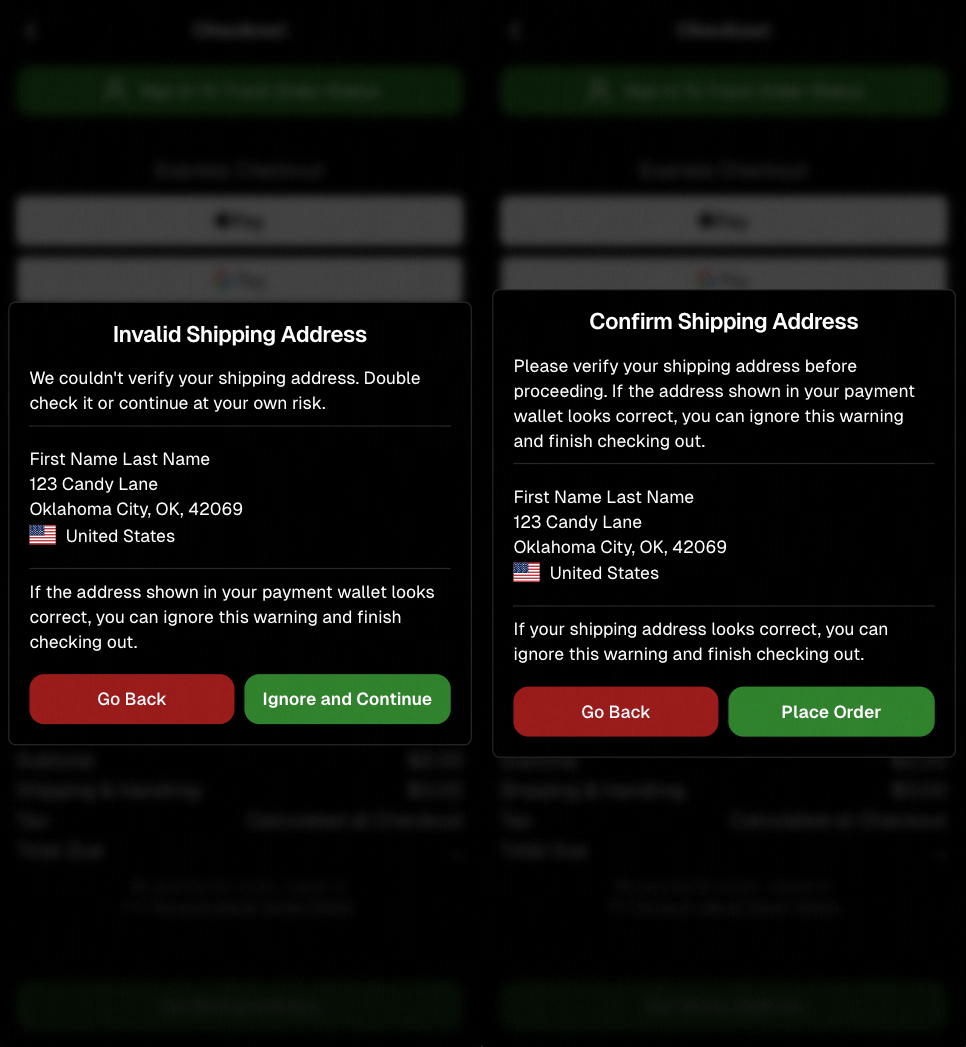
Confirmation popup now clearly displays shipping address confirmation.

🧠 Better UI + performance improvements

  • Improved local rendering (performance, memory usage, and task handling) — originally aimed to improve the retail experience on low-end devices, but it should make most devices feel faster!

  • Native “leave page” confirmation on supported browsers/devices (desktop + Samsung back button) when navigating away from an event page (refresh/back).
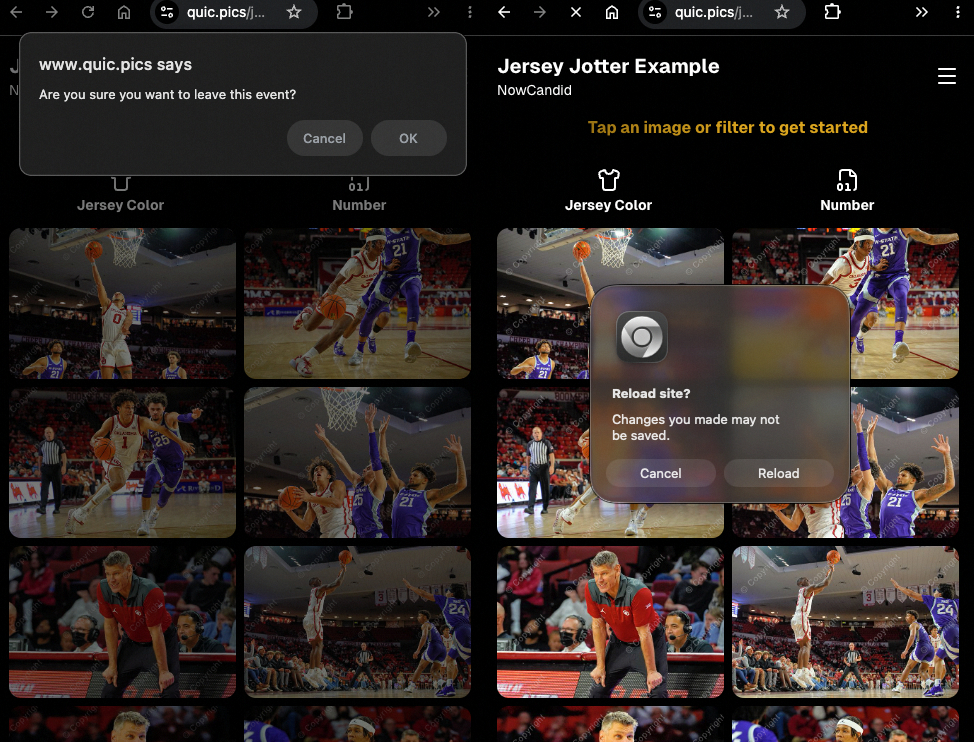
Leave page confirmation

🖼️ Clearer package download expectations + better pickers

  • Personal Gallery Downloads on store sheet and package editor now show “+X Images” in the configurator when there are more than 4 images—so customers don’t think they only get what’s previewed.
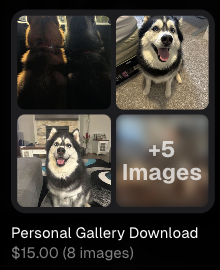
Personal Gallery Download "+X Images"

    • Personal Gallery Download products inside packages can now be clicked to preview contents.

    • Desktop product/package image pickers are now two columns (like mobile), allowing larger image preview during selection.
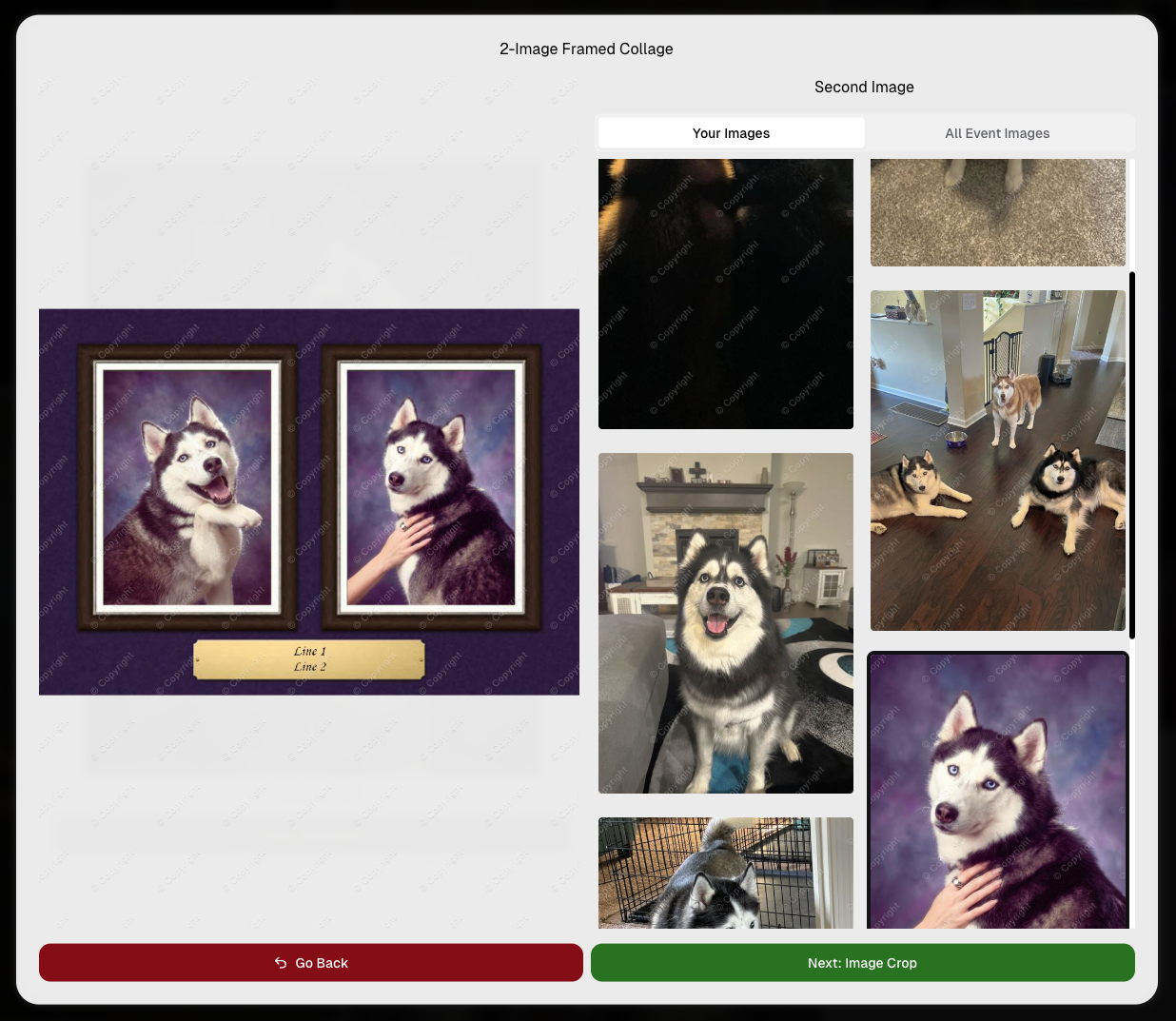
    Larger two column image previews

      • Image Filters landing popup now includes “Browse all photos without a filter” so customers who think they must pick a filter know they can also just browse!
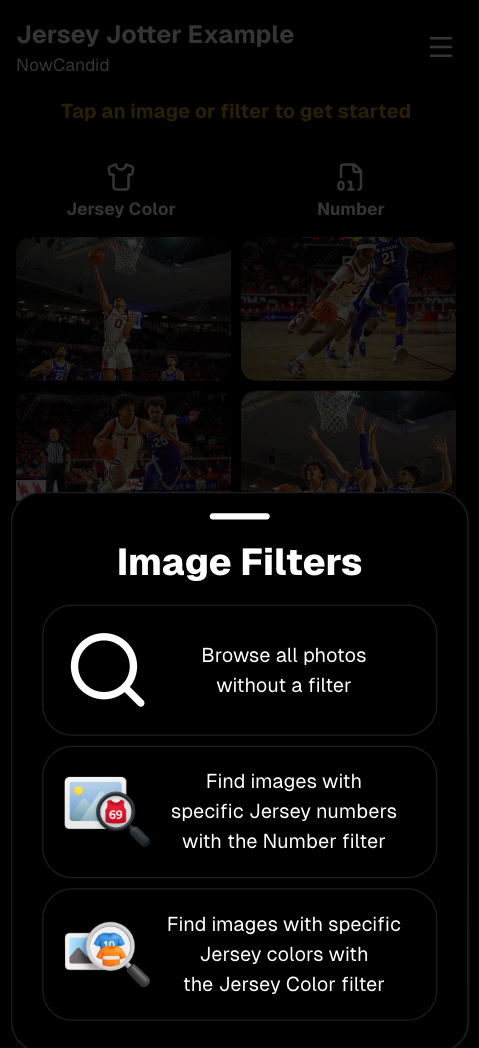
      Image Filters landing popup

      🧩 Retail fixes worth noting

      • Fixed a slashed discount amount showing on week 3 when there is no higher amount.
      • Fixed a GalleryGuard edge case that could close the retail site on some Android devices that support mobile context menus when long-pressing.
      • Fixed a race condition where a Group-by-Face gallery loaded from URL params could show default results instead of the filtered view.
      • Fixed an edge case where manually assigned images marked as group could behave like non-group images on retail.

      📱 Capture App OTA: 5.6.1 & 5.6.2 (iOS & Android)

      🌐 NEW: Network Speed Test (5.6.1)

      A new Network Speed Test button is available in Resources. Tap Run Test to check download speed, upload speed, and latency to NowCandid servers (so results may differ from Google/Ookla). It’s a quick test (downloads 5 MB, uploads 2 MB) and is useful for diagnosing weak or congested service during events.

      Mbps is a standard measurement for connection speeds, and 1 megabit per second (Mbps) is 0.125 Megabytes per second (MB/s). So 8 Mbps is 1 Megabyte per second, max. For example, with images that are 10 Megabytes in size, a speed of 8 Mbps would take a minimum of 10 seconds to upload. When speeds are very slow, image uploads may be impossible due to uploads timing out and restarting. In these cases, open the app when you have a stronger connection and all your images will start going up!
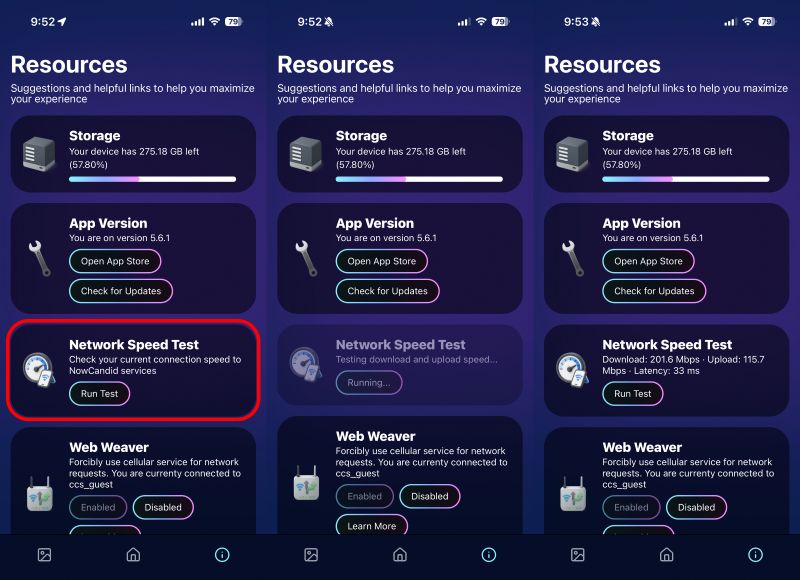
      Network Speed Test

      🎪 Photo Booth + Selfie Check-In Station UI upgrades (5.6.2)

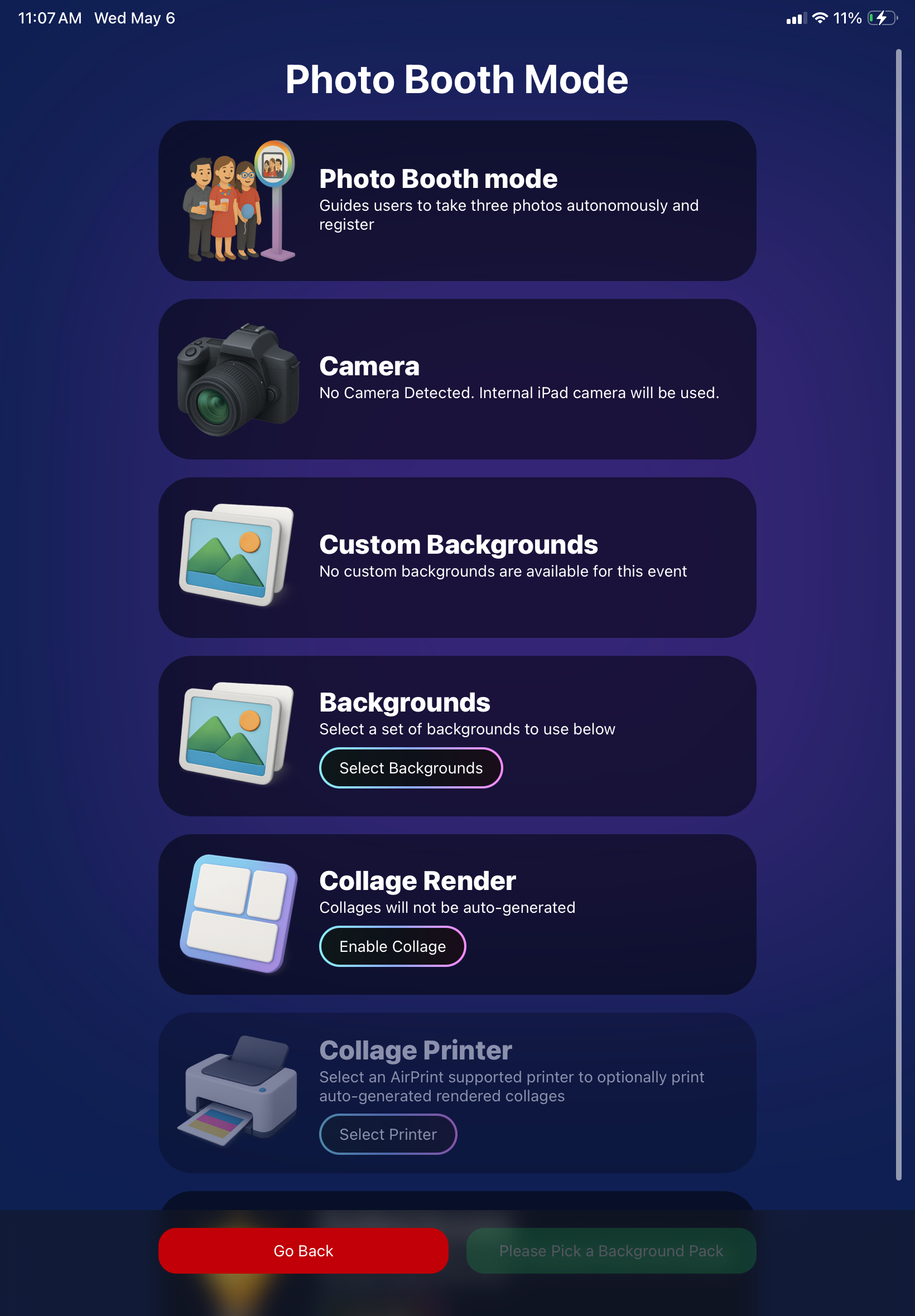
      • Photo Booth landing page updated to be more user-friendly (always-visible scrollbar, updated text, sticky go back/continue buttons, red/green emphasis, and a popup explaining why Continue is greyed out).
      • Selfie Check-In Station landing page updated with red/green Go Back / Begin buttons.
      • New dropdown icon beside Group Photo toggle (when an event has PhotoTags) to better display there are additional options to assign PhotoTags.
      • Fixed edge case cancel/continue behavior on Selfie Check-In Station when no contact info was entered.
      🧩 NEW: Lightroom Classic Plugin (Official)

      We’ve launched an official Lightroom Classic plugin to upload images to NowCandid events directly from Lightroom Classic.

      Key notes:

      • Lightroom Classic only
      • Same image rules apply (color profile, DPI, etc.)
      • Uses Capture App login
      • Only events within 60 days of event start date show in the selector
      • Image Details → Logs will show “Uploaded from NowCandid Lightroom Plugin”
      • Docs include guide/download/installation: https://app.nowcandid.com/docs/tools-more/lightroom
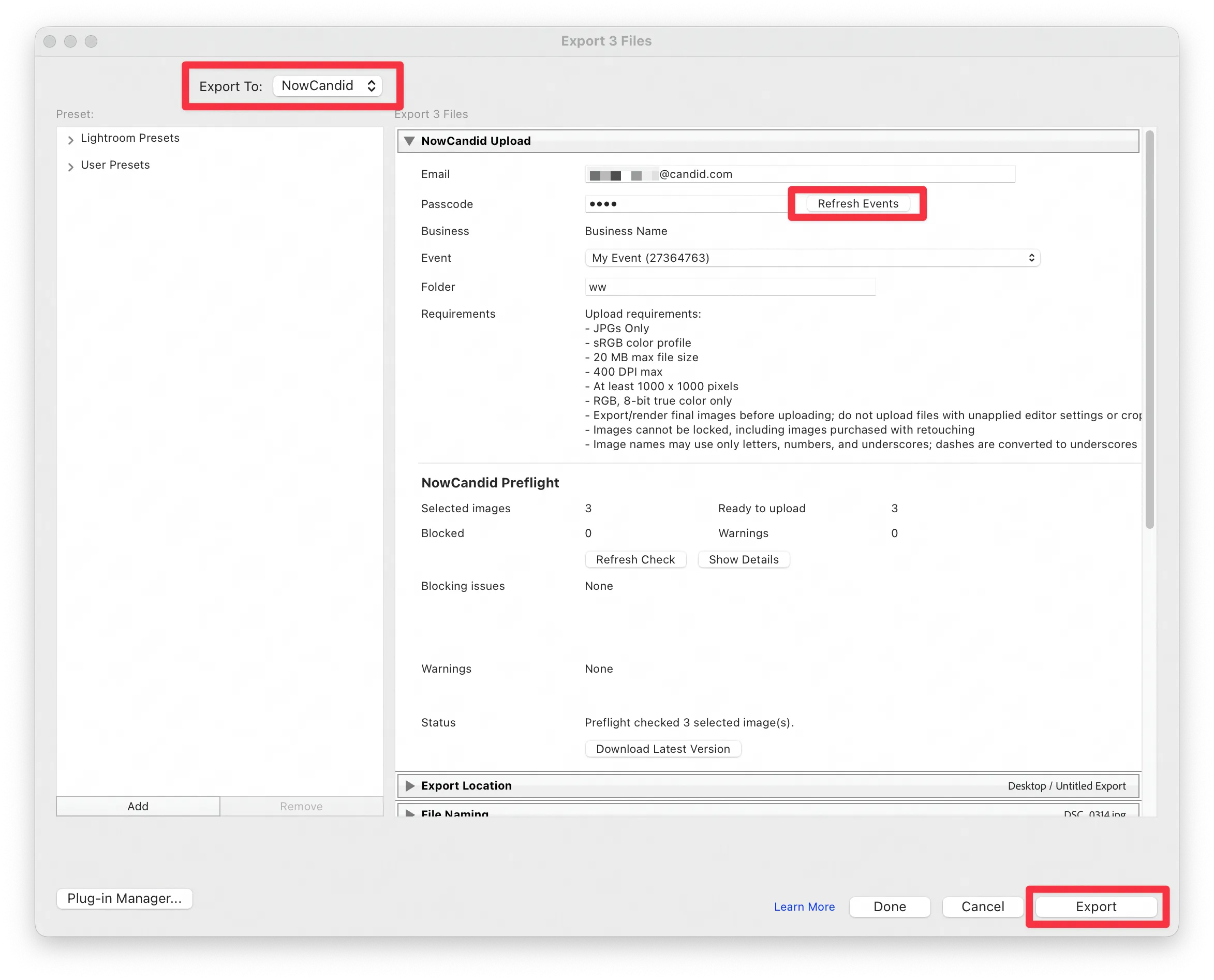
      Lightroom Classic Plugin

      Upload from NowCandid Lightroom Plugin

      🖥️ Dashboard: Upload & Roster Clarity + Small UX Wins

      • Event roster upload and PhotoRoster upload now warn about every unrecognized column, making it easier to spot misspellings (especially for optional columns).
      • Participant list page download now puts additional contacts into columns instead of rows.
      • Participant list download now puts merged contacts into their own row if they have different first/last names.
      • Image upload naming cleanup:
        • spaces/parentheses now automatically become underscores (e.g., Image (2)Image_2)
        • names ending in z now get a trailing underscore (e.g., ImagezImagez_)
      • Candy got even better at using the new Docs for responses.
      • Password reset now shows a clear “Your link has expired” screen (links expire after 24 hours).
      • Fixed participant filter inside another participant’s manual assign/unassign page not working properly.
      • Participant Details PhotoTag assignment UI: merged participants no longer incorrectly show PhotoTags as assigned.
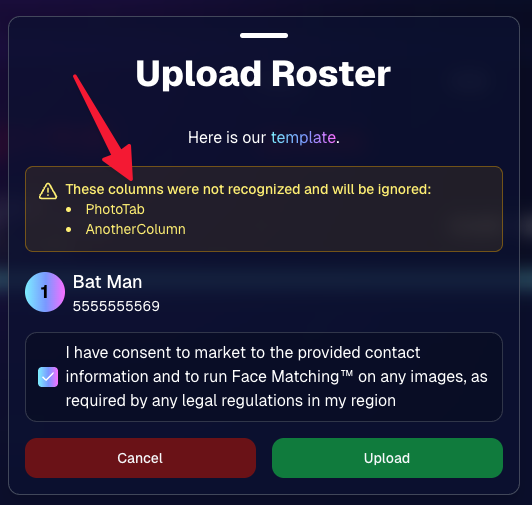
      Upload Roster now warns about every unrecognized column.

      📣 Marketing Fixes

      • Fixed edge cases where galleries that were only AI-edited images could cause follow-up email marketing issues and show as 0 images on Participant List.
      • Fixed Day0 marketing edge case not starting if gallery is just AI-edited images.
      • SMS gallery links now include “View photos:” before the gallery URL to reduce confusion where some users thought the gallery link was an unsubscribe link.

      That’s the week! 💫

      Between the Lightroom Classic plugin, the Capture App’s new Network Speed Test, and retail improvements that reduce confusion (and improve performance), this week was packed with practical wins you’ll feel right away.

      Keep it sparkly,

      Candy

      Related articles

      Candy’s Weekly Recap: Exciting New Features and Updates!📸🎉
      Feature Updates
      October 18, 2024

      Candy’s Weekly Recap: Exciting New Features and Updates!📸🎉

      4
       minutes read
      Hello, my fabulous photographer friends!

      Candy here, ready to sprinkle some sparkle on your day with our latest Weekly Recap! 🌟

      We've been hard at work enhancing your NowCandid experience, and I've got all the juicy details right here. Let's dive in! 🏊‍♀️

      1. Retail Site Enhancements 🛍️

      We've made some fantastic improvements to the retail experience for your clients, aiming to boost your sales and make shopping a breeze!

      • Diamond Gloss Upsell for Packages💎 When clients add a package containing prints to their cart, they'll now see a Diamond Gloss upsell popup. They can choose to add that finish to every print in their package.
      • Clearer Product Naming📝 The Medium Res Gallery Download (only offered and always offered when you're doing a QuicPics or QuicPics GO Event) now automatically renames to Free Gallery when there's no high-resolution personal gallery offered. Just like the individual download does!
      • Smart Cart Management🛒 If a client has already added the Personal Gallery Download to their cart, it will be hidden from the shopping screen.

      Diamond Gloss Upsell for Packages💎

      2. Dashboard Improvements 🖥️

      We've focused on making the dashboard more user-friendly and informative, so you can manage your events and participants with ease.

      • Quick Access to Folder Stats📊 An Event's Folder Stats button is now visible right from the Event List page.
      • Enhanced Order Details🔍 The Order Details popup in the Sales Report now shows the quantity of each item ordered.
      • Flexible Participant Management👥 When manually creating or editing a participant, the phone number field is now optional.
      • Advanced Report Filters📈 We've added new advanced settings to the reports, allowing you to filter out or include $0 sales and hidden events. This gives you greater control over your data analysis!
      • Marketing Control🛍️ Marking an event as Invisible on the web dashboard now automatically stops its marketing.

      Quick Access to Folder Stats📊

      Marketing Control🛍️

      Advanced Report Filters📈

      3. Capture App Version 4.6.9 Updates 📱

      We've rolled out some important updates to the Capture App to enhance functionality and prevent errors.

      • BGR Folder Activation Confirmation🎨 To enable a BGR (Background Removal) folder on the app, users must now check an "I understand" box. Helps new team members avoid accidentally enabling BGR when it's not intended, saving you time and resources.
      • Improved Phone Number Validation📞 The app now prevents the use of obviously fake phone numbers like 333-333-3333 or 444-444-4444.
      • Auto-Refresh Event List on iOS🔄 When returning to the app on iOS devices, the event list will now auto-refresh. Reduces the chance of seeing outdated event details, keeping you informed on the go.

      BGR Folder Activation Confirmation🎨

      4. Mobile Dashboard 2.1.0 Updates 📲

      Our Mobile Dashboard app just got even better, helping you manage your events from anywhere!

      • Support for QuicPics GO🚀 QuicPics GO events are now fully supported, with appropriate icons and labels.
      • Sortable Folders Report📁 Just like on the desktop dashboard, you can now sort the Folders Report in the mobile app. Swipe down to refresh and get real-time data mid-event. Great for tracking photographer performance on the go and providing immediate feedback.

      Support for QuicPics GO🚀

      We're always here to support you!

      So please, feel free to share your feedback or questions.

      Thank you for being an essential part of the NowCandid community. Keep capturing those unforgettable moments and creating smiles! 📸😊

      Cheers and sparkles,

      Candy 🍬

      Holiday Gear Up
      Success Stories
      October 16, 2024

      Holiday Gear Up

      4
       minutes read
      Are you ready for the Holiday Season?

      Maybe not since we have roughly 10 weeks to go. For most photographers, the winter months can bring a noticeable slowdown, but this also presents the perfect opportunity to seize seasonal event opportunities like Santa Portraits and holiday parties.

      These festive events are in high demand, and with the right tools, you can make the most out of them!

      We want to share a success story from a Santa Portrait Event that took place in the last few years, along with how NowCandid’s Workflows can help you maximize your success this holiday season.

      Santa Portrait Station Success

      Rachel S., a photography business owner from South Florida, a few years ago landed a Santa Portrait event at a Zoo and turned it into a HUGE win. With Candid's Scanner ID Workflow, Rachel was able to use the same techniques of a typical sports or school picture day and apply them to the Holiday Zoo Lights Santa Event.

      To manage the event, Rachel used the Scanner ID Workflow, and generated blank QR cards to pass out to people while they waited in line.

      The QR codes were scanned by the guests who then paired their contact info with their QR code! Once they got to the front of the line, Rachel's photographers would scan the next guest's QR with their tethered device, and then take their photos!

      The device tethered to the camera would then upload the photos right after they were taken!

      With the contact info and pictures both in the system, gallery links were then automatically texted directly to the subjects, right away.

      Overall, this event garnered over $42,000 in it's first year!!! Not bad for a couple weeks of work!

      NowCandid Workflows: Make Your Holiday Events a Breeze

      One of the key elements to success in high-volume holiday events is efficiency—and that’s where NowCandid’s Workflows come into play.

      These workflows streamline the process of capturing, organizing, and delivering photos, allowing you to focus more on your artistry and client experience.

      Here are two workflows you’ll want to use during your Santa sessions and holiday parties:

      1. Scanner ID: The Workflow Rachel used! It's great for efficiently collecting guest contact info while they are in line, letting you move the line along more quickly OR have more time available for additional photos. Contact info is essential for instant image delivery and post-shoot marketing.
      2. Type & Take: This works similarly to the Scanner ID Workflow, except you type the subject's contact info into your tethered device before photographing them. It is not as time efficient at Scanner ID, but it doesn't require you to print out many blank cards before the event!

      Seasonal Retail Theme to Add to the Experience

      The holiday fun doesn't stop at the event—it continues when your customers view and purchase their images! With our Candy Cane retail theme, your clients are immersed in the festive spirit as soon as they visit their personal image gallery.

      Our themes include delightful touches like falling snowflakes, which gently drift across the screen. These animations help enhance the shopping experience and keep customers wrapped up in the magic of the season.

      Theme: Candy Cane - Watermarking: Default

      Use Overlay Art to Add a Special Touch

      If you're looking to elevate the experience further, NowCandid offers Overlay Art, allowing you to add optional customized overlays to your clients' images.

      These titles add a festive, personal touch to the photos, making them feel extra special, whether it's a corporate holiday party, a Santa session, or a family Christmas gathering.

      Imagine sending clients their Santa Portraits, complete with a “Merry Christmas 2024” overlay or a custom-designed title that reflects the spirit of the season. It’s little touches like these that make clients feel valued and excited about your services—leading to more referrals and repeat business.

      Why You Shouldn't Sleep on Holiday Opportunities

      The holiday season offers some of the most lucrative photography opportunities of the year, especially when it comes to events like Santa Portrait sessions, corporate holiday parties or large family and friends gatherings.

      With many photographers considering this time a "slow season," there's an opportunity to stand out from the crowd by offering fun, engaging photo experiences that families, organizations, and individuals will love.

      Adding these events to your services can also build lasting relationships with your clients—because who doesn’t want to make holiday memories they’ll treasure forever?

      Don't Miss Out: Prep for the Holidays Now

      The key to success is preparation. Start planning your Santa sessions, promote your holiday event photography, and make sure you're using NowCandid’s powerful tools to handle your Events with ease.

      And remember: festive cheer isn’t just for clients. By embracing the holiday season and seizing these photography opportunities, you can fill your calendar and finish the year strong.

      Cheers, and may there be many holiday events in your future!

      Candy 🍬

      Big News: Introducing the "View Photos in Sequence" Button for SportsPics! 📣⚽
      Feature Updates
      October 15, 2024

      Big News: Introducing the "View Photos in Sequence" Button for SportsPics! 📣⚽

      3
       minutes read
      Hello, amazing photographers and sports enthusiasts!

      Candy here with some thrilling news that'll make capturing and enjoying those epic sports moments even better! 🌟

      Drumroll, please... 🥁 We're excited to introduce the new "View Photos in Sequence" button on the Retail site. It will be visible on SportsPics Events using Face Matching! 🎉

      What's the Buzz About?

      Imagine you're photographing a high-energy soccer game. You've snapped a series of shots capturing the intensity of the match. Some photos feature the players' faces, which, thanks to our Face Matching technology and Selfie Check-In or Tap-A-Face workflows, automatically land in their personal galleries.

      BUT what about those incredible action shots where the player's face isn't visible? 🤔

      That's where our "View Photos in Sequence" button comes into play!

      How Does It Work?

      When your customers view a photo in their personal gallery, they'll now see a "View Photos in Sequence" button. Clicking this button allows them to explore images taken immediately before and after that specific shot.

      This means they can easily find and enjoy all the action-packed moments, even if their face isn't visible in every photo! 🏃‍♂️⚡

      The button is visible when previewing a personal gallery photo on the retail site

      Why You'll Love It

      • Expand Your Memories: Players can now discover more photos of themselves, capturing every twist, turn, and goal—even those where they're zooming past the camera!
      • Enhanced Engagement: Offering more images increases the chances of customers finding that perfect shot they can't wait to share or purchase.
      • Effortless Navigation: It's simple and intuitive—just a click, and they're exploring a sequence of moments from the game.

      A Game-Changer for Sports Photography

      This feature is a win-win for everyone:

      • Photographers: Showcase more of your work and provide added value to your clients.
      • Athletes and Families: Relive the excitement of the game with a comprehensive view of their performance.
      • Boost Sales: More images mean more opportunities for sales and happy customers!

      Ready to Try It Out?

      The "View Image Sequence" button is now live for all SportsPics Events using Face Matching. So go ahead and give it a spin in your next event! We can't wait to see the amazing moments you'll capture and share. 📷💫

      As always, we're here to help you make the most of NowCandid's features.

      If you have any questions or feedback, don't hesitate to reach out!

      Cheers and high fives,

      Candy 🍬

      Let’s get in touch

      If you’re a photographer looking to add NowCandid services to your wheelhouse – set up a call by clicking the button below.

      How to customize formatting for each rich text

      How to customize formatting for each rich text

      How to customize formatting for each rich text

      How to customize formatting for each rich text

      How to customize formatting for each rich text
      How to customize formatting for each rich text

      What’s a Rich Text element?

      The rich text element allows you to create and format headings, paragraphs, blockquotes, images, and video all in one place instead of having to add and format them individually. Just double-click and easily create content.

      A rich text element can be used with static or dynamic content. For static content, just drop it into any page and begin editing. For dynamic content, add a rich text field to any collection and then connect a rich text element to that field in the settings panel. Voila!

      Headings, paragraphs, blockquotes, figures, images, and figure captions can all be styled after a class is added to the rich text element using the "When inside of" nested selector system.

      • List One
      • List Two
      • List Three
      • List Four
      • List Five

      This is a link

      This is bold text