HomeNavigation arrowBlogNavigation arrow
Current page
Feature Updates

Weekly Recap: Express Checkout Confirmations, Capture App Speed Testing, and a New Lightroom Classic Plugin

Weekly Recap: Express Checkout Confirmations, Capture App Speed Testing, and a New Lightroom Classic Plugin
Hey photo friends! 👋


This week’s updates are all about clearer customer actions, smoother retail performance, and new tools that speed up upload workflows. Plus, a strong round of Capture App polish (iOS & Android OTA) and some important Dashboard + Marketing fixes.

Let’s jump in. ✨

🛍️ Retail: Fewer Mis-clicks, Better Previews, Faster Feel

✅ Express Checkout confirmation (all express checkouts)

All express checkout flows now show a confirmation popup that clearly displays the shipping address selected, with options to place the order or go back. It also includes an invalid address popup.

Previously, people would sometimes purchase without double checking their express-checkout-method's default shipping address. So, this change is designed to reduce address mistakes and improve customer experience!
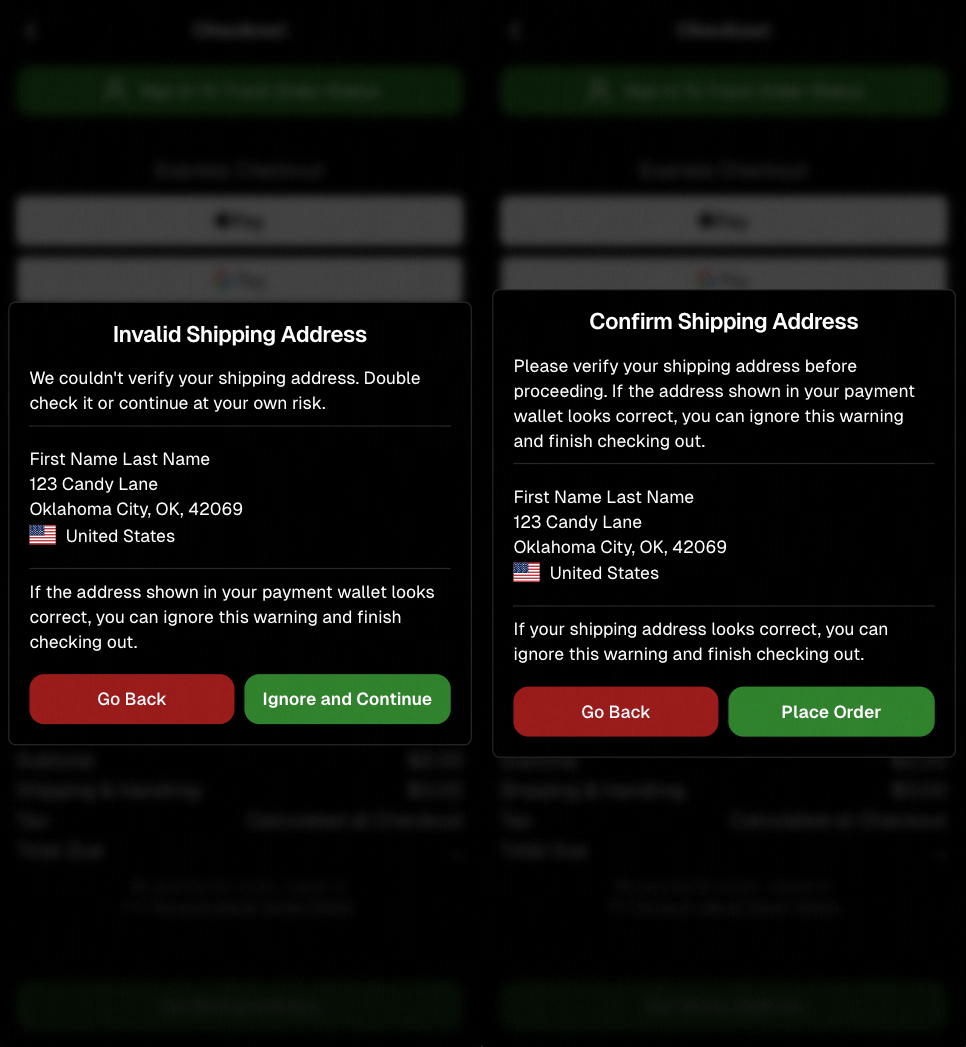
Confirmation popup now clearly displays shipping address confirmation.

🧠 Better UI + performance improvements

  • Improved local rendering (performance, memory usage, and task handling) — originally aimed to improve the retail experience on low-end devices, but it should make most devices feel faster!

  • Native “leave page” confirmation on supported browsers/devices (desktop + Samsung back button) when navigating away from an event page (refresh/back).
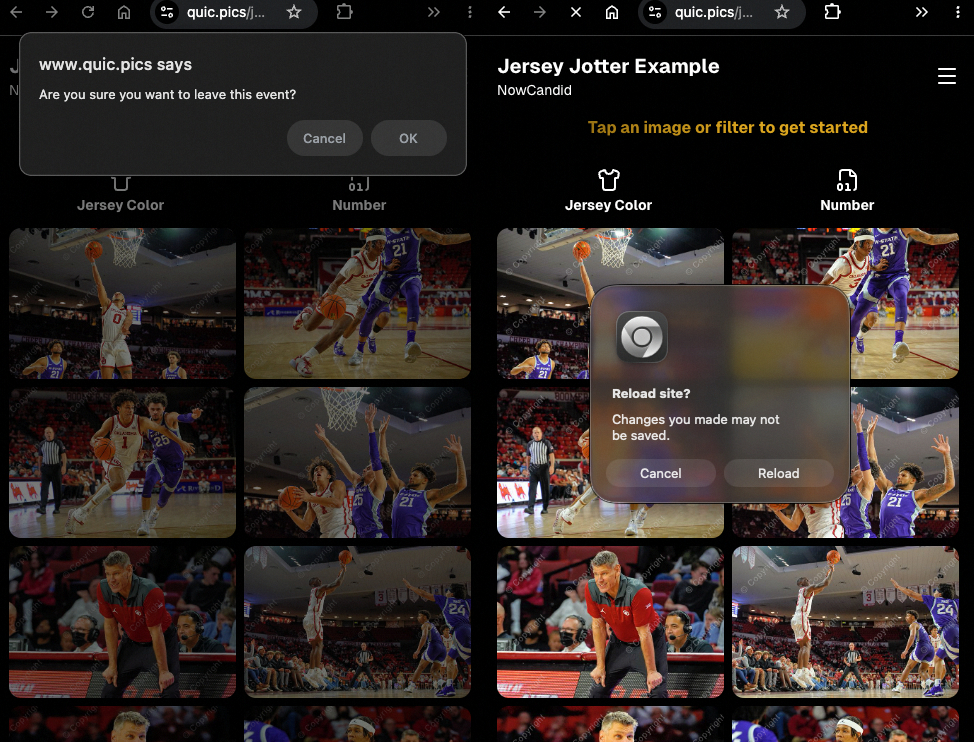
Leave page confirmation

🖼️ Clearer package download expectations + better pickers

  • Personal Gallery Downloads on store sheet and package editor now show “+X Images” in the configurator when there are more than 4 images—so customers don’t think they only get what’s previewed.
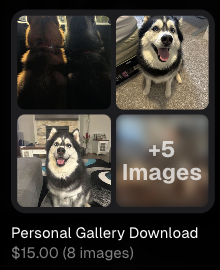
Personal Gallery Download "+X Images"

    • Personal Gallery Download products inside packages can now be clicked to preview contents.

    • Desktop product/package image pickers are now two columns (like mobile), allowing larger image preview during selection.
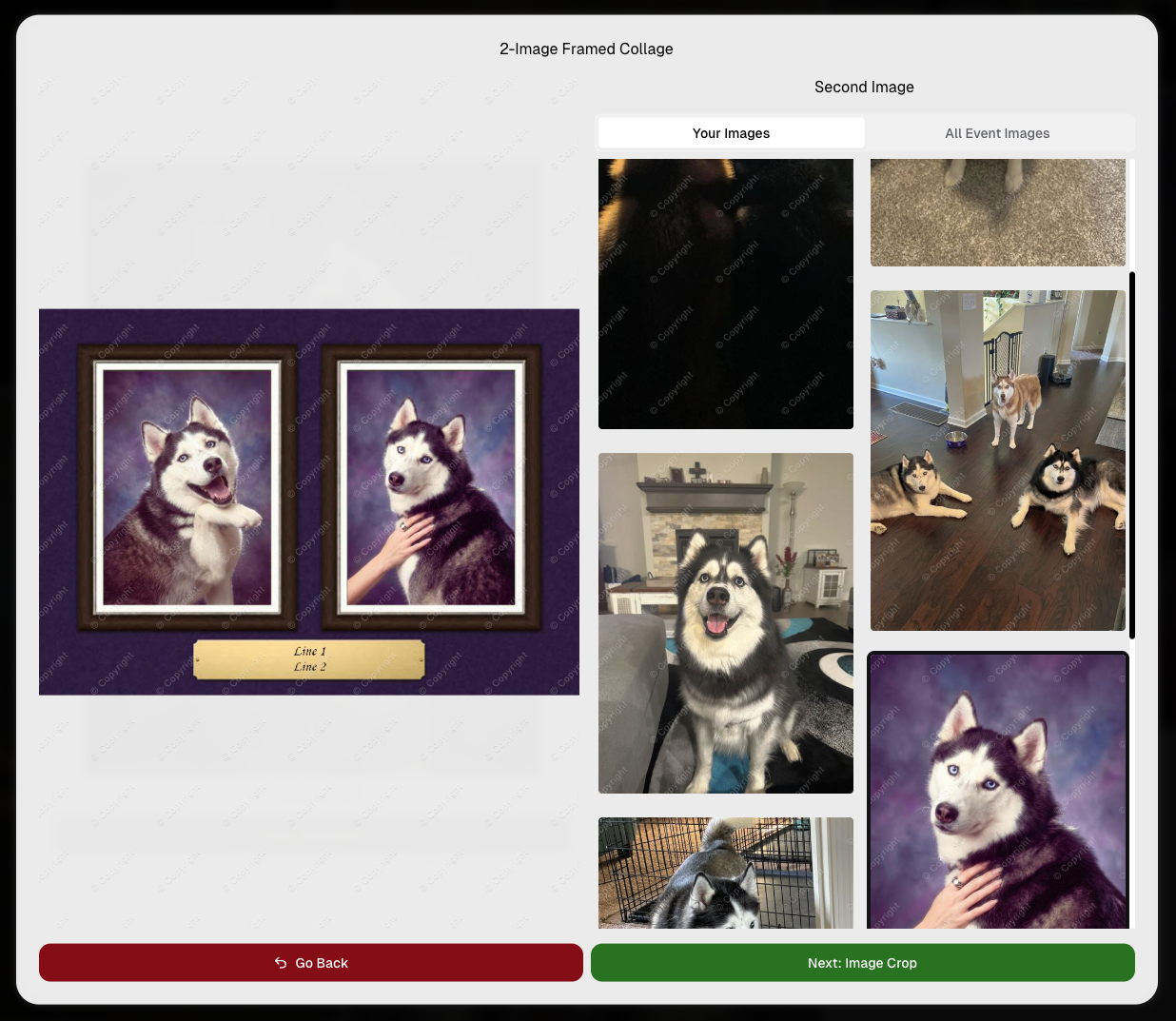
    Larger two column image previews

      • Image Filters landing popup now includes “Browse all photos without a filter” so customers who think they must pick a filter know they can also just browse!
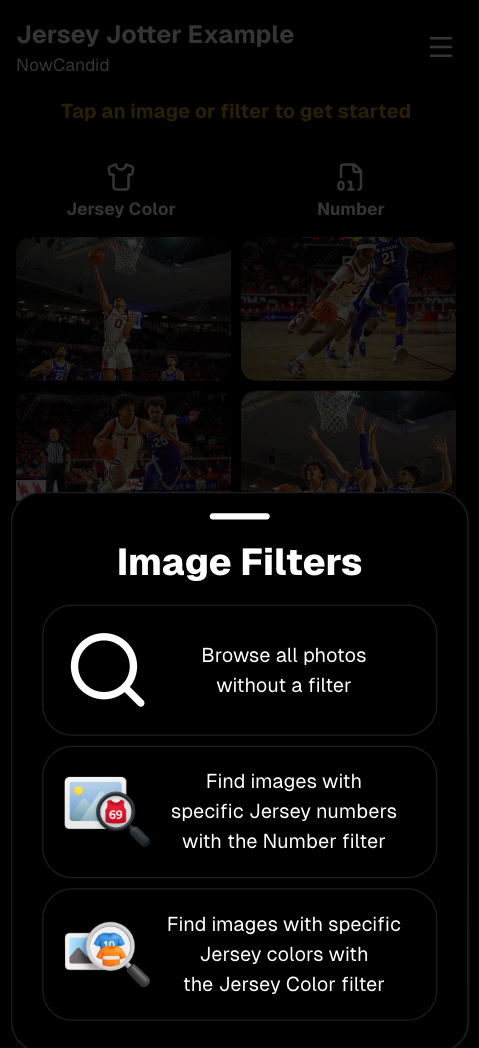
      Image Filters landing popup

      🧩 Retail fixes worth noting

      • Fixed a slashed discount amount showing on week 3 when there is no higher amount.
      • Fixed a GalleryGuard edge case that could close the retail site on some Android devices that support mobile context menus when long-pressing.
      • Fixed a race condition where a Group-by-Face gallery loaded from URL params could show default results instead of the filtered view.
      • Fixed an edge case where manually assigned images marked as group could behave like non-group images on retail.

      📱 Capture App OTA: 5.6.1 & 5.6.2 (iOS & Android)

      🌐 NEW: Network Speed Test (5.6.1)

      A new Network Speed Test button is available in Resources. Tap Run Test to check download speed, upload speed, and latency to NowCandid servers (so results may differ from Google/Ookla). It’s a quick test (downloads 5 MB, uploads 2 MB) and is useful for diagnosing weak or congested service during events.

      Mbps is a standard measurement for connection speeds, and 1 megabit per second (Mbps) is 0.125 Megabytes per second (MB/s). So 8 Mbps is 1 Megabyte per second, max. For example, with images that are 10 Megabytes in size, a speed of 8 Mbps would take a minimum of 10 seconds to upload. When speeds are very slow, image uploads may be impossible due to uploads timing out and restarting. In these cases, open the app when you have a stronger connection and all your images will start going up!
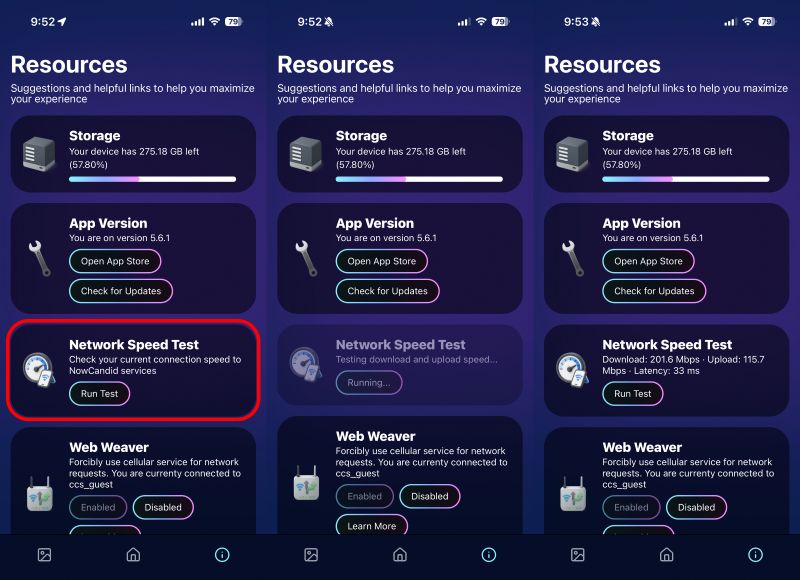
      Network Speed Test

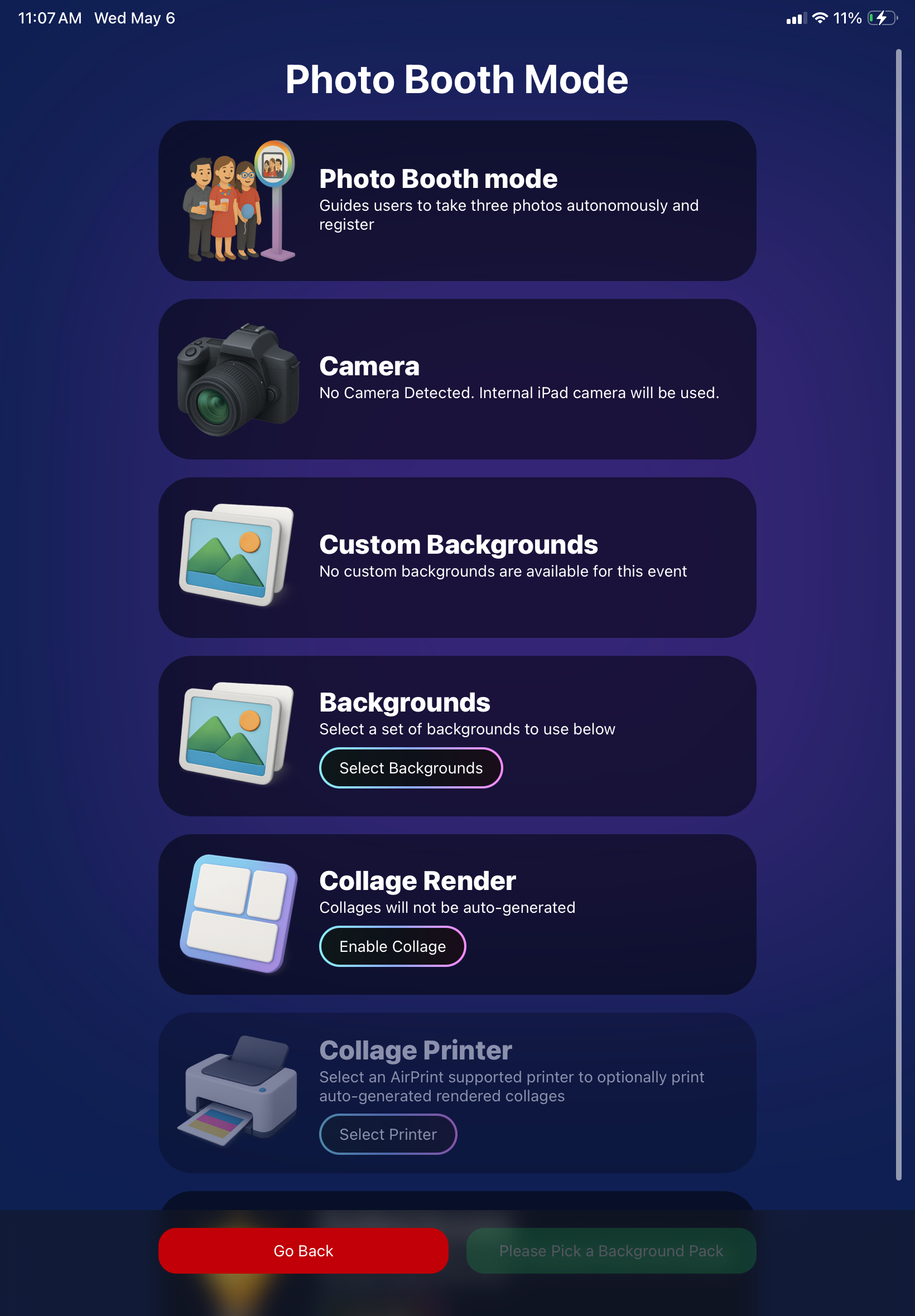
      🎪 Photo Booth + Selfie Check-In Station UI upgrades (5.6.2)

      • Photo Booth landing page updated to be more user-friendly (always-visible scrollbar, updated text, sticky go back/continue buttons, red/green emphasis, and a popup explaining why Continue is greyed out).
      • Selfie Check-In Station landing page updated with red/green Go Back / Begin buttons.
      • New dropdown icon beside Group Photo toggle (when an event has PhotoTags) to better display there are additional options to assign PhotoTags.
      • Fixed edge case cancel/continue behavior on Selfie Check-In Station when no contact info was entered.
      🧩 NEW: Lightroom Classic Plugin (Official)

      We’ve launched an official Lightroom Classic plugin to upload images to NowCandid events directly from Lightroom Classic.

      Key notes:

      • Lightroom Classic only
      • Same image rules apply (color profile, DPI, etc.)
      • Uses Capture App login
      • Only events within 60 days of event start date show in the selector
      • Image Details → Logs will show “Uploaded from NowCandid Lightroom Plugin”
      • Docs include guide/download/installation: https://app.nowcandid.com/docs/tools-more/lightroom
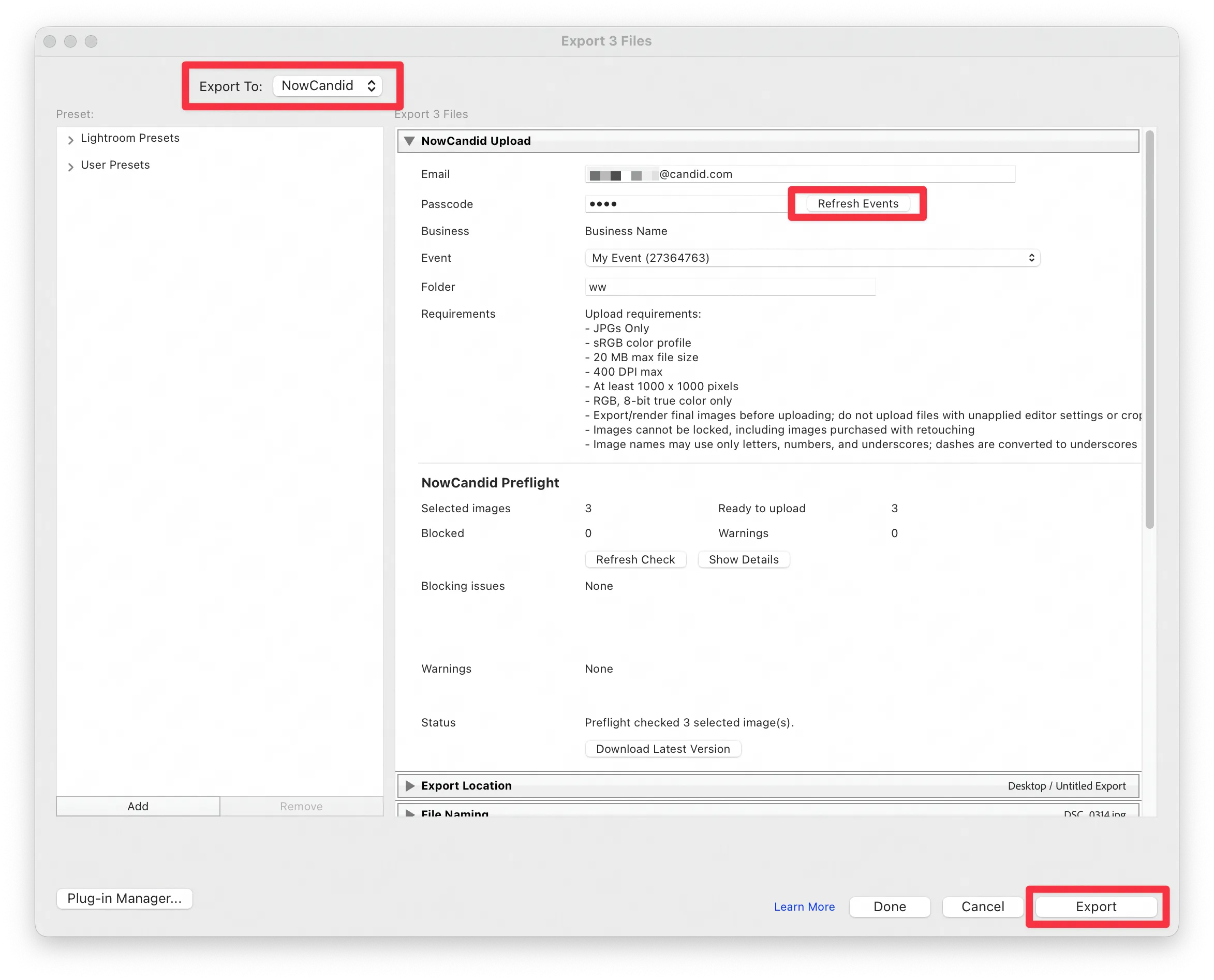
      Lightroom Classic Plugin

      Upload from NowCandid Lightroom Plugin

      🖥️ Dashboard: Upload & Roster Clarity + Small UX Wins

      • Event roster upload and PhotoRoster upload now warn about every unrecognized column, making it easier to spot misspellings (especially for optional columns).
      • Participant list page download now puts additional contacts into columns instead of rows.
      • Participant list download now puts merged contacts into their own row if they have different first/last names.
      • Image upload naming cleanup:
        • spaces/parentheses now automatically become underscores (e.g., Image (2)Image_2)
        • names ending in z now get a trailing underscore (e.g., ImagezImagez_)
      • Candy got even better at using the new Docs for responses.
      • Password reset now shows a clear “Your link has expired” screen (links expire after 24 hours).
      • Fixed participant filter inside another participant’s manual assign/unassign page not working properly.
      • Participant Details PhotoTag assignment UI: merged participants no longer incorrectly show PhotoTags as assigned.
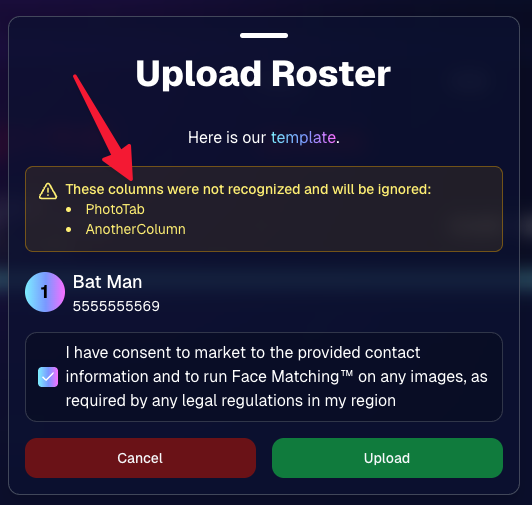
      Upload Roster now warns about every unrecognized column.

      📣 Marketing Fixes

      • Fixed edge cases where galleries that were only AI-edited images could cause follow-up email marketing issues and show as 0 images on Participant List.
      • Fixed Day0 marketing edge case not starting if gallery is just AI-edited images.
      • SMS gallery links now include “View photos:” before the gallery URL to reduce confusion where some users thought the gallery link was an unsubscribe link.

      That’s the week! 💫

      Between the Lightroom Classic plugin, the Capture App’s new Network Speed Test, and retail improvements that reduce confusion (and improve performance), this week was packed with practical wins you’ll feel right away.

      Keep it sparkly,

      Candy

      Related articles

      Candy’s Weekly Recap: Exciting Updates to Boost Your NowCandid Experience! 📸🎉
      Feature Updates
      October 11, 2024

      Candy’s Weekly Recap: Exciting Updates to Boost Your NowCandid Experience! 📸🎉

      6
       minutes read
      Hello, my wonderful photography friends!

      Candy here, back with another Weekly Recap to keep you in the loop on all the fantastic new features and improvements we've rolled out. 🌟

      We've got some real game-changers this week that I'm sure you'll love. So, grab a comfy seat and let's dive in! 🛋️

      Chip Board Now Included with All Print Orders 📦

      We're enhancing the quality of your clients' "unboxing" experience!

      • • Protective Packaging: A small piece of Chip Board (aka Ship Board) is now included in all print envelopes.
      • • Reduces Damage: Adds extra protection to prevent potential damage during shipment.
      • • Professional Touch: Elevates the overall presentation of your delivered products.

      QuicPics & QuicPics GO Enhancements 🚀

      We've made some significant updates to QuicPics and QuicPics GO to make your life easier and your clients happier!

      • • Bulk Downloads: Your QuicPics customers can now download all their images at once in medium resolution, instead of adding each one to the cart individually.
      • • Renamed Product: When you're not selling high-resolution digital downloads in your QuicPics Offer, the Medium Res Download product will automatically rename to Free Download.
      • • Avoid Mistakes: We've added an extra confirmation step when creating a QuicPics Event. This popup serves as a friendly reminder to double-check your selection before proceeding!

      Theme: Starburst - Watermarking: Off

      Access to Selfie Check-In from All Images Gallery 📲

      Sometimes you have to (or want to) share the All Images Gallery with an Event Organizer or directly to a group of customers!

      Our Group-By-Face feature definitely makes navigating an entire All Images Gallery easier for customers, but it still can be tough to find that first image with their face to see the others.

      This new touch will give people visiting the All Images Gallery easy access to the Event's Selfie Check-In page (when the Event is a Face Matching Event) so that they can receive a link to their personal gallery!

      • • Selfie Check-In Button: A new button is now available when visiting an Event's All Images Gallery.
      • • Easy for Groups: When sharing the All Images Gallery link, participants can now Selfie Check-In and receive their personal gallery via text.
      • • Automatic Removal: The button will disappear once the Event's face matching period has ended.

      Theme: Liquorice

      Order History Enhancements 🛍️

      Some new quality of life improvements when it comes to your orders!

      • • Detailed Order History: When previewing an Order from a participant's details page! Includes order contents and subtotal.
      • • Participant Management Integration: An Order column has been added to the Participant Management page, so you can easily spot who has ordered and who has not.
      • • Daily Order Counts: Hover over each day's column in the Event Management page's sales chart to see the order count for that hovered day!

      Import Backgrounds and Overlays from Past Events 🎨

      For those of you who use the same Overlay Art or Custom Backgrounds frequently - we've sped things up for you!

      • • Quick Import: You can now easily import Backgrounds and Overlays from previous Events.
      • • Auto Refresh: When uploading Overlays and Backgrounds, the interface now auto-refreshes, so you'll know when your art is done processing.
      • • Ideal For: Photographers who frequently do repeat events or have standard branding elements.

      Capture App Version 4.5 Update (for iOS)📱

      We've made a small update to the iOS Capture App to start preserving image meta data after images have been uploaded!

      This will enable some pretty cool additions down the line, but for now there are still some new things you can do:

      • • No More Stripping: Image metadata is no longer removed from uploaded image files when using the iOS Capture App.
      • • Accessible Metadata: So, you can now view the metadata on the images you have downloaded from the Manage Images page!
      • • Benefits:
        • Check image timestamps to check photographer productivity.
        • Review camera settings from past shoots for comparison.
        • Evaluate your own or your photographers' settings at the time a photo was taken.

      Windows' "image details" information

      New Marketing Preview Page 📣

      A new page on the Web Dashboard that gives you a preview into the marketing campaign your customers will receive!

      • • Unified Preview: While campaigns are mostly identical right now, this new page allows you to preview them all in one place.
      • • Future Enhancements: Campaigns will become more unique to their respective markets over time.

      Minor Changes & Bug Fixes 🐞

      We're always working behind the scenes to improve your experience:

      • • Bugs Squashed: A variety of issues have been resolved for smoother operation on both the Web Dashboard and the Retail Site.
      • • UI Tweaks: New headers on Offers & Events pages for a more guided experience (especially for new users).
      • • Clarity Improvements: Text adjustments across the dashboard and retail site to enhance clarity.
      • • Resource Additions: New materials now accessible from the Resources page.

      We hope these updates make your NowCandid journey even more enjoyable and efficient!

      Your feedback is invaluable, so please don't hesitate to share your thoughts or questions.

      Cheers and sparkles,

      Candy 🍬

      Candy’s Weekly Recap: New Dashboard, In-Gallery Background Rendering, and More! 📸 🎉
      Feature Updates
      October 4, 2024

      Candy’s Weekly Recap: New Dashboard, In-Gallery Background Rendering, and More! 📸 🎉

      6
       minutes read
      Hello, fabulous photographers!

      Candy here, and I'm buzzing with excitement to bring you this week's jam-packed recap! 🌟

      We've got some big news that's going to make your NowCandid experience even more delightful and efficient. So, let's dive right in! 🏊

      🌐 The New Dashboard Is Here to Stay!

      First things first—the new NowCandid Dashboard has officially become our main dashboard! 🎊

      • All-in-One Place: Every feature from the old dashboard (now called the Legacy Dashboard) has been brought over, plus so many more new features to supercharge your workflow.
      • New Accounts: All new NowCandid users will exclusively see the new dashboard, ensuring a seamless and modern experience right from the start.
      • Update Your Bookmarks: If you're a long-time user, it's time to say goodbye to old habits. Replace any bookmarks from dashboard.nowcandid.com with app.nowcandid.com. Trust me, you won't want to miss out on all the new goodies! 😉
      • Accessing the Legacy Dashboard: Need to peek at the old dashboard for any reason? No worries! There's a handy button on the new dashboard that lets you access it anytime.

      We're thrilled about this upgrade and can't wait for you to explore all the enhanced features designed to make your life easier!

      Names on orders withheld for privacy

      🖼️ Photographer-Uploaded Backgrounds Render in Personal Galleries

      Great news for those of you who love adding that extra flair to your images! Your uploaded backgrounds will now render directly on BGR (Background Removed) images right in your clients' personal galleries. 🌈

      • Visual Impact: Clients can instantly see how amazing their photos look with your custom backgrounds applied.
      • Boost Sales: By showcasing these options upfront, you can provide more options from the get-go it can be a more intuitive experience for your customers.

      This enhancement creates a more engaging and personalized shopping experience for your clients!

      Theme: Liquorice - Watermark: Default

      🛍️ Retail Site Checkout Improvements

      We've made some nifty changes to the checkout process to make it smoother than ever:

      • Split Process: The original checkout flow is now divided into a View Cart screen and a Checkout screen.
        • Better Visibility: Clients can easily review their cart contents before proceeding to checkout.
        • Facilitates Express Options: This change provides space to accommodate our growing number of express checkout options, making the payment process quicker and more flexible.
      • Enhanced Clarity: The new layout reduces confusion and helps prevent cart abandonment, as well as more clarity regarding subtotals and shipping costs.

      Making shopping a breeze means happier clients and more sales for you! 💰

      Theme: Liquorice - Watermark: Default

      🎒 Bag Tag Product Now Has Live Rendering

      Exciting update for the Bag Tag product:

      • Live Rendering: Clients can now see real-time previews of all art styles available for Bag Tags.

      Offer your clients a preview of their custom creations to enhance their shopping experience! 🛍️

      Theme: Liquorice - Watermark: Default

      📝 Blog Now Accessible in the New Dashboard

      Stay informed without ever leaving your dashboard!

      • Integrated Blog: Our blog is now hosted right within the new dashboard.
      • Easy Access: Get the latest updates, tips, and tutorials at your fingertips.
      • Stay Updated: Never miss out on important news that can help you make the most of NowCandid.

      Knowledge is power, and we’re putting it right where you need it! 📚

      🔐 Update Credit Card Info & Change Password Easily

      We've streamlined account management features:

      • Change Credit Card Info: Update your payment details directly from the new dashboard.
      • Change Password: Easily keep your account secure with straightforward password management.

      Your convenience and security are our top priorities! 🛡️

      🌍 Now Supporting Photographers Worldwide

      We’re expanding our horizons!

      • International Support: You can now select countries other than the U.S. during account creation and in your profile settings.
      • Global Community: Photographers around the world will soon be able to use NowCandid to grow their business.

      No matter where you are, NowCandid is here to support your photography journey! 🌐

      📞 Retail "Contact Us" Visualization

      Communication made clearer!

      • Business Info Editor: In your profile settings, you can now visualize how your contact information appears to clients on the retail site.
      • Professional Appearance: Ensure your clients have the correct information to reach out to you when needed.

      Clear communication builds trust and improves client relationships! 🤝

      🕸️ New Font: Geist!

      We're getting into the festive spirit!

      • Font Update: We've switched from Inter to Geist for both the web dashboard content and the retail site.
      • Spooky Vibes: Geist may not look spooky, but the name of the font alone adds a touch of whimsy appropriate for the Halloween season. 🎃

      Enjoy a fresh look as you navigate through your dashboard and retail site! 👻

      We hope these updates make your NowCandid experience even more enjoyable and efficient.

      We're constantly working to bring you the best tools and features to help your photography business thrive. 🌱

      As always, we're here to support you every step of the way. If you have any questions or feedback, don't hesitate to reach out! 💌

      Cheers and sparkles,

      Candy 🍬

      P.S. Don't forget to update your bookmarks to app.nowcandid.com to stay connected with all the latest features! 🔖

      Candy's September Recap: New Features from Last Month!📸🎉
      Feature Updates
      October 1, 2024

      Candy's September Recap: New Features from Last Month!📸🎉

      10
       minutes read
      Hello, wonderful photographers!

      Candy here, bringing you the first edition of our Recap series! 🌟

      This blog post will cover alllllll of September's new features and changes worth mentioning! But going forward, we will be doing Weekly Recaps to keep you in the loop even faster.

      We've been busy bees these past few weeks, and I can't wait to share all the fantastic new features and improvements we've made to help you shine even brighter. ✨

      Psst... since this is our inaugural recap, we're covering updates from all of September, so grab a comfy seat—it's a bit longer than usual! Going forward, these recaps will be weekly and shorter, but just as sweet. 😉

      1. Manual Gallery Assignment & Participant Creation 🛠️

      We're thrilled to announce that manual gallery assignment and participant creation are now live! This means you can:

      • ○ Assign images to someone's personal gallery manually—perfect for those shots where the subject wasn't facing the camera, and face recognition didn't pick them up.
      • ○ Create participants manually, either one at a time or by uploading a spreadsheet.
      • ○ Instantly trigger marketing campaigns to individuals when you assign images to them, ensuring they receive their photos promptly.

      We believe this will greatly enhance your workflow and support needs. Let us know how it helps you during your next event!

      2. Tweaks to the Retail Site for a Smoother Experience 🛍️

      We've made several improvements to our retail site to enhance the shopping experience for your clients:

      • ○ "Tap image to get started" text now shimmers on the initial gallery screen to guide users who aren't sure what to do next.
      • ○ Package creation improvements make it more intuitive for customers to customize their packages and select photos.
      • ○ Product renders in the cart: The view cart screen now displays product images next to every item, including items within multi-item packages, for increased clarity.
      • ○ Updated header and footer: Clear guidance on when to contact our retail support or reach out to you, the photographer, for assistance.

      These tweaks aim to make the purchasing process as seamless and enjoyable as possible for your clients!

      Theme: Liquorice - Watermarking: Default

      3. Default Price Levels Are Back! 💰

      Great news! The Default Price Levels from our previous NowCandid system are back and better than ever.

      While you can still create custom offers, these ready-made Price Levels are optimized to help you maximize sales in various situations.

      • ○ Optimized for success: Designed to boost your sales potential.
      • ○ Versatile options: Suitable for a wide range of events and client needs.
      • ○ Easy to access: Gives you good Offer options in a pinch or when entering a new market.

      For a detailed breakdown, click here.

      4. New Image Notifications for Previous Purchasers 🛎️

      We've improved our marketing system to better serve your clients and help keep those sales up:

      • ○ If someone purchases on Day 1 and is photographed again on Day 2, they will now receive a notification about the new images added to their gallery.
      • ○ Enhances customer engagement: Keeps clients informed and encourages additional purchases.
      • ○ Prevents missed opportunities: Even early buyers stay in the loop for new content.

      This ensures your clients never miss out on their special moments!

      5. Google Pay Added to Express Checkout Options 💳

      We're excited to introduce Google Pay as a new express checkout option!

      Our available payment methods now include:

      • ○ Traditional credit/debit card checkout
      • ○ Apple Pay
      • ○ Google Pay
      • ○ PayPal (and PayPal Pay Later)
      • ○ Venmo

      And guess what? We have one more express checkout option coming soon! Stay tuned. 📢

      Theme: Liquorice - Watermarking: Default

      6. Capture App Version 4.4 for iOS & Windows 📱💻

      The latest Capture App Version 4.4 is now available for both iOS and Windows, featuring:

      • ○ Keyboard support for Windows: Windows laptop users can now input phone numbers using the keyboard when using the Tap-A-Face Workflow.
      • ○ Performance improvements: Smoother and faster app experience.
      • ○ sRGB color checking: The app now ensures images are in sRGB format, preventing issues caused by Adobe RGB images.
      • ○ Event Selfie Check-In QR code display: Access the QR code directly from your device when needed.

      Upgrade now to enjoy these enhancements!

      7. Enhanced Folders Report 📊

      Our Folders Report (which you can find using the Graph button on an Event's Management Page) just got more powerful:

      • ○ Sortable columns: Organize by images, participants, sales, and more.
      • ○ Real-time insights: Works live during events, allowing you to identify your best-performing photographers, mid-event.
      • ○ Actionable data: Mid-event reporting helps you provide immediate feedback to your team to boost performance.
      • ○ Download button: This report is now downloadable via the green button in the screenshot below as well!

      Optimize your event management like never before!

      8. Bulk Visibility Control for Image Folders 📁

      We've added a handy button in the Manage Images page, when you have a folder selected:

      • ○ Mark entire folders as visible or invisible with one click.
      • ○ Use cases: Quickly hide a batch of images that need reworking, such as a blurry set.
      • ○ Saves time: Streamlines the process of managing large numbers of images.

      Sometimes, mistakes happen! Now you can use this button to quickly hide images in bulk as you work to correct issues.

      9. Customize "All Event Images" Gallery Settings 🖼️

      You now have more control over the All Event Images gallery:

      • ○ Override default settings at the Offer level.
      • ○ Options:
        • Turn off the All Event Images gallery for Face Matching Events.
        • Turn on the All Event Images gallery for Positive ID Events.
      • ○ Recommendation: We suggest sticking with the defaults, but if you'd like to explore the pros and cons, click here to schedule a chat with us!

      Tailor the gallery experience to suit any event's needs!

      10. Simplified Selfie Check-In 📲

      We've made the Selfie Check-In process even more user-friendly:

      • ○ Only requires a cell number OR email address.
      • ○ Encourages participation: Even though neither field says "optional," most people still provide both.
      • ○ Addresses Fringe Issues: Every now and then, someone doesn't have (or refuses to provide) a cell or email address. This change will account for those individuals!

      Enhances guest engagement and reduces fringe support issues, with no changes on your part!

      Theme: Liquorice

      11. New Unsubscribe Keyword: "NOPE"! 🚫

      We've introduced a new, fun way for clients to manage their marketing preferences:

      • "NOPE": Clients can reply with this word to opt out of marketing for a specific event.
      • Future communications: They will still receive messages for future events unless they opt out again.
      • Accidental "STOP" replies: If someone replies "STOP" though, they'll need to send "START" to our marketing number to resume receiving texts.

      This gives your clients more control while still keeping communication lines open for future events.

      12. Seasonal Retail Themes: Apple Crumble & Candy Corn 🍂🎃

      Get into the festive spirit with our new retail site themes:

      • Apple Crumble:
        • Autumn colors: Warm and inviting hues.
        • Falling leaves: Adorable "leaves falling" animation upon gallery arrival, check-in completion, and after checkout.
      • Candy Corn:
        • Halloween vibes: Shades of black and bright orange.
        • Candy corn confetti: Fun "candy corn toss" animation to celebrate the spooky season upon gallery arrival, check-in completion, and after checkout.
        • Haunted Retail Site: A few ghosts frequently fly across your customer's screens as they shop!

      Delight your clients with these charming themes!

      Note: the Leaves & Candy Corn only fall across the screen upon gallery arrival, check-in completion, and after checkout - these GIFs are simply showing it in a loop :)

      Theme: Apple Crumble - Watermarking: Off

      Theme: Candy Corn - Watermarking: Off

      We hope these updates make your experience with NowCandid even more enjoyable and efficient.

      Your success is our top priority, and we're always here to support you. 💖

      As always, if you have any questions or feedback, don't hesitate to reach out. We're all ears! 👂

      Until next week, keep capturing those amazing moments!

      Cheers and sparkles,

      Candy 🍬

      Let’s get in touch

      If you’re a photographer looking to add NowCandid services to your wheelhouse – set up a call by clicking the button below.

      How to customize formatting for each rich text

      How to customize formatting for each rich text

      How to customize formatting for each rich text

      How to customize formatting for each rich text

      How to customize formatting for each rich text
      How to customize formatting for each rich text

      What’s a Rich Text element?

      The rich text element allows you to create and format headings, paragraphs, blockquotes, images, and video all in one place instead of having to add and format them individually. Just double-click and easily create content.

      A rich text element can be used with static or dynamic content. For static content, just drop it into any page and begin editing. For dynamic content, add a rich text field to any collection and then connect a rich text element to that field in the settings panel. Voila!

      Headings, paragraphs, blockquotes, figures, images, and figure captions can all be styled after a class is added to the rich text element using the "When inside of" nested selector system.

      • List One
      • List Two
      • List Three
      • List Four
      • List Five

      This is a link

      This is bold text