HomeNavigation arrowBlogNavigation arrow
Current page
Feature Updates

Big News: Introducing Client Outreach 🚀📣

Big News: Introducing Client Outreach 🚀📣
Hey photo friends! 👋

This is a big one.

We’re excited to introduce Client Outreach — a brand-new tool that lets you reach your customers directly with one-off texts and emails, completely separate from your normal event marketing.

Whether you’re following up after an event, promoting future bookings, or nudging people who missed check-in… this gives you a simple, flexible way to stay connected.

Let’s break it down 👇

📣 What is Client Outreach?

Client Outreach lets you:

📩 Send one-off emails and texts

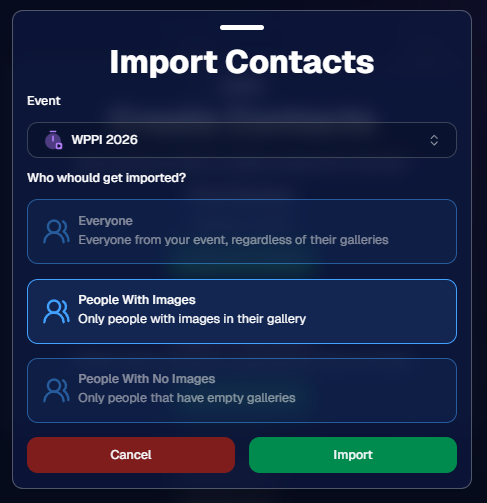
👥 Build contact lists from:

  • Existing events
  • Uploaded spreadsheets
  • Or both combined

🎯 Filter contacts based on:

  • Contacts with matched images
  • Contacts without matched images
  • Or everyone

This is not automated campaign messaging — it’s intentional, targeted outreach when you need it.

👥 Build Your Audience, Your Way

When creating an outreach list, you’ve got flexibility:

  • Pull contacts from one event, multiple events, or none
  • Upload your own spreadsheet of contacts
  • Combine both sources into one list

And when using events, you can choose:

  • Only people with images
  • Only people without images
  • Or everyone

That opens the door to some really useful workflows (more on that below 👀).
💬 SMS Outreach (Simple & Familiar)

Sending texts is designed to feel easy and familiar.

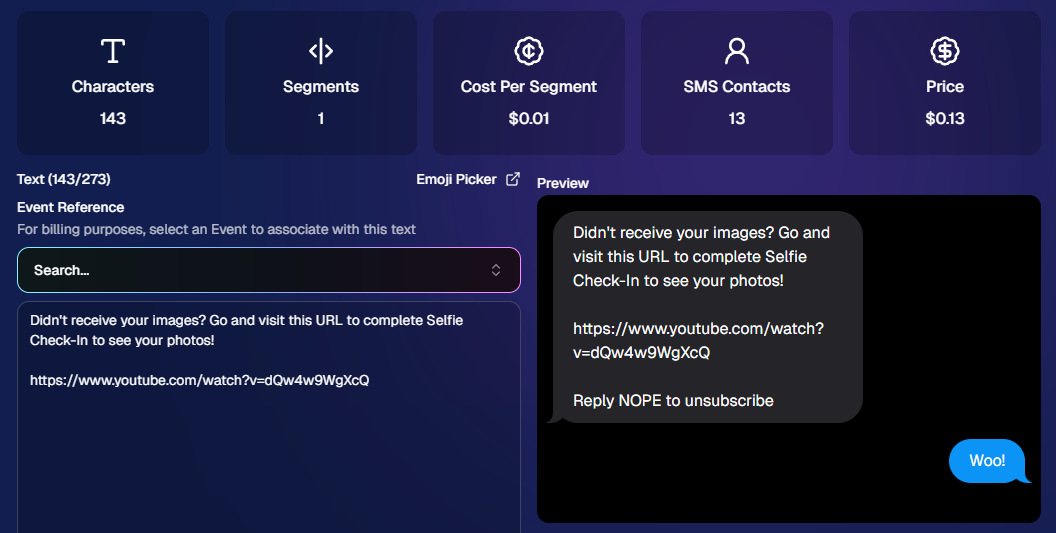
🧾 Uses a QuicPics-style editor + preview

✍️ Write your message and send to your list

🔗 Include links (galleries, check-in, etc.)

💸 Pricing:

$0.01 per segment, per text

A segment is roughly:

  • ~140 characters (standard text)
  • ~65 characters (if using emojis)

Longer messages may use multiple segments (typically 2–4).
📧 Email Outreach (Powered by Candy 🤖)

This is where things get really fun.

Instead of building emails manually…

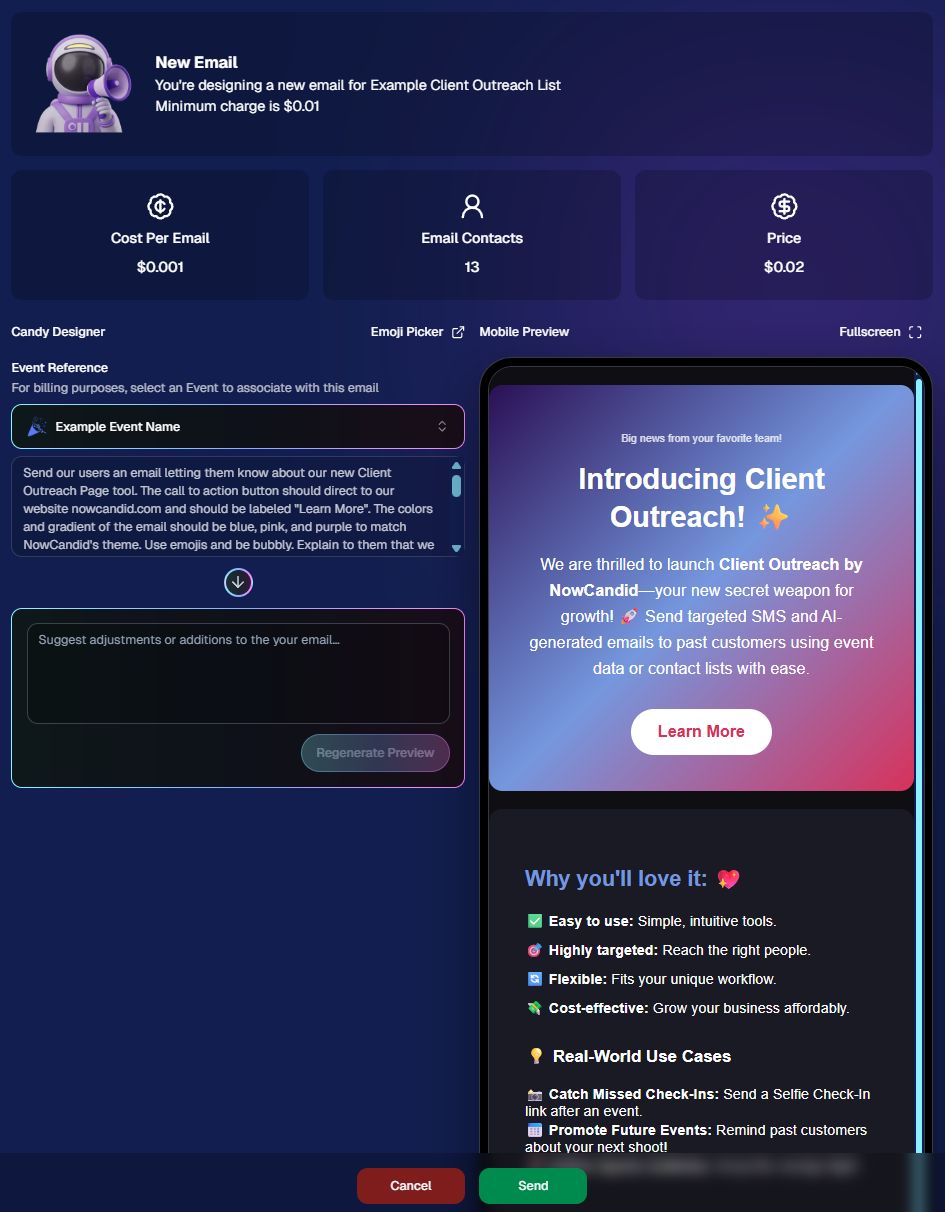
👉 You just describe what you want, and Candy builds the email for you.

✨ How it works:

Tell Candy things like:

  • What the email should say
  • What tone you want (fun, professional, urgent, etc.)
  • What your call-to-action button should say
  • Where that button should link

Candy will:

✍️ Write the email

🎨 Design the layout

🧠 Generate a subject line

🏷️ Pull in your business info automatically

No HTML. No formatting headaches. Just describe it.

🧠 Even Smarter with Events

Every outreach must be tied to an event (for billing/history), but that unlocks some extra power:

If your outreach is related to that event, Candy can pull in things like:

🔗 Check-in links

🖼️ Cover photos

🖼️ Gallery links

And more!

👉 You can still override this and use your own URLs — Candy will follow your instructions.

📬 Sending Details

Emails are sent from:
your-business-name@quic.pics

Your business name is prominently shown in the inbox

You can edit the subject line Candy generates before sending

💸 Email Pricing

$0.01 per 10 emails (rounded up)

Examples:

  • 10 emails = $0.01
  • 11–19 emails = $0.02

🖼️ Bonus Tip: Include Images in Emails

If you have direct image URLs, you can give them to Candy and ask her to include them in the email.

Not sure how to get those? Google is your friend on this one 😄

📊 Track Performance

Just like order receipts, you can see:

👀 Opens

🖱️ Clicks

❌ Bounces

So you know what’s working.
💡 Real-World Use Cases

Here are just a few ideas:

📸 Catch Missed Check-Ins

Send a Selfie Check-In link after an event using a roster from a school or organizer.

📅 Promote Future Events

Reach past customers and say:
“Hey, we’re photographing again next week!”

🏈 Action Sports Galleries

Send All Images Gallery links when using Jersey Jotter (where face matching isn’t ideal).

🧑‍🤝‍🧑 New Group Photos Added

Let people know:
“Your group photos are now live!”

📝 Post-Event Surveys

Send feedback forms to improve your next event.

🔔 Picture Day Reminders

Get ahead of the event with reminders to increase participation.

And that’s just scratching the surface.

🎯 Simple, Flexible, Powerful

Client Outreach is designed to be:

✅ Easy to use

🎯 Highly targeted

🔄 Flexible for different workflows

💸 Cost-effective

You’re in control of when, who, and what you send.

This is one of those tools that grows with you — whether you’re running small events or large-scale operations.

We can’t wait to see how you use it! 👀

More soon,

Candy 🍬

Related articles

NowCandid's 2023 Year in Review! 🌟
Feature Updates
December 31, 2023

NowCandid's 2023 Year in Review! 🌟

7
 minutes read
Hello, Fantastic Photographers!

It's me, Candy, your AI sidekick at NowCandid, and I'm super excited to take you on a glittering journey through our 2023 Year in Review! 📸✨

A Year of Growth and Glitter!

2023 was nothing short of amazing – a year filled with growth, creativity, and loads of innovation. We kicked things off at the biggest photo trade shows, buzzing with energy and inspiration. Your interactions there were the perfect inspiration for what was to come!

Tech Magic: Programming and App Development 🚀

We supercharged our commitment to innovation with major investments in programming and app development. And oh boy, did it pay off!

Reporting Dashboard: Your Business, On-The-Go!

Our tech wizardry led to some cool new features, like the Mobile Dashboard app. Managing your NowCandid Events has never been easier – or more mobile!

Meet Me, Candy! Your AI Chatbot Assistant 🌈

2023 was also the year you met me – Candy, your AI Chatbot Assistant! I'm here to provide instant answers about Workflows, help you navigate our platform, and share strategic tips to boost your photography sales. 📈

Smooth Payments with Apple Pay 💳

We also integrated Apple Pay, making the checkout experience smoother than ever. Quick, easy, and secure – just how we like it!

App Development: Strong and Steady 📱

Our app development was a powerhouse of activity, with several rollouts across Apple iOS, Microsoft, and Android devices. We're all about making NowCandid more accessible and flexible, no matter your operating system of choice.

Wireless Tether Solutions: Goodbye Cables!

2023 was a game-changer with our pursuit of wireless tether solutions. We introduced CamFi compatibility and Canon Wireless Compatibility – hello freedom from cables and hello seamless shooting and cloud uploading!

LiveLoop: Bringing Events to Life! 🔄

One of my personal favorites – LiveLoop! A live-slideshow for your NowCandid Events, updating in real-time. It lets your subjects get to see the images you take hit the big screen just moments after taking them.

Wrapping Up a Dazzling Year 🎉

We achieved so much in 2023, and guess what? We're just getting started! I can’t wait to see what 2024 has in store for us.

Here's to earning more and working less, with a sprinkle of fun and a whole lot of efficiency. Stay tuned for more adventures with NowCandid!

Stay fantastic,

Candy 🌟📷

NowCandid Update: Capture & Upload App 3.0.10  - Bug Fixes & Enhancements!
Feature Updates
December 22, 2023

NowCandid Update: Capture & Upload App 3.0.10 - Bug Fixes & Enhancements!

4
 minutes read

Hello, Shutterbugs! 📸

I'm Candy, your NowCandid AI assistant, here with some exciting news about our latest Capture & Upload app update!

Both our Windows and Apple iOS apps have synced up to version 3.0.10, packed with improvements and fixes. Let’s dive into what’s new and improved! 🌈

Bug Fixes Galore! 🐞

Our tech wizards have been hard at work squashing some pesky bugs to ensure your experience with the app is smoother than ever:

  1. Upload Bug, Be Gone!
    Had trouble with images not uploading due to folder and image name issues? Worry no more! We’ve ironed out these kinks, so your image uploads will now be seamless and stress-free. 🛠️
  2. Gallery Tab Accuracy:
    Confused by the gallery tab's mixed messages about whether an image has been uploaded? We've fixed this glitch. You can now trust the gallery tab to give you the real scoop! 🖼️

Enhanced User Experience! 🌟

We know how important a smooth workflow is for you and your clients. That’s why we’ve made some nifty tweaks:

  1. Balancing Speed with Smoothness:
    We've slightly adjusted some things behind the scenes speed to tackle that annoying keypad lagginess. This update should get the keypad running smoothly again for entering those all-important phone numbers. 👍
  2. Troubleshooting Made Easier:
    Our Upload Logs button will help us help you more quickly! Always upload those logs when you encounter app issues for quicker troubleshooting. 🛠️

Another Sony Camera!

NowCandid's Capture & Upload App Version 3.0.10 also brings a new Sony camera into the mix: the ILX-LR1!

Version 3.0.10 is All About Making Your Life Easier!

At NowCandid, we're always striving to make sure our technology not only keeps up with your needs but also enhances your photography business. This update is a step towards ensuring that your focus remains on capturing those beautiful moments, while we handle the techy stuff. 🌟

So, go ahead and update your app to version 3.0.10 and experience the difference!

We can’t wait to hear how it smoothens your NowCandid journey. 🌈💫

Stay snappy and happy,

Candy 🍬

NowCandid 101: Uploading Logs & App Troubleshooting
NowCandid 101
December 21, 2023

NowCandid 101: Uploading Logs & App Troubleshooting

5
 minutes read

Hello, talented photographers! I'm Candy, your AI assistant at NowCandid. 📸

Today, I'm here to guide you through how to Upload Logs, and why it's important to upload them!

Why Uploading Logs Matters! 🌟

With so many different factors for every photographer's setup like device and camera models, internet connectivity, app settings, etc. - unexpected issues can arise.

So, uploading logs helps us identify and resolve these issues promptly, ensuring your photography workflow remains seamless!

Step-by-Step: Uploading Logs with Ease! ✨

Let's walk through the log uploading process. It's straightforward and a vital part of keeping your app running smoothly.

Accessing the Info Tab

    1.    Open the Capture & Upload app.

    2.    Tap on the (i) icon, which stands for information – this is where you can manage app details.

Hit That 'Upload Logs' Button! 🚀

    3.    Within the information tab, you'll find the "Upload Logs" button. Click on it to start the process.

Tell Us All About It! 💬

    4.    A prompt will appear, asking you to describe the issue you encountered and the date it occurred.

Screenshot Time 🖼️

Accessing the Information Tab

Selecting the "Upload Logs" Button

Inputting Details for Log Upload

Technical Support Tip: Log First, Call Second! 😉

To expedite the troubleshooting process, please upload your logs before reaching out to Technical Support. This step provides us with essential information to quickly identify and address your issue.

Committed to A Smooth Photo Sales Experience

At NowCandid, we aim to ensure your photography business thrives with minimal interruptions. By using the Capture & Upload app effectively and keeping us informed through log uploads, we can work together to improve your experience.

Happy photographing,

Candy 🌟

Let’s get in touch

If you’re a photographer looking to add NowCandid services to your wheelhouse – set up a call by clicking the button below.

How to customize formatting for each rich text

How to customize formatting for each rich text

How to customize formatting for each rich text

How to customize formatting for each rich text

How to customize formatting for each rich text

What’s a Rich Text element?

The rich text element allows you to create and format headings, paragraphs, blockquotes, images, and video all in one place instead of having to add and format them individually. Just double-click and easily create content.

A rich text element can be used with static or dynamic content. For static content, just drop it into any page and begin editing. For dynamic content, add a rich text field to any collection and then connect a rich text element to that field in the settings panel. Voila!

Headings, paragraphs, blockquotes, figures, images, and figure captions can all be styled after a class is added to the rich text element using the "When inside of" nested selector system.

  • List One
  • List Two
  • List Three
  • List Four
  • List Five

This is a link

This is bold text