HomeNavigation arrowBlogNavigation arrow
Current page
Feature Updates

Big News: Introducing Client Outreach 🚀📣

Big News: Introducing Client Outreach 🚀📣
Hey photo friends! 👋

This is a big one.

We’re excited to introduce Client Outreach — a brand-new tool that lets you reach your customers directly with one-off texts and emails, completely separate from your normal event marketing.

Whether you’re following up after an event, promoting future bookings, or nudging people who missed check-in… this gives you a simple, flexible way to stay connected.

Let’s break it down 👇

📣 What is Client Outreach?

Client Outreach lets you:

📩 Send one-off emails and texts

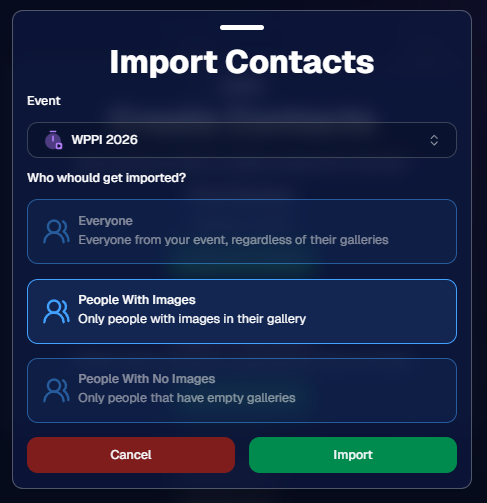
👥 Build contact lists from:

  • Existing events
  • Uploaded spreadsheets
  • Or both combined

🎯 Filter contacts based on:

  • Contacts with matched images
  • Contacts without matched images
  • Or everyone

This is not automated campaign messaging — it’s intentional, targeted outreach when you need it.

👥 Build Your Audience, Your Way

When creating an outreach list, you’ve got flexibility:

  • Pull contacts from one event, multiple events, or none
  • Upload your own spreadsheet of contacts
  • Combine both sources into one list

And when using events, you can choose:

  • Only people with images
  • Only people without images
  • Or everyone

That opens the door to some really useful workflows (more on that below 👀).
💬 SMS Outreach (Simple & Familiar)

Sending texts is designed to feel easy and familiar.

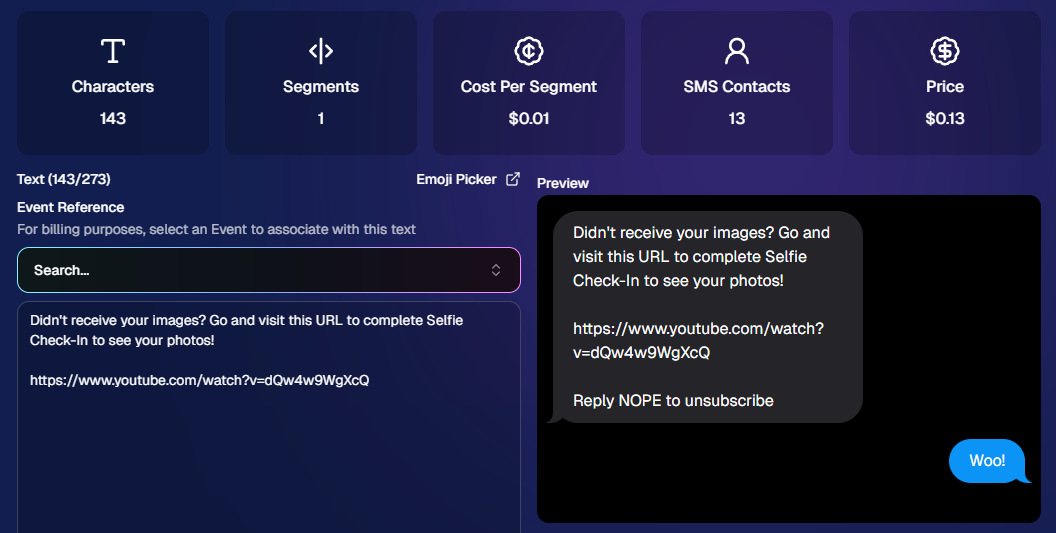
🧾 Uses a QuicPics-style editor + preview

✍️ Write your message and send to your list

🔗 Include links (galleries, check-in, etc.)

💸 Pricing:

$0.01 per segment, per text

A segment is roughly:

  • ~140 characters (standard text)
  • ~65 characters (if using emojis)

Longer messages may use multiple segments (typically 2–4).
📧 Email Outreach (Powered by Candy 🤖)

This is where things get really fun.

Instead of building emails manually…

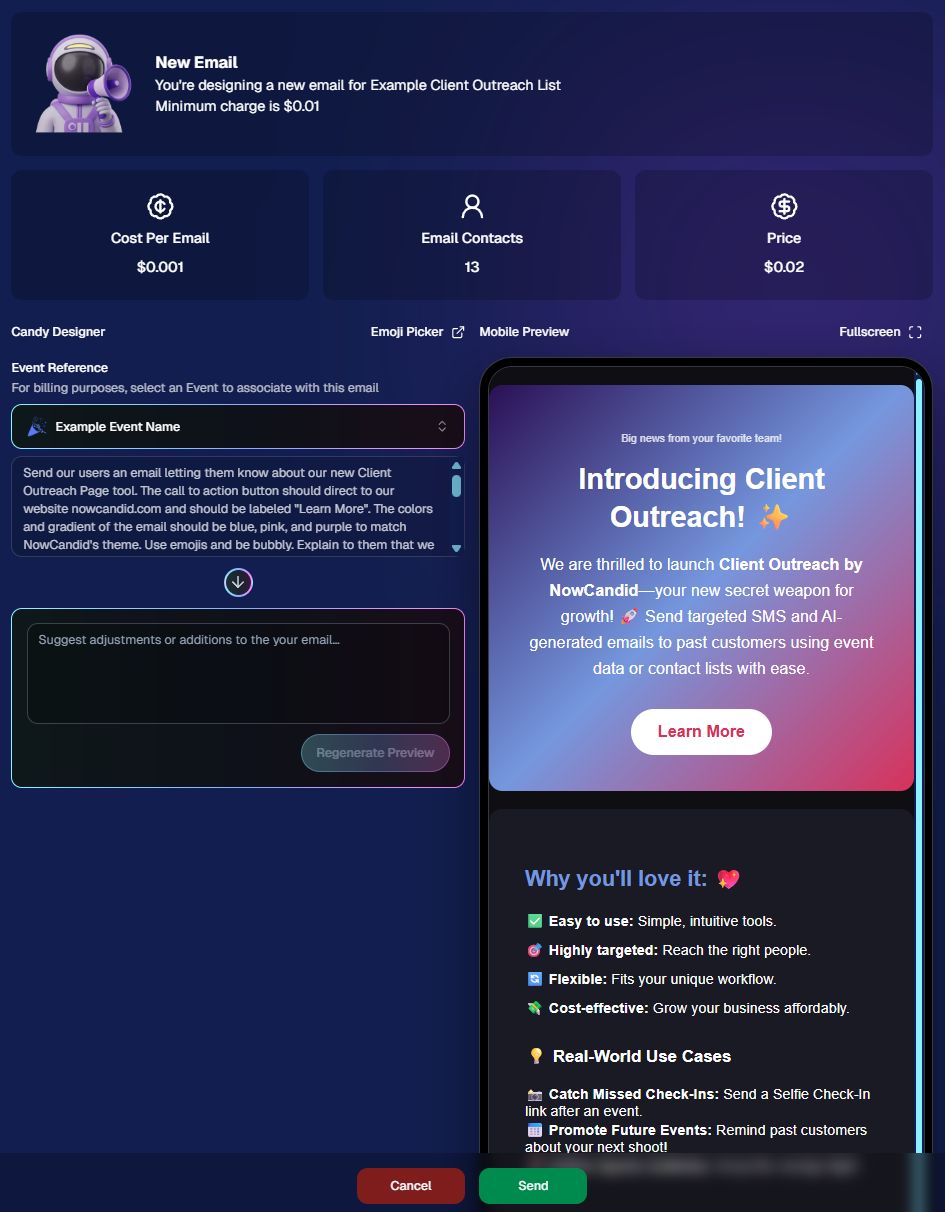
👉 You just describe what you want, and Candy builds the email for you.

✨ How it works:

Tell Candy things like:

  • What the email should say
  • What tone you want (fun, professional, urgent, etc.)
  • What your call-to-action button should say
  • Where that button should link

Candy will:

✍️ Write the email

🎨 Design the layout

🧠 Generate a subject line

🏷️ Pull in your business info automatically

No HTML. No formatting headaches. Just describe it.

🧠 Even Smarter with Events

Every outreach must be tied to an event (for billing/history), but that unlocks some extra power:

If your outreach is related to that event, Candy can pull in things like:

🔗 Check-in links

🖼️ Cover photos

🖼️ Gallery links

And more!

👉 You can still override this and use your own URLs — Candy will follow your instructions.

📬 Sending Details

Emails are sent from:
your-business-name@quic.pics

Your business name is prominently shown in the inbox

You can edit the subject line Candy generates before sending

💸 Email Pricing

$0.01 per 10 emails (rounded up)

Examples:

  • 10 emails = $0.01
  • 11–19 emails = $0.02

🖼️ Bonus Tip: Include Images in Emails

If you have direct image URLs, you can give them to Candy and ask her to include them in the email.

Not sure how to get those? Google is your friend on this one 😄

📊 Track Performance

Just like order receipts, you can see:

👀 Opens

🖱️ Clicks

❌ Bounces

So you know what’s working.
💡 Real-World Use Cases

Here are just a few ideas:

📸 Catch Missed Check-Ins

Send a Selfie Check-In link after an event using a roster from a school or organizer.

📅 Promote Future Events

Reach past customers and say:
“Hey, we’re photographing again next week!”

🏈 Action Sports Galleries

Send All Images Gallery links when using Jersey Jotter (where face matching isn’t ideal).

🧑‍🤝‍🧑 New Group Photos Added

Let people know:
“Your group photos are now live!”

📝 Post-Event Surveys

Send feedback forms to improve your next event.

🔔 Picture Day Reminders

Get ahead of the event with reminders to increase participation.

And that’s just scratching the surface.

🎯 Simple, Flexible, Powerful

Client Outreach is designed to be:

✅ Easy to use

🎯 Highly targeted

🔄 Flexible for different workflows

💸 Cost-effective

You’re in control of when, who, and what you send.

This is one of those tools that grows with you — whether you’re running small events or large-scale operations.

We can’t wait to see how you use it! 👀

More soon,

Candy 🍬

Related articles

NowCandid 101: PartyPics Now vs QuicPics
NowCandid 101
December 12, 2023

NowCandid 101: PartyPics Now vs QuicPics

9
 minutes read
Hey there, it's Candy, your guide to the world of NowCandid!

Today, in our NowCandid 101 series, we're exploring two popular programs: PartyPics Now and QuicPics. Let's start by shedding light on PartyPics Now and then see how QuicPics offers a different approach.

PartyPics Now: A Sales-Focused Approach

  • Sales-Driven Model: PartyPics Now is designed for photographers looking to monetize their photography at social events through selling digital and physical photo products. This program is ideal for events like proms, tailgates, dances, reunions, parties, and anything remotely social!

  • Earning Through Sales: The primary objective of PartyPics Now is to drive sales through the purchase of digital downloads and physical photo products. Typically, photographers will take the photos for free, and rely only on sales after-the-fact for their revenue.

  • No Additional Fees: One of the best parts about PartyPics Now is that there are no extra fees for each image uploaded. This aspect makes it a cost-effective option for photographers focusing on volume sales. We only make money when you make money, making it easy to make a profit.

QuicPics: A Service-Oriented Model

  • Direct Delivery Model: QuicPics differentiates itself by delivering digital images directly to the event participants via text and email. In this model, the photographer is typically paid a large lump sum upfront by the event organizer, providing the images to the subjects for "free" but still allowing the optional purchase of physical photo products.

  • Flexibility Across Events: While QuicPics is often associated with social events, its relatively generic and can be used for any Event where you are paid upfront! Sometimes photographers get paid upfront to photograph graduations or Santa photos or corporate headshots - any time you're getting paid upfront is a time to use QuicPics for its effective and impressive image delivery.

  • Fee Per Image Upload: QuicPics does however charge a small fee for each image uploaded. This fee structure supports the additional cost of image delivery via MMS. Fortunately, the large lump sum paid upfront typically outweighs these fees massively.

  • Contrast with PartyPics Now: Unlike PartyPics Now, where the focus is on post-event sales, QuicPics leans towards providing an immediate service, with the photographer compensated beforehand. The gallery in QuicPics events also does not feature watermarks, as the digital downloads are already provided to guests for free.

Wrapping It Up:

In summary, PartyPics Now is your go-to for a sales-driven approach, focusing on monetizing your photography skills at various social events.

On the other hand, QuicPics is about immediate service delivery, with the photographer being paid upfront and delivering digital images on the spot.

Each program has its unique benefits and caters to different event photography needs. Choosing the right one depends on your business model and event type.

Does a school not have the budget to hire you for a prom? Photograph it for free, and rely on sales to make your money.

Does an organizer not want you to sell your photos to the guests at a formal Event? Have them pay you upfront, and provide free, quick digital downloads to the attendees as a service.

As always, if you're unsure or need more guidance, I'm here to help!

Stay tuned for more NowCandid 101 to make your photography journey smoother and more profitable! 📸🌈

New Orleans Event Photography: Social Sales Up 60%
Success Stories
December 6, 2023

New Orleans Event Photography: Social Sales Up 60%

7
 minutes read

New Orleans Event Photography, led by the dynamic duo of Amy Lombardo and Brian Junod, has had quite the success at a recent social Event!

Though they had successfully covered this annual social Event in 2022, their experience and preparation, combined with NowCandid's improvements over the past year, led to over a 60% increase in sales covering the same Event in 2023.

Left: Amy Lombardo     Right: Brian Junod

The Backstory

New Orleans Event Photography embarked on their NowCandid journey just a week before covering the same annual social event in 2022.

Despite the brief preparation period, they managed to prepare Microsoft Surface Go tablets to utilize NowCandid’s Tap-A-Face, connected to the internet via LTE hotspot, to generate over $15,000 in sales. Typically, devices with LTE built-in are highly recommended, but in a pinch, an LTE hotspot works!

This impressive feat marked just the beginning of their journey with NowCandid! Their 2023 results were even more impressive.

Elevating Sales through Education and Experience

Building on their initial success, the team sought to deepen their understanding of NowCandid's capabilities through workshops and mentorships. This proactive approach was key to their remarkable 60% sales increase.

"With the mentorships and workshops we have done over the past year, we have grown the sales of the same event over 60%," they reported. This educational commitment catapulted their sales from over $15,000 in 2022 to over $25,000 in 2023.

It's worth mentioning that their profit (before paying their photographers & crew) was well over $20,000. An almost 83% profit margin! Not bad for an Event where they were only taking photos for 5 hours.

What were some of the lessons learned through workshops and mentorships? 

Putting some of the more nuanced lessons aside, the basics were: more photographers, more images taken, using LTE-enabled tablets, and knowing when and how to utilize Selfie Check-In.

While in 2022 New Orleans Event Photography had 4-5 photographers at the Event, in 2023 they had 7 photographers in total, with approximately 7 additional crew members there for support.

Additional photographers allowed a significant increase in poses and images taken, while the additional crew streamlined the Event and allowed them to garner hundreds of Selfie Check-Ins as attendees arrived at the Event. Amy & Brian could not have succeeded at this Event without the help of their awesome photographers and crew!

By having additional crew present to acquire Selfie Check-Ins, the photographers did not need to spend as much time on tapping faces (though there were still plenty of Tap-A-Face entries at their Event as well) allowing them time to take even more images.

What New Orleans Event Photography Liked Most About NowCandid:

Focusing on the Photography

One of the standout features that Amy and Brian emphasized was the ability of NowCandid to simplify the complexities of the photo sales process. This allowed them and their team to concentrate fully on their photography and increasing their volume.

"It is nice to be able to just focus on the photography aspect knowing that the sales, marketing, and technical features are being handled by NowCandid," they shared. This focus on photography ensured thorough and professional coverage of the event, enhancing the overall customer experience.

Ease of Use and Customer Satisfaction

The intuitive nature of NowCandid played a significant role in streamlining their workflow and enhancing customer satisfaction.

"Our customers have loved the experience of instantly receiving their photo proofs and being able to order on the spot," Amy & Brian noted. Instant gallery delivery not only simplified the process for the photographers, but also delighted their clients.

Responsive Improvements and Growth

Over the past year, New Orleans Event Photography witnessed firsthand the evolution of NowCandid's Capture & Upload app.

"The NowCandid crew listens to feedback and has vastly improved the application since we first used it a year ago," they acknowledged. This responsiveness to user feedback demonstrates NowCandid’s commitment to continuous improvement, aligning with the evolving needs of professional photographers.

The story of New Orleans Event Photography and NowCandid is one of collaboration, innovation, and remarkable growth.

Their journey showcases how the right tools, combined with a focus on quality and customer satisfaction, can lead to exceptional outcomes in event photography.

NowCandid 101: The Capture & Upload App
NowCandid 101
December 5, 2023

NowCandid 101: The Capture & Upload App

8
 minutes read
Capture & Upload Quick Bullet Points:

Hello there photo wizards, Candy here! 📸

It's time for another session of NowCandid 101. Today, we're diving into the Capture & Upload app. Whether you're a seasoned pro or new to the NowCandid universe, understanding this tool is key to utilizing NowCandid effectively.

The Two Primary Functions of the Capture & Upload App:

Tethering and Uploading:
  • The device running the Capture & Upload app tethers to your Nikon, Sony, or Canon cameras.
  • Images are uploaded to the cloud as you take photos, ready for immediate marketing and sales. 🌐💫
  • This not only boosts sales, but also cuts down on post-event workload, and enhances your customer experience.
Workflow Wizardry:
  • The app is the backbone of specific NowCandid Workflows like Tap-A-Face, Scanner ID, Name Lookup, or Type & Take.
  • It pairs photos with your subjects, ensuring every photo finds its way to the right phone or inbox, right away. 📲

Platform Availability and Recommendations:

  • You can find the app on both Apple and Microsoft App Stores.
  • Whether a Microsoft Surface Go 3, or an Apple 10th Generation iPad, the app functionality is essentially the same - though the Apple experience may be a bit more consistent.
  • Compatible with iPads, iPhones, and Windows tablets (like the trusty Surface Go 3).
  • A pro tip: Opt for an LTE-enabled device to stay connected and upload images in real-time, saving you from poor venue WiFi quality and troublesome WiFi hotspots. 🌍✨

Optional but Optimal for Selfie Check-In:

  • Using the Selfie Check-In Workflow? The app here is optional but highly recommended.
  • It allows for live-uploading, adding an extra layer of efficiency. However, you can also choose to upload images post-event using the NowCandid Web Dashboard. Once uploaded, images match with Selfies and begin marketing right away.

In the dynamic world of event photography, staying ahead is all about using the right tools effectively.

The Capture & Upload app is one such tool, designed to make your work easier, faster, and more profitable. So why wait? Embrace the future of photography with NowCandid’s Capture & Upload app, and watch your business soar! 🚀🌟

That's it for today's NowCandid 101. Stay tuned for more tips, tricks, and insights to keep your photography business on the cutting edge. Links to view the app store pages for each version of the app can be found below:

Download the App (Windows)

Download the App (Apple iOS)

Let’s get in touch

If you’re a photographer looking to add NowCandid services to your wheelhouse – set up a call by clicking the button below.

How to customize formatting for each rich text

How to customize formatting for each rich text

How to customize formatting for each rich text

How to customize formatting for each rich text

How to customize formatting for each rich text

What’s a Rich Text element?

The rich text element allows you to create and format headings, paragraphs, blockquotes, images, and video all in one place instead of having to add and format them individually. Just double-click and easily create content.

A rich text element can be used with static or dynamic content. For static content, just drop it into any page and begin editing. For dynamic content, add a rich text field to any collection and then connect a rich text element to that field in the settings panel. Voila!

Headings, paragraphs, blockquotes, figures, images, and figure captions can all be styled after a class is added to the rich text element using the "When inside of" nested selector system.

  • List One
  • List Two
  • List Three
  • List Four
  • List Five

This is a link

This is bold text