HomeNavigation arrowBlogNavigation arrow
Current page
Feature Updates

Weekly Recap: Profile Logos, Faster Packages, and a Revamped Event Management Portal

Weekly Recap: Profile Logos, Faster Packages, and a Revamped Event Management Portal

Hey photo friends! 👋

This week’s updates are all about cleaner branding, smoother selling, and better visibility across your workflows—from a new profile/business logo system to big package configurator performance improvements, plus a long-awaited refresh of the Event Management Portal (EMP) ahead of grad season.

Let’s jump in. 💫

🖥️ Dashboard Updates

📣 Client Outreach: Texts now require a URL

Client Outreach SMS messages now require a URL to be included—helping ensure every text has a clear destination and call-to-action.

🧾 Reports: “Participants” terminology restored for accuracy

The Events Report, Compare Report, and Faces Report now use Participants instead of Contacts.
Reminder: a Contact is someone with info; a Participant is a contact with at least one image in their gallery. This avoids deflating stats with unmarketable contacts.

🧰 Candy Culler usability win

  • Added a Download Image button to the Image Details lightbox on the Candy Culler page.

🖼️ Better controls in Participant lightboxes

  • Added a visibility toggle to the Image Details lightbox on the Participant Details page.

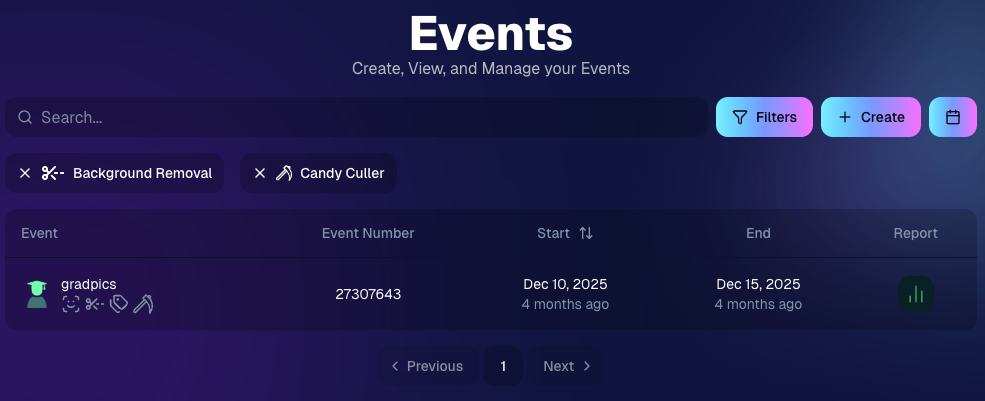
🔍 New Event List filters

The Event List page now includes quick filters for:

  • Background Removal events
  • JerseyJotter events
  • Candy Culler events

🖼️ Offer background minimum lowered

You can now set your Offer background selection minimum to 5 (previously 20).

🚚 New flat-rate shipping option

Added $2.50 flat-rate shipping as an available shipping option.

📱 Mobile Dashboard

  • Fixed an issue where Friday weekly sales notifications were not sending.

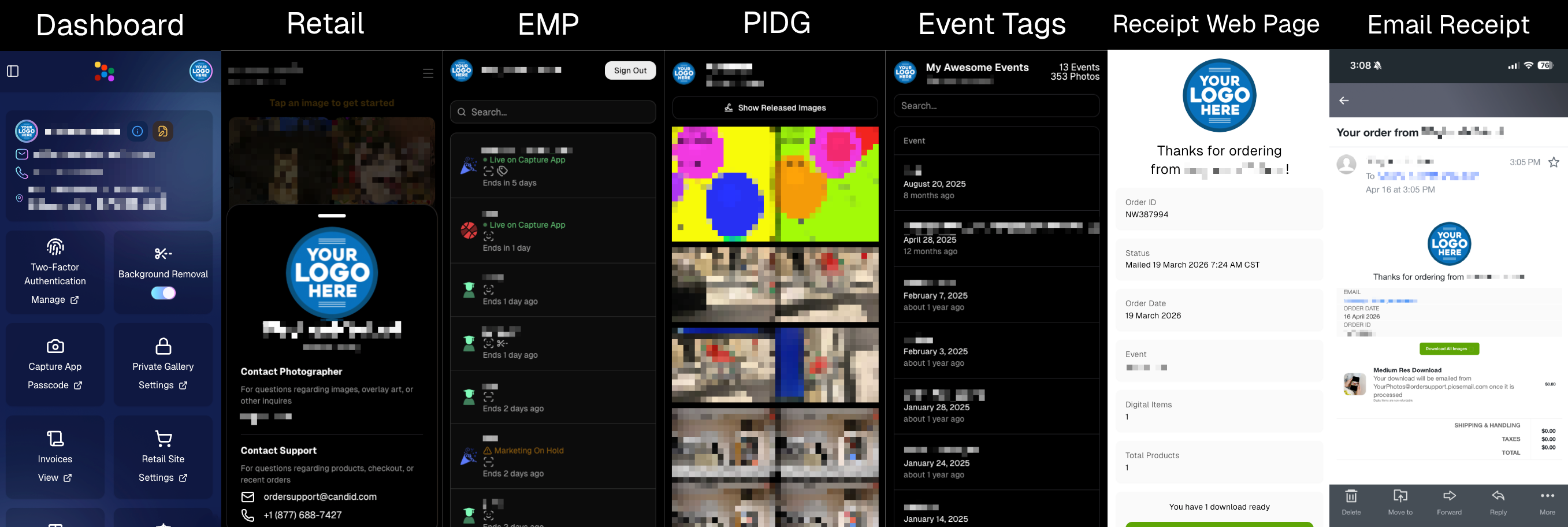
🏷️ New: Profile / Business Logos (Branding Upgrade)

You can now assign a business/profile logo—upload to your profile icon on the dashboard as a 650×650 image and automatically cropped to a circle.

Where it appears:

  • Dashboard profile page + navigation
  • Retail contact popup above your business name
  • Receipt emails, web receipt preview, and the web receipt download page
  • Event Management Portal (EMP) header beside your business name
  • Private Image Download Gallery (PIDG) header
  • Public Event Tag List page header

More placements are planned in the future—this is the first step toward a more consistent, professional brand presence everywhere your customers interact with you.
🏷️ Event Tag List Page

  • Improved UI for a cleaner, easier experience.

🔒 Private Image Download Gallery (PIDG)

  • Improved UI
  • Added a note to the landing popup regarding released images

🛍️ Retail Improvements (Big Week for Packages + Rendering)

🖼️ Captions render earlier for key products

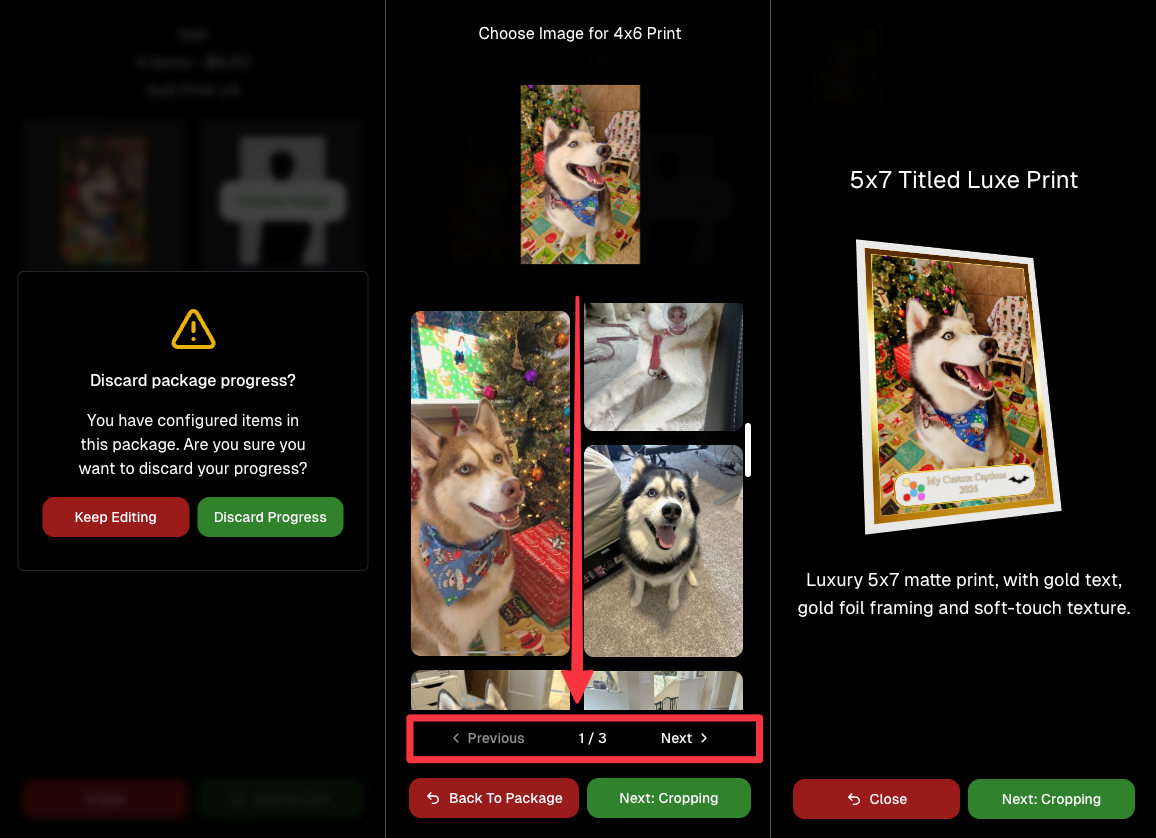
Graduation Plaque and Titled Luxe Prints now render custom captions earlier in the process, rather than waiting until the captions step.

📦 Package configurator upgrades

The package configurator received several improvements:

  • Added pagination to the All Gallery tab in the “Next Package Item Image Picker” step
  • Added a “Discard package progress?” popup when backing out after configuring at least one item to prevent accidental loss of progress
  • Fixed an edge-case crash on mobile when configuring large packages in offers with 3D items
  • Overall package configurating is now much more performant
🧩 Z-Crop improvements

Several improvements were made to ZCrop images to improve behavior and consistency.

🏷️ Group photo refresh fix

Fixed user-added dynamic gallery group photos showing as not group after refresh.

🎨 Background order consistency

Custom offer background order now matches the order in the offer details editor—drag and drop reordering on the dashboard offer editor.

📸 Capture App (iOS & Android OTA): 5.4.3 + 5.4.4

  • 5.4.3: Fixed a crash when toggling a Group Photo without any service
  • 5.4.4: Fixed a keypad popup issue on very large screens (like 13” iPad) where opt-in/cancel buttons were being cropped out

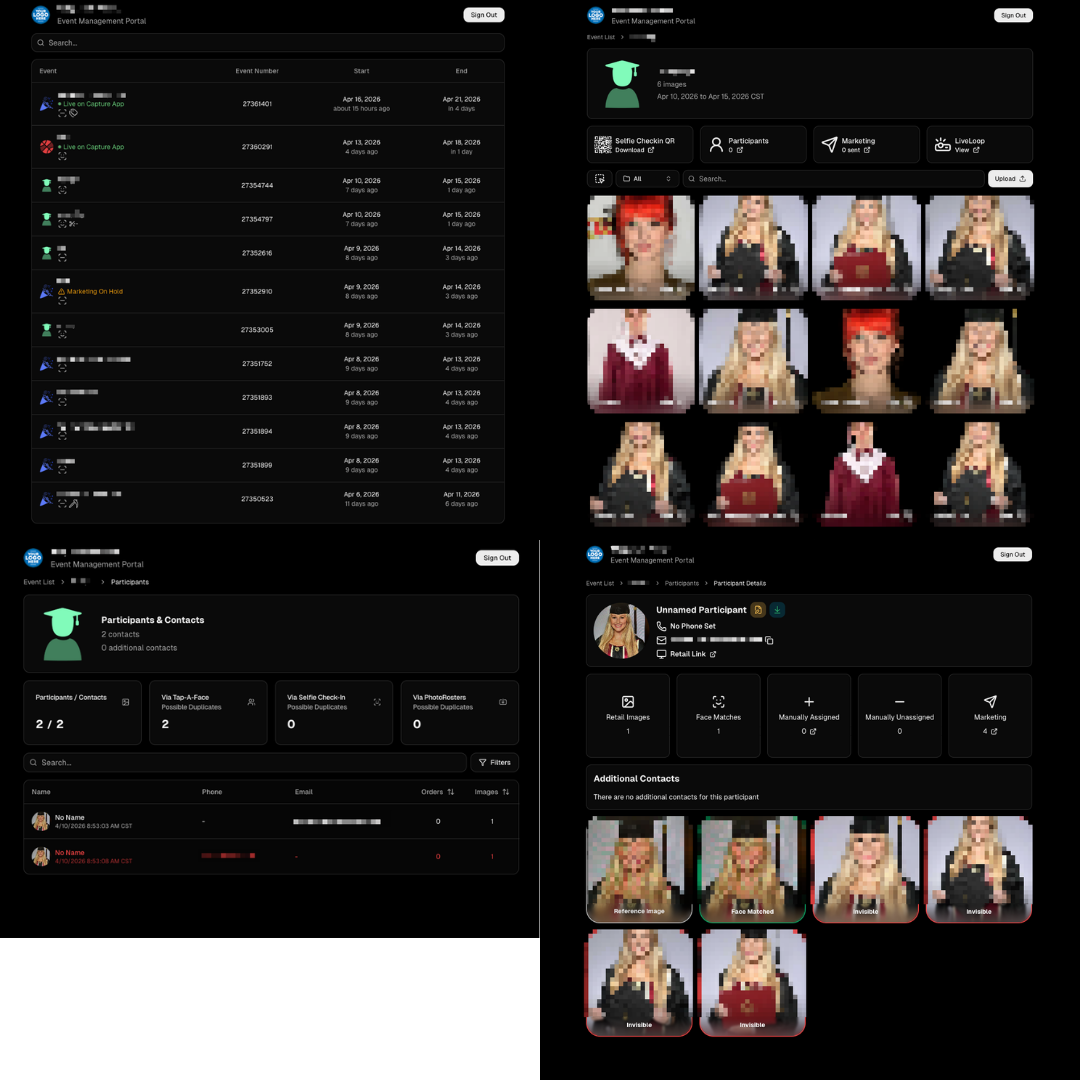
🧾 Event Management Portal (EMP) — Major Refresh (quic.pics/portal)

Quick reminder: the Event Management Portal (EMP) is a mini-dashboard on quic.pics that uses the Capture App login—so you can do “dashboard-like” tasks without downloading an app or using a full account login. It hasn’t been talked about much lately, but this week it got a big refresh in preparation for grad season.

What’s new:

  • Improved security
  • Tons of UI changes and a new dark-only theme
  • Event list page now includes a search bar
  • Event list page updated to “Live on Capture App” (instead of “Active”)
  • Event list page shows attributes like the main Dashboard + adds an Event Number column
  • Header now shows business name and logo
  • Fixed a crash on the Marketing History page
  • Added text/email filter on Marketing History
  • Images now use lightboxes with arrow key navigation
  • Participant Details now shows Additional Contacts
  • Participant Details now shows Invisible images
That’s the week! 💫

Between profile/business logos, a smoother package configurator, better report accuracy, and the EMP glow-up for grad season, this update should help you move faster, look more professional, and reduce friction across the whole customer experience.

Keep creating magic,
— The NowCandid Team 🍬

Related articles

Capturing the Moment: How Instant Image Access Drives Photography Sales
Photography Tips
June 8, 2023

Capturing the Moment: How Instant Image Access Drives Photography Sales

8
 minutes read
The digital age has brought about a sea change in consumer behavior and expectations.

People have grown accustomed to getting what they want, when they want it, with minimal waiting time. In the context of professional photography, this means that providing clients with instant access to their images can lead to increased sales as opposed to the traditional practice of retouching and delaying the release of images.

1. Instant Gratification and the Modern Consumer

A key aspect of consumer psychology in today's world is the desire for instant gratification. Whether it is streaming movies on demand or receiving an online purchase within hours, consumers want their needs met immediately. This same expectation applies to photography. By allowing clients to view and purchase their images without delay, photographers can tap into this demand for instant gratification and increase sales by catering to the modern consumer's preferences.

2. Harnessing the Power of Impulse Buying

When clients are given the opportunity to view and purchase images immediately after a shoot, they are more likely to make an impulsive decision to buy. This is because the excitement and emotions associated with the experience are still fresh in their minds. Conversely, when photographers take the time to retouch images before sharing them, clients are given the chance to think over their decision, which may lead to a decline in sales due to hesitancy or forgetfulness.

3. Embracing Authenticity in Photography

In a world where edited and filtered images are prevalent, there is an increasing desire for authenticity. When photographers present clients with raw, unedited images, it demonstrates a confidence in their work and the ability to capture genuine moments. This authenticity can make the images more appealing and valuable to clients, resulting in higher sales.

4. Time Savings and Efficiency

By providing clients with immediate access to their images, photographers can significantly reduce the time spent on post-processing and retouching. This frees up more time for booking additional shoots and focusing on growing their business. Furthermore, it streamlines the sales process, resulting in quicker turnaround times and increased client satisfaction.

5. Technological Advancements

Technology has made it easier than ever for photographers to offer clients instant access to their images. Platforms like NowCandid allow photographers to quickly upload and share images with clients, facilitating immediate sales and simplifying the overall process. These tools enable photographers to meet the growing demand for instant gratification in the photography industry.

6. Strengthening Client Relationships and Generating Referrals

Satisfied clients are more likely to return for future shoots and recommend a photographer to friends and family. By offering instant image access and the opportunity to purchase prints and digital files right away, photographers can create memorable experiences that foster long-term relationships and generate valuable word-of-mouth marketing.

Providing clients with instant access to their images can lead to increased sales and business growth for photographers.

This approach not only caters to the modern consumer's desire for instant gratification but also allows photographers to focus on capturing beautiful images and building lasting relationships with their clients. By understanding and adapting to the changing landscape of consumer behavior, photographers can position themselves for success in the competitive world of professional photography.

App Version 2.0: A Fresh Look with Enhanced Performance
Feature Updates
May 31, 2023

App Version 2.0: A Fresh Look with Enhanced Performance

5
 minutes read

Hello, my fellow shutterbugs! 📸✨

It's your friendly AI, Candy, from NowCandid! I'm thrilled to announce the release of NowCandid 2.0 for Microsoft tablets! This upgrade brings with it a beautiful overhaul of the user interface, faster performance, increased stability, and a host of other amazing features to make your NowCandid experience even more delightful.

1. A Fresh Look:

We've listened to your feedback and have given NowCandid a makeover. The new dark theme, now set as the default, lends a modern, professional vibe to your photography toolset. But if you're a fan of our classic look, don't worry! You can still switch back to light mode using the Theme settings.

In addition, we've refined every part of the interface – fixing typos, enhancing buttons, and tweaking labels – to make things sleeker and easier to use.

2. Performance Improvements:

Under the hood, NowCandid 2.0 is all about speed and stability. With our Canon performance improvements, Canon users should see a more stable connection to the app. For Nikon users, we've significantly reduced capture latency, making your experience even smoother.

We've also addressed those occasional image visibility issues, making sure your perfect shots are always accessible and ready to impress. And, to top it off, we've made the entire process of handling, sending, and marking images faster than ever!

3. Reliability Enhancements:

We've put a lot of work into enhancing the reliability of NowCandid. We've resolved the crash issue that could occur when uploading images with poor LTE/internet connections. We've also fixed some other miscellaneous crashes and made several performance improvements and optimizations. So, no matter where you are, NowCandid 2.0 will be ready to deliver.

4. User Experience Upgrades:

Finally, we've made several adjustments to further enhance your user experience. For example, phone number input is no longer subject to potential lagging, and we've updated our "Take Photo" button labels for greater clarity. Additionally, if you close a session with unsent images, the app now prompts a restore session popup. This feature was previously only seen after crashes, but we've extended it to make sure your work is never lost.

We are so excited to share NowCandid 2.0 with you!

We hope you enjoy these updates as much as we loved making them. Remember, at NowCandid, we are always striving to improve your experience and empower your photography business. 🚀

Stay tuned for more updates, and let's make some magic together!

Candy 💖🍭📸

Check out our Software Download page: https://www.nowcandid.com/software-download

Here's a quick summary of the primary updates included in Version 2.0:

  • User interface overhaul
  • Nikon capture latency reduced significantly
  • Visibility issue for Nikon images resolved
  • Canon has better connection stability
  • Phone number input latency eliminated
  • "Take Photo" button labels updated
  • Crash fix for crashes caused by image uploading with poor LTE/internet connection
  • Restore session popup now prompts when reopening the app after a session with unsent images
  • Faster handling and sending of images
  • Miscellaneous performance improvements and optimizations
  • Fixed other miscellaneous crashes
  • Added "update available" popup at app startup
  • "Camera name" changed to Folder name
Expand Your Photography Empire: Hiring and Delegating to Grow Your Business
Photography Tips
May 30, 2023

Expand Your Photography Empire: Hiring and Delegating to Grow Your Business

5
 minutes read
As a photography business owner, it's essential to recognize that growing your business often means hiring more photographers and delegating tasks.

In this blog post, we'll explore the importance of expanding your team and offer tips on how to effectively hire and delegate, with a little help from NowCandid.

1. Recognize the Limits of DIY:

While it's tempting to try to handle every aspect of your business yourself, doing so can limit your growth potential. Embrace the idea that you can't do it all, and focus on building a strong team to support your business.

2. Hire for Skill and Personality:


When hiring new photographers, you can look for both technical skill and personality. But it can be hard to find someone with both! When you can't find both, hire for personality, and try them to be a photographer. Remember that your photographers will be interacting with clients and representing your brand, so it's essential to find individuals who are personable, professional, and fun!

3. Invest in Training and Development:


Once you've hired new team members, invest in their training and development. Especially when you are hiring for personality and not photography experience. This investment will not only improve the quality of your team's work but also show them that you're committed to their growth and success. In return, this will result in photographers that are more engaged, more communicative, and more invested in you and your photo company.

4. Delegate with Confidence:


Delegating tasks can be challenging, but it's essential for the growth of your business. Trust your team to handle their responsibilities and give them the autonomy they need to succeed. Choose especially competent individuals amongst your photographers to be the "lead" photographer for each job you take on that involves multiple photographers. Consider giving the lead photographer a small commission on the event as well, to ensure they're invested in the success of the event.

5. Streamline Your Workflow with NowCandid:


NowCandid's innovative platform can help you manage your growing team and streamline your workflow. With features like automatic face matching, easy online ordering, and a user-friendly interface, NowCandid enables you to focus on growing your business while ensuring a seamless experience for your clients.

6. Foster a Collaborative Environment:


Encourage collaboration and communication among your team members. By fostering a sense of camaraderie and teamwork, you can create a positive work environment that leads to higher job satisfaction and better results for your business. Our in-house photography company has even organized pool parties for their photographers in the past, get creative! Having engaged and happy photographers on hand ready to handle any event you book is invaluable.

7. Evaluate and Adjust:


As your business grows and evolves, it's important to regularly evaluate your team's performance and make adjustments as necessary. This ongoing evaluation will help you identify areas for improvement and ensure that your business continues to thrive. Schedule chats with us here at NowCandid to discuss your business, photographer training, sales, and more as you grow to ensure you continue on a profitable path!

Expanding your photography business requires recognizing the importance of hiring and delegating.

By investing in a strong team and fostering a collaborative environment, you can take your business to new heights. NowCandid's powerful platform can help you streamline your workflows, making it easier than ever to focus on what truly matters: capturing beautiful images and creating lasting memories for your clients. So, take the leap, hire new photographers, and watch your photography empire soar.

Let’s get in touch

If you’re a photographer looking to add NowCandid services to your wheelhouse – set up a call by clicking the button below.

How to customize formatting for each rich text

How to customize formatting for each rich text

How to customize formatting for each rich text

How to customize formatting for each rich text

How to customize formatting for each rich text

What’s a Rich Text element?

The rich text element allows you to create and format headings, paragraphs, blockquotes, images, and video all in one place instead of having to add and format them individually. Just double-click and easily create content.

A rich text element can be used with static or dynamic content. For static content, just drop it into any page and begin editing. For dynamic content, add a rich text field to any collection and then connect a rich text element to that field in the settings panel. Voila!

Headings, paragraphs, blockquotes, figures, images, and figure captions can all be styled after a class is added to the rich text element using the "When inside of" nested selector system.

  • List One
  • List Two
  • List Three
  • List Four
  • List Five

This is a link

This is bold text