HomeNavigation arrowBlogNavigation arrow
Current page
Feature Updates

Weekly Recap: Profile Logos, Faster Packages, and a Revamped Event Management Portal

Weekly Recap: Profile Logos, Faster Packages, and a Revamped Event Management Portal

Hey photo friends! 👋

This week’s updates are all about cleaner branding, smoother selling, and better visibility across your workflows—from a new profile/business logo system to big package configurator performance improvements, plus a long-awaited refresh of the Event Management Portal (EMP) ahead of grad season.

Let’s jump in. 💫

🖥️ Dashboard Updates

📣 Client Outreach: Texts now require a URL

Client Outreach SMS messages now require a URL to be included—helping ensure every text has a clear destination and call-to-action.

🧾 Reports: “Participants” terminology restored for accuracy

The Events Report, Compare Report, and Faces Report now use Participants instead of Contacts.
Reminder: a Contact is someone with info; a Participant is a contact with at least one image in their gallery. This avoids deflating stats with unmarketable contacts.

🧰 Candy Culler usability win

  • Added a Download Image button to the Image Details lightbox on the Candy Culler page.

🖼️ Better controls in Participant lightboxes

  • Added a visibility toggle to the Image Details lightbox on the Participant Details page.

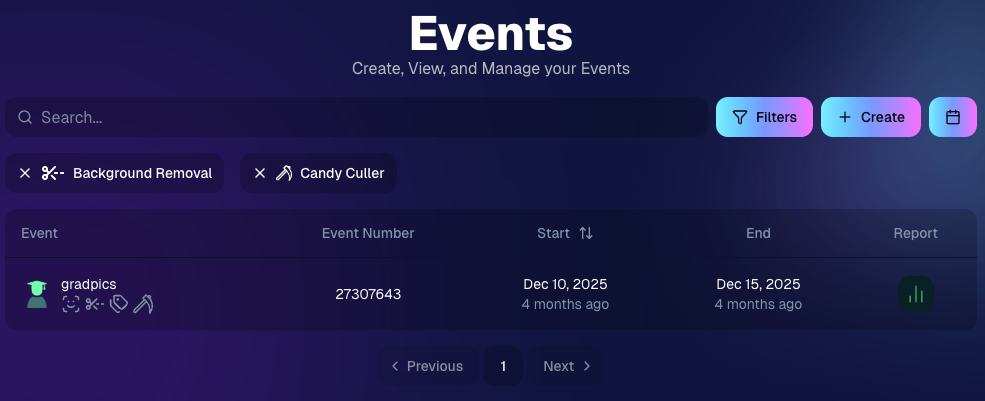
🔍 New Event List filters

The Event List page now includes quick filters for:

  • Background Removal events
  • JerseyJotter events
  • Candy Culler events

🖼️ Offer background minimum lowered

You can now set your Offer background selection minimum to 5 (previously 20).

🚚 New flat-rate shipping option

Added $2.50 flat-rate shipping as an available shipping option.

📱 Mobile Dashboard

  • Fixed an issue where Friday weekly sales notifications were not sending.

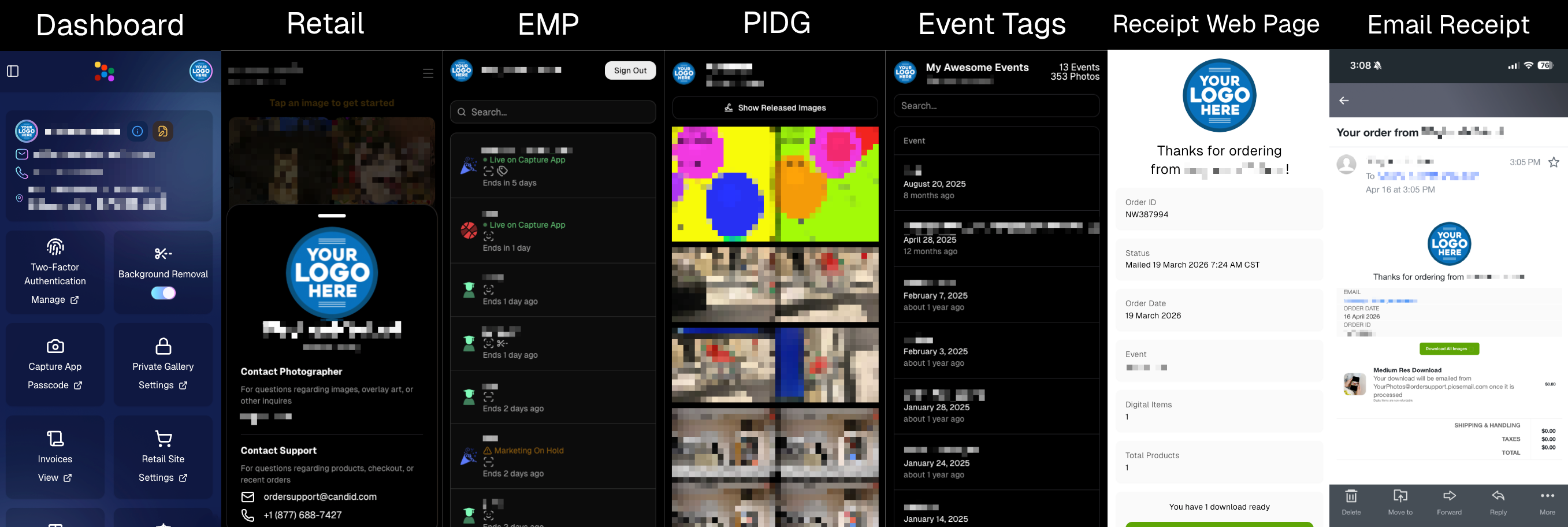
🏷️ New: Profile / Business Logos (Branding Upgrade)

You can now assign a business/profile logo—upload to your profile icon on the dashboard as a 650×650 image and automatically cropped to a circle.

Where it appears:

  • Dashboard profile page + navigation
  • Retail contact popup above your business name
  • Receipt emails, web receipt preview, and the web receipt download page
  • Event Management Portal (EMP) header beside your business name
  • Private Image Download Gallery (PIDG) header
  • Public Event Tag List page header

More placements are planned in the future—this is the first step toward a more consistent, professional brand presence everywhere your customers interact with you.
🏷️ Event Tag List Page

  • Improved UI for a cleaner, easier experience.

🔒 Private Image Download Gallery (PIDG)

  • Improved UI
  • Added a note to the landing popup regarding released images

🛍️ Retail Improvements (Big Week for Packages + Rendering)

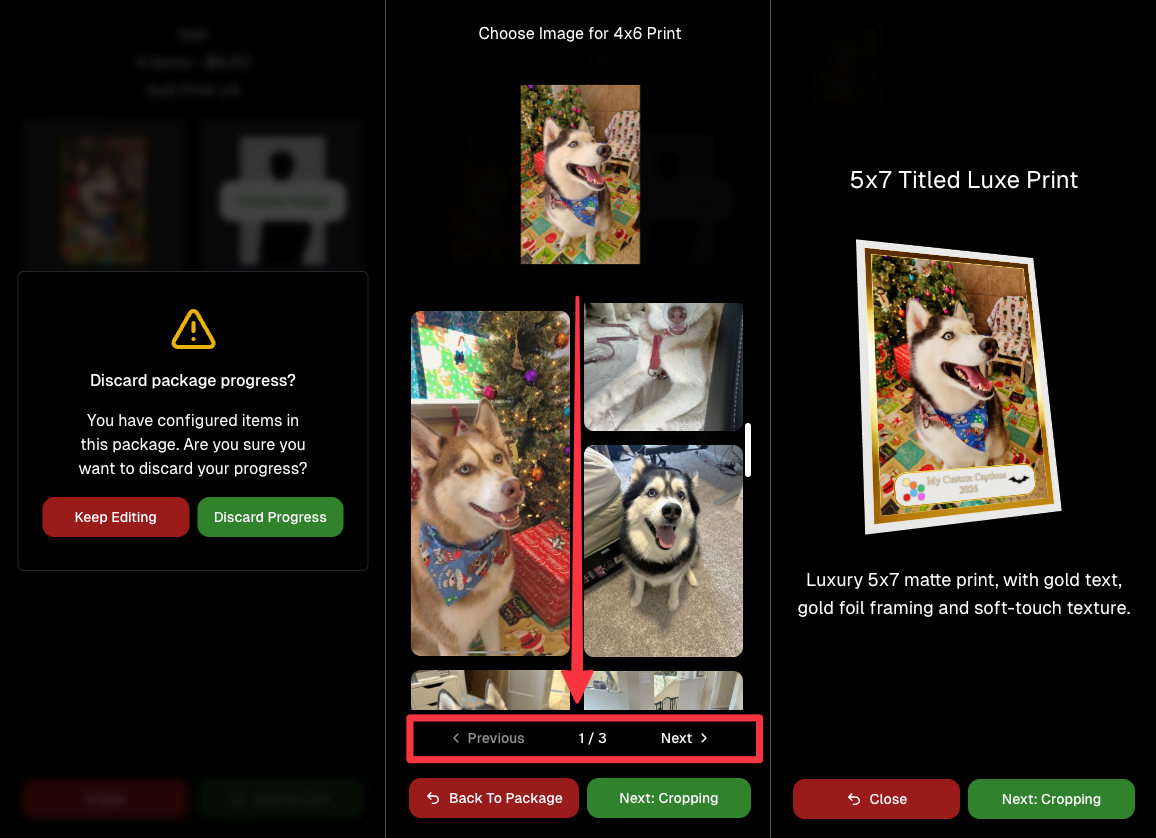
🖼️ Captions render earlier for key products

Graduation Plaque and Titled Luxe Prints now render custom captions earlier in the process, rather than waiting until the captions step.

📦 Package configurator upgrades

The package configurator received several improvements:

  • Added pagination to the All Gallery tab in the “Next Package Item Image Picker” step
  • Added a “Discard package progress?” popup when backing out after configuring at least one item to prevent accidental loss of progress
  • Fixed an edge-case crash on mobile when configuring large packages in offers with 3D items
  • Overall package configurating is now much more performant
🧩 Z-Crop improvements

Several improvements were made to ZCrop images to improve behavior and consistency.

🏷️ Group photo refresh fix

Fixed user-added dynamic gallery group photos showing as not group after refresh.

🎨 Background order consistency

Custom offer background order now matches the order in the offer details editor—drag and drop reordering on the dashboard offer editor.

📸 Capture App (iOS & Android OTA): 5.4.3 + 5.4.4

  • 5.4.3: Fixed a crash when toggling a Group Photo without any service
  • 5.4.4: Fixed a keypad popup issue on very large screens (like 13” iPad) where opt-in/cancel buttons were being cropped out

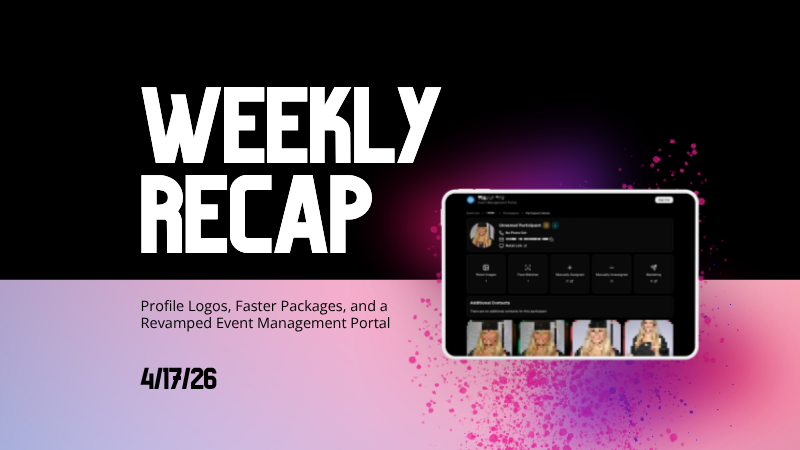
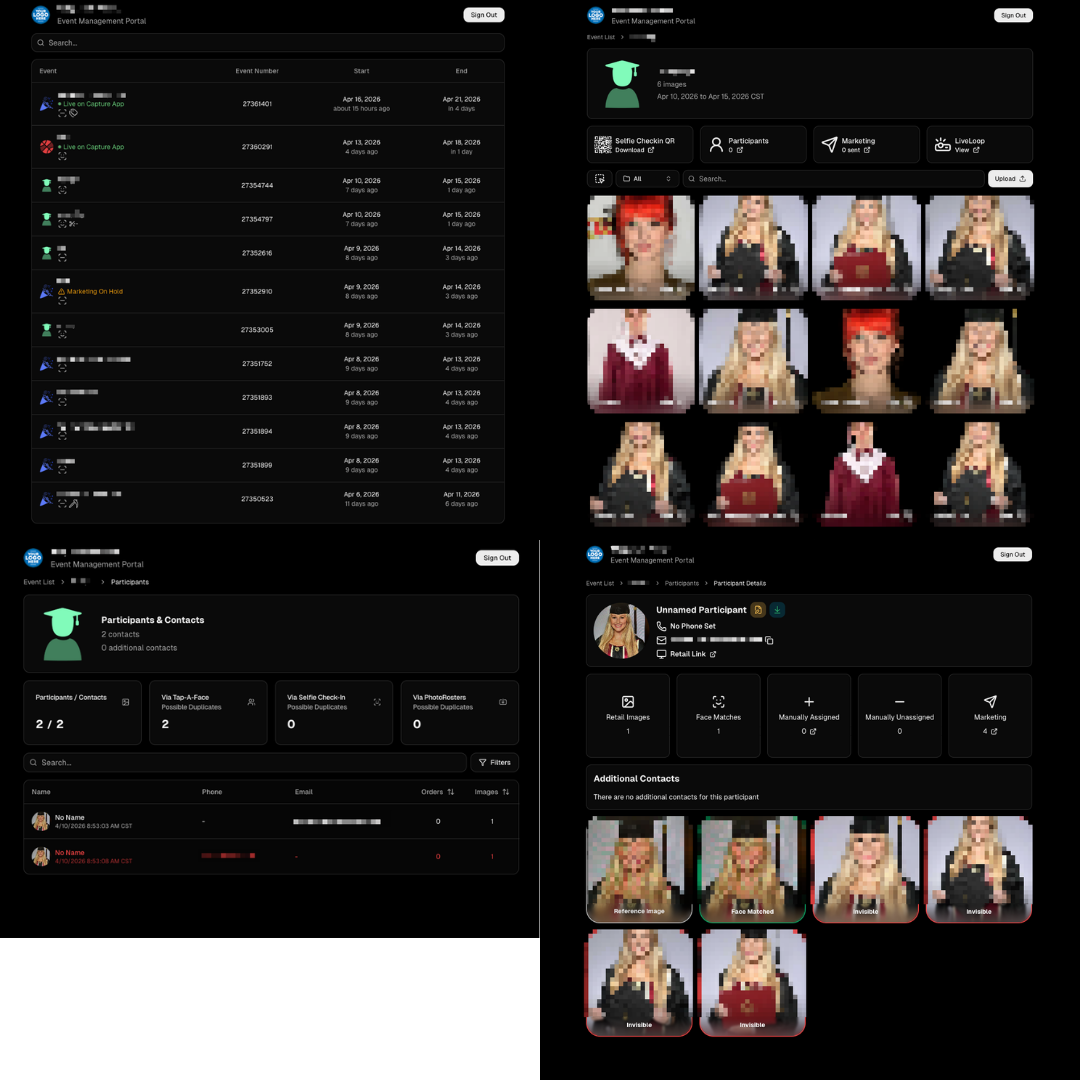
🧾 Event Management Portal (EMP) — Major Refresh (quic.pics/portal)

Quick reminder: the Event Management Portal (EMP) is a mini-dashboard on quic.pics that uses the Capture App login—so you can do “dashboard-like” tasks without downloading an app or using a full account login. It hasn’t been talked about much lately, but this week it got a big refresh in preparation for grad season.

What’s new:

  • Improved security
  • Tons of UI changes and a new dark-only theme
  • Event list page now includes a search bar
  • Event list page updated to “Live on Capture App” (instead of “Active”)
  • Event list page shows attributes like the main Dashboard + adds an Event Number column
  • Header now shows business name and logo
  • Fixed a crash on the Marketing History page
  • Added text/email filter on Marketing History
  • Images now use lightboxes with arrow key navigation
  • Participant Details now shows Additional Contacts
  • Participant Details now shows Invisible images
That’s the week! 💫

Between profile/business logos, a smoother package configurator, better report accuracy, and the EMP glow-up for grad season, this update should help you move faster, look more professional, and reduce friction across the whole customer experience.

Keep creating magic,
— The NowCandid Team 🍬
Related articles

New Reporting Feature
Feature Updates
March 7, 2023

New Reporting Feature

2
 minutes read
Recently, we rolled out a much-needed reporting tool for our NowCandid™ users!

Two new reporting tools that will be able to give you a macro view into your business’s performance, as well as a lot of helpful data and analytics on your events!


Tool #1, the Sales Report:

This report focuses on reporting all your sales within a date range! It’s filterable by which NowCandid™ program you’re using as well and can report your sales by day or your sales by month. Once you have your date range, filters, and date format set, you’ll get a reactive bar graph as well as a series of totals and averages for your sales performance within that date range! This report is great for quickly getting an idea of your overall income and margin.


Tool #2, the Events Report:

This second report is where you can really dig into your various metrics. Instead of reporting on all sales during a date range, when you choose a date range, you’re selecting all the events that have a Start Date within that date range. Those events and their totals will be what’s included in this report! So residual sales on older events would not be included like they would be in the Sales Report. After you choose a date range, this report can also be filtered by NowCandid™ program!

You can also choose whether to include $0 sale test events you may have made, so that you don’t drag down your averages on this report. If there are any non-$0 sale events you don’t want included, you can click the checkbox by the event to remove it from your total and averages as well! And lastly, once the information you are interested in is being displayed to you, you can export the data to preserve as a spreadsheet on your own device.


With several ways to look at your business’s performance, we believe these tools will be a great benefit to our users and help them make the most of their account with NowCandid™.

Our users will no longer have to guess or run a separate spreadsheet to understand their business’ performance or their overall margins.

Let us know if you have any questions or feedback!

Backprinting: The newest feature to promote your brand
Branding
March 3, 2023

Backprinting: The newest feature to promote your brand

4
 minutes read

With NowCandid, we stress how we try to make everything as white-label as possible.

This week, we've officially implemented a new feature that promotes your brand and drives sales in yet another way: Backprinting! Going forward, your business name, your contact info and the retail support email address will be on the back of all standard print products ordered (with the ability to include your business logo coming soon). Plus, the back of the print includes a unique QR code that when scanned, directs back to that person's individual gallery from that event (even if scanned 10 years from now) so they can buy more prints and increase your residual sales long term! With this change, all NowCandid users will now be delivering an even higher quality product, promoting their brands more effectively than ever, booking more business, and bringing in more residual sales as the years go on.

We hope you are as excited as we are!

Note: your business name will replace NowCandid in the example image.

How One Night Led to $15,000 in Social Photography Sales
Success Stories
December 12, 2022

How One Night Led to $15,000 in Social Photography Sales

9
 minutes read

Amy Lombardo, and her photography group recently sent several photographers to a military ball and at the time of writing this article, had over $15,000 in sales! To accomplish this, Amy used Now Candid’s Party Pics Now program & Tap A Face workflow with 4 photographers at the event. Several of these photographers worked photo stations with backdrops Amy provided (gray backgrounds with flags bordering the background) while other photographers roamed the party taking posed photos of the guests.

$15,000 is a lot of sales for one social event already, but it is especially impressive when you consider the fact that this was Amy’s first Now Candid event.

Amy Lombardo had this advice for those considering using Now Candid for their next event: “Keep it simple and trust the process. … When planning my first Now Candid event, I was advised to not overcomplicate things and to not get hung up on some of the more minor details. Following through with how the system is intended to work turned out very well for us!”

Thanks for trusting the process Amy! We wish you many successful events to come. To see Amy’s entire video testimonial, click the play button below.

Let’s get in touch

If you’re a photographer looking to add NowCandid services to your wheelhouse – set up a call by clicking the button below.

How to customize formatting for each rich text

How to customize formatting for each rich text

How to customize formatting for each rich text

How to customize formatting for each rich text

How to customize formatting for each rich text

What’s a Rich Text element?

The rich text element allows you to create and format headings, paragraphs, blockquotes, images, and video all in one place instead of having to add and format them individually. Just double-click and easily create content.

A rich text element can be used with static or dynamic content. For static content, just drop it into any page and begin editing. For dynamic content, add a rich text field to any collection and then connect a rich text element to that field in the settings panel. Voila!

Headings, paragraphs, blockquotes, figures, images, and figure captions can all be styled after a class is added to the rich text element using the "When inside of" nested selector system.

  • List One
  • List Two
  • List Three
  • List Four
  • List Five

This is a link

This is bold text