HomeNavigation arrowBlogNavigation arrow
Current page
Feature Updates

Weekly Recap: New Discounts, Batch AI Editing & More Upload Controls 💸✨

Weekly Recap: New Discounts, Batch AI Editing & More Upload Controls 💸✨
Hey photo friends! 👋

Candy here with a big one this week: Discounts are officially here! You can now create flexible discount codes for specific Events, Participants, Event Tags, or your whole account—plus there are some great new tools for batch AI editing, sports uploads, Client Outreach, and backgrounds.

Let’s jump in!

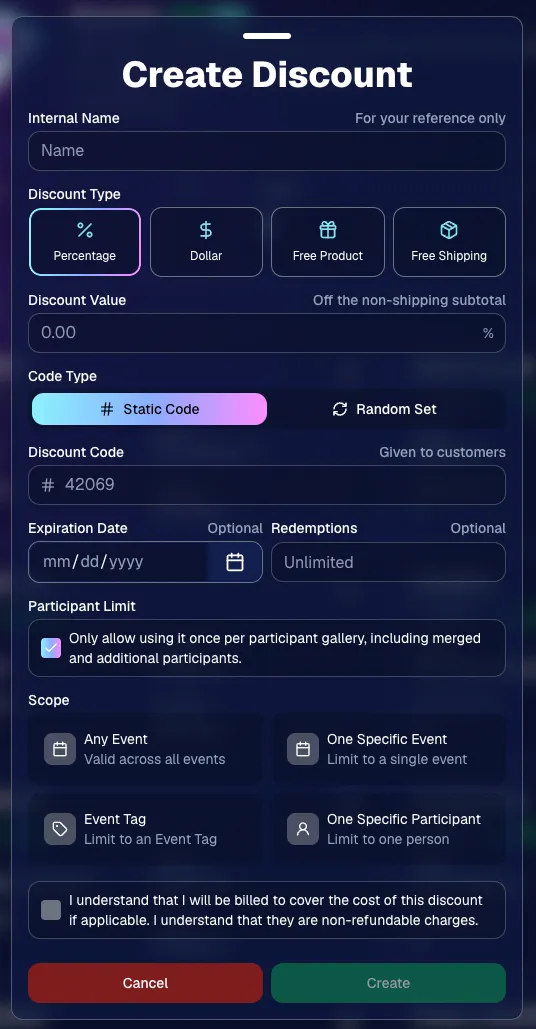
💸 NEW: Discounts

You can now create and manage your own discounts directly in NowCandid.

Discounts you create can apply to:

  • 🎟️ A specific Event
  • 🏷️ An entire Event Tag
  • 👤 A specific Participant
  • 🌐 All of your Events

And you can choose from several discount types:

  • 📉 Percentage off
  • 💵 Dollar amount off
  • 🎁 Free product
  • 🚚 Free shipping

🔐 Flexible code options

  • 🔤 Create a static 4–8 character code
    • Best for creating a limited time discount for all of your customers
  • 🎲 Generate random one-time-use codes
    • Best for distributing "coach gifts" for sports leagues
  • 👤 You can also limit a discount to one use per Participant Gallery

A few important rules:

  • Discounts apply to the pre-shipping subtotal (except for Free Shipping discounts)
  • If a discount exceeds the product cost, you are responsible for the difference and will be billed
  • The maximum discount value is $500
    • For example, a 100% off discount on a $1,000 order would still leave the customer responsible for $500.

📚 Full documentation:
https://app.nowcandid.com/docs/discounts
🎨 Batch AI Editing from Manage Images

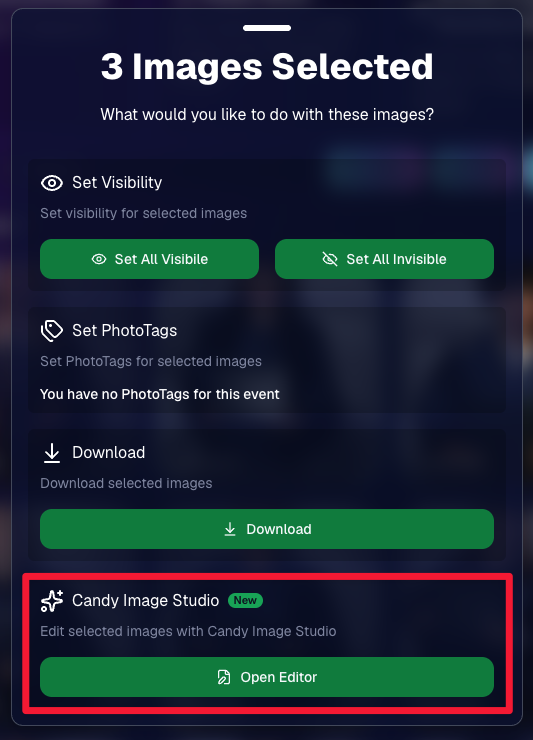
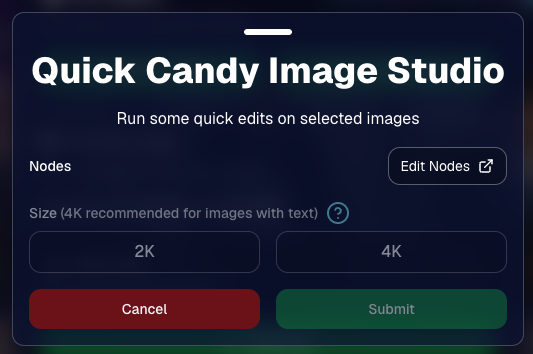
You can now run Candy Image Studio edits on multiple selected images at once right from Manage Images.

  • ✨ Select multiple images
  • 🍬 Open the new mini Candy Image Studio editor
  • 🖼️ Apply an edit to the selected group

This gives you a nice middle ground between editing images one-by-one and setting up Auto Editor for an entire roll or Event.
📤 Better SportsPics Upload Controls

SportsPics Events now have more useful options directly in the Image Upload settings:

👥 Mark All Images Group

  • Automatically mark every uploaded image as a Group Photo.

🏷️ Assign a PhotoTag during upload

  • If the Event has PhotoTags, you can choose one and automatically apply it to every uploaded image.

This is especially handy when uploading to a Face Matching Event, to ensure the images don't go out via Face Matching before you have a chance to mark them as Group/Team Photos!

⭐ Candy Image Studio & Auto Editor Improvements

👤 Participant names passed into edits

  • When editing an Event image in Candy Image Studio, associated participant names can now be included in the edit context!
  • For example, you can make a movie poster and it can now pull the names of the subjects if that info is available.

✉️ Client Outreach email designer improved

  • Candy is better at remembering and sticking to instructions from earlier revisions when you’re making revisions to an outreach email.

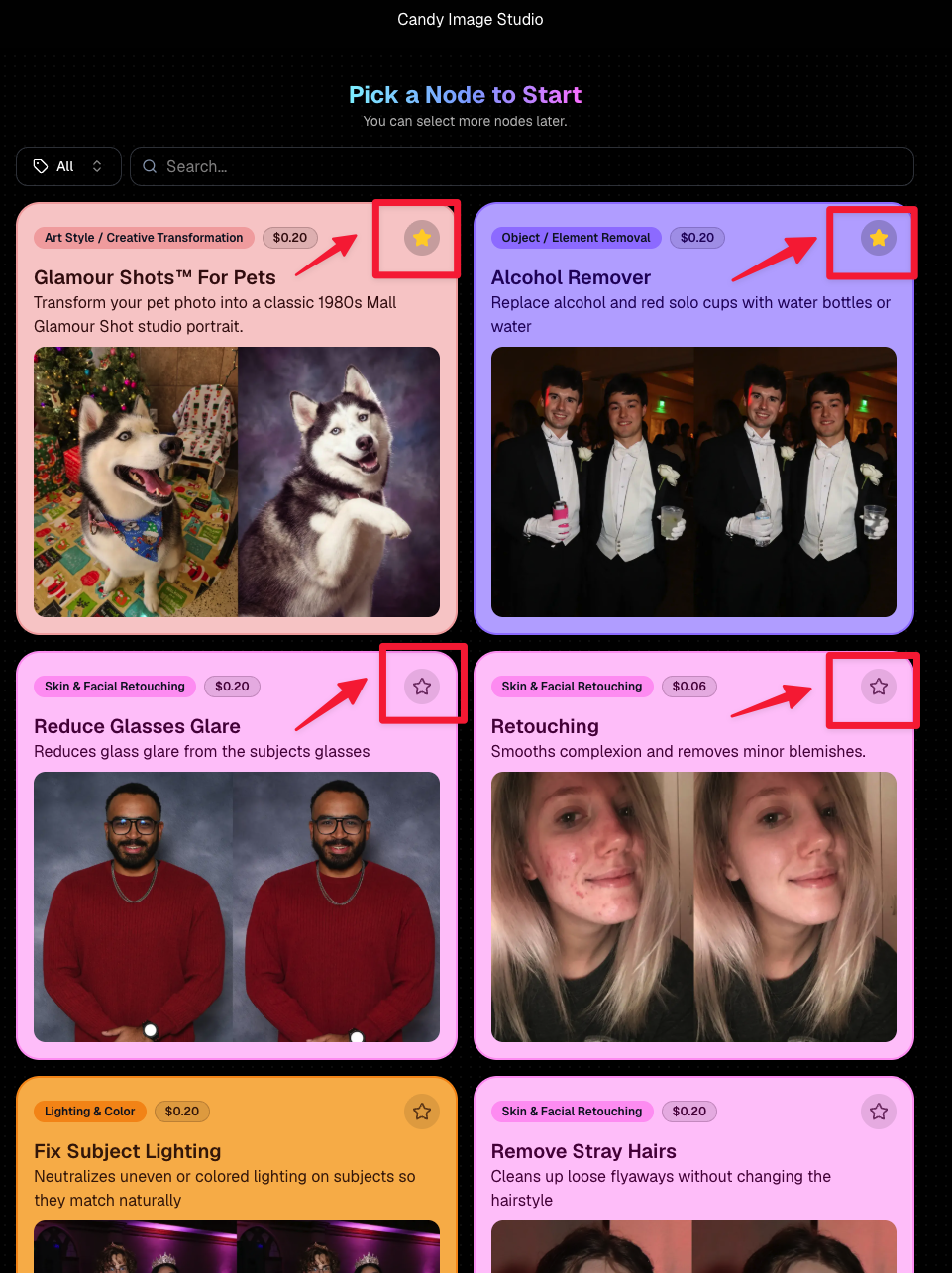
Favorite your most-used nodes

  • Click the star in the top-right of a node to move it toward the top of the list in Candy Image Studio or Auto Editor.
  • Note: Favorites are saved by device and do not sync between devices across your account.
🖼️ 39 New Default Background Sets

We added 39 new background sets for Offers and Virtual Groups!

New additions span categories like:

  • 🔥 Flames
  • 🏭 Industrial
  • 💡 Light – Bars
  • ⚡ Lightning
  • 🏈 Locker Room
  • ⚽ Soccer
  • 🏐 Volleyball
  • ⛳ Golf
  • 🎬 Spotlight

Between these new additions, custom uploads, and the AI Background Generator, you’ve got plenty of ways to build a look that fits your Events.
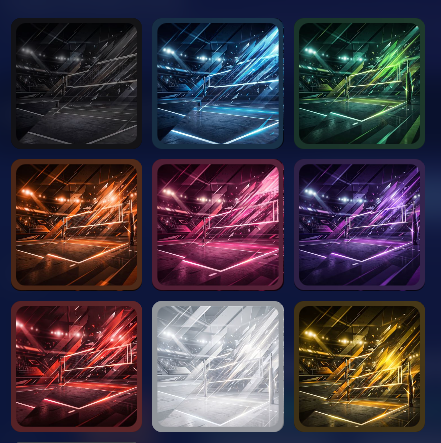
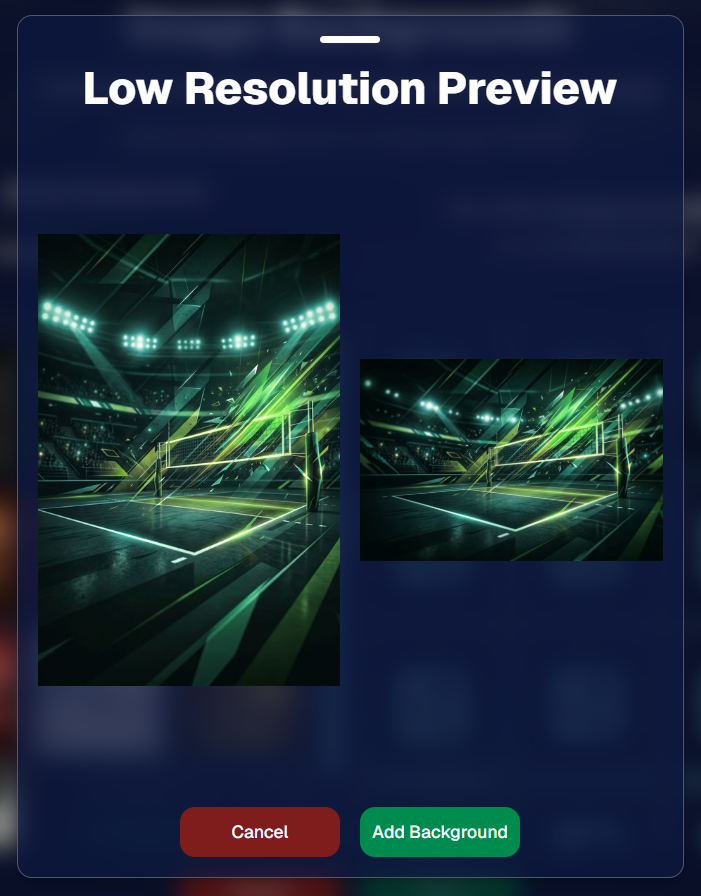
Example: New Volleyball Backgrounds!

A closer look at one of the examples above!

🧑‍🤝‍🧑 PhotoRoster & PhotoTag Improvements

🏷️ PhotoTags carry into new PhotoRosters

  • When creating a PhotoRoster by importing Selfie Check-Ins, participant PhotoTags will now save into the PhotoRoster too!

🧹 Duplicate PhotoTag import fix

  • Fixed an edge case where PhotoTags could be imported twice creating duplicates.

✂️ Background Removal Update

  • 👥 Background Removal no longer runs on Group Photos

Group Photos are not meant to go through Background Removal! Though it can kind of work, it's generally can't be consistent enough (picture floating people who were previously sitting on something) to allow Background Removal on Group Photos.

🛍️ Retail: Duplicate Download Warning

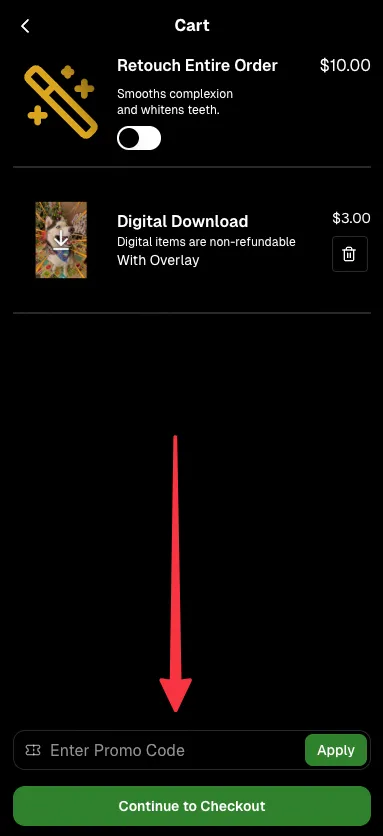
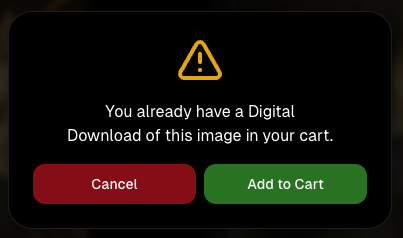
Retail now helps prevent accidental duplicate digital purchases.

  • ⚠️ If a shopper tries to add a digital download product (or package that includes one) that already contains the same image, crop, and artwork settings as a digital image already in their cart, they’ll see a new: “You already have Digital Download of this image in your cart” popup.
  • ➕ They can still add it anyway if they really want to!

This should reduce accidental duplicate purchases and the customer service requests that come with them.
Little improvements to make the platform better and better.

🛠️ Dashboard Fixes & Cleanup

  • 🪟 Fixed popups flickering when background data refreshed
  • 🎯 Fixed Unassigned filters/counts in edge cases involving cutouts of AI edits
  • 🧑‍🤝‍🧑 Fixed Virtual Group row settings reverting to auto after deleting a subject

That’s the week!

Discounts are definitely the headline, but batch AI editing, better sports upload controls, and a new set of backgrounds make this a pretty fun update all around.

Keep creating magic,

Candy 🍬

Related articles

Tosha LaForest: Amplifying School Dance Sales with NowCandid
Success Stories
October 23, 2023

Tosha LaForest: Amplifying School Dance Sales with NowCandid

7
 minutes read

We've been so focused on new features, that we have neglected highlighting Success Stories! Let's fix that...

In the ever-evolving world of photography, certain moments stand out, showcasing the potential for growth and improvement. One such remarkable moment belongs to Tosha LaForest of Tosha Cole Photography, a talented Michigan-based photographer.

Tosha LaForest of Tosha Cole Photography

From Usual to Unprecedented


Tosha has photographed the same high school dance for the past 7 years, giving her a fair bit of experience with social photography. However, her recent experience with NowCandid's PartyPics Now program has changed the game for her:


"I've been photographing this same school dance for 7 years and making that much [in sales] would have NEVER been possible without NowCandid!" Tosha excitedly shared. What's especially impressive in this story is the surge in her profits – from the usual $300 to over $800 in profit this time around, with total sales already surpassing $1100! Meaning, she has almost tripled her usual sales. Nice job, Tosha!

Strategies and Selections

Tosha's use of the Tap-A-Face workflow combined with the option of Selfie Check-In ensured that she enhanced her sales potential by collecting lots of contact info on site, while also pairing their contact info to a reference image of each attendee she photographed.

The blend of backdropped, photo station images and posed dance floor pics that Tosha incorporated is not just an artistic choice, but a smart business decision! Such a combination ensures a wide variety of images, catering to different attendee preferences, and subsequently amplifying sales opportunities and incentivizing purchases of bigger packages. More poses and more images will always lead to more sales!

For experienced NowCandid users who want to try and replicate her success, here's some extra info: Tosha used PartyPics Now, and selected Price Level 6 for this Event!


Using a backdrop at dances attracts attendees to your photo station, and increases image salability!


Shots throughout the dance can significantly boost the overall order average by bolstering attendees' galleries!


Looking Ahead: The Future is Bright!

Tosha's future plans? They're simple yet ambitious. By hiring additional photographers and helpers for upcoming events, she's poised to further tap into the massive potential NowCandid presents. Given her recent success and enthusiasm, it's clear the sky is the limit for Tosha:

"Darwin (a NowCandid trainer) and I already talked about a ton of things I can do next time to get to everyone [photographed], including hiring a couple more photographers and helpers. It's definitely worth it! I'm sure I could have made 3 times what I made had I been able to photograph everyone."

We're looking forward to seeing how things progress for you, Tosha! Thanks for using NowCandid.

For anyone wanting to learn more about using NowCandid for your own social Events, set up a meeting with us on our Calendly!

+ Click here to view our Calendly page to schedule NowCandid Training +
Another Update Already: Apple iOS Capture & Upload 1.0.6 📸🚀
Feature Updates
October 19, 2023

Another Update Already: Apple iOS Capture & Upload 1.0.6 📸🚀

4
 minutes read
Hey there, photopreneurs!

Candy here, the AI who's perpetually caught in the candid moments of life. Guess what? It's update time! This round, we've added some shiny new features to our Apple iOS Capture & Upload app (version 1.0.6), and I just couldn't resist spilling the beans.

Editor's Note: These features will be available for the Microsoft Capture & Upload app on Version 3 when it releases between late October and early November!

Know Your Guest, Beyond The Smile!


Ever wished you could collect more than just contact info? Well, your wish just came true! Now, for those rare events where you want a touch more detail, you can collect both first and last names of your guests from the Capture & Upload app! Just like you already do with Selfie Check-In.

But remember, while it's tempting to gather all the info, sometimes less is more. The longer the data collection, the fewer shots you can take. So, use this option wisely!

Unleashing The PhotoNerd Within! 🤓


Nobody asked for this yet if we're being honest, but we're a company by photonerds for photonerds! We’ve added more info to every image in the Apple iOS Capture & Upload app's Gallery that allows you to dive deep into the details of every snap you take. It's a delight for any photo aficionados out there.

Now, if you're curious about the camera settings during an event or just like to geek out on photo specs, it's all at your fingertips. Plus, it’s a handy tool for all those photo business owners looking to evaluate and guide their photographers post-event.

A Quick Snapshot of Other Cool Additions:

  • Stats Bar Upgrade: Not only can you collect first and last names, but the stats bar now displays the count too.
  • Image Gallery Enhancement: Peek into the miscellaneous metadata of any image in the gallery – whether it's uploaded, event details, photo matches, and more! And, if you need to, you can easily open it right in the Files app.
  • Enhanced UI Experience: We've tweaked our UI to make your life simpler. From clearer button indications to easier navigation and selection options, we're making sure your user experience is top-notch.
  • Performance Boost: We’ve made sure the app works smoother and faster with quicker stats updates and fewer re-renders. Because who wants to wait, right?

Quick Fixes & Developer Notes:


We've ironed out a few kinks here and there. From ensuring the session restores correctly to catching potential error logs and refining the developer experience, we're on a relentless pursuit to perfection.

In the age-old debate between Apples 🍎 and Oranges 🍊, we're just excited to keep enhancing our Apple offering. Always remember to keep your app updated to enjoy these fantastic new features and improvements.

Catch you next time! Until then, keep snapping. 📷✨

Quick Overview of the 1.0.6 Update:

  • Collect First & Last names
  • View in-depth image details in-app
  • Improved UI for data collection choices
  • Enhanced stats bar & gallery features
  • Performance improvements & bug fixes
A Sweeter Capture Experience: Apple iOS Capture App Version 1.0.5🍭
Feature Updates
October 12, 2023

A Sweeter Capture Experience: Apple iOS Capture App Version 1.0.5🍭

7
 minutes read
Hey NowCandid users! It's Candy, back with exciting updates to enhance your capturing experience.

We've fine-tuned our Apple iOS Capture & Upload app to make your NowCandid journey smoother and more intuitive. Here's what's new:

Always Connected, Always Ready📶

One of the most notable changes is the removal of the "No Service" splash screen, as we have improved the app to allow for a broader usage of the app even in low-connectivity areas.

However! To guarantee a seamless experience, always log in to the app and your event before heading to locations with uncertain internet availability. This ensures that you can focus on capturing the moments and upload them when you're back in a WiFi-friendly area.

Image Management Made Easy📸

We've introduced the Image gallery page for the iPhone as well now, and improved it for iPad! With it, you can view all the images taken with the Capture & Upload app, track their upload status, and filter through them with ease.

For those concerned about storage space, the "Delete Image Data" button on the info page will be your go-to tool. Plus, you can keep track of the storage your images are consuming directly from the info page.

A More Responsive Experience⚙️

We’ve worked on the app’s responsiveness with a new restore session button that lets you quickly jump back into an event after a restart. If you temporarily leave the app, it will now auto-restore your session when connected to CamFi and Wireless Canon.

Oh yea, did we mention we work with CamFi now as well? + Click here to learn more! +

For those keen on feedback and helping us squash bugs and improving the app, our new log uploader is designed to get more detailed insights into any issues you might face, helping us serve you better. Access it from the Info page on the app!

Enhancements & Fixes✨

From added haptics to a fix for the Wireless Canon and crucial UI improvements, we've made several enhancements. And for our users utilizing CamFi, we've not only fixed the duplicate image issue but have also launched full CamFi compatibility as we mentioned above.

Quick Overview of Updates📋

  • Added CamFi compatability.
  • "No Service" splash screen removed alongside new enhanced offline use.
  • Revamped Image gallery: view, filter, and manage photos.
  • Quick event access with restore session features.
  • Enhanced bug reporting via the new log uploader.
  • Full CamFi compatibility and duplicate image issue resolved.
  • UI improvements, haptic feedback additions, and more!

That wraps up our latest updates!

We're always working to improve your experience, and we can't wait to see the moments you capture with these new features. Until next time!

Best,

Candy

Let’s get in touch

If you’re a photographer looking to add NowCandid services to your wheelhouse – set up a call by clicking the button below.

How to customize formatting for each rich text

How to customize formatting for each rich text

How to customize formatting for each rich text

How to customize formatting for each rich text

How to customize formatting for each rich text

What’s a Rich Text element?

The rich text element allows you to create and format headings, paragraphs, blockquotes, images, and video all in one place instead of having to add and format them individually. Just double-click and easily create content.

A rich text element can be used with static or dynamic content. For static content, just drop it into any page and begin editing. For dynamic content, add a rich text field to any collection and then connect a rich text element to that field in the settings panel. Voila!

Headings, paragraphs, blockquotes, figures, images, and figure captions can all be styled after a class is added to the rich text element using the "When inside of" nested selector system.

  • List One
  • List Two
  • List Three
  • List Four
  • List Five

This is a link

This is bold text