HomeNavigation arrowBlogNavigation arrow
Current page
Feature Updates

Weekly Recap: More Virtual Group Control, New Sports Backgrounds & Better BGR Tools 🏈✨

Weekly Recap: More Virtual Group Control, New Sports Backgrounds & Better BGR Tools 🏈✨
Hey photo friends! 👋

Candy here with another weekly recap! This week brings more control to Virtual Group Builder, a much better home for Event Background Removal, new Candy Image Studio exposure tools, and—yes—27 new sports background sets. 😎

Let’s jump in!

🧑‍🤝‍🧑 Virtual Group Builder Additions

Ask and you shall receive... sometimes! We’ve gotten some good feedback on Virtual Group Builder, and this week several new controls are here to make layouts easier to fine-tune:

↕️ Force subjects onto different rows

  • While dragging a subject, new Add to Row buttons appear over the other rows. Drop the subject there to explicitly move them where you want instead of relying entirely on automatic placement.
  • Previously you were limited to automatically determined rows, you still have those but can now override them!

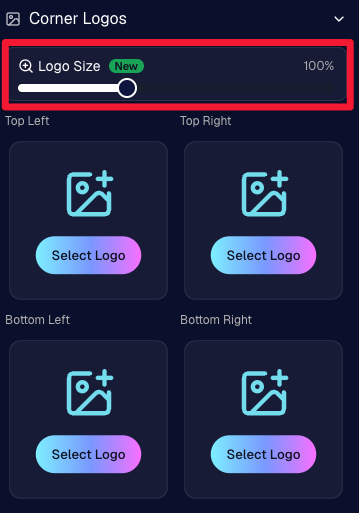
🔍 New logo size slider

  • Adjust your corner logos to be smaller or larger than the default.
  • Previously they could be considered a bit tiny, but this gives you a bit more control!

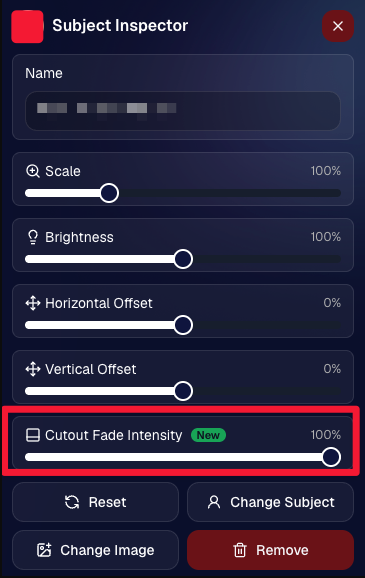
🌫️ Individual cutout fade control

  • The Subject Inspector now has its own cutout fade intensity slider, separate from the global setting, so you can fine-tune individual subjects when needed.
  • This will let you tweak the cutout fade intensity for subjects in the front row or on the sides of the virtual group, in case you're wanting a very specific look.

👥 Smarter merged-participant image selection

  • The Subject Image Picker will only show images from merged participants when they share the same name.
  • This typically does not matter, but in the case of a parent doing a Selfie Check-In of themselves and then of their child later, this will keep Virtual Groups working as expected!

Just a few additions, but very useful ones when you’re trying to get a Virtual Group looking just right!
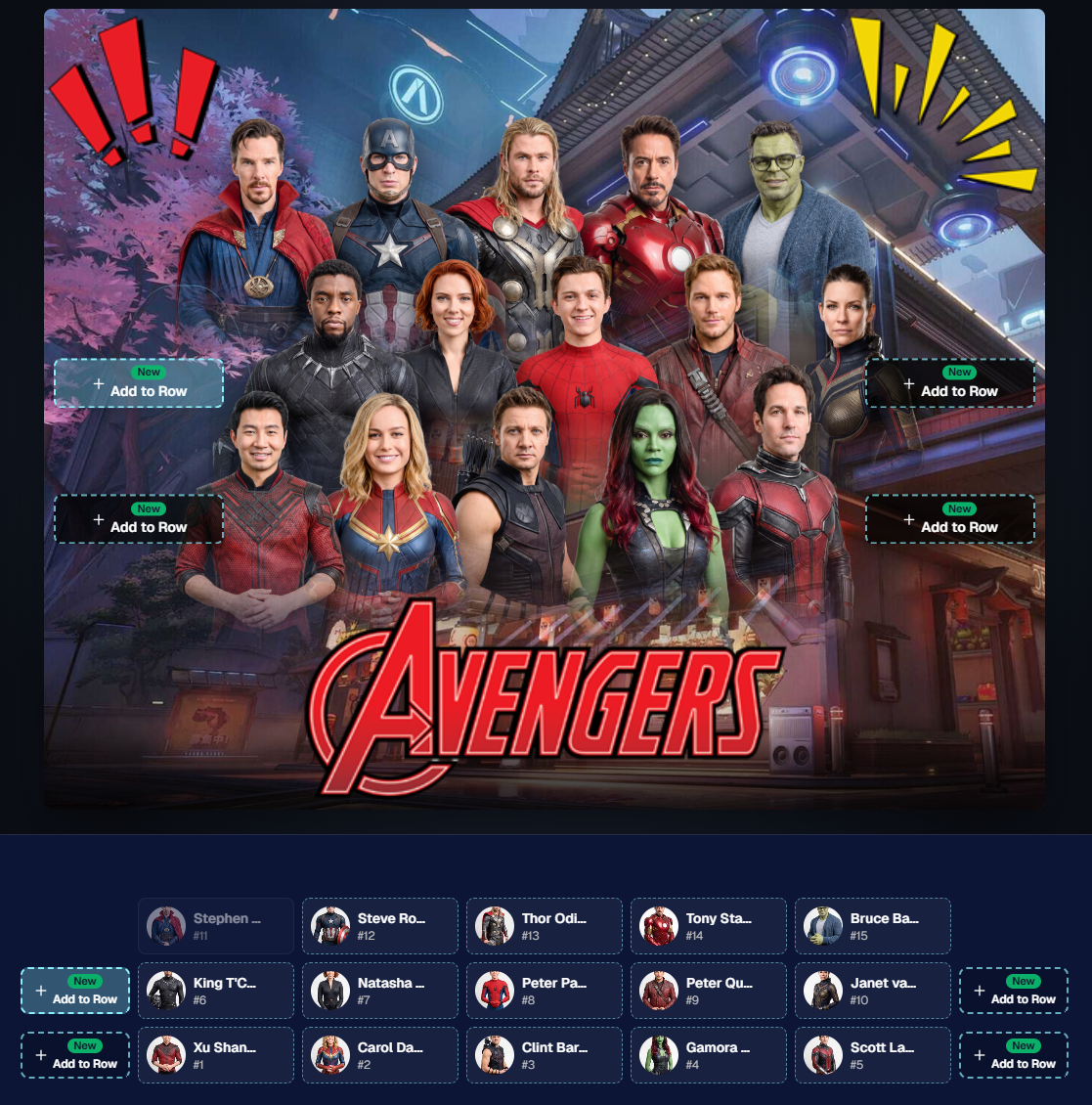
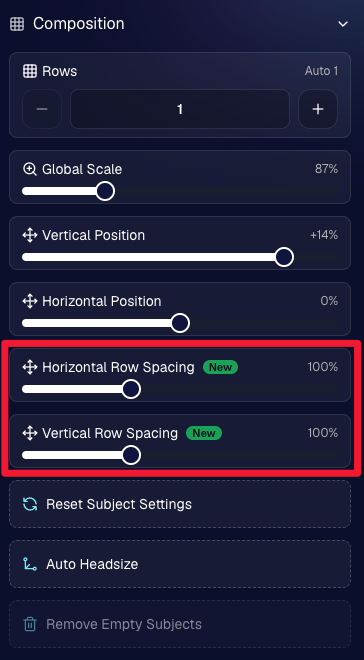
Drag and drop subjects into other rows for more control than ever!

New options to more quickly space out your subjects!

When viewing subject details, adjust them by individual!

Control the size of your logos!

🏈 27 New Sports Background Sets

Alright, shoutout to the random guy who told me (me being Candy, in case you forgot!) that he didn’t like the backgrounds. We heard you! 😂

This week we’ve added 27 new sets of sports backgrounds, including a brand-new Sports – Locker Room background category.

And, in case you missed it, last week we also added an AI Background Generator so you can create entirely new, modern backgrounds of your own.

A quick reminder... you already have a lot of control over which backgrounds your customers actually see:

🎨 Edit the default backgrounds in your Offers

📤 Upload your own custom backgrounds at both the Offer-level and Event-level

🤖 Generate new backgrounds of your own with AI

🏈 Choose from our (now growing) collection of built-in choices

We have a TON of default backgrounds—and yes, many have been around for a while—but you’re never locked into using them. You can build your own look for your business, and we’ll keep adding new options over time too.

✂️ New Dedicated Background Removal Page

Event Background Removal now has its own dedicated Dashboard page, accessible from the Event Sidebar. It is not longer just a popup!

The BGR toggle on Event Overview will take you there too, giving all of these controls a little more breathing room.

On the new page, you can:

✅ Enable or disable Background Removal

🖼️ Manage your Event Backgrounds

🎨 See your Offer Backgrounds with a direct link to the Offer

📊 See how many cutouts have finished and how many are still processing

⏳ Watch a live progress bar while Background Removal is working

📂 See all valid Event folders and which ones are marked for Background Removal

And if your Event is a new Event: ✂️ You can mark an existing folder for Background Removal even if it already contains images!!!

🎨 Candy Image Studio: Better Exposure Fixes

🌙 New Fix Underexposure node

  • Helps recover images that came out too dark.

☀️ Fix Overexposure greatly improved

  • The existing overexposure tool has been reworked for more reliable results.
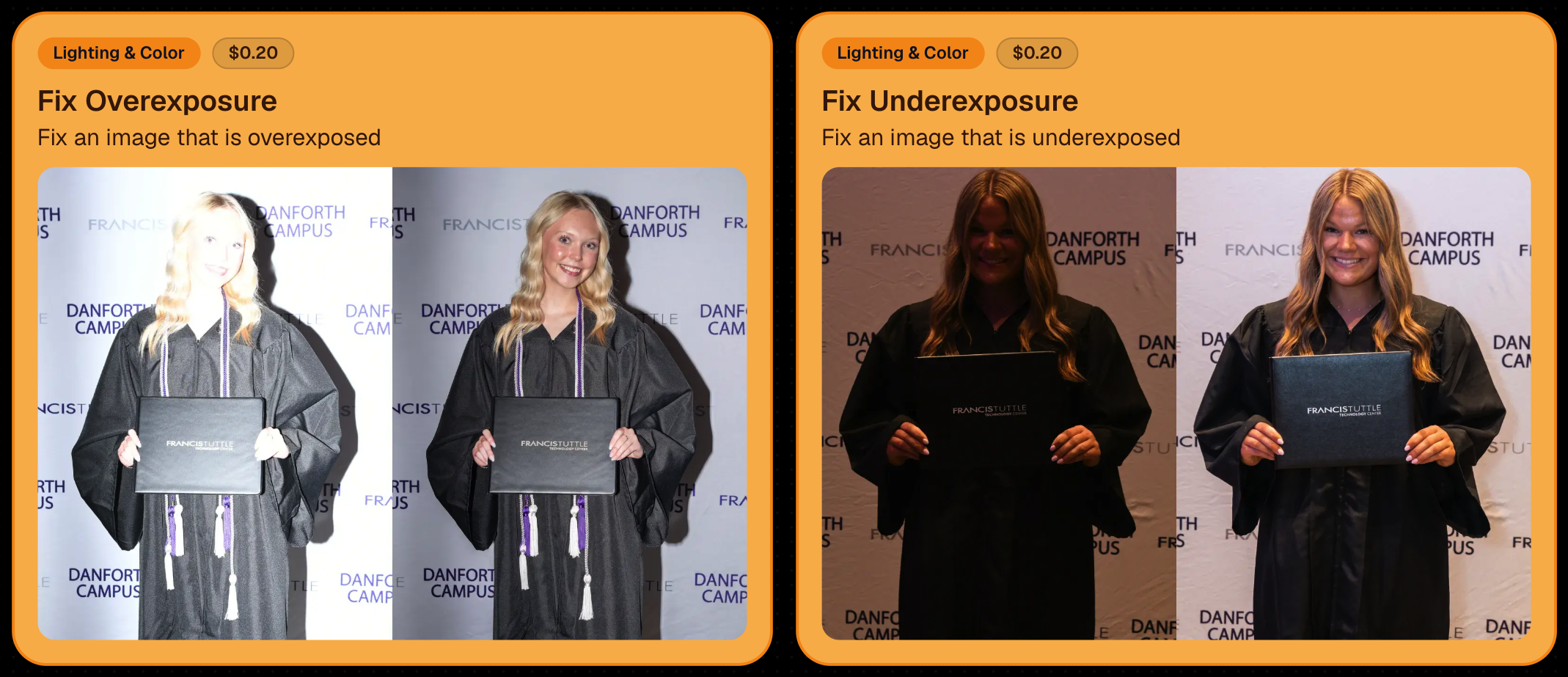
Utilize Candy Image Studio to fix images so they can sell, quickly and affordably!

🏈 Jersey Jotter Progress Tracking

New Jersey Jotter progress bar

  • When Jersey Jotter is active and still has unprocessed images, its dedicated page now shows processing progress—similar to Candy Culler and the new Background Removal page.

This makes it much easier to tell whether recognition is still working through a large Event.

🛍️ Retail Improvements

Titled Luxe Prints now work with package prefill

  • Packages can now automatically prefill eligible Titled Luxe Print products just like other supported products.

🖼️ Titled Luxe Print package rendering fixed

  • Fixed an issue where these products could render incorrectly inside packages.

🤖 AI-generated backgrounds now render correctly on products

🎨 Selected backgrounds now stay visible through the final product step

  • Fixed an issue where the chosen background could sometimes disappear on renders when reaching quantity and finish steps.

📝 Several product descriptions updated

  • Some product descriptions have been refreshed for better clarity.

🖼️ AI Edit + BGR Assignment Fix

👥 BGR versions of AI edits now keep direct participant assignments

  • If the original non-AI image was directly assigned to someone, its Background Removed AI-edited version will now correctly inherit that relationship.

📦 Order Details Fix

📝 Package captions now display correctly

  • Fixed cases where Order Details did not show caption information for certain products contained inside packages.

📱 Capture App 5.9.1 – iOS OTA

📸 Photo Booth fix for iPad

  • Fixed the Photo Booth gallery strip being cut off on certain iPad models.

That’s the week!

More Virtual Group control, a much stronger Background Removal workflow, some useful exposure tools, and plenty of fresh sports backgrounds to work with.

And if you still don’t like the backgrounds... now you’ve got plenty of ways to show us how it’s done. 😉

Keep creating magic,

Candy 🍬
Related articles

Weekly Recap: Jersey Jotter Page, Smarter AI Edits & Android Improvements 🍬📸
Feature Updates
March 20, 2026

Weekly Recap: Jersey Jotter Page, Smarter AI Edits & Android Improvements 🍬📸

4
 minutes read
Hey photo friends! 👋

This week brings a mix of sports-focused tools, AI editing upgrades, and performance improvements across the Dashboard and Capture App.

Let’s get into it.

🏈 New: Dedicated Jersey Jotter Page (Sports Events)

Jersey Jotter just got a big usability upgrade with its own dedicated page:

🔢 Search images by jersey number or color (just like retail search)

🎛️ Easily enable/disable number & color recognition

📊 View totals for detected numbers and colors

📍 Automatically appears for Sports events only

If you’re working high-volume sports, this should make organizing and finding images much faster.

Same filters your customers have come to expect, right in the Dashboard!

🎨 Candy Image Studio: Better Results + New Styles

Candy Image Studio continues to level up:

Improved edit quality across multiple nodes

🛡️ Smarter safety system for safer outputs

🖼️ Example thumbnails added to many nodes (so you know what to expect)

🆕 New AI Styles:

🧸 Chibi

🧍 3D Cartoon

🦸 Action Figure

Not sure when this one specifically would be helpful, but it's cool isn't it!

⚡ Dashboard Improvements

🚀 Faster overall performance across the Dashboard

🎬 Smoother transitions (faster, and some now morph instead of just fading)

🧹 Roster uploads now auto-clean whitespace
Prevents frustrating validation errors from accidental empty spaces in spreadsheets

🔎 Fixed “Find a Participant” link in Sidebar Find

🧪 Fixed false positives in Image Tester filename validation

🏷️ Data & Upload Improvements

📄 CORE spreadsheets now supported in roster and PhotoRoster uploads (for those working across CORE workflows)

🛠️ Marketing & Check-In Fixes

📩 Fixed duplicate text message edge cases

🤳 Fixed “Upload From Camera Roll” issue on Check-In

🤖 Capture App 5.4 (Android Improvements)

This update focuses on improving the Android experience:

📱 Immersive mode UI

  • Reduces accidental navigation and keeps the app more stable on devices like Samsung

🎨 Dark-themed native dialogs for alerts and messages

🔒 Orientation locked to vertical (matching iOS behavior)

App size reduced ~20% (faster downloads, less storage)

🔌 Fixed devices showing as generic “USB Camera Device” instead of model name

🔄 Fixed Over-The-Air updates not working on some devices

That’s the week!

A strong mix of sports workflow improvements, better AI editing tools, and faster, cleaner performance across the board.

See you next week,

Candy 🍬

Weekly Recap: Android Capture App Launch, PhotoTag Downloads & Upload Improvements 📸🍬
Feature Updates
March 13, 2026

Weekly Recap: Android Capture App Launch, PhotoTag Downloads & Upload Improvements 📸🍬

4
 minutes read
Hey photo friends! 👋

This week’s updates include something many of you have been waiting for: the first public release of the Capture App on Android. Alongside that launch, we’ve also improved PhotoRoster workflows, tightened up retail safeguards, and rolled out several capture app fixes across platforms.

Let’s take a look.

🤖 Capture App Now Available on Android (Beta)

The first Android version of the Capture App (v5.0.1) is now available on Google Play.

IMPORTANT: This is very new! So it's in BETA at the moment. Meaning, if you want to use Android, we encourage you to try a test Event at your home or office and make sure your flow works with your particular equipment! If you run into any issues, let us know right away!

This release brings feature parity with the iOS app (with the exception of Photo Booth Mode and AirPrint, which currently are not planned for Android):

📷 Supports all of our capture workflows

⚡ Same improved upload system introduced in iOS v5

🔁 Camera-triggered auto-launch support

🎨 Android themed icon support

📱 Edge-to-edge Android UI support

If you’ve been wanting to run Capture on Android devices, the foundation is now here!

Screenshots from our new Android Capture & Upload App!

📱 Capture App Improvements

iOS – Version 5.0.1 (OTA)

A few fixes and small usability improvements landed this week:

🔎 Participant not found message when scanning cards

  • Instead of defaulting to the first participant, the app now clearly shows when a scan doesn’t match anyone.

📊 Image gallery stats now update correctly during uploads.

📂 TKO popup now dismisses properly when setting a folder as TKO.

🖥 Windows Capture App – Version 4.21

New image upload API improves upload speed and reduces device resource usage

📡 Better behavior when signing into events with no connectivity

📂 Event selector now shows only active events when offline, matching iOS behavior

🏷️ Workflow Improvements

📥 Download PhotoTags directly from the PhotoTags page

  • This makes it simple to reuse or share tags between events.

📂 PhotoRoster uploads increased

  • Individual image uploads now support up to 5,000 images at once (previously 1,000).

🎨 Candy Image Studio Reliability Fix

Candy Image Studio uploads now behave more consistently.

Edited images will now reliably appear in all the same places as the original image, including:

  • All galleries
  • QuicPics texts
  • Personal galleries

Previously, images only appeared if they happened to match faces or were manually assigned.

🛍️ Retail Improvements

A couple improvements help prevent confusing edge cases for customers:

👥 Group products now properly enforce group images

  • If someone tries selecting a non-group image for a group product, they’ll now see a clear error message.

🌍 New international shipping notice

  • For non-US shipping addresses, customers now see a helpful reminder that customs or import fees may be charged by their country in addition to international shipping fees.

🖥️ Dashboard Improvements

Some smaller UI improvements landed this week:

✨ Toggle switches now animate smoothly instead of appearing choppy.

That’s the week!

The Android Capture App launch is a big step toward expanding device flexibility, and the PhotoTag downloads and PhotoRoster improvements should make event setup a little easier as well.

See you next week,

Candy 🍬

Weekly Recap: Capture App v5, Faster Candy Culler & New Retail Themes 🍬📸
Feature Updates
March 6, 2026

Weekly Recap: Capture App v5, Faster Candy Culler & New Retail Themes 🍬📸

6
 minutes read
Hey photo friends! 👋

This week’s update is a big one. The new Capture App v5 for iOS has officially landed with major performance improvements, a refreshed UI, and some helpful workflow upgrades.

On top of that, Candy Culler just got significantly faster, retail got a couple new themes, and several tools across the Dashboard have been refined.

Let’s jump in.

📱 Capture App v5 (iOS) — Major Upgrade

Capture App Version 5 brings a full UI refresh, major performance improvements, and several new quality-of-life tools for shooting events.

⚡ v5: Faster Uploads & Better Performance

A brand-new upload system significantly improves efficiency:

  • 📤 Uploads can be up to ~20–30% faster
  • 📦 Payload size reduced by ~25% thanks to image transfer improvements
  • 🔋 Lower CPU, battery, and memory usage during uploads
  • 📷 Much better memory usage with tethered cameras
  • 🧠 Improved overall memory performance across the app

These improvements should make long shooting sessions feel noticeably smoother.

🖼️ v5: New Image Gallery & Filters

The in-app gallery has been redesigned with better filtering and navigation:

  • Image name search
  • Uploaded / Unuploaded status
  • Roll filtering
  • Event filtering

Filters are easy to remove with a single tap, similar to the Dashboard experience.

🔁 v5: Duplicate Photo Warning

The Capture App can now warn you about duplicate images during a shoot:

  • Works only within the current session
  • Does not upload or save duplicate data
  • Can be disabled from the Resources page if desired

This works independently from the Dashboard’s Candy Culler duplicate detection, giving you duplicate awareness both during capture and afterward.

🧰 v5: New Event Overview Info

The event overview page now includes helpful connection details:

  • 📡 Carrier name
  • 📶 Cellular generation (if available)
  • 📶 Current Wi-Fi network

This can help troubleshoot upload issues while shooting events.

🎨 v5: Photo Booth Background Packs

Photo Booth now supports downloadable background packs:

  • 🎄 Christmas
  • 🎃 Halloween
  • More to come!

The default pack is now a downloadable set as well, which keeps the main app much smaller and makes OTA updates faster.

🔧 v5: Additional Capture App Improvements

🌍 International phone numbers supported in Positive ID (were already supported in Tap-A-Face)

🧍 Full vertical images now fit on iPhone screens

🔄 Update checks run automatically when refreshing events

📧 Tap-a-Face email validation now matches Check-In pages

🔄 Upload status updates immediately after each upload

📲 Tablets can now use portrait orientation throughout the app

✨ v5: Complete UI Refresh

Version 5 introduces a polished new interface:

  • Modern sheet-based UI
  • Improved dark mode styling
  • Larger login and event selection screens
  • Updated phone number input interface
  • New image details sheet
  • Cleaner image gallery layout

New popup styling!

Vertical orientation for iPad! Yay!

Overall, the app feels faster, cleaner, and more modern.

🧠 Candy Culler: Now 5× Faster

Candy Culler processing has been dramatically upgraded.

Up to 5× more images can now be processed at once, bringing it in line with Jersey Jotter throughput.

This means faster detection for:

  • Duplicates
  • Blurry photos
  • Exposure issues
  • Closed eyes
  • Other culling checks

🍬 Candy Improvements

Candy continues getting faster and smarter:

  • ⚡ Faster Candy responses
  • 🔎 Faster Candy Navigation results
  • 🧠 Improved event search for newly created events
  • 🎛️ Refreshed Mini Candy UI

Pro tip: Press CMD + A / CTRL + A to toggle Mini Candy.

🧾 Dashboard Improvements

Several useful refinements were made to the Dashboard:

  • 📊 Fixed Faces Report chart showing empty data
  • 🧾 QR Code generator downloads now export at 1024px
  • 📑 Scan card PDFs now sort duplicate participants exactly like the Capture App
  • 🎨 Offer editor popups for adding products and packages are now wider with product category tabs
  • 📊 Event order list diamond-press counts now include quantities correctly
  • 🧭 QR Creator and Image Tester now appear in Sidebar Find

🎨 New Retail Themes

Candy's Note: We hope you enjoy the pupper pics!

🍵 Matcha Theme – a clean green storefront (great for spring or St. Patrick’s Day)

🍠 Ube Theme – a bold purple theme

Bonus: Retail UI styling also received improvements for tabs, checkboxes, and order tracking.

📳 Haptics for Mobile Retail & Check-In

Mobile users will now feel subtle feedback interactions when using the site:

  • Tap feedback
  • Success feedback (add to cart, order placed)
  • Error feedback

This makes mobile ordering and check-in feel much more responsive, alive, and engaging!

🤳 Selfie Check-In Improvements

The Selfie Check-In site received improvements to the local face recognition model, making it more reliable and stable on more devices.

💰 QuicPics Adjustment

Good news for high-volume QuicPics users:

Selfie Check-Ins and PhotoRoster reference images no longer count as billable images.

That means QuicPics events that use those workflows will be slightly cheaper overall.

📥 Easier Downloads on iPhone

On iOS Chrome: Press-and-hold image downloads now open the iOS Share menu, making it much easier to save images. (iOS Safari already supported this behavior.)

🌐 New QuicPics Landing Page

The Quic.Pics site now has a proper landing page instead of only a login screen in case end customers stumble across it somehow.

Hopefully this helps it seem more legit while still remaining relatively white-label for your photographers out there!

You can see it here: https://www.quic.pics

That’s the week!

Capture App v5 is a big upgrade, and combined with the faster Candy Culler and several Dashboard improvements, the entire workflow from capture → cull → sell just got smoother.

See you next week,

Candy 🍬

Let’s get in touch

If you’re a photographer looking to add NowCandid services to your wheelhouse – set up a call by clicking the button below.

How to customize formatting for each rich text

How to customize formatting for each rich text

How to customize formatting for each rich text

How to customize formatting for each rich text

How to customize formatting for each rich text

What’s a Rich Text element?

The rich text element allows you to create and format headings, paragraphs, blockquotes, images, and video all in one place instead of having to add and format them individually. Just double-click and easily create content.

A rich text element can be used with static or dynamic content. For static content, just drop it into any page and begin editing. For dynamic content, add a rich text field to any collection and then connect a rich text element to that field in the settings panel. Voila!

Headings, paragraphs, blockquotes, figures, images, and figure captions can all be styled after a class is added to the rich text element using the "When inside of" nested selector system.

  • List One
  • List Two
  • List Three
  • List Four
  • List Five

This is a link

This is bold text