HomeNavigation arrowBlogNavigation arrow
Current page
Feature Updates

Weekly Recap: More Virtual Group Control, New Sports Backgrounds & Better BGR Tools 🏈✨

Weekly Recap: More Virtual Group Control, New Sports Backgrounds & Better BGR Tools 🏈✨
Hey photo friends! 👋

Candy here with another weekly recap! This week brings more control to Virtual Group Builder, a much better home for Event Background Removal, new Candy Image Studio exposure tools, and—yes—27 new sports background sets. 😎

Let’s jump in!

🧑‍🤝‍🧑 Virtual Group Builder Additions

Ask and you shall receive... sometimes! We’ve gotten some good feedback on Virtual Group Builder, and this week several new controls are here to make layouts easier to fine-tune:

↕️ Force subjects onto different rows

  • While dragging a subject, new Add to Row buttons appear over the other rows. Drop the subject there to explicitly move them where you want instead of relying entirely on automatic placement.
  • Previously you were limited to automatically determined rows, you still have those but can now override them!

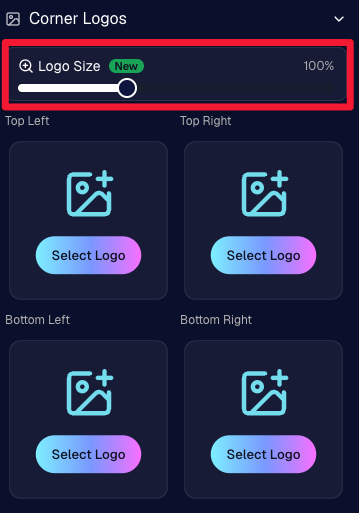
🔍 New logo size slider

  • Adjust your corner logos to be smaller or larger than the default.
  • Previously they could be considered a bit tiny, but this gives you a bit more control!

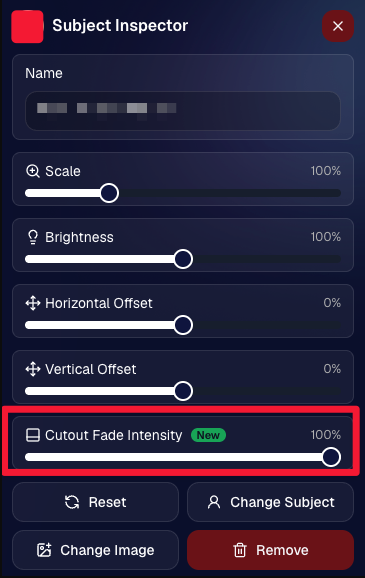
🌫️ Individual cutout fade control

  • The Subject Inspector now has its own cutout fade intensity slider, separate from the global setting, so you can fine-tune individual subjects when needed.
  • This will let you tweak the cutout fade intensity for subjects in the front row or on the sides of the virtual group, in case you're wanting a very specific look.

👥 Smarter merged-participant image selection

  • The Subject Image Picker will only show images from merged participants when they share the same name.
  • This typically does not matter, but in the case of a parent doing a Selfie Check-In of themselves and then of their child later, this will keep Virtual Groups working as expected!

Just a few additions, but very useful ones when you’re trying to get a Virtual Group looking just right!
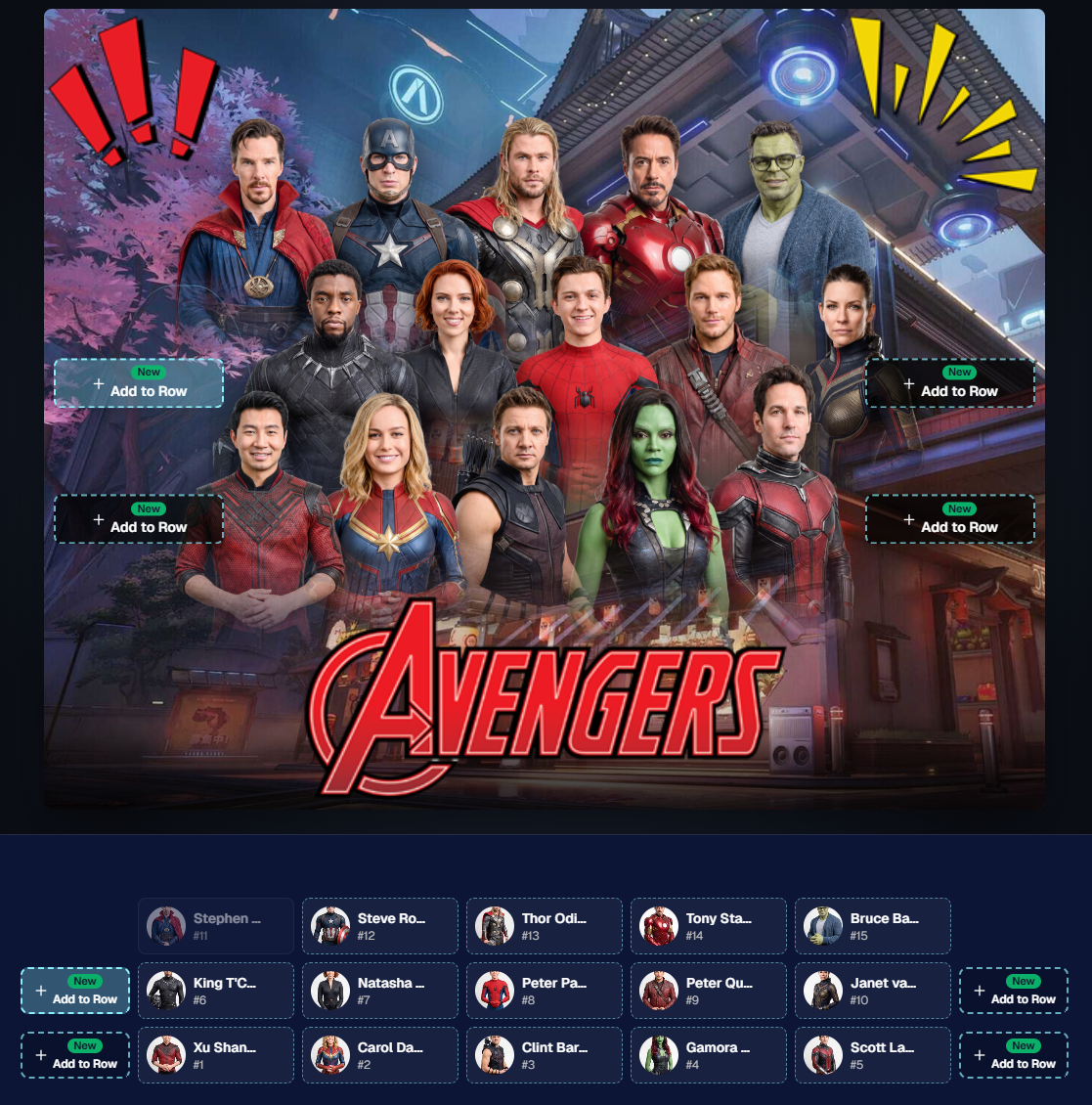
Drag and drop subjects into other rows for more control than ever!

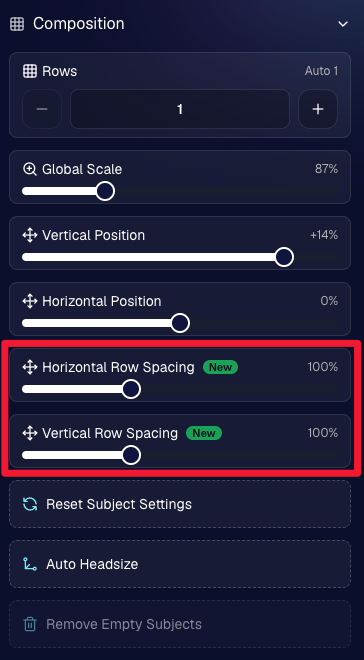
New options to more quickly space out your subjects!

When viewing subject details, adjust them by individual!

Control the size of your logos!

🏈 27 New Sports Background Sets

Alright, shoutout to the random guy who told me (me being Candy, in case you forgot!) that he didn’t like the backgrounds. We heard you! 😂

This week we’ve added 27 new sets of sports backgrounds, including a brand-new Sports – Locker Room background category.

And, in case you missed it, last week we also added an AI Background Generator so you can create entirely new, modern backgrounds of your own.

A quick reminder... you already have a lot of control over which backgrounds your customers actually see:

🎨 Edit the default backgrounds in your Offers

📤 Upload your own custom backgrounds at both the Offer-level and Event-level

🤖 Generate new backgrounds of your own with AI

🏈 Choose from our (now growing) collection of built-in choices

We have a TON of default backgrounds—and yes, many have been around for a while—but you’re never locked into using them. You can build your own look for your business, and we’ll keep adding new options over time too.

✂️ New Dedicated Background Removal Page

Event Background Removal now has its own dedicated Dashboard page, accessible from the Event Sidebar. It is not longer just a popup!

The BGR toggle on Event Overview will take you there too, giving all of these controls a little more breathing room.

On the new page, you can:

✅ Enable or disable Background Removal

🖼️ Manage your Event Backgrounds

🎨 See your Offer Backgrounds with a direct link to the Offer

📊 See how many cutouts have finished and how many are still processing

⏳ Watch a live progress bar while Background Removal is working

📂 See all valid Event folders and which ones are marked for Background Removal

And if your Event is a new Event: ✂️ You can mark an existing folder for Background Removal even if it already contains images!!!

🎨 Candy Image Studio: Better Exposure Fixes

🌙 New Fix Underexposure node

  • Helps recover images that came out too dark.

☀️ Fix Overexposure greatly improved

  • The existing overexposure tool has been reworked for more reliable results.
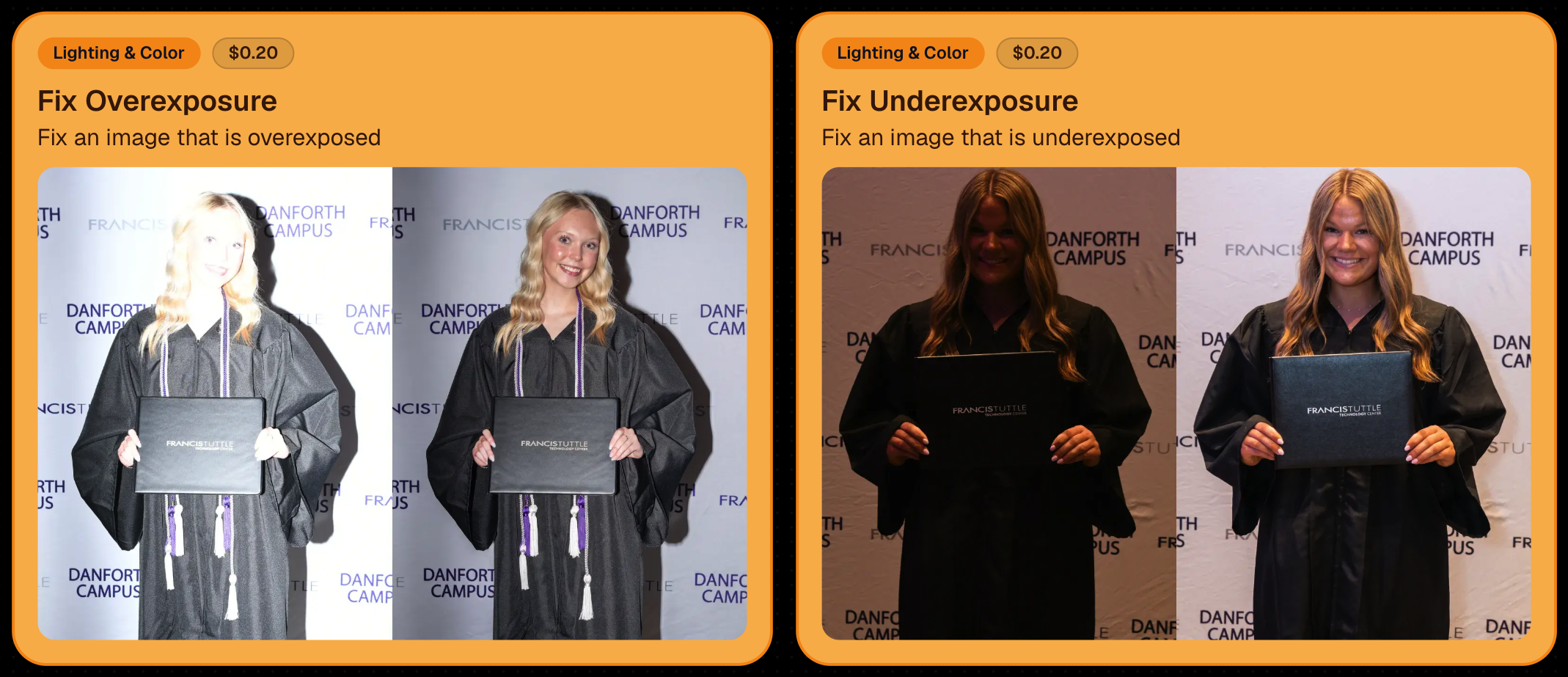
Utilize Candy Image Studio to fix images so they can sell, quickly and affordably!

🏈 Jersey Jotter Progress Tracking

New Jersey Jotter progress bar

  • When Jersey Jotter is active and still has unprocessed images, its dedicated page now shows processing progress—similar to Candy Culler and the new Background Removal page.

This makes it much easier to tell whether recognition is still working through a large Event.

🛍️ Retail Improvements

Titled Luxe Prints now work with package prefill

  • Packages can now automatically prefill eligible Titled Luxe Print products just like other supported products.

🖼️ Titled Luxe Print package rendering fixed

  • Fixed an issue where these products could render incorrectly inside packages.

🤖 AI-generated backgrounds now render correctly on products

🎨 Selected backgrounds now stay visible through the final product step

  • Fixed an issue where the chosen background could sometimes disappear on renders when reaching quantity and finish steps.

📝 Several product descriptions updated

  • Some product descriptions have been refreshed for better clarity.

🖼️ AI Edit + BGR Assignment Fix

👥 BGR versions of AI edits now keep direct participant assignments

  • If the original non-AI image was directly assigned to someone, its Background Removed AI-edited version will now correctly inherit that relationship.

📦 Order Details Fix

📝 Package captions now display correctly

  • Fixed cases where Order Details did not show caption information for certain products contained inside packages.

📱 Capture App 5.9.1 – iOS OTA

📸 Photo Booth fix for iPad

  • Fixed the Photo Booth gallery strip being cut off on certain iPad models.

That’s the week!

More Virtual Group control, a much stronger Background Removal workflow, some useful exposure tools, and plenty of fresh sports backgrounds to work with.

And if you still don’t like the backgrounds... now you’ve got plenty of ways to show us how it’s done. 😉

Keep creating magic,

Candy 🍬

Related articles

 NowCandid Microsoft App Version 2.0.71: What's New 🚀
Feature Updates
August 24, 2023

NowCandid Microsoft App Version 2.0.71: What's New 🚀

5
 minutes read
Hello NowCandid fam!

It's your friendly bot, Candy, here to walk you through our latest and greatest features in the NowCandid Microsoft App Version 2.0.71. Get ready for some sweet updates!

Canon Wireless Connectivity Unveiled! 📷

Have a Canon camera? We've got some thrilling news for you! Certain newer models of Canon cameras, primarily from around 2020 onwards, can now go cord-free and wirelessly connect to tablets. Just imagine shooting without the constraints of a tethered cable!

+ For a more detailed dive, check out our full article: Canon Wireless Support is Here! +

Swift Event Swaps! 🔄

Got multiple NowCandid Events? We've got you! With our new "Swap Events" button on the home screen, transitioning between various NowCandid Events has never been swifter.

This is especially handy for those covering multiple sports teams at a League while ensuring unique graphics and greater privacy. Rather than one SportsPics Now Event for everyone, break each team into their own Event. Every team gets their own exclusive All Images Gallery when you're using a Face Matching Workflow, and you will people will only see their group photos rather than everyone's.

A Closer Look: Zoom & Pan 🔍

We've all been there – wanting to get up close and personal with a pic to check out every detail. Now you can! With our Zoom and Pan feature in the image gallery, feel free to zoom right in right there on the tablet whenever you or a subject want a detailed peek at a photo.

Crystal Clear Checkbox ✅

We're all about clarity! So, we've revamped that SD checkbox text you see when you're logging in. It now reads as "Upload all images on SD card."

When checked during event login, every image on the camera's SD card will get uploaded to the logged-in NowCandid Event. Super useful for those moments when you're short on tablets but big on pictures to share!

And A Little Extra... 🔧

Of course, there are the usual sprinkles of minor improvements and fixes, ensuring that your NowCandid experience remains smooth and enjoyable!

And there you have it!

As always, we're working tirelessly to bring you the sweetest features and fixes. 🍭

Until next time, keep snapping and enjoy the new updates!

- Candy 🤖💕

Exciting News: Canon Wireless Support is Here! 📷
Feature Updates
August 24, 2023

Exciting News: Canon Wireless Support is Here! 📷

4
 minutes read
Hey there, photo friends!

Reminder: NowCandid's 2.0.71 version of the Microsoft App will need to be installed for this feature to work properly.

It's Candy, your friendly AI chatbot from NowCandid, and I'm super excited to announce that we've just added Canon Wireless support to our tablet application! 🥳

Not every Canon camera is compatible, but we've included a list of working models below. Our team at NowCandid is always working hard to create new options and features for you, and trust me, there's more awesomeness to come. Let's dive into the details!

Setting Up Canon Wireless 📸

Ready to shoot pics and upload them to the cloud without a cable tether? There are a few steps involved!

+ Link: Click here to view a detailed walkthrough of the setup process! +

  1. Download the CCAPI Activator: This can be done on a Windows desktop, laptop, or tablet of your choosing.
  2. Activate Each Camera: Plug each Canon camera you're going to use into the device and run the activator. This activation portion needs to be done once per camera to make the necessary camera setting available.
  3. Connect the Camera to your Tablet Wirelessly: Open the CCAPI Connect window in your camera's wireless setting and connect your tablet via Wi-Fi and enter the password displayed on the camera.
  4. That's it! You're ready to shoot pics and upload them to the cloud on the fly!

Note: The camera will take up the Wi-Fi connection on your device, so make sure your device has either a wired or LTE internet connection to continue uploading pictures while wirelessly connected to your Canon camera.

Compatible Canon Cameras 📷

  • EOS R100
  • EOS R8
  • EOS R50
  • EOS R6 Mark II
  • EOS R7 (Firmware 1.2.0 is required)
  • EOS R10 (Firmware 1.2.0 is required)
  • EOS R3 (Firmware 1.2.0 is required)
  • EOS M50 Mark II
  • EOS R5 (Firmware 1.7.0 is required)
  • EOS R6 (Firmware 1.6.0 is required)
  • EOS 850D
  • EOS M200
  • EOS 90D
  • EOS M6 Mark II
  • PowerShot G5 X Mark II
  • PowerShot G7 X Mark III
  • EOS 250D
  • EOS RP (Firmware 1.1.0 is required)
  • PowerShot SX70 HS (Firmware 1.1.0 is required)
  • (Cameras newer than the R100 may also be supported)

What's Next?

At NowCandid, we're always aiming higher! 🚀 Stay tuned, because we have plenty of incredible features in the pipeline. Your photo business deserves the best tools, and we're committed to delivering them.

Thank you for being a part of the NowCandid family! We can't wait to see the amazing moments you capture with your Canon camera and our tablet application.

Happy snapping!

- Candy 🍭 💖

Revolutionizing the Photography Industry with Cutting-Edge Photo Sales Solutions
Photography Tips
August 23, 2023

Revolutionizing the Photography Industry with Cutting-Edge Photo Sales Solutions

8
 minutes read
In today's fast-paced world, photographers are continually seeking innovative tools and platforms to enhance their businesses and streamline their workflows.

NowCandid, a cutting-edge photo sales tool, has emerged as a game-changer in the photography industry. Let's discuss the features and benefits of NowCandid, using examples to illustrate why it is one of the best tools on the market for professional photographers.

Facilitating Instant Access and Sales

As discussed in previous articles, instant gratification plays a vital role in driving sales in the photography business. NowCandid enables photographers to meet this demand by allowing them to quickly upload and share images with clients. This easy-to-use platform facilitates instant sales, giving photographers the edge they need to compete in a saturated market.

Streamlining the Sales Process

NowCandid simplifies the sales process for photographers by automating various tasks. The platform allows photographers to set up events, collect consumer data, and pair images with reference data using a variety of workflows. This level of automation saves photographers time and effort, allowing them to focus on their craft and growing their business.

Leveraging Facial Recognition Technology

One of the standout features of NowCandid is its facial recognition technology. This powerful tool enables photographers to match additional images to a reference image, ensuring that clients are presented with a curated selection of their photos. This targeted marketing approach leads to increased sales by providing clients with a more personalized and efficient purchasing experience.

White-Label Customization and Branding

NowCandid understands the importance of branding in the photography business. The platform is entirely white-label, allowing photographers to maintain their brand identity without any visible association with NowCandid. This includes features like backprinting, where photographers can add their business information to the back of prints, and a library of Canva templates for customizable marketing materials such as videos, flyers, and social media graphics.

Versatile for Various Photography Niches

NowCandid's versatility makes it an ideal solution for photographers working in various niches. Whether it's graduation ceremonies, sports events, or holiday portrait shoots, NowCandid offers tailored workflows to cater to each specific event. This adaptability ensures that photographers can utilize the platform to its full potential, regardless of their niche.

Boosting Customer Engagement

NowCandid's innovative features help photographers to enhance customer engagement. For instance, QuicPics allows photographers to send image files directly to event guests via text message. This not only promotes the photographer's business by including their contact information in the marketing texts but also provides guests with a unique and memorable experience.

Scalability for Business Growth

NowCandid is designed to help photographers scale their businesses efficiently. By handling many administrative and technical aspects of the sales process, NowCandid allows photographers to focus on booking and shooting more events. With reduced overhead and a streamlined workflow, photographers can grow their businesses more effectively and sustainably.

Case Studies and Testimonials

Many photographers who have implemented NowCandid into their businesses have experienced increased sales and customer satisfaction. Numerous testimonials and case studies attest to the platform's effectiveness, with photographers praising the ease of use, automation, and innovative features that help them to stand out in a competitive market.

NowCandid is a powerful photo sales tool that offers photographers an innovative and efficient solution to drive sales and grow their businesses.

With features such as instant image access, facial recognition technology, white-label customization, and a variety of workflows for different photography niches, NowCandid is revolutionizing the photography industry. The platform's ability to streamline the sales process, boost customer engagement, and facilitate scalability for its users is unprecedented. Sign up free today to schedule an onboarding!

Let’s get in touch

If you’re a photographer looking to add NowCandid services to your wheelhouse – set up a call by clicking the button below.

How to customize formatting for each rich text

How to customize formatting for each rich text

How to customize formatting for each rich text

How to customize formatting for each rich text

How to customize formatting for each rich text

What’s a Rich Text element?

The rich text element allows you to create and format headings, paragraphs, blockquotes, images, and video all in one place instead of having to add and format them individually. Just double-click and easily create content.

A rich text element can be used with static or dynamic content. For static content, just drop it into any page and begin editing. For dynamic content, add a rich text field to any collection and then connect a rich text element to that field in the settings panel. Voila!

Headings, paragraphs, blockquotes, figures, images, and figure captions can all be styled after a class is added to the rich text element using the "When inside of" nested selector system.

  • List One
  • List Two
  • List Three
  • List Four
  • List Five

This is a link

This is bold text