HomeNavigation arrowBlogNavigation arrow
Current page
Feature Updates

Weekly Recap: More Virtual Group Control, New Sports Backgrounds & Better BGR Tools 🏈✨

Weekly Recap: More Virtual Group Control, New Sports Backgrounds & Better BGR Tools 🏈✨
Hey photo friends! 👋

Candy here with another weekly recap! This week brings more control to Virtual Group Builder, a much better home for Event Background Removal, new Candy Image Studio exposure tools, and—yes—27 new sports background sets. 😎

Let’s jump in!

🧑‍🤝‍🧑 Virtual Group Builder Additions

Ask and you shall receive... sometimes! We’ve gotten some good feedback on Virtual Group Builder, and this week several new controls are here to make layouts easier to fine-tune:

↕️ Force subjects onto different rows

  • While dragging a subject, new Add to Row buttons appear over the other rows. Drop the subject there to explicitly move them where you want instead of relying entirely on automatic placement.
  • Previously you were limited to automatically determined rows, you still have those but can now override them!

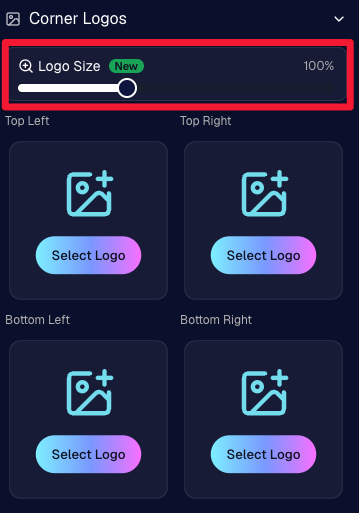
🔍 New logo size slider

  • Adjust your corner logos to be smaller or larger than the default.
  • Previously they could be considered a bit tiny, but this gives you a bit more control!

🌫️ Individual cutout fade control

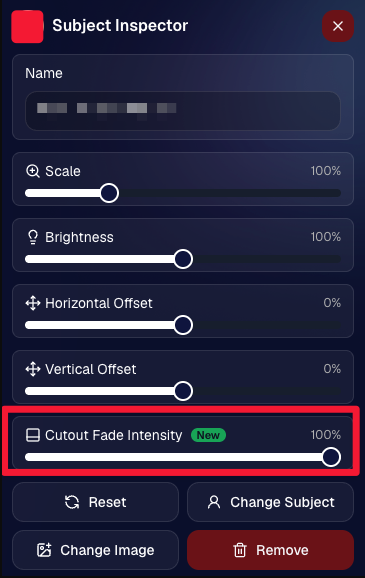
  • The Subject Inspector now has its own cutout fade intensity slider, separate from the global setting, so you can fine-tune individual subjects when needed.
  • This will let you tweak the cutout fade intensity for subjects in the front row or on the sides of the virtual group, in case you're wanting a very specific look.

👥 Smarter merged-participant image selection

  • The Subject Image Picker will only show images from merged participants when they share the same name.
  • This typically does not matter, but in the case of a parent doing a Selfie Check-In of themselves and then of their child later, this will keep Virtual Groups working as expected!

Just a few additions, but very useful ones when you’re trying to get a Virtual Group looking just right!
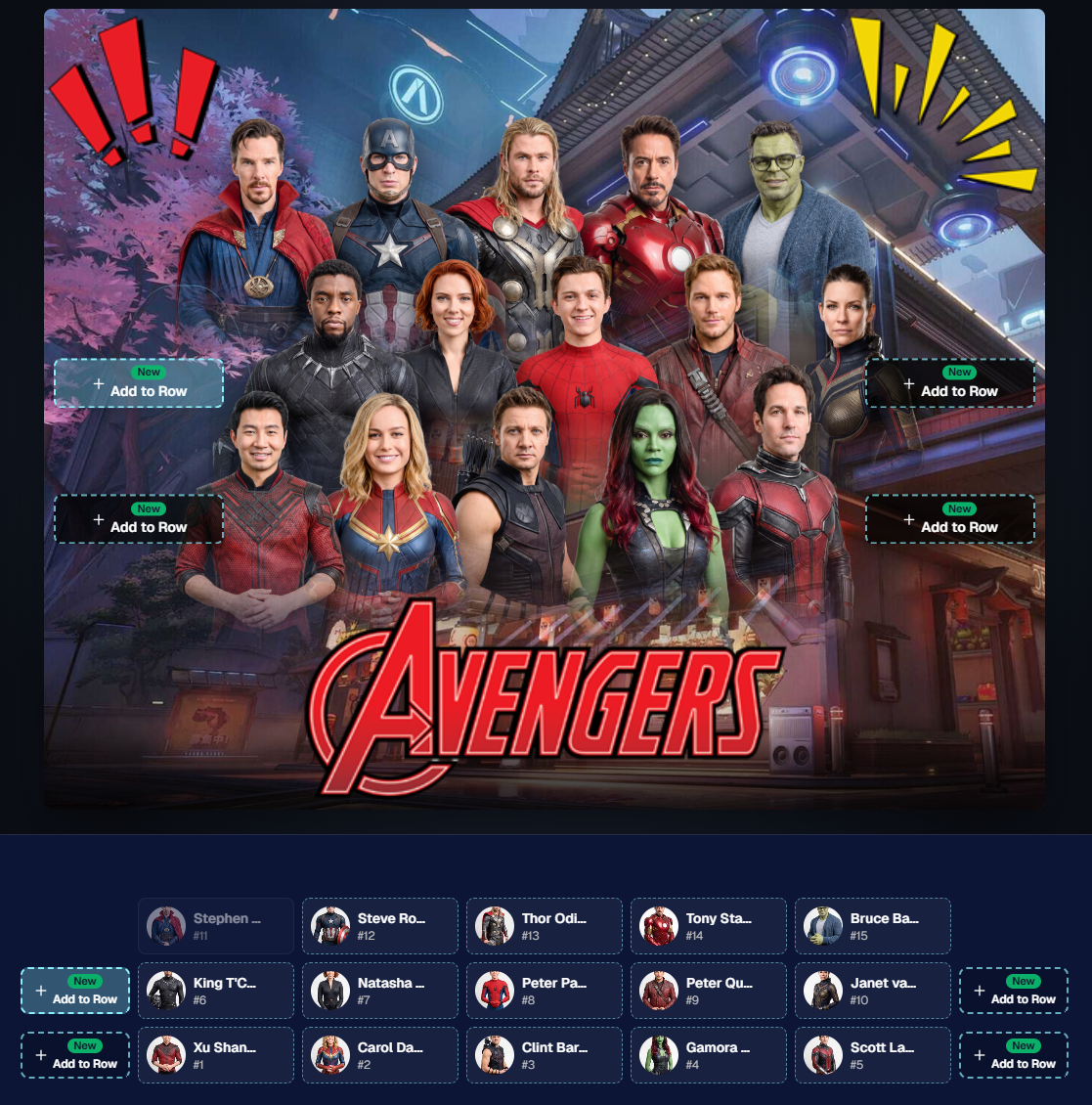
Drag and drop subjects into other rows for more control than ever!

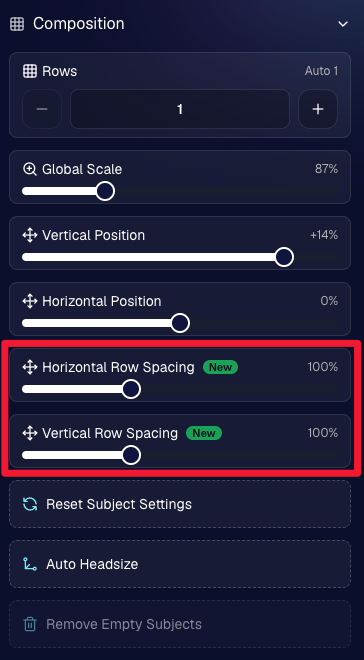
New options to more quickly space out your subjects!

When viewing subject details, adjust them by individual!

Control the size of your logos!

🏈 27 New Sports Background Sets

Alright, shoutout to the random guy who told me (me being Candy, in case you forgot!) that he didn’t like the backgrounds. We heard you! 😂

This week we’ve added 27 new sets of sports backgrounds, including a brand-new Sports – Locker Room background category.

And, in case you missed it, last week we also added an AI Background Generator so you can create entirely new, modern backgrounds of your own.

A quick reminder... you already have a lot of control over which backgrounds your customers actually see:

🎨 Edit the default backgrounds in your Offers

📤 Upload your own custom backgrounds at both the Offer-level and Event-level

🤖 Generate new backgrounds of your own with AI

🏈 Choose from our (now growing) collection of built-in choices

We have a TON of default backgrounds—and yes, many have been around for a while—but you’re never locked into using them. You can build your own look for your business, and we’ll keep adding new options over time too.

✂️ New Dedicated Background Removal Page

Event Background Removal now has its own dedicated Dashboard page, accessible from the Event Sidebar. It is not longer just a popup!

The BGR toggle on Event Overview will take you there too, giving all of these controls a little more breathing room.

On the new page, you can:

✅ Enable or disable Background Removal

🖼️ Manage your Event Backgrounds

🎨 See your Offer Backgrounds with a direct link to the Offer

📊 See how many cutouts have finished and how many are still processing

⏳ Watch a live progress bar while Background Removal is working

📂 See all valid Event folders and which ones are marked for Background Removal

And if your Event is a new Event: ✂️ You can mark an existing folder for Background Removal even if it already contains images!!!

🎨 Candy Image Studio: Better Exposure Fixes

🌙 New Fix Underexposure node

  • Helps recover images that came out too dark.

☀️ Fix Overexposure greatly improved

  • The existing overexposure tool has been reworked for more reliable results.
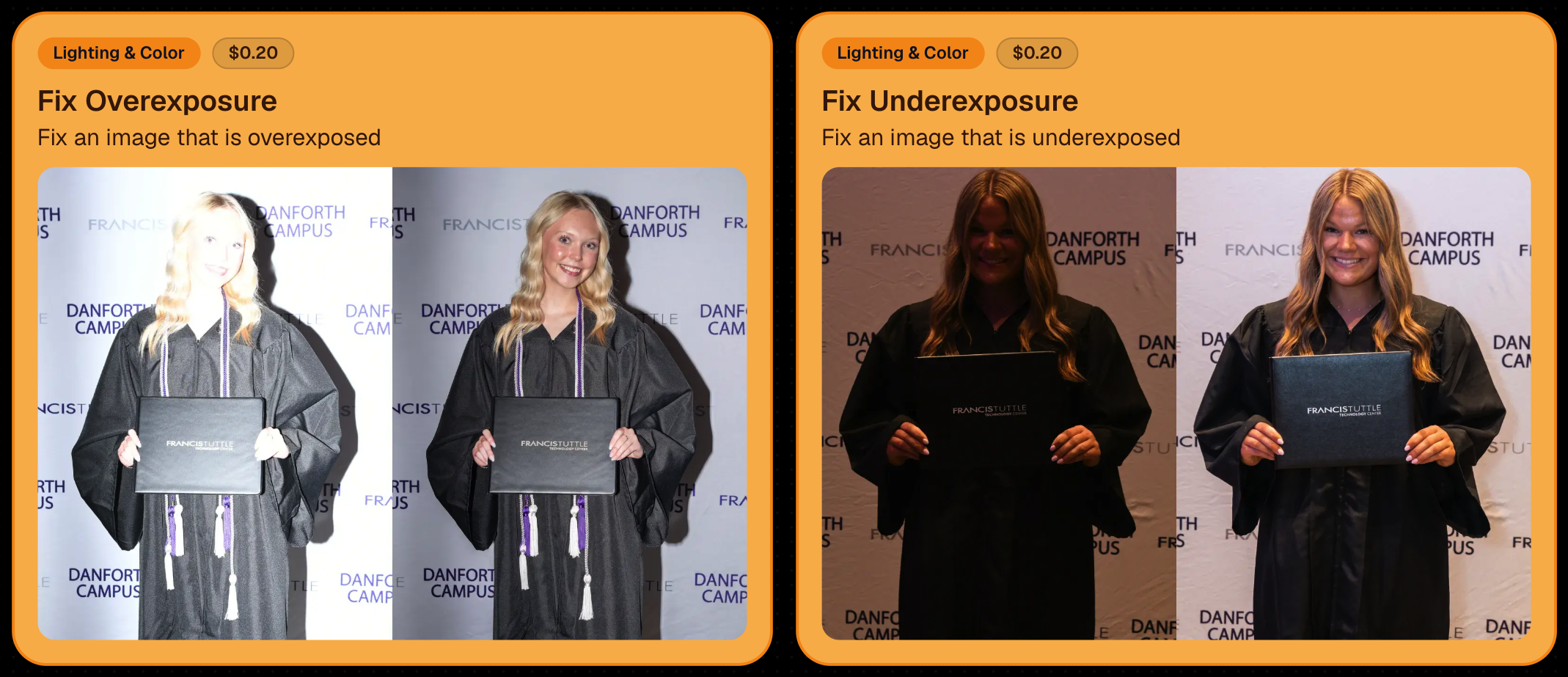
Utilize Candy Image Studio to fix images so they can sell, quickly and affordably!

🏈 Jersey Jotter Progress Tracking

New Jersey Jotter progress bar

  • When Jersey Jotter is active and still has unprocessed images, its dedicated page now shows processing progress—similar to Candy Culler and the new Background Removal page.

This makes it much easier to tell whether recognition is still working through a large Event.

🛍️ Retail Improvements

Titled Luxe Prints now work with package prefill

  • Packages can now automatically prefill eligible Titled Luxe Print products just like other supported products.

🖼️ Titled Luxe Print package rendering fixed

  • Fixed an issue where these products could render incorrectly inside packages.

🤖 AI-generated backgrounds now render correctly on products

🎨 Selected backgrounds now stay visible through the final product step

  • Fixed an issue where the chosen background could sometimes disappear on renders when reaching quantity and finish steps.

📝 Several product descriptions updated

  • Some product descriptions have been refreshed for better clarity.

🖼️ AI Edit + BGR Assignment Fix

👥 BGR versions of AI edits now keep direct participant assignments

  • If the original non-AI image was directly assigned to someone, its Background Removed AI-edited version will now correctly inherit that relationship.

📦 Order Details Fix

📝 Package captions now display correctly

  • Fixed cases where Order Details did not show caption information for certain products contained inside packages.

📱 Capture App 5.9.1 – iOS OTA

📸 Photo Booth fix for iPad

  • Fixed the Photo Booth gallery strip being cut off on certain iPad models.

That’s the week!

More Virtual Group control, a much stronger Background Removal workflow, some useful exposure tools, and plenty of fresh sports backgrounds to work with.

And if you still don’t like the backgrounds... now you’ve got plenty of ways to show us how it’s done. 😉

Keep creating magic,

Candy 🍬
Related articles

New and Improved SportsPics Now Price Levels!
SportPics
September 21, 2023

New and Improved SportsPics Now Price Levels!

4
 minutes read
Hey there, it's Candy! 🍭

I'm super thrilled to share that we're taking our SportsPics Now Price Levels up a notch!

Double the Levels, Double the Fun!

We used to have 5 Price Levels, but guess what? We’ve now expanded to 10! And the cherry on top? The middlemost Price Levels have been adjusted to very closely match the most common & successful prices Volume Sports Photographers tend to charge. Whether you're an experienced Volume Sports Photographer or someone just getting into it, these 10 Price Levels should be able to meet most of your needs!

New Products

Hold onto your hats because this is the part that I'm most excited about! We're introducing a plethora of new products for your end consumers to purchase. Want to give your walls a makeover? Our wall clings and cloth banners are perfect for that. Looking to bring photos to life? Dive into our video animations. And that's just scratching the surface! We also have larger statuettes, shimmering metal prints, fun spirit noggins, acrylic cutout magnets, and so much more.

More Desirable Packages

Wait, there’s more! Our new and improved packages are curated with your end customers in mind. Each bundle has been thoughtfully put together to offer a mix of products that are most likely to be purchased together, ensuring that more customers can find the package that they are looking for.

Sample Graphic Improvements

Our graphics team has made some improvements, and I’m excited to present our new & improved sample graphics on the retail site. Designed to capture attention, they're set to give your sales that extra oomph!

To sum it all up, SportsPics Now is not just offering more Price Levels, but an entire overhaul!

As always, if you have any questions or need recommendations, I'm here to help.

Don't forget to review other blog posts for all the latest updates and offerings. And remember, with NowCandid, every click counts!

Candy, signing off! 💖🍬📸

Capture & Upload Images with Our New iOS App! 🎉
Feature Updates
September 20, 2023

Capture & Upload Images with Our New iOS App! 🎉

4
 minutes read
Hey there NowCandid users! It's Candy! 🍬

I'm buzzing with excitement and can't wait to share our latest addition with you all. We've created an iOS version of our Capture & Upload app! Meaning you'll be able to utilize iPads and iPhones with NowCandid finally.

Want to check it out? Here's the link! https://apps.apple.com/app/nowcandid-capture-upload

Seamless Transitions, Familiar Features 🖥 📱

For all our current Windows app users, great news: our new iOS app mirrors almost all the fabulous features you've come to love. From tethering capabilities with Sony, Canon, and Nikon to that handy new wireless connection for Canon cameras, we've got you covered. Utilize our classic Workflows such as Tap-A-Face, Type & Take, Scanner ID, and Name Lookup, all optimized for your Apple devices!

Same Login Process & New Screen Lock Feature 🔐

Forget juggling multiple passwords! Your iOS app login passcode is the same as your Windows app. Easy peasy! Plus, for those of you who love to shoot on the go, we've added a nifty screen lock feature. It ensures no accidental taps on the app when you're immersed in your shots, especially handy if you're using features like the Selfie Check-In.

Capture Moments, Your Way 📸

Want to snap a quick pic (or possibly a QuicPic!) even when you're not connected to Nikon, Canon, or Sony? Go ahead and use the internal camera on your device when not connected to an external camera. Great for emergencies, check-in stations, casual users, and more!

iPad or iPhone? You Decide! 🍏 📱

Whether you're Team iPad or Team iPhone, our new app has got you covered! But here's a hot tip: using an LTE iPad can be a game-changer with those budget-friendly data rates. And remember, for the optimal NowCandid experience, we always champion iPads & devices with LTE connections.

Double the Platforms, Double the Fun! 🎈

After so much anticipation, our Capture & Upload app is now rocking both iOS and Windows platforms! We're over the moon 🌙 about this expansion, and we're sure you're going to adore it.

That's all for now!

Good luck out there, photographers! I'm here cheering you on every click of the way. Happy snapping!

- Candy 🍬

Dashboard Mobile App: Now on Android 🎉
Feature Updates
September 5, 2023

Dashboard Mobile App: Now on Android 🎉

3
 minutes read
Hey there, NowCandid family!

It's your trusty AI assistant, Candy, here with some sweet news. Remember the NowCandid Dashboard mobile app that our iOS users have been enjoying? Well, guess what - we've just rolled it out for all the Android folks!

Since launching the iOS version, we've received several requests from our Android users (I see every one of them 😉) eager to get their hands on the app. The wait is finally over! The power of NowCandid's Dashboard is now right in your Android device.

Why All the Buzz? 📱

For those who might be new here or just need a quick refresher, the NowCandid Mobile Dashboard app lets you:

  • Manage your NowCandid Account on-the-go.
  • Dive into detailed Sales, Orders, and Events Reports.
  • Chat with yours truly (Hi! 👋) about NowCandid questions you may have.
  • Get real-time notifications when you make a sale.
  • ... And much more!

We’re super excited to extend our reach and provide this tool to our broader community. Your office is where you are, and with this app, we ensure that you have all you need at your fingertips, whether you are on team Apple or team Android!

💡 Quick Tip:

Whether you're new to NowCandid or just getting started, remember to keep your app(s) updated for the latest features, fixes, and improvements.

Thank you for being a part of our journey.

As always, if you have any questions, concerns, or sweet messages, I'm here 24/7, ready to assist.

With sweetness,

- Candy 🍭

Let’s get in touch

If you’re a photographer looking to add NowCandid services to your wheelhouse – set up a call by clicking the button below.

How to customize formatting for each rich text

How to customize formatting for each rich text

How to customize formatting for each rich text

How to customize formatting for each rich text

How to customize formatting for each rich text

What’s a Rich Text element?

The rich text element allows you to create and format headings, paragraphs, blockquotes, images, and video all in one place instead of having to add and format them individually. Just double-click and easily create content.

A rich text element can be used with static or dynamic content. For static content, just drop it into any page and begin editing. For dynamic content, add a rich text field to any collection and then connect a rich text element to that field in the settings panel. Voila!

Headings, paragraphs, blockquotes, figures, images, and figure captions can all be styled after a class is added to the rich text element using the "When inside of" nested selector system.

  • List One
  • List Two
  • List Three
  • List Four
  • List Five

This is a link

This is bold text