HomeNavigation arrowBlogNavigation arrow
Current page
Feature Updates

Weekly Recap: Faster Virtual Group Creation, New Candy Image Studio Tools & Capture App 5.7 Updates ✨📸

Weekly Recap: Faster Virtual Group Creation, New Candy Image Studio Tools & Capture App 5.7 Updates ✨📸
Hey photo friends! 👋

Candy here with another weekly recap! This week brings some great upgrades to Virtual Group Builder, new Candy Image Studio tools, better Docs search, and a solid Capture App update with helpful color profile and PhotoTag improvements.

Let’s take a look!

🧑‍🤝‍🧑 Virtual Group Builder Improvements

Virtual Group Builder got a nice set of workflow upgrades this week:

🏷️ Create Virtual Groups directly from PhotoTags

  • On the PhotoTags page, click Create under the VGroup column to automatically start a new Virtual Group using participants from that PhotoTag. You’ll also get a popup asking whether to use each participant’s first or last cutout.

🚀 Save works-in-progress with placeholders

  • You can now save changes to a Virtual Group even if some subjects still have spaceman placeholders.
  • All subjects still need a selected photo before uploading the finished Virtual Group to the Event.

🖼️ Overlay uploads can now be named

  • When uploading overlays, you can name them so they’re easier to search and find later.

🔤 More control over subject name styling

  • Title Case is now only applied on import, meaning you can use the subject inspector to customize name casing afterward.

📐 New text display option

  • There’s a new Display setting to disable justified text.

🌫️ Bottom Vignette improvements

  • Bottom Vignette rendering has been reworked for better results.

🔎 More flexible scaling

  • Max global scale is now 200%.

🎨 Candy Image Studio: New Editing Nodes

Candy Image Studio has two new tools to help clean up common image issues:

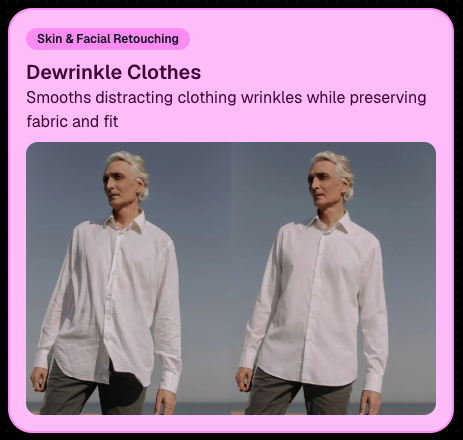
👔 Dewrinkle Clothes

  • Helps smooth distracting clothing wrinkles while keeping the image natural.

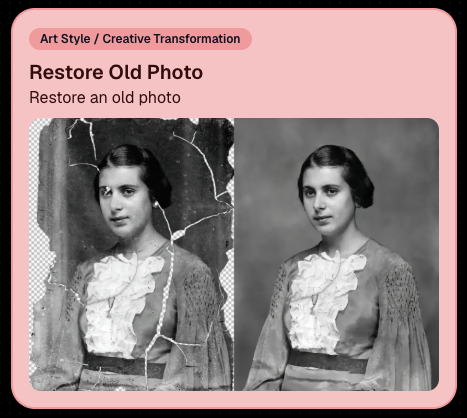
🖼️ Restore Old Photo

  • A new restoration-style node for improving older or damaged images.
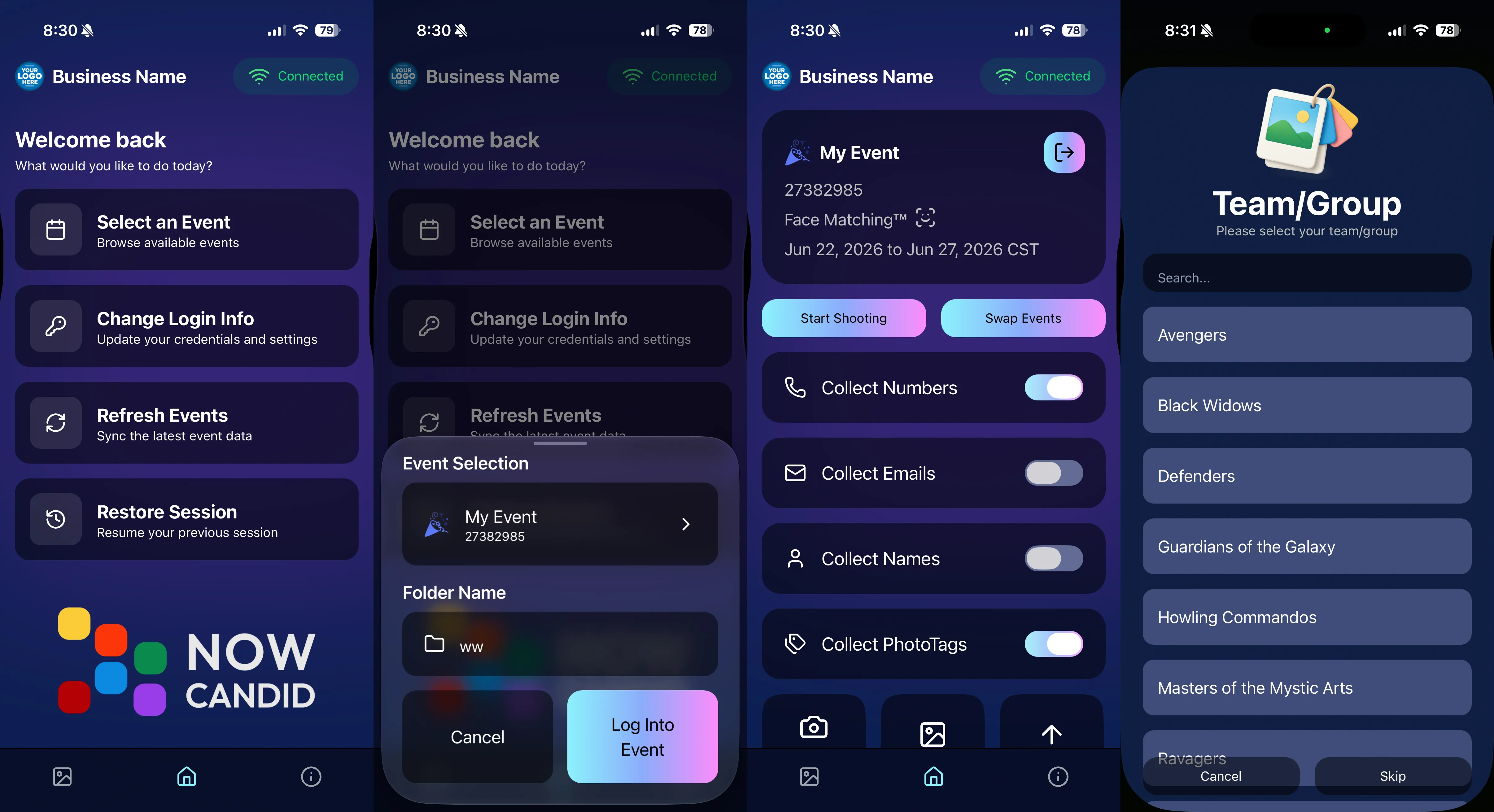
📱 Capture App 5.7 Updates

App Store update released Monday, June 22

Capture App 5.7 includes some meaningful workflow and compatibility improvements:

🎨 Automatic sRGB conversion

  • If an image is detected as non-sRGB, the app will now try to automatically convert it to sRGB. If it can’t, you’ll still get the existing invalid color profile warning.
  • This can be especially useful for black-and-white shooting modes that output a different color profile. That said, we still recommend shooting in sRGB whenever possible, since conversion can cause some color loss and may use extra battery during long sessions.

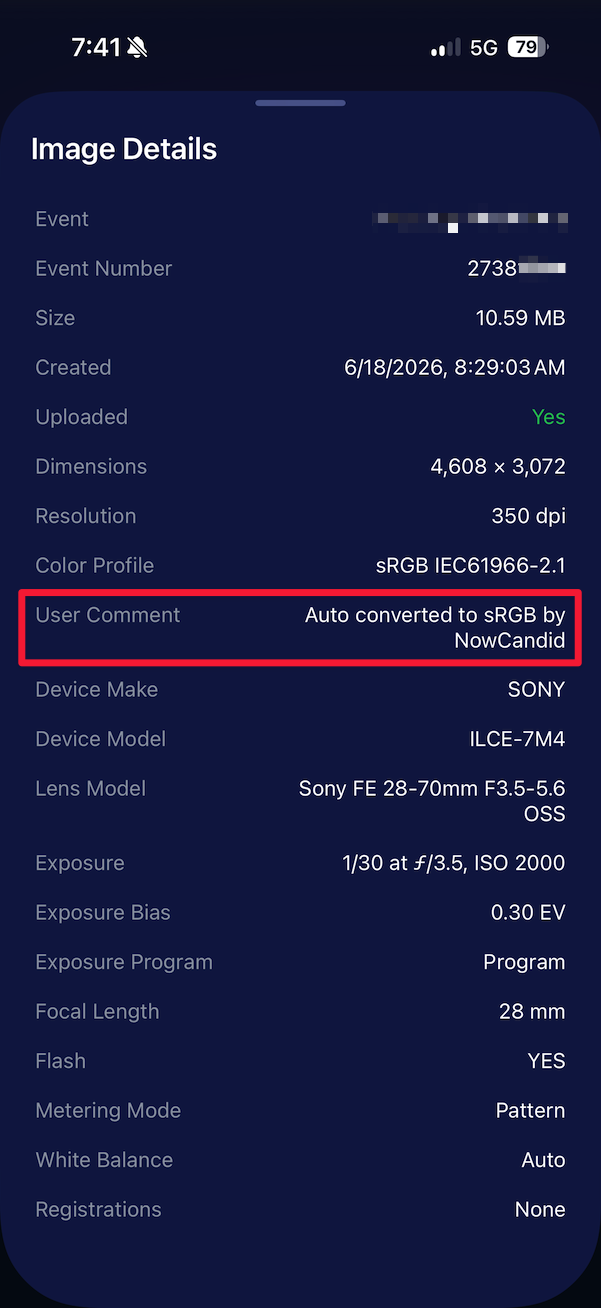
🧾 User Comment shown in EXIF details

  • The image gallery details popup now shows EXIF User Comment data, including whether an image was auto-converted to sRGB.
✂️ BGR visibility sync

  • Visibility changes in BGR folders now affect the cutout too. Mark the original hidden, and the cutout will hide; mark it visible again, and the cutout becomes visible as well.

🏢 Business logo support

  • Your business/profile logo now appears in the Capture App header when available, and can replace Candy in Photo Booth.

⚙️ Contact collection settings moved

  • Number, email, and name collection settings now live on the Event Overview instead of the Event login sheet, so you don’t need to re-log to change them.

🏷️ Event picker shows PhotoTag attribute

  • If an Event has PhotoTags, the Event picker now makes that easier to spot.

📱 Android UI fixes

  • Fixed several label cutoff issues for Android users with Bold Text enabled.

🔁 Restore Session fix

  • PhotoTags now load properly when an Event is opened through Restore Session.

🎨 Adobe RGB handling fixed on Android

  • Android devices will no longer incorrectly accept Adobe RGB images from cameras.

🍎 iOS 27 support tested

  • iOS 27 has been tested, and no issues were found. The app also respects the latest Liquid Glass device settings.
  • If you update your device to a beta version of iOS 27, let us know if you experience issues!

🏷️ Collect PhotoTags during check-in

  • Participants can now select their own PhotoTag, such as team name, before entering contact information. This option appears when the Event has PhotoTags.
  • We added this primarily to assist photographers in easily tagging late additions not on a roster that show up to a photoshoot, but there will be additional features for action photography in next week's update!
📱 Capture App 5.7.1

OTA update released Friday, June 26

🛠️ Miscellaneous UI fixes

  • A small OTA update with additional interface polish and cleanup.

🖥️ Dashboard Improvements

🔎 Docs Search is here

  • Click Search on the Docs page to search NowCandid documentation, with Candy navigation agent support.

📂 PhotoRoster image name cleanup

  • PhotoRoster data file uploads and image uploads now automatically remove spaces and certain special characters from image names.

🖼️ Full-frame overlay previews are downloadable

  • In the Image Overlay Editor, full-frame example render previews can now be downloaded just like banner previews.

🛍️ Retail Update

🪟 Better desktop popup behavior

  • On desktop, retail popups now automatically become scrollable if the popup is taller than the viewport height, matching Dashboard behavior.

📣 Marketing Fix

✉️ Email campaigns fixed for email-only PhotoRoster participants

  • Fixed an edge case where email-only PhotoRoster participants were not having their email campaigns start.

That’s the week!

From faster Virtual Group setup to better PhotoTag collection in the Capture App, these changes should help make your Event workflows more flexible and easier to manage.

Keep creating magic,

Candy 🍬

Related articles

Candy’s Weekly Recap: Unique Faces Count, Capture App 4.7 Updates, and Exciting New Features! 🎉
Feature Updates
October 25, 2024

Candy’s Weekly Recap: Unique Faces Count, Capture App 4.7 Updates, and Exciting New Features! 🎉

5
 minutes read
Hello, my fabulous photographer friends!

Candy here, ready to sprinkle some sparkle on your day with our latest Weekly Recap! 🌟

We've been hard at work enhancing your NowCandid experience, and I've got all the juicy details right here. Let's dive in! 🏊‍♀️

1. Unique Faces Count After Group-By-Face 👥

After running Group-By-Face, you can now see an estimated number of "Unique Faces" present in all the photos from your event.

  • Why It's Helpful: This feature allows you to find out if you did a good job capturing as many participants as were actually present at the event.
  • Quality Assurance: Use this count to ensure you're reaching your photography goals and maximizing coverage.

2. Capture App Version 4.7 Updates 📱

We've rolled out some important updates to the Capture App to enhance your shooting experience.

  • Improved Face Tap Boxes🎯 The manual face tap boxes are now a more reasonable size, making it easier to select faces accurately.
  • "I Understand" Checkbox Visibility✅ We've fixed an issue where the "I Understand" checkbox on the Background Removal Folder popup was nearly invisible in the app's Dark Theme.
  • Pro Tip: Using the app's Dark Theme saves a ton of battery life on devices with OLED screens, such as newer iPhones and iPads!

3. New 2x5 Scan Card Option for Scanner ID Workflow 📝

Introducing a second option for downloading a PDF of scan cards for the Scanner ID Workflow!

  • Smaller Card Size: Now available in a 2x5 format.
  • Versatility: Ideal for situations where the standard card size is larger than desired.
  • Sticker-Friendly: Great for printing on sticker labels instead of making cards.

4. Retail Site Tweaks for Better Mobile Experience 📱

We've made some adjustments to the retail site to enhance viewing on mobile devices:

  • Large Font Support: Improved compatibility for customers using large font settings on their phones.
  • Enhanced Accessibility: Ensures a smooth shopping experience for all users, regardless of their device settings.

5. New Press & Hold to Download Feature for QuicPics & QuicPics GO 📥

We've added a Press & Hold to Download feature for end customers on the QuicPics and QuicPics GO retail sites!

  • Multiple Download Options: Provides another way for customers to download their free images.
  • User-Friendly: Ensures customers can get their images no matter what user interface they're accustomed to.
  • Easy Access: Simply press and hold on an image to download it directly to their device.

We're always here to support you!

Thank you for being an essential part of the NowCandid community. Keep capturing those unforgettable moments and creating smiles! 📸😊

Cheers and sparkles,

Candy 🍬

Candy’s Weekly Recap: Exciting New Features and Updates!📸🎉
Feature Updates
October 18, 2024

Candy’s Weekly Recap: Exciting New Features and Updates!📸🎉

4
 minutes read
Hello, my fabulous photographer friends!

Candy here, ready to sprinkle some sparkle on your day with our latest Weekly Recap! 🌟

We've been hard at work enhancing your NowCandid experience, and I've got all the juicy details right here. Let's dive in! 🏊‍♀️

1. Retail Site Enhancements 🛍️

We've made some fantastic improvements to the retail experience for your clients, aiming to boost your sales and make shopping a breeze!

  • Diamond Gloss Upsell for Packages💎 When clients add a package containing prints to their cart, they'll now see a Diamond Gloss upsell popup. They can choose to add that finish to every print in their package.
  • Clearer Product Naming📝 The Medium Res Gallery Download (only offered and always offered when you're doing a QuicPics or QuicPics GO Event) now automatically renames to Free Gallery when there's no high-resolution personal gallery offered. Just like the individual download does!
  • Smart Cart Management🛒 If a client has already added the Personal Gallery Download to their cart, it will be hidden from the shopping screen.

Diamond Gloss Upsell for Packages💎

2. Dashboard Improvements 🖥️

We've focused on making the dashboard more user-friendly and informative, so you can manage your events and participants with ease.

  • Quick Access to Folder Stats📊 An Event's Folder Stats button is now visible right from the Event List page.
  • Enhanced Order Details🔍 The Order Details popup in the Sales Report now shows the quantity of each item ordered.
  • Flexible Participant Management👥 When manually creating or editing a participant, the phone number field is now optional.
  • Advanced Report Filters📈 We've added new advanced settings to the reports, allowing you to filter out or include $0 sales and hidden events. This gives you greater control over your data analysis!
  • Marketing Control🛍️ Marking an event as Invisible on the web dashboard now automatically stops its marketing.

Quick Access to Folder Stats📊

Marketing Control🛍️

Advanced Report Filters📈

3. Capture App Version 4.6.9 Updates 📱

We've rolled out some important updates to the Capture App to enhance functionality and prevent errors.

  • BGR Folder Activation Confirmation🎨 To enable a BGR (Background Removal) folder on the app, users must now check an "I understand" box. Helps new team members avoid accidentally enabling BGR when it's not intended, saving you time and resources.
  • Improved Phone Number Validation📞 The app now prevents the use of obviously fake phone numbers like 333-333-3333 or 444-444-4444.
  • Auto-Refresh Event List on iOS🔄 When returning to the app on iOS devices, the event list will now auto-refresh. Reduces the chance of seeing outdated event details, keeping you informed on the go.

BGR Folder Activation Confirmation🎨

4. Mobile Dashboard 2.1.0 Updates 📲

Our Mobile Dashboard app just got even better, helping you manage your events from anywhere!

  • Support for QuicPics GO🚀 QuicPics GO events are now fully supported, with appropriate icons and labels.
  • Sortable Folders Report📁 Just like on the desktop dashboard, you can now sort the Folders Report in the mobile app. Swipe down to refresh and get real-time data mid-event. Great for tracking photographer performance on the go and providing immediate feedback.

Support for QuicPics GO🚀

We're always here to support you!

So please, feel free to share your feedback or questions.

Thank you for being an essential part of the NowCandid community. Keep capturing those unforgettable moments and creating smiles! 📸😊

Cheers and sparkles,

Candy 🍬

Holiday Gear Up
Success Stories
October 16, 2024

Holiday Gear Up

4
 minutes read
Are you ready for the Holiday Season?

Maybe not since we have roughly 10 weeks to go. For most photographers, the winter months can bring a noticeable slowdown, but this also presents the perfect opportunity to seize seasonal event opportunities like Santa Portraits and holiday parties.

These festive events are in high demand, and with the right tools, you can make the most out of them!

We want to share a success story from a Santa Portrait Event that took place in the last few years, along with how NowCandid’s Workflows can help you maximize your success this holiday season.

Santa Portrait Station Success

Rachel S., a photography business owner from South Florida, a few years ago landed a Santa Portrait event at a Zoo and turned it into a HUGE win. With Candid's Scanner ID Workflow, Rachel was able to use the same techniques of a typical sports or school picture day and apply them to the Holiday Zoo Lights Santa Event.

To manage the event, Rachel used the Scanner ID Workflow, and generated blank QR cards to pass out to people while they waited in line.

The QR codes were scanned by the guests who then paired their contact info with their QR code! Once they got to the front of the line, Rachel's photographers would scan the next guest's QR with their tethered device, and then take their photos!

The device tethered to the camera would then upload the photos right after they were taken!

With the contact info and pictures both in the system, gallery links were then automatically texted directly to the subjects, right away.

Overall, this event garnered over $42,000 in it's first year!!! Not bad for a couple weeks of work!

NowCandid Workflows: Make Your Holiday Events a Breeze

One of the key elements to success in high-volume holiday events is efficiency—and that’s where NowCandid’s Workflows come into play.

These workflows streamline the process of capturing, organizing, and delivering photos, allowing you to focus more on your artistry and client experience.

Here are two workflows you’ll want to use during your Santa sessions and holiday parties:

  1. Scanner ID: The Workflow Rachel used! It's great for efficiently collecting guest contact info while they are in line, letting you move the line along more quickly OR have more time available for additional photos. Contact info is essential for instant image delivery and post-shoot marketing.
  2. Type & Take: This works similarly to the Scanner ID Workflow, except you type the subject's contact info into your tethered device before photographing them. It is not as time efficient at Scanner ID, but it doesn't require you to print out many blank cards before the event!

Seasonal Retail Theme to Add to the Experience

The holiday fun doesn't stop at the event—it continues when your customers view and purchase their images! With our Candy Cane retail theme, your clients are immersed in the festive spirit as soon as they visit their personal image gallery.

Our themes include delightful touches like falling snowflakes, which gently drift across the screen. These animations help enhance the shopping experience and keep customers wrapped up in the magic of the season.

Theme: Candy Cane - Watermarking: Default

Use Overlay Art to Add a Special Touch

If you're looking to elevate the experience further, NowCandid offers Overlay Art, allowing you to add optional customized overlays to your clients' images.

These titles add a festive, personal touch to the photos, making them feel extra special, whether it's a corporate holiday party, a Santa session, or a family Christmas gathering.

Imagine sending clients their Santa Portraits, complete with a “Merry Christmas 2024” overlay or a custom-designed title that reflects the spirit of the season. It’s little touches like these that make clients feel valued and excited about your services—leading to more referrals and repeat business.

Why You Shouldn't Sleep on Holiday Opportunities

The holiday season offers some of the most lucrative photography opportunities of the year, especially when it comes to events like Santa Portrait sessions, corporate holiday parties or large family and friends gatherings.

With many photographers considering this time a "slow season," there's an opportunity to stand out from the crowd by offering fun, engaging photo experiences that families, organizations, and individuals will love.

Adding these events to your services can also build lasting relationships with your clients—because who doesn’t want to make holiday memories they’ll treasure forever?

Don't Miss Out: Prep for the Holidays Now

The key to success is preparation. Start planning your Santa sessions, promote your holiday event photography, and make sure you're using NowCandid’s powerful tools to handle your Events with ease.

And remember: festive cheer isn’t just for clients. By embracing the holiday season and seizing these photography opportunities, you can fill your calendar and finish the year strong.

Cheers, and may there be many holiday events in your future!

Candy 🍬

Let’s get in touch

If you’re a photographer looking to add NowCandid services to your wheelhouse – set up a call by clicking the button below.

How to customize formatting for each rich text

How to customize formatting for each rich text

How to customize formatting for each rich text

How to customize formatting for each rich text

How to customize formatting for each rich text

What’s a Rich Text element?

The rich text element allows you to create and format headings, paragraphs, blockquotes, images, and video all in one place instead of having to add and format them individually. Just double-click and easily create content.

A rich text element can be used with static or dynamic content. For static content, just drop it into any page and begin editing. For dynamic content, add a rich text field to any collection and then connect a rich text element to that field in the settings panel. Voila!

Headings, paragraphs, blockquotes, figures, images, and figure captions can all be styled after a class is added to the rich text element using the "When inside of" nested selector system.

  • List One
  • List Two
  • List Three
  • List Four
  • List Five

This is a link

This is bold text