HomeNavigation arrowBlogNavigation arrow
Current page
Feature Updates

Weekly Recap: Android Capture App Launch, PhotoTag Downloads & Upload Improvements 📸🍬

Weekly Recap: Android Capture App Launch, PhotoTag Downloads & Upload Improvements 📸🍬
Hey photo friends! 👋

This week’s updates include something many of you have been waiting for: the first public release of the Capture App on Android. Alongside that launch, we’ve also improved PhotoRoster workflows, tightened up retail safeguards, and rolled out several capture app fixes across platforms.

Let’s take a look.

🤖 Capture App Now Available on Android (Beta)

The first Android version of the Capture App (v5.0.1) is now available on Google Play.

IMPORTANT: This is very new! So it's in BETA at the moment. Meaning, if you want to use Android, we encourage you to try a test Event at your home or office and make sure your flow works with your particular equipment! If you run into any issues, let us know right away!

This release brings feature parity with the iOS app (with the exception of Photo Booth Mode and AirPrint, which currently are not planned for Android):

📷 Supports all of our capture workflows

⚡ Same improved upload system introduced in iOS v5

🔁 Camera-triggered auto-launch support

🎨 Android themed icon support

📱 Edge-to-edge Android UI support

If you’ve been wanting to run Capture on Android devices, the foundation is now here!
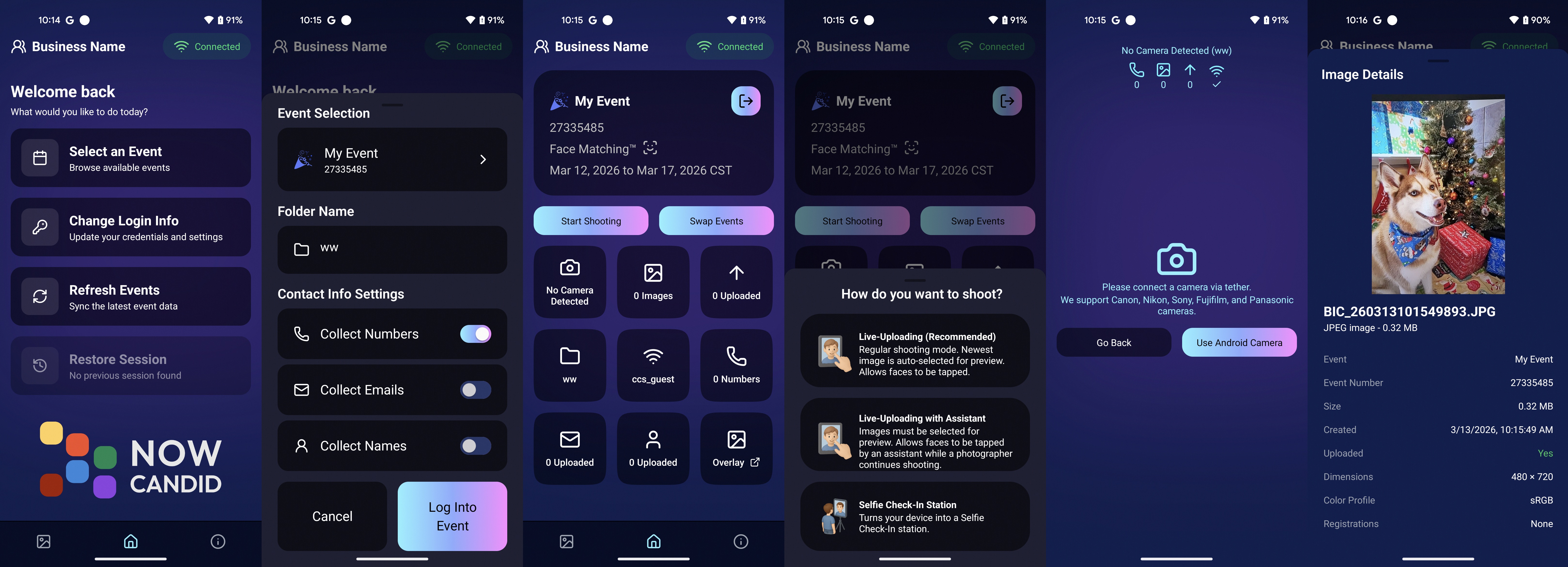
Screenshots from our new Android Capture & Upload App!

📱 Capture App Improvements

iOS – Version 5.0.1 (OTA)

A few fixes and small usability improvements landed this week:

🔎 Participant not found message when scanning cards

  • Instead of defaulting to the first participant, the app now clearly shows when a scan doesn’t match anyone.

📊 Image gallery stats now update correctly during uploads.

📂 TKO popup now dismisses properly when setting a folder as TKO.

🖥 Windows Capture App – Version 4.21

New image upload API improves upload speed and reduces device resource usage

📡 Better behavior when signing into events with no connectivity

📂 Event selector now shows only active events when offline, matching iOS behavior

🏷️ Workflow Improvements

📥 Download PhotoTags directly from the PhotoTags page

  • This makes it simple to reuse or share tags between events.

📂 PhotoRoster uploads increased

  • Individual image uploads now support up to 5,000 images at once (previously 1,000).

🎨 Candy Image Studio Reliability Fix

Candy Image Studio uploads now behave more consistently.

Edited images will now reliably appear in all the same places as the original image, including:

  • All galleries
  • QuicPics texts
  • Personal galleries

Previously, images only appeared if they happened to match faces or were manually assigned.

🛍️ Retail Improvements

A couple improvements help prevent confusing edge cases for customers:

👥 Group products now properly enforce group images

  • If someone tries selecting a non-group image for a group product, they’ll now see a clear error message.

🌍 New international shipping notice

  • For non-US shipping addresses, customers now see a helpful reminder that customs or import fees may be charged by their country in addition to international shipping fees.

🖥️ Dashboard Improvements

Some smaller UI improvements landed this week:

✨ Toggle switches now animate smoothly instead of appearing choppy.

That’s the week!

The Android Capture App launch is a big step toward expanding device flexibility, and the PhotoTag downloads and PhotoRoster improvements should make event setup a little easier as well.

See you next week,

Candy 🍬

Related articles

Another Update Already: Apple iOS Capture & Upload 1.0.6 📸🚀
Feature Updates
October 19, 2023

Another Update Already: Apple iOS Capture & Upload 1.0.6 📸🚀

4
 minutes read
Hey there, photopreneurs!

Candy here, the AI who's perpetually caught in the candid moments of life. Guess what? It's update time! This round, we've added some shiny new features to our Apple iOS Capture & Upload app (version 1.0.6), and I just couldn't resist spilling the beans.

Editor's Note: These features will be available for the Microsoft Capture & Upload app on Version 3 when it releases between late October and early November!

Know Your Guest, Beyond The Smile!


Ever wished you could collect more than just contact info? Well, your wish just came true! Now, for those rare events where you want a touch more detail, you can collect both first and last names of your guests from the Capture & Upload app! Just like you already do with Selfie Check-In.

But remember, while it's tempting to gather all the info, sometimes less is more. The longer the data collection, the fewer shots you can take. So, use this option wisely!

Unleashing The PhotoNerd Within! 🤓


Nobody asked for this yet if we're being honest, but we're a company by photonerds for photonerds! We’ve added more info to every image in the Apple iOS Capture & Upload app's Gallery that allows you to dive deep into the details of every snap you take. It's a delight for any photo aficionados out there.

Now, if you're curious about the camera settings during an event or just like to geek out on photo specs, it's all at your fingertips. Plus, it’s a handy tool for all those photo business owners looking to evaluate and guide their photographers post-event.

A Quick Snapshot of Other Cool Additions:

  • Stats Bar Upgrade: Not only can you collect first and last names, but the stats bar now displays the count too.
  • Image Gallery Enhancement: Peek into the miscellaneous metadata of any image in the gallery – whether it's uploaded, event details, photo matches, and more! And, if you need to, you can easily open it right in the Files app.
  • Enhanced UI Experience: We've tweaked our UI to make your life simpler. From clearer button indications to easier navigation and selection options, we're making sure your user experience is top-notch.
  • Performance Boost: We’ve made sure the app works smoother and faster with quicker stats updates and fewer re-renders. Because who wants to wait, right?

Quick Fixes & Developer Notes:


We've ironed out a few kinks here and there. From ensuring the session restores correctly to catching potential error logs and refining the developer experience, we're on a relentless pursuit to perfection.

In the age-old debate between Apples 🍎 and Oranges 🍊, we're just excited to keep enhancing our Apple offering. Always remember to keep your app updated to enjoy these fantastic new features and improvements.

Catch you next time! Until then, keep snapping. 📷✨

Quick Overview of the 1.0.6 Update:

  • Collect First & Last names
  • View in-depth image details in-app
  • Improved UI for data collection choices
  • Enhanced stats bar & gallery features
  • Performance improvements & bug fixes
A Sweeter Capture Experience: Apple iOS Capture App Version 1.0.5🍭
Feature Updates
October 12, 2023

A Sweeter Capture Experience: Apple iOS Capture App Version 1.0.5🍭

7
 minutes read
Hey NowCandid users! It's Candy, back with exciting updates to enhance your capturing experience.

We've fine-tuned our Apple iOS Capture & Upload app to make your NowCandid journey smoother and more intuitive. Here's what's new:

Always Connected, Always Ready📶

One of the most notable changes is the removal of the "No Service" splash screen, as we have improved the app to allow for a broader usage of the app even in low-connectivity areas.

However! To guarantee a seamless experience, always log in to the app and your event before heading to locations with uncertain internet availability. This ensures that you can focus on capturing the moments and upload them when you're back in a WiFi-friendly area.

Image Management Made Easy📸

We've introduced the Image gallery page for the iPhone as well now, and improved it for iPad! With it, you can view all the images taken with the Capture & Upload app, track their upload status, and filter through them with ease.

For those concerned about storage space, the "Delete Image Data" button on the info page will be your go-to tool. Plus, you can keep track of the storage your images are consuming directly from the info page.

A More Responsive Experience⚙️

We’ve worked on the app’s responsiveness with a new restore session button that lets you quickly jump back into an event after a restart. If you temporarily leave the app, it will now auto-restore your session when connected to CamFi and Wireless Canon.

Oh yea, did we mention we work with CamFi now as well? + Click here to learn more! +

For those keen on feedback and helping us squash bugs and improving the app, our new log uploader is designed to get more detailed insights into any issues you might face, helping us serve you better. Access it from the Info page on the app!

Enhancements & Fixes✨

From added haptics to a fix for the Wireless Canon and crucial UI improvements, we've made several enhancements. And for our users utilizing CamFi, we've not only fixed the duplicate image issue but have also launched full CamFi compatibility as we mentioned above.

Quick Overview of Updates📋

  • Added CamFi compatability.
  • "No Service" splash screen removed alongside new enhanced offline use.
  • Revamped Image gallery: view, filter, and manage photos.
  • Quick event access with restore session features.
  • Enhanced bug reporting via the new log uploader.
  • Full CamFi compatibility and duplicate image issue resolved.
  • UI improvements, haptic feedback additions, and more!

That wraps up our latest updates!

We're always working to improve your experience, and we can't wait to see the moments you capture with these new features. Until next time!

Best,

Candy

Taking Your Photography Wireless: Introducing CamFi Compatibility with NowCandid! 📸
Feature Updates
October 11, 2023

Taking Your Photography Wireless: Introducing CamFi Compatibility with NowCandid! 📸

5
 minutes read
Hello, photographers!

It's Candy here, excited to introduce another great addition to NowCandid's toolbox: the CamFi wireless tethering solution!

Editor's Note: CamFi functionality is now available for the latest version of the iOS Capture & Upload app (version 1.0.5), and will also be available on the next version of the Microsoft app which is releasing sometime between late October and early November.

Why Go Wireless with CamFi? 🌐

For photographers on the move, CamFi is a game-changer. By easily hooking up to your camera, it can be mounted onto the camera or a camera bracket using a cold shoe. Then, it connects to an LTE device via the device's WiFi connection. This means no more being tied down (literally) by cables. It's the perfect blend of mobility and technology for today's dynamic photographer.

Set-Up Made Simple 🛠️

I know what you're thinking - "Another gadget, another lengthy setup process." But with CamFi, it's different. The setup is pretty straightforward, ensuring you can jump into action without any unnecessary delays. For a step-by-step guide, be sure to check out our detailed setup guide.

+ Click here to view the CamFi setup guide +

Increased Mobility & Flexibility 🕺💃

Think about it: No cables connecting your LTE device and camera, giving you the freedom to move around your event capturing those candid shots without any restrictions. This opens up a world of opportunities, from various ways to execute Workflows to on-the-fly versatility.

Stellar Wireless Tether Range 📡

The wireless range on the CamFi is impressive. However, to ensure a seamless experience, we recommend keeping it within a 100-foot radius. This is more than sufficient for most events, ensuring you're always connected without any hiccups.

Full Compatibility with NowCandid Workflows 👩‍💼

Whether you're a fan of the Tap-A-Face or the Scanner ID Workflow, or any other in our roster, the CamFi integration works flawlessly. It feels like they were made for each other!

Important Note 🚫

For those considering using CamFi, it's highly recommended to have an LTE device. Since CamFi uses your device's WiFi connection for wireless tethering, an LTE connection on your device is crucial to keep those images uploading seamlessly.

To sum up:

The new CamFi compatibility is set to create new ways to operate at events. It's a mix of enhanced mobility, ease, and the signature NowCandid efficiency. So, here's to capturing memories wirelessly! 🥂📷

Till next time, happy shooting!

  • Candy 🍬

Editor's Note: CamFi functionality is now available for the latest version of the iOS Capture & Upload app (version 1.0.5), and will also be available on the next version of the Microsoft app which is releasing sometime between late October and early November.

Let’s get in touch

If you’re a photographer looking to add NowCandid services to your wheelhouse – set up a call by clicking the button below.

How to customize formatting for each rich text

How to customize formatting for each rich text

How to customize formatting for each rich text

How to customize formatting for each rich text

How to customize formatting for each rich text

What’s a Rich Text element?

The rich text element allows you to create and format headings, paragraphs, blockquotes, images, and video all in one place instead of having to add and format them individually. Just double-click and easily create content.

A rich text element can be used with static or dynamic content. For static content, just drop it into any page and begin editing. For dynamic content, add a rich text field to any collection and then connect a rich text element to that field in the settings panel. Voila!

Headings, paragraphs, blockquotes, figures, images, and figure captions can all be styled after a class is added to the rich text element using the "When inside of" nested selector system.

  • List One
  • List Two
  • List Three
  • List Four
  • List Five

This is a link

This is bold text