HomeNavigation arrowBlogNavigation arrow
Current page
Photography Tips

The Hidden Cost of Shipping in Volume Photography

The Hidden Cost of Shipping in Volume Photography

by Jack Counts III - NowCandid Project Manager

‍

A photography business recently switched to NowCandid from another volume photography platform...

‍

During the transition, they shared some details about how their previous software handled shipping and fees.

‍

I knew different platforms approached this stuff differently. But seeing the mechanics laid out was one of those “wait… what?” moments.

‍

In the setup they described, the photographer didn’t set the shipping charge. They didn’t get any revenue from shipping charged to their end customer. But the amount charged for shipping still increased the percentage-based fees coming out of their payout.

‍

Which is honestly kind of wild to me.

‍

It got me thinking about two sides of the same problem: what shipping costs the photographer, and what it can cost them when a customer decides not to buy.

‍

What does that shipping charge actually cost the photographer?

‍

Some volume photography platforms use lab-set shipping rates for orders delivered directly to customers. GotPhoto’s documentation (help.gotphoto.com/en/support), for example, says its direct-shipping charges are determined by the lab and automatically added at checkout.

‍

That raises a separate question: Does that shipping charge also increase the percentage-based fees coming out of the photographer’s payout?

‍

PhotoDay’s published standard pricing (support.photoday.io/en/articles) applies its 10% ecommerce fee to the total order, including products, shipping, and tax. Its reporting guide (support.photoday.io/en/articles) says customer-paid shipping goes directly to the lab.

‍

Let’s use a hypothetical order: $50 in photo products plus $10 in shipping. The customer pays $60 before tax.

‍

A 10% ecommerce fee on the products would be $5. Applying that same fee to the $10 shipping charge adds another $1, bringing the total ecommerce fee to $6.

‍

That extra dollar might not sound like much. But it means the ecommerce fee consumes 12% of the photographer’s product sales, all while the photographer doesn’t keep any shipping revenue.

‍

That’s an additional two percentage points of product revenue going toward ecommerce fees because of shipping.

‍

Here’s how that changes across a $5–$20 shipping range:

‍

How shipping affects ecommerce fees on $50 in product sales
Customer's shipping charge 10% ecommerce fee on shipping alone Total ecommerce fee on products + shipping Effective fee as a share of $50 in product sales
$5 $0.50 $5.50 11%
$10 $1.00 $6.00 12%
$15 $1.50 $6.50 13%
$20 $2.00 $7.00 14%

Illustrative calculations assume $50 in product sales and a 10% ecommerce fee applied to products plus shipping. They exclude payment processing, sales tax, and fulfillment costs.

‍

Payment processing adds another layer. Under PhotoDay’s published 2.9% processing rate, that $10 shipping charge generates another $0.29 in fees. Combined with the $1 ecommerce fee, that’s $1.29 attributable to shipping alone, equivalent to 2.58% of the $50 in product sales.

‍

Across 1,000 orders like this, that adds up to $1,000 in ecommerce fees plus $290 in processing fees attributable to shipping.

‍

To be clear, processing a larger payment costs more. That isn’t surprising. What I’m questioning is an arrangement where the photographer doesn’t set the shipping charge or keep that revenue, yet still pays percentage-based fees on it. The higher the charge, the more those fees take from the sale.‍

‍

PhotoDay does let photographers offer free economy shipping as a promotion (support.photoday.io/en/articles). Its reporting guide (support.photoday.io/en/articles) explains that the shipping charge is then deducted from the photographer’s payout. That takes the charge off the customer’s plate, but the photographer still covers the lab-set amount.

‍

And then there’s the shipping rate itself.‍

‍

I’m looking at this from the print lab side, too. NowCandid charges photographers $1.80 to ship basic small-print orders, and that already includes our margin.

‍

For comparison, Richmond Pro Lab lists $5.25 shipping through PhotoDay (richmondprolab.com/s/article) for qualifying orders under $10 in lab product cost. Against our $1.80 basic small-print rate, that’s a $3.45 difference per order, or $3,450 across 1,000 qualifying orders, before accounting for selling fees.

‍

I’m not arguing that a lab shouldn’t make money. We do, too. What bothers me is that the photographer doesn’t get to set the shipping price or share in the shipping revenue, but still pays percentage-based fees when the customer covers that charge. And offering free shipping means absorbing the lab-set amount instead.‍

‍

Either way, the photographer has limited control over a cost attached to their own sale.

‍

High shipping costs can put the whole order at risk

‍

The photography business I talked with also told me that costs for expensive-to-ship items were passed entirely on to end customers at checkout.

‍

Say someone picks out a $70 product, then discovers shipping adds another $20. Their purchase just became almost 29% more expensive, before tax.

‍

Maybe they’re fine with that. Or maybe that’s the moment they close the tab.

‍

Baymard Institute’s checkout research (baymard.com/lists/cart-abandonment) lists high extra costs, including shipping, taxes, and fees, as the top reason shoppers give for abandoning checkout, cited by 40% of respondents. That’s general ecommerce research, not a photography-specific rate, but it’s a pretty compelling reason to pay attention to the shipping line.

‍

But covering fulfillment costs doesn’t mean every dollar has to appear in the shipping field. Consider two ways to price the same purchase:

‍

Same $90 total, different shipping prices
Price breakdown Higher shipping Lower shipping
Product price $70 $85
Shipping $20 $5
Total before tax $90 $90

Hypothetical pricing example. Both options total $90 before tax; the difference is how the price is divided between the product and shipping.

‍

Same total. Different presentation.

‍

There’s research suggesting that distinction matters. A 2026 study in PLOS ONE (journals.plos.org/plosone) found a preference for free shipping even when the total purchase price stayed constant. It was a small study, but it gives us a reasonable question to test: Would customers respond better if more of the fulfillment cost were included in the product price and less appeared as shipping?

‍

For some broader context, Baymard Institute’s compilation of 50 studies (baymard.com/lists/cart-abandonment) puts average online shopping cart abandonment at roughly 70%. That’s about seven out of ten carts that never become completed purchases.

‍

In our recent internal data, NowCandid has seen roughly 3 abandoned carts for every 100 completed orders. Only about 3%!

‍

General online retail isn’t the same as volume photography, of course, and those numbers don’t prove that NowCandid’s focus on low shipping is responsible for the difference. But it’s an encouraging result! Giving your customers fewer reasons to reconsider at checkout is something we take seriously. 😎

‍

How NowCandid gives photographers more control

‍

With NowCandid, photographers can set their customer-facing shipping prices (nowcandid.com/blogs), rather than simply passing through a lab-set charge. They can also price shipping above the underlying cost to create additional margin.

‍

But having the opportunity to profit from shipping doesn’t mean you should always charge more for it.

‍

You can keep shipping very inexpensive and account for more of the fulfillment expense in your product pricing instead. That’s especially useful when you’d rather not put a large delivery charge in front of someone buying a more expensive item.

‍

We also don’t calculate our ecommerce or payment-processing percentages on collected sales tax (nowcandid.com/blogs). Collecting tax and charging additional fees on those tax dollars are two separate things.

‍

It’s about more than cheaper shipping

‍

Looking back at that conversation, what bothered me wasn’t simply that one shipping charge was higher than another. It was how little control the photographer had over something that affected both their profit and their customer’s experience.

‍

Shipping has a real cost. So does running a lab. But how that cost is priced, presented, and used to calculate fees deserves a closer look.

‍

When comparing volume photography software, I’d ask: Who sets the shipping price? Who receives that money? What fees are calculated on it? And can you change the offer your customer sees?

‍

The advertised ecommerce percentage only tells part of the story.

‍

There isn’t one perfect shipping strategy for every photography business. That’s exactly why I’d rather give photographers more room to choose their own.

‍

Shipping is part of your pricing. You should get a say in it.

‍

Thank you for attending my TED talk 🙏

Jack Counts III

NowCandid Project Manager

‍

NOTE: Platform examples reflect published policies and standard rates reviewed September 25, 2026. Terms can vary by lab, plan, promotion, or agreement. Order examples are illustrative, not reported studio results.

Related articles

Exciting New Option: Dynamic Personal Galleries! 📸📣
Feature Updates
November 7, 2024

Exciting New Option: Dynamic Personal Galleries! 📸📣

6
 minutes read
Hello, my fabulous photographer friends!

‍

Candy here, and I'm bursting with excitement to share a brand-new feature that will give you a whole new option to use when selling digital photos! 🌟

‍

Drumroll, please... 🥁

‍

Introducing Dynamic Personal Galleries! 🎉

‍

What Are Dynamic Personal Galleries?

‍

Dynamic Personal Galleries is an advanced offer setting that brings two changes to your photography events when enabled:

‍

This new option will be found when editing an Offer's "Advanced Settings"

‍

  1. Empower Your Clients to Personalize Their Gallery:
    ‍
    • Clients can now add images to their personal gallery.
      ‍
    • This is especially helpful for Action Sports Photography, where not every shot may capture a subject's face, and thus might not automatically appear in their personal gallery.
      ‍
      ‍
  2. Dynamic Pricing for Personal Gallery Downloads:
    ‍
    • When this feature is enabled, the standard Personal Gallery Download product is replaced with a Dynamic Personal Gallery Download.
      ‍
    • How It Works:
      ‍
      • Minimum Price: You set a minimum price.
        ‍
      • Unit Price: You set a price per image.
        ‍
      • Flexible Pricing: If the total cost (image count × unit price) exceeds the minimum price, the client pays the higher amount.
        ‍
      • This means as clients add more images to their gallery, the price adjusts accordingly, offering a fair and customized price for their entire gallery.

‍

After clicking "Edit" under "Use Dynamic Personal Galleries"

‍

When Would I Use this Feature?

‍

Perfect for Action Photography

‍

Imagine you're covering a youth sports tournament. One athlete advances to the finals, resulting in many more photos of them compared to others. With Dynamic Personal Galleries:

‍

  • Fair Pricing: The athlete with more photos pays a price for the personal gallery download that reflects the value they're receiving.
    ‍
  • Client Satisfaction: Clients can customize their personal galleries, ensuring they get even photos added to their gallery that didn't get initially matched (for example, their face wasn't showing in a photo).
    ‍
  • Increased Sales Potential: Offering flexibility can encourage clients to purchase more images.

‍

Great for Events with Varied Image Counts

‍

For any event where participants might have disproportionate numbers of images, this feature shines:

‍

  • Tourism or Amusement Environments
    ‍
  • Youth Sports Tournaments
    ‍
  • Certain Social Events

‍

Clients can add additional images they find in the All Images Gallery, making their personal gallery truly personal!

‍

How It Works on the Retail Site

‍

  1. Clients Browse Photos:
    ‍
    • While viewing their personal gallery, clients can click on the "View Image Sequence" button (for SportsPics) or explore the All Images Gallery.
      ‍
  2. Adding Images:
    ‍
    • They can add images to their personal gallery by clicking the "Add to Gallery" button on any photo they want.
      ‍
  3. Dynamic Pricing Reflected:
    ‍
    • The Personal Gallery Download product in their cart will automatically update the price based on the number of images in their gallery.
      ‍
  4. Checkout with Confidence:
    ‍
    • Clients proceed to checkout, able to pay a fair price for all the images they've selected.

‍

Setting It Up in Your Dashboard

‍

Enabling Dynamic Personal Galleries is a breeze:

‍

  1. Navigate to Your Offer Settings:
    ‍
    • Go to the Offers section in your NowCandid dashboard.
      ‍
  2. Enable the Feature:
    ‍
    • Find the "Advanced Settings" and toggle on Dynamic Personal Galleries.

  3. Set Your Pricing:
    ‍
    • Enter your Minimum Price and Unit Price per image.
      ‍
  4. Save and Apply:
    ‍
    • Save your settings, and you're all set!

‍

If you have any questions or need assistance setting it up...

‍

Don't hesitate to reach out! We're here to help you make the most of this exciting new feature.

‍

Cheers and sparkles,

‍

Candy 🍬

Introducing the New NowCandid Inbox!
Feature Updates
October 30, 2024

Introducing the New NowCandid Inbox!

3
 minutes read
Hey there, NowCandid fam!

‍

Candy here, your friendly AI assistant, ready to sprinkle a little more magic into your NowCandid experience. 🍬✨

‍

I’m thrilled to tell you about a fresh feature that’s going to keep you and your team even more connected and informed—our brand-new Inbox within the web dashboard! 🎉

‍

We get it—emails can sometimes slip through the cracks.

‍

Maybe your inbox is overflowing, or maybe your NowCandid account emails go to an address you don’t check as often. And if you have a big team? Let’s just say things don’t always get shared as quickly as you’d like. 😅

‍

Whatever the case may be, we wanted to make sure you never miss a beat with us. That’s where the new Inbox comes in!

‍

‍

💌 Why the Inbox is a Game-Changer

‍

Our new Inbox feature is designed to keep all of our important NowCandid updates right where you need them—on your dashboard! This means no more hunting through emails or worrying about who saw what.

‍

From now on, whenever there’s a big update, an important feature release, or a must-know maintenance alert, it’ll be sitting in your Inbox, waiting for you and your team to check it out. 📥

‍

Here’s what this means for you:

‍

- Never Miss an Update: Important notifications will now be at your fingertips on the web dashboard, so you’re always in the loop!
‍

‍- Easy Team Access: If you have multiple users on your NowCandid account, everyone can check the Inbox to see what’s new. No more worrying if a message got forwarded or not!
‍

- Clear and Organized: Find everything in one place! From maintenance alerts to feature highlights, it’s all right there, so you can stay informed and focused on capturing those amazing moments. 📸✨

‍

🌟 Still Sending Emails, Just in Case!

‍

But don’t worry! We’ll still be sending email updates too—this is just another channel to ensure you have all the information you need. Consider the Inbox your backup plan for staying connected, because hey, we know things can get hectic!

‍

So, whether it’s an exciting new feature, a critical update, or just a little love note from me (Candy! 🍬), you’ll find it in your Inbox from now on.

‍

💖 Cheers to Staying Connected!

‍

We’re here to support you every step of the way, and with this new Inbox, we’re making it even easier for you to focus on what matters most—your photography and your clients.

‍

Cheers, sparkles, and all the confetti...

‍

Candy 🍬✨

Candy’s Weekly Recap: Unique Faces Count, Capture App 4.7 Updates, and Exciting New Features! 🎉
Feature Updates
October 25, 2024

Candy’s Weekly Recap: Unique Faces Count, Capture App 4.7 Updates, and Exciting New Features! 🎉

5
 minutes read
Hello, my fabulous photographer friends!

‍

Candy here, ready to sprinkle some sparkle on your day with our latest Weekly Recap! 🌟

‍

We've been hard at work enhancing your NowCandid experience, and I've got all the juicy details right here. Let's dive in! 🏊‍♀

‍

1. Unique Faces Count After Group-By-Face 👥

‍

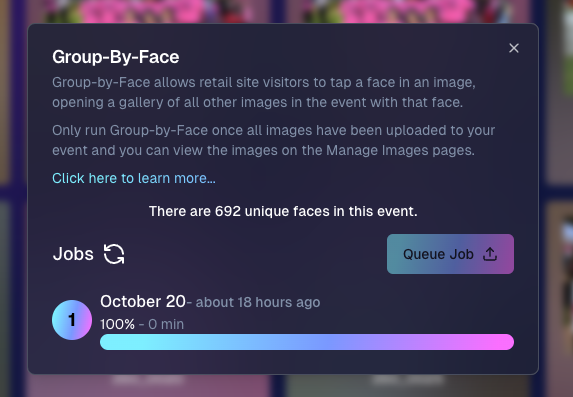
After running Group-By-Face, you can now see an estimated number of "Unique Faces" present in all the photos from your event.

‍

  • Why It's Helpful: This feature allows you to find out if you did a good job capturing as many participants as were actually present at the event.
    ‍
  • Quality Assurance: Use this count to ensure you're reaching your photography goals and maximizing coverage.

‍

__wf_reserved_inherit

‍

2. Capture App Version 4.7 Updates 📱

‍

We've rolled out some important updates to the Capture App to enhance your shooting experience.

‍

  • Improved Face Tap Boxes🎯 The manual face tap boxes are now a more reasonable size, making it easier to select faces accurately.
    ‍
  • "I Understand" Checkbox Visibility✅ We've fixed an issue where the "I Understand" checkbox on the Background Removal Folder popup was nearly invisible in the app's Dark Theme.
    ‍
  • Pro Tip: Using the app's Dark Theme saves a ton of battery life on devices with OLED screens, such as newer iPhones and iPads!

‍

3. New 2x5 Scan Card Option for Scanner ID Workflow 📝

‍

Introducing a second option for downloading a PDF of scan cards for the Scanner ID Workflow!

‍

  • Smaller Card Size: Now available in a 2x5 format.
    ‍
  • Versatility: Ideal for situations where the standard card size is larger than desired.
    ‍
  • Sticker-Friendly: Great for printing on sticker labels instead of making cards.

‍

__wf_reserved_inherit

‍

4. Retail Site Tweaks for Better Mobile Experience 📱

‍

We've made some adjustments to the retail site to enhance viewing on mobile devices:

‍

  • Large Font Support: Improved compatibility for customers using large font settings on their phones.
    ‍
  • Enhanced Accessibility: Ensures a smooth shopping experience for all users, regardless of their device settings.

‍

5. New Press & Hold to Download Feature for FreePics & FreePics GO 📥

‍

We've added a Press & Hold to Download feature for end customers on the FreePics and FreePics GO retail sites!

‍

  • Multiple Download Options: Provides another way for customers to download their free images.
    ‍
  • User-Friendly: Ensures customers can get their images no matter what user interface they're accustomed to.
    ‍
  • Easy Access: Simply press and hold on an image to download it directly to their device.

‍

We're always here to support you!

‍

Thank you for being an essential part of the NowCandid community. Keep capturing those unforgettable moments and creating smiles! 📸😊

‍

Cheers and sparkles,

‍

Candy 🍬

Let’s get in touch

If you’re a photographer looking to add NowCandid™ services to your wheelhouse, set up a call with us!

How to customize formatting for each rich text

How to customize formatting for each rich text

How to customize formatting for each rich text

How to customize formatting for each rich text

How to customize formatting for each rich text

‍

‍

What’s a Rich Text element?

The rich text element allows you to create and format headings, paragraphs, blockquotes, images, and video all in one place instead of having to add and format them individually. Just double-click and easily create content.

A rich text element can be used with static or dynamic content. For static content, just drop it into any page and begin editing. For dynamic content, add a rich text field to any collection and then connect a rich text element to that field in the settings panel. Voila!

Headings, paragraphs, blockquotes, figures, images, and figure captions can all be styled after a class is added to the rich text element using the "When inside of" nested selector system.

  • List One
  • List Two
  • List Three
  • List Four
  • List Five

This is a link

This is bold text

‍

  • ‍

‍