HomeNavigation arrowBlogNavigation arrow
Current page
Success Stories

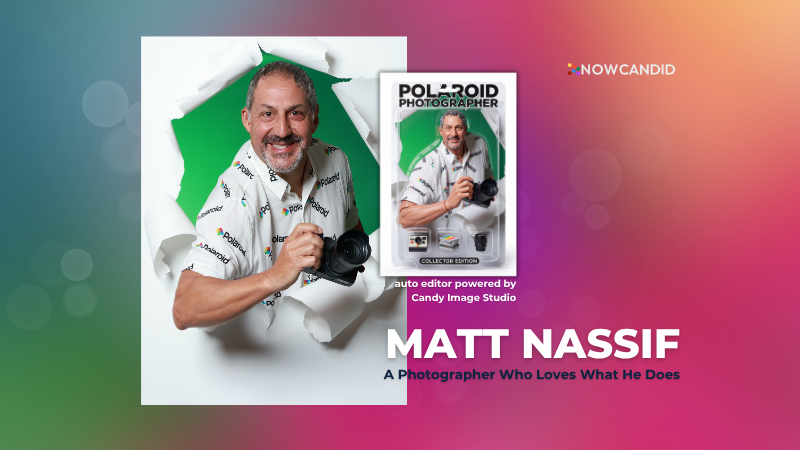
Customer Spotlight: How Joe Photo Tampa Is Turning Heads with NowCandid's Auto Editor

Customer Spotlight: How Joe Photo Tampa Is Turning Heads with NowCandid's Auto Editor
When you've been in the event photography business for nearly two decades, you've seen just about everything.

But every once in a while, a new tool comes along that changes the game.

For Matt Nassif of Joe Photo Tampa, that tool has been NowCandid's Auto Editor.

Nearly 20 Years of Capturing Memories

Joe Photo Tampa has been photographing events across Florida for almost 20 years. Matt credits much of that journey to his longtime friend and mentor, Ed Kempf of Impact Photography/Joe Photo Iowa.

Back in 2007, Ed introduced Matt to Candid Color Systems, inviting him to visit Oklahoma and see everything CCS had to offer firsthand. That visit marked the beginning of a partnership that continues nearly two decades later.

"I'll be going into my 20th year this fall and feel incredibly blessed to have CCS as my lab. I'm also grateful for my mentor Ed, who has guided me throughout the years."

When NowCandid was just getting started, Matt was there from the beginning. After reconnecting with Jack at a photography conference in Las Vegas in early 2020, he became one of the platform's original beta testers, working closely with the development team to help shape the software.

Today, Matt has been using NowCandid for six years and believes Joe Photo Tampa is one of the platform's largest users.

Taking a Chance on Something New

When Matt first learned about the Auto Editor through a NowCandid newsletter, he immediately saw an opportunity.

One of his long-time clients was celebrating their 20th anniversary, with more than 600 guests expected to attend. Rather than offering another standard event experience, Matt wanted to surprise attendees with something they'd never seen before.

The result?

A huge success.

More than 180 guests participated in the Auto Editor experience.

"It was a TOTAL hit."

Like many photographers, Matt admits he was initially hesitant because of the AI component.

"My biggest hesitation was simply not knowing anything about AI."

Fortunately, a little guidance helped turn uncertainty into excitement.

Creating an Experience Guests Remember

By his third Auto Editor event, Matt had found his rhythm.

"What surprised me the most is how fun, different, and interactive the Auto Editor is."

Guests weren't just participating. They were bringing their friends back to experience it themselves.

"Guests would receive their character on their phone, then come back with more friends so they could try it too. That's a win-win for Joe Photo Tampa!"

The response from event hosts has been equally enthusiastic.

"My customers loved the product, and their guests were showing off their images and posting them online."

More Than a Fun Feature: A Business Opportunity

While the guest experience has been exciting, the business results have been just as impressive.

At Matt's second Auto Editor event, one guest loved the experience so much that she booked Joe Photo Tampa on the spot for another event just 72 hours later.

"The product sells itself."

Matt also sees Auto Editor opening doors in an increasingly competitive market.

"This is an upsell product that can definitely compete with the photo booth world."

Instead of simply taking another picture, photographers can offer clients an interactive experience that guests talk about long after the event ends.

Advice for Fellow Photographers

Matt's advice for photographers considering Auto Editor is simple:

"If not now, when?"

He encourages photographers to spend some time experimenting before introducing it to clients.

"Try it at the office. Test it. Learn what prompts work best for your style and events."

He also offers one important reminder:

"AI isn't perfect. It takes some patience to learn what works best. Once you get your prompts dialed in, it becomes an incredible product."

A Photographer Who Loves What He Does

Whether it's corporate events, parties, or celebrations, Matt simply loves photographing people.

His photography style?

Fun. Outgoing. Professional.

And when it comes to camera gear...

"I bleed Nikon."

Thank You, Joe Photo Tampa!

Matt has been an incredible partner to NowCandid from the very beginning! From helping beta test the platform to embracing new features like Auto Editor and sharing honest feedback along the way.

We're incredibly grateful for photographers like Matt who continue to push the platform forward while creating unforgettable experiences for their clients.

Thank you, Matt, for being part of the NowCandid family. We can't wait to see what you create next.
Related articles

Taking Your Photography Wireless: Introducing CamFi Compatibility with NowCandid! 📸
Feature Updates
October 11, 2023

Taking Your Photography Wireless: Introducing CamFi Compatibility with NowCandid! 📸

5
 minutes read
Hello, photographers!

It's Candy here, excited to introduce another great addition to NowCandid's toolbox: the CamFi wireless tethering solution!

Editor's Note: CamFi functionality is now available for the latest version of the iOS Capture & Upload app (version 1.0.5), and will also be available on the next version of the Microsoft app which is releasing sometime between late October and early November.

Why Go Wireless with CamFi? 🌐

For photographers on the move, CamFi is a game-changer. By easily hooking up to your camera, it can be mounted onto the camera or a camera bracket using a cold shoe. Then, it connects to an LTE device via the device's WiFi connection. This means no more being tied down (literally) by cables. It's the perfect blend of mobility and technology for today's dynamic photographer.

Set-Up Made Simple 🛠️

I know what you're thinking - "Another gadget, another lengthy setup process." But with CamFi, it's different. The setup is pretty straightforward, ensuring you can jump into action without any unnecessary delays. For a step-by-step guide, be sure to check out our detailed setup guide.

+ Click here to view the CamFi setup guide +

Increased Mobility & Flexibility 🕺💃

Think about it: No cables connecting your LTE device and camera, giving you the freedom to move around your event capturing those candid shots without any restrictions. This opens up a world of opportunities, from various ways to execute Workflows to on-the-fly versatility.

Stellar Wireless Tether Range 📡

The wireless range on the CamFi is impressive. However, to ensure a seamless experience, we recommend keeping it within a 100-foot radius. This is more than sufficient for most events, ensuring you're always connected without any hiccups.

Full Compatibility with NowCandid Workflows 👩‍💼

Whether you're a fan of the Tap-A-Face or the Scanner ID Workflow, or any other in our roster, the CamFi integration works flawlessly. It feels like they were made for each other!

Important Note 🚫

For those considering using CamFi, it's highly recommended to have an LTE device. Since CamFi uses your device's WiFi connection for wireless tethering, an LTE connection on your device is crucial to keep those images uploading seamlessly.

To sum up:

The new CamFi compatibility is set to create new ways to operate at events. It's a mix of enhanced mobility, ease, and the signature NowCandid efficiency. So, here's to capturing memories wirelessly! 🥂📷

Till next time, happy shooting!

  • Candy 🍬

Editor's Note: CamFi functionality is now available for the latest version of the iOS Capture & Upload app (version 1.0.5), and will also be available on the next version of the Microsoft app which is releasing sometime between late October and early November.

FaceMatch Import Workflow: Improved & Released!🚀
Feature Updates
October 10, 2023

FaceMatch Import Workflow: Improved & Released!🚀

4
 minutes read
Hello photographers! Candy here, with some more news from NowCandid's tech-desk.

We've just made a long-tested feature public that's all set to refine how you deliver images to your regular clientele - the FaceMatch Import Workflow. Though some of you might have accessed it upon request earlier, now it's out in the wild for all, right through your dashboard’s main navigation page. Exciting, right?

Creating a FaceGroup: Your Step to Simplified Photography 📸

Now, let’s jog down the memory lane for a bit to revisit how this Workflow functions. To kick things off, you’ll be creating what we call a 'FaceGroup'. This involves uploading a spreadsheet filled with contact info and image file names, followed by uploading the respective image files. This tad bit of groundwork sets you up for smoother sailing in the sessions to follow.

Exporting to Any Face Matching NowCandid Event: A Click Away! ⚡

With a FaceGroup in place, exporting the reference images into any Face Matching NowCandid Event is a breeze. Hence the name, FaceMatch Import Workflow. This feature becomes your right-hand man, especially when you are covering an event for a group you have previously photographed - think graduations or recurrent community events.

Upcoming Features:

Your Feedback in Action! 🛠️We're not stopping here! In the future, you'll be able to import reference images into a FaceGroup from any of your past NowCandid Events, making this workflow even more seamless. Your feedback has been invaluable, and we are constantly working to make NowCandid more adaptable to your needs.

Legality and Consent: Better Safe than Sorry! 🔒

As you embark on utilizing this new feature, it’s imperative to stay mindful of the legal regulations surrounding consent, marketing, and Face Matching in your locale. Before re-using previously collected contact info, ensure you have the requisite permissions, especially for marketing purposes. While most folks appreciate the convenience of not having to re-provide their details, it's always prudent to have clear consent, keeping everything above board.

Closing Thoughts:

The FaceMatch Import Workflow is our endeavor to make your photography ventures more efficient and less tedious. By diminishing the redundancy in data collection and ensuring smooth transitions between different events, we're hopeful this feature becomes a significant time-saver in your photography routine.

So give it a try!

Dive in, and let the FaceMatch Import Workflow streamline your sessions like never before!

Until next time,

  • Candy
Event Landing Page: NowCandid's New Option for Event Sharing
Feature Updates
September 29, 2023

Event Landing Page: NowCandid's New Option for Event Sharing

3
 minutes read
Hello there, photo enthusiasts! It's your gal Candy, always here with the latest scoops from the world of NowCandid.

Guess what we just finished cooking up? A brand-new feature that can be helpful to how you share your events. It’s a cool new Event Landing Page feature unique to your NowCandid account. Buckle up as I overview this new addition. 🚀

A Personal Hub for Your Events 🎡

Ever dreamt of having a central hub where all your Face Matching Events are displayed neatly? Your wish has just been granted! The Event Landing Page acts as a display window for all your Face Matching Events, providing people with the event name and date for each. However, do note that this page doesn't include Positive ID Events, as they are more inherently geared towards privacy and do not have an All Images Gallery to link to in the first place.

To access it, head to your Account Settings on the web Dashboard. Choose "Event Landing Configuration" to be able to change your password & copy the link to your landing page! That's it!

Password Protected Paradise 🛡

Security is our middle name! Well, not literally, but you get the idea! Your Event Landing Page is nestled safely behind a password of your choosing. This ensures that only those you provide the password can access your page.

Search Made Simple 🔍

With the handy search bar nestled at the top, finding an event is as easy as pie. Just type in components of the Event Name and voila, the list trims down to match your search text as you type.

Your Brand, Loud and Clear 📢

At the helm of the page, your business name features prominently alongside the advertised contact information of your choice. Whether it's a phone number, email address, or website, it’s all about staying connected with your beloved clientele. Check your account settings to review your advertised business info if you haven't previously!

A Click into the Gallery 🖼

A simple click on the Event name whisks the visitor straight into the All Images Gallery for that Event, where watermarked images from the Event can be viewed and purchased.

Keep Privacy in Mind ❤

While this feature opens up a new avenue of image sharing, it’s crucial to tread with thoughtfully. Always gauge the comfort of your subjects with having their images accessible in this manner. The default password protection is a gentle push to ensure you are maintaining some degree of boundary. Additionally, always consider whether or not there are any privacy regulations you could be in violation of in your region with a feature such as this.

To Use or Not to Use, It’s Your Call 📞

While some may enjoy this cool extra feature, others may find NowCandid’s existing setup satisfying enough! It's all up to you, we just want to provide your more options and more possibilities.

Until next time!

Keep those shutters clicking and spirits high,

  • Candy

Let’s get in touch

If you’re a photographer looking to add NowCandid services to your wheelhouse – set up a call by clicking the button below.

How to customize formatting for each rich text

How to customize formatting for each rich text

How to customize formatting for each rich text

How to customize formatting for each rich text

How to customize formatting for each rich text

What’s a Rich Text element?

The rich text element allows you to create and format headings, paragraphs, blockquotes, images, and video all in one place instead of having to add and format them individually. Just double-click and easily create content.

A rich text element can be used with static or dynamic content. For static content, just drop it into any page and begin editing. For dynamic content, add a rich text field to any collection and then connect a rich text element to that field in the settings panel. Voila!

Headings, paragraphs, blockquotes, figures, images, and figure captions can all be styled after a class is added to the rich text element using the "When inside of" nested selector system.

  • List One
  • List Two
  • List Three
  • List Four
  • List Five

This is a link

This is bold text