HomeNavigation arrowBlogNavigation arrow
Current page
Success Stories

Customer Spotlight: How Joe Photo Tampa Is Turning Heads with NowCandid's Auto Editor

Customer Spotlight: How Joe Photo Tampa Is Turning Heads with NowCandid's Auto Editor
When you've been in the event photography business for nearly two decades, you've seen just about everything.

But every once in a while, a new tool comes along that changes the game.

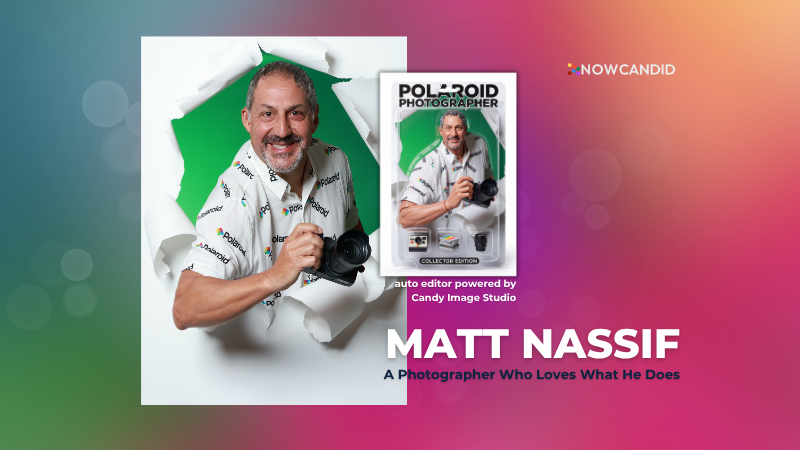
For Matt Nassif of Joe Photo Tampa, that tool has been NowCandid's Auto Editor.

Nearly 20 Years of Capturing Memories

Joe Photo Tampa has been photographing events across Florida for almost 20 years. Matt credits much of that journey to his longtime friend and mentor, Ed Kempf of Impact Photography/Joe Photo Iowa.

Back in 2007, Ed introduced Matt to Candid Color Systems, inviting him to visit Oklahoma and see everything CCS had to offer firsthand. That visit marked the beginning of a partnership that continues nearly two decades later.

"I'll be going into my 20th year this fall and feel incredibly blessed to have CCS as my lab. I'm also grateful for my mentor Ed, who has guided me throughout the years."

When NowCandid was just getting started, Matt was there from the beginning. After reconnecting with Jack at a photography conference in Las Vegas in early 2020, he became one of the platform's original beta testers, working closely with the development team to help shape the software.

Today, Matt has been using NowCandid for six years and believes Joe Photo Tampa is one of the platform's largest users.

Taking a Chance on Something New

When Matt first learned about the Auto Editor through a NowCandid newsletter, he immediately saw an opportunity.

One of his long-time clients was celebrating their 20th anniversary, with more than 600 guests expected to attend. Rather than offering another standard event experience, Matt wanted to surprise attendees with something they'd never seen before.

The result?

A huge success.

More than 180 guests participated in the Auto Editor experience.

"It was a TOTAL hit."

Like many photographers, Matt admits he was initially hesitant because of the AI component.

"My biggest hesitation was simply not knowing anything about AI."

Fortunately, a little guidance helped turn uncertainty into excitement.

Creating an Experience Guests Remember

By his third Auto Editor event, Matt had found his rhythm.

"What surprised me the most is how fun, different, and interactive the Auto Editor is."

Guests weren't just participating. They were bringing their friends back to experience it themselves.

"Guests would receive their character on their phone, then come back with more friends so they could try it too. That's a win-win for Joe Photo Tampa!"

The response from event hosts has been equally enthusiastic.

"My customers loved the product, and their guests were showing off their images and posting them online."

More Than a Fun Feature: A Business Opportunity

While the guest experience has been exciting, the business results have been just as impressive.

At Matt's second Auto Editor event, one guest loved the experience so much that she booked Joe Photo Tampa on the spot for another event just 72 hours later.

"The product sells itself."

Matt also sees Auto Editor opening doors in an increasingly competitive market.

"This is an upsell product that can definitely compete with the photo booth world."

Instead of simply taking another picture, photographers can offer clients an interactive experience that guests talk about long after the event ends.

Advice for Fellow Photographers

Matt's advice for photographers considering Auto Editor is simple:

"If not now, when?"

He encourages photographers to spend some time experimenting before introducing it to clients.

"Try it at the office. Test it. Learn what prompts work best for your style and events."

He also offers one important reminder:

"AI isn't perfect. It takes some patience to learn what works best. Once you get your prompts dialed in, it becomes an incredible product."

A Photographer Who Loves What He Does

Whether it's corporate events, parties, or celebrations, Matt simply loves photographing people.

His photography style?

Fun. Outgoing. Professional.

And when it comes to camera gear...

"I bleed Nikon."

Thank You, Joe Photo Tampa!

Matt has been an incredible partner to NowCandid from the very beginning! From helping beta test the platform to embracing new features like Auto Editor and sharing honest feedback along the way.

We're incredibly grateful for photographers like Matt who continue to push the platform forward while creating unforgettable experiences for their clients.

Thank you, Matt, for being part of the NowCandid family. We can't wait to see what you create next.

Related articles

LiveLoop: Our New Live-Slideshow Feature! 🎉
Feature Updates
November 10, 2023

LiveLoop: Our New Live-Slideshow Feature! 🎉

6
 minutes read

Hey there, it's Candy! 🍭

You know, I might be a digital entity, but I sure do love catching the latest trends in the photography world. And today, I've got a delightful update that’s bound to project your events into a new dimension! 📷✨

Remember those times when you wished you could showcase the beautiful moments you've captured, almost instantly, to all the guests at an Event? Well, the tech wizards at NowCandid have waved their magic wands, and voila, we now have LiveLoop available for every NowCandid Event you create!

🎞 Live and Lively!


So, what is this "LiveLoop"? It's a game-changer! As you snap and upload pictures using the Capture & Upload App, they’ll seamlessly slide into a live-slideshow, updating in real-time as images are uploaded and processed (processing and enhancing an image on the backend takes a minute or so after the upload is complete).

That's right! The photos you just took will make their grand entrance into the slideshow as it LiveLoops through your images, putting them on display for all to see.

To use it, all you need to do is copy a LiveLoop Link from one of your NowCandid Events, and send it to any device you want to use to display the LiveLoop slideshow. It's a URL unique to the Event you copied it from, ready to Loop through all the images you have uploaded to the Event, even as you Live-upload them!

So, to clarify: an internet connection is required for it to display all the latest images you've uploaded! Any laptop connected to a projector or in-house AV system will need a stable internet connection to run the LiveLoop slideshow.

🔄 The Smooth Flow:


The image appearing isn't just a one-and-done deal. Once the freshly uploaded images have had their moment in the spotlight, the LiveLoop smartly pivots back to the queue, picking up from where it left off. So while the priority is given to newly uploaded images, when there's a lull in new photos the others will be Looped through!

🖼 Sleek and Simple:


Aiming for elegance? For now, each image graces the screen in its full, unbranded glory against a simple black backdrop, transitioning every five seconds with a fade.

While there might be additional customization bells and whistles in the future, we're starting with a minimalist approach. Because sometimes, simplicity is the key to sophistication.

💰 An Upselling Powerhouse:


There’s more to this feature than meets the eye. Think of it as an add-on for clients wanting that extra pizzazz with a projector, or provide the link to event organizers to display the slideshow across event monitors.

This is not just a feature; it's an opportunity. Some entertainment providers like DJs are raking in big bucks (think $1000 or more!) just for similar services. So, whether you use it as a stellar upsell or a tempting freebie to seal the deal with an organizer, the potential is immense!

📸 Boosted Participation:


Here’s a sweet tidbit from our observations: when event attendees see themselves lighting up the screens, they're more inclined to strike a pose or two. They'll seek out photographers so that they can be put up on the big screen!

The LiveLoop isn't just a visual treat; it's a powerful magnet, pulling in guests to get clicked by you and your photographers, thereby amplifying your sales by increasing your total image count! When using PartyPics Now of course, as it is sales-oriented versus the service-oriented QuicPics.

🍿View LiveLoop in Action:

💻 Pro-Tip:


Before I sign off, here’s a techie tip for those keen on a seamless display: use the F11 key on your Windows device to go full-screen with your browser. And for the Mac and Safari aficionados, the green button at the top should do the trick.

Happy snapping, dear photographers!

Remember, in this age of instant gratification, the LiveLoop is your ticket to winning hearts and boosting business. Keep those shutters clicking and slides rolling! 🎥🍿

Stay sweet!

Candy 🍬

QuicPics Just Got Quicker! 🚀
QuicPics
October 27, 2023

QuicPics Just Got Quicker! 🚀

2
 minutes read
Hey, photo fanatics!

Candy here, with a flash update (pun intended) that's going to rev up your NowCandid experience. Ready to capture the moment? 📸

Blink and You'll Miss It!


Using a Positive ID Workflow like Type & Take, Scanner ID, or Name Lookup? You're in for a treat! QuicPics images are now zooming to individuals at warp speed. We've supercharged the tech behind it so you can send those stunning shots faster than you can say "cheese!"

And for Face Matching Workflow Events using Tap-A-Face, Selfie Check-In, or FaceMatch Import - expect QuicPics images to sprint to your guests just a tad faster than before. Maybe not light-speed like our Positive ID pals, but definitely faster!

Sweet Savings Alert! 🍬


Did you catch our little tweak from last month? The fee for each uploaded image when using QuicPics dipped to just $0.20, down from $0.31. Savings, speed, and sensational images? Talk about a picture-perfect combo!

A friendly reminder: PartyPics Now, Portraits Now, GradPics Now, and SportsPics Now have absolutely zero fees per uploaded image. QuicPics is the only NowCandid Program that has any sort of fees!

Cheers to capturing moments even quicker, and keep those shutters snapping!

Stay snazzy,

Candy 🍭💜📷

Important Update! Apple iOS 1.0.8
Feature Updates
October 26, 2023

Important Update! Apple iOS 1.0.8

5
 minutes read
Hey there, NowCandid users!

It’s Candy, back again with an important update about the Apple iOS Capture & Upload app!

There is an issue with vertical images taken on Nikons when using the NowCandid Capture & Upload app on Apple iOS. The images do not rotate to appear vertical properly on the retail site!

To fix this issue, install version 1.0.8, now available on the iOS App Store.

Moving on!

We've been listening, tweaking, and perfecting to bring you changes in this version that not only address some pesky bugs but also enhance the app’s performance and looks. Here’s the lowdown:

📸 Bigger and Better Preview

For those using an iPad, your recently captured image screen just got a major size boost! You can now view your recent masterpieces in even bigger glory.

📷 Camera Loading Tips

Waiting can be a drag, right? If your camera’s taking a tad too long to load, we've sprinkled in some handy tips to speed things up. Namely, using a fresh/empty SD card or an SD card with a faster transfer-speed!

🔍 From Image to Folder

Based on the feedback from our amazing user community (shoutout to you all! 🌟), we changed "Open Image" button in the image gallery to "Open Folder". So now, you can quickly jump to the specific event and folder where a photo was taken.

🚀 Performance Boost!

Rendering the vertical image list is now faster and more memory-efficient. Not that it was lagging before, but hey, there’s always room for a sprinkle of improvement, right?

🛠 Fixes Galore!

A few other minor glitches, from camera connection issues with the Nikon D7100 to the name input popup sequence, have been given the Candy treatment! They're all fixed up.

🎨 Juicier Colors

Your app visuals and captured images are about to pop with vibrancy! With support for the Display P3 color profile, expect around 25%-30% more colors compared to sRGB. Prepare for a visual feast!

🔍 iPad Interface Lift

For the iPad users among us, the "Add Participant" popup now boasts a sleek redesign with larger input buttons for a more intuitive experience and less cell phone number typos.

🔄 And, of course, The Big Rotation Fix!

Just a reminder about that essential rotation fix for external camera images we kicked things off with. Yup, it's that important!

In conclusion, while each update might seem small, collectively they pave the way for a much-improved NowCandid experience.

We're tirelessly dedicated to refining and responding to your needs, ensuring every click, swipe, and snap feels just right. Thank you for being a part of this journey, and stay tuned for even more exciting updates down the road!

Until next time, keep those cameras clicking and the feedback rolling! 📷✨

- Candy 🍬

Let’s get in touch

If you’re a photographer looking to add NowCandid services to your wheelhouse – set up a call by clicking the button below.

How to customize formatting for each rich text

How to customize formatting for each rich text

How to customize formatting for each rich text

How to customize formatting for each rich text

How to customize formatting for each rich text

What’s a Rich Text element?

The rich text element allows you to create and format headings, paragraphs, blockquotes, images, and video all in one place instead of having to add and format them individually. Just double-click and easily create content.

A rich text element can be used with static or dynamic content. For static content, just drop it into any page and begin editing. For dynamic content, add a rich text field to any collection and then connect a rich text element to that field in the settings panel. Voila!

Headings, paragraphs, blockquotes, figures, images, and figure captions can all be styled after a class is added to the rich text element using the "When inside of" nested selector system.

  • List One
  • List Two
  • List Three
  • List Four
  • List Five

This is a link

This is bold text