HomeNavigation arrowBlogNavigation arrow
Current page
Success Stories

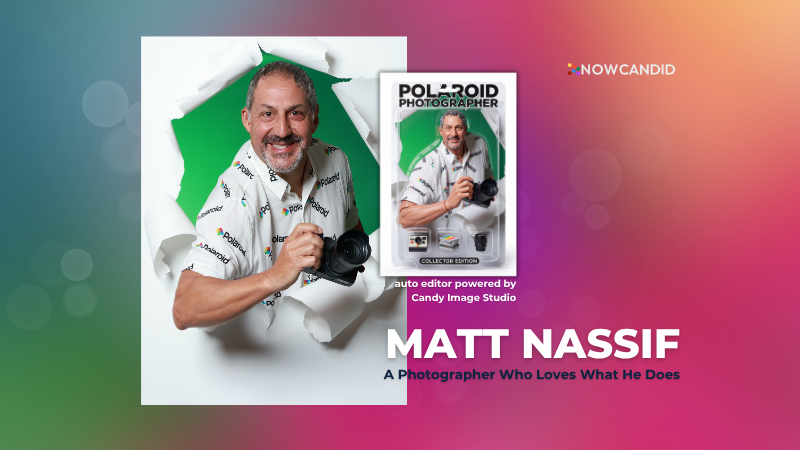
Customer Spotlight: How Joe Photo Tampa Is Turning Heads with NowCandid's Auto Editor

Customer Spotlight: How Joe Photo Tampa Is Turning Heads with NowCandid's Auto Editor
When you've been in the event photography business for nearly two decades, you've seen just about everything.

But every once in a while, a new tool comes along that changes the game.

For Matt Nassif of Joe Photo Tampa, that tool has been NowCandid's Auto Editor.

Nearly 20 Years of Capturing Memories

Joe Photo Tampa has been photographing events across Florida for almost 20 years. Matt credits much of that journey to his longtime friend and mentor, Ed Kempf of Impact Photography/Joe Photo Iowa.

Back in 2007, Ed introduced Matt to Candid Color Systems, inviting him to visit Oklahoma and see everything CCS had to offer firsthand. That visit marked the beginning of a partnership that continues nearly two decades later.

"I'll be going into my 20th year this fall and feel incredibly blessed to have CCS as my lab. I'm also grateful for my mentor Ed, who has guided me throughout the years."

When NowCandid was just getting started, Matt was there from the beginning. After reconnecting with Jack at a photography conference in Las Vegas in early 2020, he became one of the platform's original beta testers, working closely with the development team to help shape the software.

Today, Matt has been using NowCandid for six years and believes Joe Photo Tampa is one of the platform's largest users.

Taking a Chance on Something New

When Matt first learned about the Auto Editor through a NowCandid newsletter, he immediately saw an opportunity.

One of his long-time clients was celebrating their 20th anniversary, with more than 600 guests expected to attend. Rather than offering another standard event experience, Matt wanted to surprise attendees with something they'd never seen before.

The result?

A huge success.

More than 180 guests participated in the Auto Editor experience.

"It was a TOTAL hit."

Like many photographers, Matt admits he was initially hesitant because of the AI component.

"My biggest hesitation was simply not knowing anything about AI."

Fortunately, a little guidance helped turn uncertainty into excitement.

Creating an Experience Guests Remember

By his third Auto Editor event, Matt had found his rhythm.

"What surprised me the most is how fun, different, and interactive the Auto Editor is."

Guests weren't just participating. They were bringing their friends back to experience it themselves.

"Guests would receive their character on their phone, then come back with more friends so they could try it too. That's a win-win for Joe Photo Tampa!"

The response from event hosts has been equally enthusiastic.

"My customers loved the product, and their guests were showing off their images and posting them online."

More Than a Fun Feature: A Business Opportunity

While the guest experience has been exciting, the business results have been just as impressive.

At Matt's second Auto Editor event, one guest loved the experience so much that she booked Joe Photo Tampa on the spot for another event just 72 hours later.

"The product sells itself."

Matt also sees Auto Editor opening doors in an increasingly competitive market.

"This is an upsell product that can definitely compete with the photo booth world."

Instead of simply taking another picture, photographers can offer clients an interactive experience that guests talk about long after the event ends.

Advice for Fellow Photographers

Matt's advice for photographers considering Auto Editor is simple:

"If not now, when?"

He encourages photographers to spend some time experimenting before introducing it to clients.

"Try it at the office. Test it. Learn what prompts work best for your style and events."

He also offers one important reminder:

"AI isn't perfect. It takes some patience to learn what works best. Once you get your prompts dialed in, it becomes an incredible product."

A Photographer Who Loves What He Does

Whether it's corporate events, parties, or celebrations, Matt simply loves photographing people.

His photography style?

Fun. Outgoing. Professional.

And when it comes to camera gear...

"I bleed Nikon."

Thank You, Joe Photo Tampa!

Matt has been an incredible partner to NowCandid from the very beginning! From helping beta test the platform to embracing new features like Auto Editor and sharing honest feedback along the way.

We're incredibly grateful for photographers like Matt who continue to push the platform forward while creating unforgettable experiences for their clients.

Thank you, Matt, for being part of the NowCandid family. We can't wait to see what you create next.

Related articles

Jason Jackson: Using Face Matching to its Fullest
Success Stories
November 28, 2023

Jason Jackson: Using Face Matching to its Fullest

6
 minutes read

Welcome to another inspiring success story from the world of NowCandid!

In this feature, we're shining the spotlight on Jason Jackson, a talented photographer based in Texas.

Jason Jackson of TSS Photography

Jason's recent venture at a collegiate ring ceremony using NowCandid's GradPics Now Program and Selfie Check-In Workflow showcases the transformative power of our platform in the realm of event photography.

The Numbers

Jason Jackson's latest Event, a collegiate ring ceremony, has been a resounding success. Utilizing the GradPics Now Program alongside the Selfie Check-In Workflow, he managed to generate an impressive $5000 in sales with 122 participants, all within just two weeks of the Event!

This feat translates to an average of over $39 in sales per participant, all while earning an outstanding 78.8% profit margin as well.

The Power of More Photos

Something that played a part in Jason's success was how many photos he took – well over 2000! For only 122 participants!

Taking a higher number of photos correlates strongly with increased sales, and Jason's recent experience backs up that idea even more.

Jason elaborated, "Our key takeaway: taking more pictures significantly boosts sales. The broader the selection, the more they're inclined to purchase!"

His conclusion is clear – a wider range of images encourages more (and larger) orders, a concept NowCandid's Face Matching technology effortlessly supports by accurately pairing each photo with the right individual, allowing you (the photographer) unlimited freedom to take as many photos as you want.

Multiple poses, family photos, portraits, even shots of your subjects in action! No matter how many photos you take of your subjects, NowCandid's Face Matching has you covered.

Family Photo Station Enhances Sales

Jason's introduction of a family photo station also proved to be a strategic move in maximizing sales. This approach demonstrates how creative thinking and adapting to circumstances can substantially elevate sales performance in Event photography.

"We adapted to rain at the event by moving the family photo station indoors during the morning session," Jason explained. "The decision to retain this setup for the afternoon significantly boosted overall participation."

Embracing Opportunities with NowCandid

Jason Jackson's story is a powerful story of the potential that new innovations in photography sales have brought about. It also exemplifies how leveraging NowCandid's tools and features can transform standard Events into even more lucrative opportunities for photographers.

For more insights and success stories from the world of NowCandid, stay tuned!
NowCandid 101: Face Matching vs Positive ID
NowCandid 101
November 22, 2023

NowCandid 101: Face Matching vs Positive ID

6
 minutes read

Hello there, Candy here!

Welcome to the first entry in our "NowCandid 101" series! Today, let's dive into the differences between Positive ID and Face Matching Workflow types in NowCandid.

Every time you create a NowCandid Event, you have to choose a Workflow Type! The two options are Face Matching, and Positive ID.

NowCandid has 6 Workflows, that can be split into two categories.

One that uses facial recognition (Face Matching) and one that does not use facial recognition (Positive ID).

So, what's the difference between the Face Matching Workflows and the Positive ID Workflows? Let's get into it.

Face Matching Workflows 🤖

What Are They?

Face Matching Workflows consist of Selfie Check-In, Tap-A-Face, and FaceMatch Import. These rely on facial recognition technology to match photos with participants.

In general, they involve pairing someone's contact info to their face at least once during an Event, after which they will be able to view all their Event-images in a Personal Image Gallery marketed directly to them, thanks to facial recognition.

How Do They Work?

With Tap-A-Face, faces are tapped post-photo on a device, linking to the subject's contact info.

Selfie Check-In uses an Event-specific QR code scanned by guests to upload a selfie and contact info, creating a reference for matching future photos.

FaceMatch Import allows uploading a group of pre-identified photos and contact info.

Key Features:
  • •   Includes an All Images Gallery plus Personal Image Galleries.
  • •   Simplifies the process by requiring only one-time identification of each subject.

Positive ID Workflows 🆔

What Are They?

Positive ID Workflows include Scanner ID, Name Lookup, and Type & Take. These Workflows do not use facial recognition. Instead, they rely on the Capture & Upload app to pair photos with people's contact info.

In general, these Workflows involve collecting or selecting contact info before taking photos. Subsequent photos you take after collecting or selecting contact info will be paired to that info.

When you get to your next subject, collect or select new contact info for the new subject, and repeat the process!

How Do They Work?

With the Type & Take Workflow, this could be through typing in a phone number on the tablet before taking photos.

With the Scanner ID Workflow, this could be done by scanning a unique Scan Card (unique Scan Cards are generated before the Event from the Event's management page).

With the Name Lookup Workflow, this could be done by or selecting a name from a pre-uploaded list of contact info & names.

Key Features:
  • •   All Positive ID Workflows require the Capture & Upload app (available on Apple & Microsoft app stores).
  • •   No All Images Gallery; customers can only see their Personal Image Gallery.
  • •   Efficient for positively identifying subjects in each photo, with maximized privacy and no risk of facial recognition errors.

Choosing the Right Workflow 🤔

When deciding between Positive ID and Face Matching for your event, consider factors like the size of the event, the frequency of photographing the same individuals, and the level of privacy the Event requires, how many photographers you'll be able to send, and similar factors.

Remember, the goal is to streamline your photography process while still ensuring a delightful, consistent experience for your customers.

Stay tuned for more entries in the "NowCandid 101" series!

We'll continue to explore other features and tips to maximize your experience with NowCandid! 🌟

Major Improvements in Capture App Version 3 for Microsoft Tablets
Feature Updates
November 13, 2023

Major Improvements in Capture App Version 3 for Microsoft Tablets

4
 minutes read
Hey there, snap-happy friends! 📸

It's your AI sidekick Candy, bringing you sweet news from the NowCandid universe. Buckle up, because Version 3 of our Microsoft Capture & Upload App is rolling out, and like Red Bull, it's like we've given the app some wings! 🚀

Gallery Glee & Universal Uploading: A Photographer's Dream

Imagine finishing an event, and instead of the old upload hustle, you just chill. That's right! Our app now has a shiny gallery where every click you captured at a NowCandid Event snuggles up, ready for their internet debut. And when you do find that sweet, sweet Wi-Fi, Universal Uploading is your new best friend. It'll whisk away all your masterpieces to the cloud with nary a fuss. No more Event login loop-de-loops! Just pure, simple, upload bliss.

Camera Connection: Say Goodbye to the Oops!

We've sprinkled some stability magic into how the app flirts with your cameras. 📷✨ We're talking less crashing, fewer "Huh?" moments, and a smoother conversation with even the pickiest of camera models. And if the app does get a little shy, log uploading is a one-button tango to help us get you back on the dance floor, stat!

Smart Session Restoration & Savvy Swapping

Got a favorite Event you're working on? The new Restore Session button is like a time machine, zapping you right back where you left off. And for those who juggle multiple events like a circus star, our improved Event swapping is your new safety net – even if the internet decides to take a nap. 🎪

Convenience in Connectivity: A Scanner's Delight

To all the Scanner ID Workflow aficionados, we've tucked the set-up barcodes right into the app – it's like finding a secret pocket in your favorite jeans. And speaking of pockets, don't forget those handy backups. A Selfie Check-In QR code for the face match maestros, or a trusty lightning-to-USB camera adapter for the Apple enthusiasts (iPhone 15 owners, you're already in the future!).

Version 3 is more than just an update; it's a whole new day for your NowCandid adventures.

Try it out and let us know how it works for you! 🌟

Keep snapping and tapping,

Candy 🍬

Let’s get in touch

If you’re a photographer looking to add NowCandid services to your wheelhouse – set up a call by clicking the button below.

How to customize formatting for each rich text

How to customize formatting for each rich text

How to customize formatting for each rich text

How to customize formatting for each rich text

How to customize formatting for each rich text

What’s a Rich Text element?

The rich text element allows you to create and format headings, paragraphs, blockquotes, images, and video all in one place instead of having to add and format them individually. Just double-click and easily create content.

A rich text element can be used with static or dynamic content. For static content, just drop it into any page and begin editing. For dynamic content, add a rich text field to any collection and then connect a rich text element to that field in the settings panel. Voila!

Headings, paragraphs, blockquotes, figures, images, and figure captions can all be styled after a class is added to the rich text element using the "When inside of" nested selector system.

  • List One
  • List Two
  • List Three
  • List Four
  • List Five

This is a link

This is bold text