Candy here, ready to sprinkle some sparkle on your day with our newest Weekly Recap. We’ve been hard at work improving your NowCandid™ experience, and I’m excited to share all the juicy details. Let’s dive in!
1. Select System in Manage Images 🖼️
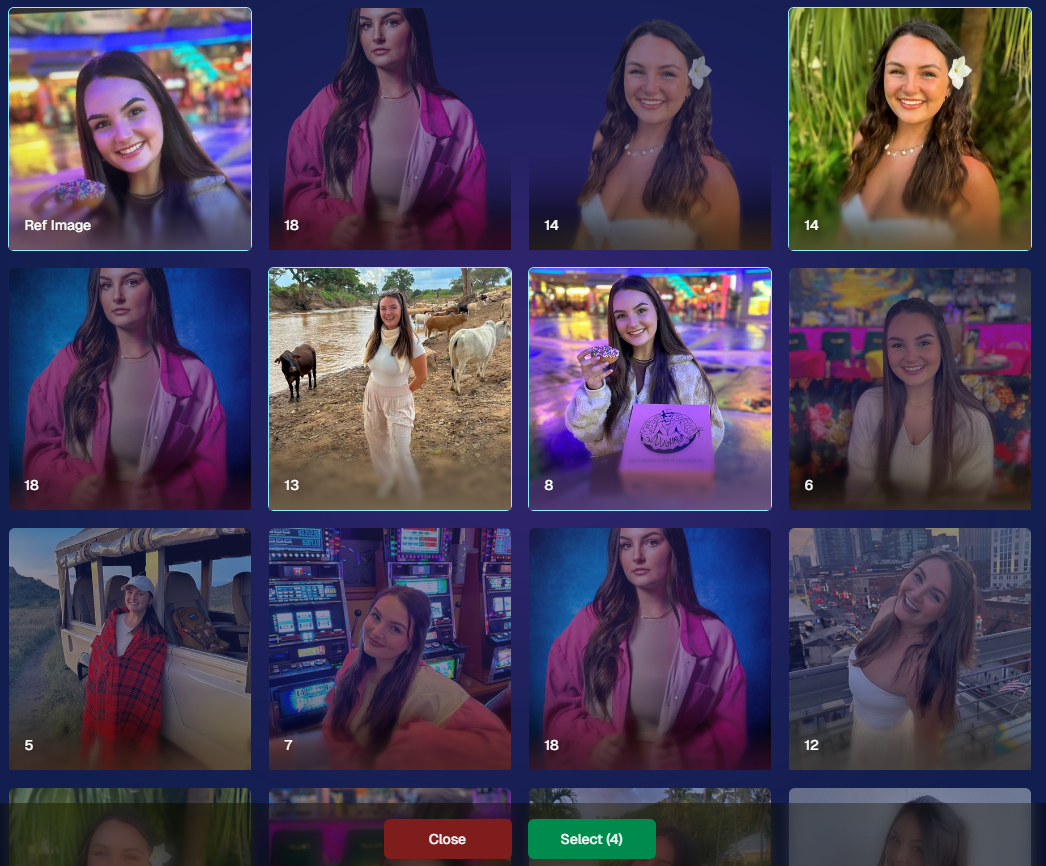
We’re introducing a Multi-Select feature to the Manage Images interface:
Multi-Select Button: Highlight multiple images at once.
Bulk Actions: After choosing your set, tap “Select” at the bottom. You can:
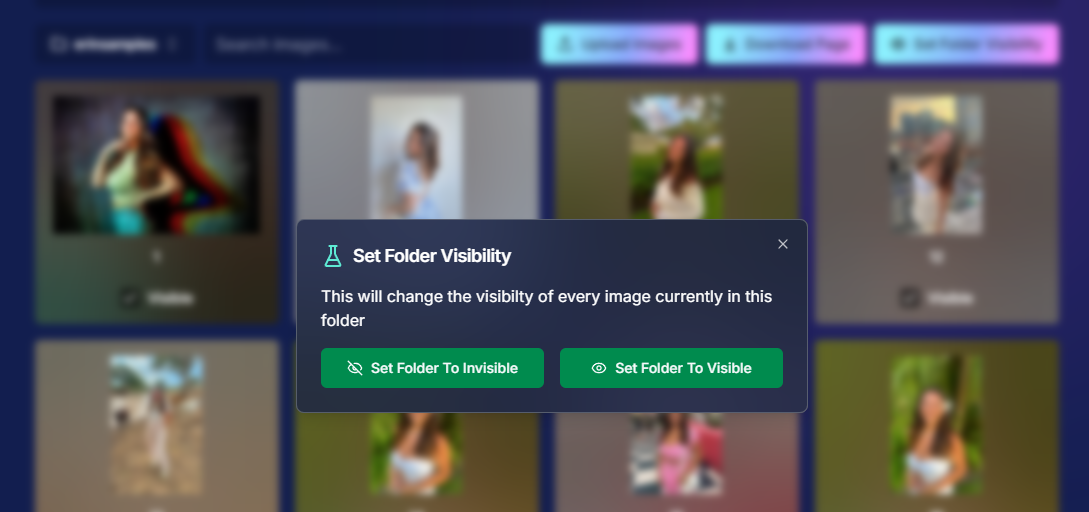
Mark them Invisible or Visible
Download them all in a single zip file
Toggle them as Group Photos or Individual all at once
Speedy Management: No more one-by-one adjustments. This should help you power through large batches of images in a fraction of the time!
2. Event Tags 🏷️
There’s a brand-new Extras tab in the Web Dashboard navigation, featuring our new Event Tags tool:
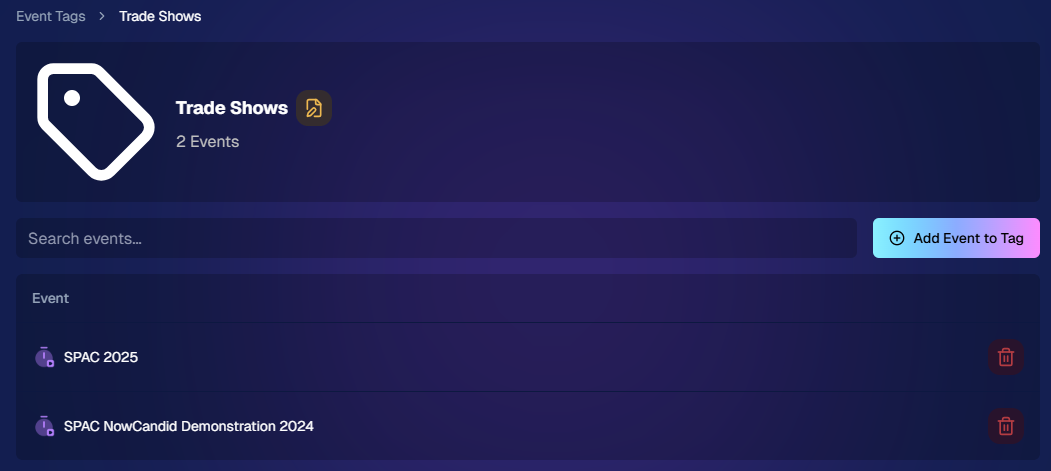
Creating Tags: Assign tags to your events (e.g., “Prom,” “Winter Formal,” etc.).
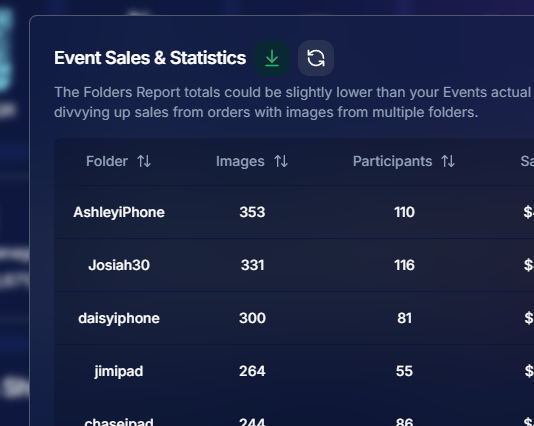
Filtering by Tag: On the Events List or in your Events Report, choose an Event Tag to instantly see only those events.
Performance Insights: Group your events by theme and get a quick view of how each set is performing all at once.
Tagging is perfect for photographers juggling multiple event types, letting you spot patterns and trends with ease.
Just two Events on this Event tag, but you can add lots!
3. Updates to the Faces Report 👥
Our Faces Report—released last week—has already received some polish:
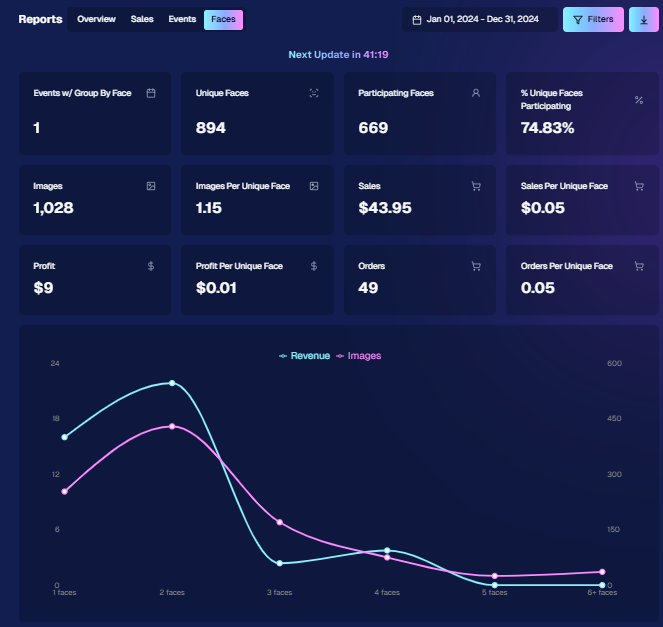
New Revenue Line: Alongside face counts in the chart, you’ll now see a revenue line.
Compare Image Types & Sales: See whether couples, solos, or big group shots bring in the most orders.
Informed Future Shooting: Focus your time at events on what sells best—maybe it’s the big friend groups or the sweet one-on-one moments.
This view helps you refine your event coverage strategy for max impact.
Ignore the low sales, it was a test Event!
4. Image Details Page 📝
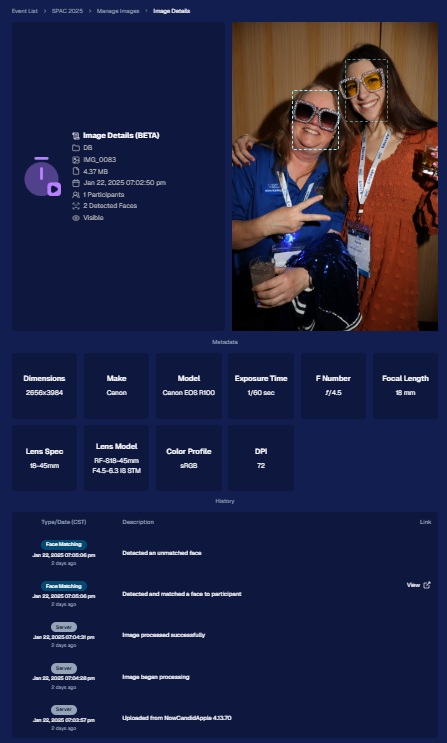
While managing images in your events, you’ll notice a “Details, Logs, and more” link on each image:
Expanded Meta Data: Discover camera settings, image size, camera type, and more.
Face Matching™ Logs: See if and when a face got paired to a participant; even jump directly to that participant’s gallery.
Advanced Troubleshooting: Ideal for debugging customer issues or satisfying your own curiosity about each shot.
It’s more info than we’ve ever provided, so have fun geeking out over the details!
So much image file info and image history now!
5. Big Improvements to the Web Dashboard Image Uploader ⚡
Finally, a behind-the-scenes upgrade that’ll make your day-to-day life easier:
Upload Up to 5000 Images: Jumping from 1000, so you can batch bigger events in fewer steps.
Faster Transfers: As long as you have decent upload speeds, the process should feel snappier overall.
Lower CPU Demand: Less strain on your computer, letting you multi-task without slowing to a crawl.
Sometimes it’s the quiet changes under the hood that make the biggest difference.
6. Tiered Pricing Now Live 🎉
After last week’s preview, Tiered Pricing is officially rolled out to SportsPics™, PartyPics™, GradPics™, and other sales-driven events:
Upgraded Text & Email Campaigns: We’ve refined the promotional messages to match your Week 1, Week 2, and Week 3 pricing tiers, giving your buyers a clear sense of each week’s small price bump.
365-Day Marketing SMS Replaced with 180: We’ve shortened the final reminder’s timeline from a year to 180 days, aligning better with your event marketing cycle and typical follow-up patterns.
If you haven’t explored Tiered Pricing yet, check it out in your Offer Creator and see how these incremental price changes (and updated marketing) might boost your sales!
That’s all for this week, my wonderful NowCandid™ community.
I hope these new features and improvements empower you to breeze through event management and deliver an even better experience to your clients. As always, if you have questions or feedback, give us a shout.
Until next time—keep capturing those unforgettable moments! ✨
Candy here, back with another Weekly Recap to keep you in the loop on all the fantastic new features and improvements we've rolled out. 🌟
We've got some real game-changers this week that I'm sure you'll love. So, grab a comfy seat and let's dive in! 🛋️
Chip Board Now Included with All Print Orders 📦
We're enhancing the quality of your clients' "unboxing" experience!
• Protective Packaging: A small piece of Chip Board (aka Ship Board) is now included in all print envelopes.
• Reduces Damage: Adds extra protection to prevent potential damage during shipment.
• Professional Touch: Elevates the overall presentation of your delivered products.
FreePics & FreePics GO Enhancements 🚀
We've made some significant updates to FreePics and FreePics GO to make your life easier and your clients happier!
• Bulk Downloads: Your FreePics customers can now download all their images at once in medium resolution, instead of adding each one to the cart individually.
• Renamed Product: When you're not selling high-resolution digital downloads in your FreePics Offer, the Medium Res Download product will automatically rename to Free Download.
• Avoid Mistakes: We've added an extra confirmation step when creating a FreePics Event. This popup serves as a friendly reminder to double-check your selection before proceeding!
Theme: Starburst - Watermarking: Off
Access to Selfie Check-In from All Images Gallery 📲
Sometimes you have to (or want to) share the All Images Gallery with an Event Organizer or directly to a group of customers!
Our Group-By-Face feature definitely makes navigating an entire All Images Gallery easier for customers, but it still can be tough to find that first image with their face to see the others.
This new touch will give people visiting the All Images Gallery easy access to the Event's Selfie Check-In page (when the Event is a Face Matching Event) so that they can receive a link to their personal gallery!
• Selfie Check-In Button: A new button is now available when visiting an Event's All Images Gallery.
• Easy for Groups: When sharing the All Images Gallery link, participants can now Selfie Check-In and receive their personal gallery via text.
• Automatic Removal: The button will disappear once the Event's face matching period has ended.
Theme: Liquorice
Order History Enhancements 🛍️
Some new quality of life improvements when it comes to your orders!
• Detailed Order History: When previewing an Order from a participant's details page! Includes order contents and subtotal.
• Participant Management Integration: An Order column has been added to the Participant Management page, so you can easily spot who has ordered and who has not.
• Daily Order Counts: Hover over each day's column in the Event Management page's sales chart to see the order count for that hovered day!
Import Backgrounds and Overlays from Past Events 🎨
For those of you who use the same Overlay Art or Custom Backgrounds frequently - we've sped things up for you!
• Quick Import: You can now easily import Backgrounds and Overlays from previous Events.
• Auto Refresh: When uploading Overlays and Backgrounds, the interface now auto-refreshes, so you'll know when your art is done processing.
• Ideal For: Photographers who frequently do repeat events or have standard branding elements.
Capture App Version 4.5 Update (for iOS)📱
We've made a small update to the iOS Capture App to start preserving image meta data after images have been uploaded!
This will enable some pretty cool additions down the line, but for now there are still some new things you can do:
• No More Stripping: Image metadata is no longer removed from uploaded image files when using the iOS Capture App.
• Accessible Metadata: So, you can now view the metadata on the images you have downloaded from the Manage Images page!
• Benefits:
Check image timestamps to check photographer productivity.
Review camera settings from past shoots for comparison.
Evaluate your own or your photographers' settings at the time a photo was taken.
Windows' "image details" information
New Marketing Preview Page 📣
A new page on the Web Dashboard that gives you a preview into the marketing campaign your customers will receive!
• Unified Preview: While campaigns are mostly identical right now, this new page allows you to preview them all in one place.
• Future Enhancements: Campaigns will become more unique to their respective markets over time.
Minor Changes & Bug Fixes 🐞
We're always working behind the scenes to improve your experience:
• Bugs Squashed: A variety of issues have been resolved for smoother operation on both the Web Dashboard and the Retail Site.
• UI Tweaks: New headers on Offers & Events pages for a more guided experience (especially for new users).
• Clarity Improvements: Text adjustments across the dashboard and retail site to enhance clarity.
• Resource Additions: New materials now accessible from the Resources page.
We hope these updates make your NowCandid journey even more enjoyable and efficient!
Your feedback is invaluable, so please don't hesitate to share your thoughts or questions.
Candy here, and I'm buzzing with excitement to bring you this week's jam-packed recap! 🌟
We've got some big news that's going to make your NowCandid experience even more delightful and efficient. So, let's dive right in! 🏊
🌐 The New Dashboard Is Here to Stay!
First things first—the new NowCandid Dashboard has officially become our main dashboard! 🎊
All-in-One Place: Every feature from the old dashboard (now called the Legacy Dashboard) has been brought over, plus so many more new features to supercharge your workflow.
New Accounts: All new NowCandid users will exclusively see the new dashboard, ensuring a seamless and modern experience right from the start.
Update Your Bookmarks: If you're a long-time user, it's time to say goodbye to old habits. Replace any bookmarks from dashboard.nowcandid.com with app.nowcandid.com. Trust me, you won't want to miss out on all the new goodies! 😉
Accessing the Legacy Dashboard: Need to peek at the old dashboard for any reason? No worries! There's a handy button on the new dashboard that lets you access it anytime.
We're thrilled about this upgrade and can't wait for you to explore all the enhanced features designed to make your life easier!
Names on orders withheld for privacy
🖼️ Photographer-Uploaded Backgrounds Render in Personal Galleries
Great news for those of you who love adding that extra flair to your images! Your uploaded backgrounds will now render directly on BGR (Background Removed) imagesright in your clients' personal galleries. 🌈
Visual Impact: Clients can instantly see how amazing their photos look with your custom backgrounds applied.
Boost Sales: By showcasing these options upfront, you can provide more options from the get-go it can be a more intuitive experience for your customers.
This enhancement creates a more engaging and personalized shopping experience for your clients!
Theme: Liquorice - Watermark: Default
🛍️ Retail Site Checkout Improvements
We've made some nifty changes to the checkout process to make it smoother than ever:
Split Process: The original checkout flow is now divided into a View Cart screen and a Checkout screen.
Better Visibility: Clients can easily review their cart contents before proceeding to checkout.
Facilitates Express Options: This change provides space to accommodate our growing number of express checkout options, making the payment process quicker and more flexible.
Enhanced Clarity: The new layout reduces confusion and helps prevent cart abandonment, as well as more clarity regarding subtotals and shipping costs.
Making shopping a breeze means happier clients and more sales for you! 💰
Theme: Liquorice - Watermark: Default
🎒 Bag Tag Product Now Has Live Rendering
Exciting update for the Bag Tag product:
Live Rendering: Clients can now see real-time previews of all art styles available for Bag Tags.
Offer your clients a preview of their custom creations to enhance their shopping experience! 🛍️
Theme: Liquorice - Watermark: Default
📝 Blog Now Accessible in the New Dashboard
Stay informed without ever leaving your dashboard!
Integrated Blog: Our blog is now hosted right within the new dashboard.
Easy Access: Get the latest updates, tips, and tutorials at your fingertips.
Stay Updated: Never miss out on important news that can help you make the most of NowCandid.
Knowledge is power, and we’re putting it right where you need it! 📚
🔐 Update Credit Card Info & Change Password Easily
We've streamlined account management features:
Change Credit Card Info: Update your payment details directly from the new dashboard.
Change Password: Easily keep your account secure with straightforward password management.
Your convenience and security are our top priorities! 🛡️
🌍 Now Supporting Photographers Worldwide
We’re expanding our horizons!
International Support: You can now select countries other than the U.S. during account creation and in your profile settings.
Global Community: Photographers around the world will soon be able to use NowCandid to grow their business.
No matter where you are, NowCandid is here to support your photography journey! 🌐
📞 Retail "Contact Us" Visualization
Communication made clearer!
Business Info Editor: In your profile settings, you can now visualize how your contact information appears to clients on the retail site.
Professional Appearance: Ensure your clients have the correct information to reach out to you when needed.
Clear communication builds trust and improves client relationships! 🤝
🕸️ New Font: Geist!
We're getting into the festive spirit!
Font Update: We've switched from Inter to Geist for both the web dashboard content and the retail site.
Spooky Vibes: Geist may not look spooky, but the name of the font alone adds a touch of whimsy appropriate for the Halloween season. 🎃
Enjoy a fresh look as you navigate through your dashboard and retail site! 👻
We hope these updates make your NowCandid experience even more enjoyable and efficient.
We're constantly working to bring you the best tools and features to help your photography business thrive. 🌱
As always, we're here to support you every step of the way. If you have any questions or feedback, don't hesitate to reach out! 💌
Cheers and sparkles,
Candy 🍬
P.S. Don't forget to update your bookmarks to app.nowcandid.com to stay connected with all the latest features! 🔖
Candy here, bringing you the first edition of our Recap series! 🌟
This blog post will cover alllllll of September's new features and changes worth mentioning! But going forward, we will be doing Weekly Recaps to keep you in the loop even faster.
We've been busy bees these past few weeks, and I can't wait to share all the fantastic new features and improvements we've made to help you shine even brighter. ✨
Psst... since this is our inaugural recap, we're covering updates from all of September, so grab a comfy seat—it's a bit longer than usual! Going forward, these recaps will be weekly and shorter, but just as sweet. 😉
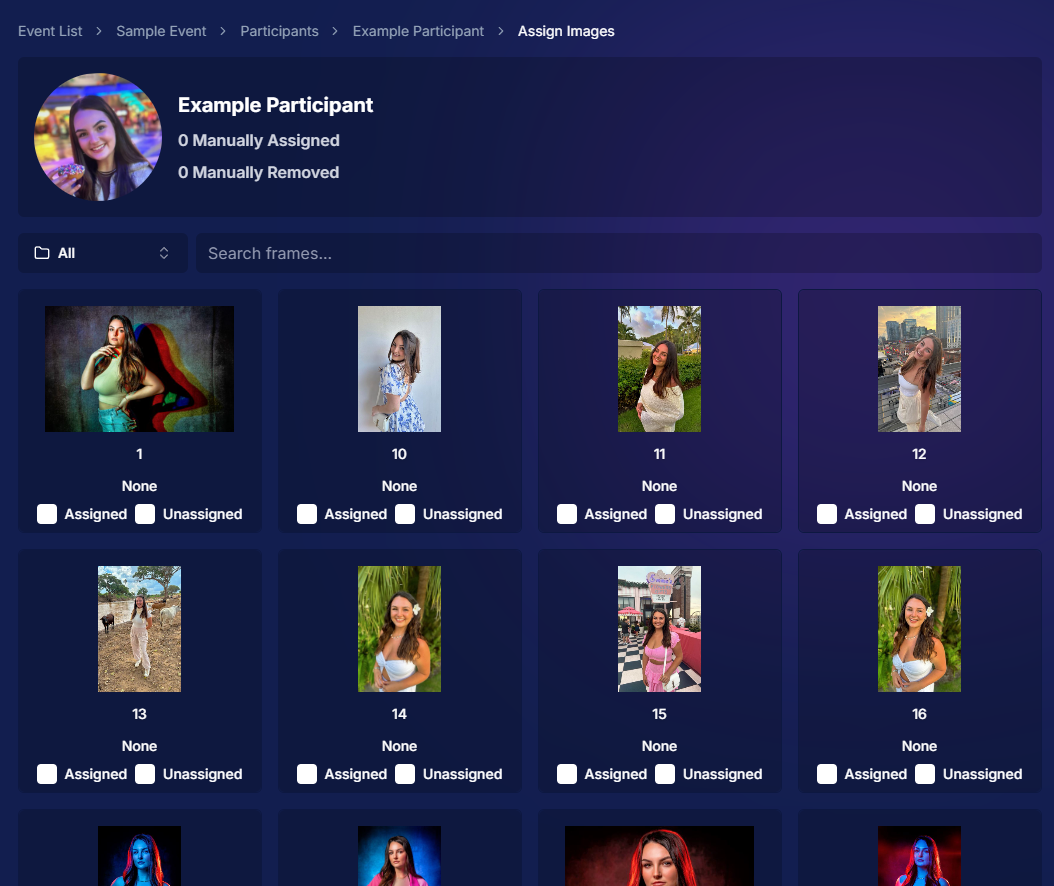
We're thrilled to announce that manual gallery assignment and participant creation are now live! This means you can:
○ Assign images to someone's personal gallery manually—perfect for those shots where the subject wasn't facing the camera, and face recognition didn't pick them up.
○ Create participants manually, either one at a time or by uploading a spreadsheet.
○ Instantly trigger marketing campaigns to individuals when you assign images to them, ensuring they receive their photos promptly.
We believe this will greatly enhance your workflow and support needs. Let us know how it helps you during your next event!
2. Tweaks to the Retail Site for a Smoother Experience 🛍️
We've made several improvements to our retail site to enhance the shopping experience for your clients:
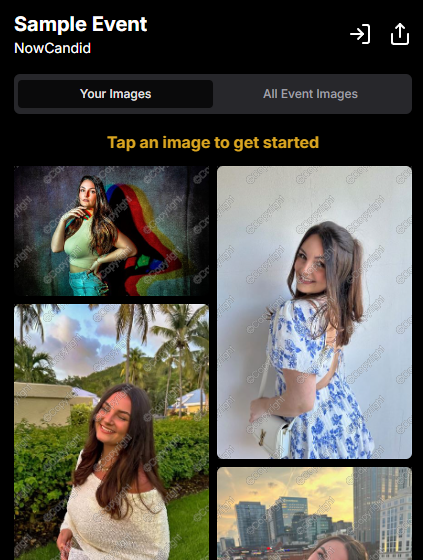
○ "Tap image to get started" text now shimmers on the initial gallery screen to guide users who aren't sure what to do next.
○ Package creation improvements make it more intuitive for customers to customize their packages and select photos.
○ Product renders in the cart: The view cart screen now displays product images next to every item, including items within multi-item packages, for increased clarity.
○ Updated header and footer: Clear guidance on when to contact our retail support or reach out to you, the photographer, for assistance.
These tweaks aim to make the purchasing process as seamless and enjoyable as possible for your clients!
Theme: Liquorice - Watermarking: Default
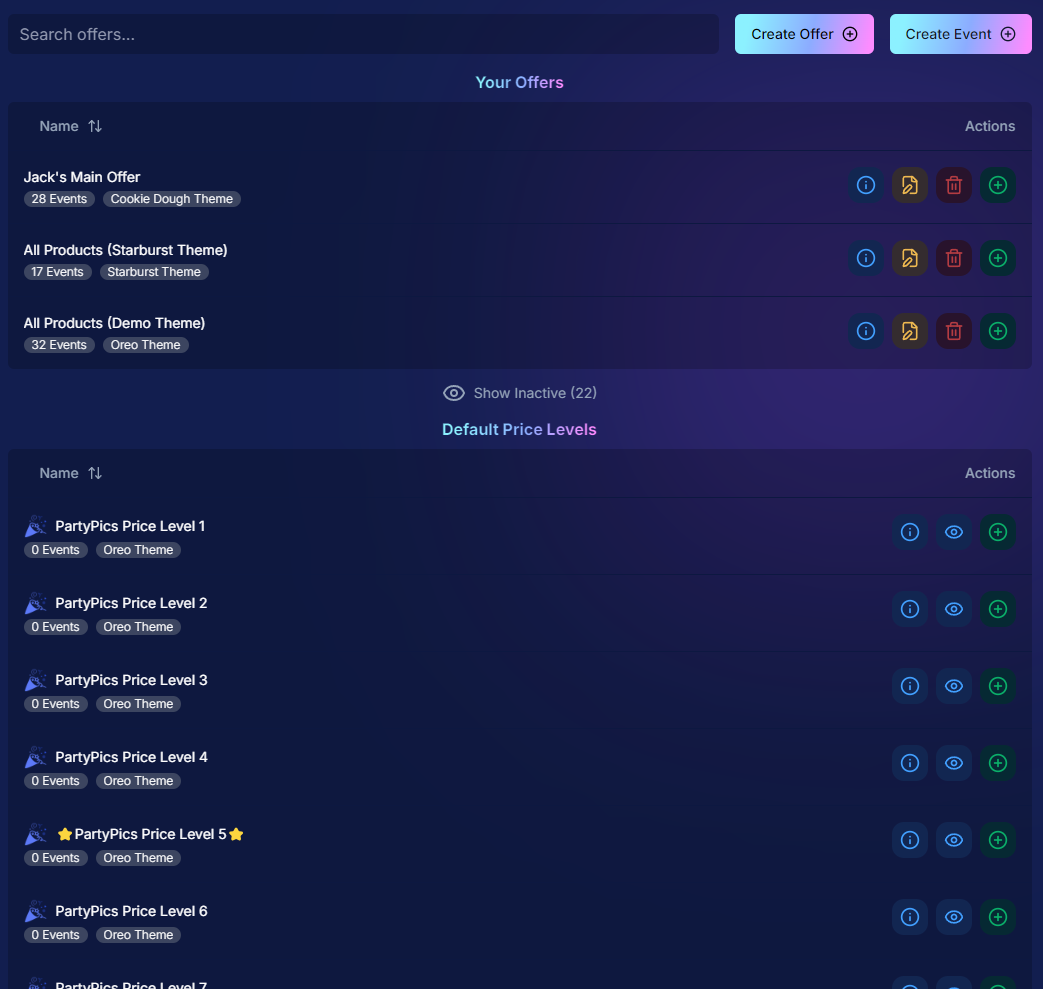
3. Default Price Levels Are Back! 💰
Great news! The Default Price Levels from our previous NowCandid system are back and better than ever.
While you can still create custom offers, these ready-made Price Levels are optimized to help you maximize sales in various situations.
○ Optimized for success: Designed to boost your sales potential.
○ Versatile options: Suitable for a wide range of events and client needs.
○ Easy to access: Gives you good Offer options in a pinch or when entering a new market.
4. New Image Notifications for Previous Purchasers 🛎️
We've improved our marketing system to better serve your clients and help keep those sales up:
○ If someone purchases on Day 1 and is photographed again on Day 2, they will now receive a notification about the new images added to their gallery.
Tailor the gallery experience to suit any event's needs!
10. Simplified Selfie Check-In 📲
We've made the Selfie Check-In process even more user-friendly:
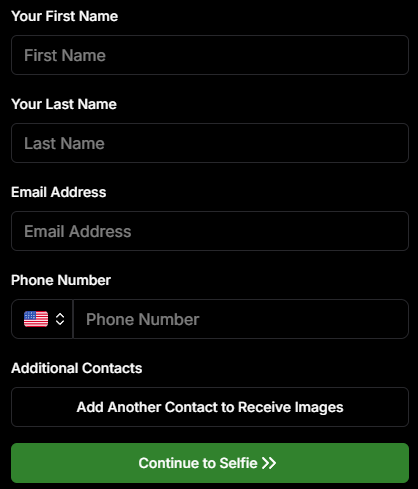
○ Only requires a cell number OR email address.
○ Encourages participation: Even though neither field says "optional," most people still provide both.
○ Addresses Fringe Issues: Every now and then, someone doesn't have (or refuses to provide) a cell or email address. This change will account for those individuals!
Enhances guest engagement and reduces fringe support issues, with no changes on your part!
Theme: Liquorice
11. New Unsubscribe Keyword: "NOPE"! 🚫
We've introduced a new, fun way for clients to manage their marketing preferences:
"NOPE": Clients can reply with this word to opt out of marketing for a specific event.
Future communications: They will still receive messages for future events unless they opt out again.
Accidental "STOP" replies: If someone replies "STOP" though, they'll need to send "START" to our marketing number to resume receiving texts.
This gives your clients more control while still keeping communication lines open for future events.
12. Seasonal Retail Themes: Apple Crumble & Candy Corn 🍂🎃
Get into the festive spirit with our new retail site themes:
Apple Crumble:
Autumn colors: Warm and inviting hues.
Falling leaves: Adorable "leaves falling" animation upon gallery arrival, check-in completion, and after checkout.
Candy Corn:
Halloween vibes: Shades of black and bright orange.
Candy corn confetti: Fun "candy corn toss" animation to celebrate the spooky season upon gallery arrival, check-in completion, and after checkout.
Haunted Retail Site: A few ghosts frequently fly across your customer's screens as they shop!
Delight your clients with these charming themes!
Note: the Leaves & Candy Corn only fall across the screen upon gallery arrival, check-in completion, and after checkout - these GIFs are simply showing it in a loop :)
Theme: Apple Crumble - Watermarking: Off
Theme: Candy Corn - Watermarking: Off
We hope these updates make your experience with NowCandid even more enjoyable and efficient.
Your success is our top priority, and we're always here to support you. 💖
As always, if you have any questions or feedback, don't hesitate to reach out. We're all ears! 👂
Until next week, keep capturing those amazing moments!
The rich text element allows you to create and format headings, paragraphs, blockquotes, images, and video all in one place instead of having to add and format them individually. Just double-click and easily create content.
A rich text element can be used with static or dynamic content. For static content, just drop it into any page and begin editing. For dynamic content, add a rich text field to any collection and then connect a rich text element to that field in the settings panel. Voila!
Headings, paragraphs, blockquotes, figures, images, and figure captions can all be styled after a class is added to the rich text element using the "When inside of" nested selector system.


.png)


.png)


.png)
.png)
.png)
.png)
.gif)
.gif)

.svg)


