HomeNavigation arrowBlogNavigation arrow
Current page
Feature Updates

Weekly Recap: Virtual Group Builder, Client Outreach Updates & Smarter Retail Support 🎉📸

Weekly Recap: Virtual Group Builder, Client Outreach Updates & Smarter Retail Support 🎉📸
Hey photo friends! 👋

This is a big week! The headline feature is one many sports and volume photographers are going to love: An all-new Virtual Group Builder is now available directly on the Dashboard.

We’ve also added new Candy Image Studio tools, improved Client Outreach behavior, refreshed image assignment tools, and made retail support easier for shoppers and photographers alike.

Let’s jump in!

🧑‍🤝‍🧑 Big New Feature: Virtual Group Builder

You can now build Virtual Groups directly on the Dashboard — with Mobile Dashboard support too!

Find it from an Event page by clicking Virtual Groups in the sidebar menu.

With Virtual Group Builder, you can:

👥 Import participants from the full Event, one at a time, or everyone with a specific PhotoTag

✂️ Use participant cutouts to build polished group images

🏷️ Build groups quickly when your Event has consistent cutouts and participants tagged with PhotoTags

🖼️ Create Virtual Groups in 4×6, 5×7, 8×10, or 11×14 formats

🎨 Choose from NowCandid default backgrounds, upload custom backgrounds, and add overlays

🧢 Add account logos to the corners

🔤 Toggle subject names on or off

📐 Preview crop lines and aspect ratio lines

🖱️ Zoom, pan, drag, reorder, resize, brighten, and position subjects

You can also adjust group-level settings like background, overlay, overall scale, vertical position, bottom shadow falloff, and individual cutout fade to help hide cropped legs.

When your Event is set up cleanly with cutouts and PhotoTags, you can create a full Virtual Group in just a few clicks. ✨

Docs page: https://app.nowcandid.com/docs/image-management/virtual-groups
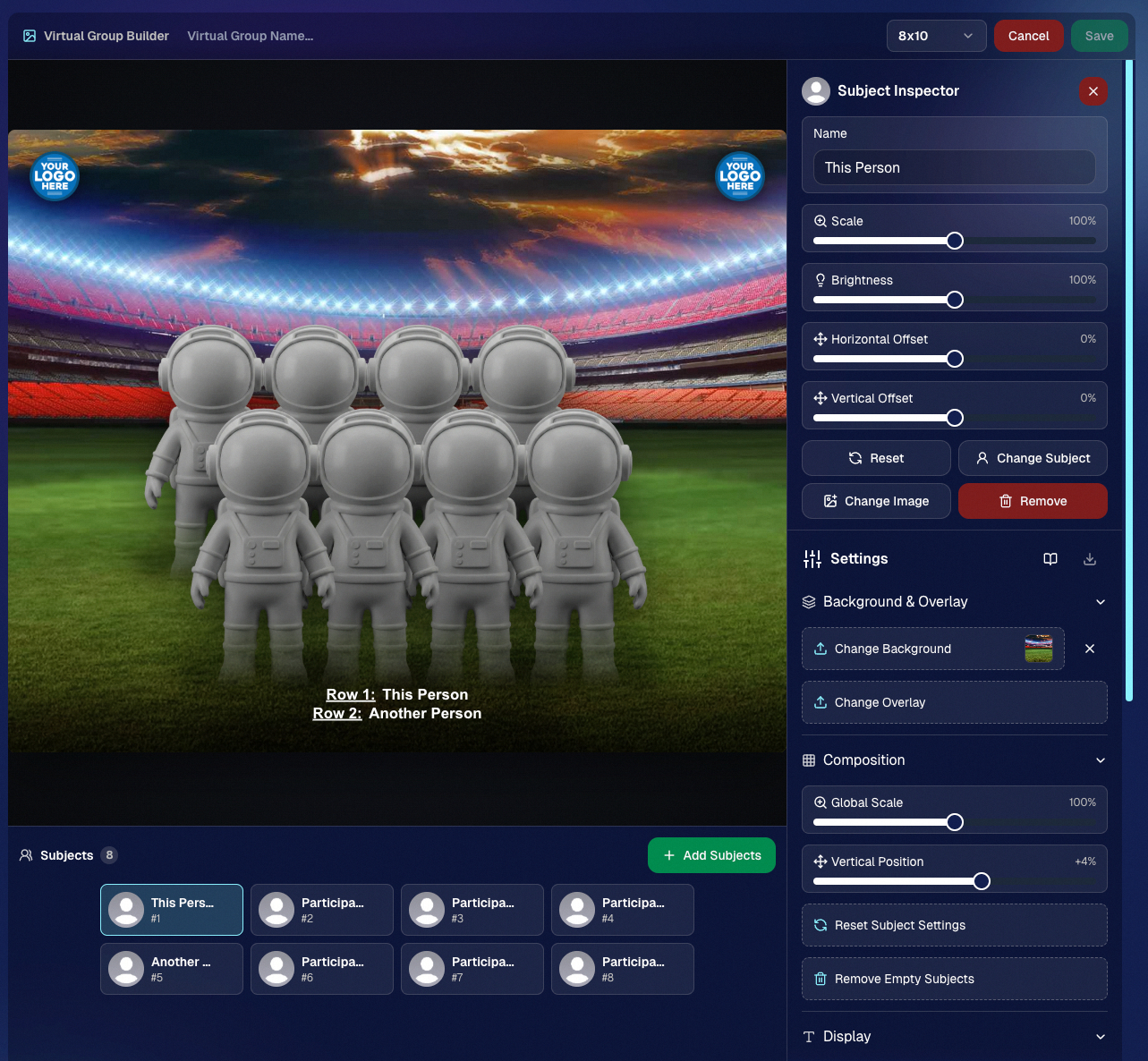
Desktop Dashboard view of the new Virtual Group Builder

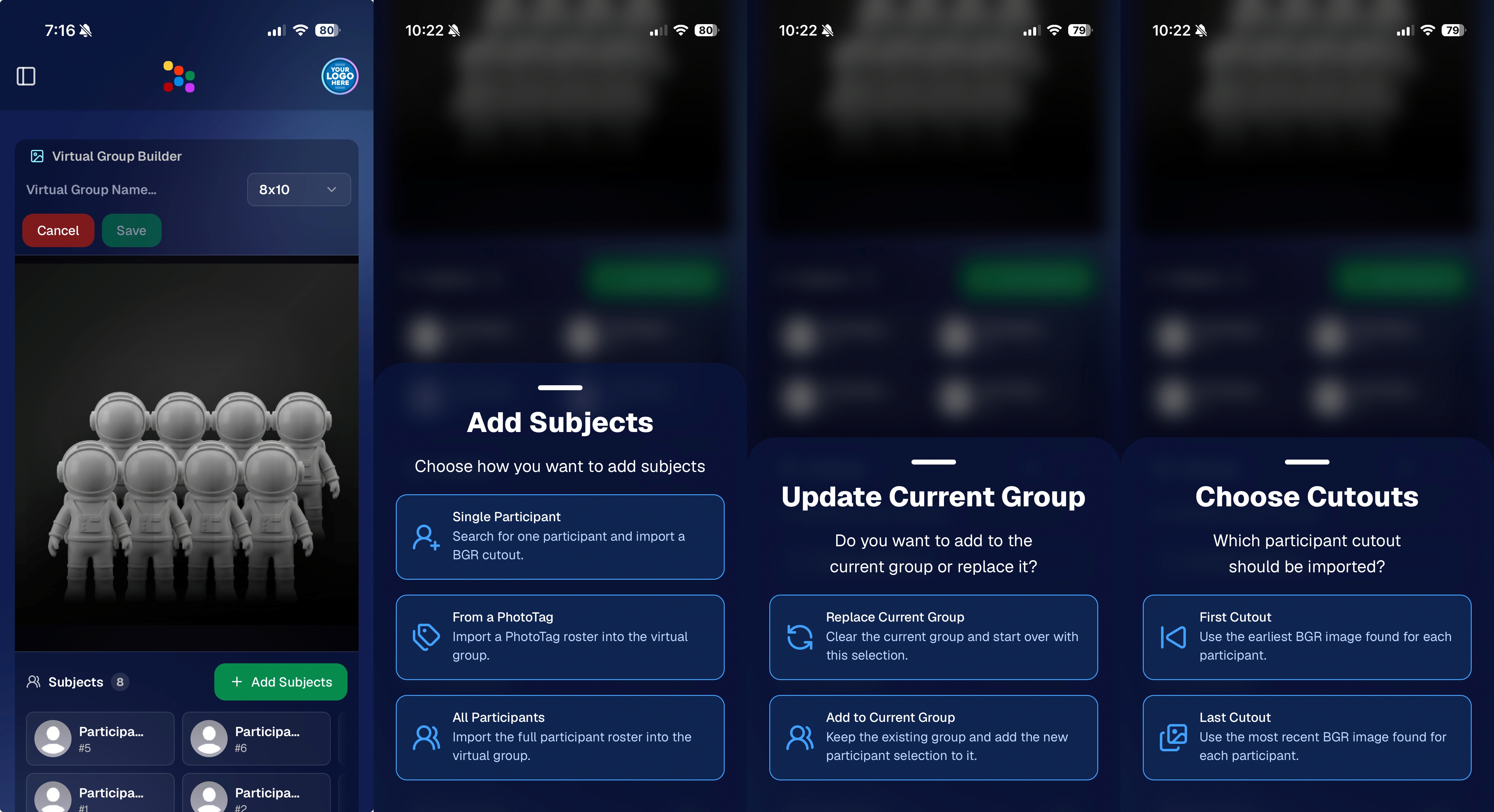
Mobile Dashboard view of the new Virtual Group Builder

🎓 Candy Image Studio: New Graduation Tools

Candy Image Studio got some very timely upgrades for graduation season:

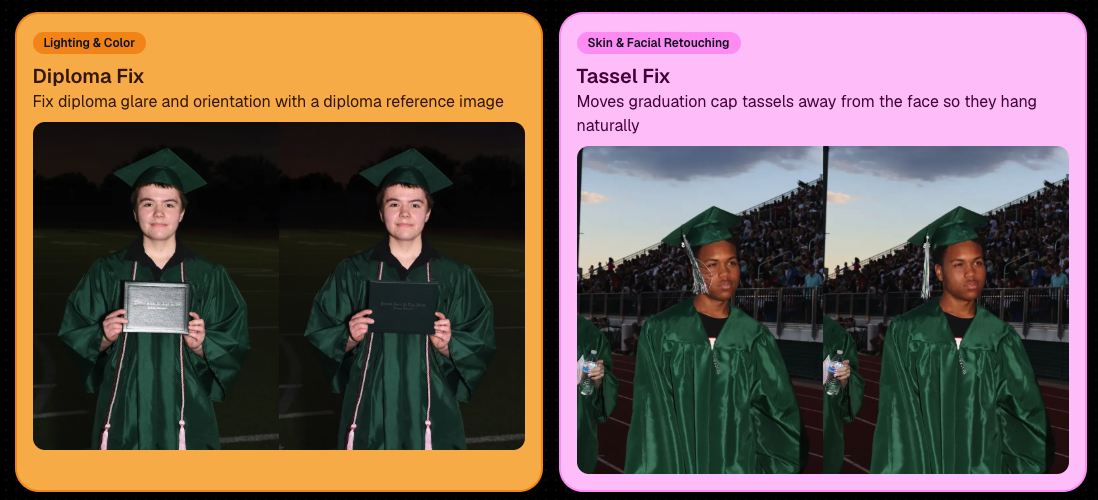
🎓 New “Diploma Fix” node

  • Helps fix diploma orientation and glare. You’ll need to upload a reference diploma so Candy knows what the diploma should look like, including details like school name, emblem, fonts, and colors.

🎗️ New “Tassel Fix” node

  • Helps adjust graduation tassels that are covering a subject’s face — similar to Stray Hair Removal, but tailored specifically for grad tassels.

👓 Improved Reduce Glass Glare

  • This node is now more reliable and less likely to accidentally add glasses to subjects who aren’t wearing them.
📣 Client Outreach Improvements

Client Outreach got a few useful updates to help save money and keep lists cleaner:

🚫 Unsubscribed contacts excluded by default

  • Imported Client Outreach contacts now exclude unsubscribed contacts unless you choose to include them.

🔘 New “Include unsubscribed contacts” toggle

  • You can still include them if needed, but the default helps avoid spending on contacts who can’t receive your outreach.

👀 Show Hidden on Client Lists

  • The Client Outreach list page now has a Show Hidden option, similar to Offers and PhotoRoster organizations.

🧭 Client List sidebar shortcut

  • The Client Outreach sidebar item now takes you back to the Client List page more clearly.

🖼️ Image Management & Dashboard Upgrades

🧩 Image Release Gallery redesign

  • The Image Release Gallery now uses a masonry layout like retail, supports lightboxes with arrow key navigation, has CMD/CTRL+F search support, and saves filters in the URL.

🧑‍💻 Manual Assignment page refresh

  • The Participant Manual Assignment page has a cleaner, more intuitive UI.

Camera star ratings on Image Details

  • If your camera includes star ratings, they now appear on the Image Details page.

⬇️ Image Details convenience buttons

  • Image Details now includes quick actions to download or open in Candy Image Studio.

🏷️ PhotoTag ampersand fix

  • PhotoTag names with ampersands now save correctly.

🧍 Merged participant name fix

  • Manual Assignment now shows the selected participant’s name instead of the first merged participant’s name.

🔙 Event sidebar remembers filters

  • When going back to the Event List from an Event Overview page, your filters are remembered as long as you haven’t refreshed.

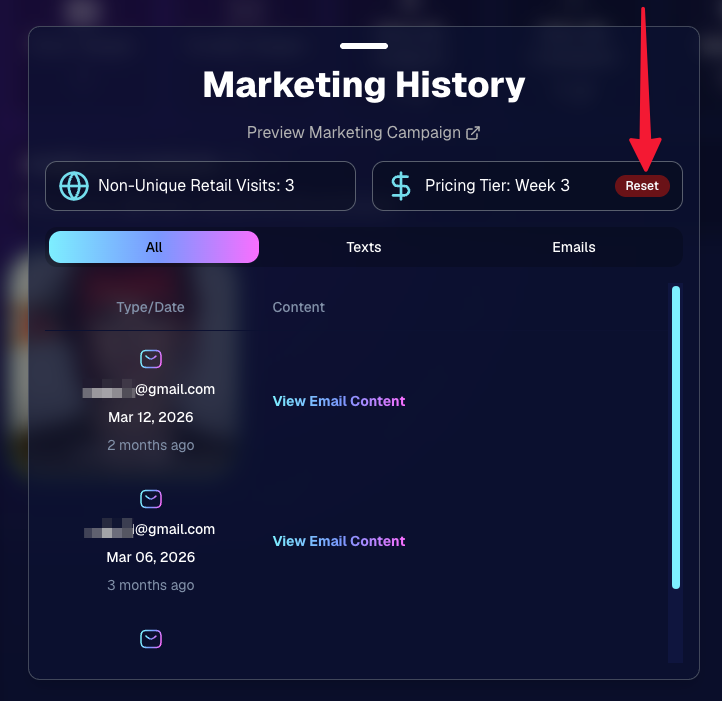
🔁 Pricing tier reset button

  • Participant marketing history now includes a button to reset a participant’s pricing tier start date, useful if support wants to re-offer first-week pricing.
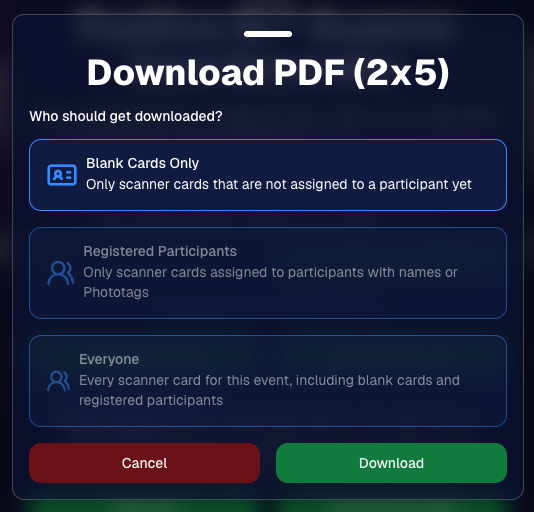
🪪 Positive ID QR Code downloader options

  • You can now download blank cards only, registered participants only, or everyone, making scan card PDFs easier to manage for multi-workflow sports events.
🛠️ New Tool: Image Converter

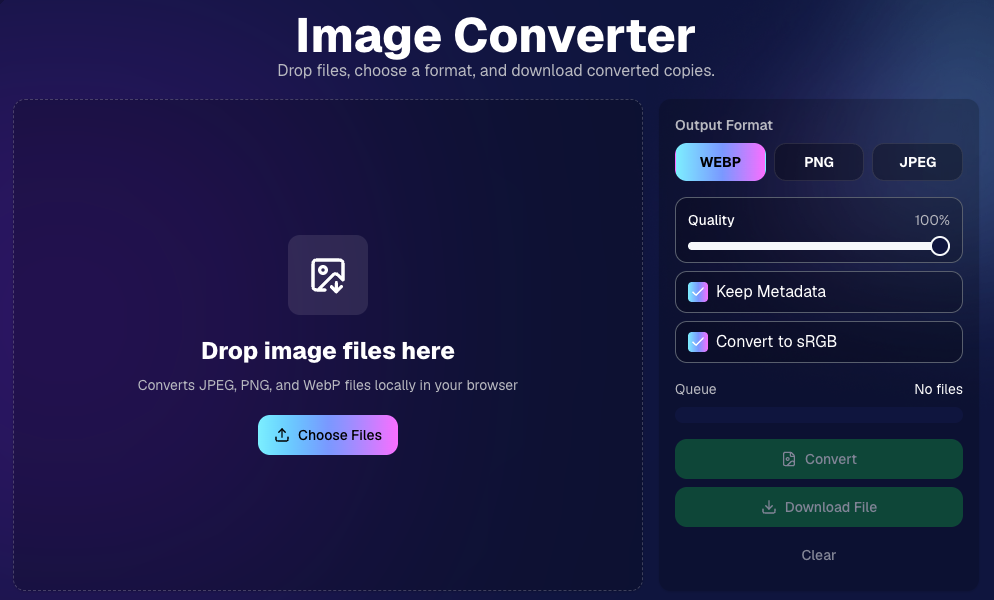
There’s a new tool under Tools & More → Image Converter.

Use it to:

🔄 Convert images to WEBP, PNG, or JPEG

🎨 Convert images to sRGB

Handy for preparing files before uploading them to NowCandid Events.
📚 New Capture App Camera Docs

We added a dedicated docs page for confirmed camera models that work with the Capture App.

More cameras may work than what’s listed, but this page focuses on models we’ve confirmed.

Docs page: https://app.nowcandid.com/docs/capture-app/cameras

🛍️ Retail Improvements

📬 New Contact Us form on retail

  • The Contact Us popup now includes a form that sends support an email with helpful details automatically included, such as browser info, window size, retail link, Event details, and order number when available. This should make support faster and reduce back-and-forth.

🖼️ Overlay step now comes before cropping

  • This prepares retail for future improvements while keeping product customization clearer.

🗓️ Smarter Year captions

  • Certain products now default the Year caption to the Event start year or participant Day 0 year instead of the current year. Helpful for late-December events or older graduation galleries.

🌍 International order fix

  • Fixed an edge case where some international orders could send multiple receipts and incorrectly show that the order wasn’t submitted.

🤳 Selfie Check-In & Capture App Updates

📶 Clearer Selfie Check-In upload errors

  • If a selfie upload fails, subjects now see a more specific error reason — like upload speed being too slow — so they know what to try next.

📱 Capture App 5.6.3 OTA update

  • Contact Info Settings now says Tap-A-Face or Type & Take based on the Event program
  • The 1000×1000 reference image requirement has been removed for Selfie Check-In Station and Roster Check-In, especially helpful for Android devices with lower-resolution cameras

That’s the week!

Virtual Group Builder is the big one, especially for sports and volume workflows — but between Client Outreach, Candy Image Studio, Image Converter, and retail support improvements, there’s a lot here to make your next Event easier to manage.

Keep creating magic,

Candy 🍬

Related articles

QuicPics: Lowering Fees & Trying Something New
QuicPics
September 21, 2023

QuicPics: Lowering Fees & Trying Something New

7
 minutes read
Change is in the air at NowCandid!

It's all about creating more value for you the photographer and enhancing the customer experience! Here's a detailed look at the latest changes we're rolling out for QuicPics and what they mean for you.

1. More Room to Click with Reduced Fees:

The upload fee for each image on QuicPics is getting a significant trim, dropping from $0.31 to just $0.20. Our aim? To offer photographers greater flexibility, letting you focus on capturing plenty of shots without being overly conscious about the associated costs.

2. Unique Price Levels Tailored for QuicPics:

QuicPics is donning a fresh identity with its Price Levels. No longer a reflection of PartyPics Now, these new levels are designed to specifically enhance the QuicPics experience. There's now an expansive range of specialty products, including blankets, canvas wraps, metal prints, and much more. We've created fun themed packages, set very reasonable prices on premium items, and provided enticing discounts on the full-resolution digital downloads & packages. And here's the cherry on top - to the end consumer, all products come with free shipping!

+ Click here to check out the new Price Levels. +

3. Lowered Margin:

With QuicPics' new pricing strategy, photographers can anticipate margins ranging between 10% to 30%. While this is much lower than our other programs, our goal is to bolster the overall volume of sales through reasonable pricing on specialty items. QuicPics sales have been almost non-existent thus far, given you're providing "free" social media size image files of all images to all participants. We think these changes will help bolster the sales of QuicPics Events a bit. And remember, a smaller percentage of a bigger pie can often be more substantial than a larger slice of a smaller pie.

4. Continuing to Market with a Gentle Touch:

While we're working hard to boost sales, we're committed to keeping our marketing approach gentle and unobtrusive. With the new QuicPics Price Levels, the removal of weekly price hikes reflects this ethos, ensuring there's zero undue pressure on the end consumer to make a purchase.

5. The Bigger Picture:

Our new strategy aims to strike a balance. By nurturing a growth in QuicPics Event sales while ensuring a reasonable margin for NowCandid, we have been able to justify the reduced upload fee. Furthermore, if sales surpass our conservative estimates, we are planning even more substantial fee reductions in the future!

Some Parting Thoughts:

While the average sales from QuicPics Events have traditionally been on the modest side, our revamped approach aims to change that narrative. Higher sales volumes, even with the revised margins, should translate to improved profits for our photographers. Reducing the fee per image upload will allow you to both save money and take more images, and more images could result in slightly higher sales as well. We'd like to lower the image per upload fee as low as possible, but need a way to cover costs in the meantime, all while trying to provide a good experience to the end consumer. We hope this new direction can result in a win-win-win for all parties involved. More pictures taken of end consumers and more fun product options, less fees for the photographer, same revenue for NowCandid.

We're excited!

We like these changes and truly believe they reflect a balanced mix of value, quality, and profit. Your feedback matters, so if you have thoughts, queries, or concerns, don't hesitate to get in touch.

Here's to a brighter, more lucrative future with QuicPics!

New and Improved SportsPics Now Price Levels!
SportPics
September 21, 2023

New and Improved SportsPics Now Price Levels!

4
 minutes read
Hey there, it's Candy! 🍭

I'm super thrilled to share that we're taking our SportsPics Now Price Levels up a notch!

Double the Levels, Double the Fun!

We used to have 5 Price Levels, but guess what? We’ve now expanded to 10! And the cherry on top? The middlemost Price Levels have been adjusted to very closely match the most common & successful prices Volume Sports Photographers tend to charge. Whether you're an experienced Volume Sports Photographer or someone just getting into it, these 10 Price Levels should be able to meet most of your needs!

New Products

Hold onto your hats because this is the part that I'm most excited about! We're introducing a plethora of new products for your end consumers to purchase. Want to give your walls a makeover? Our wall clings and cloth banners are perfect for that. Looking to bring photos to life? Dive into our video animations. And that's just scratching the surface! We also have larger statuettes, shimmering metal prints, fun spirit noggins, acrylic cutout magnets, and so much more.

More Desirable Packages

Wait, there’s more! Our new and improved packages are curated with your end customers in mind. Each bundle has been thoughtfully put together to offer a mix of products that are most likely to be purchased together, ensuring that more customers can find the package that they are looking for.

Sample Graphic Improvements

Our graphics team has made some improvements, and I’m excited to present our new & improved sample graphics on the retail site. Designed to capture attention, they're set to give your sales that extra oomph!

To sum it all up, SportsPics Now is not just offering more Price Levels, but an entire overhaul!

As always, if you have any questions or need recommendations, I'm here to help.

Don't forget to review other blog posts for all the latest updates and offerings. And remember, with NowCandid, every click counts!

Candy, signing off! 💖🍬📸

Capture & Upload Images with Our New iOS App! 🎉
Feature Updates
September 20, 2023

Capture & Upload Images with Our New iOS App! 🎉

4
 minutes read
Hey there NowCandid users! It's Candy! 🍬

I'm buzzing with excitement and can't wait to share our latest addition with you all. We've created an iOS version of our Capture & Upload app! Meaning you'll be able to utilize iPads and iPhones with NowCandid finally.

Want to check it out? Here's the link! https://apps.apple.com/app/nowcandid-capture-upload

Seamless Transitions, Familiar Features 🖥 📱

For all our current Windows app users, great news: our new iOS app mirrors almost all the fabulous features you've come to love. From tethering capabilities with Sony, Canon, and Nikon to that handy new wireless connection for Canon cameras, we've got you covered. Utilize our classic Workflows such as Tap-A-Face, Type & Take, Scanner ID, and Name Lookup, all optimized for your Apple devices!

Same Login Process & New Screen Lock Feature 🔐

Forget juggling multiple passwords! Your iOS app login passcode is the same as your Windows app. Easy peasy! Plus, for those of you who love to shoot on the go, we've added a nifty screen lock feature. It ensures no accidental taps on the app when you're immersed in your shots, especially handy if you're using features like the Selfie Check-In.

Capture Moments, Your Way 📸

Want to snap a quick pic (or possibly a QuicPic!) even when you're not connected to Nikon, Canon, or Sony? Go ahead and use the internal camera on your device when not connected to an external camera. Great for emergencies, check-in stations, casual users, and more!

iPad or iPhone? You Decide! 🍏 📱

Whether you're Team iPad or Team iPhone, our new app has got you covered! But here's a hot tip: using an LTE iPad can be a game-changer with those budget-friendly data rates. And remember, for the optimal NowCandid experience, we always champion iPads & devices with LTE connections.

Double the Platforms, Double the Fun! 🎈

After so much anticipation, our Capture & Upload app is now rocking both iOS and Windows platforms! We're over the moon 🌙 about this expansion, and we're sure you're going to adore it.

That's all for now!

Good luck out there, photographers! I'm here cheering you on every click of the way. Happy snapping!

- Candy 🍬

Let’s get in touch

If you’re a photographer looking to add NowCandid services to your wheelhouse – set up a call by clicking the button below.

How to customize formatting for each rich text

How to customize formatting for each rich text

How to customize formatting for each rich text

How to customize formatting for each rich text

How to customize formatting for each rich text

What’s a Rich Text element?

The rich text element allows you to create and format headings, paragraphs, blockquotes, images, and video all in one place instead of having to add and format them individually. Just double-click and easily create content.

A rich text element can be used with static or dynamic content. For static content, just drop it into any page and begin editing. For dynamic content, add a rich text field to any collection and then connect a rich text element to that field in the settings panel. Voila!

Headings, paragraphs, blockquotes, figures, images, and figure captions can all be styled after a class is added to the rich text element using the "When inside of" nested selector system.

  • List One
  • List Two
  • List Three
  • List Four
  • List Five

This is a link

This is bold text