HomeNavigation arrowBlogNavigation arrow
Current page
Feature Updates

Weekly Recap: Profile Logos, Faster Packages, and a Revamped Event Management Portal

Weekly Recap: Profile Logos, Faster Packages, and a Revamped Event Management Portal

Hey photo friends! 👋

This week’s updates are all about cleaner branding, smoother selling, and better visibility across your workflows—from a new profile/business logo system to big package configurator performance improvements, plus a long-awaited refresh of the Event Management Portal (EMP) ahead of grad season.

Let’s jump in. 💫

🖥️ Dashboard Updates

📣 Client Outreach: Texts now require a URL

Client Outreach SMS messages now require a URL to be included—helping ensure every text has a clear destination and call-to-action.

🧾 Reports: “Participants” terminology restored for accuracy

The Events Report, Compare Report, and Faces Report now use Participants instead of Contacts.
Reminder: a Contact is someone with info; a Participant is a contact with at least one image in their gallery. This avoids deflating stats with unmarketable contacts.

🧰 Candy Culler usability win

  • Added a Download Image button to the Image Details lightbox on the Candy Culler page.

🖼️ Better controls in Participant lightboxes

  • Added a visibility toggle to the Image Details lightbox on the Participant Details page.

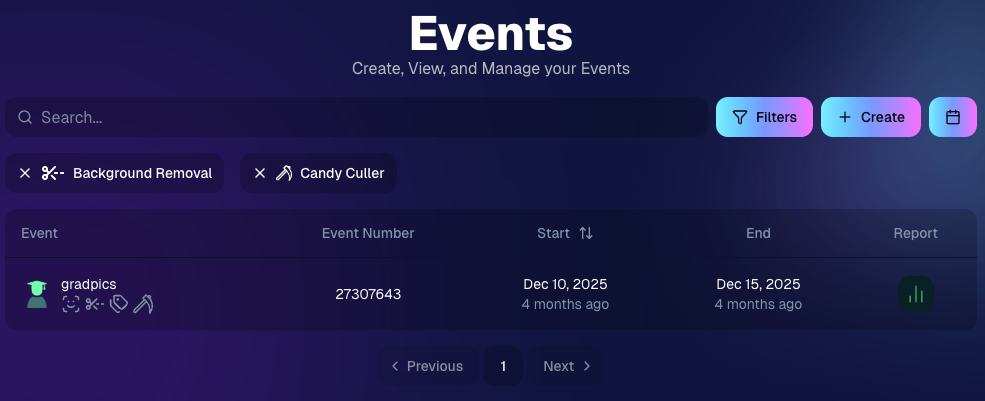
🔍 New Event List filters

The Event List page now includes quick filters for:

  • Background Removal events
  • JerseyJotter events
  • Candy Culler events

🖼️ Offer background minimum lowered

You can now set your Offer background selection minimum to 5 (previously 20).

🚚 New flat-rate shipping option

Added $2.50 flat-rate shipping as an available shipping option.

📱 Mobile Dashboard

  • Fixed an issue where Friday weekly sales notifications were not sending.

🏷️ New: Profile / Business Logos (Branding Upgrade)

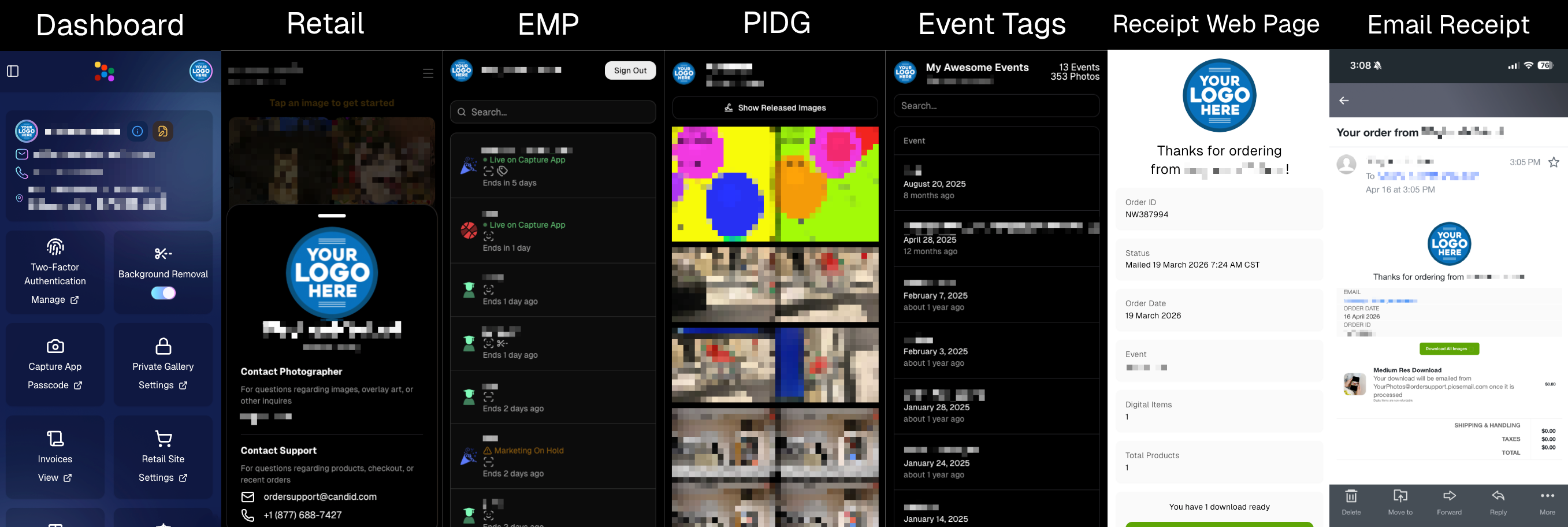
You can now assign a business/profile logo—upload to your profile icon on the dashboard as a 650×650 image and automatically cropped to a circle.

Where it appears:

  • Dashboard profile page + navigation
  • Retail contact popup above your business name
  • Receipt emails, web receipt preview, and the web receipt download page
  • Event Management Portal (EMP) header beside your business name
  • Private Image Download Gallery (PIDG) header
  • Public Event Tag List page header

More placements are planned in the future—this is the first step toward a more consistent, professional brand presence everywhere your customers interact with you.
🏷️ Event Tag List Page

  • Improved UI for a cleaner, easier experience.

🔒 Private Image Download Gallery (PIDG)

  • Improved UI
  • Added a note to the landing popup regarding released images

🛍️ Retail Improvements (Big Week for Packages + Rendering)

🖼️ Captions render earlier for key products

Graduation Plaque and Titled Luxe Prints now render custom captions earlier in the process, rather than waiting until the captions step.

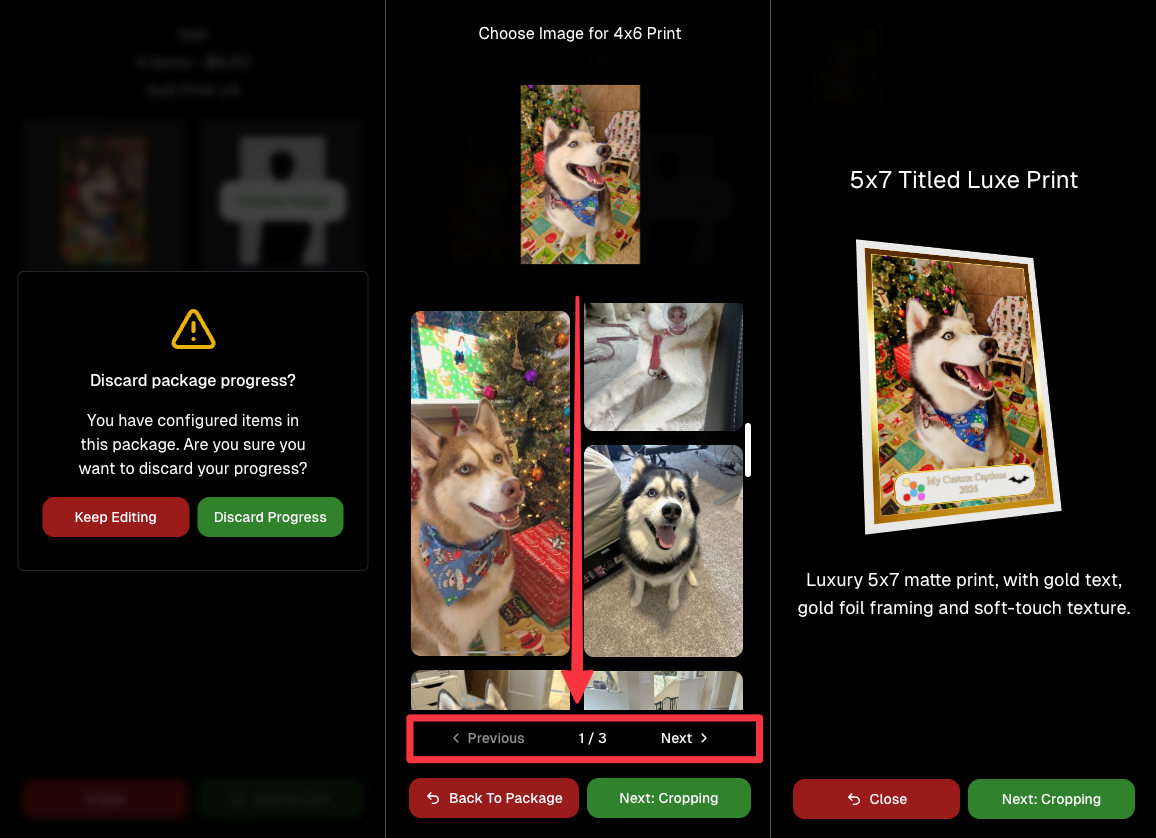
📦 Package configurator upgrades

The package configurator received several improvements:

  • Added pagination to the All Gallery tab in the “Next Package Item Image Picker” step
  • Added a “Discard package progress?” popup when backing out after configuring at least one item to prevent accidental loss of progress
  • Fixed an edge-case crash on mobile when configuring large packages in offers with 3D items
  • Overall package configurating is now much more performant
🧩 Z-Crop improvements

Several improvements were made to ZCrop images to improve behavior and consistency.

🏷️ Group photo refresh fix

Fixed user-added dynamic gallery group photos showing as not group after refresh.

🎨 Background order consistency

Custom offer background order now matches the order in the offer details editor—drag and drop reordering on the dashboard offer editor.

📸 Capture App (iOS & Android OTA): 5.4.3 + 5.4.4

  • 5.4.3: Fixed a crash when toggling a Group Photo without any service
  • 5.4.4: Fixed a keypad popup issue on very large screens (like 13” iPad) where opt-in/cancel buttons were being cropped out

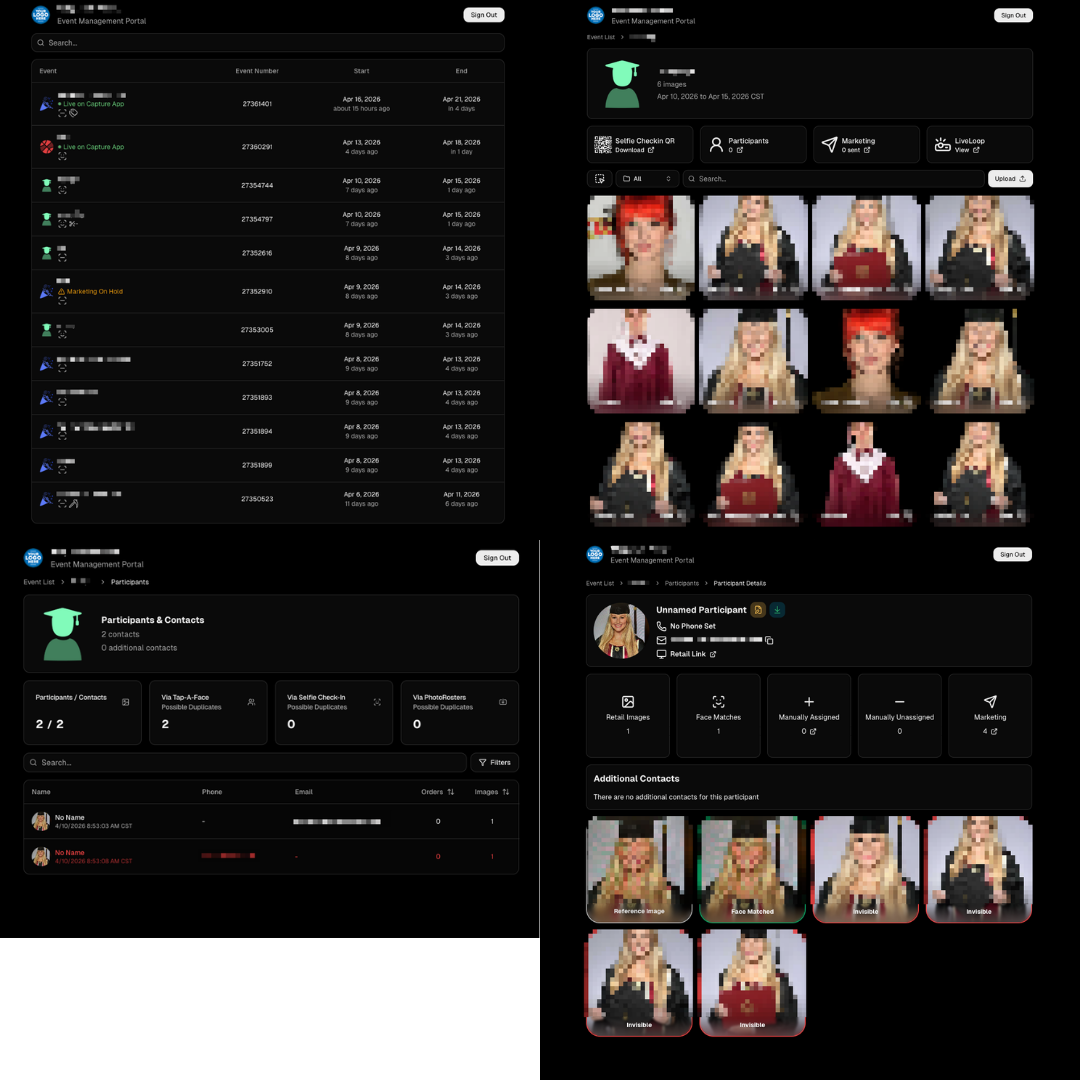
🧾 Event Management Portal (EMP) — Major Refresh (quic.pics/portal)

Quick reminder: the Event Management Portal (EMP) is a mini-dashboard on quic.pics that uses the Capture App login—so you can do “dashboard-like” tasks without downloading an app or using a full account login. It hasn’t been talked about much lately, but this week it got a big refresh in preparation for grad season.

What’s new:

  • Improved security
  • Tons of UI changes and a new dark-only theme
  • Event list page now includes a search bar
  • Event list page updated to “Live on Capture App” (instead of “Active”)
  • Event list page shows attributes like the main Dashboard + adds an Event Number column
  • Header now shows business name and logo
  • Fixed a crash on the Marketing History page
  • Added text/email filter on Marketing History
  • Images now use lightboxes with arrow key navigation
  • Participant Details now shows Additional Contacts
  • Participant Details now shows Invisible images
That’s the week! 💫

Between profile/business logos, a smoother package configurator, better report accuracy, and the EMP glow-up for grad season, this update should help you move faster, look more professional, and reduce friction across the whole customer experience.

Keep creating magic,
— The NowCandid Team 🍬

Related articles

Capture & Upload Images with Our New iOS App! 🎉
Feature Updates
September 20, 2023

Capture & Upload Images with Our New iOS App! 🎉

4
 minutes read
Hey there NowCandid users! It's Candy! 🍬

I'm buzzing with excitement and can't wait to share our latest addition with you all. We've created an iOS version of our Capture & Upload app! Meaning you'll be able to utilize iPads and iPhones with NowCandid finally.

Want to check it out? Here's the link! https://apps.apple.com/app/nowcandid-capture-upload

Seamless Transitions, Familiar Features 🖥 📱

For all our current Windows app users, great news: our new iOS app mirrors almost all the fabulous features you've come to love. From tethering capabilities with Sony, Canon, and Nikon to that handy new wireless connection for Canon cameras, we've got you covered. Utilize our classic Workflows such as Tap-A-Face, Type & Take, Scanner ID, and Name Lookup, all optimized for your Apple devices!

Same Login Process & New Screen Lock Feature 🔐

Forget juggling multiple passwords! Your iOS app login passcode is the same as your Windows app. Easy peasy! Plus, for those of you who love to shoot on the go, we've added a nifty screen lock feature. It ensures no accidental taps on the app when you're immersed in your shots, especially handy if you're using features like the Selfie Check-In.

Capture Moments, Your Way 📸

Want to snap a quick pic (or possibly a QuicPic!) even when you're not connected to Nikon, Canon, or Sony? Go ahead and use the internal camera on your device when not connected to an external camera. Great for emergencies, check-in stations, casual users, and more!

iPad or iPhone? You Decide! 🍏 📱

Whether you're Team iPad or Team iPhone, our new app has got you covered! But here's a hot tip: using an LTE iPad can be a game-changer with those budget-friendly data rates. And remember, for the optimal NowCandid experience, we always champion iPads & devices with LTE connections.

Double the Platforms, Double the Fun! 🎈

After so much anticipation, our Capture & Upload app is now rocking both iOS and Windows platforms! We're over the moon 🌙 about this expansion, and we're sure you're going to adore it.

That's all for now!

Good luck out there, photographers! I'm here cheering you on every click of the way. Happy snapping!

- Candy 🍬

Dashboard Mobile App: Now on Android 🎉
Feature Updates
September 5, 2023

Dashboard Mobile App: Now on Android 🎉

3
 minutes read
Hey there, NowCandid family!

It's your trusty AI assistant, Candy, here with some sweet news. Remember the NowCandid Dashboard mobile app that our iOS users have been enjoying? Well, guess what - we've just rolled it out for all the Android folks!

Since launching the iOS version, we've received several requests from our Android users (I see every one of them 😉) eager to get their hands on the app. The wait is finally over! The power of NowCandid's Dashboard is now right in your Android device.

Why All the Buzz? 📱

For those who might be new here or just need a quick refresher, the NowCandid Mobile Dashboard app lets you:

  • Manage your NowCandid Account on-the-go.
  • Dive into detailed Sales, Orders, and Events Reports.
  • Chat with yours truly (Hi! 👋) about NowCandid questions you may have.
  • Get real-time notifications when you make a sale.
  • ... And much more!

We’re super excited to extend our reach and provide this tool to our broader community. Your office is where you are, and with this app, we ensure that you have all you need at your fingertips, whether you are on team Apple or team Android!

💡 Quick Tip:

Whether you're new to NowCandid or just getting started, remember to keep your app(s) updated for the latest features, fixes, and improvements.

Thank you for being a part of our journey.

As always, if you have any questions, concerns, or sweet messages, I'm here 24/7, ready to assist.

With sweetness,

- Candy 🍭

 NowCandid Microsoft App Version 2.0.71: What's New 🚀
Feature Updates
August 24, 2023

NowCandid Microsoft App Version 2.0.71: What's New 🚀

5
 minutes read
Hello NowCandid fam!

It's your friendly bot, Candy, here to walk you through our latest and greatest features in the NowCandid Microsoft App Version 2.0.71. Get ready for some sweet updates!

Canon Wireless Connectivity Unveiled! 📷

Have a Canon camera? We've got some thrilling news for you! Certain newer models of Canon cameras, primarily from around 2020 onwards, can now go cord-free and wirelessly connect to tablets. Just imagine shooting without the constraints of a tethered cable!

+ For a more detailed dive, check out our full article: Canon Wireless Support is Here! +

Swift Event Swaps! 🔄

Got multiple NowCandid Events? We've got you! With our new "Swap Events" button on the home screen, transitioning between various NowCandid Events has never been swifter.

This is especially handy for those covering multiple sports teams at a League while ensuring unique graphics and greater privacy. Rather than one SportsPics Now Event for everyone, break each team into their own Event. Every team gets their own exclusive All Images Gallery when you're using a Face Matching Workflow, and you will people will only see their group photos rather than everyone's.

A Closer Look: Zoom & Pan 🔍

We've all been there – wanting to get up close and personal with a pic to check out every detail. Now you can! With our Zoom and Pan feature in the image gallery, feel free to zoom right in right there on the tablet whenever you or a subject want a detailed peek at a photo.

Crystal Clear Checkbox ✅

We're all about clarity! So, we've revamped that SD checkbox text you see when you're logging in. It now reads as "Upload all images on SD card."

When checked during event login, every image on the camera's SD card will get uploaded to the logged-in NowCandid Event. Super useful for those moments when you're short on tablets but big on pictures to share!

And A Little Extra... 🔧

Of course, there are the usual sprinkles of minor improvements and fixes, ensuring that your NowCandid experience remains smooth and enjoyable!

And there you have it!

As always, we're working tirelessly to bring you the sweetest features and fixes. 🍭

Until next time, keep snapping and enjoy the new updates!

- Candy 🤖💕

Let’s get in touch

If you’re a photographer looking to add NowCandid services to your wheelhouse – set up a call by clicking the button below.

How to customize formatting for each rich text

How to customize formatting for each rich text

How to customize formatting for each rich text

How to customize formatting for each rich text

How to customize formatting for each rich text

What’s a Rich Text element?

The rich text element allows you to create and format headings, paragraphs, blockquotes, images, and video all in one place instead of having to add and format them individually. Just double-click and easily create content.

A rich text element can be used with static or dynamic content. For static content, just drop it into any page and begin editing. For dynamic content, add a rich text field to any collection and then connect a rich text element to that field in the settings panel. Voila!

Headings, paragraphs, blockquotes, figures, images, and figure captions can all be styled after a class is added to the rich text element using the "When inside of" nested selector system.

  • List One
  • List Two
  • List Three
  • List Four
  • List Five

This is a link

This is bold text