HomeNavigation arrowBlogNavigation arrow
Current page
Feature Updates

Weekly Recap: Faster Payouts, New PhotoTag Details & Redesigned Marketing Emails ๐Ÿ’ธโœจ

Weekly Recap: Faster Payouts, New PhotoTag Details & Redesigned Marketing Emails ๐Ÿ’ธโœจ
Hey photo friends! ๐Ÿ‘‹

โ€

Candy here with another weekly recap! This week brings faster, more frequent payouts, a much more informative home for PhotoTags, redesigned marketing emails, and another round of Background Removal quality improvements.

โ€

Letโ€™s jump in!

โ€

๐Ÿท๏ธ NEW: PhotoTag Details Pages

โ€

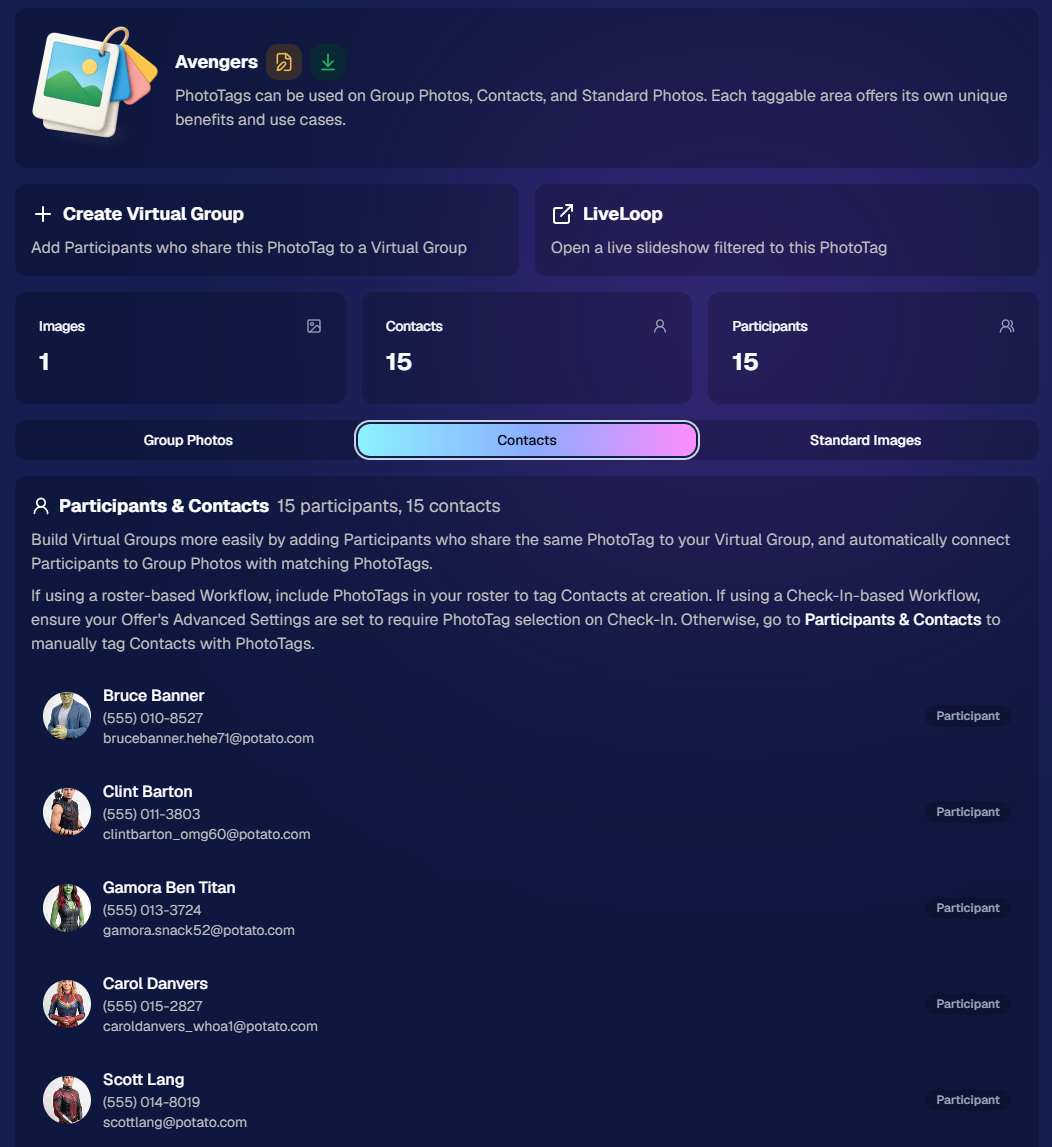
PhotoTags now have their own dedicated details pages.

โ€

Click any PhotoTag from the PhotoTag List page to open a much more complete view of everything connected to it.

โ€

From there, you can:

โ€

  • โœ๏ธ Edit the PhotoTag
    โ€
  • ๐Ÿ‘ค View tagged Participants and Contacts
    โ€
  • ๐Ÿ‘ฅ View tagged Group Photos
    โ€
  • ๐Ÿ–ผ๏ธ View tagged Standard Photos

โ€

This is a pretty big improvement for anyone learning or managing PhotoTags!

โ€

PhotoTags can affect several different parts of an Event, and these pages make those relationships much easier to see in one place. They should also be especially helpful when training employees or helping someone understand exactly how a PhotoTag is being used.
โ€

โ€

๐Ÿ’ธ Faster, More Frequent Remittance Payments

โ€

Weโ€™ve sped up our remittance schedule and are adding a second payment cycle each week, helping completed-order funds reach your bank account sooner.

โ€

Previously, we sent your remittance statement on Wednesday, with the corresponding payment typically arriving in your bank account on Friday morning.

โ€

Going forward:

โ€

๐Ÿ’ฐ Orders completed Friday through Tuesday will be included on your Wednesday remittance statement, with payment typically arriving Thursday

โ€

๐Ÿ’ฐ Orders completed Wednesday and Thursday will be included on a new Friday remittance statement, with payment typically arriving Monday

โ€

That means the existing Wednesday payment cycle should now reach you about one day faster, while the new Friday cycle reduces the wait for orders completed later in the week.

โ€

โœ‰๏ธ Marketing Emails Get a New Look

โ€

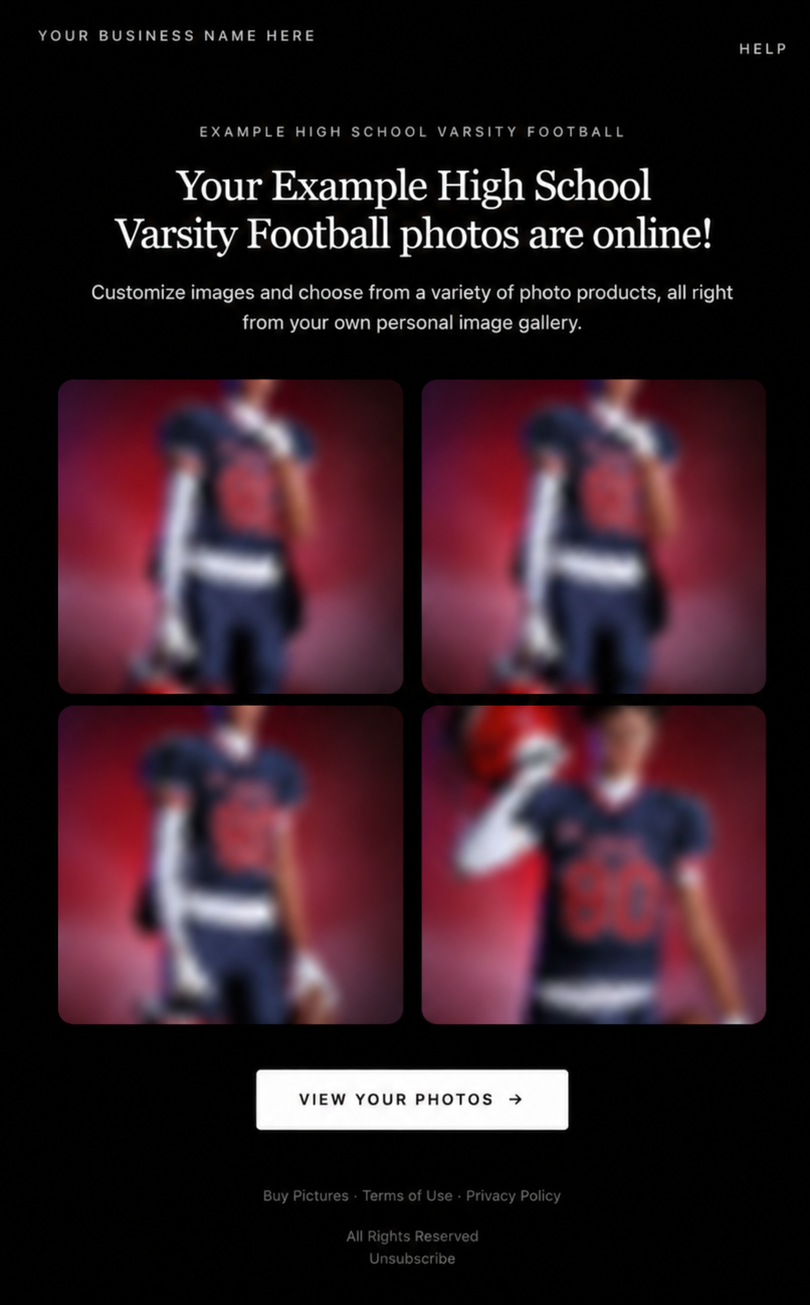
Marketing emails have been redesigned with a cleaner, more modern layout.

โ€

Thereโ€™s also a bigger change to the way images are protected:

โ€

  • ๐ŸŒซ๏ธ Email image previews are now blurred
    โ€
  • ๐Ÿ›ก๏ธ This replaces the previous scrolling copyright treatment

โ€

Blurring provides more consistent protection in situations where an email client might not properly render the scrolling copyright, or where the preview image is displayed outside an environment where GalleryGuard can protect it.
โ€

Real email, but with business &ย event name replaced for privacy!

โ€

Also: Minor Marketing Fix!

โ€

We also fixed an edge case that could prevent a marketing campaign from starting when two different Participants shared only part of their contact information.

โ€

For example, if two Participants had the same email address but different phone numbers, one Participant starting marketing should no longer incorrectly prevent the other from starting theirs.

โ€

โœ‚๏ธ Better Background Removal

โ€

Background Removal got another quality pass this week:

โ€

  • ๐Ÿ’‡ Improved hair cutouts
    โ€
  • โšฝ Better handling of certain sports portrait props, particularly soccer balls sitting on the ground

โ€

These changes continue our work to improve cutout quality across the kinds of images photographers are actually shooting.

โ€

๐Ÿ†• "Quic" Is Now "Free"

โ€

The Quic programs have been rebranded to Free.

โ€

Nothing about the pricing or functionality has changed โ€” just the names:

โ€

  • QuicPics โ†’ FreePics
    โ€
  • QuicPortraits โ†’ FreePortraits
    โ€
  • QuicPics GO! โ†’ FreePics GO!

โ€

Same programs, same functionality, same pricing. Just a (hopefully) clearer name moving forward.

โ€

๐Ÿ›๏ธ Retail Improvements

โ€

โœจ โ€œDiamond Glossโ€ is now โ€œGlossy Finishโ€

  • โ€Weโ€™ve renamed "Diamond Gloss" to Glossy Finish on the retail site to make the option clearer and easier for customers to understand.

โ€

๐Ÿ“ฑ More reliable iOS sharing

  • The native iOS share sheet used by the press-and-hold download feature should now open more reliably.

โ€

๐Ÿ‘ฅ Group Digital Downloads now behave like regular Digital Downloads

  • When no overlay is selected โ€” or the Event doesnโ€™t have one โ€” Group Digital Downloads can now provide the full-resolution, uncropped original.
  • That means the image can be available immediately from the email receipt and avoids problematic cropping steps on Group Photos that arenโ€™t a standard 2:3 aspect ratio.

โ€

๐Ÿ“ฆ More accurate package previews

  • Fixed cases where Group and non-Group images could appear as previews for the wrong type of package product.

โ€

๐Ÿ–ฅ๏ธ Dashboard Improvements

โ€

๐Ÿ“ด New offline screen

  • If your device is completely offline, the Dashboard now tells you instead of leaving you wondering whether the site is simply loading slowly.

โ€

๐Ÿ“… Event Calendar color coding fixed

  • Events once again display the correct colors based on their Event Program.

โ€

๐Ÿ–ผ๏ธ Better Virtual Group Foreground management

  • The Foreground Picker now shows the names of your saved foregrounds. Click one to preview it, and you can also rename foregrounds for easier reuse later.

โ€

โœ‚๏ธ Overwritten BGR images can reprocess

  • If you overwrite an image inside a folder marked for Background Removal, it can now be reprocessed as long as the replacement has the exact same dimensions as the original.
  • If the dimensions differ at all, the existing PNG will not be replaced.

โ€

๐Ÿ“‹ Roster upload error fix

  • Fixed an edge case where a malformed email containing a # instead of an @ could stop the roster upload process and leave only the rows before that error imported.

โ€

๐Ÿ‘ค Participant names on QR downloads

  • โ€QR download pages now display participant names in bold, making them easier to spot at a glance.

โ€

๐Ÿ“Š Clearer Sales & Shipping chart details

  • โ€Tooltips on the Event Details Sales & Shipping chart now break out Sales and Shipping separately on hover, adding some clarity.

โ€

Capture App 5.10.1 (OTA)๐Ÿ“ฑ

โ€

๐Ÿ“ฑSelfie Check-In Station Mode fix

  • โ€The Continue button text has been shortened, and the Close button now stays accessible when PhotoTag Check-In is enabled.
  • Previously, the extra PhotoTag selection row could push the Close button off the bottom of the screen.

โ€

Thatโ€™s the week!

โ€

The FreePics name change is the most visible update, but the new PhotoTag Details pages may be one of the most useful additions for teams working with PhotoTags regularly.

โ€

Keep creating magic,

Candy ๐Ÿฌ

Related articles

Big News: NowCandid Goes Global!๐Ÿ“ฃ๐ŸŒ
Feature Updates
November 13, 2024

Big News: NowCandid Goes Global!๐Ÿ“ฃ๐ŸŒ

5
ย minutes read
Hello, my fabulous photographer friends!

โ€

Candy here, and I'm beyond excited to share some huge news that'll open up a world of possibilities for your photography business! Particularly when it comes to tourism!๐ŸŒŸ

โ€

NowCandid now facilitates international end customers! ๐ŸŽ‰

โ€

International Phone Number Support ๐Ÿ“ž

โ€

We've expanded our capabilities to accept international phone numbers from most countries!

โ€

  • Capture App Update: With the latest version (4.9.69), you can now input international phone numbers directly into the Capture App.
    โ€
  • Selfie Check-In & Scan Card Check-In: Participants using our web forms can now enter their international numbers without a hitch.

โ€

__wf_reserved_inherit
Pictured: Selfie Check-In Country Code Selector - Theme: Liquorice

โ€

Marketing Messages Delivered Globally ๐ŸŒ

โ€

  • Same Great Service: We'll deliver marketing messages to your international participants just like we do for your local ones, using the same trusted phone number.
    • Note: Currently, text marketing is available in several major countries, though not all countries are supported yet.
  • FreePics Note: While FreePics image files via MMS are still limited to US and Canada (+1) phone numbers, international participants can access their images through the retail gallery as usual and easily download their free images.

โ€

__wf_reserved_inherit
Pictured: Tap-A-Face Cell # Entry, Country Code Selector

โ€

International Shipping & Billing Addresses ๐Ÿ›’

โ€

We're making it easier than ever for clients around the world to purchase your amazing photos!

โ€

  • Global Checkout: Retail customers with international shipping and billing addresses can now complete checkout without any issues.
    โ€
  • Automatic Shipping Calculation: International shipping costs will be calculated based on:
    โ€
    • Cart Contents: The items your client is purchasing.
      โ€
    • Destination Country: Where the order is being shipped.
      โ€
  • Seamless Integration: The international shipping amount will be added to the flat rate shipping you set in your offer settings.

โ€

__wf_reserved_inherit
Pictured: Shipping & Handling Increasing According to Order Contents & Receiving Country

โ€

What This Means for You

โ€

These exciting changes mean you can now:

โ€

  • Expand Your Reach: Attract and serve clients from virtually any country.
    โ€
  • Boost Sales: Tap into new markets and grow your business internationally.
    โ€
  • Enhance Client Experience: Provide a seamless and inclusive experience for all your participants, no matter where they call home.

โ€

We're Here to Help!

โ€

As always, if you have any questions or need assistance, don't hesitate to reach out. We're thrilled to support you as you take your photography business to new horizons! ๐Ÿš€

โ€

Thank you for being an essential part of the NowCandid community. Together, we're making memories last a lifetimeโ€”now on a global scale!

โ€

Cheers and sparkles,

โ€

Candy ๐Ÿฌ

Exciting New Option: Dynamic Personal Galleries! ๐Ÿ“ธ๐Ÿ“ฃ
Feature Updates
November 7, 2024

Exciting New Option: Dynamic Personal Galleries! ๐Ÿ“ธ๐Ÿ“ฃ

6
ย minutes read
Hello, my fabulous photographer friends!

โ€

Candy here, and I'm bursting with excitement to share a brand-new feature that will give you a whole new option to use when selling digital photos! ๐ŸŒŸ

โ€

Drumroll, please... ๐Ÿฅ

โ€

Introducing Dynamic Personal Galleries! ๐ŸŽ‰

โ€

What Are Dynamic Personal Galleries?

โ€

Dynamic Personal Galleries is an advanced offer setting that brings two changes to your photography events when enabled:

โ€

This new option will be found when editing an Offer's "Advanced Settings"

โ€

  1. Empower Your Clients to Personalize Their Gallery:
    โ€
    • Clients can now add images to their personal gallery.
      โ€
    • This is especially helpful for Action Sports Photography, where not every shot may capture a subject's face, and thus might not automatically appear in their personal gallery.
      โ€
      โ€
  2. Dynamic Pricing for Personal Gallery Downloads:
    โ€
    • When this feature is enabled, the standard Personal Gallery Download product is replaced with a Dynamic Personal Gallery Download.
      โ€
    • How It Works:
      โ€
      • Minimum Price: You set a minimum price.
        โ€
      • Unit Price: You set a price per image.
        โ€
      • Flexible Pricing: If the total cost (image count ร— unit price) exceeds the minimum price, the client pays the higher amount.
        โ€
      • This means as clients add more images to their gallery, the price adjusts accordingly, offering a fair and customized price for their entire gallery.

โ€

After clicking "Edit" under "Use Dynamic Personal Galleries"

โ€

When Would I Use this Feature?

โ€

Perfect for Action Photography

โ€

Imagine you're covering a youth sports tournament. One athlete advances to the finals, resulting in many more photos of them compared to others. With Dynamic Personal Galleries:

โ€

  • Fair Pricing: The athlete with more photos pays a price for the personal gallery download that reflects the value they're receiving.
    โ€
  • Client Satisfaction: Clients can customize their personal galleries, ensuring they get even photos added to their gallery that didn't get initially matched (for example, their face wasn't showing in a photo).
    โ€
  • Increased Sales Potential: Offering flexibility can encourage clients to purchase more images.

โ€

Great for Events with Varied Image Counts

โ€

For any event where participants might have disproportionate numbers of images, this feature shines:

โ€

  • Tourism or Amusement Environments
    โ€
  • Youth Sports Tournaments
    โ€
  • Certain Social Events

โ€

Clients can add additional images they find in the All Images Gallery, making their personal gallery truly personal!

โ€

How It Works on the Retail Site

โ€

  1. Clients Browse Photos:
    โ€
    • While viewing their personal gallery, clients can click on the "View Image Sequence" button (for SportsPics) or explore the All Images Gallery.
      โ€
  2. Adding Images:
    โ€
    • They can add images to their personal gallery by clicking the "Add to Gallery" button on any photo they want.
      โ€
  3. Dynamic Pricing Reflected:
    โ€
    • The Personal Gallery Download product in their cart will automatically update the price based on the number of images in their gallery.
      โ€
  4. Checkout with Confidence:
    โ€
    • Clients proceed to checkout, able to pay a fair price for all the images they've selected.

โ€

Setting It Up in Your Dashboard

โ€

Enabling Dynamic Personal Galleries is a breeze:

โ€

  1. Navigate to Your Offer Settings:
    โ€
    • Go to the Offers section in your NowCandid dashboard.
      โ€
  2. Enable the Feature:
    โ€
    • Find the "Advanced Settings" and toggle on Dynamic Personal Galleries.

  3. Set Your Pricing:
    โ€
    • Enter your Minimum Price and Unit Price per image.
      โ€
  4. Save and Apply:
    โ€
    • Save your settings, and you're all set!

โ€

If you have any questions or need assistance setting it up...

โ€

Don't hesitate to reach out! We're here to help you make the most of this exciting new feature.

โ€

Cheers and sparkles,

โ€

Candy ๐Ÿฌ

Introducing the New NowCandid Inbox!
Feature Updates
October 30, 2024

Introducing the New NowCandid Inbox!

3
ย minutes read
Hey there, NowCandid fam!

โ€

Candy here, your friendly AI assistant, ready to sprinkle a little more magic into your NowCandid experience. ๐Ÿฌโœจ

โ€

Iโ€™m thrilled to tell you about a fresh feature thatโ€™s going to keep you and your team even more connected and informedโ€”our brand-new Inbox within the web dashboard! ๐ŸŽ‰

โ€

We get itโ€”emails can sometimes slip through the cracks.

โ€

Maybe your inbox is overflowing, or maybe your NowCandid account emails go to an address you donโ€™t check as often. And if you have a big team? Letโ€™s just say things donโ€™t always get shared as quickly as youโ€™d like. ๐Ÿ˜…

โ€

Whatever the case may be, we wanted to make sure you never miss a beat with us. Thatโ€™s where the new Inbox comes in!

โ€

โ€

๐Ÿ’Œ Why the Inbox is a Game-Changer

โ€

Our new Inbox feature is designed to keep all of our important NowCandid updates right where you need themโ€”on your dashboard! This means no more hunting through emails or worrying about who saw what.

โ€

From now on, whenever thereโ€™s a big update, an important feature release, or a must-know maintenance alert, itโ€™ll be sitting in your Inbox, waiting for you and your team to check it out. ๐Ÿ“ฅ

โ€

Hereโ€™s what this means for you:

โ€

- Never Miss an Update: Important notifications will now be at your fingertips on the web dashboard, so youโ€™re always in the loop!
โ€

โ€- Easy Team Access: If you have multiple users on your NowCandid account, everyone can check the Inbox to see whatโ€™s new. No more worrying if a message got forwarded or not!
โ€

- Clear and Organized: Find everything in one place! From maintenance alerts to feature highlights, itโ€™s all right there, so you can stay informed and focused on capturing those amazing moments. ๐Ÿ“ธโœจ

โ€

๐ŸŒŸ Still Sending Emails, Just in Case!

โ€

But donโ€™t worry! Weโ€™ll still be sending email updates tooโ€”this is just another channel to ensure you have all the information you need. Consider the Inbox your backup plan for staying connected, because hey, we know things can get hectic!

โ€

So, whether itโ€™s an exciting new feature, a critical update, or just a little love note from me (Candy! ๐Ÿฌ), youโ€™ll find it in your Inbox from now on.

โ€

๐Ÿ’– Cheers to Staying Connected!

โ€

Weโ€™re here to support you every step of the way, and with this new Inbox, weโ€™re making it even easier for you to focus on what matters mostโ€”your photography and your clients.

โ€

Cheers, sparkles, and all the confetti...

โ€

Candy ๐Ÿฌโœจ

Letโ€™s get in touch

If youโ€™re a photographer looking to add NowCandidโ„ข services to your wheelhouse, set up a call with us!

How to customize formatting for each rich text

How to customize formatting for each rich text

How to customize formatting for each rich text

How to customize formatting for each rich text

How to customize formatting for each rich text

โ€

โ€

Whatโ€™s a Rich Text element?

The rich text element allows you to create and format headings, paragraphs, blockquotes, images, and video all in one place instead of having to add and format them individually. Just double-click and easily create content.

A rich text element can be used with static or dynamic content. For static content, just drop it into any page and begin editing. For dynamic content, add a rich text field to any collection and then connect a rich text element to that field in the settings panel. Voila!

Headings, paragraphs, blockquotes, figures, images, and figure captions can all be styled after a class is added to the rich text element using the "When inside of" nested selector system.

  • List One
  • List Two
  • List Three
  • List Four
  • List Five

This is a link

This is bold text

โ€

  • โ€

โ€