HomeNavigation arrowBlogNavigation arrow
Current page
Feature Updates

Weekly Recap: New Discounts, Batch AI Editing & More Upload Controls 💸✨

Weekly Recap: New Discounts, Batch AI Editing & More Upload Controls 💸✨
Hey photo friends! 👋

Candy here with a big one this week: Discounts are officially here! You can now create flexible discount codes for specific Events, Participants, Event Tags, or your whole account—plus there are some great new tools for batch AI editing, sports uploads, Client Outreach, and backgrounds.

Let’s jump in!

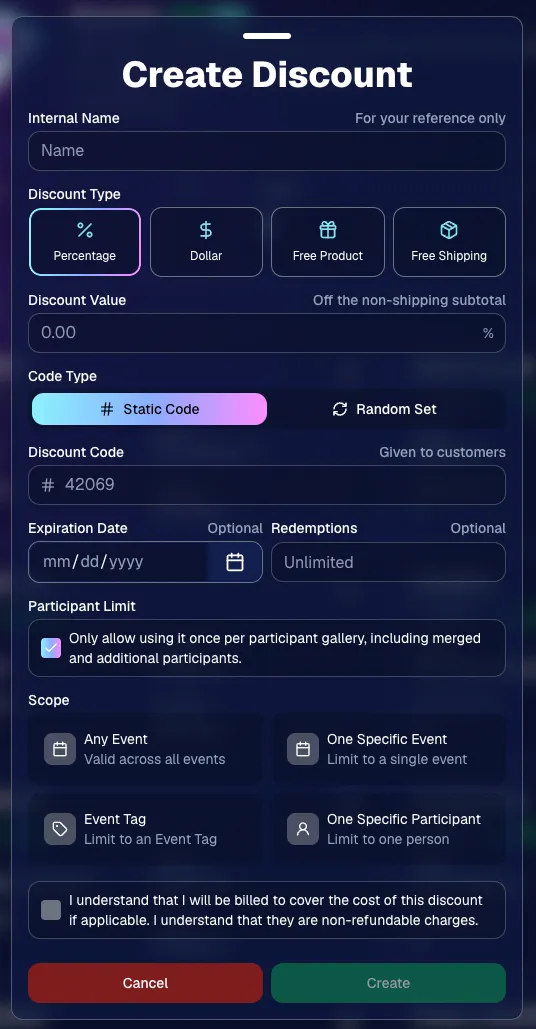
💸 NEW: Discounts

You can now create and manage your own discounts directly in NowCandid.

Discounts you create can apply to:

  • 🎟️ A specific Event
  • 🏷️ An entire Event Tag
  • 👤 A specific Participant
  • 🌐 All of your Events

And you can choose from several discount types:

  • 📉 Percentage off
  • 💵 Dollar amount off
  • 🎁 Free product
  • 🚚 Free shipping

🔐 Flexible code options

  • 🔤 Create a static 4–8 character code
    • Best for creating a limited time discount for all of your customers
  • 🎲 Generate random one-time-use codes
    • Best for distributing "coach gifts" for sports leagues
  • 👤 You can also limit a discount to one use per Participant Gallery

A few important rules:

  • Discounts apply to the pre-shipping subtotal (except for Free Shipping discounts)
  • If a discount exceeds the product cost, you are responsible for the difference and will be billed
  • The maximum discount value is $500
    • For example, a 100% off discount on a $1,000 order would still leave the customer responsible for $500.

📚 Full documentation:
https://app.nowcandid.com/docs/discounts
🎨 Batch AI Editing from Manage Images

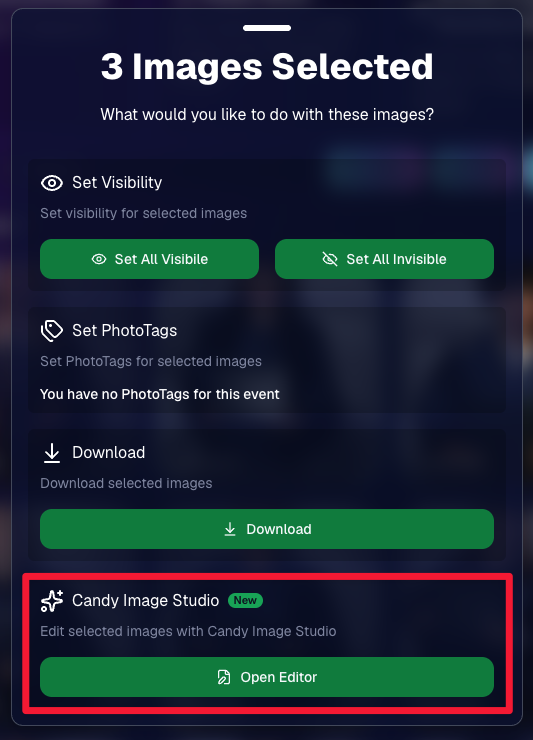
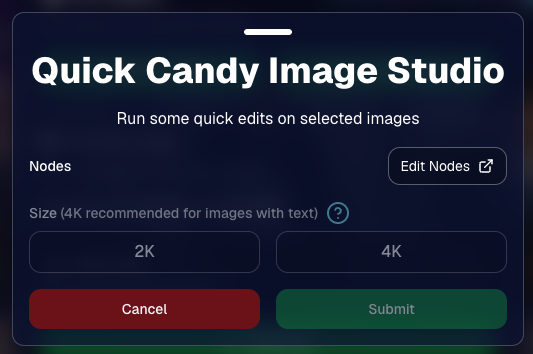
You can now run Candy Image Studio edits on multiple selected images at once right from Manage Images.

  • ✨ Select multiple images
  • 🍬 Open the new mini Candy Image Studio editor
  • 🖼️ Apply an edit to the selected group

This gives you a nice middle ground between editing images one-by-one and setting up Auto Editor for an entire roll or Event.
📤 Better SportsPics Upload Controls

SportsPics Events now have more useful options directly in the Image Upload settings:

👥 Mark All Images Group

  • Automatically mark every uploaded image as a Group Photo.

🏷️ Assign a PhotoTag during upload

  • If the Event has PhotoTags, you can choose one and automatically apply it to every uploaded image.

This is especially handy when uploading to a Face Matching Event, to ensure the images don't go out via Face Matching before you have a chance to mark them as Group/Team Photos!

⭐ Candy Image Studio & Auto Editor Improvements

👤 Participant names passed into edits

  • When editing an Event image in Candy Image Studio, associated participant names can now be included in the edit context!
  • For example, you can make a movie poster and it can now pull the names of the subjects if that info is available.

✉️ Client Outreach email designer improved

  • Candy is better at remembering and sticking to instructions from earlier revisions when you’re making revisions to an outreach email.

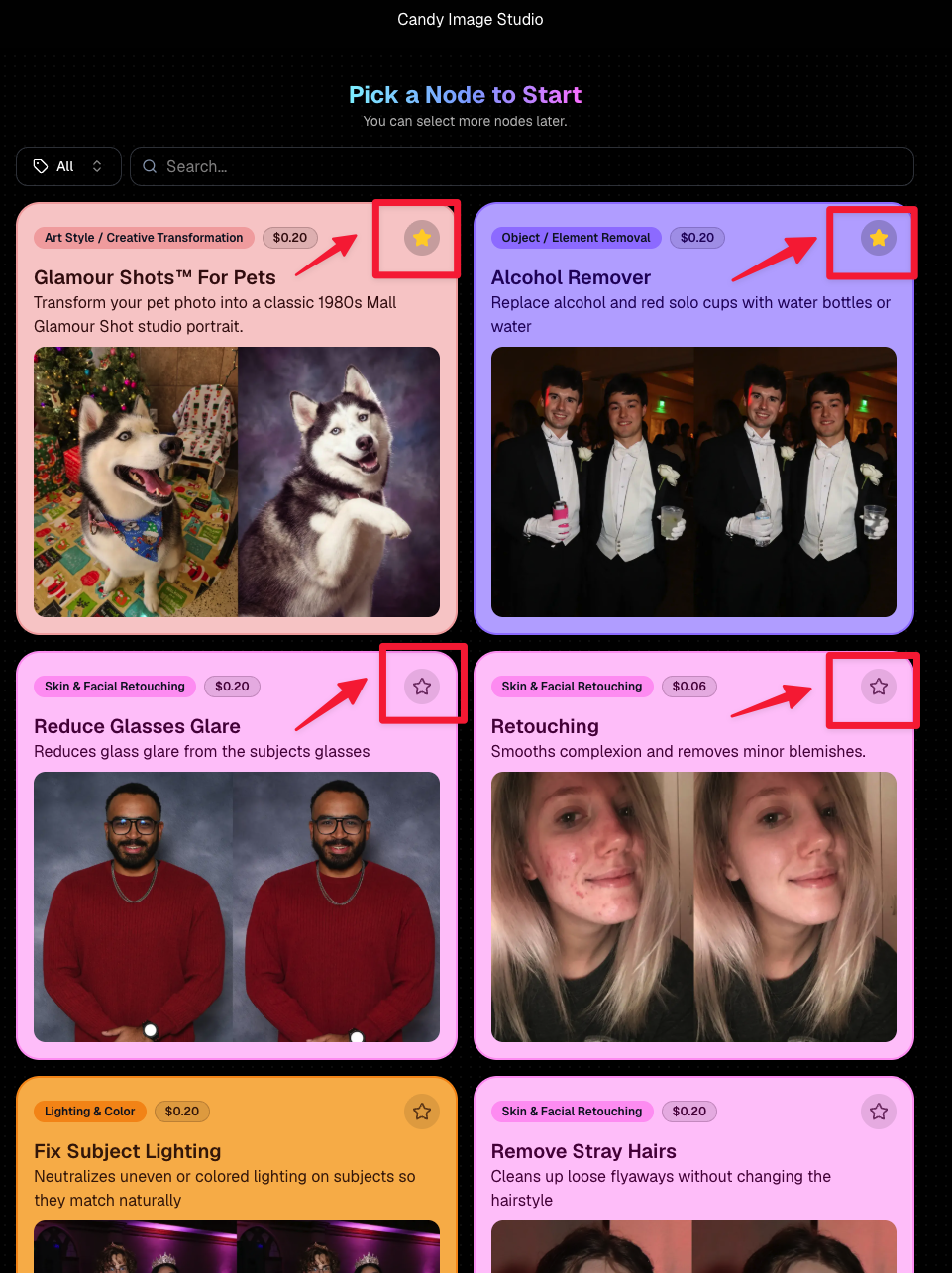
Favorite your most-used nodes

  • Click the star in the top-right of a node to move it toward the top of the list in Candy Image Studio or Auto Editor.
  • Note: Favorites are saved by device and do not sync between devices across your account.
🖼️ 39 New Default Background Sets

We added 39 new background sets for Offers and Virtual Groups!

New additions span categories like:

  • 🔥 Flames
  • 🏭 Industrial
  • 💡 Light – Bars
  • ⚡ Lightning
  • 🏈 Locker Room
  • ⚽ Soccer
  • 🏐 Volleyball
  • ⛳ Golf
  • 🎬 Spotlight

Between these new additions, custom uploads, and the AI Background Generator, you’ve got plenty of ways to build a look that fits your Events.
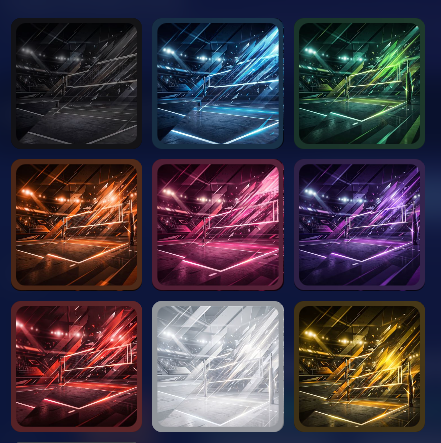
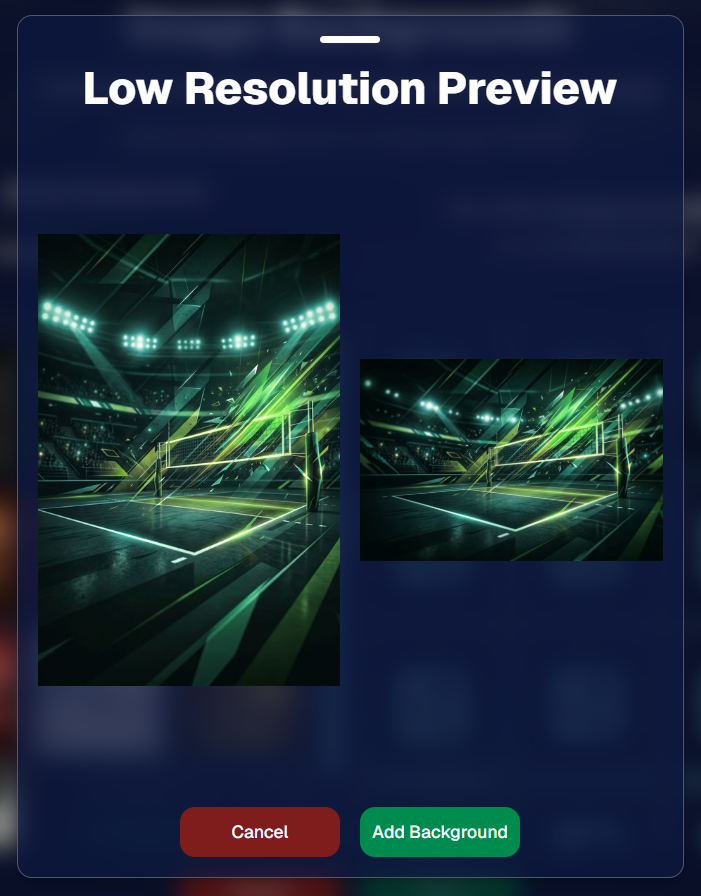
Example: New Volleyball Backgrounds!

A closer look at one of the examples above!

🧑‍🤝‍🧑 PhotoRoster & PhotoTag Improvements

🏷️ PhotoTags carry into new PhotoRosters

  • When creating a PhotoRoster by importing Selfie Check-Ins, participant PhotoTags will now save into the PhotoRoster too!

🧹 Duplicate PhotoTag import fix

  • Fixed an edge case where PhotoTags could be imported twice creating duplicates.

✂️ Background Removal Update

  • 👥 Background Removal no longer runs on Group Photos

Group Photos are not meant to go through Background Removal! Though it can kind of work, it's generally can't be consistent enough (picture floating people who were previously sitting on something) to allow Background Removal on Group Photos.

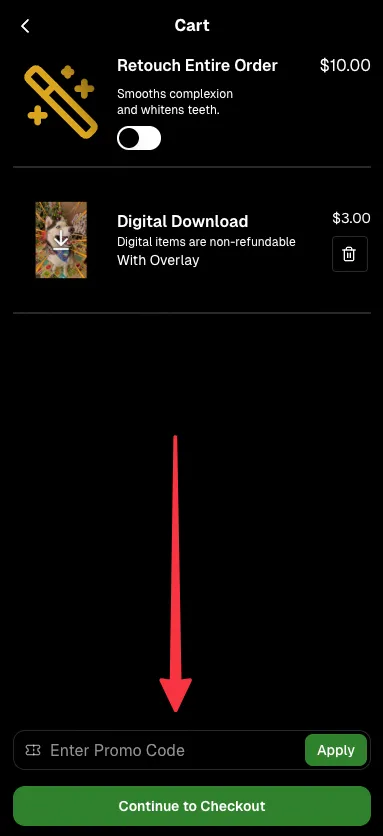
🛍️ Retail: Duplicate Download Warning

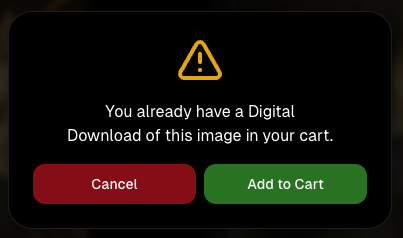
Retail now helps prevent accidental duplicate digital purchases.

  • ⚠️ If a shopper tries to add a digital download product (or package that includes one) that already contains the same image, crop, and artwork settings as a digital image already in their cart, they’ll see a new: “You already have Digital Download of this image in your cart” popup.
  • ➕ They can still add it anyway if they really want to!

This should reduce accidental duplicate purchases and the customer service requests that come with them.
Little improvements to make the platform better and better.

🛠️ Dashboard Fixes & Cleanup

  • 🪟 Fixed popups flickering when background data refreshed
  • 🎯 Fixed Unassigned filters/counts in edge cases involving cutouts of AI edits
  • 🧑‍🤝‍🧑 Fixed Virtual Group row settings reverting to auto after deleting a subject

That’s the week!

Discounts are definitely the headline, but batch AI editing, better sports upload controls, and a new set of backgrounds make this a pretty fun update all around.

Keep creating magic,

Candy 🍬
Related articles

Deliver Faster and Start Selling Sooner
Events
May 26, 2026

Deliver Faster and Start Selling Sooner

7
 minutes read

Why timing is the most overlooked “marketing strategy” in event photography

In photography, timing matters.

Not just because clients want their photos quickly—but because buying behavior is emotional and time-sensitive. The longer customers wait to see their images, the more the energy fades. The excitement from the event turns into “I’ll get to it later,” and “later” often becomes “never.”

That’s why one of the biggest marketing advantages you can build into your business isn’t a fancy email template or a new ad campaign. It’s this:

Deliver faster—so you can start selling sooner.

NowCandid™ is built around that idea.

The real problem: attention decays fast

After an event, people are at peak interest:

  • •They’re excited.
  • •They’re already talking about it.
  • •They’re texting friends.
  • •They’re posting.
  • •They’re still in “memory mode.”

That’s the moment when they’re most likely to open a message, click a gallery link, and buy.

But when delivery drags out:

  • •They stop checking.
  • •They forget.
  • •They move on.
  • •They’re less likely to convert.

Even a delay of a couple days can change the outcome.

The NowCandid approach: proactive delivery, not passive browsing

A lot of platforms rely on customers to work hard to find their photos. The experience is often:

“Here’s a link. Good luck.”

NowCandid is designed to flip that.

Instead of waiting for customers to dig through a massive gallery, the platform is built to connect the right photos to the right people quickly, and then help you reach them while the moment still feels immediate.

Here’s what that looks like.

The “faster = more sales” workflow

1) Customers complete a quick Selfie Check-In™

Selfie Check-In gives customers a simple way to identify themselves and provide contact info, so your system has what it needs to deliver their images efficiently—without a bunch of manual work on your end.

The key benefit: less friction.
You’re not chasing names after the fact. They’re raising their hand while the event energy is still high.

2) Images can be live-uploaded as they are shot

When you can upload while you shoot, you change the entire sales timeline.

Instead of “photos delivered days later,” you’re moving toward:

  • •Same-day visibility
  • •Immediate browsing
  • •Faster order velocity

Even if you don’t upload every frame live, the ability to move photos quickly gives you leverage. It’s the difference between a slow drip and a real-time experience.

3) Galleries can be sent right away

Once customers are identified and images are flowing in, the next step is simple:

Send the gallery.

That’s where momentum turns into conversion.

You’re no longer hoping attendees remember to check a website later. You’re proactively reaching them with a direct path to their photos.

4) Customers receive images while it still feels immediate

This is the most important part.

People buy when:

  • •They can find themselves quickly
  • •The experience feels fresh
  • •They’re emotionally connected to the moment

When images arrive while the event still feels “present,” the purchase becomes part of the experience—not an afterthought.

That’s why speed isn’t just operational.
It’s marketing.

What this unlocks for photographers

When delivery speeds up, you’ll feel the impact in a few places immediately:

✅ More orders (because more people actually view their photos)

Fast delivery increases engagement. Engagement increases conversion.

✅ Higher order values (because customers stay in the moment)

When people browse while excited, they tend to buy more. They’re not minimizing the purchase—they’re celebrating the memory.

✅ Less support burden

Most support requests come from confusion and delay:

  • •“Where are my photos?”
  • •“How do I find my kid?”
  • •“I can’t remember the link.”

A fast, direct delivery workflow reduces those issues naturally.

✅ Better event/client satisfaction

Organizers don’t want complaints. Faster delivery means fewer unhappy guests and fewer incoming emails for the client—which makes you look professional (and helps you get rebooked).

The takeaway: timing is a growth strategy

If you want to grow your event photography business, you don’t always need more marketing.

Sometimes you need better timing.

NowCandid is built to help you:

  • •Identify customers quickly
  • •Upload faster
  • •Deliver sooner
  • •Convert while energy is high

Because in volume photography, the platform that helps you move faster is usually the platform that helps you sell more.

Want to see what “fast delivery” looks like in practice?

If you tell us what type of events you shoot (sports, schools, graduations, dances, etc.), we’ll recommend the best NowCandid workflow to deliver faster and start selling sooner. Set a time with one of our reps using our Calendly: https://calendly.com/nowcandid-training.

Weekly Recap: Virtual Group Builder, Client Outreach Updates & Smarter Retail Support 🎉📸
Feature Updates
May 22, 2026

Weekly Recap: Virtual Group Builder, Client Outreach Updates & Smarter Retail Support 🎉📸

6
 minutes read
Hey photo friends! 👋

This is a big week! The headline feature is one many sports and volume photographers are going to love: An all-new Virtual Group Builder is now available directly on the Dashboard.

We’ve also added new Candy Image Studio tools, improved Client Outreach behavior, refreshed image assignment tools, and made retail support easier for shoppers and photographers alike.

Let’s jump in!

🧑‍🤝‍🧑 Big New Feature: Virtual Group Builder

You can now build Virtual Groups directly on the Dashboard — with Mobile Dashboard support too!

Find it from an Event page by clicking Virtual Groups in the sidebar menu.

With Virtual Group Builder, you can:

👥 Import participants from the full Event, one at a time, or everyone with a specific PhotoTag

✂️ Use participant cutouts to build polished group images

🏷️ Build groups quickly when your Event has consistent cutouts and participants tagged with PhotoTags

🖼️ Create Virtual Groups in 4×6, 5×7, 8×10, or 11×14 formats

🎨 Choose from NowCandid default backgrounds, upload custom backgrounds, and add overlays

🧢 Add account logos to the corners

🔤 Toggle subject names on or off

📐 Preview crop lines and aspect ratio lines

🖱️ Zoom, pan, drag, reorder, resize, brighten, and position subjects

You can also adjust group-level settings like background, overlay, overall scale, vertical position, bottom shadow falloff, and individual cutout fade to help hide cropped legs.

When your Event is set up cleanly with cutouts and PhotoTags, you can create a full Virtual Group in just a few clicks. ✨

Docs page: https://app.nowcandid.com/docs/image-management/virtual-groups

Desktop Dashboard view of the new Virtual Group Builder

Mobile Dashboard view of the new Virtual Group Builder

🎓 Candy Image Studio: New Graduation Tools

Candy Image Studio got some very timely upgrades for graduation season:

🎓 New “Diploma Fix” node

  • Helps fix diploma orientation and glare. You’ll need to upload a reference diploma so Candy knows what the diploma should look like, including details like school name, emblem, fonts, and colors.

🎗️ New “Tassel Fix” node

  • Helps adjust graduation tassels that are covering a subject’s face — similar to Stray Hair Removal, but tailored specifically for grad tassels.

👓 Improved Reduce Glass Glare

  • This node is now more reliable and less likely to accidentally add glasses to subjects who aren’t wearing them.

📣 Client Outreach Improvements

Client Outreach got a few useful updates to help save money and keep lists cleaner:

🚫 Unsubscribed contacts excluded by default

  • Imported Client Outreach contacts now exclude unsubscribed contacts unless you choose to include them.

🔘 New “Include unsubscribed contacts” toggle

  • You can still include them if needed, but the default helps avoid spending on contacts who can’t receive your outreach.

👀 Show Hidden on Client Lists

  • The Client Outreach list page now has a Show Hidden option, similar to Offers and PhotoRoster organizations.

🧭 Client List sidebar shortcut

  • The Client Outreach sidebar item now takes you back to the Client List page more clearly.

🖼️ Image Management & Dashboard Upgrades

🧩 Image Release Gallery redesign

  • The Image Release Gallery now uses a masonry layout like retail, supports lightboxes with arrow key navigation, has CMD/CTRL+F search support, and saves filters in the URL.

🧑‍💻 Manual Assignment page refresh

  • The Participant Manual Assignment page has a cleaner, more intuitive UI.

Camera star ratings on Image Details

  • If your camera includes star ratings, they now appear on the Image Details page.

⬇️ Image Details convenience buttons

  • Image Details now includes quick actions to download or open in Candy Image Studio.

🏷️ PhotoTag ampersand fix

  • PhotoTag names with ampersands now save correctly.

🧍 Merged participant name fix

  • Manual Assignment now shows the selected participant’s name instead of the first merged participant’s name.

🔙 Event sidebar remembers filters

  • When going back to the Event List from an Event Overview page, your filters are remembered as long as you haven’t refreshed.

🔁 Pricing tier reset button

  • Participant marketing history now includes a button to reset a participant’s pricing tier start date, useful if support wants to re-offer first-week pricing.

🪪 Positive ID QR Code downloader options

  • You can now download blank cards only, registered participants only, or everyone, making scan card PDFs easier to manage for multi-workflow sports events.

🛠️ New Tool: Image Converter

There’s a new tool under Tools & More → Image Converter.

Use it to:

🔄 Convert images to WEBP, PNG, or JPEG

🎨 Convert images to sRGB

Handy for preparing files before uploading them to NowCandid Events.

📚 New Capture App Camera Docs

We added a dedicated docs page for confirmed camera models that work with the Capture App.

More cameras may work than what’s listed, but this page focuses on models we’ve confirmed.

Docs page: https://app.nowcandid.com/docs/capture-app/cameras

🛍️ Retail Improvements

📬 New Contact Us form on retail

  • The Contact Us popup now includes a form that sends support an email with helpful details automatically included, such as browser info, window size, retail link, Event details, and order number when available. This should make support faster and reduce back-and-forth.

🖼️ Overlay step now comes before cropping

  • This prepares retail for future improvements while keeping product customization clearer.

🗓️ Smarter Year captions

  • Certain products now default the Year caption to the Event start year or participant Day 0 year instead of the current year. Helpful for late-December events or older graduation galleries.

🌍 International order fix

  • Fixed an edge case where some international orders could send multiple receipts and incorrectly show that the order wasn’t submitted.

🤳 Selfie Check-In & Capture App Updates

📶 Clearer Selfie Check-In upload errors

  • If a selfie upload fails, subjects now see a more specific error reason — like upload speed being too slow — so they know what to try next.

📱 Capture App 5.6.3 OTA update

  • Contact Info Settings now says Tap-A-Face or Type & Take based on the Event program
  • The 1000×1000 reference image requirement has been removed for Selfie Check-In Station and Roster Check-In, especially helpful for Android devices with lower-resolution cameras

That’s the week!

Virtual Group Builder is the big one, especially for sports and volume workflows — but between Client Outreach, Candy Image Studio, Image Converter, and retail support improvements, there’s a lot here to make your next Event easier to manage.

Keep creating magic,

Candy 🍬

Weekly Recap: Collapsible Sidebar, QR Code Printouts & RCS Text Preview ✨📱
Feature Updates
May 15, 2026

Weekly Recap: Collapsible Sidebar, QR Code Printouts & RCS Text Preview ✨📱

3
 minutes read
Hey photo friends! 👋

Candy here with another round of NowCandid updates! This week brings a more flexible Dashboard sidebar, easier QR code sharing, a new price level reference page, and a preview of cleaner-looking RCS messaging.

🖥️ Dashboard Improvements

📌 Collapsible Sidebar on desktop

  • You can now collapse the Dashboard Sidebar to give yourself more room. Click the edge of the Sidebar to toggle it, or use CTRL/CMD+B or CTRL/CMD+S.

🎓 “Class of 2026” background pack added

  • Available now in the Offer Creator.

🖼️ Participant Details fix

  • Invisible BGR images now appear where expected.

📅 Event Calendar fix

  • Hidden Events no longer appear on the Event Calendar.

Better performance for large Events

  • Event Participants and Manage Images pages now behave better with several thousand participants or images, including faster initial loading, longer timeouts, and clearer loading feedback.

📊 Default Price Levels Overview is now built into the Dashboard

View it here: https://app.nowcandid.com/offers/price-level-overview

🔳 QR Creator Upgrade: Printable QR Code Cards

🖨️ Download a PDF sheet of QR code cards

  • The NowCandid QR Code Generator can now create a printable PDF sheet with customizable text.

Great for:

🎓 Placing QR cards on graduation chairs for Selfie Check-In

🏈 Handing out QR cards at sports events linking to an All Images Gallery

📸 Creating polished cards for check-in links, retail links, or any URL you want to share

💬 RCS Messaging Preview

We’re testing RCS messaging for some texts.

📱 Texts can appear as coming from “QuicPics” instead of a phone number

📷 Uses a generic camera-style logo to keep things white-labeled

✅ Helps messages look cleaner and easier to find

🛡️ May help reduce spam filtering in some cases

Currently, RCS is available for:

  • Dashboard 2FA texts
  • Find Me Portal texts

We’ll likely explore rolling this out to marketing texts after grad season.

🛍️ Retail Updates

💸 Slash-through pricing improved

  • Slash-through amounts now use week 3 pricing when applicable, or à la carte pricing if that is higher.
  • So now, we've ensured your customer is always seeing the maximum amount of Discount being provided! Automatically.

📦 Personal Gallery Download slash-through price

  • Even though Personal Gallery Download is technically a package, it can now show a slash-through price based on the individual download product in your Event, when available.

🖼️ Better package performance with BGR images

  • Selecting and editing BGR images inside packages should feel faster.

🧼 Cleaner BGR timing on retail

  • Images going through background removal will no longer appear on the retail site before the BGR process is finished.
  • This helps keep galleries clearer for shoppers! Especially during grad season, when high BGR volume can occasionally slow processing down.

🧩 Favorites Gallery download fix

  • Fixed an edge case where the Personal Image Gallery Download product could appear for Favorites Galleries even when Dynamic Personal Gallery Download was not enabled.

🛠️ Small Fixes & Cleanup

📅 Hidden Events no longer appear on the Event Calendar.

🖼️ Invisible BGR images now display correctly on Participant Details.

⚡ Large Events with thousands of participants or images should feel more stable and responsive.

That’s the update for this week!

From a cleaner Dashboard layout to printable QR cards and better retail pricing displays, these changes are all about making NowCandid easier to use in real-world event workflows.

Keep creating magic,

Candy 🍬

Let’s get in touch

If you’re a photographer looking to add NowCandid services to your wheelhouse – set up a call by clicking the button below.

How to customize formatting for each rich text

How to customize formatting for each rich text

How to customize formatting for each rich text

How to customize formatting for each rich text

How to customize formatting for each rich text

What’s a Rich Text element?

The rich text element allows you to create and format headings, paragraphs, blockquotes, images, and video all in one place instead of having to add and format them individually. Just double-click and easily create content.

A rich text element can be used with static or dynamic content. For static content, just drop it into any page and begin editing. For dynamic content, add a rich text field to any collection and then connect a rich text element to that field in the settings panel. Voila!

Headings, paragraphs, blockquotes, figures, images, and figure captions can all be styled after a class is added to the rich text element using the "When inside of" nested selector system.

  • List One
  • List Two
  • List Three
  • List Four
  • List Five

This is a link

This is bold text