HomeNavigation arrowBlogNavigation arrow
Current page
Feature Updates

Weekly Recap: Reworked Titled Luxe Prints, Better Cutouts & Faster PhotoRoster Imports โœจ๐Ÿ“ธ

Weekly Recap: Reworked Titled Luxe Prints, Better Cutouts & Faster PhotoRoster Imports โœจ๐Ÿ“ธ
Hey photo friends! ๐Ÿ‘‹

โ€

Candy here with another round of updates! This weekโ€™s highlights include a fresh redesign for Titled Luxe Prints, a brand-new 4ร—6 size, continued Background Removal improvements, and some helpful Dashboard upgrades for PhotoRosters, Event Tags, and Positive ID workflows.

โ€

โœจ Titled Luxe Prints Get a Refresh

โ€

Titled Luxe Prints have been reworked to feel more like the classic PartyPics style while still keeping the premium embellishments that make them special.

โ€

๐Ÿ–ผ๏ธ Updated Titled Luxe Print design

  • Still embellished
  • Still supports 3 caption lines
  • Still includes 2 crests
  • Now has a more traditional PartyPics-style look

โ€

๐Ÿ†• New 4ร—6 Titled Luxe Print

  • Priced at $1.38
  • Includes both 2D and 3D renders
  • Joins the existing 5ร—7 and 8ร—10 sizes

โ€

You can preview the updated product here:
https://app.nowcandid.com/3d/titled-luxe-print

โ€

โœ‚๏ธ Background Removal Keeps Getting Better

โ€

๐ŸŸข Green screen cutouts improved (again!)

โ€

โœจ Overall cutout quality improved

โ€

Weโ€™re continuing to tune Background Removal so cutouts look cleaner across more shooting conditions. Stay tuned for even more improvements!

โ€

๐Ÿ“ฑ Capture App 5.9.1 โ€“ Android

โ€

๐Ÿ“ท Full-quality internal camera capture

  • Android devices now use the full available quality of their internal cameras when shooting through the Capture App.
  • Previously, it was using a down-sized version!

โ€

๐Ÿ–ฅ๏ธ Dashboard Improvements

โ€

๐Ÿชช Faster Positive ID Scanner Card generation

  • The Scanner IDย Workflow's Scan Card PDFย Generator is now performs better, stalls less, and produces significantly smaller download files.

โ€

โš ๏ธ Background artwork warningโ€

  • When uploading an Event background, NowCandid can now detect text or logos and show an extra warning.
  • This reinforces the existing recommendation to avoid placing important text or branding on backgrounds where product cropping could cut it off. Use our Overlay features instead!

โ€

โœจ Clearer Auto Editor folder naming

  • Manage Images now shows a sparkles icon for Folders containing AI edits, with clearer formatting for Folders created by the Auto Editor.

โ€

๐Ÿ“ฅ Import PhotoRosters directly from Participant List

  • Face Matching Events now have an Import from PhotoRoster button at the top of the Participant List page, letting you select and import a PhotoRoster without navigating away.

โ€

๐ŸŽจ Candy Image Studio & Auto Editor

โ€

๐Ÿ–ผ๏ธ Background Generator improvements

  • Outputs are now sized more appropriately for uploading back into an Event
  • Generated background sets match each other more consistently

โ€

๐Ÿ’ฐ Every node now displays its price

  • Previously, only discounted nodes showed pricing. Now every node clearly displays what it costs!
  • Expect more nodes with their own unique prices in the future! We will continue to build on and improve our Auto Edit &ย Image Studio tools.

โ€

๐Ÿงฉ Predetermined node order

  • Nodes can no longer be drag-and-dropped into different edit "orders".
  • Their hierarchy is now set automatically so edits run in the best possible sequence without you needing to think about it!

โ€

๐Ÿ› ๏ธ Auto Editor UI refreshed

  • Several interface changes make setup and options clearer and easier to understand.

โ€

๐Ÿ“‹ PhotoRoster Improvements

โ€

๐Ÿ‘ฅ Multiple PhotoRosters per Event

  • Fixed an issue that could prevent you from importing more than one PhotoRoster into the same Event.

โ€

๐Ÿ’ฌ Clearer disabled export messaging

  • If Export is unavailable, clicking it now explains why.

โ€

๐Ÿšซ Empty PhotoRosters canโ€™t be exported

  • A PhotoRoster must have at least one member with an image before it can be exported to an Event.

โ€

๐Ÿ” Password-Protected Public Event Lists

โ€

Event Tags now have an optional extra layer of privacy:

โ€

๐Ÿ”‘ Password-protect your Public Event List Pages:

  • โž• Set a password while creating a new Event Tag
  • โœ๏ธ OR add or remove the password using the Event Tag editor

โ€

This works similarly to the password protection for your Private Image Download Galleries.

โ€

๐Ÿ›๏ธ Retail Fixes & Protection

โ€

๐Ÿ–ผ๏ธ Fixed package editing edge cases where the Overlay step could be missing while choosing a new image

โ€

๐Ÿ›ก๏ธ Additional GalleryGuard improvements

โ€

Thatโ€™s the week!

โ€

The refreshed Titled Luxe Prints are the star of this update, with better Background Removal, easier PhotoRoster importing, and more control over Event Tags rounding things out.

โ€

Keep creating magic,โ€

Candy ๐Ÿฌ

Related articles

Weekly Recap: Faster Payouts, New PhotoTag Details & Redesigned Marketing Emails ๐Ÿ’ธโœจ
Feature Updates
September 18, 2026

Weekly Recap: Faster Payouts, New PhotoTag Details & Redesigned Marketing Emails ๐Ÿ’ธโœจ

3
ย minutes read
Hey photo friends! ๐Ÿ‘‹

โ€

Candy here with another weekly recap! This week brings faster, more frequent payouts, a much more informative home for PhotoTags, redesigned marketing emails, and another round of Background Removal quality improvements.

โ€

Letโ€™s jump in!

โ€

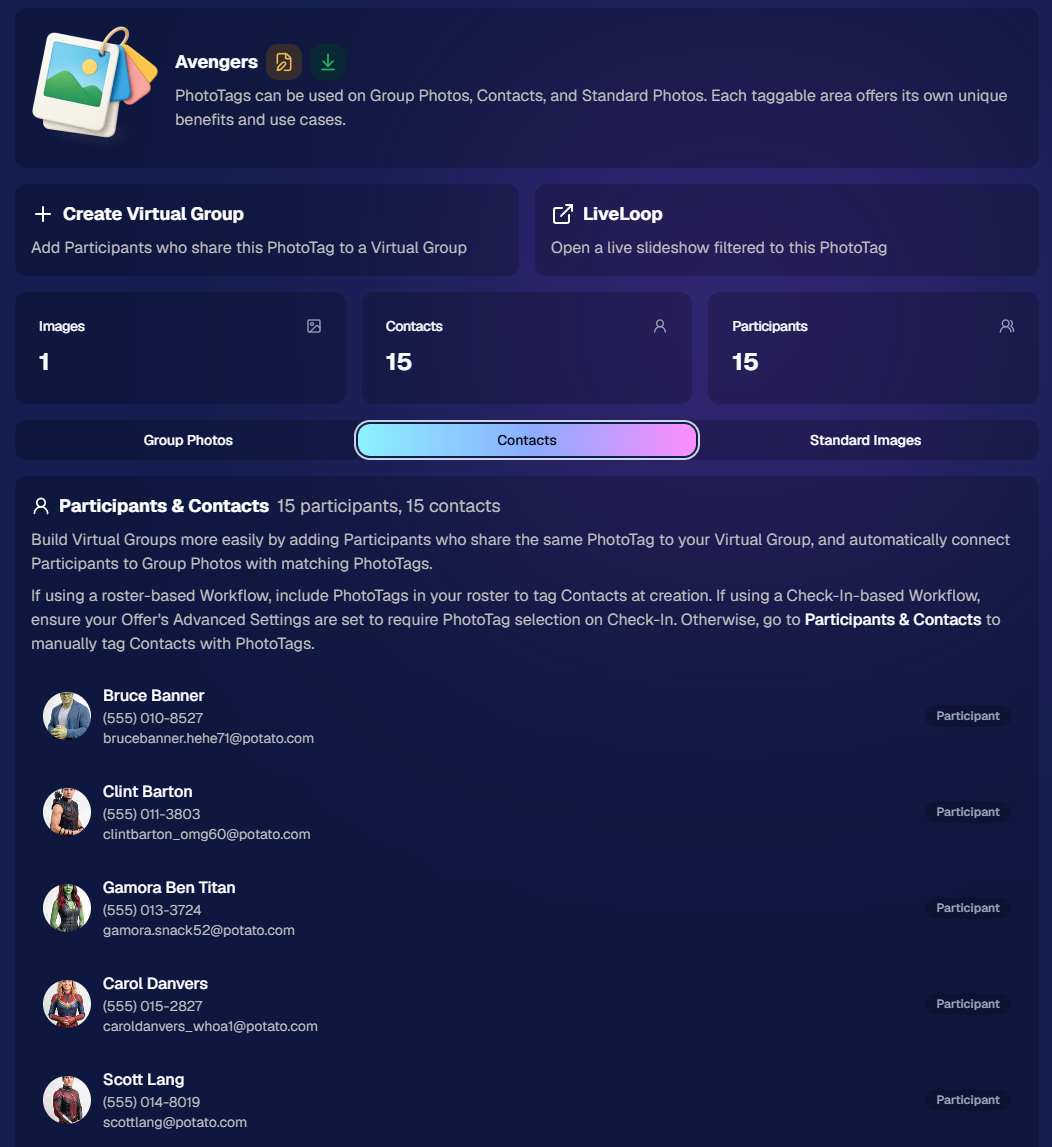
๐Ÿท๏ธ NEW: PhotoTag Details Pages

โ€

PhotoTags now have their own dedicated details pages.

โ€

Click any PhotoTag from the PhotoTag List page to open a much more complete view of everything connected to it.

โ€

From there, you can:

โ€

  • โœ๏ธ Edit the PhotoTag
    โ€
  • ๐Ÿ‘ค View tagged Participants and Contacts
    โ€
  • ๐Ÿ‘ฅ View tagged Group Photos
    โ€
  • ๐Ÿ–ผ๏ธ View tagged Standard Photos

โ€

This is a pretty big improvement for anyone learning or managing PhotoTags!

โ€

PhotoTags can affect several different parts of an Event, and these pages make those relationships much easier to see in one place. They should also be especially helpful when training employees or helping someone understand exactly how a PhotoTag is being used.

โ€

โ€

๐Ÿ’ธ Faster, More Frequent Remittance Payments

โ€

Weโ€™ve sped up our remittance schedule and are adding a second payment cycle each week, helping completed-order funds reach your bank account sooner.

โ€

Previously, we sent your remittance statement on Wednesday, with the corresponding payment typically arriving in your bank account on Friday morning.

โ€

Going forward:

โ€

๐Ÿ’ฐ Orders completed Friday through Tuesday will be included on your Wednesday remittance statement, with payment typically arriving Thursday

โ€

๐Ÿ’ฐ Orders completed Wednesday and Thursday will be included on a new Friday remittance statement, with payment typically arriving Monday

โ€

That means the existing Wednesday payment cycle should now reach you about one day faster, while the new Friday cycle reduces the wait for orders completed later in the week.

โ€

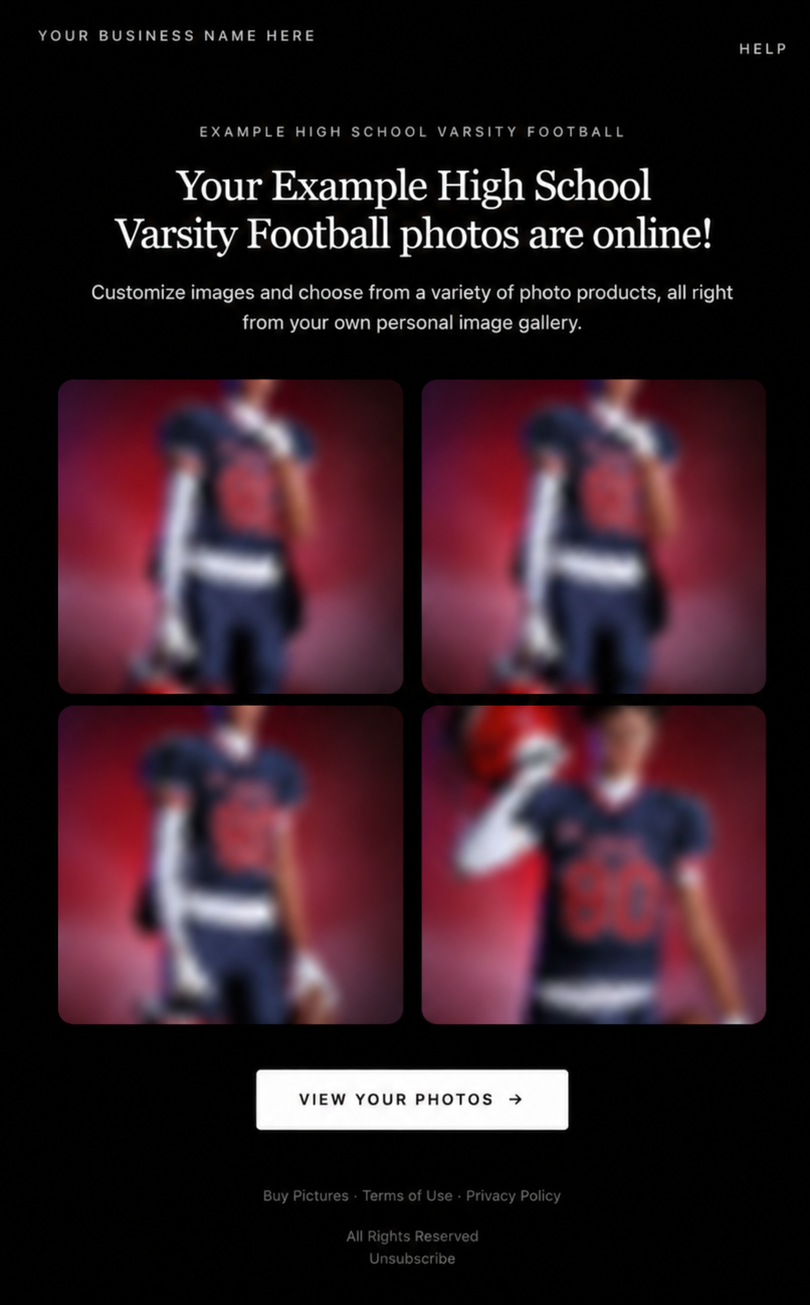
โœ‰๏ธ Marketing Emails Get a New Look

โ€

Marketing emails have been redesigned with a cleaner, more modern layout.

โ€

Thereโ€™s also a bigger change to the way images are protected:

โ€

  • ๐ŸŒซ๏ธ Email image previews are now blurred
    โ€
  • ๐Ÿ›ก๏ธ This replaces the previous scrolling copyright treatment

โ€

Blurring provides more consistent protection in situations where an email client might not properly render the scrolling copyright, or where the preview image is displayed outside an environment where GalleryGuard can protect it.

โ€

Real email, but with business &ย event name replaced for privacy!

โ€

Also: Minor Marketing Fix!

โ€

We also fixed an edge case that could prevent a marketing campaign from starting when two different Participants shared only part of their contact information.

โ€

For example, if two Participants had the same email address but different phone numbers, one Participant starting marketing should no longer incorrectly prevent the other from starting theirs.

โ€

โœ‚๏ธ Better Background Removal

โ€

Background Removal got another quality pass this week:

โ€

  • ๐Ÿ’‡ Improved hair cutouts
    โ€
  • โšฝ Better handling of certain sports portrait props, particularly soccer balls sitting on the ground

โ€

These changes continue our work to improve cutout quality across the kinds of images photographers are actually shooting.

โ€

๐Ÿ†• "Quic" Is Now "Free"

โ€

The Quic programs have been rebranded to Free.

โ€

Nothing about the pricing or functionality has changed โ€” just the names:

โ€

  • QuicPics โ†’ FreePics
    โ€
  • QuicPortraits โ†’ FreePortraits
    โ€
  • QuicPics GO! โ†’ FreePics GO!

โ€

Same programs, same functionality, same pricing. Just a (hopefully) clearer name moving forward.

โ€

๐Ÿ›๏ธ Retail Improvements

โ€

โœจ โ€œDiamond Glossโ€ is now โ€œGlossy Finishโ€

  • โ€Weโ€™ve renamed "Diamond Gloss" to Glossy Finish on the retail site to make the option clearer and easier for customers to understand.

โ€

๐Ÿ“ฑ More reliable iOS sharing

  • The native iOS share sheet used by the press-and-hold download feature should now open more reliably.

โ€

๐Ÿ‘ฅ Group Digital Downloads now behave like regular Digital Downloads

  • When no overlay is selected โ€” or the Event doesnโ€™t have one โ€” Group Digital Downloads can now provide the full-resolution, uncropped original.
  • That means the image can be available immediately from the email receipt and avoids problematic cropping steps on Group Photos that arenโ€™t a standard 2:3 aspect ratio.

โ€

๐Ÿ“ฆ More accurate package previews

  • Fixed cases where Group and non-Group images could appear as previews for the wrong type of package product.

โ€

๐Ÿ–ฅ๏ธ Dashboard Improvements

โ€

๐Ÿ“ด New offline screen

  • If your device is completely offline, the Dashboard now tells you instead of leaving you wondering whether the site is simply loading slowly.

โ€

๐Ÿ“… Event Calendar color coding fixed

  • Events once again display the correct colors based on their Event Program.

โ€

๐Ÿ–ผ๏ธ Better Virtual Group Foreground management

  • The Foreground Picker now shows the names of your saved foregrounds. Click one to preview it, and you can also rename foregrounds for easier reuse later.

โ€

โœ‚๏ธ Overwritten BGR images can reprocess

  • If you overwrite an image inside a folder marked for Background Removal, it can now be reprocessed as long as the replacement has the exact same dimensions as the original.
  • If the dimensions differ at all, the existing PNG will not be replaced.

โ€

๐Ÿ“‹ Roster upload error fix

  • Fixed an edge case where a malformed email containing a # instead of an @ could stop the roster upload process and leave only the rows before that error imported.

โ€

๐Ÿ‘ค Participant names on QR downloads

  • โ€QR download pages now display participant names in bold, making them easier to spot at a glance.

โ€

๐Ÿ“Š Clearer Sales & Shipping chart details

  • โ€Tooltips on the Event Details Sales & Shipping chart now break out Sales and Shipping separately on hover, adding some clarity.

โ€

Capture App 5.10.1 (OTA)๐Ÿ“ฑ

โ€

๐Ÿ“ฑSelfie Check-In Station Mode fix

  • โ€The Continue button text has been shortened, and the Close button now stays accessible when PhotoTag Check-In is enabled.
  • Previously, the extra PhotoTag selection row could push the Close button off the bottom of the screen.

โ€

Thatโ€™s the week!

โ€

The FreePics name change is the most visible update, but the new PhotoTag Details pages may be one of the most useful additions for teams working with PhotoTags regularly.

โ€

Keep creating magic,

Candy ๐Ÿฌ

How to Make FreePics Work for Your Photography Business ๐Ÿ“ธโœจ
NowCandid 101
September 14, 2026

How to Make FreePics Work for Your Photography Business ๐Ÿ“ธโœจ

6
ย minutes read
In honor of our QuicPics Programโ€™s rebrand to FreePics, we wanted to take a fresh look at some helpful info, best practices, and booking strategies for using FreePics and service photography successfully!

โ€

Giving photos away for free might not sound like an obvious way to make money.

โ€

But with the right setup, FreePics can be a powerful business tool โ€” whether youโ€™re getting paid by an event organizer, working with a sponsor, building the cost into ticket sales, developing relationships with venues, or simply using free photos to get your name in front of more potential customers.

โ€

And depending on the kind of experience you want to offer, you now have three different Programs to choose from: FreePics, FreePics GO!, and FreePortraits.

โ€

First: What Is FreePics?

โ€

FreePics is designed for photographers who want to provide images to subjects at no cost to the person being photographed.

โ€

Instead of relying on each participant to purchase their own images, the photography can be funded another way โ€” or used as a marketing tool to help generate future business.

โ€

That opens up a lot of possibilities.

โ€

Ways to โ€œSellโ€ FreePics ๐Ÿ’ธ

โ€

1. Work Through an Event Organizer

โ€

One of the simplest approaches is to have the event organizer pay for photography as part of the event itself.

โ€

That could include:

  • Reunions
  • Luncheons
  • Galas
  • Corporate parties
  • Balls
  • Private events
  • Community events

โ€

Instead of charging individual guests for their photos, the organizer pays you for your time and coverage.

โ€

This can make the photography feel like another included event amenity โ€” just like entertainment, dรฉcor, or catering.

โ€

The original FreePics training material even suggested photographers may be able to charge a few hundred dollars per hour, per photographer, depending on the event and market.

โ€

2. Find an Event Sponsor

โ€

Another option is to have a sponsor cover the photography.

โ€

In exchange, you can incorporate the sponsorโ€™s branding into the experience, including branded image artwork or overlays.

โ€

That gives the sponsor something more memorable than a banner or table sign: photos attendees may actually save, share, and revisit.

โ€

Sponsorship pricing will naturally depend on the event, audience, and sponsor, but this type of arrangement may support a much higher overall photography budget than selling directly to individual attendees.

โ€

3. Build Photography Into Ticket Sales ๐ŸŽŸ๏ธ

โ€

If every attendee is going to receive photos, another option is to simply include the photography cost in the ticket price.

โ€

A relatively small increase per ticket can add up quickly across a large event.

โ€

For example, an organizer could add a photography fee to each admission ticket, then use that revenue to pay for event coverage while letting every guest access their photos afterward.

โ€

Participants feel like theyโ€™re getting something included with admission, while the photographer still gets paid.

โ€

4. Partner With Party Planners or Venues ๐Ÿค

โ€

FreePics can also be a great tool for building recurring relationships.

โ€

A photographer can establish themselves as the go-to photographer for a planner or venue and create an arrangement that works for everyone involved.

โ€

That could mean a commission, referral agreement, preferred-vendor relationship, or another setup that encourages the planner or venue to continue sending events your way.

โ€

Instead of thinking about a single event, youโ€™re using FreePics to help build a steady pipeline of future bookings.

โ€

5. Use FreePics as Marketing for Your Own Business ๐Ÿ“ฃ

โ€

You donโ€™t necessarily have to make money directly from every FreePics Event.

โ€

Sometimes, the value is the exposure.

โ€

Offering free photography at the right event can introduce your business to dozens or even hundreds of potential customers.

โ€

Because participants receive their images directly, you have an opportunity to put your business and branding in front of them while creating a positive interaction with your photography.

โ€

That can turn one promotional event into future:

  • Event bookings
  • Portrait sessions
  • School or sports opportunities
  • Corporate work
  • Referrals
  • Repeat customers

โ€

Sometimes the free photo is the product.

โ€

Sometimes itโ€™s the advertisement. ๐Ÿ‘€

โ€

Which Free Program Should You Use?

โ€

This is where the three Programs start to differ.

โ€

FreePics โ€” Best for Most Events โญ

โ€

For most photographers, FreePics is the best all-around option.

โ€

It provides the full FreePics experience and gives you the most flexibility in how images are delivered to participants.

โ€

If you simply want to photograph an event and make it easy for subjects to receive their images for free, start here.

โ€

It costs more per image than the other Free Programs, but youโ€™re paying for the broader experience and flexibility.

โ€

Best for:

  • Parties
  • Galas
  • Corporate events
  • Reunions
  • Sponsored events
  • General event photography
  • Most situations where you want free image delivery

โ€

FreePics GO! โ€” Best for a Gallery-First Experience ๐Ÿ–ผ๏ธ

โ€

FreePics GO! is a gallery-only experience, which allows it to cost less per image than standard FreePics.

โ€

But the gallery format also gives it some unique advantages.

โ€

FreePics GO! is especially useful if you want participants to clearly see that they can download different versions of their images โ€” such as versions without overlay artwork.

โ€

It can also be a better choice when using Background Removal, because participants can browse different background options before deciding which version of an image they want to download.

โ€

And because subjects are already browsing through a gallery, FreePics GO! gives you a stronger opportunity to showcase physical products and other potential upsells alongside their free images.

โ€

Best for:

  • No-overlay option is important
  • Sponsored events with branded artwork
  • Background Removal workflows
  • Events where you want subjects choosing between different image treatments
  • Photographers who want to promote prints or physical products
  • Situations where keeping per-image costs lower is important

โ€

FreePortraits โ€” Best for Headshots ๐Ÿ‘ค

โ€

FreePortraits takes the FreePics concept and adapts it specifically for headshot-style photography.

โ€

Because the workflow is more limited โ€” with only one image file sent out per image โ€” it can be offered at a lower per-image cost than standard FreePics.

โ€

If your Event is centered around individual portraits rather than a larger event gallery, that limitation can actually make perfect sense.

โ€

Best for:

  • Corporate headshots
  • Conferences
  • Professional networking events
  • Employee portraits
  • Profile photos
  • Other single-image portrait workflows

โ€

If you want the FreePics experience but youโ€™re really photographing headshots, FreePortraits is likely the better fit.

โ€

A Simple Way to Choose ๐Ÿฌ

โ€

When in doubt:

โ€

Use FreePics for the best general-purpose experience.

โ€

Choose FreePics GO! when the gallery itself adds value โ€” especially for Background Removal choices and physical-product upsells.

โ€

Choose FreePortraits when youโ€™re photographing headshots and only need to deliver one finished image file per image.

โ€

The goal with all three is the same: make it easy to get great images into your subjectsโ€™ hands while giving you flexibility in how the photography fits into your business.

โ€

Free Doesnโ€™t Have to Mean Unprofitable ๐Ÿš€

โ€

FreePics is less about giving your work away and more about deciding who is paying for the experience โ€” and what value the photography creates.

โ€

Maybe the event organizer pays you.

โ€

Maybe a sponsor does.

โ€

Maybe the cost is included in admission.

โ€

Maybe a venue relationship brings you more bookings.

โ€

Or maybe the Event itself acts as marketing that introduces your photography business to a whole new group of people.

โ€

There are plenty of ways to make free photos make business sense.

โ€

And with FreePics, FreePics GO!, and FreePortraits, you can choose the version that fits the Event instead of forcing every job into the same workflow. ๐Ÿ“ธโœจ

โ€

Cheers,

โ€” Candy ๐Ÿฌ

QuicPics Is Becoming FreePics! ๐Ÿ“ธโœจ Hereโ€™s Whatโ€™s Changing:
FreePics
September 14, 2026

QuicPics Is Becoming FreePics! ๐Ÿ“ธโœจ Hereโ€™s Whatโ€™s Changing:

3
ย minutes read
You may notice some familiar names looking a little different around our platform.

โ€

Thatโ€™s because weโ€™re making a few big naming changes! ๐Ÿฌ

โ€

QuicPics is now FreePics.

โ€
QuicPics GO! is now FreePics GO!

โ€
QuicPortraits is now FreePortraits.

โ€

Donโ€™t worry โ€” the Programs you know arenโ€™t going anywhere! This update is all about making our platform easier to understand, especially for photographers who are just getting started. ๐Ÿ™Œ

โ€

Note:ย And if you did not know - the "GO!" stands for "Gallery Only!" since that Program delivers free images via one URL and not directly texting your Participant every image like standard FreePics.

โ€

Why FreePics? ๐Ÿ’ก

โ€

As our platform has grown, so have the number of Programs, tools, and Workflows available when creating and managing Events.

โ€

Thatโ€™s a great problem to have, but it also means the names we use need to do a better job of helping photographers understand what each option actually does.

โ€

FreePics gets right to the point. ๐Ÿ“ท

โ€

The FreePics Program allows photographers to provide images to participants for free, while FreePics GO! brings that same idea to our pay-as-you-go image delivery workflow. FreePortraits follows suit, giving the portrait-focused Program a name that fits naturally alongside them.

โ€

For longtime users, it may take a little getting used to. But for someone creating their first Event and deciding which Program is right for them, we think these names make those choices much clearer.

โ€

Clarity is something weโ€™re continually working to improve across our platform, and sometimes that means revisiting things that have been around for a long time. โœจ

โ€

And speaking of things that have been around for a long timeโ€ฆ

โ€

So, What Happens to the QuicPics Name? ๐Ÿ‘€

โ€

Weโ€™re not saying goodbye to QuicPics.

โ€

Quite the opposite.

โ€

Weโ€™re freeing it up. ๐Ÿš€

โ€

The QuicPics name has a lot of history within Candid Color Systems, Inc. and with our founder, Jack Counts Jr.

โ€

Long before the software, tools, and photography platform we have today, QuicPics was part of the story that eventually grew into PartyPics, Candid Color Systems, and even Glamour Shots.

โ€

Jackโ€™s photography story began more than five decades ago photographing college parties and building a business around getting those photos back to customers quickly. That early operation grew into PartyPics and ultimately helped launch Candid Color Systems in 1972.

โ€

Over the decades, the company continued building around many of those same ideas that started it all: speed, innovation, and finding better ways to get photos into customersโ€™ hands. โšก๐Ÿ“ธ

โ€

That same entrepreneurial spirit eventually helped lead to ventures like Glamour Shots, which became one of the most recognizable photography brands of its era.

โ€

So, when we started thinking about where weโ€™re headed next, QuicPics felt like a name worth bringing back to center stage.

โ€

And no, we're isnโ€™t spilling all the beans just yet. ๐Ÿฌ๐Ÿค

โ€

But freeing up the QuicPics name gives us room for something exciting coming soon. ๐Ÿ‘€โœจ

โ€

Pardon Our Dust! ๐Ÿ› ๏ธ

โ€

This is a pretty sweeping change.

โ€

Weโ€™re updating QuicPics to FreePics, QuicPics GO! to FreePics GO!, and QuicPortraits to FreePortraits throughout our platform, documentation, resources, and more.

โ€

With that many places to update, thereโ€™s always a chance we missed a spot. ๐Ÿ˜…

โ€

If you run into something that still says QuicPics when it should say FreePics โ€” or if anything seems off or isnโ€™t working quite right following the change โ€” please let us know!

โ€

We apologize for any short-term confusion while everything gets switched over, and we appreciate your patience as we make the transition. ๐Ÿ’œ

โ€

FreePics is here, and QuicPics isnโ€™t gone. Itโ€™s just getting ready for its next chapter. ๐Ÿš€

โ€

Cheers,

โ€” Candy ๐Ÿฌ

Letโ€™s get in touch

If youโ€™re a photographer looking to add NowCandidโ„ข services to your wheelhouse, set up a call with us!

How to customize formatting for each rich text

How to customize formatting for each rich text

How to customize formatting for each rich text

How to customize formatting for each rich text

How to customize formatting for each rich text

โ€

โ€

Whatโ€™s a Rich Text element?

The rich text element allows you to create and format headings, paragraphs, blockquotes, images, and video all in one place instead of having to add and format them individually. Just double-click and easily create content.

A rich text element can be used with static or dynamic content. For static content, just drop it into any page and begin editing. For dynamic content, add a rich text field to any collection and then connect a rich text element to that field in the settings panel. Voila!

Headings, paragraphs, blockquotes, figures, images, and figure captions can all be styled after a class is added to the rich text element using the "When inside of" nested selector system.

  • List One
  • List Two
  • List Three
  • List Four
  • List Five

This is a link

This is bold text

โ€

  • โ€

โ€