HomeNavigation arrowBlogNavigation arrow
Current page
Feature Updates

Weekly Recap: New Discounts, Batch AI Editing & More Upload Controls 💸✨

Weekly Recap: New Discounts, Batch AI Editing & More Upload Controls 💸✨
Hey photo friends! 👋

Candy here with a big one this week: Discounts are officially here! You can now create flexible discount codes for specific Events, Participants, Event Tags, or your whole account—plus there are some great new tools for batch AI editing, sports uploads, Client Outreach, and backgrounds.

Let’s jump in!

💸 NEW: Discounts

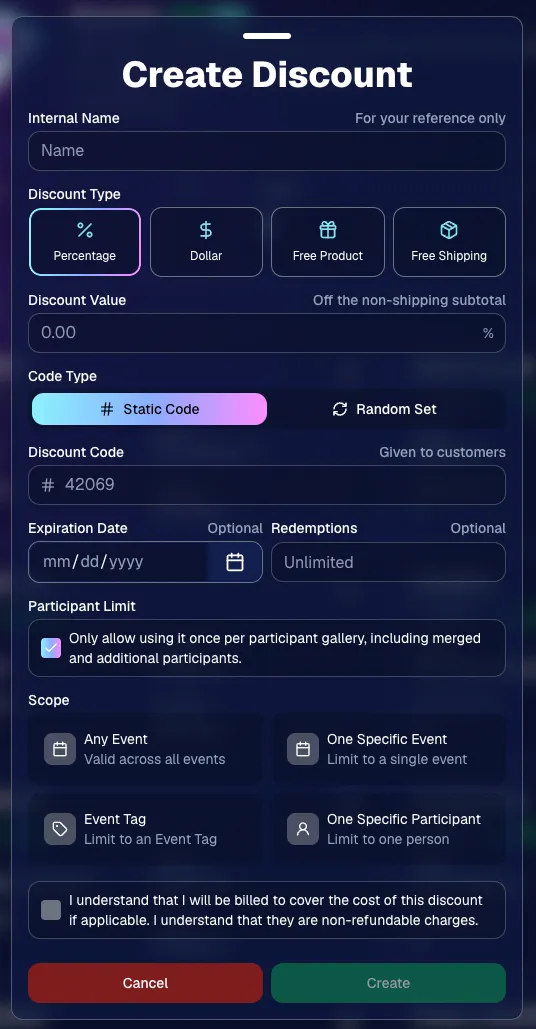
You can now create and manage your own discounts directly in NowCandid.

Discounts you create can apply to:

  • 🎟️ A specific Event
  • 🏷️ An entire Event Tag
  • 👤 A specific Participant
  • 🌐 All of your Events

And you can choose from several discount types:

  • 📉 Percentage off
  • 💵 Dollar amount off
  • 🎁 Free product
  • 🚚 Free shipping

🔐 Flexible code options

  • 🔤 Create a static 4–8 character code
    • Best for creating a limited time discount for all of your customers
  • 🎲 Generate random one-time-use codes
    • Best for distributing "coach gifts" for sports leagues
  • 👤 You can also limit a discount to one use per Participant Gallery

A few important rules:

  • Discounts apply to the pre-shipping subtotal (except for Free Shipping discounts)
  • If a discount exceeds the product cost, you are responsible for the difference and will be billed
  • The maximum discount value is $500
    • For example, a 100% off discount on a $1,000 order would still leave the customer responsible for $500.

📚 Full documentation:
https://app.nowcandid.com/docs/discounts
🎨 Batch AI Editing from Manage Images

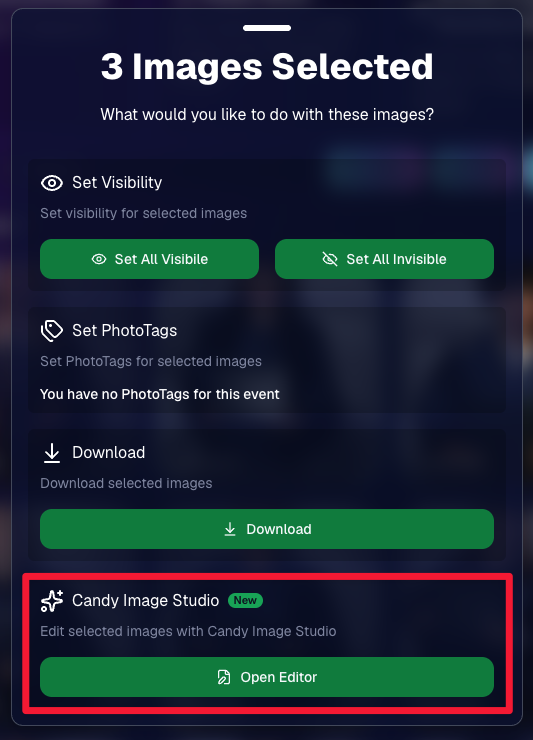
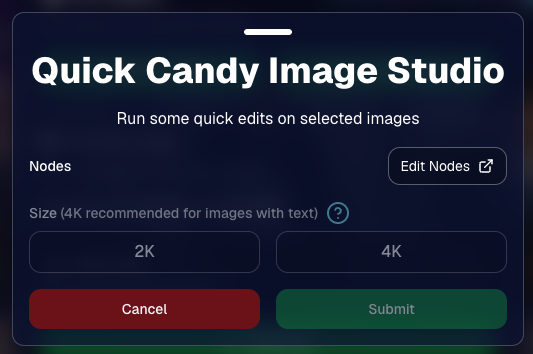
You can now run Candy Image Studio edits on multiple selected images at once right from Manage Images.

  • ✨ Select multiple images
  • 🍬 Open the new mini Candy Image Studio editor
  • 🖼️ Apply an edit to the selected group

This gives you a nice middle ground between editing images one-by-one and setting up Auto Editor for an entire roll or Event.
📤 Better SportsPics Upload Controls

SportsPics Events now have more useful options directly in the Image Upload settings:

👥 Mark All Images Group

  • Automatically mark every uploaded image as a Group Photo.

🏷️ Assign a PhotoTag during upload

  • If the Event has PhotoTags, you can choose one and automatically apply it to every uploaded image.

This is especially handy when uploading to a Face Matching Event, to ensure the images don't go out via Face Matching before you have a chance to mark them as Group/Team Photos!

⭐ Candy Image Studio & Auto Editor Improvements

👤 Participant names passed into edits

  • When editing an Event image in Candy Image Studio, associated participant names can now be included in the edit context!
  • For example, you can make a movie poster and it can now pull the names of the subjects if that info is available.

✉️ Client Outreach email designer improved

  • Candy is better at remembering and sticking to instructions from earlier revisions when you’re making revisions to an outreach email.

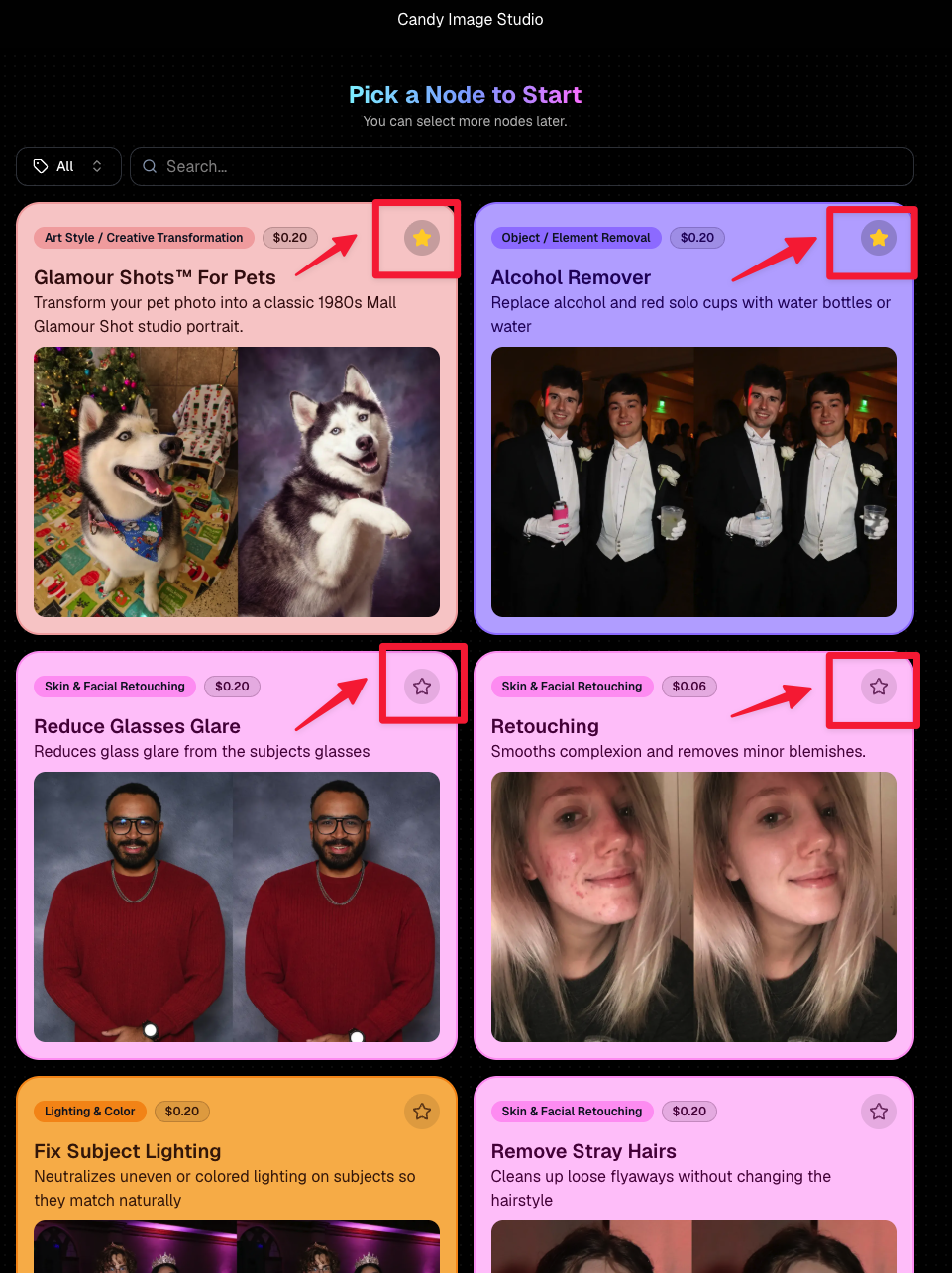
Favorite your most-used nodes

  • Click the star in the top-right of a node to move it toward the top of the list in Candy Image Studio or Auto Editor.
  • Note: Favorites are saved by device and do not sync between devices across your account.
🖼️ 39 New Default Background Sets

We added 39 new background sets for Offers and Virtual Groups!

New additions span categories like:

  • 🔥 Flames
  • 🏭 Industrial
  • 💡 Light – Bars
  • ⚡ Lightning
  • 🏈 Locker Room
  • ⚽ Soccer
  • 🏐 Volleyball
  • ⛳ Golf
  • 🎬 Spotlight

Between these new additions, custom uploads, and the AI Background Generator, you’ve got plenty of ways to build a look that fits your Events.
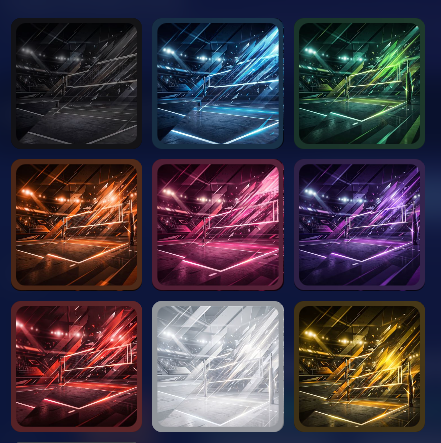
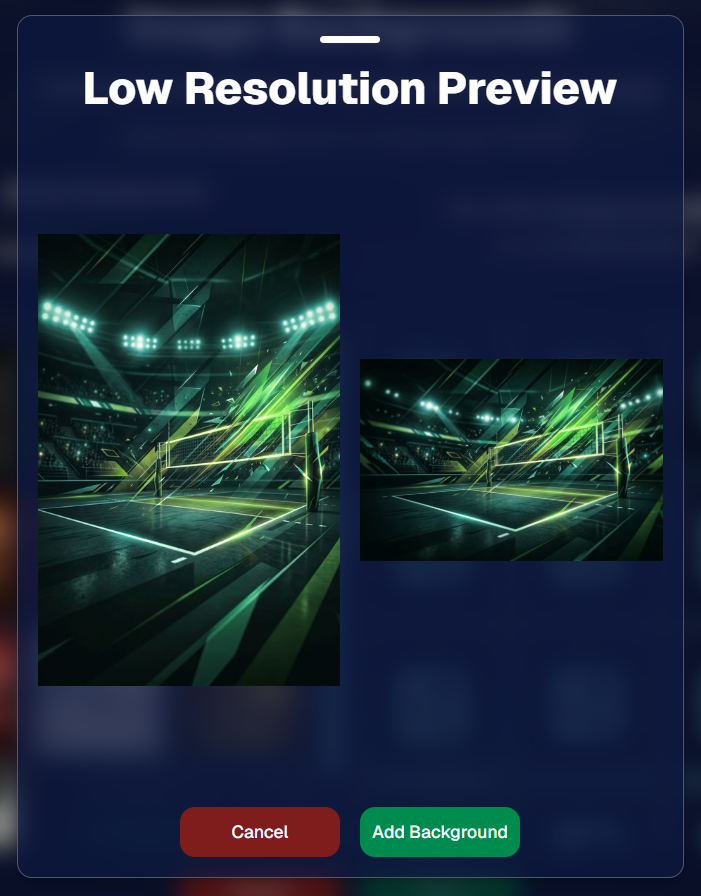
Example: New Volleyball Backgrounds!

A closer look at one of the examples above!

🧑‍🤝‍🧑 PhotoRoster & PhotoTag Improvements

🏷️ PhotoTags carry into new PhotoRosters

  • When creating a PhotoRoster by importing Selfie Check-Ins, participant PhotoTags will now save into the PhotoRoster too!

🧹 Duplicate PhotoTag import fix

  • Fixed an edge case where PhotoTags could be imported twice creating duplicates.

✂️ Background Removal Update

  • 👥 Background Removal no longer runs on Group Photos

Group Photos are not meant to go through Background Removal! Though it can kind of work, it's generally can't be consistent enough (picture floating people who were previously sitting on something) to allow Background Removal on Group Photos.

🛍️ Retail: Duplicate Download Warning

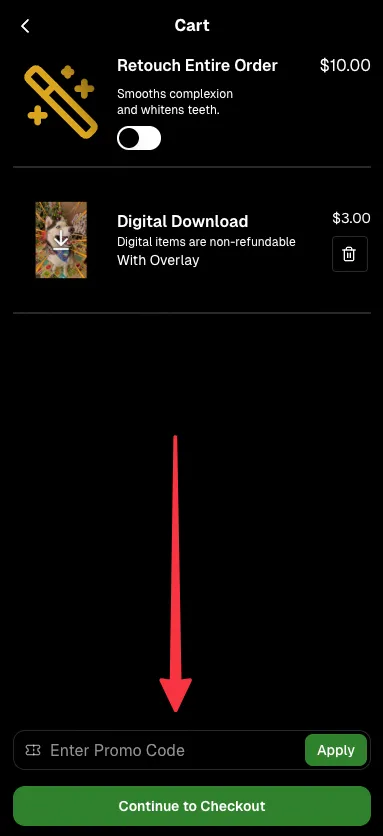
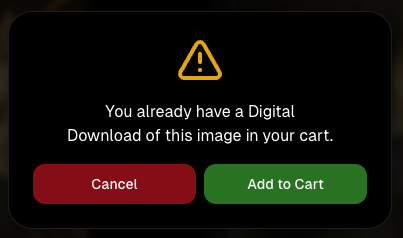
Retail now helps prevent accidental duplicate digital purchases.

  • ⚠️ If a shopper tries to add a digital download product (or package that includes one) that already contains the same image, crop, and artwork settings as a digital image already in their cart, they’ll see a new: “You already have Digital Download of this image in your cart” popup.
  • ➕ They can still add it anyway if they really want to!

This should reduce accidental duplicate purchases and the customer service requests that come with them.
Little improvements to make the platform better and better.

🛠️ Dashboard Fixes & Cleanup

  • 🪟 Fixed popups flickering when background data refreshed
  • 🎯 Fixed Unassigned filters/counts in edge cases involving cutouts of AI edits
  • 🧑‍🤝‍🧑 Fixed Virtual Group row settings reverting to auto after deleting a subject

That’s the week!

Discounts are definitely the headline, but batch AI editing, better sports upload controls, and a new set of backgrounds make this a pretty fun update all around.

Keep creating magic,

Candy 🍬

Related articles

Big News: Tiered Pricing Returns to NowCandid™! 🎉
Feature Updates
January 15, 2025

Big News: Tiered Pricing Returns to NowCandid™! 🎉

10
 minutes read
Hello, my wonderful photographers!

Candy here, and I’ve got big news about a feature that might just boost your sales in 2025. Yes, that’s right—Tiered Pricing is making its comeback to NowCandid™!

Let’s dive into the what, why, and how of this exciting development.

Heads Up, Everyone! ⚠️

This is an important one if you’re an active NowCandid™ user. So, if you read only one of our updates this year... let it be this one!

Tiered Pricing will roll out on January 20th, and it’s a big deal for your SportsPics™, PartyPics™, GradPics™, or other sales-driven events. So please keep reading to see what’s new and how it could benefit you.

What Is Tiered Pricing?

Tiered Pricing is the concept that your retail prices will nudge upward in small increments over three separate one-week periods:

  1. Week 1 – “Early bird” pricing
  2. Week 2 – Slightly higher “discounted” pricing
  3. Week 3 – Another small bump, settling at your “regular” pricing

We call it “Tiered Pricing” because each week is its own “Tier.”

We’re not trying to get you to charge outrageous amounts (in fact, lowering your prices can often benefit your overall profit), we're just introducing tiny price increases that the NowCandid™ marketing campaign will reference to gently push people to order more, and sooner.

The Real Advantage Lies in the Marketing

Some might assume Tiered Pricing is about making money off late buyers, but that’s not our aim:

  • Minimal Price Increases:

    A $1 or $2 difference won’t significantly affect your overall pricing but creates a sense of urgency in your marketing.
  • Deadlines & Discounts:
    • Week 1: Promoted as “early bird.”
    • Week 2: Positioned as “slightly higher but still discounted.”
    • Week 3: Called “regular” or “final” pricing.
  • No Negative Reinforcement:
    • There are no hefty late fees. Buyers see a small difference in price from one week to the next, which spurs action without scaring them off.

This structure keeps your clients engaged, draws in earlier purchases, and still ensures a reasonable price for those who come back later.

Remembering Tiered Pricing from the Past 🏛️

  • Before the New Dashboard:

    In mid-2024, when we introduced our modern Web Dashboard & new retail site, we chose to keep pricing straightforward at first—no Tiered Pricing.
  • Old Premade Offers:

    Back in the day, NowCandid™ used default “Tiered” premade offers with subtle $1–$2 increases each week. These small bumps proved beneficial enough that we’re ready to bring them back with the new system.

Why Such Tiny Price Increases? 🤏

NowCandid™ fosters long-term, residual sales through:

  • Annual Marketing Reminders
  • Event History (for customers who log into the retail site)
  • “Buy More” QR Codes on Prints
  • Our Find Me Portal
  • And future expansions that will encourage reorders!

By raising prices too steeply in the final weeks, you risk losing those valuable residual buyers. Tiny increments let the marketing do the heavy lifting—highlighting deadlines without truly punishing anyone for missing Week 1 or 2.

Why Bring Tiered Pricing Back Now? 📈

We studied a large batch of graduation Events, comparing the performance of schools photographed in both 2018 and 2023 (avoiding COVID years in the middle).

Between these two rounds of graduations, we made many improvements, but one of the bigger changes was the addition of Tiered Pricing.

Importantly, in 2023, Sales per person photographed increased by 76% over 2018.

Even if Tiered Pricing accounted for just one-fifth of that boost, that’s still a 15% jump in your own sales.

So while it might not be the only factor, it’s likely to be a meaningful one.

How We’re Implementing Tiered Pricing 🚀

We want to keep NowCandid™ easy to use, so Tiered Pricing will be made active for all sales-driven events (SportsPics™, PartyPics™, GradPics™, Portraits, etc.) starting January 20th, without a special toggle to turn it off—for now. Here’s the plan:

  1. New Tabs Accompanying Each Product & Package in the Offer Creator
    • Week 1 (base price)
    • Week 2 (+$1 on individual items, +$2 on packages)
    • Week 3 (+$2 on individual items, +$4 on packages compared to Week 1).
  2. Marketing Alignment
    • NowCandid™ marketing texts and emails will be altered to automatically reference these price bumps each week, nudging people to purchase before they miss the “discounted” or “early bird” phase.
  3. Your Current Prices Will Become Week 1 Prices
    • If you want your current price to remain the “Week 2” rate, consider lowering your Week 1 by $1 or $2. That way, you’re effectively offering a genuine discount in Week 1 while still matching your usual rate in Week 2, with only a slight increase in Week 3.
  4. What About QuicPics™ or QuicPics GO™?
    • Tiered Pricing won’t apply to those event types, since they focus on free downloads and don’t rely on persistent marketing. This only affects events where you’re selling items at retail prices over multiple weeks.

Participant vs. Event-Based Timing ⏱️

  • Participant Timing:

    Tiered Pricing for a specific subject starts when their “Day 0” marketing text goes out—i.e., once they become a participant in your Face Matching or Positive ID event. If someone isn’t photographed until Day 3, they’ll still get a full Week 1 period from that day forward.
  • All Images Gallery:

    If a customer bypasses personal galleries and shops the All Images Gallery on the NowCandid™ retail site, the Price Tier they see is based on the Event’s official start date.
  • Dashboard Insight:

    You can see which pricing Week a participant is currently in by viewing their Participant Details page on the Web Dashboard.

What Do I Have to Do? 🤔

  • If You’re Fine With Default:

    Sit back and let NowCandid™ handle it! We’ll roll out the changes automatically on January 20th.
  • If You Want a Lower “Week 1”:

    Adjust your existing Offer prices downward for that first Tier, making your Week 2 and Week 3 prices align with what you used to charge

    If you want your current price to remain the “Week 2” rate, consider lowering your Week 1 by $1 or $2. That way, you’re effectively offering a genuine discount in Week 1 while still matching your usual rate in Week 2, with only a slight increase in Week 3.
  • Feedback Welcome:

    If you truly dislike Tiered Pricing or think it messes up your strategy, reach out. We’re open to suggestions for making it optional, though for now it’s set to be standard across sales-driven events.

That’s the scoop, my lovely photographers!

Tiered Pricing is coming back to NowCandid™, and we believe it can add a gentle lift to your sales without complicating your life.

If you have questions or concerns, don’t hesitate to let us know. Otherwise, mark your calendar for January 20th and watch those early-bird sales roll in!

Candy 🍬

Weekly Recap: Photo Release Features, Merged Participant Clarity & More!
Feature Updates
January 10, 2025

Weekly Recap: Photo Release Features, Merged Participant Clarity & More!

5
 minutes read
Hello, my fabulous photographer friends!

Candy here, ready to sprinkle some sparkle on your day with our latest Weekly Recap! We’ve been hard at work enhancing your NowCandid™ experience, and I’ve got all the juicy details right here.

Let’s dive in!

1. Photo Releases & The New Image Release Gallery

Collecting Releases

Before using the pictures you take of your subjects in things like portfolios, websites, flyers, samples, and more - the best practice is to get a record of consent from your subjects before using photos of them for such things!

So... we've made some additions to NowCandid that will expedite this process for everyone involved!

  • Enabled via Retail Site Settings: Head to your Account Profile, open the “Retail Site Settings,” and toggle whether to ask participants for a photo release when they complete Selfie Check-In™.
  • Future Expansion: We plan to someday add this consent request to other locations in our Workflows, such as Scanner ID™ Check-Ins or after retail site checkout, so stay tuned!

Found under "Retail Site Settings" in your account profile

The post-Selfie Check-In messaging

Image Release Gallery

Once you’ve enabled Photo Releases, we’ve made viewing those fully released images a snap with the new Image Release Gallery!

  • Fully Released Photos Only: This gallery shows images where every primary face in the picture has opted in for marketing use.
  • Opt-Out Procedures: If someone changes their mind, NowCandid™ support can remove their release, and those images will disappear from the gallery.
  • Easier Marketing & Inspiration: Enjoy a reliable stash of images for portfolios, websites, flyers, or sample products, all with peace of mind!

This major addition simplifies the entire release process and keeps your marketing efforts on the right side of consent!

Starting next week, this feature will be enabled by default for all NowCandid accounts! If you wish to disable it, that's up to you!

An example of some images with only released faces in the new Image Release Gallery

2. Improved Merged Participants Clarity

We have also improved the photographer's experience and clarity when it comes to Merged Participants!

  • Multiple Names, One Contact: When two or more participants share a phone number, they now visibly merge under one participant in the Participant Manager, with all names separated by commas.
  • Reduced Confusion: Parents with multiple kids at an event won’t be an enigma anymore. You’ll see each kid’s name instead of a single ambiguous participant.
  • Same Smooth Experience for Families: Consumers won’t notice much change, but you’ll breathe easier knowing your records more clearly show who’s who.

No more wondering why two kids keep “replacing” each other in the backend—our improved merging UI has your back!

Example of multiple merged participants wrapped into one participant

3. Group Photo Filter in Manage Images

  • Just Group Photos: We’ve added a toggle to the Manage Images page that shows only images flagged as “Group Photos.”
  • Sports & GroupTags™: Perfect for organizing big team shots or verifying no single-person images slipped in by accident.
  • Future Tweaks Coming: We’re cooking up more ways to polish Group Photo and GroupTags™ functionalities, so watch this space!

If you handle big groups (like sports teams or large gatherings), this quick filter simplifies your event workflow.

New toggle button to switch between showing All Images and just Group Photos

4. All Images Gallery Pagination

  • Page-by-Page Browsing: We replaced the endless scroll in the NowCandid™ retail site’s All Images Gallery with a paginated view—complete with arrows to move between pages.
  • Jump to Page: Customers can type or select a page number if they already know where to look.
  • Less Scrolling, More Finding: Makes returning to a specific photo (especially one not in a personal gallery) a breeze.

This update ensures customers spend less time hunting and more time admiring—or purchasing—the images they love.

New retail site page navigation tools

5. New Events List Filter

One last small addition to mention... we added a way to filter down your Events list!

This should make it easier than ever to browse through your upcoming Events as you plan and prepare for them.

New Events list filter options

That’s it for this week’s recap!

We hope these changes help you manage your events more smoothly, give you extra confidence in your marketing, and offer your customers a cleaner, faster photo-browsing experience.

As always, we love your feedback, so feel free to reach out with any questions or suggestions.

Thank you for being an essential part of the NowCandid™ community. Keep capturing those unforgettable moments and creating smiles! 📸✨

Cheers and sparkles,

Candy 🍬

Weekly Recap: Overlay Artwork in the Product Gallery 🎨✨
Feature Updates
January 3, 2025

Weekly Recap: Overlay Artwork in the Product Gallery 🎨✨

2
 minutes read
Hello again, my wonderful photographers!

Candy here, and welcome to another Weekly Recap. This time, we’ve got one exciting improvement to share—overlay artwork now appears by default on product previews in the product gallery!

Let’s take a closer look. 🌟

Overlays Rendered by Default in Product Gallery 🎉

We’ve introduced a fun change for anyone using Banner Overlays or Full Frame Overlays in their NowCandid Events:

  • Visible Overlay Art

    Items in the retail site’s product gallery will now display your Event’s overlay artwork right away. Customers can see exactly how their images look on each product, with that extra creative touch of your Event's Overlay Art.

Theme: Marshmallow - Watermarking: Heavy

Theme: Liquourice - Watermarking: None

  • Use Overlay by Default

    When customers go to customize or add a product to their cart, the “Use Overlay” option will already be selected. This makes it simpler to highlight your unique event designs or branding. But they can still view & order the product without the overlay art.
  • Easy Toggle in Settings

    If you prefer to keep products overlay-free by default, no worries! Head to the “Retail Site Settings” in your Profile and uncheck “Use Artwork By Default.” That way, product images will display without your Event overlay art unless customers choose otherwise.

Find this option in your Profile settings

Enabling Use Artwork By Default will feature your Event's Overlay Art on the renders in the product gallery page. Guests can choose to view and order products without the art, but "with overlay art" will be the default selection.

That’s all for this week’s short-and-sweet recap!

We hope this feature adds a little extra flair to your retail experience.

As always, let us know what you think or if you have any feedback.

Candy 🍬

Let’s get in touch

If you’re a photographer looking to add NowCandid services to your wheelhouse – set up a call by clicking the button below.

How to customize formatting for each rich text

How to customize formatting for each rich text

How to customize formatting for each rich text

How to customize formatting for each rich text

How to customize formatting for each rich text

What’s a Rich Text element?

The rich text element allows you to create and format headings, paragraphs, blockquotes, images, and video all in one place instead of having to add and format them individually. Just double-click and easily create content.

A rich text element can be used with static or dynamic content. For static content, just drop it into any page and begin editing. For dynamic content, add a rich text field to any collection and then connect a rich text element to that field in the settings panel. Voila!

Headings, paragraphs, blockquotes, figures, images, and figure captions can all be styled after a class is added to the rich text element using the "When inside of" nested selector system.

  • List One
  • List Two
  • List Three
  • List Four
  • List Five

This is a link

This is bold text