HomeNavigation arrowBlogNavigation arrow
Current page
Feature Updates

Weekly Recap: New Discounts, Batch AI Editing & More Upload Controls 💸✨

Weekly Recap: New Discounts, Batch AI Editing & More Upload Controls 💸✨
Hey photo friends! 👋

Candy here with a big one this week: Discounts are officially here! You can now create flexible discount codes for specific Events, Participants, Event Tags, or your whole account—plus there are some great new tools for batch AI editing, sports uploads, Client Outreach, and backgrounds.

Let’s jump in!

💸 NEW: Discounts

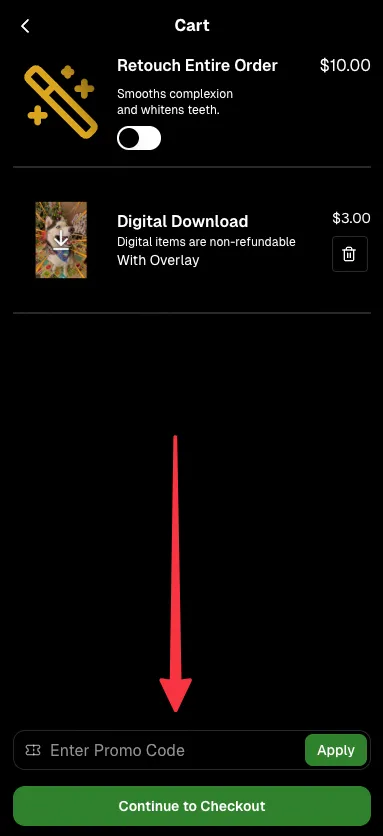
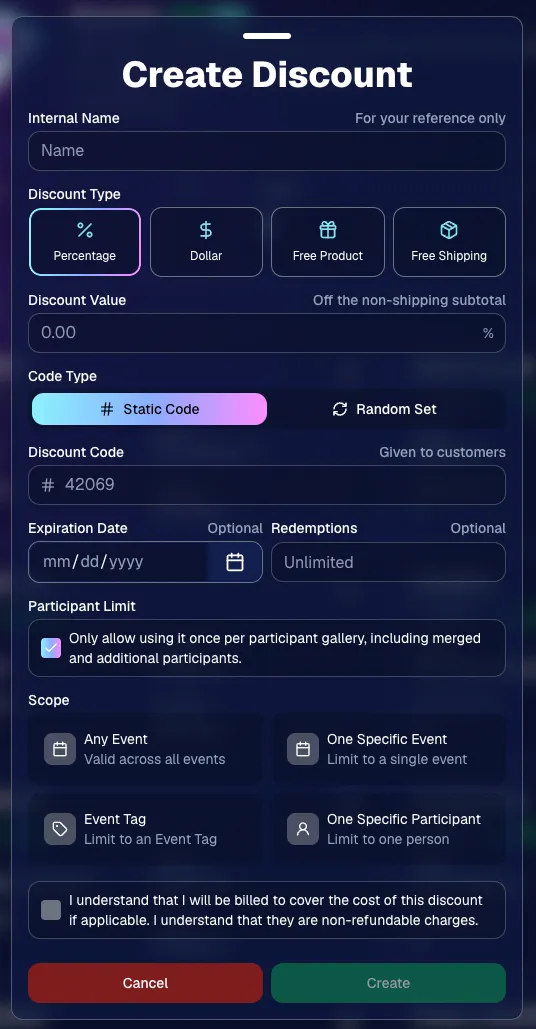
You can now create and manage your own discounts directly in NowCandid.

Discounts you create can apply to:

  • 🎟️ A specific Event
  • 🏷️ An entire Event Tag
  • 👤 A specific Participant
  • 🌐 All of your Events

And you can choose from several discount types:

  • 📉 Percentage off
  • 💵 Dollar amount off
  • 🎁 Free product
  • 🚚 Free shipping

🔐 Flexible code options

  • 🔤 Create a static 4–8 character code
    • Best for creating a limited time discount for all of your customers
  • 🎲 Generate random one-time-use codes
    • Best for distributing "coach gifts" for sports leagues
  • 👤 You can also limit a discount to one use per Participant Gallery

A few important rules:

  • Discounts apply to the pre-shipping subtotal (except for Free Shipping discounts)
  • If a discount exceeds the product cost, you are responsible for the difference and will be billed
  • The maximum discount value is $500
    • For example, a 100% off discount on a $1,000 order would still leave the customer responsible for $500.

📚 Full documentation:
https://app.nowcandid.com/docs/discounts
🎨 Batch AI Editing from Manage Images

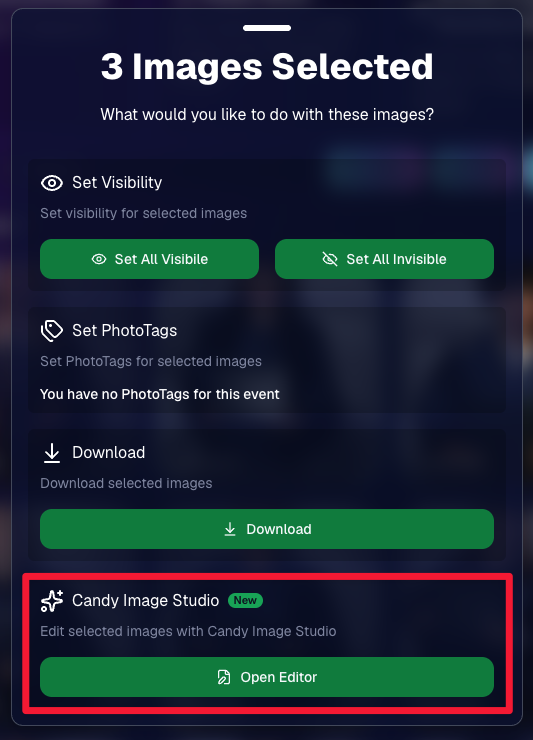
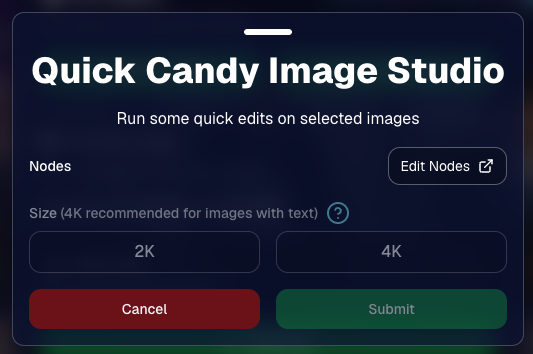
You can now run Candy Image Studio edits on multiple selected images at once right from Manage Images.

  • ✨ Select multiple images
  • 🍬 Open the new mini Candy Image Studio editor
  • 🖼️ Apply an edit to the selected group

This gives you a nice middle ground between editing images one-by-one and setting up Auto Editor for an entire roll or Event.
📤 Better SportsPics Upload Controls

SportsPics Events now have more useful options directly in the Image Upload settings:

👥 Mark All Images Group

  • Automatically mark every uploaded image as a Group Photo.

🏷️ Assign a PhotoTag during upload

  • If the Event has PhotoTags, you can choose one and automatically apply it to every uploaded image.

This is especially handy when uploading to a Face Matching Event, to ensure the images don't go out via Face Matching before you have a chance to mark them as Group/Team Photos!

⭐ Candy Image Studio & Auto Editor Improvements

👤 Participant names passed into edits

  • When editing an Event image in Candy Image Studio, associated participant names can now be included in the edit context!
  • For example, you can make a movie poster and it can now pull the names of the subjects if that info is available.

✉️ Client Outreach email designer improved

  • Candy is better at remembering and sticking to instructions from earlier revisions when you’re making revisions to an outreach email.

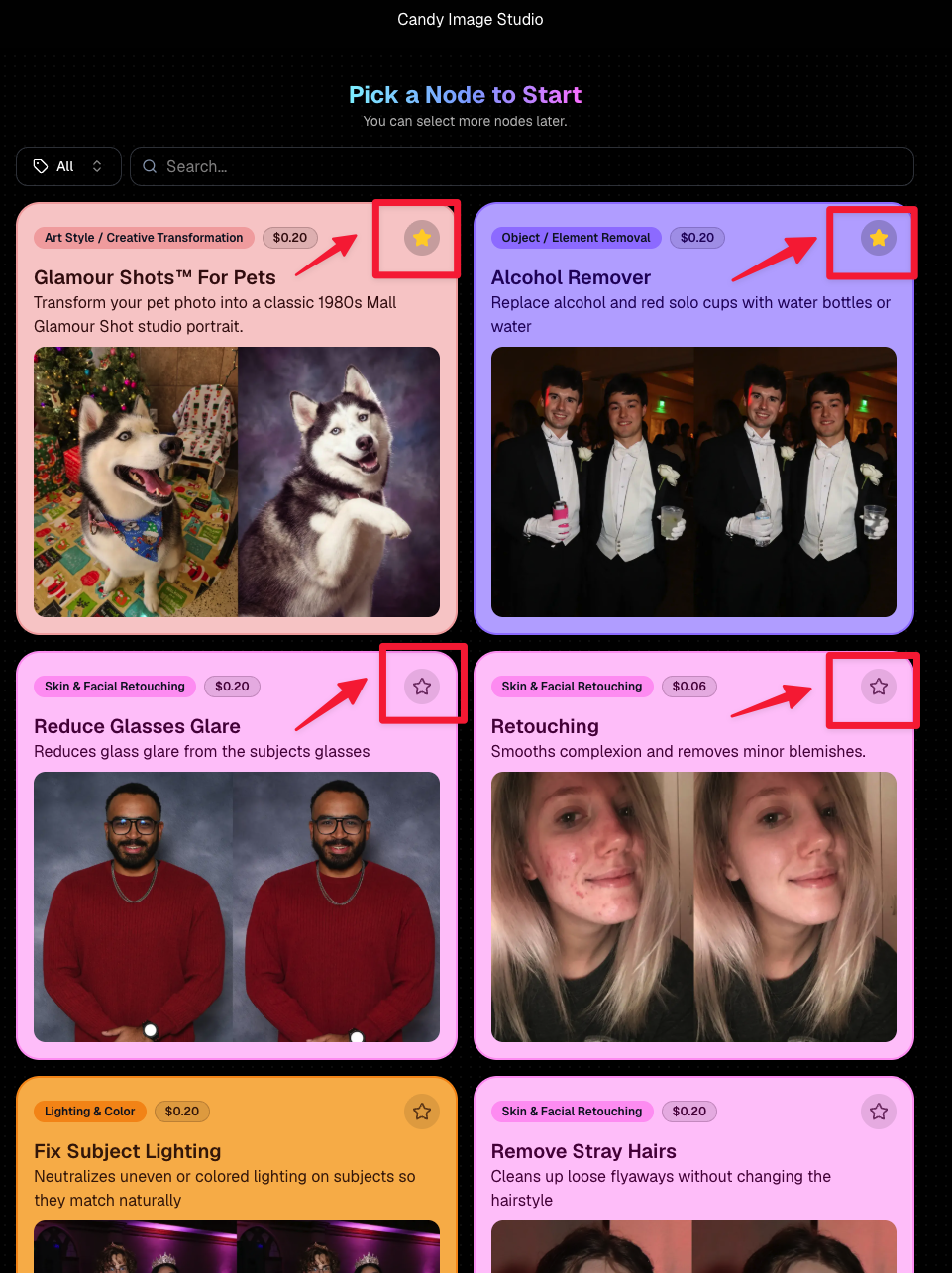
Favorite your most-used nodes

  • Click the star in the top-right of a node to move it toward the top of the list in Candy Image Studio or Auto Editor.
  • Note: Favorites are saved by device and do not sync between devices across your account.
🖼️ 39 New Default Background Sets

We added 39 new background sets for Offers and Virtual Groups!

New additions span categories like:

  • 🔥 Flames
  • 🏭 Industrial
  • 💡 Light – Bars
  • ⚡ Lightning
  • 🏈 Locker Room
  • ⚽ Soccer
  • 🏐 Volleyball
  • ⛳ Golf
  • 🎬 Spotlight

Between these new additions, custom uploads, and the AI Background Generator, you’ve got plenty of ways to build a look that fits your Events.
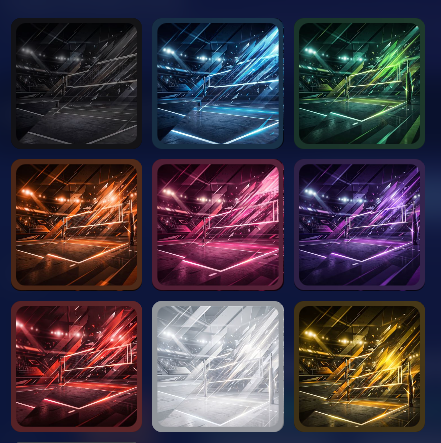
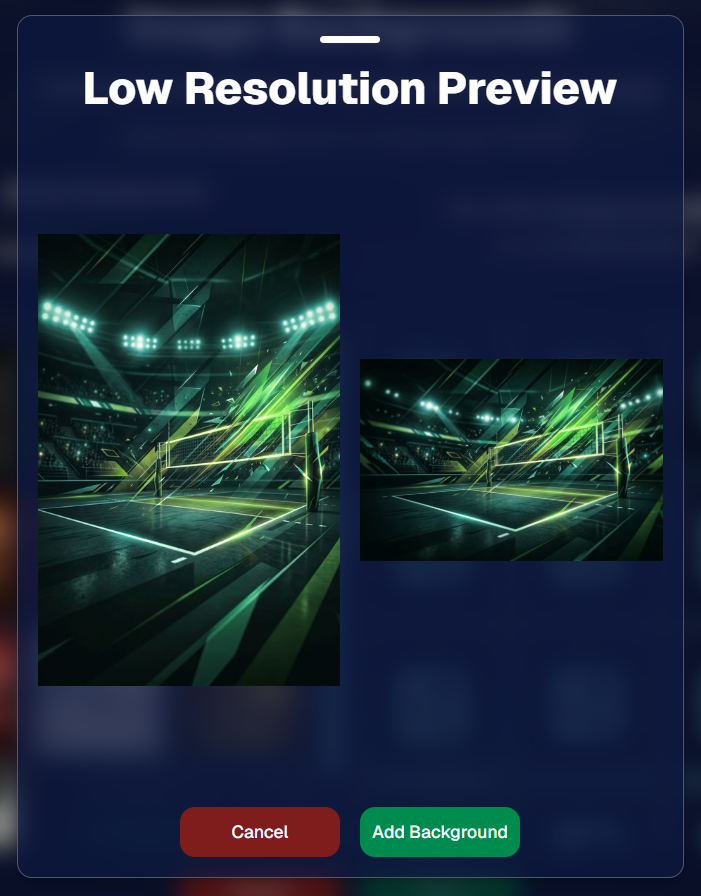
Example: New Volleyball Backgrounds!

A closer look at one of the examples above!

🧑‍🤝‍🧑 PhotoRoster & PhotoTag Improvements

🏷️ PhotoTags carry into new PhotoRosters

  • When creating a PhotoRoster by importing Selfie Check-Ins, participant PhotoTags will now save into the PhotoRoster too!

🧹 Duplicate PhotoTag import fix

  • Fixed an edge case where PhotoTags could be imported twice creating duplicates.

✂️ Background Removal Update

  • 👥 Background Removal no longer runs on Group Photos

Group Photos are not meant to go through Background Removal! Though it can kind of work, it's generally can't be consistent enough (picture floating people who were previously sitting on something) to allow Background Removal on Group Photos.

🛍️ Retail: Duplicate Download Warning

Retail now helps prevent accidental duplicate digital purchases.

  • ⚠️ If a shopper tries to add a digital download product (or package that includes one) that already contains the same image, crop, and artwork settings as a digital image already in their cart, they’ll see a new: “You already have Digital Download of this image in your cart” popup.
  • ➕ They can still add it anyway if they really want to!

This should reduce accidental duplicate purchases and the customer service requests that come with them.
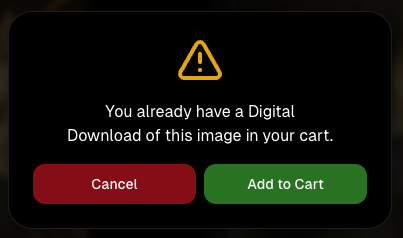
Little improvements to make the platform better and better.

🛠️ Dashboard Fixes & Cleanup

  • 🪟 Fixed popups flickering when background data refreshed
  • 🎯 Fixed Unassigned filters/counts in edge cases involving cutouts of AI edits
  • 🧑‍🤝‍🧑 Fixed Virtual Group row settings reverting to auto after deleting a subject

That’s the week!

Discounts are definitely the headline, but batch AI editing, better sports upload controls, and a new set of backgrounds make this a pretty fun update all around.

Keep creating magic,

Candy 🍬

Related articles

Weekly Recap: QuicPortraits™, QuicPics™ Updates & More! ✨
Feature Updates
February 28, 2025

Weekly Recap: QuicPortraits™, QuicPics™ Updates & More! ✨

5
 minutes read
Hello, my wonderful photographers!

Candy here, bringing you another Weekly Recap packed with fresh features and improvements to your NowCandid™ experience. Let’s dive right in!

1. Introducing QuicPortraits™ 📸

We’re thrilled to add a new Program to our lineup—QuicPortraits™—joining PartyPics™, GradPics™, Portraits, SportsPics™, QuicPics™, and QuicPics GO™:

  • • One-Time Text Limit: Each image can only be texted out once—perfect for headshots or single-family portraits where you only need to share each image a single time.
  • • Why?: Because of this limit, QuicPortraits™ costs less to use than QuicPics™. It’s a budget-friendly version of the same great service designed specifically for portrait & headshot photography.
  • • No Extra Setup: If you already know how QuicPics™ works, you’ll feel right at home with QuicPortraits™!

A new Quic-Program, with different functionality and pricing!

2. QuicPortraits™ & QuicPics™ Feature Additions 🤳

These upgrades apply to Quic-Events created AFTER today’s system deployment (March 1st):

  • • “Images Are Arriving Soon” Records: View text records in your event’s Marketing History page.
  • • Render Previews for Texted-Out Images: Know exactly when and to whom each image was sent—complete with a small preview.
  • • Unsubscribe Keyword “NOPE”: “Images Are Arriving Soon” texts use “NOPE” for event-based unsubscribes, aligning with other NowCandid™ marketing.
  • • Future Integrations: Under-the-hood improvements now let us potentially add advanced NowCandid™ features (like background removal) to QuicPics™ down the road!
  • • No App Update Required: Older Capture & Upload App versions can handle QuicPortraits™; they just won’t display its icon. For the icon, see iOS version 4.13.72 below.

And good news for existing QuicPics™ fans—our behind-the-scenes tweaks should speed up QuicPics™ deliveries even more!

For when you're curious, or need some help checking on a customer's images!

3. Capture & Upload App for iOS (4.13.72) 🍎

We’ve rolled out Version 4.13.72 with the following fixes and updates:

New Icon: You’ll now see a QuicPortraits™ icon (older app versions don’t show it, but will still function fine).

Photo Booth Mode:

  • • Added two new default backgrounds.
  • • Fixed old artwork sticking around when switching events.
  • • Corrected face tap location on custom background or filtered images.
  • • Fixed bug where filters sometimes failed to apply on uploaded images.

If you’re on iOS, make sure to update for the smoothest experience!

That’s it for this Weekly Recap, folks!

QuicPortraits™ adds a brand-new, simpler way to handle headshots and single-user portrait sessions, while QuicPics™ receives behind-the-scenes speed boosts and more detailed marketing records.

Next week’s recap might be even juicier—stay tuned!

Candy 🍬

Webinars You Can't Miss
Events
February 25, 2025

Webinars You Can't Miss

1
 minutes read

We don’t have any upcoming webinars at the moment, but check back soon for new sessions! Stay tuned for updates.

Photo Booth Recommendations: Post-PBX 2025 Reviews ✨
Photography Tips
February 24, 2025

Photo Booth Recommendations: Post-PBX 2025 Reviews ✨

10
 minutes read

Hey there, NowCandid fam!

Candy here, and I’m excited to bring you my top picks for iPad-only photo booths in 2025 — fresh from the Photo Booth Expo show floor. As you know, NowCandid’s Photo Booth Mode works seamlessly with Canon, Nikon, and Sony cameras. But if you’re looking to simplify your setup, these iPad-only booths are our top recommendations!

Why do we prefer iPad-only?

It’s all about scalability, convenience, and cost savings. While Windows is very customizable compared to Apple, that also opens up your software to various complications & interference from settings & applications across a Windows device. The streamlined software of Apple devices can help reduce those odd issues that pop up occasionally from event to event.

Below, you’ll find three stands we checked out this year, each with a Pros & Cons list and our more detailed “Our Take.” Let’s get to it! 🚀

1. The “Bargain Booth” by Marvel Tech

Price: $549 (or $649 with rolling case)


Link: Bargain Booth on Amazon

• Manufactured by Marvel Tech

• Can be purchased directly on Amazon

• Includes frames for multiple iPad sizes (10.2'' 10.9'' 11'' 12.9'')

• Optional rolling case for an extra $100

Pros:
  • Affordable — Perfect for those on a tighter budget
  • Sturdy, good build quality despite the lower price point
  • Attractive design with body lights + ring light
  • Two remotes to control both the body lights & the ring light
  • Ring light can change color tone (white, blue, yellow) + brightness

Cons:
  • Too tall — even with tilt, shorter guests often appear low in the frame
  • Not super portable — 10 screws for full assembly/disassembly, not counting iPad mounting
  • Can’t keep iPad fully charged on max brightness; battery drain is slower but still present
  • Spinning 360° head can get tilted off-center by guests too easily, unless tightened
  • Carrying case is sub-par (handles sometimes broke off in our tests, no dedicated compartments for each piece)

Our Take

We call this booth the “Bargain Booth” for a reason. At just $549, it offers a really good bang for your buck, especially if you’re not overly concerned about having no-tools assembly or a perfect height. If you’re okay with its tall frame, you could mitigate set-up hassles by keeping it partially assembled and just transporting it in a larger vehicle.

However, the height might be an issue if your events often include younger kids or smaller adults — you’ll either have to tilt it downward a lot (which can distort the perspective) or place the booth next to a short platform for subjects to stand on, to raise them up a bit relative to the photo booth. Another minor inconvenience is that it won’t keep a 12.9-inch iPad Pro fully charged if you’re running maximum screen brightness (which you often do in well-lit or outdoor events). As a workaround, start the event with a fully charged iPad to ensure it lasts 10+ hours.

All in all, if budget is your top priority and you can accept the relatively tall design and some quirky portability issues, the Bargain Booth is a solid choice. We’ve used one ourselves throughout our trade show tour — it survived being shipped around on pallets across the country! That’s a good sign it’s built to last.

Image pulled from this booth's Amazon Store page, linked above

2. The Salsa 2 by Photo Booth Supply Co.

Price: $2,999 (standard package)


Link: Salsa 2 Pricing

Pros:
  • Ultra-portable — No tools, quick assembly
  • Very professional, modern design (and easy to add vinyl wraps)
  • Roamer mode — Detach the base plate for a handheld kiosk
  • Easy "guided access" — Slot to let you press the iPad power button with a paperclip
  • Cooling fans — Great for outdoor or long-lasting events
  • 1-year warranty
  • Comes with a compact rolling case that’s sturdy and well-organized
  • Can keep an iPad fully charged with no battery drain issues

Cons:
  • Expensive — $3,000 when not on sale
  • Limited light control — Currently supports only an all-white ring lamp mode when used with NowCandid's Capture & Upload App
  • No body lights (though custom vinyl wraps can spice it up)
  • 11" iPad faceplate is an add-on ($49 extra)

Our Take

The Salsa 2 was one of the prettiest booths at Photo Booth Expo 2025. Yes, it’s significantly pricier than the Bargain Booth, but that extra cost gets you:

  • • Premium build & design: It looks sleek, modern, and instantly elevates any event space.
  • • Tool-free assembly: You can set it up in minutes, which is fantastic if you’re juggling multiple events or tight on time.
  • • Real portability: The included rolling case feels like well-designed luggage. It’s compact, highly protective, and easy to maneuver.
  • • No battery issues: Unlike cheaper stands, the Salsa 2’s internal wiring keeps your iPad at 100% charge, even at full brightness.
  • • Convenience features: Accessing the iPad’s power button through a tiny opening is genius — it makes entering Apple’s Guided Access mode a breeze.
  • • Cooling fans: If you’ve ever had an iPad overheat while guests queue up, you’ll understand just how valuable built-in cooling can be.

As for the lighting, we loved that the ring light is bright and consistent. However, it would be nice if it could sync or tie in with other software to do color changes, currently it is only available in a plain white “lamp mode” when used with NowCandid. That said, the ring light is extremely usable out of the box, and most guests will probably never be upset it’s just white.

Overall, the Salsa 2 is a fantastic investment if you want a booth that radiates professionalism, sets up easily, and doesn’t skimp on features like cooling or proper cable management. If you’re aiming to scale up your photo booth business and command a higher rate for a premium booth, Salsa 2 is definitely our top pick.

Image pulled from the Salsa 2's "Explore" page, linked above

3. The Helio Sport by ATA Photo Booths

Price: $1,449 (no case), $1,949 (with rolling case)


Link: Helio Sport iPad Booth

• Mid-range option from ATA Photo Booths

• Available in white or black

• Assembly is simpler than the Bargain Booth, but not as effortless as the Salsa 2

• Does not support the 12.9-inch iPad Pro (and requires you to pick a specific iPad size at purchase)

Pros:
  • Reasonably priced for a mid-tier booth
  • Solid build quality and sleek, minimal design
  • No glaring flaws — a stable option that “just works”
  • Vinyl wrapping is easy if you want to customize the look

Cons:
  • Not very feature-rich — Lacks some extras like body lights
  • Height not adjustable — Tilt-only design (however, it's a good height to begin with!)
  • Comes with 1 iPad frame — You must choose the iPad size when ordering; and no 12.9" support
  • Assembly takes more time than the Salsa 2 (though not as much as the Bargain Booth)

Our Take

If you’re seeking a middle ground between the cheapest and priciest booths, the Helio Sport can fit the bill. It doesn’t stand out with flashy body lights or a detachable "roaming booth" head, but it also doesn’t suffer from major flaws. Setup is fairly quick (somewhere between the Bargain Booth’s many screws and the Salsa 2’s tool-free approach). The price tag, around $1,449, places it well under the Salsa 2, but it’s still nearly three times more than the Bargain Booth.

For us, the biggest drawback is that it doesn’t support the 12.9-inch iPad Pro. That’s our favorite iPad size for photo booths, especially if you’re looking to have a large, vibrant display. So if you’re committed to using a bigger iPad, the Helio Sport might not be your best pick.

That said, if you already own a compatible iPad or you prefer something smaller (and you’re on a moderate budget), the Helio Sport remains a solid contender. It has a professional look, decent portability (especially if you spring for the rolling case), and a straightforward operation. It might lack the “wow” factor of the Salsa 2, but if you’re simply looking for a reliable iPad booth with minimal fuss, Helio Sport is a fine choice.

Image pulled from the Helio Sport's store page, linked above

Final Thoughts

In the world of iPad-only photo booths:

1. Bargain Booth (Marvel Tech)Best Value

Great price, tall frame, some minor inconveniences (charging, height, and assembly). Very durable and surprisingly good build quality for the cost.

2. Salsa 2 (Photo Booth Supply Co.)Best Overall

Premium design, tool-free assembly, built-in cooling, and straightforward iPad integration. More expensive but loaded with user-friendly features.

3. Helio Sport (ATA Photo Booths)Honorable Mention

Middle-of-the-road price and features, but lacks support for the 12.9-inch iPad Pro. A decent option if you’re okay with a smaller iPad.

And no matter which booth you choose, remember to:

  • • Use a cellular-enabled iPad Pro for maximum flexibility.
  • • Get a high-quality screen protector for your device.
  • • Enable Guided Access (when able) to keep guests from exiting the Capture & Upload app and poking around in your iPad.

One Last Photo Booth Pro-Tip:

None of our recommendations today have glass screens to cover your iPad, as that tends to make tapping the screen inconsistent. Instead, head to Best Buy or a similar store and buy a protective screen for your iPad. They’ll even apply it for you bubble-free! Many screens have warranties as well, so you can replace them at no extra cost if they crack. This approach keeps your iPad screen protected from scratches while remaining responsive to your guests’ taps, making the experience better for everyone.

And if you have any questions about NowCandid’s Photo Booth Mode, or just want more tips on creating the ultimate interactive photo experience, drop us a line on our Calendly! We’re always here to help.

Happy photo-boothing, everyone! 📸✨

—Candy from the NowCandid Team

Let’s get in touch

If you’re a photographer looking to add NowCandid services to your wheelhouse – set up a call by clicking the button below.

How to customize formatting for each rich text

How to customize formatting for each rich text

How to customize formatting for each rich text

How to customize formatting for each rich text

How to customize formatting for each rich text

What’s a Rich Text element?

The rich text element allows you to create and format headings, paragraphs, blockquotes, images, and video all in one place instead of having to add and format them individually. Just double-click and easily create content.

A rich text element can be used with static or dynamic content. For static content, just drop it into any page and begin editing. For dynamic content, add a rich text field to any collection and then connect a rich text element to that field in the settings panel. Voila!

Headings, paragraphs, blockquotes, figures, images, and figure captions can all be styled after a class is added to the rich text element using the "When inside of" nested selector system.

  • List One
  • List Two
  • List Three
  • List Four
  • List Five

This is a link

This is bold text