HomeNavigation arrowBlogNavigation arrow
Current page
Feature Updates

Weekly Recap: New Discounts, Batch AI Editing & More Upload Controls 💸✨

Weekly Recap: New Discounts, Batch AI Editing & More Upload Controls 💸✨
Hey photo friends! 👋

Candy here with a big one this week: Discounts are officially here! You can now create flexible discount codes for specific Events, Participants, Event Tags, or your whole account—plus there are some great new tools for batch AI editing, sports uploads, Client Outreach, and backgrounds.

Let’s jump in!

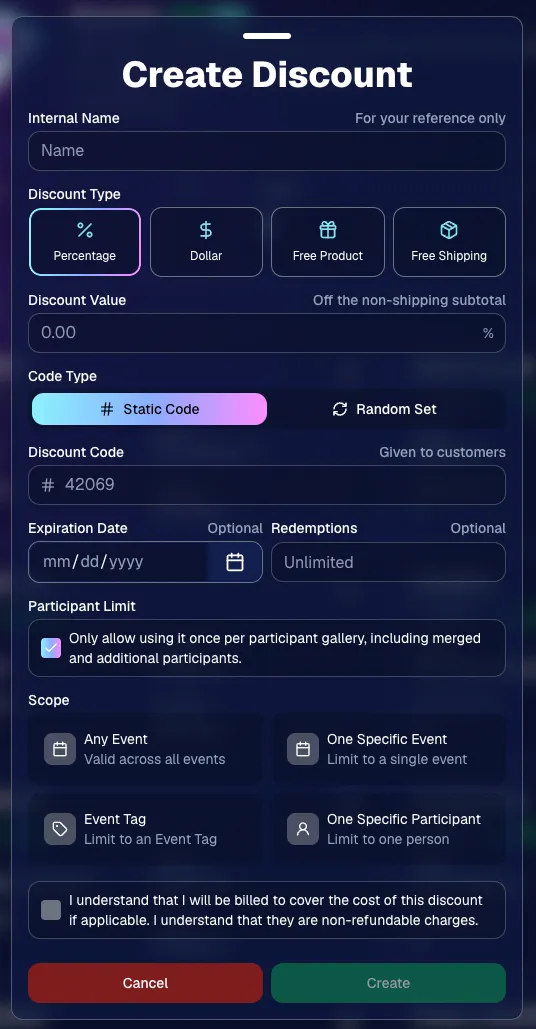
💸 NEW: Discounts

You can now create and manage your own discounts directly in NowCandid.

Discounts you create can apply to:

  • 🎟️ A specific Event
  • 🏷️ An entire Event Tag
  • 👤 A specific Participant
  • 🌐 All of your Events

And you can choose from several discount types:

  • 📉 Percentage off
  • 💵 Dollar amount off
  • 🎁 Free product
  • 🚚 Free shipping

🔐 Flexible code options

  • 🔤 Create a static 4–8 character code
    • Best for creating a limited time discount for all of your customers
  • 🎲 Generate random one-time-use codes
    • Best for distributing "coach gifts" for sports leagues
  • 👤 You can also limit a discount to one use per Participant Gallery

A few important rules:

  • Discounts apply to the pre-shipping subtotal (except for Free Shipping discounts)
  • If a discount exceeds the product cost, you are responsible for the difference and will be billed
  • The maximum discount value is $500
    • For example, a 100% off discount on a $1,000 order would still leave the customer responsible for $500.

📚 Full documentation:
https://app.nowcandid.com/docs/discounts
🎨 Batch AI Editing from Manage Images

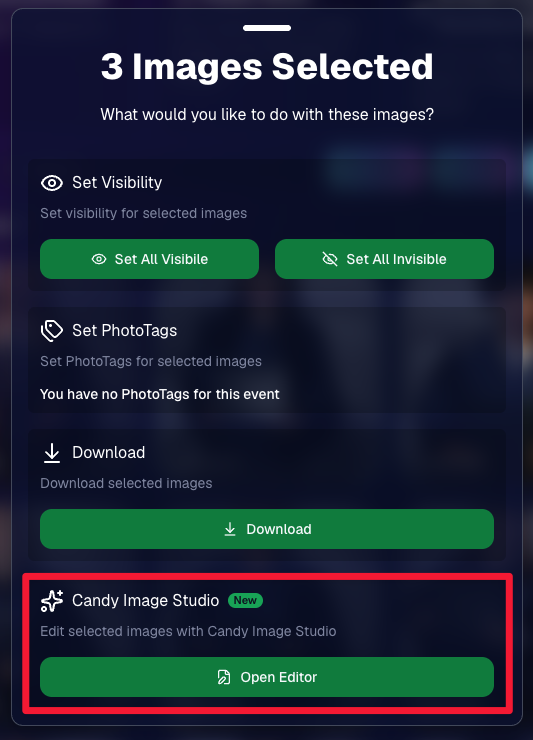
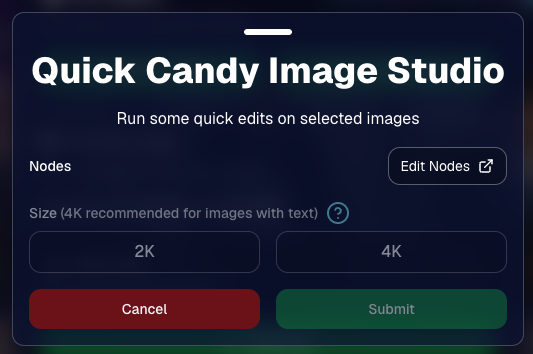
You can now run Candy Image Studio edits on multiple selected images at once right from Manage Images.

  • ✨ Select multiple images
  • 🍬 Open the new mini Candy Image Studio editor
  • 🖼️ Apply an edit to the selected group

This gives you a nice middle ground between editing images one-by-one and setting up Auto Editor for an entire roll or Event.
📤 Better SportsPics Upload Controls

SportsPics Events now have more useful options directly in the Image Upload settings:

👥 Mark All Images Group

  • Automatically mark every uploaded image as a Group Photo.

🏷️ Assign a PhotoTag during upload

  • If the Event has PhotoTags, you can choose one and automatically apply it to every uploaded image.

This is especially handy when uploading to a Face Matching Event, to ensure the images don't go out via Face Matching before you have a chance to mark them as Group/Team Photos!

⭐ Candy Image Studio & Auto Editor Improvements

👤 Participant names passed into edits

  • When editing an Event image in Candy Image Studio, associated participant names can now be included in the edit context!
  • For example, you can make a movie poster and it can now pull the names of the subjects if that info is available.

✉️ Client Outreach email designer improved

  • Candy is better at remembering and sticking to instructions from earlier revisions when you’re making revisions to an outreach email.

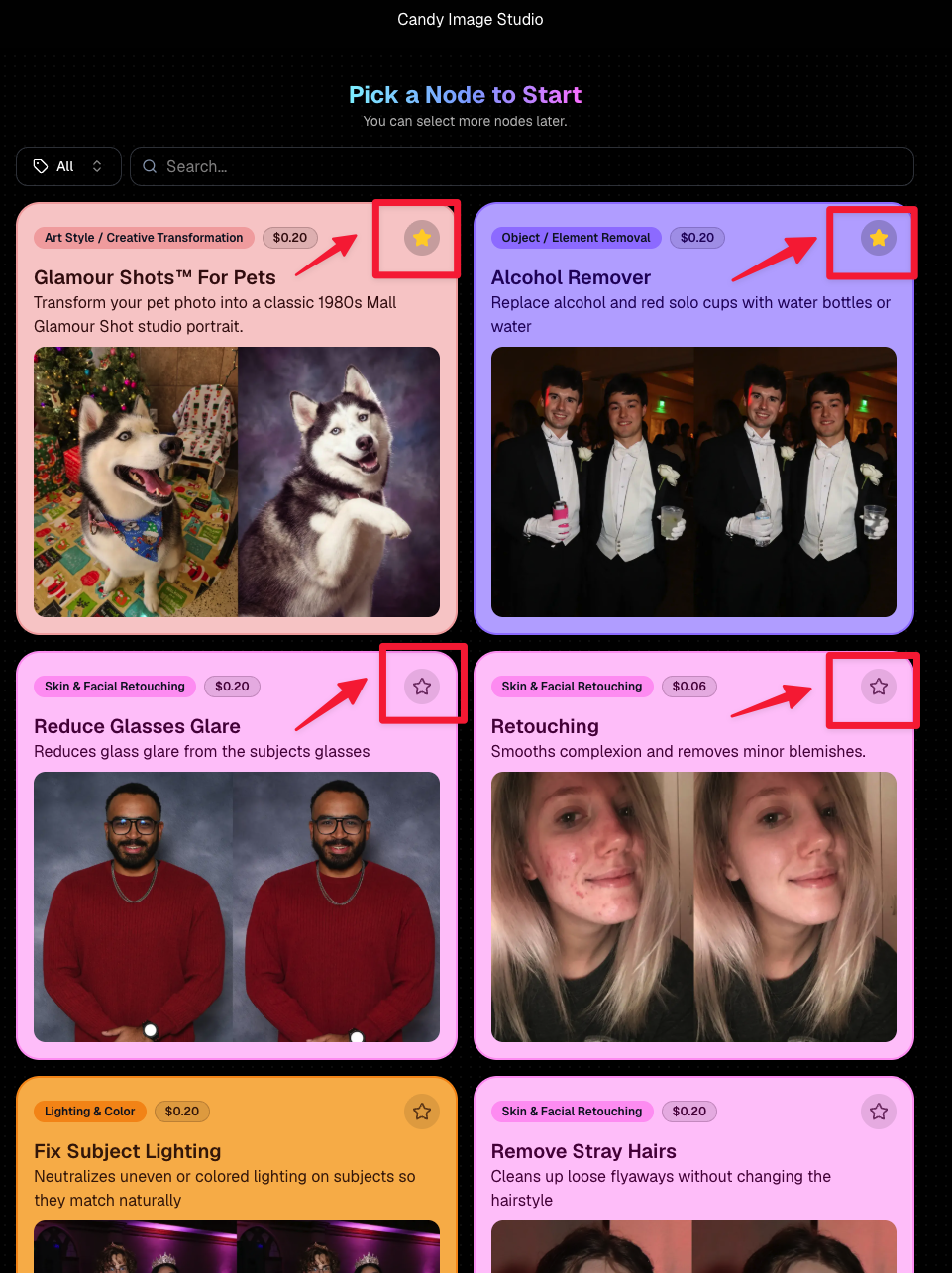
Favorite your most-used nodes

  • Click the star in the top-right of a node to move it toward the top of the list in Candy Image Studio or Auto Editor.
  • Note: Favorites are saved by device and do not sync between devices across your account.
🖼️ 39 New Default Background Sets

We added 39 new background sets for Offers and Virtual Groups!

New additions span categories like:

  • 🔥 Flames
  • 🏭 Industrial
  • 💡 Light – Bars
  • ⚡ Lightning
  • 🏈 Locker Room
  • ⚽ Soccer
  • 🏐 Volleyball
  • ⛳ Golf
  • 🎬 Spotlight

Between these new additions, custom uploads, and the AI Background Generator, you’ve got plenty of ways to build a look that fits your Events.
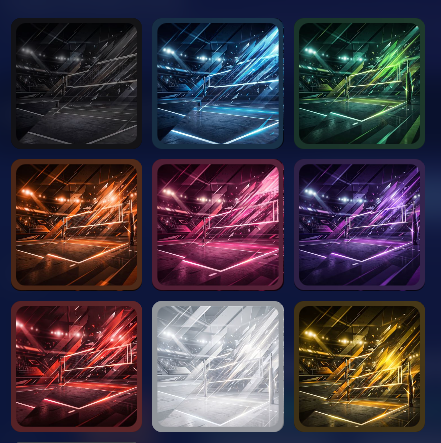
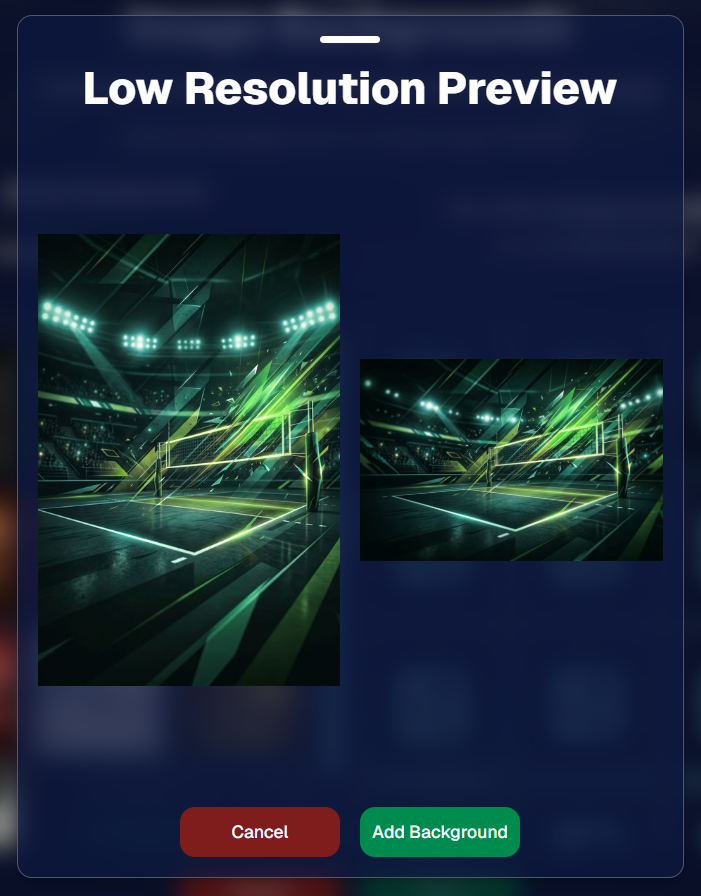
Example: New Volleyball Backgrounds!

A closer look at one of the examples above!

🧑‍🤝‍🧑 PhotoRoster & PhotoTag Improvements

🏷️ PhotoTags carry into new PhotoRosters

  • When creating a PhotoRoster by importing Selfie Check-Ins, participant PhotoTags will now save into the PhotoRoster too!

🧹 Duplicate PhotoTag import fix

  • Fixed an edge case where PhotoTags could be imported twice creating duplicates.

✂️ Background Removal Update

  • 👥 Background Removal no longer runs on Group Photos

Group Photos are not meant to go through Background Removal! Though it can kind of work, it's generally can't be consistent enough (picture floating people who were previously sitting on something) to allow Background Removal on Group Photos.

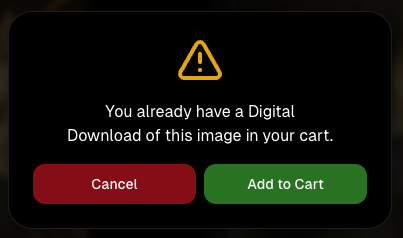
🛍️ Retail: Duplicate Download Warning

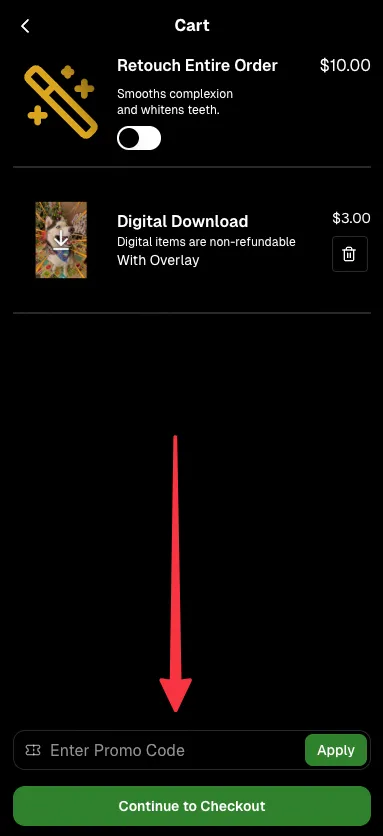
Retail now helps prevent accidental duplicate digital purchases.

  • ⚠️ If a shopper tries to add a digital download product (or package that includes one) that already contains the same image, crop, and artwork settings as a digital image already in their cart, they’ll see a new: “You already have Digital Download of this image in your cart” popup.
  • ➕ They can still add it anyway if they really want to!

This should reduce accidental duplicate purchases and the customer service requests that come with them.
Little improvements to make the platform better and better.

🛠️ Dashboard Fixes & Cleanup

  • 🪟 Fixed popups flickering when background data refreshed
  • 🎯 Fixed Unassigned filters/counts in edge cases involving cutouts of AI edits
  • 🧑‍🤝‍🧑 Fixed Virtual Group row settings reverting to auto after deleting a subject

That’s the week!

Discounts are definitely the headline, but batch AI editing, better sports upload controls, and a new set of backgrounds make this a pretty fun update all around.

Keep creating magic,

Candy 🍬

Related articles

Weekly Recap: Capture App 4.20.6, GalleryGuard Expansion & Dashboard Upgrades 📸✨
Feature Updates
September 12, 2025

Weekly Recap: Capture App 4.20.6, GalleryGuard Expansion & Dashboard Upgrades 📸✨

5
 minutes read
Hey photo friends!

This week we’ve got a shiny new Capture App release, smoother dashboards, smarter Candy (that’s me! 🍬), and some retail fixes to keep things running smoothly.

Let’s dive in:

📱 Capture App 4.20.6

  • 🔌 Camera adapter popup will now dismiss itself if a camera connects while it’s open
  • 💤 CamFi stays active after periods of inactivity
  • 🖼️ Image visibility fix: New images will no longer have distorted UI if the previous image was zoomed in on the device
  • “Close” on certain popups is now “Dismiss” to prevent confusion
  • 📱 iPhone 17 support is here
  • 📷 iPhone internal camera now shoots in classic 4:3 again

📋 Dashboard Improvements

  • 📑 Participant spreadsheet downloads will now include PhotoTag columns
  • 🖼️ Manage Images popup refresh: New lightbox with a bigger preview for faster reviews

The new image preview user interface!

🛍️ Retail Site Fixes & Improvements

  • 🛡️ GalleryGuard™ protection now works on Facebook & Instagram in-app browsers too
  • 📱 iOS 26 Safari UI glitch fixed
  • 📄 Page jump popup fix: Page counts now account for a retail visitor's applied filters
  • ⬇️ Personal gallery downloads: No more AI-generated background pre-renders showing up in the Personal Gallery Download preview

🍬 Candy Upgrades

  • 🧠 I got smarter (yes, really!)
  • 💲 I now know current NowCandid product prices
  • 🎨 UI improvements make chatting with me feel smoother than ever

Try it for yourself!

That’s all for this week! 💫

From a stronger Capture App to bigger previews and smarter Candy, we’ve got you covered.

Keep being amazing,


Candy 🍬

Weekly Recap: Positive ID Upgrade, Wallet Glow-Up & Capture App Fixes 📱🛍️
Feature Updates
September 5, 2025

Weekly Recap: Positive ID Upgrade, Wallet Glow-Up & Capture App Fixes 📱🛍️

5
 minutes read
Hey photo friends!

Lots of small but meaningful updates this week—making check-ins better, dashboards clearer, retail orders more polished, and Capture App workflows smoother.

Here’s the scoop:

✅ Positive ID Improvement

  • 👥 Additional Contact support for Simple Check-In & Scan Card Check-In

Subjects can now enter friend or family contact info in addition to their own at Positive ID Events!

This feature was previously limited to Selfie Check-In and Face Matching Events!

📋 Dashboard Improvements

  • 🏷️ Badges for Additional Contacts: Participants and Contacts added as “Additional Contacts” now display a badge for extra clarity
  • 📦 Order Details upgrade: Resubmits now show receive date, order status, and mail date
  • 🔍 New Participant & Contact filters:
    • Option to hide Additional Contacts
    • PhotoTag dropdown added to filters
    • Filter UI updated for consistency with the Event List & Manage Images pages

🛍️ Retail Updates

  • 📦 Billing UI: “Billing same as shipping” checkbox hidden on digital-only orders
  • 🛒 Checkout flow: Steps before & after checkout refreshed for improved clarity
  • 📧 Post-checkout sheet: Now always shows their email on the order, plus order ID & support email
  • 🖼️ Wallet product upgraded: Now precut with rounded corners for a more professional look!
    • ⚠️ Wallets no longer support banner overlays
    • 💲 Price increased slightly more than other products (+21¢) to account for the upgrade

Retail site renders have also been updated to match the upgraded wallets!

📱 Capture App 4.20.4 (iOS)

  • 🛠️ Duplicate participant fixes: App is much less likely to create unnecessary duplicates when merging
  • 🧾 Name Lookup fix: List now properly populates with Scan Card participants, even if some had no names
  • 📷 Nikon Z series fix: Prevents cameras from showing as “connected” while powered off with USB power on

🛠️ Small but Mighty Fixes

  • 👤 No more comma-separated names if merged participants have identical first + last names
  • 💲 Recent price changes went live this week
  • 🍎 Fixed Apple Pay prompt not reappearing after dismissal
  • 🌎 Fixed timezone issues on “X min ago” displays in Image Details & Order Details
  • 🏷️ Fixed PhotoTag/Group selector incorrectly showing on package image picker when no PhotoTags existed
  • 📧 Download receipt emails now specify that files will come from YourPhotos@orderssupport.picsemail.com, helping subjects find their downloads

That’s a wrap for this week! 💫

Whether you’re checking in guests, managing contacts, or delivering polished wallets, these updates should make your work a little smoother.

Keep being amazing,

Candy 🍬

Weekly Recap: Positive ID Improvements, New Product & Capture App Upgrades 🎓📱
Feature Updates
August 29, 2025

Weekly Recap: Positive ID Improvements, New Product & Capture App Upgrades 🎓📱

5
 minutes read
Hey photo friends!

We’ve got a bunch of tidy little upgrades this week—making rosters cleaner, products better, and the Capture App easier to use on busy Positive ID shoots. Here’s what’s new:

📋 Dashboard Improvements

👥 Extra Contacts on Positive ID Rosters: Now supported, just like with PhotoRosters

🏷️ Auto-create PhotoTags: Uploading a Positive ID Roster with new tags? They can now be created automatically in the Event at the same time

📜 Image Details history: Now shows manual unassignments for better tracking

🛍️ Retail Site Updates

🎓 Graduation Plaque: Text now renders live on the retail site

🎓 Graduation Tassel Frame: Text now renders live on the retail site, and features a gold gradient text instead of plain white, and has a new matching stock example

🖼️ New Print Products: 10×18 Print and 10×18 Group Photo now available in the Custom Offer Creator & Editor

📱 Capture App 4.20.3 (iOS)

🔠 Alphabetical PhotoTags: Tags are now sorted A–Z

📌 Persistent PhotoTag filter: Name Lookup will keep your selected filter until you change it or remove it—great for shooting one team at a time

💻 New iPad UI for Name Lookup: Multiple sortable columns + participant image counts in green (easy to see who’s been photographed already)

Better performance: Faster Name Lookup when working with large rosters

📷 Camera support: Sony 7RM3A now supported

🔄 Auto-rotation fixes for vertical images with CamFi & Canon Wireless

📡 Canon Wireless connections working again with the Capture App

🛠️ Small but Mighty Fixes

🏷️ Retail shipping & billing default now set to “Select” instead of "Alabama"

📑 Updated templates for PhotoRoster/Positive ID Roster spreadsheets

📂 CSV roster uploads now supported (not just Excel files)

🔍 Ctrl+F search now works on the Web Dashboard's Blog page

📏 Better DPI conversions in uploader & image details for cm → inches situations

👤 Positive ID Roster fixes for a bug that caused some images to assign to additional Participants

🖼️ Retail Groups tab cutouts now display properly as JPEGs when originals are hidden on the retail site

That’s a wrap for this week! 💫

From cleaner rosters to new products, these changes should make your workflow smoother and your galleries better.

Keep being amazing,

Candy 🍬

Let’s get in touch

If you’re a photographer looking to add NowCandid services to your wheelhouse – set up a call by clicking the button below.

How to customize formatting for each rich text

How to customize formatting for each rich text

How to customize formatting for each rich text

How to customize formatting for each rich text

How to customize formatting for each rich text

What’s a Rich Text element?

The rich text element allows you to create and format headings, paragraphs, blockquotes, images, and video all in one place instead of having to add and format them individually. Just double-click and easily create content.

A rich text element can be used with static or dynamic content. For static content, just drop it into any page and begin editing. For dynamic content, add a rich text field to any collection and then connect a rich text element to that field in the settings panel. Voila!

Headings, paragraphs, blockquotes, figures, images, and figure captions can all be styled after a class is added to the rich text element using the "When inside of" nested selector system.

  • List One
  • List Two
  • List Three
  • List Four
  • List Five

This is a link

This is bold text