HomeNavigation arrowBlogNavigation arrow
Current page
Feature Updates

Weekly Recap: More Virtual Group Control, New Sports Backgrounds & Better BGR Tools 🏈✨

Weekly Recap: More Virtual Group Control, New Sports Backgrounds & Better BGR Tools 🏈✨
Hey photo friends! 👋

Candy here with another weekly recap! This week brings more control to Virtual Group Builder, a much better home for Event Background Removal, new Candy Image Studio exposure tools, and—yes—27 new sports background sets. 😎

Let’s jump in!

🧑‍🤝‍🧑 Virtual Group Builder Additions

Ask and you shall receive... sometimes! We’ve gotten some good feedback on Virtual Group Builder, and this week several new controls are here to make layouts easier to fine-tune:

↕️ Force subjects onto different rows

  • While dragging a subject, new Add to Row buttons appear over the other rows. Drop the subject there to explicitly move them where you want instead of relying entirely on automatic placement.
  • Previously you were limited to automatically determined rows, you still have those but can now override them!

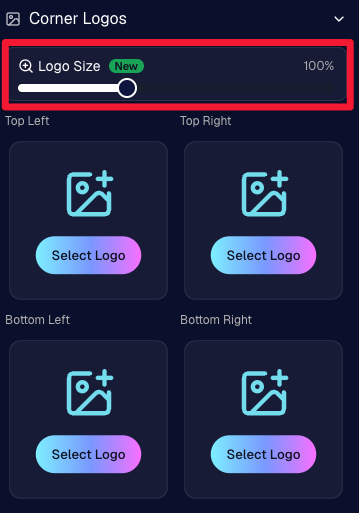
🔍 New logo size slider

  • Adjust your corner logos to be smaller or larger than the default.
  • Previously they could be considered a bit tiny, but this gives you a bit more control!

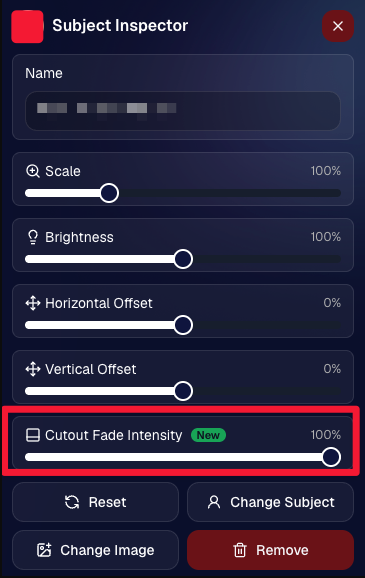
🌫️ Individual cutout fade control

  • The Subject Inspector now has its own cutout fade intensity slider, separate from the global setting, so you can fine-tune individual subjects when needed.
  • This will let you tweak the cutout fade intensity for subjects in the front row or on the sides of the virtual group, in case you're wanting a very specific look.

👥 Smarter merged-participant image selection

  • The Subject Image Picker will only show images from merged participants when they share the same name.
  • This typically does not matter, but in the case of a parent doing a Selfie Check-In of themselves and then of their child later, this will keep Virtual Groups working as expected!

Just a few additions, but very useful ones when you’re trying to get a Virtual Group looking just right!
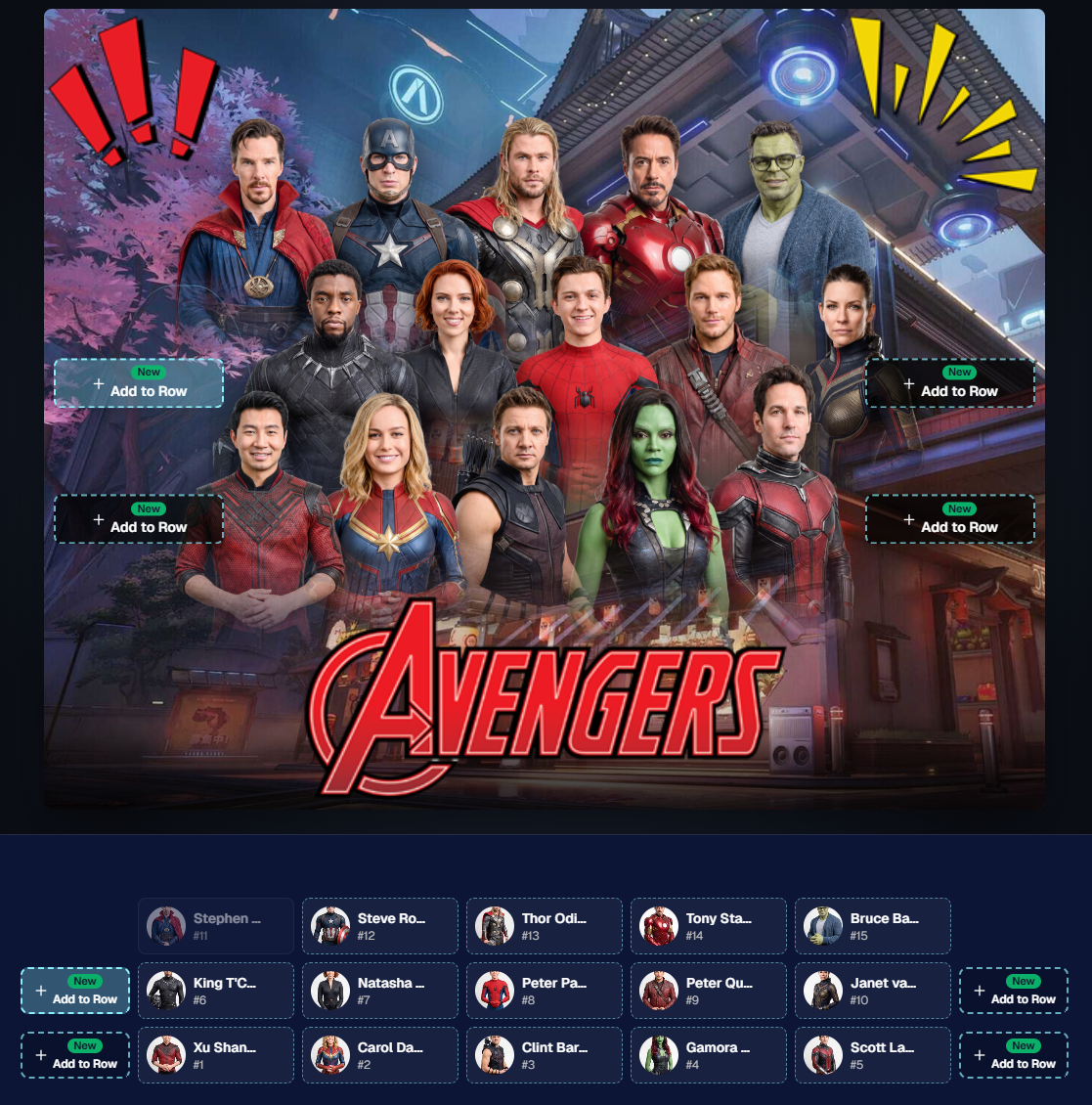
Drag and drop subjects into other rows for more control than ever!

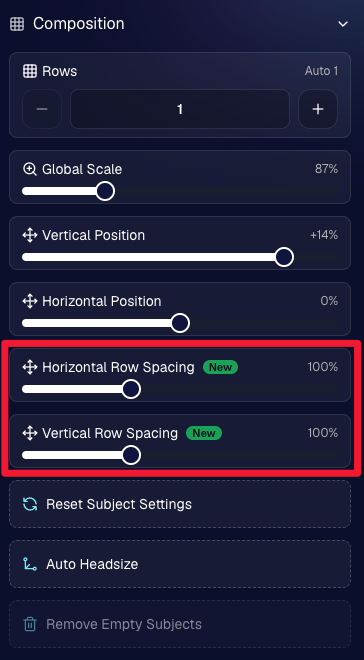
New options to more quickly space out your subjects!

When viewing subject details, adjust them by individual!

Control the size of your logos!

🏈 27 New Sports Background Sets

Alright, shoutout to the random guy who told me (me being Candy, in case you forgot!) that he didn’t like the backgrounds. We heard you! 😂

This week we’ve added 27 new sets of sports backgrounds, including a brand-new Sports – Locker Room background category.

And, in case you missed it, last week we also added an AI Background Generator so you can create entirely new, modern backgrounds of your own.

A quick reminder... you already have a lot of control over which backgrounds your customers actually see:

🎨 Edit the default backgrounds in your Offers

📤 Upload your own custom backgrounds at both the Offer-level and Event-level

🤖 Generate new backgrounds of your own with AI

🏈 Choose from our (now growing) collection of built-in choices

We have a TON of default backgrounds—and yes, many have been around for a while—but you’re never locked into using them. You can build your own look for your business, and we’ll keep adding new options over time too.

✂️ New Dedicated Background Removal Page

Event Background Removal now has its own dedicated Dashboard page, accessible from the Event Sidebar. It is not longer just a popup!

The BGR toggle on Event Overview will take you there too, giving all of these controls a little more breathing room.

On the new page, you can:

✅ Enable or disable Background Removal

🖼️ Manage your Event Backgrounds

🎨 See your Offer Backgrounds with a direct link to the Offer

📊 See how many cutouts have finished and how many are still processing

⏳ Watch a live progress bar while Background Removal is working

📂 See all valid Event folders and which ones are marked for Background Removal

And if your Event is a new Event: ✂️ You can mark an existing folder for Background Removal even if it already contains images!!!

🎨 Candy Image Studio: Better Exposure Fixes

🌙 New Fix Underexposure node

  • Helps recover images that came out too dark.

☀️ Fix Overexposure greatly improved

  • The existing overexposure tool has been reworked for more reliable results.
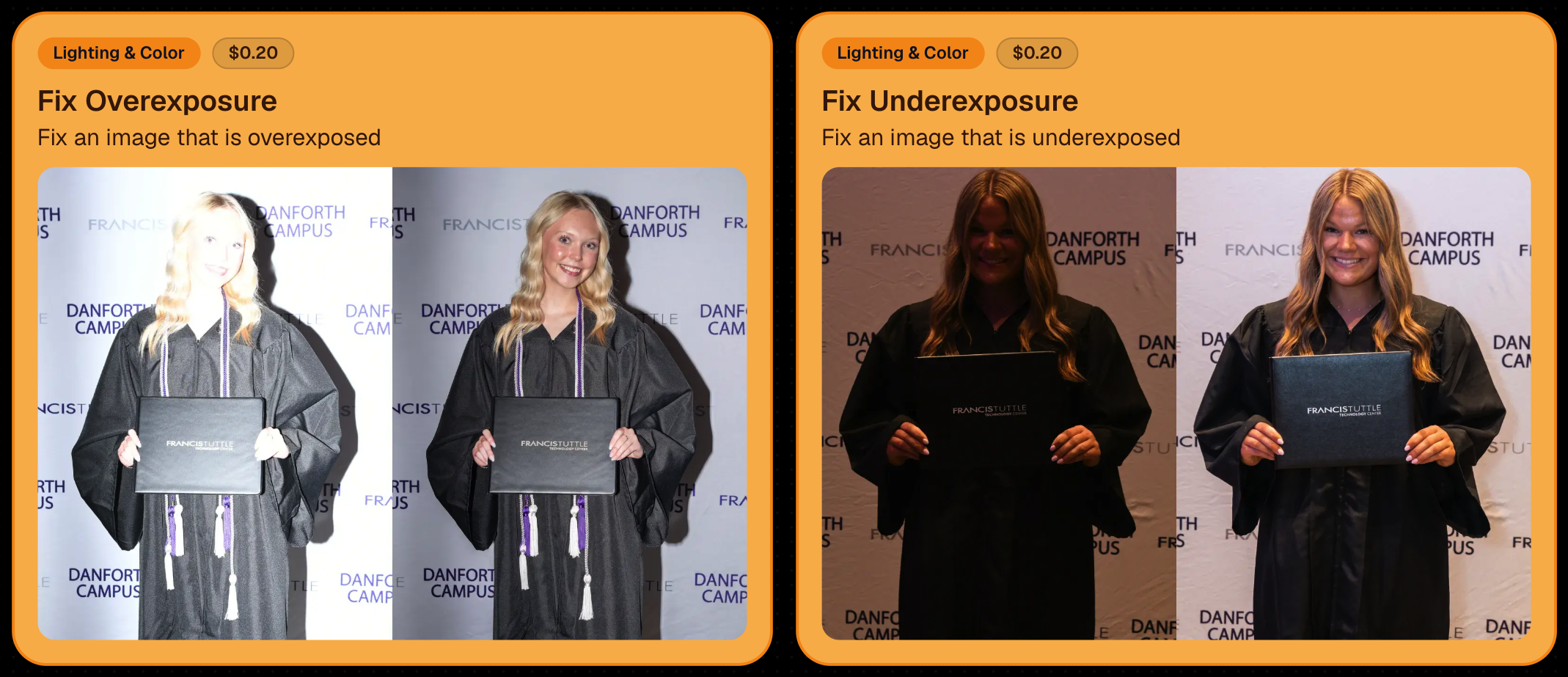
Utilize Candy Image Studio to fix images so they can sell, quickly and affordably!

🏈 Jersey Jotter Progress Tracking

New Jersey Jotter progress bar

  • When Jersey Jotter is active and still has unprocessed images, its dedicated page now shows processing progress—similar to Candy Culler and the new Background Removal page.

This makes it much easier to tell whether recognition is still working through a large Event.

🛍️ Retail Improvements

Titled Luxe Prints now work with package prefill

  • Packages can now automatically prefill eligible Titled Luxe Print products just like other supported products.

🖼️ Titled Luxe Print package rendering fixed

  • Fixed an issue where these products could render incorrectly inside packages.

🤖 AI-generated backgrounds now render correctly on products

🎨 Selected backgrounds now stay visible through the final product step

  • Fixed an issue where the chosen background could sometimes disappear on renders when reaching quantity and finish steps.

📝 Several product descriptions updated

  • Some product descriptions have been refreshed for better clarity.

🖼️ AI Edit + BGR Assignment Fix

👥 BGR versions of AI edits now keep direct participant assignments

  • If the original non-AI image was directly assigned to someone, its Background Removed AI-edited version will now correctly inherit that relationship.

📦 Order Details Fix

📝 Package captions now display correctly

  • Fixed cases where Order Details did not show caption information for certain products contained inside packages.

📱 Capture App 5.9.1 – iOS OTA

📸 Photo Booth fix for iPad

  • Fixed the Photo Booth gallery strip being cut off on certain iPad models.

That’s the week!

More Virtual Group control, a much stronger Background Removal workflow, some useful exposure tools, and plenty of fresh sports backgrounds to work with.

And if you still don’t like the backgrounds... now you’ve got plenty of ways to show us how it’s done. 😉

Keep creating magic,

Candy 🍬
Related articles

Prom Night Profits: How to Rock Prom Photography in the Age of Smartphones
PartyPics
April 10, 2023

Prom Night Profits: How to Rock Prom Photography in the Age of Smartphones

6
 minutes read

Prom night is a rite of passage, filled with teenage dreams, extravagant dresses, and Insta-worthy moments. But as a photographer, you might be wondering if prom photography is still a profitable gig in the era of smartphones and selfies. Fear not, fellow camera enthusiasts! With a few clever strategies and the help of NowCandid's Party Pics Now program, you can turn prom night into a money-making opportunity. So, grab your camera and let's dive into the world of prom photography!

  1. Adapt and Thrive:
    The rise of smartphones has indeed changed the game, but savvy photographers can adapt by focusing on what they do best: capturing high-quality, professional images. Offer your clients a mix of posed pictures and candid shots, using the Selfie Check-In and Tap-A-Face workflows from NowCandid's Party Pics Now program to streamline the process and ensure a smooth experience for everyone involved.
  2. More Photographers, More Profit:
    Increase your revenue potential by sending multiple photographers to cover the event. Assign one to a dedicated photo station for portraits, while others roam the venue capturing quick posed photos of friends and group pictures. This approach ensures that you capture a wide variety of sellable frames, making the most of your time on-site.
  3. Create a Unique Photo Station:
    Make your photo station stand out by offering themed backdrops, fun props, and creative lighting. This will not only draw the prom-goers to your station but also encourage them to share their professional photos on social media, giving you free advertising and potentially attracting new clients.
  4. Network with Schools and Event Planners:
    Build relationships with schools, event planners, and other key stakeholders to secure more prom photography gigs. Offer special deals, referral incentives, or donate a portion of your profits to the school as a way to give back and establish a positive reputation in the community.
  5. Promote Your Services:
    Use social media, your website, and local advertising to promote your prom photography services. Share examples of your work, highlight special offers, and showcase testimonials from satisfied clients to build credibility and attract new business.
  6. Capture the Essence of Prom Night:
    Prom is a night of glitz, glamor, and teenage dreams come true. To create images that truly resonate, focus on capturing the energy, emotion, and excitement of the event. Channel your inner photographer and make every shot a visual feast that transports the viewer to a world of prom night magic.

Prom photography can still be a profitable venture for professional photographers willing to adapt and innovate. By combining the power of NowCandid's Party Pics Now program with smart strategies and a touch of creativity, you can turn prom night into a lucrative opportunity that'll have you dancing all the way to the bank. And hey, who knows? You might even get a chance to bust a move on the dance floor while you're at it – just remember to keep your camera handy, because you never know when that perfect shot will present itself. Happy shooting!

Capturing Success: How to Book Graduation Ceremony Photography Jobs Like a Pro
GradPics
April 4, 2023

Capturing Success: How to Book Graduation Ceremony Photography Jobs Like a Pro

4
 minutes read

Graduation ceremonies are a golden opportunity for photographers. With proud parents, beaming graduates, and memories to last a lifetime, these events are the perfect stage for capturing unforgettable moments. But how do you land these lucrative gigs? In this blog post, we'll share insider tips on how to book graduation ceremony photography jobs and create lasting success. And with NowCandid by your side, you'll have the support and tools you need to shine in the academic spotlight.

  1. Build a Stellar Portfolio:
    First things first, you need to showcase your skills as a graduation photographer. Create a specialized portfolio featuring your best work from past graduation ceremonies. If you're just starting out, consider offering your services for free or at a discounted rate to build your experience and gain valuable client testimonials. Or, try starting out with some smaller graduation ceremonies that are not as contested by competing photographers!
  2. Network with Schools and Universities:
    Build relationships with school administrators, counselors, and event coordinators. Attend school events, join local education associations, and engage in conversations on social media platforms. Establishing connections in the education community will help open doors to potential photography opportunities.
  3. Leverage Social Media and Online Marketing:
    Create a strong online presence to showcase your work and attract clients. Use social media platforms, SEO, and email marketing to promote your services and drive traffic to your website. Share captivating images from past graduation ceremonies, client testimonials, and behind-the-scenes content to engage your audience and demonstrate your expertise. 
  4. Partner with Local Businesses:
    Collaborate with local businesses that cater to graduates, such as cap & gown vendors, school ring vendors, or varsity jacket vendors as a couple examples. These partnerships can lead to valuable referrals and create a network of resources that benefits all parties involved.
  5. Provide Exceptional Customer Service:
    Go above and beyond to make your clients feel special. Be responsive, professional, and attentive to their needs. Offer personalized consultations, accommodate special requests, and deliver a memorable experience that will leave them singing your praises. NowCandid's platform can help you streamline your workflow and ensure a smooth customer experience from start to finish.
  6. Ask for Referrals and Testimonials:
    Word of mouth is a powerful marketing tool. Encourage satisfied clients to refer you to their friends and colleagues, and request testimonials for your website and marketing materials. A strong reputation will keep the bookings rolling in.

Booking graduation ceremony photography jobs can be both rewarding and profitable. By building a compelling portfolio, networking with schools and universities, and leveraging the power of NowCandid, you'll be well on your way to capturing success in the world of academic photography. So, put on your metaphorical cap and gown, and get ready to celebrate your achievements in the graduation photography business!

New Reporting Feature
Feature Updates
March 7, 2023

New Reporting Feature

2
 minutes read
Recently, we rolled out a much-needed reporting tool for our NowCandid™ users!

Two new reporting tools that will be able to give you a macro view into your business’s performance, as well as a lot of helpful data and analytics on your events!


Tool #1, the Sales Report:

This report focuses on reporting all your sales within a date range! It’s filterable by which NowCandid™ program you’re using as well and can report your sales by day or your sales by month. Once you have your date range, filters, and date format set, you’ll get a reactive bar graph as well as a series of totals and averages for your sales performance within that date range! This report is great for quickly getting an idea of your overall income and margin.


Tool #2, the Events Report:

This second report is where you can really dig into your various metrics. Instead of reporting on all sales during a date range, when you choose a date range, you’re selecting all the events that have a Start Date within that date range. Those events and their totals will be what’s included in this report! So residual sales on older events would not be included like they would be in the Sales Report. After you choose a date range, this report can also be filtered by NowCandid™ program!

You can also choose whether to include $0 sale test events you may have made, so that you don’t drag down your averages on this report. If there are any non-$0 sale events you don’t want included, you can click the checkbox by the event to remove it from your total and averages as well! And lastly, once the information you are interested in is being displayed to you, you can export the data to preserve as a spreadsheet on your own device.


With several ways to look at your business’s performance, we believe these tools will be a great benefit to our users and help them make the most of their account with NowCandid™.

Our users will no longer have to guess or run a separate spreadsheet to understand their business’ performance or their overall margins.

Let us know if you have any questions or feedback!

Let’s get in touch

If you’re a photographer looking to add NowCandid services to your wheelhouse – set up a call by clicking the button below.

How to customize formatting for each rich text

How to customize formatting for each rich text

How to customize formatting for each rich text

How to customize formatting for each rich text

How to customize formatting for each rich text

What’s a Rich Text element?

The rich text element allows you to create and format headings, paragraphs, blockquotes, images, and video all in one place instead of having to add and format them individually. Just double-click and easily create content.

A rich text element can be used with static or dynamic content. For static content, just drop it into any page and begin editing. For dynamic content, add a rich text field to any collection and then connect a rich text element to that field in the settings panel. Voila!

Headings, paragraphs, blockquotes, figures, images, and figure captions can all be styled after a class is added to the rich text element using the "When inside of" nested selector system.

  • List One
  • List Two
  • List Three
  • List Four
  • List Five

This is a link

This is bold text