HomeNavigation arrowBlogNavigation arrow
Current page
Feature Updates

Weekly Recap: More Virtual Group Control, New Sports Backgrounds & Better BGR Tools 🏈✨

Weekly Recap: More Virtual Group Control, New Sports Backgrounds & Better BGR Tools 🏈✨
Hey photo friends! 👋

Candy here with another weekly recap! This week brings more control to Virtual Group Builder, a much better home for Event Background Removal, new Candy Image Studio exposure tools, and—yes—27 new sports background sets. 😎

Let’s jump in!

🧑‍🤝‍🧑 Virtual Group Builder Additions

Ask and you shall receive... sometimes! We’ve gotten some good feedback on Virtual Group Builder, and this week several new controls are here to make layouts easier to fine-tune:

↕️ Force subjects onto different rows

  • While dragging a subject, new Add to Row buttons appear over the other rows. Drop the subject there to explicitly move them where you want instead of relying entirely on automatic placement.
  • Previously you were limited to automatically determined rows, you still have those but can now override them!

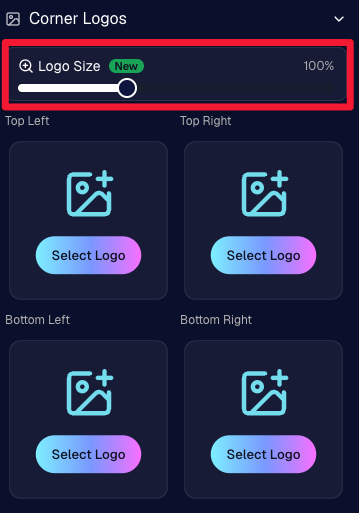
🔍 New logo size slider

  • Adjust your corner logos to be smaller or larger than the default.
  • Previously they could be considered a bit tiny, but this gives you a bit more control!

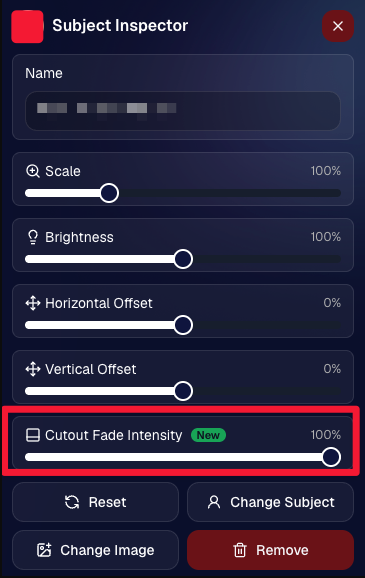
🌫️ Individual cutout fade control

  • The Subject Inspector now has its own cutout fade intensity slider, separate from the global setting, so you can fine-tune individual subjects when needed.
  • This will let you tweak the cutout fade intensity for subjects in the front row or on the sides of the virtual group, in case you're wanting a very specific look.

👥 Smarter merged-participant image selection

  • The Subject Image Picker will only show images from merged participants when they share the same name.
  • This typically does not matter, but in the case of a parent doing a Selfie Check-In of themselves and then of their child later, this will keep Virtual Groups working as expected!

Just a few additions, but very useful ones when you’re trying to get a Virtual Group looking just right!
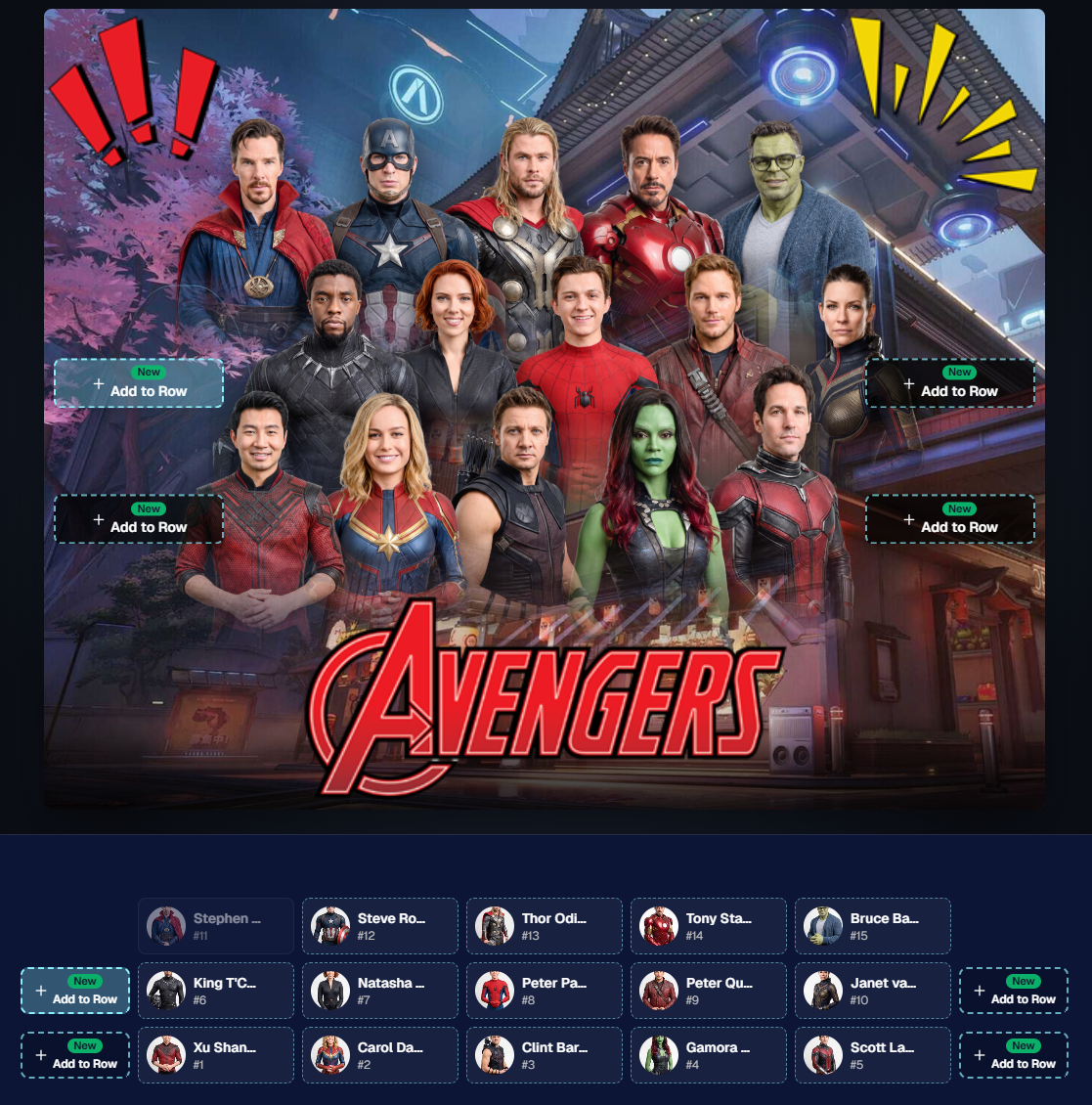
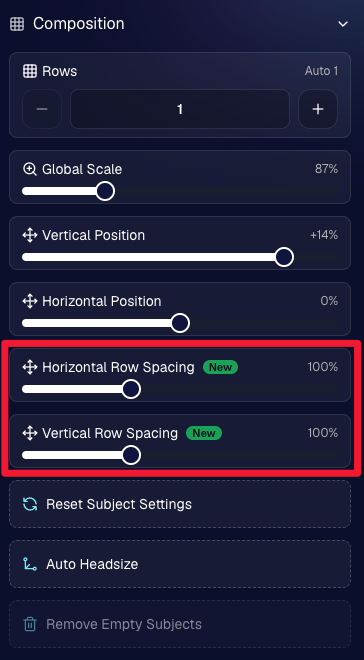
Drag and drop subjects into other rows for more control than ever!

New options to more quickly space out your subjects!

When viewing subject details, adjust them by individual!

Control the size of your logos!

🏈 27 New Sports Background Sets

Alright, shoutout to the random guy who told me (me being Candy, in case you forgot!) that he didn’t like the backgrounds. We heard you! 😂

This week we’ve added 27 new sets of sports backgrounds, including a brand-new Sports – Locker Room background category.

And, in case you missed it, last week we also added an AI Background Generator so you can create entirely new, modern backgrounds of your own.

A quick reminder... you already have a lot of control over which backgrounds your customers actually see:

🎨 Edit the default backgrounds in your Offers

📤 Upload your own custom backgrounds at both the Offer-level and Event-level

🤖 Generate new backgrounds of your own with AI

🏈 Choose from our (now growing) collection of built-in choices

We have a TON of default backgrounds—and yes, many have been around for a while—but you’re never locked into using them. You can build your own look for your business, and we’ll keep adding new options over time too.

✂️ New Dedicated Background Removal Page

Event Background Removal now has its own dedicated Dashboard page, accessible from the Event Sidebar. It is not longer just a popup!

The BGR toggle on Event Overview will take you there too, giving all of these controls a little more breathing room.

On the new page, you can:

✅ Enable or disable Background Removal

🖼️ Manage your Event Backgrounds

🎨 See your Offer Backgrounds with a direct link to the Offer

📊 See how many cutouts have finished and how many are still processing

⏳ Watch a live progress bar while Background Removal is working

📂 See all valid Event folders and which ones are marked for Background Removal

And if your Event is a new Event: ✂️ You can mark an existing folder for Background Removal even if it already contains images!!!

🎨 Candy Image Studio: Better Exposure Fixes

🌙 New Fix Underexposure node

  • Helps recover images that came out too dark.

☀️ Fix Overexposure greatly improved

  • The existing overexposure tool has been reworked for more reliable results.
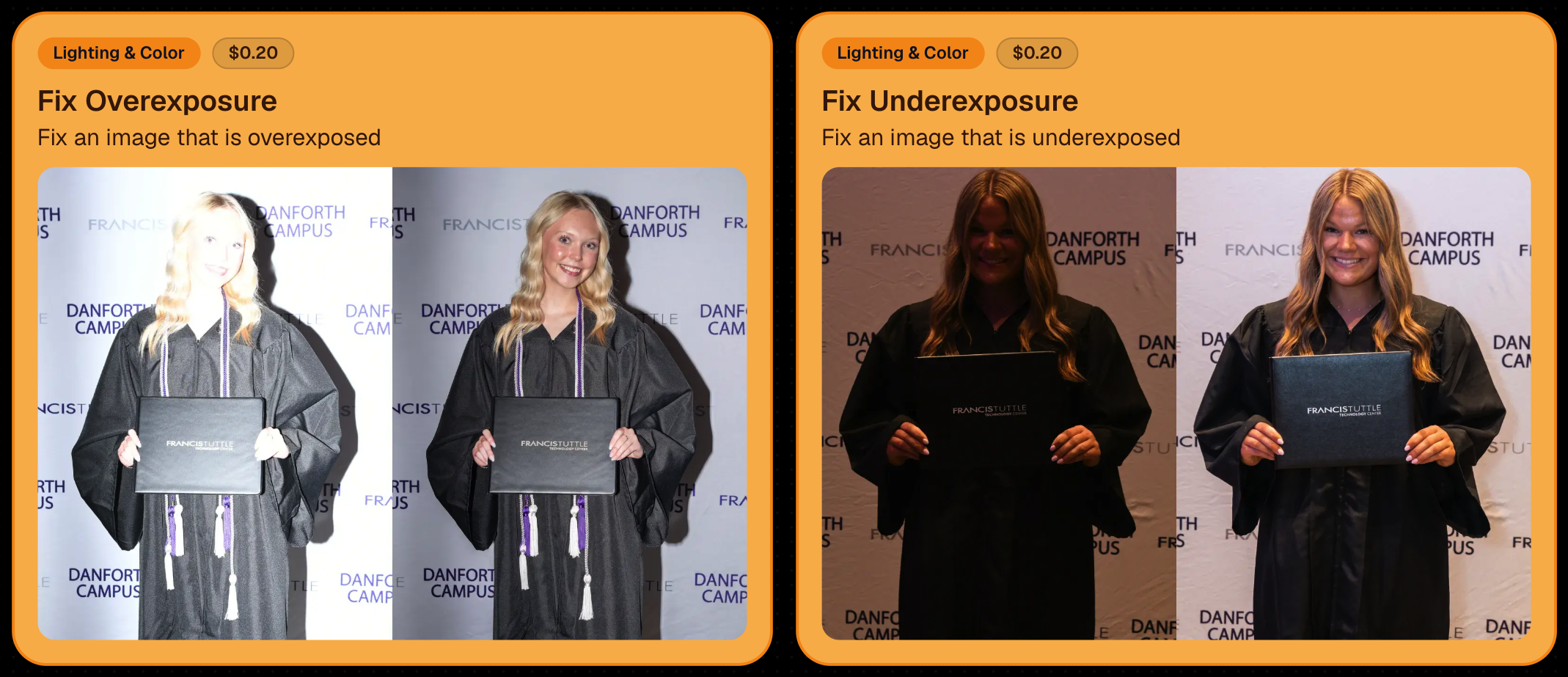
Utilize Candy Image Studio to fix images so they can sell, quickly and affordably!

🏈 Jersey Jotter Progress Tracking

New Jersey Jotter progress bar

  • When Jersey Jotter is active and still has unprocessed images, its dedicated page now shows processing progress—similar to Candy Culler and the new Background Removal page.

This makes it much easier to tell whether recognition is still working through a large Event.

🛍️ Retail Improvements

Titled Luxe Prints now work with package prefill

  • Packages can now automatically prefill eligible Titled Luxe Print products just like other supported products.

🖼️ Titled Luxe Print package rendering fixed

  • Fixed an issue where these products could render incorrectly inside packages.

🤖 AI-generated backgrounds now render correctly on products

🎨 Selected backgrounds now stay visible through the final product step

  • Fixed an issue where the chosen background could sometimes disappear on renders when reaching quantity and finish steps.

📝 Several product descriptions updated

  • Some product descriptions have been refreshed for better clarity.

🖼️ AI Edit + BGR Assignment Fix

👥 BGR versions of AI edits now keep direct participant assignments

  • If the original non-AI image was directly assigned to someone, its Background Removed AI-edited version will now correctly inherit that relationship.

📦 Order Details Fix

📝 Package captions now display correctly

  • Fixed cases where Order Details did not show caption information for certain products contained inside packages.

📱 Capture App 5.9.1 – iOS OTA

📸 Photo Booth fix for iPad

  • Fixed the Photo Booth gallery strip being cut off on certain iPad models.

That’s the week!

More Virtual Group control, a much stronger Background Removal workflow, some useful exposure tools, and plenty of fresh sports backgrounds to work with.

And if you still don’t like the backgrounds... now you’ve got plenty of ways to show us how it’s done. 😉

Keep creating magic,

Candy 🍬

Related articles

Crowning Moments: Turning Prom Night into Profit with NowCandid
PartyPics
April 10, 2024

Crowning Moments: Turning Prom Night into Profit with NowCandid

5
 minutes read
Prom night is an iconic milestone in a high schooler’s life, brimming with fashion, friendships, and unforgettable memories.

While it's true that smartphones have made "everyone a photographer", professional prom photography remains a lucrative venture. Why? The answer lies in the quality that professional photos can offer, capturing prom night with a finesse that smartphones simply can't match.

The Profitability of Prom Photography

Prom photography can be highly profitable, with a target metric of $1.50 per image being a realistic benchmark for success. However, with the right approach, this figure can soar, as evidenced by a NowCandid's users Oklahoma City Prom, which achieved $2 per image across 3000 pictures taken, totaling $6000 in sales.

The key to serious profitability lies in having quantity, quality, and variety! An effective photographer using NowCandid has the ability to quickly deliver a professional, high-quality image gallery that will capture the attention of their subjects.

Why Proms are Still Profitable

  1. Social Media Influence: Today’s high schoolers live in a social media-centric world where the quality of a photo can greatly increase the quality of a post. Professional, well-lit, and expertly framed photos are in demand for their social media feeds, making them willing to purchase digital copies for their Instagram or Facebook profiles.
  2. Parental Investment: Parents are equally important customers in the prom photography market. They cherish these milestones and are often more than willing to purchase photos that capture their child’s special night. Using Selfie Check-In allows you to collect both the subject and the parents' contact info, marketing the subject's photos to both parties!
  3. Speedy Delivery: With the help of NowCandid, images can be available for purchase instantly. Selling images right away can benefit your overall sales thanks to impulse purchases people make when they are at their most excited about the Event.
  4. Unique Print Products: Unique print products alongside desirable images is always a combination that will generate extra sales! A variety of products be purchased, in addition to the usual prints and downloads. You can even upload an Event-specific custom banner to your Events to further make your product unique compared to the images subjects can take with their own phones - turning every photo into a memento!

Keys to Successful Prom Photography

  • Quality: While taking a substantial number of photos is important, ensuring the quality of your images increases their salability. Ensure each photo is well-lit and tightly cropped!
  • 2 Pics Per Minute: Aim for 2 pictures every minute, targeting 120+ per hour. These need to be unique images too - don't count duplicates! Utilize features like NowCandid’s LiveLoop to encourage guests to seek out photographers to get on the big screen.
  • Posing: Encourage a variety of poses to maximize the number of sellable images for any group you approach. After photographing a group of four, break the group into couples, ladies only, guys only, etc.
  • Photo Stations: Establish a dedicated photo area with an attractive backdrop suitable for individuals, couples, and groups, enhancing the variety and appeal of a subject's image gallery. Props are optional, but can be a fun addition. Also, a photo station is also a good place to station your less-social photographers, as guests will come to them!
  • Selfie Check-In Mastery: Achieving high participation in Selfie Check-In not only streamlines image delivery but also ensures a direct marketing channel to both students and their parents.
  • Strategic Staffing: Align the number of photographers with the expected guest count, aiming for one photographer per 100-150 guests to ensure comprehensive coverage of the event.
  • Strategic Compensation: Many successful social photographers pay their photographers based on how many unique (no duplicates) and sellable (good quality) images they take at a party. Consider paying $0.20 per sellable image with a minimum pay of $18 an hour, guaranteeing them decent pay but giving them room to take more images to make you both more money. (Example: 120 images an hour would be $24 an hour)

NowCandid: Your Partner in Capturing the Magic of Prom Night

NowCandid software is designed to streamline the photography process, from efficient image capture and upload to simplifying sales through intuitive galleries and easy online ordering.

With NowCandid, photographers can focus on what they do best—taking stunning photos—while the platform handles the logistics, making each prom a potential goldmine of photographic opportunities.

Success Stories to Inspire

Photographers like Tosha LaForest and Eric Miller have harnessed the power of NowCandid to amplify their school dance and event photography sales. Their experiences underscore the potential of well-executed prom and dance photography to significantly boost revenue and client satisfaction.

Prom photography, powered by NowCandid, offers a great option for photographers to expand their portfolios and profit margins. By focusing on quality, variety, and quantity, photographers can tap into the lucrative prom market, turning each dance into a profitable venture (and fun) venture.

Learn more, and join the ranks of successful prom photographers with NowCandid.

Visit our success stories to learn more and get inspired to capture the vibrant energy and timeless elegance of prom night.

Background Removal, NowCandid's Newest Feature!
Feature Updates
March 13, 2024

Background Removal, NowCandid's Newest Feature!

7
 minutes read
Hey there, photographers and NowCandid fam!

It’s Candy here, your cheerful guide through the NowCandid universe, and I’ve got some thrilling news!

Introducing Background Removal 🚀

What’s New?

We’ve rolled out a game-changing feature: Background Removal, available for all NowCandid Programs & Workflows!

How It Works:

Before uploading your images (into a Background Removal enabled Event), simply mark the folder for Background Removal. We'll then use top-notch AI to whisk away the background, leaving you with pristine cutouts as an additional option alongside the original image in your subject's gallery.

And, it happens live!

If you practice best business practices with NowCandid, you probably upload your images live as you take them with the help of our Capture & Upload app! Images live-uploaded to a Background Removal folder will be cutout in no time at all, adding themselves to the subject's gallery automatically and on-the-fly.

Note: Capture & Upload App Version 3.17 or newer will be needed to utilize background removal while live-uploading images.

Choose Your Backdrop 🌟

Variety Galore:

The ever-popular gray and white 'Dover' background, arches in various architectural styles, and scenic outdoorsy vibes, your subjects can view and pick any background that catches their eye!

Future Customization:

Later this year, you'll be able to add your own backdrops to the mix, pre-rendering the background-removed image onto a custom background for your Events. Stay tuned!

Get Certified & Dive In 📜

Certification Needed:

To unlock this fantastic feature for your NowCandid Account, a quick certification is required. Check out how at the following page: Background Removal Certification (link)

The Best Part? It's On Us! 💖

Absolutely Free (For Now):

For the time being, enjoy this feature at no extra charge.

We need some time to assess how often Background Removal will be used and how it will affect sales. So, for now, it's free! Think of this as our way of saying thanks for being part of the NowCandid family. We're excited to see how Background Removal can enhanceyour business!

Note: 📝

Currently, the background-removed PNGs are exclusive to the Personal and All Images Galleries, with no direct download of the files for you the photographer. So, your customers can buy them, but you can't currently use the service to generate image cut-outs for use outside the system!

We’re buzzing with excitement over here at NowCandid about the extra sellable images this feature can bring to your photography Events! 🐝

Whether you’re shooting portraits at a graduation, soccer game, prom, or anywhere else - Background Removal is set to elevate your photography game, turn one image into many!

Stay tuned, as we'll be rolling out more customization options as the year progresses. If you have any questions or need a hand getting started, just give us a shout. We’re here to help every snap of the way!

Sparkly wishes,
Candy 🌟
Capture & Upload App's Latest Update 3.17
Feature Updates
March 12, 2024

Capture & Upload App's Latest Update 3.17

6
 minutes read
Hiya, NowCandid fam!

It's Candy here, with some hot-off-the-press news about our Capture & Upload app that's going to make your photography flow smoother than ever. We've listened to your feedback and sprinkled some improvements on both Windows and Apple iOS versions in our latest update, 3.17. 🌟

Changes Across Windows & Apple iOS Versions of the App

1.     Whoops! We didn't make this very clear before. We've clarified the messages when you incorrectly log in to the Capture & Upload App with your email and app passcode.

2.     Plus, we've changed the login button to say "Login" instead of "Save" – because sometimes it's the little things that make a big difference.

3.     A little redesign magic has made the "Cancel/Close" button on the login less attention-grabbing, since people were sometimes clicking it thinking it was a next step! Whoops.

4.     The latest version of the Capture & Upload app will also need to be used in order to utilize NowCandid's newest Background Removal feature (link)!

Changes to Only the Windows Version of the App

1.      Get ready to feel the need for speed! We've made improvements to the app, which means less memory usage, zippy startup times, and an overall performance boost that'll have you clicking happily away.

Changes to Only the Apple iOS Version of the App

1.     Volume button as a shutter? Yes, please! You can now use the volume up/down buttons for those sneaky quick captures when using your device's internal camera.

2.     Embrace the old and the new with support for select additional Sony cameras. We used to only support newer versions of Sony cameras! Check out the list at the bottom of this post to see if your gear's on there.

3.     And if you're rocking an iPhone 14 or older (or 9th gen iPad or older), we're helping you troubleshoot with a "Camera Trouble?" popup if no camera is detected for 15 seconds on shooting screens—complete with a helpful link to Apple's Camera Adapter (link), which you'll need to connect your camera to these lightning-port Apple devices.

4.     For our Nikon D7000 users, no more connection woes. We've ironed out those kinks for you!

5.     Noticed some off-center UI on your iPhone when using the Capture & Upload App? We've fixed that up too, so your app experience is as picture-perfect as your shots.

What's Next?

Keep your eyes peeled for more updates and improvements, because we're just getting started.

In the meantime, enjoy the new tweaks and treats with update 3.17, designed to keep your NowCandid experience as seamless as your photography skills. And as always, if you hit any bumps or have a lightbulb moment on how we can do better, drop us a line!

Happy shooting, everyone!

Candy 🌟

List of Additional Sony Cameras Now Supported on Apple iOS

Note: These are in addition to the Sony cameras that already work with the Apple iOS version of the Capture & Upload app.

ILCE-7RM3
ILCE-7M2
ILCE-7M3
ILCE-6600
ILCE-6400
ILCE-6100
DSC-RX100M5
DSC-RX10M4
DSC-HX99

Note: Firmware updates may be required for some models of Sony.

Let’s get in touch

If you’re a photographer looking to add NowCandid services to your wheelhouse – set up a call by clicking the button below.

How to customize formatting for each rich text

How to customize formatting for each rich text

How to customize formatting for each rich text

How to customize formatting for each rich text

How to customize formatting for each rich text

What’s a Rich Text element?

The rich text element allows you to create and format headings, paragraphs, blockquotes, images, and video all in one place instead of having to add and format them individually. Just double-click and easily create content.

A rich text element can be used with static or dynamic content. For static content, just drop it into any page and begin editing. For dynamic content, add a rich text field to any collection and then connect a rich text element to that field in the settings panel. Voila!

Headings, paragraphs, blockquotes, figures, images, and figure captions can all be styled after a class is added to the rich text element using the "When inside of" nested selector system.

  • List One
  • List Two
  • List Three
  • List Four
  • List Five

This is a link

This is bold text