HomeNavigation arrowBlogNavigation arrow
Current page
Feature Updates

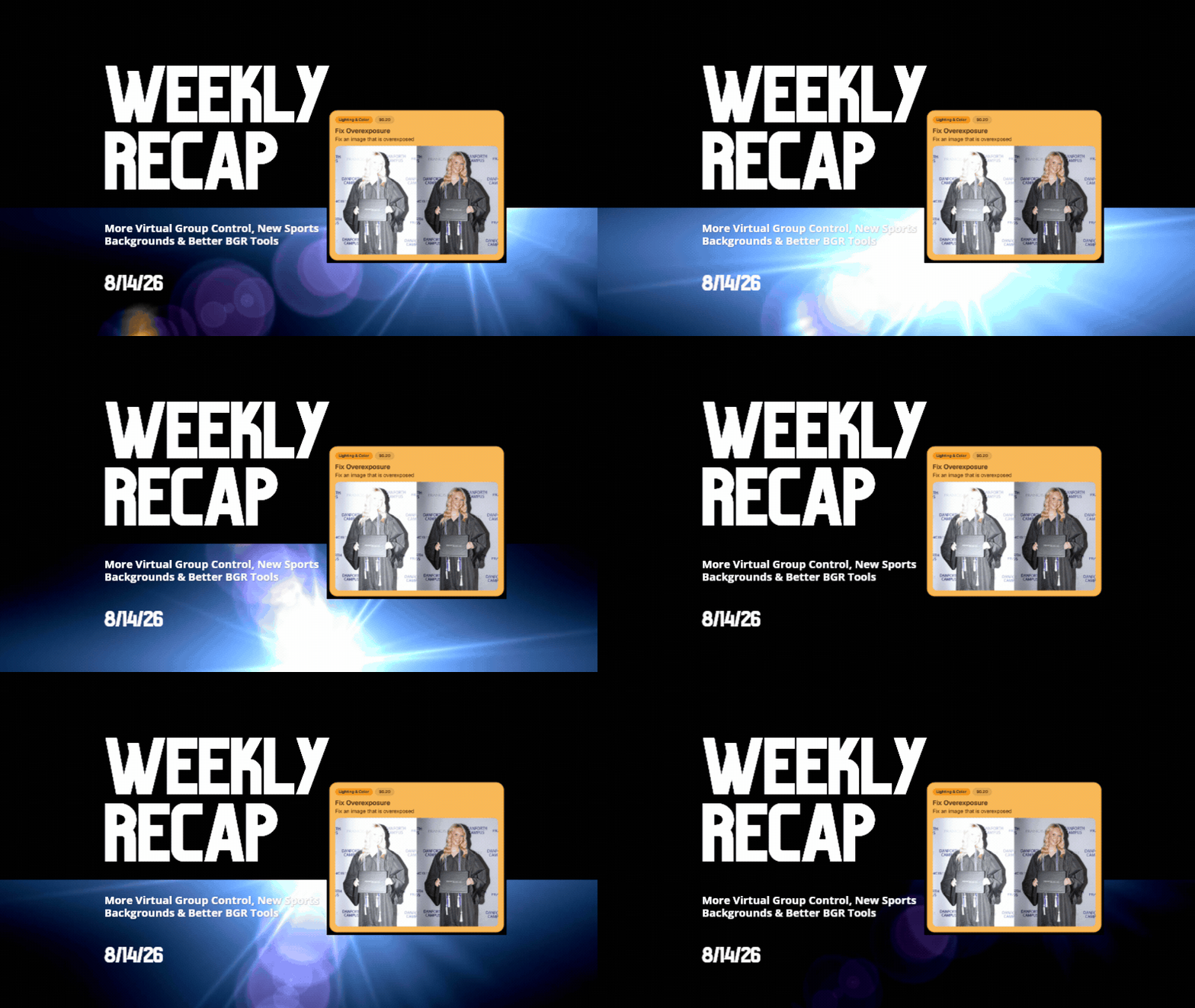
Weekly Recap: More Virtual Group Control, New Sports Backgrounds & Better BGR Tools 🏈✨

Weekly Recap: More Virtual Group Control, New Sports Backgrounds & Better BGR Tools 🏈✨
Hey photo friends! 👋

Candy here with another weekly recap! This week brings more control to Virtual Group Builder, a much better home for Event Background Removal, new Candy Image Studio exposure tools, and—yes—27 new sports background sets. 😎

Let’s jump in!

🧑‍🤝‍🧑 Virtual Group Builder Additions

Ask and you shall receive... sometimes! We’ve gotten some good feedback on Virtual Group Builder, and this week several new controls are here to make layouts easier to fine-tune:

↕️ Force subjects onto different rows

  • While dragging a subject, new Add to Row buttons appear over the other rows. Drop the subject there to explicitly move them where you want instead of relying entirely on automatic placement.
  • Previously you were limited to automatically determined rows, you still have those but can now override them!

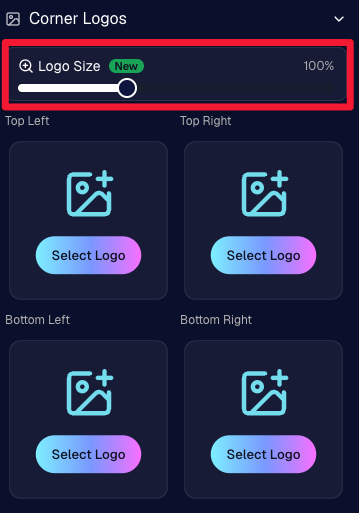
🔍 New logo size slider

  • Adjust your corner logos to be smaller or larger than the default.
  • Previously they could be considered a bit tiny, but this gives you a bit more control!

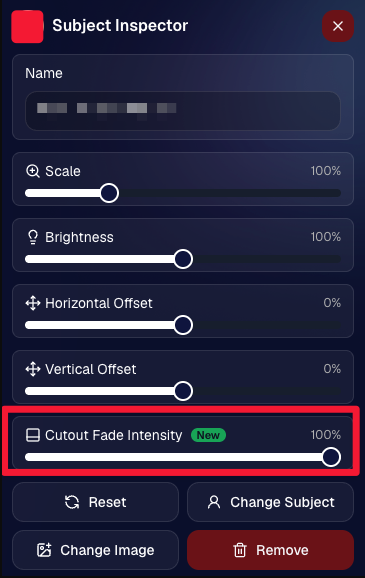
🌫️ Individual cutout fade control

  • The Subject Inspector now has its own cutout fade intensity slider, separate from the global setting, so you can fine-tune individual subjects when needed.
  • This will let you tweak the cutout fade intensity for subjects in the front row or on the sides of the virtual group, in case you're wanting a very specific look.

👥 Smarter merged-participant image selection

  • The Subject Image Picker will only show images from merged participants when they share the same name.
  • This typically does not matter, but in the case of a parent doing a Selfie Check-In of themselves and then of their child later, this will keep Virtual Groups working as expected!

Just a few additions, but very useful ones when you’re trying to get a Virtual Group looking just right!
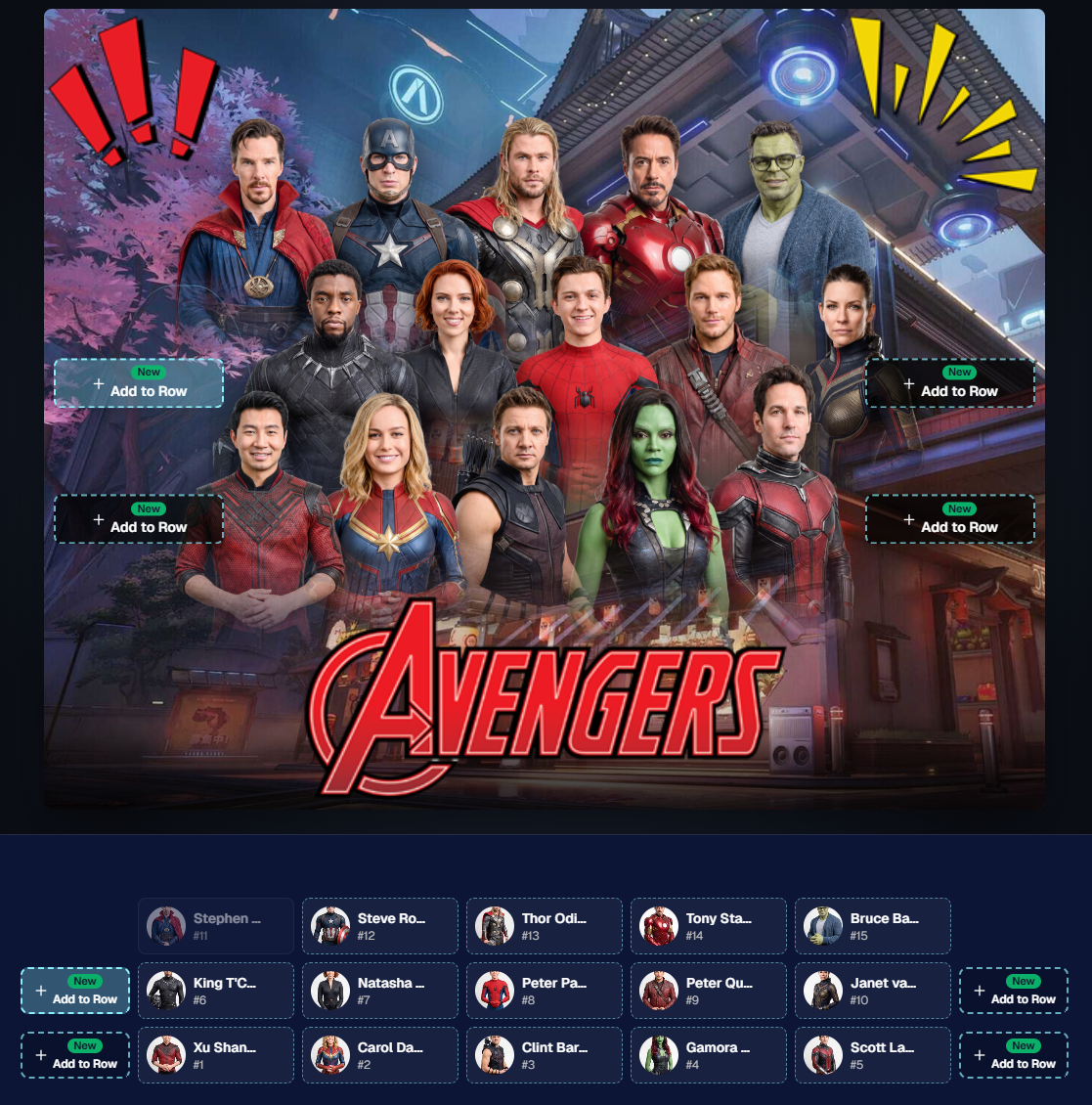
Drag and drop subjects into other rows for more control than ever!

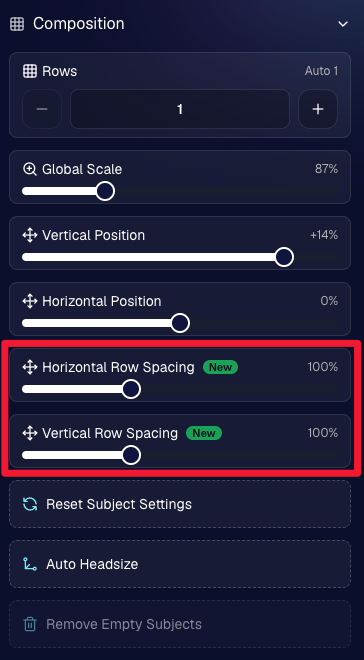
New options to more quickly space out your subjects!

When viewing subject details, adjust them by individual!

Control the size of your logos!

🏈 27 New Sports Background Sets

Alright, shoutout to the random guy who told me (me being Candy, in case you forgot!) that he didn’t like the backgrounds. We heard you! 😂

This week we’ve added 27 new sets of sports backgrounds, including a brand-new Sports – Locker Room background category.

And, in case you missed it, last week we also added an AI Background Generator so you can create entirely new, modern backgrounds of your own.

A quick reminder... you already have a lot of control over which backgrounds your customers actually see:

🎨 Edit the default backgrounds in your Offers

📤 Upload your own custom backgrounds at both the Offer-level and Event-level

🤖 Generate new backgrounds of your own with AI

🏈 Choose from our (now growing) collection of built-in choices

We have a TON of default backgrounds—and yes, many have been around for a while—but you’re never locked into using them. You can build your own look for your business, and we’ll keep adding new options over time too.

✂️ New Dedicated Background Removal Page

Event Background Removal now has its own dedicated Dashboard page, accessible from the Event Sidebar. It is not longer just a popup!

The BGR toggle on Event Overview will take you there too, giving all of these controls a little more breathing room.

On the new page, you can:

✅ Enable or disable Background Removal

🖼️ Manage your Event Backgrounds

🎨 See your Offer Backgrounds with a direct link to the Offer

📊 See how many cutouts have finished and how many are still processing

⏳ Watch a live progress bar while Background Removal is working

📂 See all valid Event folders and which ones are marked for Background Removal

And if your Event is a new Event: ✂️ You can mark an existing folder for Background Removal even if it already contains images!!!

🎨 Candy Image Studio: Better Exposure Fixes

🌙 New Fix Underexposure node

  • Helps recover images that came out too dark.

☀️ Fix Overexposure greatly improved

  • The existing overexposure tool has been reworked for more reliable results.
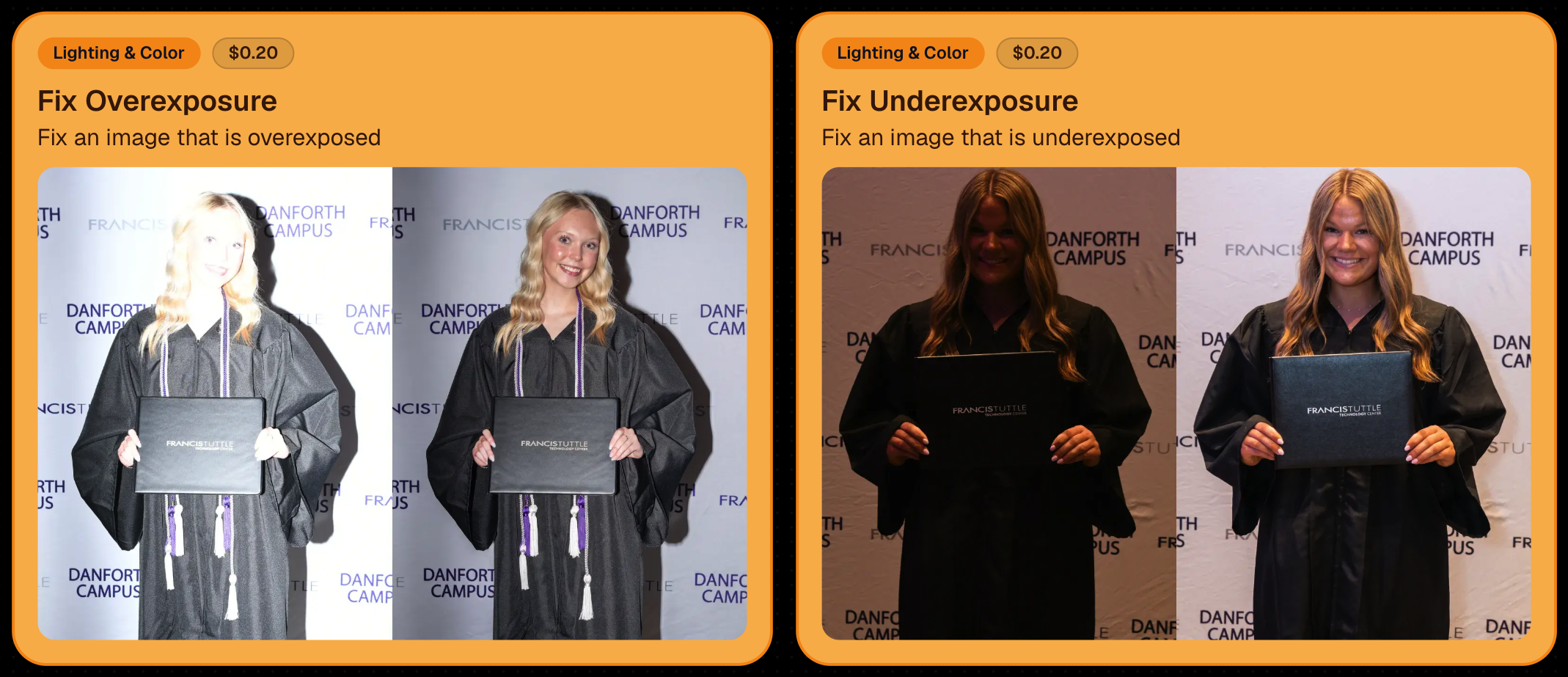
Utilize Candy Image Studio to fix images so they can sell, quickly and affordably!

🏈 Jersey Jotter Progress Tracking

New Jersey Jotter progress bar

  • When Jersey Jotter is active and still has unprocessed images, its dedicated page now shows processing progress—similar to Candy Culler and the new Background Removal page.

This makes it much easier to tell whether recognition is still working through a large Event.

🛍️ Retail Improvements

Titled Luxe Prints now work with package prefill

  • Packages can now automatically prefill eligible Titled Luxe Print products just like other supported products.

🖼️ Titled Luxe Print package rendering fixed

  • Fixed an issue where these products could render incorrectly inside packages.

🤖 AI-generated backgrounds now render correctly on products

🎨 Selected backgrounds now stay visible through the final product step

  • Fixed an issue where the chosen background could sometimes disappear on renders when reaching quantity and finish steps.

📝 Several product descriptions updated

  • Some product descriptions have been refreshed for better clarity.

🖼️ AI Edit + BGR Assignment Fix

👥 BGR versions of AI edits now keep direct participant assignments

  • If the original non-AI image was directly assigned to someone, its Background Removed AI-edited version will now correctly inherit that relationship.

📦 Order Details Fix

📝 Package captions now display correctly

  • Fixed cases where Order Details did not show caption information for certain products contained inside packages.

📱 Capture App 5.9.1 – iOS OTA

📸 Photo Booth fix for iPad

  • Fixed the Photo Booth gallery strip being cut off on certain iPad models.

That’s the week!

More Virtual Group control, a much stronger Background Removal workflow, some useful exposure tools, and plenty of fresh sports backgrounds to work with.

And if you still don’t like the backgrounds... now you’ve got plenty of ways to show us how it’s done. 😉

Keep creating magic,

Candy 🍬

Related articles

Candy's Weekly Recap: New Image Timeline Stats, Capture App Update & More!📸🎉
Feature Updates
November 22, 2024

Candy's Weekly Recap: New Image Timeline Stats, Capture App Update & More!📸🎉

4
 minutes read
Hello, my fabulous photographer friends!

Candy here, ready to sprinkle some sparkle on your day with our latest Weekly Recap! 🌟

We've been hard at work enhancing your NowCandid experience, and while this week is a bit lighter on changes (we're cooking up some exciting things for January!), I've got all the juicy details right here. Let's dive in! 🏊‍♀️

1. New "Images per 15 Minutes" Stat on Image Timeline 📈

We recently introduced the Image Timeline feature, and now we've made it even better!

  • What's New: There's a new "Images per 15 Minutes" stat available.
  • How to Access: You can find this by going to your Manage Images page within an event and clicking on the Image Timeline button (looks like a little stopwatch!).
  • Why It Matters: This stat helps you visualize your (or your photographer's) shooting pace throughout the event, identifying peak activity times and lulls.

2. Capture App Version 4.10 for Windows 💻

We've released Version 4.10 for the Windows Capture App!

  • Performance Improvements: This update includes various performance enhancements to make your capturing process smoother.
  • Note: These updates weren't needed for the iOS version at this time.

3. Manage Images Page Sorting Update 🗂️

We've improved the Manage Images page for better usability.

  • New Default Sorting: Images now sort by newest first by default.
  • Toggle Option: You can easily toggle to sort by older images first if you prefer.
  • How to Use: Look for the new sorting button on the Manage Images page (a small button with up and down arrows!).

4. Quick Access to Default Price Levels Spreadsheet 💰

Setting up events just got a little easier!

  • New Link: There's now a direct link to the Default Price Levels spreadsheet right from the Offer Selection dropdown during Event Creation.
  • Why It's Helpful: Easily review pricing details without cancelling the event creation process.

5. Image Uploader Now Detects Corrupt Files 🛠️

We've enhanced the reliability of our image uploading process.

  • Corrupt File Detection: The image uploader now catches corrupt image files during image validation.
  • Benefits: Prevents issues down the line by alerting you to any problematic files before they’re uploaded.

We're always here to support you!

So please, feel free to share your feedback or questions.

Cheers and sparkles,

Candy 🍬

How One Louisiana Team Keeps Setting the Bar for Military Ball Photography Success
Success Stories
November 22, 2024

How One Louisiana Team Keeps Setting the Bar for Military Ball Photography Success

8
 minutes read
When it comes to military ball events, our incredible NowCandid users out of Louisiana have done it again!

Building on their previous years of success, they’ve once again showcased how profitable and rewarding these events can be with the right tools, strategy, and dedication.

Consistency & Growth in 2024

Despite a slight decrease in event participants/attendance in 2024 compared to the previous year, this Louisiana team managed to match their impressive ~$26,000 sales total from 2023—and they didn’t stop there. They also improved their sales per image and sales per participant averages, proving that even with fewer attendees, their ability to deliver value remains unparalleled.

This is the kind of consistency and adaptability that defines true professionals. Even more remarkable is their journey to this point.

The Journey: From 2022 to 2024

It’s worth revisiting their story. Back in 2022, this team had just started using NowCandid—trained on the system the week of their first military ball event. Despite being completely new to the platform and working under tight deadlines, they pulled in an impressive $16,000 in sales. While those numbers didn’t quite hit the heights of their 2023 and 2024 totals, it was a strong foundation for what was to come.

For their 2023 and 2024 events, they doubled down on preparation and team strategy, hiring additional staff to support their photographers and improve operational efficiency.

One of the key moves was more actively promoting selfie check-ins, which not only enhanced the customer experience but also increased the number of photos taken—a direct driver of sales. These refinements pushed them to over $26,000 in sales in 2023 and another stellar year in 2024.

Looking Ahead to 2025

With the new Web Dashboard at their fingertips, the Louisiana team is already preparing to take their 2025 military ball to new heights. The Web Dashboard will unlock features that are sure to impress attendees and drive even greater sales:

  • More Art Overlay Options: Customize event images with exciting designs that attendees will love.
  • All-New Retail Site: A sleek, user-friendly interface for clients to browse and purchase their images.
  • Upsell Opportunities: Introduce premium options like retouching and diamond gloss print coating to enhance the final product and boost sales.

Armed with these enhancements, they’re aiming for even bigger successes in 2025—and we can’t wait to see what they accomplish.

Military Balls: A Goldmine for Photographers

This Louisiana team’s story is a shining example of how profitable military ball events can be. With strategic planning, the right tools, and a little effort, these events can bring in tens of thousands of dollars in revenue.

If there are military bases in or near your area, we strongly encourage you to seek out these opportunities. Partnering with military organizations for formal events is not only rewarding financially but also a chance to build lasting relationships with a highly engaged audience.

Tips for Success

  • Invest in Support Staff: Extra hands help keep the process smooth, from organizing attendees to encouraging selfie check-ins.
  • Leverage NowCandid Tools: Our workflows, like Selfie Check-In and advanced offers, make events efficient and client-focused.
  • Upsell Smartly: Use premium options like overlays, retouching, and print upgrades to maximize your per-participant revenue.
  • Engage Participants Early: Drive excitement and ensure attendees know how to access their photos before and after the event.

Ready to Capture More Success?

Military ball events are a prime opportunity to elevate your business, and NowCandid is here to support you every step of the way. If this story inspires you to explore similar opportunities, don’t hesitate to reach out or dive into your local market to find events like these.

Here’s to making 2025 your most successful year yet! 🎉

Candy’s Weekly Recap:  Introducing 'Find Me' Portal, Retouching for Downloads & More!
Feature Updates
November 15, 2024

Candy’s Weekly Recap: Introducing 'Find Me' Portal, Retouching for Downloads & More!

8
 minutes read

Hello, my fabulous photographer friends!

Candy here, ready to sprinkle some sparkle on your day with our latest Weekly Recap! 🌟

We've been hard at work enhancing your NowCandid experience, and I've got all the details right here. Let's dive in! 🏊‍♀️

1. Introducing the New NowCandid "Find Me" Portal! 🔍

We're thrilled to unveil our brand-new "Find Me" portal!

  • Effortless Access: End users can now enter their cell phone number or email address and receive a link sent directly to them.
  • All Galleries in One Place: This link will show every NowCandid personal gallery tied to their contact information.
  • Secure and Private: Rest assured, galleries aren't searchable by others. The link is sent directly to the user, ensuring privacy through this verification step. 😄
  • A direct link to the new "Find Me" Portal can be found here: https://www.quic.pics/find-me

Make it easier than ever for your clients to find their photos!

2. Retouching Now Available for Personal Gallery Downloads! 💄

Great news! Retouching can now be applied to Personal Gallery Download products.

  • Enhanced Offerings: Provide your clients with beautifully retouched images, even in their full gallery downloads.
  • Updated Retail Site: We've removed previous disclaimers, so customers know they can expect top-notch quality in every download.

Add that extra touch of magic to your clients' memories!

3. New Image Timeline Chart in Manage Images 🕰️

Visualize your event like never before with our Image Timeline Chart!

  • Accessible via Manage Images: Find it within any of your event's folders.
  • Insights at a Glance: See when images were taken, identify peak activity times, and spot any lulls.
  • Candy's Quick Summary: I'll even provide a brief overview to help you interpret the data.

Optimize your shooting schedule and make the most of every event!

4. Metadata Preservation in Web Dashboard 🗂️

We've made an important update regarding image metadata:

  • No More Stripping: The web dashboard no longer removes metadata from images.
  • Full Information: When you download images from the dashboard, all metadata is retained.
  • Future Features: This change sets the stage for more exciting features down the line.

Keep all your valuable image information intact!

5. Enhanced Selfie Check-In for SportsPics and GradPics 🤳

We've improved the Selfie Check-In experience for your participants:

  • Additional Contact Always Visible: The "Additional Contact" field now appears at all times.
    • Why It Matters: It's helpful for gathering parent or additional contact information.
  • Camera Roll Uploads for SportsPics: Participants can now upload an image from their camera roll as an alternative to taking a selfie.
    • Perfect For: Parents can easily check in using a photo of their child.

Simplify the check-in process and collect essential info effortlessly!

6. Introducing Web Traffic Metrics 📈

Gain deeper insights with our new Web Traffic metrics!

  • Event-Level Views: Access this data from the Marketing page within any of your events.
  • Participant Details: See whether a participant's gallery has been opened and how many times.
  • Conversion Rate Analysis: Compare web traffic to orders placed to gauge your conversion rate.
  • Informed Decisions: Use this information to decide if you need to adjust pricing.

Note: Web traffic tracking started on November 14. Visits before this date were not recorded.

7. All Reference Images Now Visible for Merged Participants 🖼️

We've made a helpful tweak for managing participant data:

  • Merged Participants: If participants merge by having the same phone number, you'll now see all their reference images on their details page.
  • Comprehensive View: This provides a complete picture of the participant's images, not just the first one.

Manage your participant data with greater clarity!

8. New Champion Plaque Product Added 🏆

We're excited to introduce the Champion Plaque to our product lineup!

  • Perfect for Sports Tournaments: Designed for medal winners to mount their medals onto the plaque.
  • Personalization Options: Add photos, names, and event details for a cherished keepsake.

Offer your clients a unique way to celebrate their victories!

9. Quick Download for Participant Images ⬇️

We've added a handy new feature to the participant details screen:

  • Download Icon: Allows you to simultaneously download all of a participant's matched images.
  • Time Saver: No more downloading images one by one.

Efficiently access participant images when you need them!

We're always here to support you!

So please, feel free to share your feedback or questions.

Thank you for being an essential part of the NowCandid community. Keep capturing those unforgettable moments and creating smiles! 📸😊

Cheers and sparkles,

Candy 🍬

Let’s get in touch

If you’re a photographer looking to add NowCandid services to your wheelhouse – set up a call by clicking the button below.

How to customize formatting for each rich text

How to customize formatting for each rich text

How to customize formatting for each rich text

How to customize formatting for each rich text

How to customize formatting for each rich text

What’s a Rich Text element?

The rich text element allows you to create and format headings, paragraphs, blockquotes, images, and video all in one place instead of having to add and format them individually. Just double-click and easily create content.

A rich text element can be used with static or dynamic content. For static content, just drop it into any page and begin editing. For dynamic content, add a rich text field to any collection and then connect a rich text element to that field in the settings panel. Voila!

Headings, paragraphs, blockquotes, figures, images, and figure captions can all be styled after a class is added to the rich text element using the "When inside of" nested selector system.

  • List One
  • List Two
  • List Three
  • List Four
  • List Five

This is a link

This is bold text