HomeNavigation arrowBlogNavigation arrow
Current page
Feature Updates

Weekly Recap: Local Print Button & Other Small Changes 🧾🖨️🔎

Weekly Recap: Local Print Button & Other Small Changes 🧾🖨️🔎
Hey photo friends! 👋

‍
Candy here with a quick round of small-but-useful updates—mostly focused on smoother checkout flows, an easy local print option, and a helpful search tweak in the Capture App.

‍

🛍️ Retail Updates

‍

🛑 Quic-Events download edge case prevented‍

  • Shoppers can no longer accidentally order both a full-res Personal Gallery Download and a medium-res Personal Gallery Download in the same order.

‍

🧹 Manual checkout: trims trailing spaces‍

  • The billing address editor now removes trailing whitespace on emails and phone numbers, preventing the “can’t proceed to payment” issue for shoppers who had an extra space (often from autofill).

‍

🧩 Packages: clearer image picker wording‍

The package item image-picker now uses cleaner language:

  • Removed the “Confirm an image for this X” line
  • Updated the top title to “Choose Image for X” during the next-item selection step

‍

🖥️ Dashboard

‍

🖨️ New “Print locally” button in lightboxes‍

  • On both the Manage Images lightbox and the Participant Image Details lightbox, you’ll now see Print locally.
    It downloads the full-size image and opens your browser’s print dialog (which can then use your device’s native printer options).

‍

📱 Capture App iOS 4.22.1 (OTA)

‍

🔎 Smarter Name Lookup search results‍

  • Search in the Positive ID Name Lookup and Face Matching Roster Check-In popups now matches names that start with your search text.
  • Example: typing “AL” finds Albert without also pulling up Hal.

‍

(As usual, OTA update = restart the app or use Check for updates.)

‍

That’s the scoop for this week!

‍

Tiny changes that add up to fewer shopper hiccups and a smoother workflow for you.

‍

Keep creating magic,
Candy 🍬

Related articles

QuicPics Is Becoming FreePics! 📸✨ Here’s What’s Changing:
FreePics
September 14, 2026

QuicPics Is Becoming FreePics! 📸✨ Here’s What’s Changing:

3
 minutes read
You may notice some familiar names looking a little different around our platform.

‍

That’s because we’re making a few big naming changes! 🍬

‍

QuicPics is now FreePics.

‍
QuicPics GO! is now FreePics GO!

‍
QuicPortraits is now FreePortraits.

‍

Don’t worry — the Programs you know aren’t going anywhere! This update is all about making our platform easier to understand, especially for photographers who are just getting started. 🙌

‍

Note: And if you did not know - the "GO!" stands for "Gallery Only!" since that Program delivers free images via one URL and not directly texting your Participant every image like standard FreePics.

‍

Why FreePics? 💡

‍

As our platform has grown, so have the number of Programs, tools, and Workflows available when creating and managing Events.

‍

That’s a great problem to have, but it also means the names we use need to do a better job of helping photographers understand what each option actually does.

‍

FreePics gets right to the point. 📷

‍

The FreePics Program allows photographers to provide images to participants for free, while FreePics GO! brings that same idea to our pay-as-you-go image delivery workflow. FreePortraits follows suit, giving the portrait-focused Program a name that fits naturally alongside them.

‍

For longtime users, it may take a little getting used to. But for someone creating their first Event and deciding which Program is right for them, we think these names make those choices much clearer.

‍

Clarity is something we’re continually working to improve across our platform, and sometimes that means revisiting things that have been around for a long time. ✨

‍

And speaking of things that have been around for a long time…

‍

So, What Happens to the QuicPics Name? 👀

‍

We’re not saying goodbye to QuicPics.

‍

Quite the opposite.

‍

We’re freeing it up. 🚀

‍

The QuicPics name has a lot of history within Candid Color Systems, Inc. and with our founder, Jack Counts Jr.

‍

Long before the software, tools, and photography platform we have today, QuicPics was part of the story that eventually grew into PartyPics, Candid Color Systems, and even Glamour Shots.

‍

Jack’s photography story began more than five decades ago photographing college parties and building a business around getting those photos back to customers quickly. That early operation grew into PartyPics and ultimately helped launch Candid Color Systems in 1972.

‍

Over the decades, the company continued building around many of those same ideas that started it all: speed, innovation, and finding better ways to get photos into customers’ hands. ⚡📸

‍

That same entrepreneurial spirit eventually helped lead to ventures like Glamour Shots, which became one of the most recognizable photography brands of its era.

‍

So, when we started thinking about where we’re headed next, QuicPics felt like a name worth bringing back to center stage.

‍

And no, we're isn’t spilling all the beans just yet. 🍬🤐

‍

But freeing up the QuicPics name gives us room for something exciting coming soon. 👀✨

‍

Pardon Our Dust! 🛠️

‍

This is a pretty sweeping change.

‍

We’re updating QuicPics to FreePics, QuicPics GO! to FreePics GO!, and QuicPortraits to FreePortraits throughout our platform, documentation, resources, and more.

‍

With that many places to update, there’s always a chance we missed a spot. 😅

‍

If you run into something that still says QuicPics when it should say FreePics — or if anything seems off or isn’t working quite right following the change — please let us know!

‍

We apologize for any short-term confusion while everything gets switched over, and we appreciate your patience as we make the transition. 💜

‍

FreePics is here, and QuicPics isn’t gone. It’s just getting ready for its next chapter. 🚀

‍

Cheers,

— Candy 🍬

Weekly Recap: Better Background Removal, Easier Mobile Downloads & Capture App 5.10 ✂️📱
Feature Updates
September 10, 2026

Weekly Recap: Better Background Removal, Easier Mobile Downloads & Capture App 5.10 ✂️📱

2
 minutes read
Hey photo friends! 👋

‍

Candy here with another weekly recap! This week’s biggest improvements are in Background Removal, with better sports cutouts, and faster processing.

‍

We’ve also made the mobile receipt download experience much easier, added a couple of helpful Capture App features, and cleaned up several Dashboard workflows.

‍

✂️ Background Removal Keeps Getting Better

‍

Background Removal got another round of quality and performance improvements this week:

‍

⚡ Faster processing‍

  • BGR is now a bit quicker overall.

‍

🏈 Better sports cutouts‍

  • Cutout quality has been improved, particularly for sports-related images.

‍

📈 Continuous improvement system‍

  • We’ve also added a new system designed to help Background Removal continue improving over time as we further refine the process.

‍

📱 Mobile Downloads Are Much Easier

‍

The Web Receipt Download Page has been reworked on mobile to make getting images into your phone or sharing them much simpler.

‍

🗂️ Info cards now use two columns‍

  • Just like desktop, which gets the actual image downloads closer to the top of the page.

‍

📤 Download is now Share on mobile‍

  • Individual images now show Share instead of Download and open your device’s native share sheet.
  • That makes it easier to save an image to your Photos app, text it to someone, or send it directly into another app.

‍

🖼️ Share All sends actual image files‍

  • The previous Download All option is now Share All on compatible mobile browsers.
  • Instead of creating one ZIP file, it attaches the images individually so you can more easily save the entire gallery to the Photos app (or send the images elsewhere).
  • If the browser can’t handle the share—for example, if there are too many images—it will automatically fall back to a ZIP like desktop.

‍

📷 Capture App 5.10

‍

iOS & Android App Store update — September 8

‍

Two handy additions made their way into Capture App 5.10:

‍

🔊 Audible scan confirmation‍

  • You’ll now hear a beep after successfully scanning a card, making it easier to know immediately that the scan worked.
  • Should help you and your hired photographers better know when a Scan Card has been succesfully scanned when using the Scanner ID Workflow!

‍

📸 “TAKE PHOTO” placeholder is back‍

  • The familiar image placeholder has returned to the shooting workflow.
  • Should help new users or hired photographers know when the app is ready to receive images!

‍

🛍️ Retail Improvements

‍

🖼️ Overlay now appears in the cropper‍

  • If a shopper selects an Event overlay, they can now see it while adjusting their crop.

‍

📱 Larger overlay preview on mobile‍

  • The image shown during the “Would you like to use this Event’s overlay?” step is now bigger on mobile.

‍

✉️ Better mobile email receipts‍

  • Receipt emails should now display more reliably in a mobile-friendly layout across mobile email clients.

‍

🧩 Memory Mate fix‍

  • Fixed an edge case where TKO images couldn’t be selected as the primary image when the Memory Mate configurator was opened from a Group Photo.

‍

🍎 iOS 26 layout cleanup‍

  • Fixed a small spacing issue on the overlay-selection screen when Safari is using bottom-positioned tabs.

‍

🖥️ Dashboard Updates

‍

🏷️ Event names are easier to keep track of‍

  • Desktop Event pages now prefix the Event name in the header.

‍

👥 Cleaner merged-participant display‍

  • Tabbed-in merged participants now have a subtle curved line visually connecting them to the main participant.

‍

📊 Marketing History traffic fix‍

  • Fixed some retail web traffic chart dates being displayed incorrectly because of timezone differences.

‍

🖼️ Virtual Group image picker fix‍

  • Double-clicking a blank participant will continue opening the Image Picker correctly after a refresh.

‍

🎨 “Overlay” renamed to “Foreground” in Virtual Group Builder‍

  • This helps distinguish Virtual Group foreground artwork from full-frame Event overlays.

‍

📄 Easier Manage Images pagination‍

  • When you’re beyond page one, page controls now also appear above the images so you don’t have to scroll all the way down just to switch pages.

‍

🪪 Clearer Positive ID activity logs‍

  • Image Details now correctly reports “Image Positive ID’d to X” rather than describing the action as Tap-A-Face or categorizing it as Face Matching.

‍

That’s the week!

‍

Better cutouts are the biggest story, but the new mobile sharing workflow should also make a noticeable difference for customers trying to get their photos from a receipt onto their phones.

‍

Keep creating magic,

Candy 🍬

Weekly Recap: Abandoned Cart Recovery, Batch AI Editing & Discount Links 🛒✨
Feature Updates
September 4, 2026

Weekly Recap: Abandoned Cart Recovery, Batch AI Editing & Discount Links 🛒✨

3
 minutes read
Hey photo friends! 👋

‍

Candy here with another weekly recap! This week’s biggest addition is a new Abandoned Cart Recovery marketing message designed to help bring shoppers back and complete purchases they already started.

‍

We’ve also made Quick Candy Image Studio more powerful for editing a selected group of images, added shareable discount links, and made several improvements across participant tools, Virtual Groups, and the Capture App.

‍

Let’s jump in!

‍

🛒 NEW: Abandoned Cart Recovery Marketing

‍

Sometimes a customer gets all the way to building a cart... and then life happens.

‍

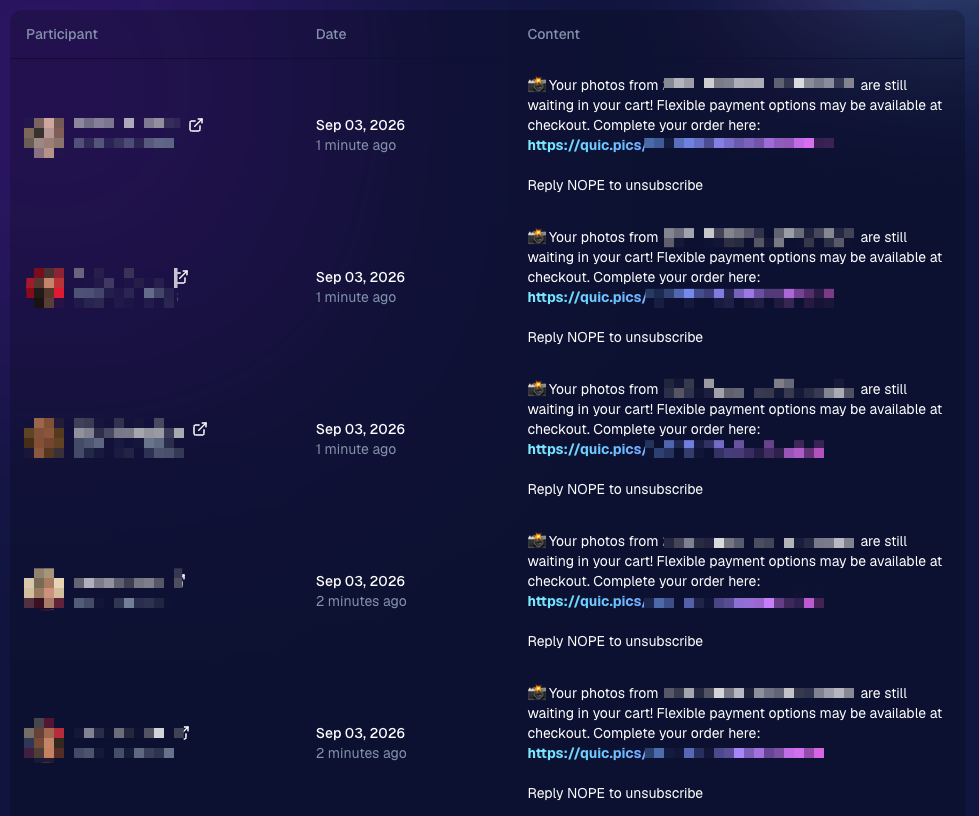
NowCandid will now automatically follow up with those shoppers via text + email to encourage them to come back and finish their order.

‍

📅 Abandoned cart messaging will go out once a week!

‍

🛍️ Targets participants who created a cart but did not complete their purchase

‍

🚫 Participants who have already ordered are excluded

‍

1️⃣ Each participant can only receive one abandoned-cart follow-up per Event

‍

📊 Sends are still recorded on the Event’s Marketing History page

‍

This gives shoppers a helpful nudge to return to something they were already interested in buying—and hopefully turns a few more unfinished carts into completed sales. 📈

‍

Note: NowCandid's abandoned cart rate is already very low. Even so, we expect this to boost your overall sales by about 0.3% or more!

‍

‍

🎨 Batch AI Editing Gets More Powerful

‍

Quick Candy Image Studio on Manage Images continues to fill the gap between editing one image at a time and running Auto Editor across an entire folder or Event.

‍

Select a handful of images, open Quick Candy Image Studio, and apply an AI edit across the selection.

‍

This week, it also gained more of the controls available in the full Candy Image Studio:

‍

👁️ Mark Original Invisible

‍

✂️ Mark Destination Folder as Background Removal Folder‍

  • Available when Background Removal is enabled for the Event.

‍

🖼️ Custom image-input nodes fixed‍

  • Nodes that require another image as an input now behave correctly through Quick Candy Image Studio.

‍

This makes it much easier to apply the same edit to a small, intentional group of images without setting up a larger Auto Editor workflow.

‍

👥 Participant List Improvements

‍

🏷️ PhotoTags now appear as badges‍

  • Participant rows now show assigned PhotoTags directly, similar to the existing Additional Contact badge.

‍

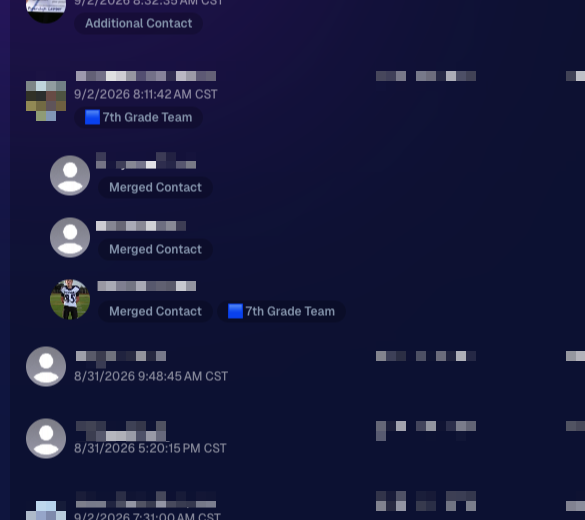
👨‍👩‍👧 Merged participants are easier to understand‍

  • Individual merged records now appear as separate, indented rows beneath the main merged participant.

‍

🙈 Hidden PhotoTags stay hidden‍

  • Fixed hidden PhotoTags incorrectly appearing on Participant Details.

‍

‍

🧑‍🤝‍🧑 Virtual Group Builder Improvements

‍

↩️ Better Undo behavior for sliders

  • CTRL/CMD + Z now behaves more naturally when adjusting slider values.

‍

🖱️ Better drag-and-drop with large groups‍

  • The Subjects pane is easier to work with when there are dozens of participants.

‍

🖼️ Full-resolution render consistency fix‍

  • Fixed an edge case where the final full-res Virtual Group could differ from the Builder preview.

‍

🤖 Auto Editor & Background Removal

‍

🙈 Hide Originals now handles BGR originals correctly‍

  • If Hide Originals is enabled and the original folder is marked for Background Removal, the original PNG will now be hidden too.

‍

The same behavior now applies in Candy Image Studio.

‍

📱 Capture App 5.9.3

‍

iOS & Android OTA — September 1

‍

📋 Shooting mode selector fixed on tablets‍

  • The popup is now scrollable, so options like Roster Check-In are always reachable.

‍

📸 Photo Booth fix on iOS‍

  • Cancelling the countdown no longer accidentally disables the Event collage.

‍

That’s the week!

‍

Abandoned Cart Recovery is the big addition here, giving NowCandid another way to help turn existing shopper interest into completed orders. And with the improvements to Quick Candy Image Studio, you’ve got more flexibility for those “edit these five photos, not the entire folder” situations too.

‍

Keep creating magic,

Candy 🍬

Let’s get in touch

If you’re a photographer looking to add NowCandid™ services to your wheelhouse, set up a call with us!

How to customize formatting for each rich text

How to customize formatting for each rich text

How to customize formatting for each rich text

How to customize formatting for each rich text

How to customize formatting for each rich text

‍

‍

What’s a Rich Text element?

The rich text element allows you to create and format headings, paragraphs, blockquotes, images, and video all in one place instead of having to add and format them individually. Just double-click and easily create content.

A rich text element can be used with static or dynamic content. For static content, just drop it into any page and begin editing. For dynamic content, add a rich text field to any collection and then connect a rich text element to that field in the settings panel. Voila!

Headings, paragraphs, blockquotes, figures, images, and figure captions can all be styled after a class is added to the rich text element using the "When inside of" nested selector system.

  • List One
  • List Two
  • List Three
  • List Four
  • List Five

This is a link

This is bold text

‍

  • ‍

‍