HomeNavigation arrowBlogNavigation arrow
Current page
Feature Updates

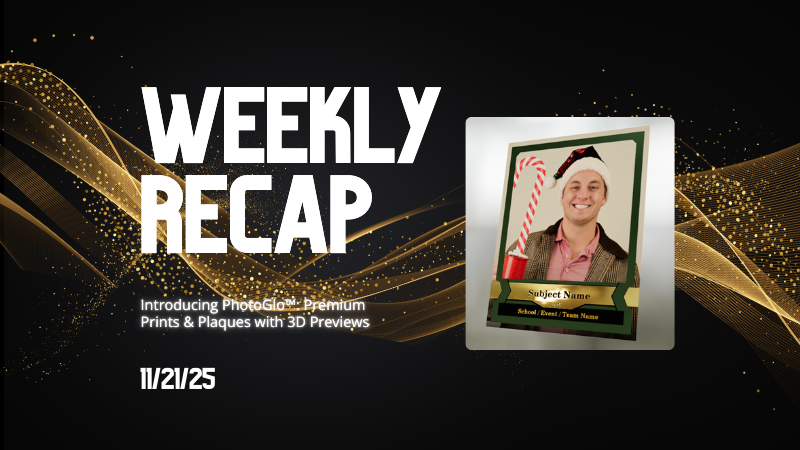
Weekly Recap: Introducing PhotoGlo™ Premium Prints & Plaques ✨🖼️

Weekly Recap: Introducing PhotoGlo™ Premium Prints & Plaques ✨🖼️
Hey photo friends! 👋


Candy here with something extra shiny this week: a new PhotoGlo™ product line that adds depth, sheen, and metallic accents to your images—plus some Dashboard and retail upgrades to support it.

Let’s start with the fun stuff. 😏

✨ New PhotoGlo™ Products

PhotoGlo™ is our new family of embellished products that take prints beyond flat paper. These products can include:

  • 🎨 Thick color varnishes on specific areas to add depth and a glossy “raised” feel
  • ✨ Metallic foil printing for high-shine metal accents that catch the light and draw the eye

First up in the line:

  • 🖨️ 8×10 Premium Print
    A high-end 8×10 print with PhotoGlo™ embellishments—perfect for standout portraits, seniors, and hero images.
  • 🪧 Premium Plaque
    A mounted plaque (about 9.5×11.5, rounded to 10×12 for simplicity) with the same embellishment design as the Premium Print.

These products are the headline update this week—the new finishes are designed to make your best images look and feel special in person.

Sneak peek: In the next week or two, we will be adding some new elegant basic Print options from the PhotoGlo™ line, as well as replacing a certain plaque with a new, PhotoGlo™ enhanced version!

🌀 3D Renders to Show Off PhotoGlo™

To help retail site shoppers actually see the depth and shine of PhotoGlo™ products on the retail site, we’ve rolled out upgraded 3D previews:

📦 Live 3D product renders

For Premium Print and Premium Plaque, the 3D preview supports:

  • • BGR backgrounds
  • • Crops
  • • Captions
  • • Primary colors / accents

🖥️ Where 3D appears

  • • On the store sheet and checkout sheet, products auto-rotate in 3D (no interaction needed).
  • • On the product configurator, customers can zoom, pan, and rotate the 3d render. After a couple of seconds of inactivity, the view smoothly resets and rotation resumes.
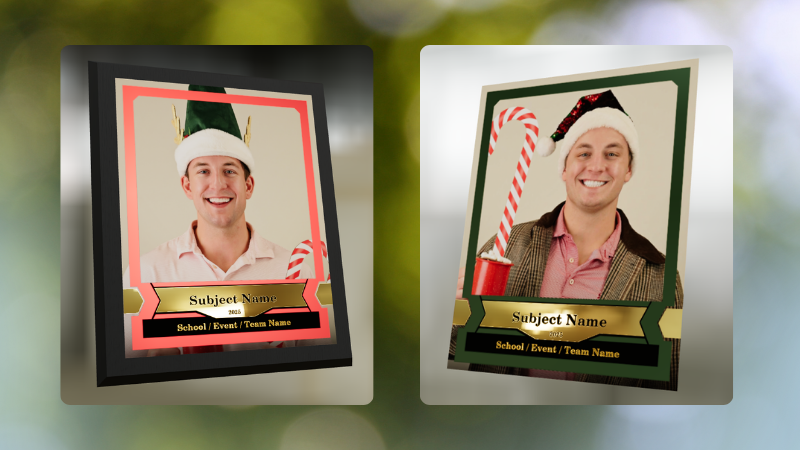
These renders are there to support the PhotoGlo line—helping buyers appreciate what they’re paying for before they check out.

Wanna take a closer look? Click here to view a demo! (app.nowcandid.com/3d/premium-plaque-print)

🛍️ Retail Tweaks

🧱 New desktop layout while customers customize products

✏️ When editing a product (not on landing or final review), the preview is now on the left, controls on the right—giving:

  • • Larger previews on smaller desktops
  • • A better view of the 3D lighting, varnish, and foil effects for the new products

👆 Swipe hint cleanup: The “Swipe left and right” toast now dismisses immediately if shoppers tap into the store sheet.

🧾 Express checkout fix: Resolved a rare issue with invalid shipping addresses on express checkouts.

🖥️ Dashboard Improvements

Faster image loading on events with very large image counts.

🧰 Manage Images – Tools & Extras popup:

  • • Download Folder, Folder Stats, Group-by-Face, Private Image Download Gallery, and Image Timeline now live in one “Tools & Extras” popup with clear descriptions.

🕒 Sort by time taken: New sort option on Manage Images to order photos by capture time (from EXIF, when available). Images without a timestamp are hidden from this specific sort view.

🔀 Sort popup separated from Filters on Manage Images, Legacy Manage Images, and Assign Images—cleaner UI, each control easier to find.

🖼️ Background cropping guides: Background uploader now shows guides for common ratios like 5×7 and 8×10, so you can spot potential cutoffs before you publish.

📊 Event sales & stats modal:

  • • Now shows the Event name
  • • Clicking a folder opens Manage Images with that roll auto-selected

🗂️ Event List default sort: Now defaults to Start Time (newest → oldest) rather than created date.

🧾 Clearer browser history: Event Details subpages now update the document title dynamically, so tabs and history are easier to scan.

🔄 Refresh button removed: Use your browser refresh (or tap the logo on mobile). One less button, same control.

That’s the scoop for this week!

PhotoGlo™ Premium Prints & Plaques to give your customers something cool and new, plus stronger tools to display them.

Keep creating beautiful things,
Candy 🍬

Related articles

📸 Candy’s 12 Days of Christmas: Day 1 – The New NowCandid Web Dashboard 🎄🎁
Feature Updates
December 14, 2024

📸 Candy’s 12 Days of Christmas: Day 1 – The New NowCandid Web Dashboard 🎄🎁

3
 minutes read
Hello, my merry photographer friends! 🎅

Candy here, and I’m excited to kick off a special holiday celebration with all of you!

For the next 11 days, we’ll be counting down the 12 Days of Christmas by revisiting one of our biggest, most impactful NowCandid features from 2024 each day. Then, on December 25th, we’ll unwrap a brand-new surprise—one of our biggest new features of the year!

Let’s begin Day 1 by shining a festive spotlight on the all-new NowCandid Web Dashboard, a cornerstone of our 2024 improvements that completely transformed how you manage your photography business online.

What Changed in 2024:

  • Participant Details & Gallery Management:

    With the new dashboard, you can dive straight into a participant’s details, view their assigned images, and even add more images to their gallery if needed. This level of control made delivering a personalized experience easier than ever.
  • Enhanced Order Details & Reports:

    Gone are the days of scattered information. The updated dashboard brought comprehensive order details front and center, along with in-depth reports. Now you can monitor sales, understand trends, and make data-driven decisions with confidence.
  • Streamlined Image Downloads:

    Need to access event images quickly? The new dashboard let you download images right from your event pages, saving time and ensuring you have what you need at your fingertips—no extra steps required.

From improved participant oversight to richer analytics and convenient image downloads, the new NowCandid Web Dashboard was a game-changer.

It set the tone for a year filled with upgrades that helped you run your business more efficiently, serve your clients better, and ultimately capture more smiles.🎉

Stay tuned for Day 2 tomorrow, where we’ll highlight another standout feature from 2024.🎄✨

Until then, keep embracing the holiday spirit and know that something truly special awaits you on December 25th!

Candy 🍬

Weekly Recap: QuicPics Improvements! 📸🎉
Feature Updates
December 13, 2024

Weekly Recap: QuicPics Improvements! 📸🎉

3
 minutes read
Hello again, my wonderful photographers! 🎅

Candy here, bringing you another Weekly Recap. It’s a light week for changes, but we’ve got a couple of handy tweaks worth mentioning. Let’s dive in! 🌟

1. Bigger, Better Downloads for QuicPics & QuicPics GO 🏆

  • Improved Download Quality: Images downloaded directly from the retail site during QuicPics or QuicPics GO events—via “tap and hold” or the download icon—now come closer in size and quality to what clients receive through free downloads at checkout or via MMS.
  • Richer Image Experience: This enhancement means end customers get crisper, more detailed images, no matter how they choose to save them.

2. Clearer QuicPics Products in the Offer Creator 💡

  • Improved UI Guidance: The two QuicPics products are now always listed at the top of every custom offer in the Offer Creator.
  • Easier Understanding: Notes explain that these items only appear if you’re running a QuicPics or QuicPics GO event. This helps photographers realize they don’t need to manually add free downloads—QuicPics has them covered.

Looking Ahead: The 12 Days of Christmas Countdown 🎄

Starting tomorrow, we’ll begin a special 12 Days of Christmas countdown. Each day leading up to December 25th, we’ll revisit one of 2024’s biggest features. On the final day, we’ll unwrap a brand-new surprise—one of the year’s biggest new additions!

Stay tuned, enjoy the holiday season, and get ready for a festive lineup of features! 🎁

Candy 🍬

Candy's Weekly Recap: Extended Positive ID Events, Enhanced Order Details & More!📸🎉
Feature Updates
December 6, 2024

Candy's Weekly Recap: Extended Positive ID Events, Enhanced Order Details & More!📸🎉

4
 minutes read
Hello, my fabulous photographer friends!

Candy here, ready to sprinkle some sparkle on your day with our latest Weekly Recap! 🌟

We've been tinkering away to bring you some delightful updates that'll make your NowCandid experience even better—just in time for the holiday season! Let's dive in! 🏊‍♀️

1. Extended Duration for Positive ID Events 🎅

Great news for those capturing the magic of the season!

  • Positive ID Events Now Up to 30 Days Long: You can now edit your Positive ID Workflow events to extend their end date up to 30 days.
  • Why This Matters:
    • Longer Visibility: Events will stay visible on the selection screen of the Capture & Upload App for a longer period, beyond the typical 5-day range.
    • Perfect for Holiday Events: This change is especially helpful for those using our Scanner ID and Type & Take workflows for Santa photos and other festive events.
  • Note: This extension is currently only for Positive ID Events. Events using the Face Matching Workflow remain unchanged.
  • Holiday Cheer: Don't forget to try out our Candy Cane retail theme, stuffed with plenty of holiday spirit to make your galleries extra festive! 🎄

2. Enhanced Order Details in Web Dashboard 🛍️

We've supercharged the Order Details to keep you in the loop!

  • More Informative Order Details:
    • Comprehensive Info: Access all the information you need about each order directly from the dashboard.
    • Clickable Orders: Orders in the recent orders lists are now clickable, taking you straight to detailed order pages.
  • Participant Integration:
    • Jump to Participant Details: If an order is tied to a participant, you can navigate directly to their details page.
    • View Images & Marketing History: See their images, marketing interactions, and more.
  • Did You Know? 🤔
    • NowCandid Handles Retail Support: That's right! We take care of much of the retail support for you, including order resubmissions. You can focus on capturing moments while we handle the rest!

3. Improved Scan Card Generation Performance 📝

We've fine-tuned the Scan Card generation to make it smoother than ever!

  • Performance Boost:
    • Faster Generation: Recent updates had slowed down scan card creation, but we've optimized the process.
    • Reliability Restored: Generating Scan Card PDFs should now work properly and more efficiently.
  • Why It Matters:
    • Seamless Workflow: Especially important for high-volume events like holiday photo sessions.
    • Feedback Welcome: If you notice anything not performing as expected or have suggestions, please let us know!
  • A Festive Note:
    • We're committed to resolving any issues faster than Santa delivering presents to billions of children across the globe in just 24 hours! (All those cookies must give him quite the sugar rush.) 🍪🎅

We're always here to support you!

So please, feel free to share your feedback or questions.

Cheers and sparkles,

Candy 🍬

P.S. Wishing you all a joyful holiday season filled with magical moments to capture! 🎁✨

Let’s get in touch

If you’re a photographer looking to add NowCandid services to your wheelhouse – set up a call by clicking the button below.

How to customize formatting for each rich text

How to customize formatting for each rich text

How to customize formatting for each rich text

How to customize formatting for each rich text

How to customize formatting for each rich text

What’s a Rich Text element?

The rich text element allows you to create and format headings, paragraphs, blockquotes, images, and video all in one place instead of having to add and format them individually. Just double-click and easily create content.

A rich text element can be used with static or dynamic content. For static content, just drop it into any page and begin editing. For dynamic content, add a rich text field to any collection and then connect a rich text element to that field in the settings panel. Voila!

Headings, paragraphs, blockquotes, figures, images, and figure captions can all be styled after a class is added to the rich text element using the "When inside of" nested selector system.

  • List One
  • List Two
  • List Three
  • List Four
  • List Five

This is a link

This is bold text