HomeNavigation arrowBlogNavigation arrow
Current page
Feature Updates

Weekly Recap: Horizontal 3D Plaques, Event Calendar View & PhotoTag LiveLoop Links 📅🌀

Weekly Recap: Horizontal 3D Plaques, Event Calendar View & PhotoTag LiveLoop Links 📅🌀
Hey photo friends! 👋

Candy here! This week’s updates are big on visual workflows: more orientation options for our 3D products, a new Calendar view for Events, and PhotoTag-powered LiveLoop™ links for better slideshow control.

Let’s jump in!

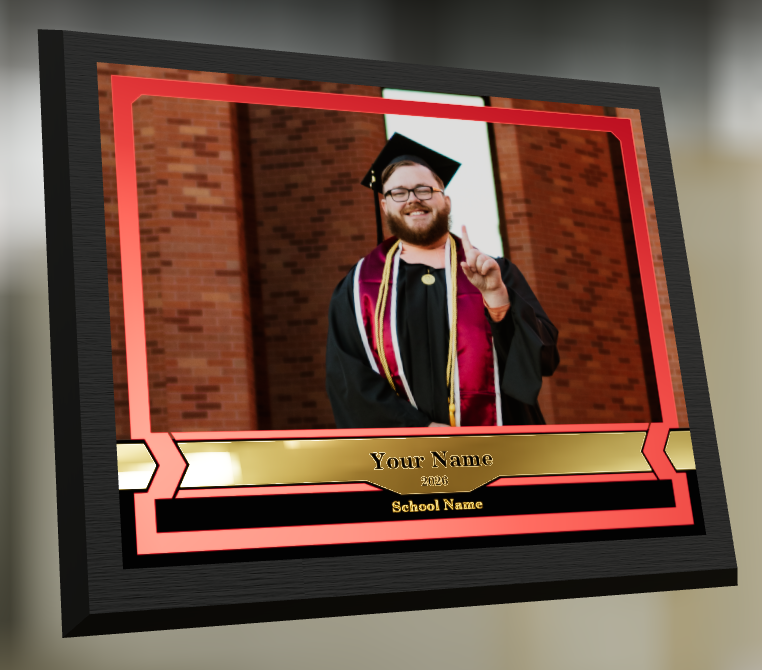
🖼️ Big Product Upgrade: Horizontal Orientation for 3D Plaques & Prints

End customers now have more flexibility when ordering these 3D-rendered products:

🎓 Graduation Plaque now supports a new horizontal design

  • • 🔄 Customers can switch orientations during the live 3D render
  • • 🖼️ Updated 2D render support included as well

🪧 Premium Plaque now supports a horizontal design

  • 🔄 Orientation can be switched during the live 3D render

🖨️ Premium Print now supports a horizontal design

  • 🔄 Orientation can be switched during the live 3D render

✍️ Caption preview fix: Premium Print/Plaque now correctly reflect the default “Line 2” in the 3D render before a shopper enters their own text

These updates make it easier to sell premium products even when the “best” shot isn’t a perfect vertical crop.

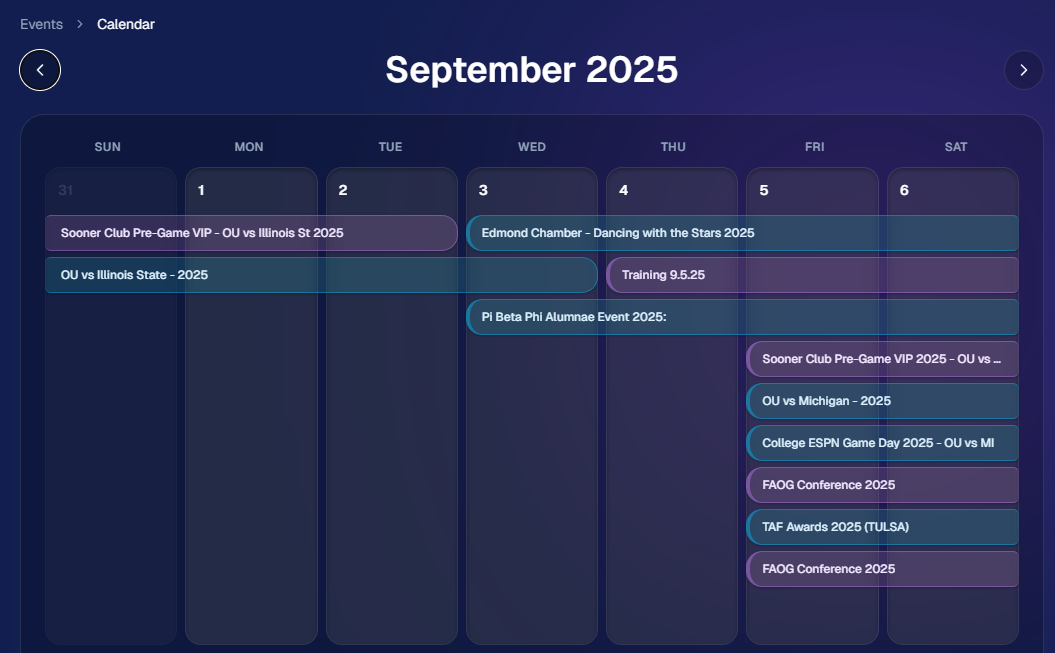
📅 New Dashboard Event Calendar View

Prefer a more visual way to plan and review your schedule?

🗓️ Event Calendar is now available via the calendar button on the Event List page

👀 Great for spotting what’s coming up at a glance, instead of scanning a long list
🌀 LiveLoop™: PhotoTag Links

LiveLoop™ just got more flexible:

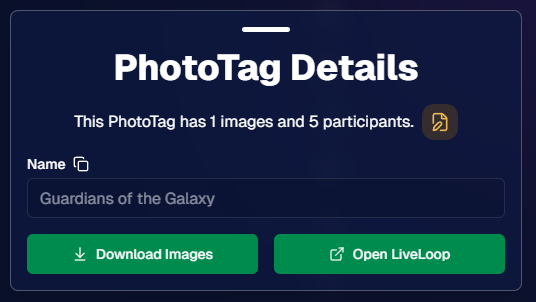
🏷️ PhotoTags now have LiveLoop links

  • • Found in a couple places on the PhotoTag page in the Dashboard
  • • Pulls in new images automatically, just like a normal LiveLoop™

🧾 Cleaner titles & history

  • • LiveLoop page now shows the Event name in the title bar, history, and links
  • • PhotoTag links show as: PhotoTagName – EventName

Perfect for running separate slideshows per team, division, day, or group without juggling multiple Events.

🖥️ Dashboard Improvements

🧹 New “Clear” button in Manage Images select mode (clear selections without re-entering select mode)

📋 PhotoRoster uploads improved:

  • • 📞 Additional phone columns now ignore parentheses (like main phone)
  • • 🔀 Columns can be in any order (matching Event roster upload behavior)

🔗 Fixed Image Details lightbox link for images manually removed on Participant Details

🧾 Positive ID Code PDF sorting updated:

  • • A–Z participants with no PhotoTag
  • • Then PhotoTags A–Z (participants A–Z inside each)
  • • Then blank cards at the end

🛍️ Retail & Check-In Updates

🚫 Invisible Events are now truly inaccessible

  • • If an Event is marked invisible, its retail site + check-in pages now show an “Event is no longer available” screen

🌎 Positive ID check-in phone formatting helper

  • • If an existing registration code has a phone without “+”, we’ll append “+1” to default to US country format (unless it already starts with “+” for another country)

🧩 Fixed a retail site crash when the Statuette Ornament was included in a package

🛡️ iPhone GalleryGuard now loads faster

🛠️ Misc Fixes & Improvements

🖨️ Backprinting updates for existing Events when your business info is updated (previously it was locked to whatever info existed when the Event was created)

✉️ Fixed a strange edge case where email-only participants wouldn’t send if another email in the queue contained “.@”

✅ Improved email validation across all web check-ins

That’s the week!

Between horizontal premium product designs, PhotoTag-level LiveLoops™, and a Calendar view for Events, you’ve got a lot more control over how things look and how you run the day. 💫

Keep creating magic,

Candy 🍬

Related articles

Capturing Success: How to Book Graduation Ceremony Photography Jobs Like a Pro
GradPics
April 4, 2023

Capturing Success: How to Book Graduation Ceremony Photography Jobs Like a Pro

4
 minutes read

Graduation ceremonies are a golden opportunity for photographers. With proud parents, beaming graduates, and memories to last a lifetime, these events are the perfect stage for capturing unforgettable moments. But how do you land these lucrative gigs? In this blog post, we'll share insider tips on how to book graduation ceremony photography jobs and create lasting success. And with NowCandid by your side, you'll have the support and tools you need to shine in the academic spotlight.

  1. Build a Stellar Portfolio:
    First things first, you need to showcase your skills as a graduation photographer. Create a specialized portfolio featuring your best work from past graduation ceremonies. If you're just starting out, consider offering your services for free or at a discounted rate to build your experience and gain valuable client testimonials. Or, try starting out with some smaller graduation ceremonies that are not as contested by competing photographers!
  2. Network with Schools and Universities:
    Build relationships with school administrators, counselors, and event coordinators. Attend school events, join local education associations, and engage in conversations on social media platforms. Establishing connections in the education community will help open doors to potential photography opportunities.
  3. Leverage Social Media and Online Marketing:
    Create a strong online presence to showcase your work and attract clients. Use social media platforms, SEO, and email marketing to promote your services and drive traffic to your website. Share captivating images from past graduation ceremonies, client testimonials, and behind-the-scenes content to engage your audience and demonstrate your expertise. 
  4. Partner with Local Businesses:
    Collaborate with local businesses that cater to graduates, such as cap & gown vendors, school ring vendors, or varsity jacket vendors as a couple examples. These partnerships can lead to valuable referrals and create a network of resources that benefits all parties involved.
  5. Provide Exceptional Customer Service:
    Go above and beyond to make your clients feel special. Be responsive, professional, and attentive to their needs. Offer personalized consultations, accommodate special requests, and deliver a memorable experience that will leave them singing your praises. NowCandid's platform can help you streamline your workflow and ensure a smooth customer experience from start to finish.
  6. Ask for Referrals and Testimonials:
    Word of mouth is a powerful marketing tool. Encourage satisfied clients to refer you to their friends and colleagues, and request testimonials for your website and marketing materials. A strong reputation will keep the bookings rolling in.

Booking graduation ceremony photography jobs can be both rewarding and profitable. By building a compelling portfolio, networking with schools and universities, and leveraging the power of NowCandid, you'll be well on your way to capturing success in the world of academic photography. So, put on your metaphorical cap and gown, and get ready to celebrate your achievements in the graduation photography business!

New Reporting Feature
Feature Updates
March 7, 2023

New Reporting Feature

2
 minutes read
Recently, we rolled out a much-needed reporting tool for our NowCandid™ users!

Two new reporting tools that will be able to give you a macro view into your business’s performance, as well as a lot of helpful data and analytics on your events!


Tool #1, the Sales Report:

This report focuses on reporting all your sales within a date range! It’s filterable by which NowCandid™ program you’re using as well and can report your sales by day or your sales by month. Once you have your date range, filters, and date format set, you’ll get a reactive bar graph as well as a series of totals and averages for your sales performance within that date range! This report is great for quickly getting an idea of your overall income and margin.


Tool #2, the Events Report:

This second report is where you can really dig into your various metrics. Instead of reporting on all sales during a date range, when you choose a date range, you’re selecting all the events that have a Start Date within that date range. Those events and their totals will be what’s included in this report! So residual sales on older events would not be included like they would be in the Sales Report. After you choose a date range, this report can also be filtered by NowCandid™ program!

You can also choose whether to include $0 sale test events you may have made, so that you don’t drag down your averages on this report. If there are any non-$0 sale events you don’t want included, you can click the checkbox by the event to remove it from your total and averages as well! And lastly, once the information you are interested in is being displayed to you, you can export the data to preserve as a spreadsheet on your own device.


With several ways to look at your business’s performance, we believe these tools will be a great benefit to our users and help them make the most of their account with NowCandid™.

Our users will no longer have to guess or run a separate spreadsheet to understand their business’ performance or their overall margins.

Let us know if you have any questions or feedback!

Backprinting: The newest feature to promote your brand
Branding
March 3, 2023

Backprinting: The newest feature to promote your brand

4
 minutes read

With NowCandid, we stress how we try to make everything as white-label as possible.

This week, we've officially implemented a new feature that promotes your brand and drives sales in yet another way: Backprinting! Going forward, your business name, your contact info and the retail support email address will be on the back of all standard print products ordered (with the ability to include your business logo coming soon). Plus, the back of the print includes a unique QR code that when scanned, directs back to that person's individual gallery from that event (even if scanned 10 years from now) so they can buy more prints and increase your residual sales long term! With this change, all NowCandid users will now be delivering an even higher quality product, promoting their brands more effectively than ever, booking more business, and bringing in more residual sales as the years go on.

We hope you are as excited as we are!

Note: your business name will replace NowCandid in the example image.

Let’s get in touch

If you’re a photographer looking to add NowCandid services to your wheelhouse – set up a call by clicking the button below.

How to customize formatting for each rich text

How to customize formatting for each rich text

How to customize formatting for each rich text

How to customize formatting for each rich text

How to customize formatting for each rich text

What’s a Rich Text element?

The rich text element allows you to create and format headings, paragraphs, blockquotes, images, and video all in one place instead of having to add and format them individually. Just double-click and easily create content.

A rich text element can be used with static or dynamic content. For static content, just drop it into any page and begin editing. For dynamic content, add a rich text field to any collection and then connect a rich text element to that field in the settings panel. Voila!

Headings, paragraphs, blockquotes, figures, images, and figure captions can all be styled after a class is added to the rich text element using the "When inside of" nested selector system.

  • List One
  • List Two
  • List Three
  • List Four
  • List Five

This is a link

This is bold text