HomeNavigation arrowBlogNavigation arrow
Current page
Feature Updates

Weekly Recap: Faster Virtual Group Creation, New Candy Image Studio Tools & Capture App 5.7 Updates ✨📸

Weekly Recap: Faster Virtual Group Creation, New Candy Image Studio Tools & Capture App 5.7 Updates ✨📸
Hey photo friends! 👋

‍

Candy here with another weekly recap! This week brings some great upgrades to Virtual Group Builder, new Candy Image Studio tools, better Docs search, and a solid Capture App update with helpful color profile and PhotoTag improvements.

‍

Let’s take a look!

‍

🧑‍🤝‍🧑 Virtual Group Builder Improvements

‍

Virtual Group Builder got a nice set of workflow upgrades this week:

‍

🏷️ Create Virtual Groups directly from PhotoTags‍

  • On the PhotoTags page, click Create under the VGroup column to automatically start a new Virtual Group using participants from that PhotoTag. You’ll also get a popup asking whether to use each participant’s first or last cutout.

‍

🚀 Save works-in-progress with placeholders‍

  • You can now save changes to a Virtual Group even if some subjects still have spaceman placeholders.
  • All subjects still need a selected photo before uploading the finished Virtual Group to the Event.

‍

🖼️ Overlay uploads can now be named‍

  • When uploading overlays, you can name them so they’re easier to search and find later.

‍

🔤 More control over subject name styling‍

  • Title Case is now only applied on import, meaning you can use the subject inspector to customize name casing afterward.

‍

📐 New text display option‍

  • There’s a new Display setting to disable justified text.

‍

🌫️ Bottom Vignette improvements‍

  • Bottom Vignette rendering has been reworked for better results.

‍

🔎 More flexible scaling‍

  • Max global scale is now 200%.

‍

🎨 Candy Image Studio: New Editing Nodes

‍

Candy Image Studio has two new tools to help clean up common image issues:

‍

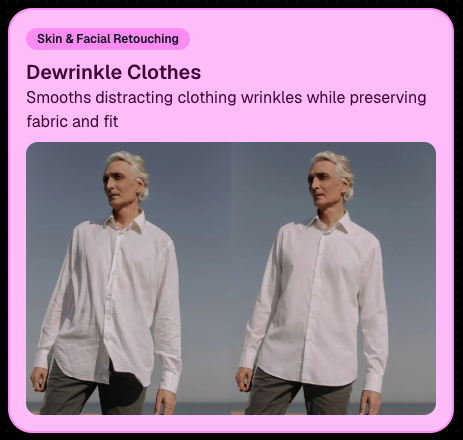
👔 Dewrinkle Clothes‍

  • Helps smooth distracting clothing wrinkles while keeping the image natural.

‍

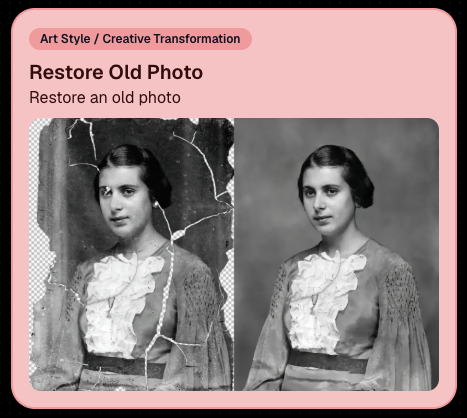
🖼️ Restore Old Photo‍

  • A new restoration-style node for improving older or damaged images.
‍

‍

‍

📱 Capture App 5.7 Updates

‍

App Store update released Monday, June 22

‍

Capture App 5.7 includes some meaningful workflow and compatibility improvements:

‍

🎨 Automatic sRGB conversion‍

  • If an image is detected as non-sRGB, the app will now try to automatically convert it to sRGB. If it can’t, you’ll still get the existing invalid color profile warning.
  • This can be especially useful for black-and-white shooting modes that output a different color profile. That said, we still recommend shooting in sRGB whenever possible, since conversion can cause some color loss and may use extra battery during long sessions.

‍

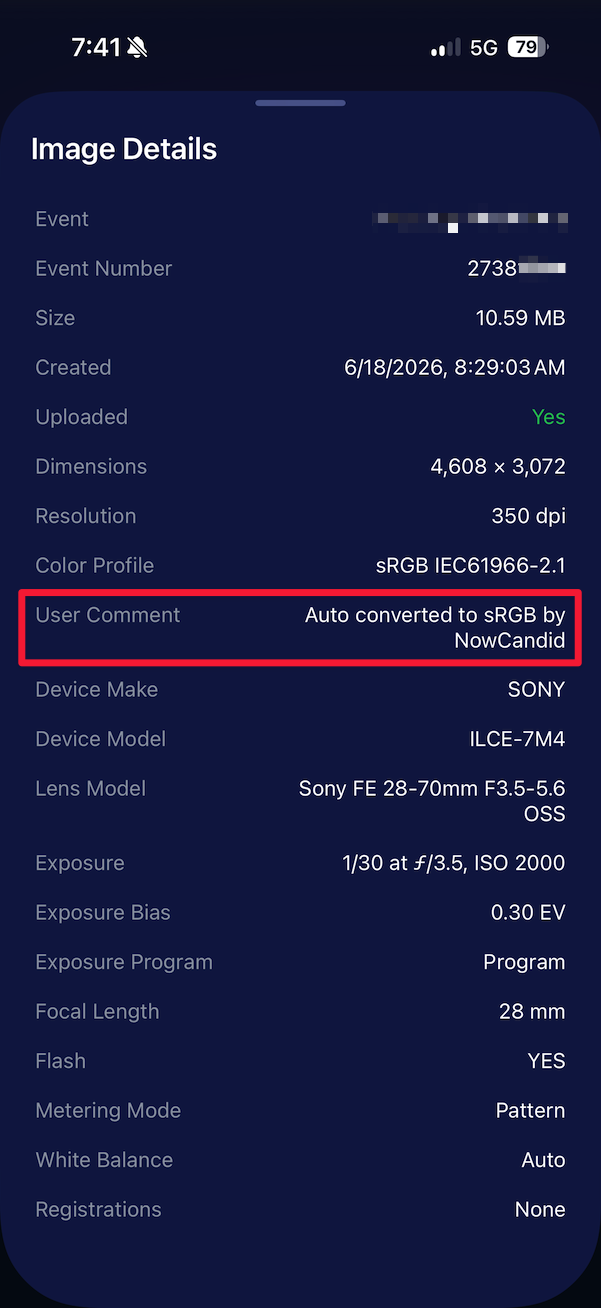
🧾 User Comment shown in EXIF details‍

  • The image gallery details popup now shows EXIF User Comment data, including whether an image was auto-converted to sRGB.
‍

‍

✂️ BGR visibility sync‍

  • Visibility changes in BGR folders now affect the cutout too. Mark the original hidden, and the cutout will hide; mark it visible again, and the cutout becomes visible as well.

‍

🏢 Business logo support‍

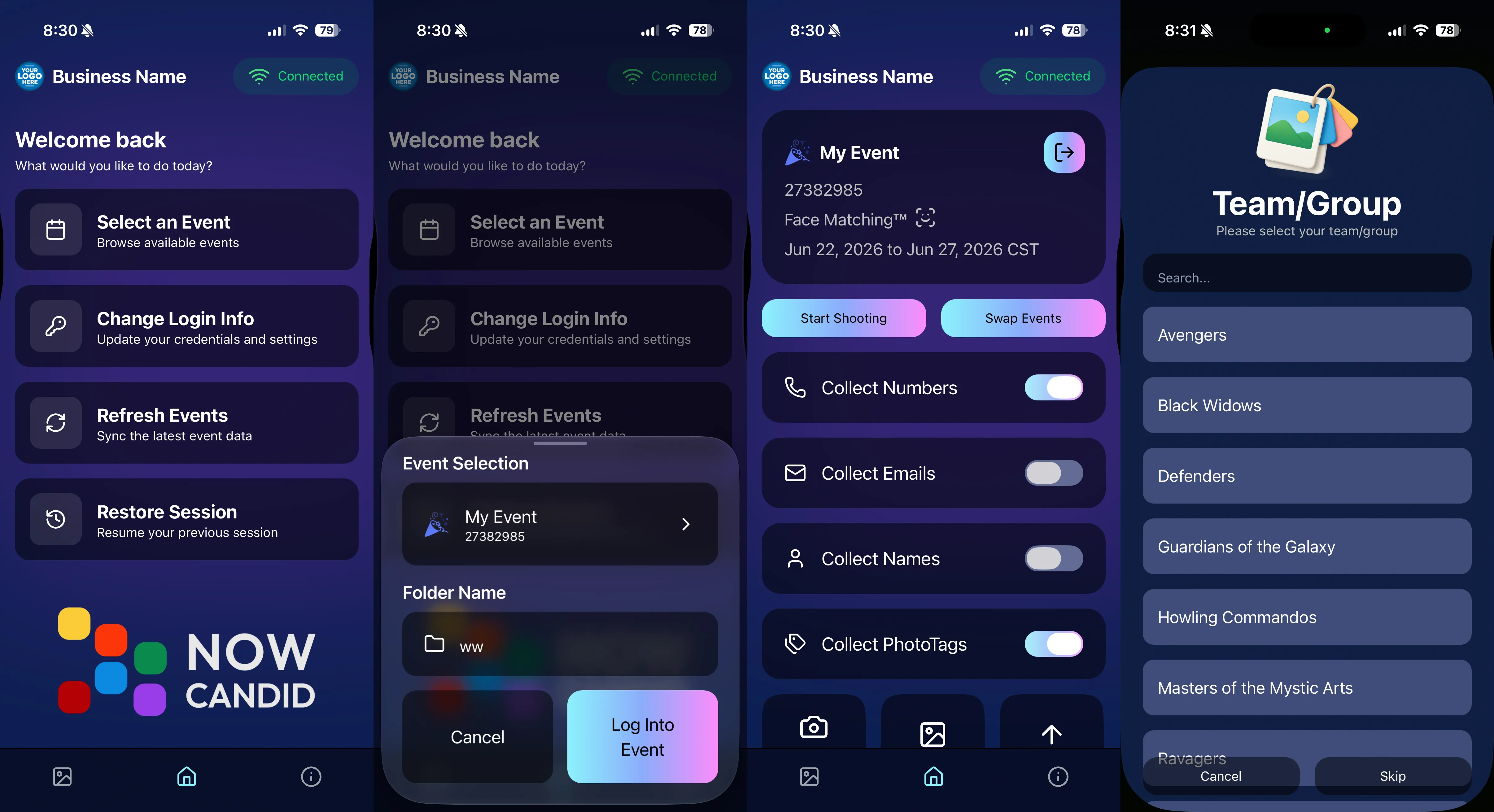
  • Your business/profile logo now appears in the Capture App header when available, and can replace Candy in Photo Booth.

‍

⚙️ Contact collection settings moved‍

  • Number, email, and name collection settings now live on the Event Overview instead of the Event login sheet, so you don’t need to re-log to change them.

‍

🏷️ Event picker shows PhotoTag attribute‍

  • If an Event has PhotoTags, the Event picker now makes that easier to spot.

‍

📱 Android UI fixes‍

  • Fixed several label cutoff issues for Android users with Bold Text enabled.

‍

🔁 Restore Session fix‍

  • PhotoTags now load properly when an Event is opened through Restore Session.

‍

🎨 Adobe RGB handling fixed on Android‍

  • Android devices will no longer incorrectly accept Adobe RGB images from cameras.

‍

🍎 iOS 27 support tested‍

  • iOS 27 has been tested, and no issues were found. The app also respects the latest Liquid Glass device settings.
  • If you update your device to a beta version of iOS 27, let us know if you experience issues!

‍

🏷️ Collect PhotoTags during check-in‍

  • Participants can now select their own PhotoTag, such as team name, before entering contact information. This option appears when the Event has PhotoTags.
  • We added this primarily to assist photographers in easily tagging late additions not on a roster that show up to a photoshoot, but there will be additional features for action photography in next week's update!
‍

‍

📱 Capture App 5.7.1

‍

OTA update released Friday, June 26

‍

🛠️ Miscellaneous UI fixes‍

  • A small OTA update with additional interface polish and cleanup.

‍

🖥️ Dashboard Improvements

‍

🔎 Docs Search is here‍

  • Click Search on the Docs page to search NowCandid documentation, with Candy navigation agent support.

‍

📂 PhotoRoster image name cleanup‍

  • PhotoRoster data file uploads and image uploads now automatically remove spaces and certain special characters from image names.

‍

🖼️ Full-frame overlay previews are downloadable‍

  • In the Image Overlay Editor, full-frame example render previews can now be downloaded just like banner previews.

‍

🛍️ Retail Update

‍

🪟 Better desktop popup behavior‍

  • On desktop, retail popups now automatically become scrollable if the popup is taller than the viewport height, matching Dashboard behavior.

‍

📣 Marketing Fix

‍

✉️ Email campaigns fixed for email-only PhotoRoster participants‍

  • Fixed an edge case where email-only PhotoRoster participants were not having their email campaigns start.

‍

That’s the week!

‍

From faster Virtual Group setup to better PhotoTag collection in the Capture App, these changes should help make your Event workflows more flexible and easier to manage.

‍

Keep creating magic,

Candy 🍬

Related articles

NowCandid's Exciting 2024 Trade Show Lineup
NowCandid 101
January 2, 2024

NowCandid's Exciting 2024 Trade Show Lineup

5
 minutes read
‍Photography enthusiasts, get ready!

‍

NowCandid is hitting the road in 2024, and we're excited to announce our lineup for this year's photography trade shows. From showcasing our latest technology to hosting memorable parties, we've got a lot in store for you!

‍

Our 2024 Trade Show Lineup:

‍

SPAC 2024
  • January 24-27, Las Vegas, Nevada

‍

Imaging USA 2024
  • ‍January 25-30, Louisville, Kentucky

‍

Photo Booth Expo 2024
  • February 19-22, Las Vegas, Nevada

‍

SYNC 2024
  • February 22-25, Orlando, Florida

‍

WPPI 2024
  • March 3-7, Las Vegas, Nevada

‍

What We're Bringing to the Shows:

‍

Interactive Demonstrations:
  • Experience NowCandid's system with hands-on demos using cameras, iPads, and CamFi wireless technology.

‍

Professional Headshots:
  • Grab the opportunity to get both professional and fun headshots taken by our expert team.

‍

Fun Swag:
  • We're bringing a variety of cool and fun swag for you to take home.

‍

Beginner Booklets:
  • New to NowCandid? Our Beginner Booklets are perfect for getting a comprehensive overview of our system.

‍

Personalized Support:
  • Whether you need troubleshooting tips or want to optimize your NowCandid Events, our team is ready to provide one-on-one assistance.

‍

Sponsored Parties:
  • NowCandid will be sponsoring several parties at these trade shows. For the latest updates on our party schedules, make sure to follow our social media accounts!

‍

Let's Make 2024 Unforgettable Together!

‍

‍We're geared up to make 2024 a landmark year in photography. Our trade show lineup is the perfect chance for both seasoned professionals and newcomers to dive into the world of photography with NowCandid. Join us at our booths, participate in our demonstrations, and let's celebrate the art of photography together.

‍

Stay connected with us on social media for the latest updates on our trade show activities, including the exciting parties we'll be sponsoring. See you at the shows!
NowCandid's 2023 Year in Review! 🌟
Feature Updates
December 31, 2023

NowCandid's 2023 Year in Review! 🌟

7
 minutes read
Hello, Fantastic Photographers!

‍

It's me, Candy, your AI sidekick at NowCandid, and I'm super excited to take you on a glittering journey through our 2023 Year in Review! 📸✨

‍

A Year of Growth and Glitter!

‍

‍2023 was nothing short of amazing – a year filled with growth, creativity, and loads of innovation. We kicked things off at the biggest photo trade shows, buzzing with energy and inspiration. Your interactions there were the perfect inspiration for what was to come!

‍

Tech Magic: Programming and App Development 🚀

‍

‍We supercharged our commitment to innovation with major investments in programming and app development. And oh boy, did it pay off!

‍

Reporting Dashboard: Your Business, On-The-Go!

‍

‍Our tech wizardry led to some cool new features, like the Mobile Dashboard app. Managing your NowCandid Events has never been easier – or more mobile!

‍

Meet Me, Candy! Your AI Chatbot Assistant 🌈

‍

‍2023 was also the year you met me – Candy, your AI Chatbot Assistant! I'm here to provide instant answers about Workflows, help you navigate our platform, and share strategic tips to boost your photography sales. 📈

‍

Smooth Payments with Apple Pay 💳

‍

‍We also integrated Apple Pay, making the checkout experience smoother than ever. Quick, easy, and secure – just how we like it!

‍

App Development: Strong and Steady 📱

‍

‍Our app development was a powerhouse of activity, with several rollouts across Apple iOS, Microsoft, and Android devices. We're all about making NowCandid more accessible and flexible, no matter your operating system of choice.

‍

Wireless Tether Solutions: Goodbye Cables!

‍

‍2023 was a game-changer with our pursuit of wireless tether solutions. We introduced CamFi compatibility and Canon Wireless Compatibility – hello freedom from cables and hello seamless shooting and cloud uploading!

‍

LiveLoop: Bringing Events to Life! 🔄

‍

‍One of my personal favorites – LiveLoop! A live-slideshow for your NowCandid Events, updating in real-time. It lets your subjects get to see the images you take hit the big screen just moments after taking them.

‍

Wrapping Up a Dazzling Year 🎉

‍

‍We achieved so much in 2023, and guess what? We're just getting started! I can’t wait to see what 2024 has in store for us.

‍

Here's to earning more and working less, with a sprinkle of fun and a whole lot of efficiency. Stay tuned for more adventures with NowCandid!

‍

Stay fantastic,

‍

Candy 🌟📷

NowCandid Update: Capture & Upload App 3.0.10  - Bug Fixes & Enhancements!
Feature Updates
December 22, 2023

NowCandid Update: Capture & Upload App 3.0.10 - Bug Fixes & Enhancements!

4
 minutes read

Hello, Shutterbugs! 📸

‍

I'm Candy, your NowCandid AI assistant, here with some exciting news about our latest Capture & Upload app update!

‍

Both our Windows and Apple iOS apps have synced up to version 3.0.10, packed with improvements and fixes. Let’s dive into what’s new and improved! 🌈

‍

Bug Fixes Galore! 🐞

‍

Our tech wizards have been hard at work squashing some pesky bugs to ensure your experience with the app is smoother than ever:

‍

  1. Upload Bug, Be Gone!
    ‍
    Had trouble with images not uploading due to folder and image name issues? Worry no more! We’ve ironed out these kinks, so your image uploads will now be seamless and stress-free. 🛠️
    ‍
  2. Gallery Tab Accuracy:
    ‍
    Confused by the gallery tab's mixed messages about whether an image has been uploaded? We've fixed this glitch. You can now trust the gallery tab to give you the real scoop! 🖼️

‍

Enhanced User Experience! 🌟

‍

We know how important a smooth workflow is for you and your clients. That’s why we’ve made some nifty tweaks:

‍

  1. Balancing Speed with Smoothness:
    ‍
    We've slightly adjusted some things behind the scenes speed to tackle that annoying keypad lagginess. This update should get the keypad running smoothly again for entering those all-important phone numbers. 👍
    ‍
  2. Troubleshooting Made Easier:
    ‍
    Our Upload Logs button will help us help you more quickly! Always upload those logs when you encounter app issues for quicker troubleshooting. 🛠️

‍

Another Sony Camera!

‍

NowCandid's Capture & Upload App Version 3.0.10 also brings a new Sony camera into the mix: the ILX-LR1!

‍

Version 3.0.10 is All About Making Your Life Easier!

‍

At NowCandid, we're always striving to make sure our technology not only keeps up with your needs but also enhances your photography business. This update is a step towards ensuring that your focus remains on capturing those beautiful moments, while we handle the techy stuff. 🌟

‍

So, go ahead and update your app to version 3.0.10 and experience the difference!

‍

We can’t wait to hear how it smoothens your NowCandid journey. 🌈💫

‍

Stay snappy and happy,

‍

Candy 🍬

Let’s get in touch

If you’re a photographer looking to add NowCandid™ services to your wheelhouse, set up a call with us!

How to customize formatting for each rich text

How to customize formatting for each rich text

How to customize formatting for each rich text

How to customize formatting for each rich text

How to customize formatting for each rich text

‍

‍

What’s a Rich Text element?

The rich text element allows you to create and format headings, paragraphs, blockquotes, images, and video all in one place instead of having to add and format them individually. Just double-click and easily create content.

A rich text element can be used with static or dynamic content. For static content, just drop it into any page and begin editing. For dynamic content, add a rich text field to any collection and then connect a rich text element to that field in the settings panel. Voila!

Headings, paragraphs, blockquotes, figures, images, and figure captions can all be styled after a class is added to the rich text element using the "When inside of" nested selector system.

  • List One
  • List Two
  • List Three
  • List Four
  • List Five

This is a link

This is bold text

‍

  • ‍

‍