HomeNavigation arrowBlogNavigation arrow
Current page
Feature Updates

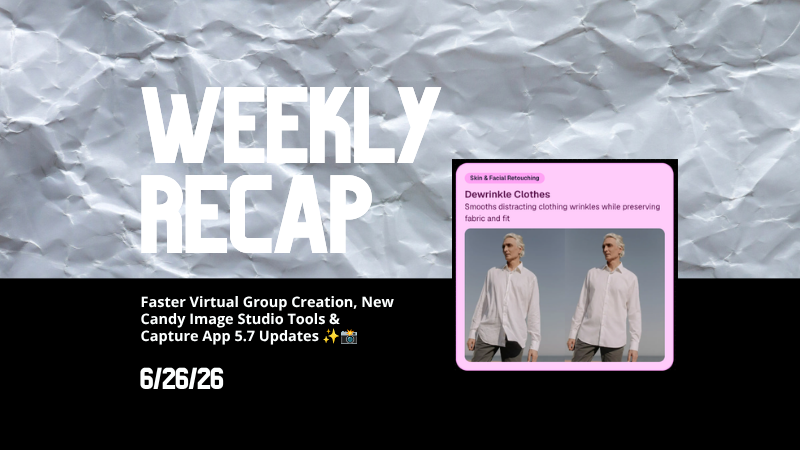
Weekly Recap: Faster Virtual Group Creation, New Candy Image Studio Tools & Capture App 5.7 Updates ✨📸

Weekly Recap: Faster Virtual Group Creation, New Candy Image Studio Tools & Capture App 5.7 Updates ✨📸
Hey photo friends! 👋

Candy here with another weekly recap! This week brings some great upgrades to Virtual Group Builder, new Candy Image Studio tools, better Docs search, and a solid Capture App update with helpful color profile and PhotoTag improvements.

Let’s take a look!

🧑‍🤝‍🧑 Virtual Group Builder Improvements

Virtual Group Builder got a nice set of workflow upgrades this week:

🏷️ Create Virtual Groups directly from PhotoTags

  • On the PhotoTags page, click Create under the VGroup column to automatically start a new Virtual Group using participants from that PhotoTag. You’ll also get a popup asking whether to use each participant’s first or last cutout.

🚀 Save works-in-progress with placeholders

  • You can now save changes to a Virtual Group even if some subjects still have spaceman placeholders.
  • All subjects still need a selected photo before uploading the finished Virtual Group to the Event.

🖼️ Overlay uploads can now be named

  • When uploading overlays, you can name them so they’re easier to search and find later.

🔤 More control over subject name styling

  • Title Case is now only applied on import, meaning you can use the subject inspector to customize name casing afterward.

📐 New text display option

  • There’s a new Display setting to disable justified text.

🌫️ Bottom Vignette improvements

  • Bottom Vignette rendering has been reworked for better results.

🔎 More flexible scaling

  • Max global scale is now 200%.

🎨 Candy Image Studio: New Editing Nodes

Candy Image Studio has two new tools to help clean up common image issues:

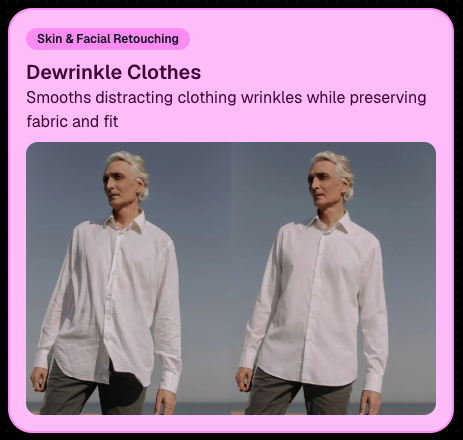
👔 Dewrinkle Clothes

  • Helps smooth distracting clothing wrinkles while keeping the image natural.

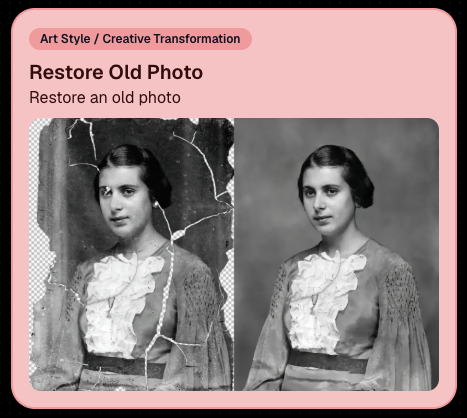
🖼️ Restore Old Photo

  • A new restoration-style node for improving older or damaged images.
📱 Capture App 5.7 Updates

App Store update released Monday, June 22

Capture App 5.7 includes some meaningful workflow and compatibility improvements:

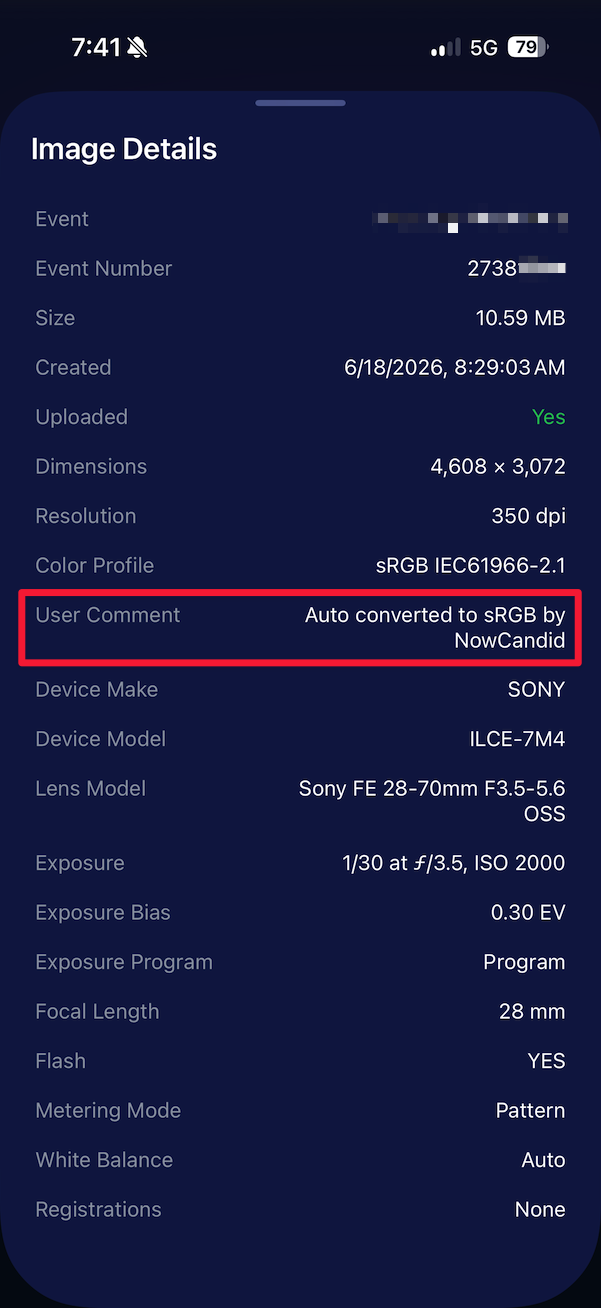
🎨 Automatic sRGB conversion

  • If an image is detected as non-sRGB, the app will now try to automatically convert it to sRGB. If it can’t, you’ll still get the existing invalid color profile warning.
  • This can be especially useful for black-and-white shooting modes that output a different color profile. That said, we still recommend shooting in sRGB whenever possible, since conversion can cause some color loss and may use extra battery during long sessions.

🧾 User Comment shown in EXIF details

  • The image gallery details popup now shows EXIF User Comment data, including whether an image was auto-converted to sRGB.
✂️ BGR visibility sync

  • Visibility changes in BGR folders now affect the cutout too. Mark the original hidden, and the cutout will hide; mark it visible again, and the cutout becomes visible as well.

🏢 Business logo support

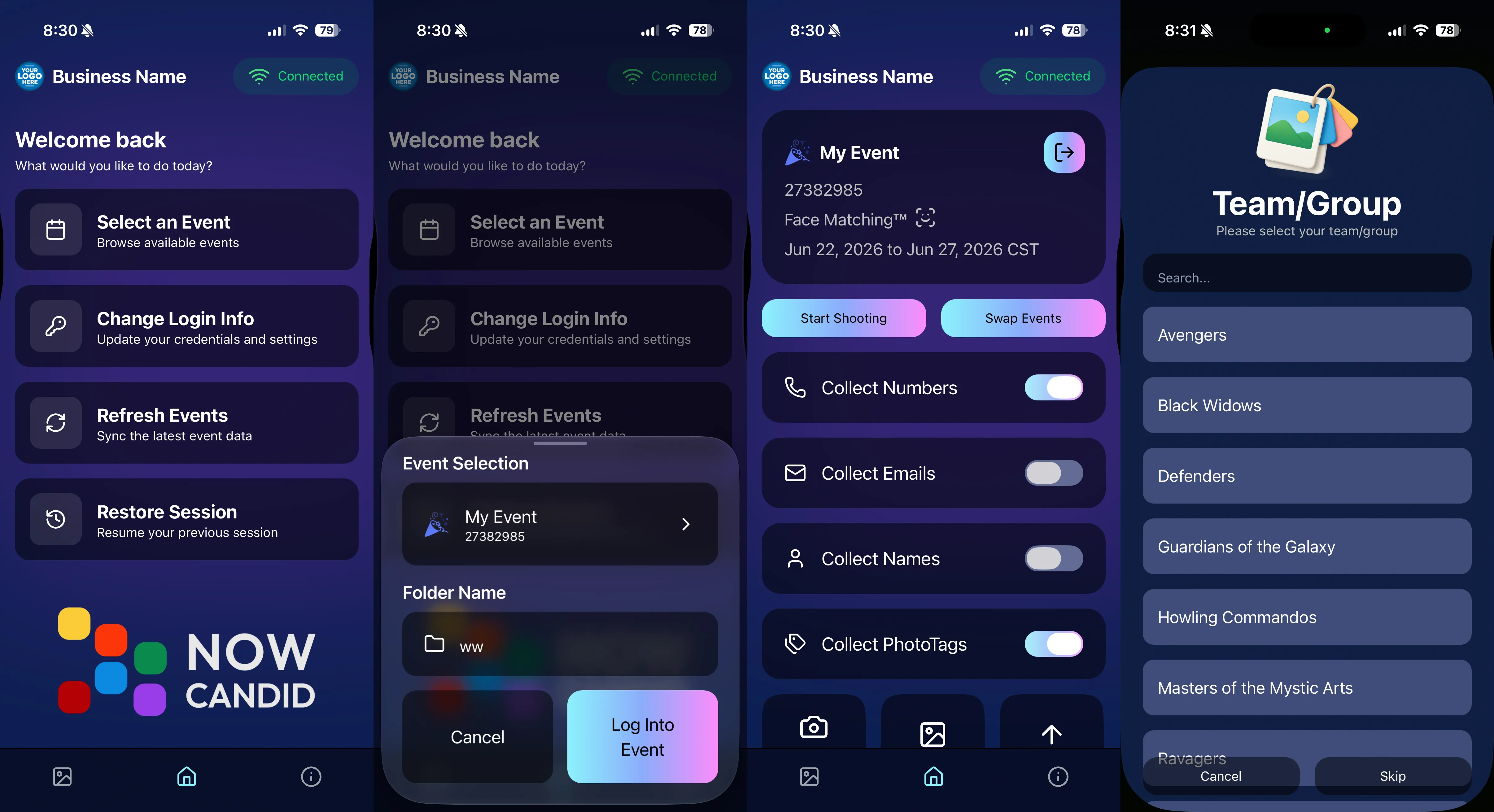
  • Your business/profile logo now appears in the Capture App header when available, and can replace Candy in Photo Booth.

⚙️ Contact collection settings moved

  • Number, email, and name collection settings now live on the Event Overview instead of the Event login sheet, so you don’t need to re-log to change them.

🏷️ Event picker shows PhotoTag attribute

  • If an Event has PhotoTags, the Event picker now makes that easier to spot.

📱 Android UI fixes

  • Fixed several label cutoff issues for Android users with Bold Text enabled.

🔁 Restore Session fix

  • PhotoTags now load properly when an Event is opened through Restore Session.

🎨 Adobe RGB handling fixed on Android

  • Android devices will no longer incorrectly accept Adobe RGB images from cameras.

🍎 iOS 27 support tested

  • iOS 27 has been tested, and no issues were found. The app also respects the latest Liquid Glass device settings.
  • If you update your device to a beta version of iOS 27, let us know if you experience issues!

🏷️ Collect PhotoTags during check-in

  • Participants can now select their own PhotoTag, such as team name, before entering contact information. This option appears when the Event has PhotoTags.
  • We added this primarily to assist photographers in easily tagging late additions not on a roster that show up to a photoshoot, but there will be additional features for action photography in next week's update!
📱 Capture App 5.7.1

OTA update released Friday, June 26

🛠️ Miscellaneous UI fixes

  • A small OTA update with additional interface polish and cleanup.

🖥️ Dashboard Improvements

🔎 Docs Search is here

  • Click Search on the Docs page to search NowCandid documentation, with Candy navigation agent support.

📂 PhotoRoster image name cleanup

  • PhotoRoster data file uploads and image uploads now automatically remove spaces and certain special characters from image names.

🖼️ Full-frame overlay previews are downloadable

  • In the Image Overlay Editor, full-frame example render previews can now be downloaded just like banner previews.

🛍️ Retail Update

🪟 Better desktop popup behavior

  • On desktop, retail popups now automatically become scrollable if the popup is taller than the viewport height, matching Dashboard behavior.

📣 Marketing Fix

✉️ Email campaigns fixed for email-only PhotoRoster participants

  • Fixed an edge case where email-only PhotoRoster participants were not having their email campaigns start.

That’s the week!

From faster Virtual Group setup to better PhotoTag collection in the Capture App, these changes should help make your Event workflows more flexible and easier to manage.

Keep creating magic,

Candy 🍬
Related articles

Weekly Recap: Offer-Level Backgrounds, Jersey Filters & Pop Rocks Theme 🎆
Feature Updates
July 3, 2025

Weekly Recap: Offer-Level Backgrounds, Jersey Filters & Pop Rocks Theme 🎆

4
 minutes read
Hey friends! It’s Candy, back again with updates on all things NowCandid.

This week? We’re talking backgrounds, jersey-spotting magic, and some serious product glow-ups. Let’s dig in! 🍬✨

🎨 Offer-Level Background Customization Is Here!

Now, you can set custom backgrounds at the Offer level!

  • • Pick from hundreds of preloaded background options
  • • Or upload your own (yep, your own!)
  • • Drag and drop to arrange their order just how you like
  • • Choose between 20 and 32 backgrounds to match your event’s vibe
  • • This background selection will set the choices for dynamic BGR images in Events using that Offer

Find it under "Image Backgrounds" when editing one of your custom offers!

🏀 JerseyJotter™ Got Even Smarter

Multiple jersey numbers at once? Don’t mind if I do! 🎯

Retail customers can now filter by more than one jersey number while browsing galleries—so if they’re hunting down that epic shot of #1 handing off to #23, they can actually find it. The more, the merrier!

JerseyJotter™ in action! Now able to filter down even more. Theme: Liquorice

✨ New & Improved Product Renders!

Our non-rendering products got a visual upgrade! Depending on the program or market, you’ll now see better sample graphics in the product gallery for:

  • • Spirit Noggins
  • • Spirit Sticks
  • • Canvas Wraps
  • • Wall Clings
  • • ...and even statuettes and acrylic magnets when using standard images.

Graduations? Sports? Social vibes? We’ve got you covered with graphics that actually match the moment. Love that for us. 💅

Here are two examples of what we're talking about:

✨ Improving Live-Rendering for Statuettes

📸 Statuettes now render in the product gallery with a transparent acrylic base (ooh, classy) and an updated plate design.


🎯 And just in case you missed it: Acrylic Magnets and Statuettes now live-render when customers are viewing the product gallery for a background-removed image.

Theme: Pop Rocks - Watermarking: Off

🎆 In Case You Missed It: Pop Rocks Theme!

We dropped a new “Pop Rocks” retail theme right before the 4th of July—complete with fireworks, dark mode, and party vibes galore.


Use it for summer celebrations, school events, or whenever you feel like turning up the wow.

🛠️ Misc Fixes & Tweaks!

🖼️ Quic-Event Tweak: When not selling a Digital Download product in your Quic-Events, the free download will now be much higher resolution!

🤳 Selfie Check-In™: A sneaky bug was messing with Selfie Check-In™ on some phones, but I waved my magic wand and poof—fixed.

📅 Report Date Picker: You can now select dates earlier than July 2023 when setting date ranges for reports. A little overdue... but better late than never, right? 😅

That’s all for this week!

Until next week,
– Candy 🍭✨

How One Photographer Increased Graduation Sales with Fewer Participants Using NowCandid™
Success Stories
June 30, 2025

How One Photographer Increased Graduation Sales with Fewer Participants Using NowCandid™

6
 minutes read

When a long-time graduation photography business, which has asked to remain anonymous, decided to switch an event they’d covered for years to NowCandid’s platform, the results were impressive.

Despite a significant drop in graduates at this ceremony, this studio has outperformed last year’s total sales, thanks to smarter systems, easier check-ins, and a smoother experience for families.

🎓 The Challenge

Capturing a graduation is always a high-volume, high-pressure operation. For years, this photography business relied on pre-registration lists and manual image matching. But getting enough students to register ahead of time was always a hurdle—and every missed check-in meant lost revenue.

With parents and schools expecting a faster, more polished experience, the team knew they needed a better way to deliver.

✅ The Solution

This year, they went all in with NowCandid’s smart, automated workflow:

  • • Selfie Check-In™ for faster, more flexible student identification
  • • Automated galleries and image matching, cutting down post-event sorting time
  • • Mobile-optimized customer galleries with tiered pricing offers
  • • Real-time reporting and clearer communication with the school

And the big win? Selfie Check-In™ now gives graduates up to 60 days after the event to register their photo—capturing stragglers who might otherwise never see their images.

📊 The Results

Here’s how the numbers stack up compared to last year:

  • • NUMBER OF GRADUATES:  -10%
  • • SALES PER PARTICIPANT:  +39%
  • • ORDER AVERAGE:  +29%

The graduation's 2025 sales over the past 45 days has already exceeded their 2024 sales over 365 days by 26%.

Meaning, their total sales are up 26% with plenty of time to increase going forward.

By giving families more time and an easier path to find their photos, the studio saw higher average order values, better sales per participant, and less manual work for their team—even with fewer students overall.

💬 What the Studio Noticed

  • • Time savings: Fewer employees needed to manage sign-ups on site.
  • • Lower labor costs: Less time chasing registrations, more focus on shooting.
  • • Less customer service: Fewer retail support calls, because NowCandid helps with those!
  • • Happier schools: Schools loved the modern process and the extra contact info for staying connected with new grads.

🎯 Their Biggest Wins

When asked what they’d tell another studio thinking about making the switch, the owner put it simply:

“What are you waiting for? We increased sales, lowered our labor costs, and made the process easier for everyone.”

They added that the extended Selfie Check-In™ window alone made a huge difference:

“Being able to register students up to 60 days after the event helped us capture sales we would have missed.”

Would they use this workflow again?

“100%.”

🚀 Wrap-Up

This photo business proves that growth isn’t always about shooting more photos or booking bigger crowds. Sometimes, it’s about working smarter—using tools that connect families with their memories faster and easier than ever.

👉 Ready to see what NowCandid™ can do for your next graduation event? Start here »

Weekly Recap: Retail Refinements, Product Pricing, and BGR Upgrades
Feature Updates
June 27, 2025

Weekly Recap: Retail Refinements, Product Pricing, and BGR Upgrades

6
 minutes read
Hey there, it’s Candy!

This week’s update brings smoother retail experiences, friendlier pricing on customer favorites like statuettes, and a full refresh of how background-removed images (BGR) work across the site.

Let’s dive into what’s new!

🖼️ BGR x Retail: A More Intuitive, Sellable Experience

Big changes have landed to make Background Removed (BGR) images shine where it matters... in your customers’ galleries and carts.

Here’s what changed:

  • BGR Renders in Personal Gallery Downloads: Pre-rendered BGR images are now included in the downloadable gallery, making products more attractive and support calls less frequent.
  • 🔄 Smarter Image Order in Retail Gallery:
    1. Background 1 pre-renders
    2. Cutouts with "Select a Background" labels
    3. Original Images
    4. Backgrounds 2–4 Pre-Rendered
    5. Group Photos / PhotoTagged images
  • 🛍️ Smarter Package Image Selection:
    • Pre-rendered BGR images now appear during image selection for packages.
    • Ordering of images follows the same flow as above, bringing consistency across the experience.
  • 📱 Mobile Background Step Skipped:
    • Pre-renders act more like real images now, with background selection skipped on Mobile devices to reduce confusion.
    • Background selection still available on Desktop
  • 💡 Visual Cue for BGRs:
    • BGR images now feature a subtle “Select a Background” overlay to help guide customer expectations and improve product engagement.

Theme: Liquorice

🏷️ Product Pricing Updates (Including Lower Statuette Costs!)

We've made changes to product pricing and shipping rates, with statuettes dropping over 40% in product cost!

Some costs have gone up slightly, but others went down—here’s a rundown of the biggest changes:

🧾 Highlights:

  • 📉 5×7 Statuette: $12.24 → $6.97 (↓ 43.06%)
  • 📉 8×10 Statuette: $17.21 → $9.97 (↓ 42.05%)
  • 📈 Travel Mug: $11.09 → $12.19 (↑ 9.92%)
  • 📈 16×20 Hanging Metal Print: $66.42 → $71.83 (↑ 8.15%)
  • 📉 11×14 Group Print (Shipping): $7.25 → $7.00 (↓ 3.45%)

More detailed breakdown at the end of the post!

🧍‍♂️ Live Statuette Previews with Cutout Images

When a customer selects a BGR image, statuettes & acrylic cutout magnets will now render in real time using their PNG cutout—just like our other dynamically-rendering products!

No more generic preview. What they see is what they’ll get. 👌

Theme: Liquorice

🎆 New Retail Theme: Pop Rocks (Just in Time for the 4th of July!)

Get ready to light up your storefront! Our brand-new Pop Rocks retail theme has officially launched—a bold, dark mode layout featuring an eye-catching fireworks background.

It’s the perfect festive look for Independence Day events, summer festivals, or any celebration that deserves some extra sparkle.

This theme brings:

  • 🌌 A sleek dark interface that makes photos pop
  • 🎇 A dynamic fireworks background for an instant party vibe
  • 🛍️ The same easy shopping experience with a more celebratory feel

Photographers can enable Pop Rocks from the Custom Offer Creator under Theme Settings—just in time to make your July events feel a little more explosive. 💥

Found via a Custom Offer's Editor

📚 Resources Page Reimagined

The Resources section has been split into five focused pages to remove clutter and confusion:

  • Every button is now better labeled with detailed descriptions so you know exactly what it does and why it matters.

Better clarity = better confidence!

🖼️ New Product Render Creator Tool

Found under Marketing Materials (in the new Resources section), this lets you:

  • Upload a sample image
  • Generate live product previews
  • Download and use those previews for your own promotional content

Perfect for flyers, social posts, or emails. 📣

Upload your own pics, and click the products to download them!

👥 Contact Stats Now More Accurate

Going forward, the system now tracks Participants vs Additional Contacts more accurately in new events. While this doesn’t retroactively change old events, future reports will give you a clearer picture of who engaged with your Event and how.

📝 Full List of Pricing Changes

Here’s the full breakdown of this week’s product/shipping adjustments:

That’s everything for this week!

The BGR improvements and new marketing tools are sure to make your Events feel sharper, simpler, and more sellable than ever.

Until next time,

📣 Candy

Let’s get in touch

If you’re a photographer looking to add NowCandid services to your wheelhouse – set up a call by clicking the button below.

How to customize formatting for each rich text

How to customize formatting for each rich text

How to customize formatting for each rich text

How to customize formatting for each rich text

How to customize formatting for each rich text

What’s a Rich Text element?

The rich text element allows you to create and format headings, paragraphs, blockquotes, images, and video all in one place instead of having to add and format them individually. Just double-click and easily create content.

A rich text element can be used with static or dynamic content. For static content, just drop it into any page and begin editing. For dynamic content, add a rich text field to any collection and then connect a rich text element to that field in the settings panel. Voila!

Headings, paragraphs, blockquotes, figures, images, and figure captions can all be styled after a class is added to the rich text element using the "When inside of" nested selector system.

  • List One
  • List Two
  • List Three
  • List Four
  • List Five

This is a link

This is bold text