HomeNavigation arrowBlogNavigation arrow
Current page
Feature Updates

Weekly Recap: Express Checkout Confirmations, Capture App Speed Testing, and a New Lightroom Classic Plugin

Weekly Recap: Express Checkout Confirmations, Capture App Speed Testing, and a New Lightroom Classic Plugin
Hey photo friends! 👋


This week’s updates are all about clearer customer actions, smoother retail performance, and new tools that speed up upload workflows. Plus, a strong round of Capture App polish (iOS & Android OTA) and some important Dashboard + Marketing fixes.

Let’s jump in. ✨

🛍️ Retail: Fewer Mis-clicks, Better Previews, Faster Feel

✅ Express Checkout confirmation (all express checkouts)

All express checkout flows now show a confirmation popup that clearly displays the shipping address selected, with options to place the order or go back. It also includes an invalid address popup.

Previously, people would sometimes purchase without double checking their express-checkout-method's default shipping address. So, this change is designed to reduce address mistakes and improve customer experience!
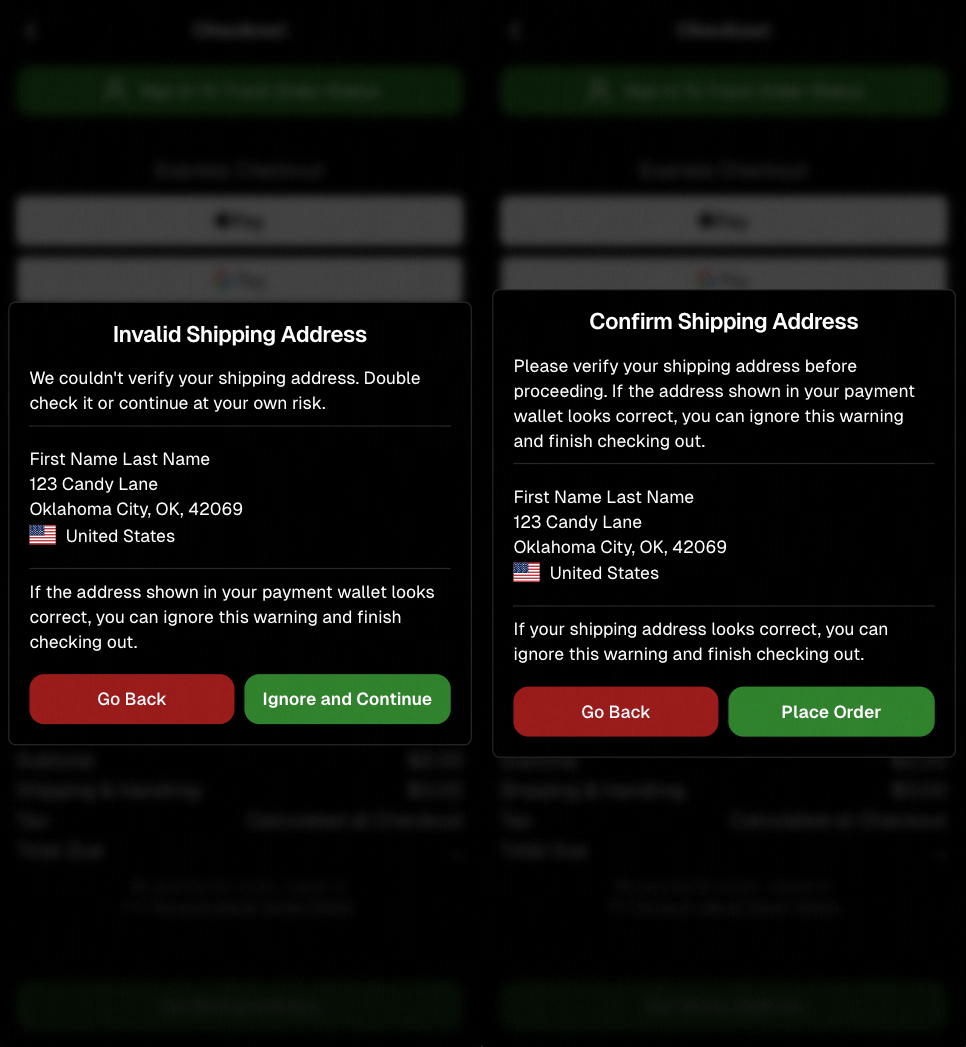
Confirmation popup now clearly displays shipping address confirmation.

🧠 Better UI + performance improvements

  • Improved local rendering (performance, memory usage, and task handling) — originally aimed to improve the retail experience on low-end devices, but it should make most devices feel faster!

  • Native “leave page” confirmation on supported browsers/devices (desktop + Samsung back button) when navigating away from an event page (refresh/back).
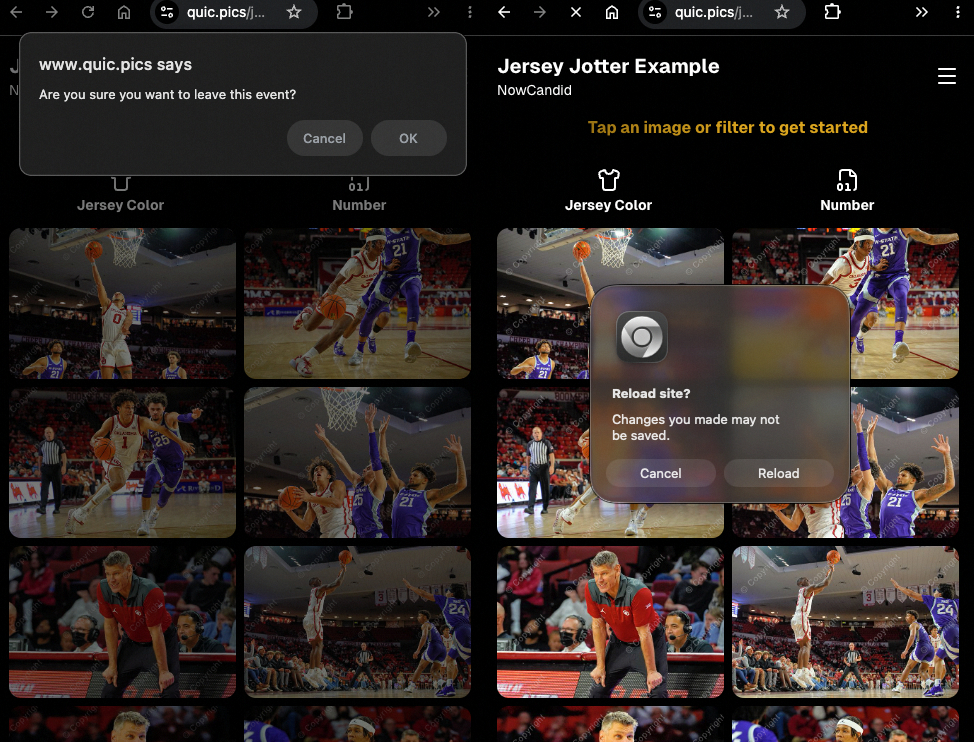
Leave page confirmation

🖼️ Clearer package download expectations + better pickers

  • Personal Gallery Downloads on store sheet and package editor now show “+X Images” in the configurator when there are more than 4 images—so customers don’t think they only get what’s previewed.
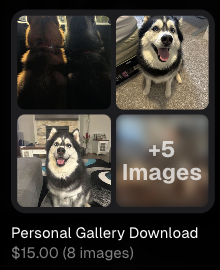
Personal Gallery Download "+X Images"

    • Personal Gallery Download products inside packages can now be clicked to preview contents.

    • Desktop product/package image pickers are now two columns (like mobile), allowing larger image preview during selection.
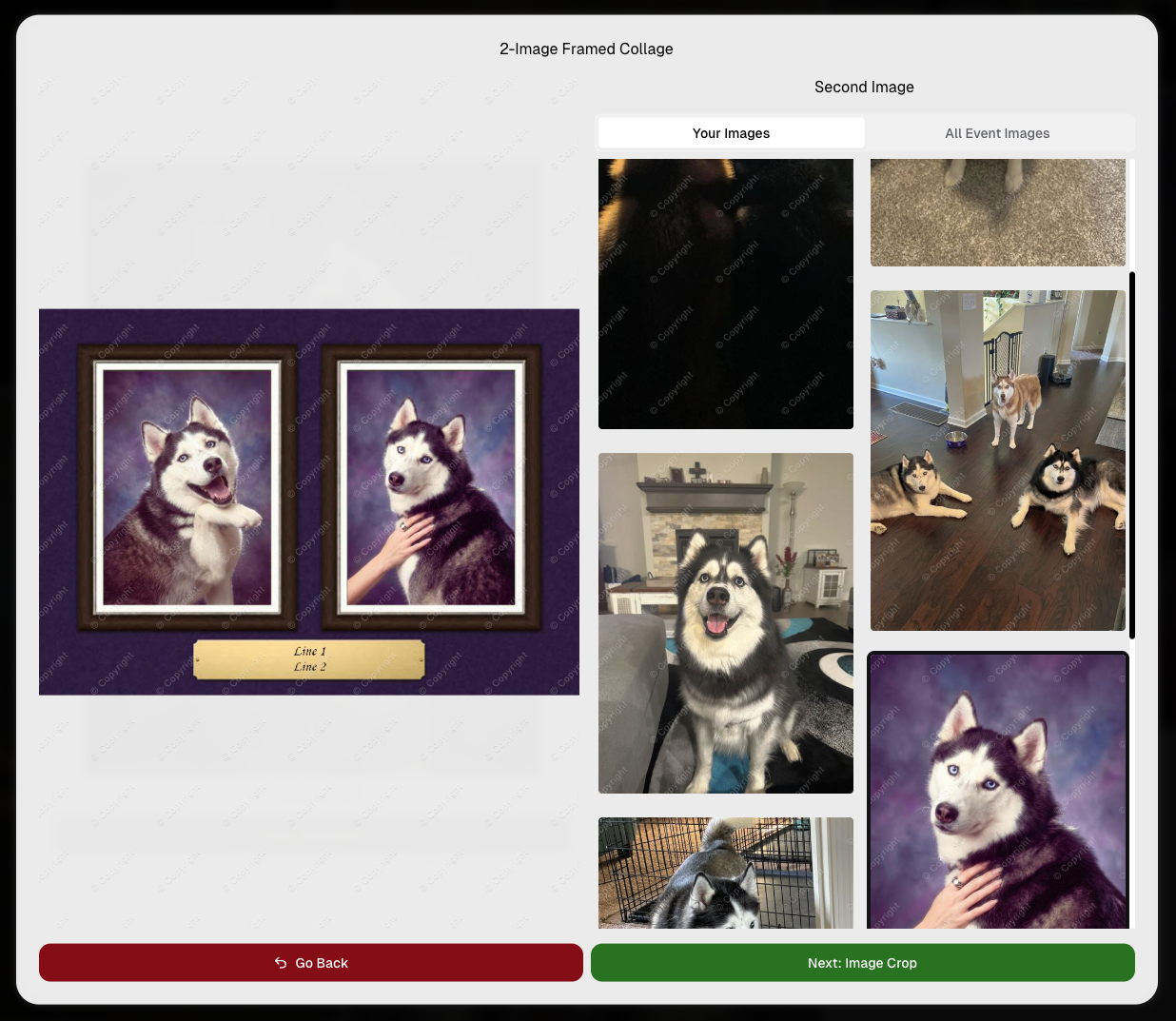
    Larger two column image previews

      • Image Filters landing popup now includes “Browse all photos without a filter” so customers who think they must pick a filter know they can also just browse!
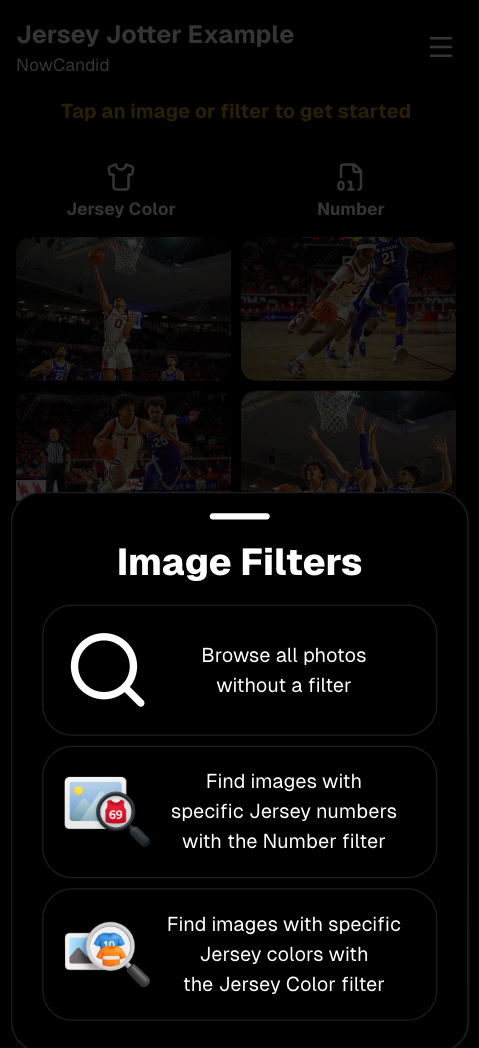
      Image Filters landing popup

      🧩 Retail fixes worth noting

      • Fixed a slashed discount amount showing on week 3 when there is no higher amount.
      • Fixed a GalleryGuard edge case that could close the retail site on some Android devices that support mobile context menus when long-pressing.
      • Fixed a race condition where a Group-by-Face gallery loaded from URL params could show default results instead of the filtered view.
      • Fixed an edge case where manually assigned images marked as group could behave like non-group images on retail.

      📱 Capture App OTA: 5.6.1 & 5.6.2 (iOS & Android)

      🌐 NEW: Network Speed Test (5.6.1)

      A new Network Speed Test button is available in Resources. Tap Run Test to check download speed, upload speed, and latency to NowCandid servers (so results may differ from Google/Ookla). It’s a quick test (downloads 5 MB, uploads 2 MB) and is useful for diagnosing weak or congested service during events.

      Mbps is a standard measurement for connection speeds, and 1 megabit per second (Mbps) is 0.125 Megabytes per second (MB/s). So 8 Mbps is 1 Megabyte per second, max. For example, with images that are 10 Megabytes in size, a speed of 8 Mbps would take a minimum of 10 seconds to upload. When speeds are very slow, image uploads may be impossible due to uploads timing out and restarting. In these cases, open the app when you have a stronger connection and all your images will start going up!
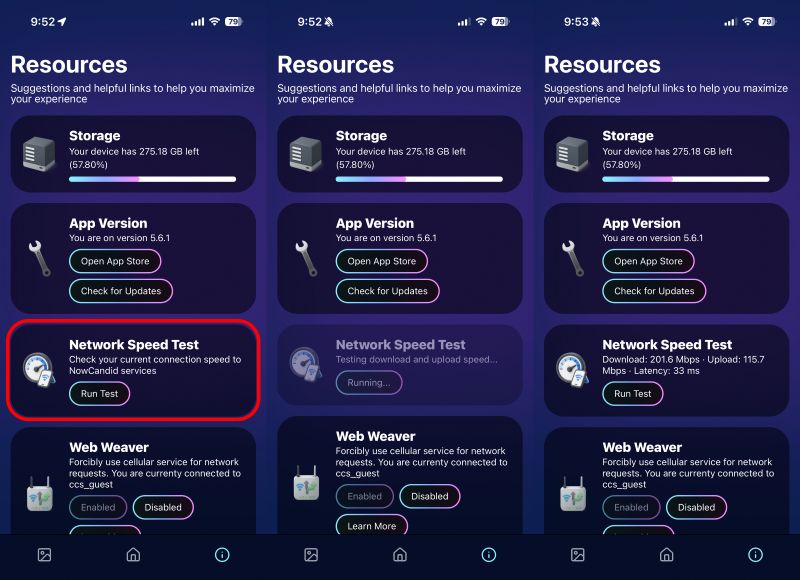
      Network Speed Test

      🎪 Photo Booth + Selfie Check-In Station UI upgrades (5.6.2)

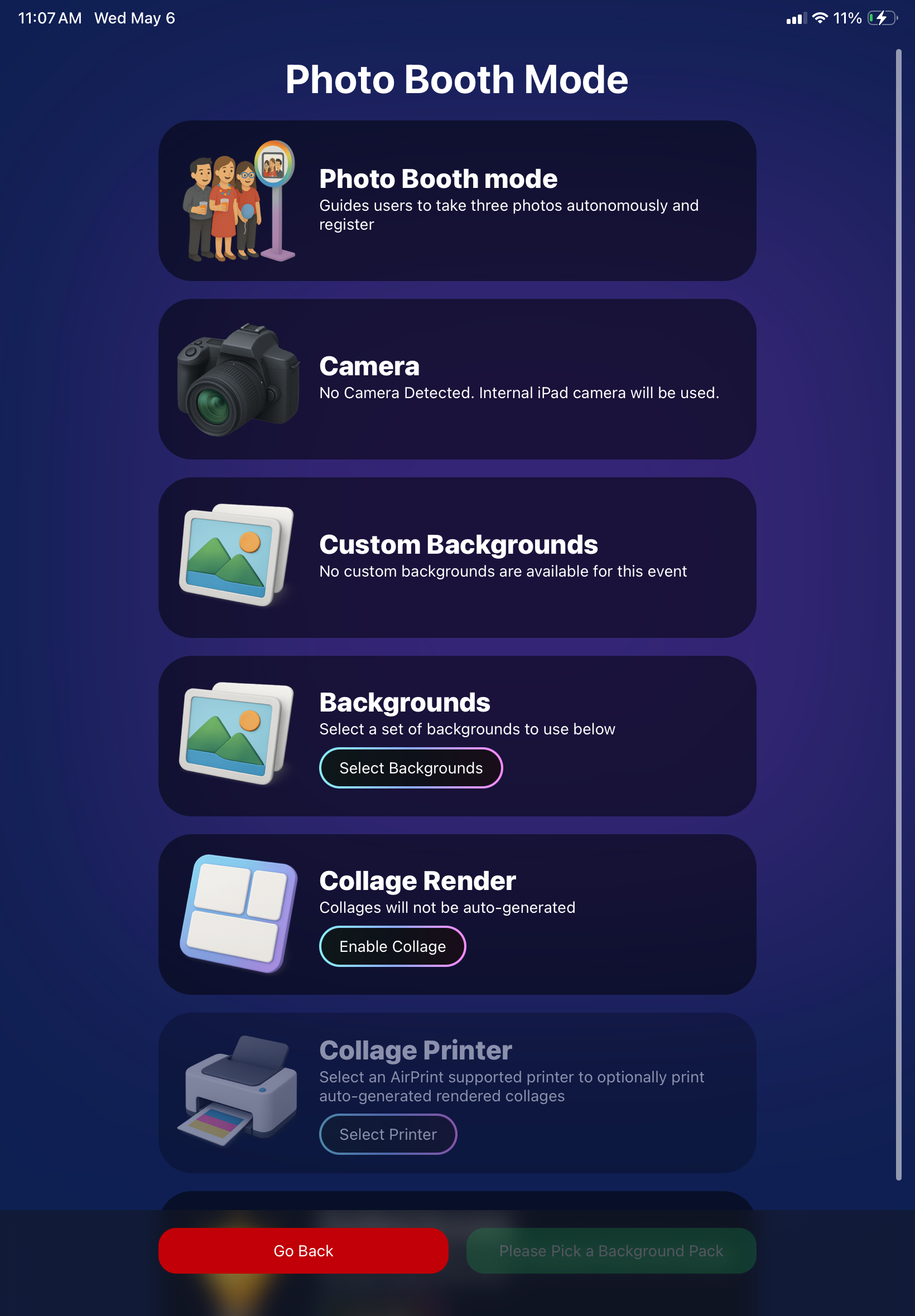
      • Photo Booth landing page updated to be more user-friendly (always-visible scrollbar, updated text, sticky go back/continue buttons, red/green emphasis, and a popup explaining why Continue is greyed out).
      • Selfie Check-In Station landing page updated with red/green Go Back / Begin buttons.
      • New dropdown icon beside Group Photo toggle (when an event has PhotoTags) to better display there are additional options to assign PhotoTags.
      • Fixed edge case cancel/continue behavior on Selfie Check-In Station when no contact info was entered.
      🧩 NEW: Lightroom Classic Plugin (Official)

      We’ve launched an official Lightroom Classic plugin to upload images to NowCandid events directly from Lightroom Classic.

      Key notes:

      • Lightroom Classic only
      • Same image rules apply (color profile, DPI, etc.)
      • Uses Capture App login
      • Only events within 60 days of event start date show in the selector
      • Image Details → Logs will show “Uploaded from NowCandid Lightroom Plugin”
      • Docs include guide/download/installation: https://app.nowcandid.com/docs/tools-more/lightroom
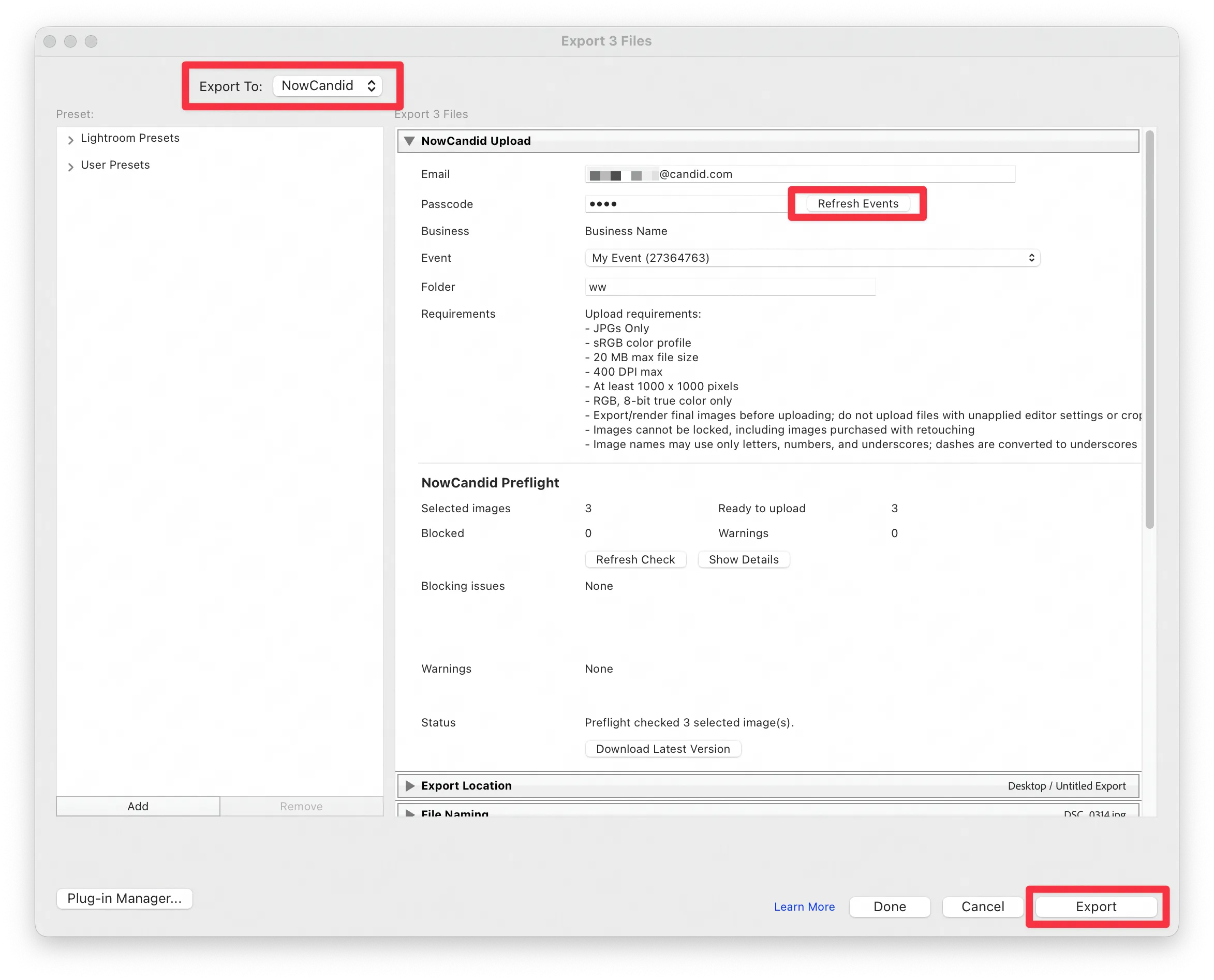
      Lightroom Classic Plugin

      Upload from NowCandid Lightroom Plugin

      🖥️ Dashboard: Upload & Roster Clarity + Small UX Wins

      • Event roster upload and PhotoRoster upload now warn about every unrecognized column, making it easier to spot misspellings (especially for optional columns).
      • Participant list page download now puts additional contacts into columns instead of rows.
      • Participant list download now puts merged contacts into their own row if they have different first/last names.
      • Image upload naming cleanup:
        • spaces/parentheses now automatically become underscores (e.g., Image (2)Image_2)
        • names ending in z now get a trailing underscore (e.g., ImagezImagez_)
      • Candy got even better at using the new Docs for responses.
      • Password reset now shows a clear “Your link has expired” screen (links expire after 24 hours).
      • Fixed participant filter inside another participant’s manual assign/unassign page not working properly.
      • Participant Details PhotoTag assignment UI: merged participants no longer incorrectly show PhotoTags as assigned.
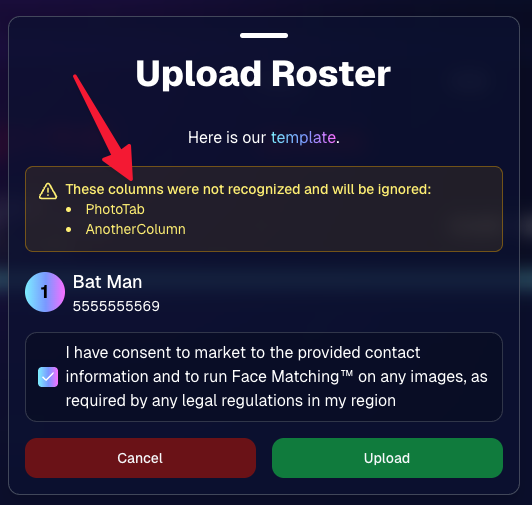
      Upload Roster now warns about every unrecognized column.

      📣 Marketing Fixes

      • Fixed edge cases where galleries that were only AI-edited images could cause follow-up email marketing issues and show as 0 images on Participant List.
      • Fixed Day0 marketing edge case not starting if gallery is just AI-edited images.
      • SMS gallery links now include “View photos:” before the gallery URL to reduce confusion where some users thought the gallery link was an unsubscribe link.

      That’s the week! 💫

      Between the Lightroom Classic plugin, the Capture App’s new Network Speed Test, and retail improvements that reduce confusion (and improve performance), this week was packed with practical wins you’ll feel right away.

      Keep it sparkly,

      Candy

      Related articles

      Grad Season 2024 Mid-Season Report: Small Grads Outperforming Expectations
      GradPics
      May 22, 2024

      Grad Season 2024 Mid-Season Report: Small Grads Outperforming Expectations

      6
       minutes read

      We have talked about graduations a lot in our blog posts lately, as we try to help photographers be as prepared as possible for graduation season this year. And now, it's time to look at some numbers, and see what kinds of Events are performing well so far. After which, we'll discuss the findings.

      Small Graduations Leading the Way 🌟

      As the title implies, small graduations (graduations in the 50-250 graduate range) have been some of the top performers so far this grad season. While some larger graduations have more total sales overall thanks to the large number of participants, certain smaller graduations have sales per graduate averages that blow large graduations out of the water.

      Below are a few examples of GradPics Now graduations that have taken place in either April or May of this year. Keep in mind these are sales so far and being these Events are recent, these numbers will continue to rise.

      Note: Many details have been removed, summarized, or approximated to preserve privacy for all parties involved with these Events.

      • An Oklahoma Medical School Graduation
        • ~100 graduates
        • ~$48 sales per graduate
        • ~$4,800 in sales

      • A Kansas Medical School Graduation
        • ~150 graduates
        • ~$49 sales per graduate
        • ~$7,350 in sales

      • A Texas Ring Ceremony
        • ~200 graduates
        • ~$46.50 sales per graduate
        • ~$9,300 in sales

      • A Louisiana High School Graduation
        • ~75 graduates
        • ~$31 sales per graduate
        • ~$2,325 in sales

      • A Small Arkansas College Graduation
        • ~250 graduates
        • ~$31.50 sales per graduate
        • ~$7,875 in sales

      5 quick examples, 5 different locations, and even some variety in terms of the type of ceremony. But all of them were relatively small. And yet, their sales per graduate averages far exceed the $20 sales per graduate benchmark we expect photographers to hit when doing a good job of implementing GradPics Now's best practices.

      Why Are Small Graduations Excelling? 🤔

      Are these more intimate graduation ceremonies more conducive to better photography? OR, is this a question of staffing? Perhaps it is simply easier to execute Selfie Check-In well, and take more pictures per graduate when there are fewer graduates to photograph. Several of these top-performing Events are related to medical schools; could that demographic have a lot of overlap with photo-buyers?

      As always, the answer is likely a mix of all the above. However, I suspect that the most influential factor is the staffing.

      Many photographers, especially those using NowCandid, are either just branching out into graduations for the first time or are just beginning their journey of scaling up and growing their photo business. To maximize your graduation sales, you need good quality pictures and a lot of them. Getting a strong image per graduate count is one of the best ways to improve your sales and sales per graduate averages - second only to doing a good job with Selfie Check-In for the Event.

      Photographers that are new to graduations or still working to grow their business likely cannot send a large enough staff to large graduation ceremonies to cover them as effectively as the same staff could cover a smaller graduation. With a better photographer-to-graduate ratio, it becomes easier to focus on getting good pictures and increasing your image per graduate averages, and thus, better sales per graduate averages.

      What This Means for You 📊

      All in all, following the best practices we have outlined in our recent graduation-related posts are the best ways to increase your graduation sales and to provide both yourself and your customers with a smooth, streamlined graduation experience:

      But perhaps we have not talked enough about proper staffing, as the exceptional averages at certain smaller ceremonies outshining NowCandid's larger ceremony averages are noteworthy.

      And of course, maybe most importantly of all, is to realize that small graduations can be extremely lucrative when care is put into them! So, consider booking some of the smaller graduations you may have shied away from in the past. Plus, it can be helpful to avoid putting all your eggs into just a few large graduations you have. Schools can be fickle, and you never know when one may decide to switch providers.

      That's all for now!

      Happy snapping,

      Jack III

      Why GradPics Now?
      GradPics
      May 16, 2024

      Why GradPics Now?

      7
       minutes read

      Streamline Your Graduation Photography Business with NowCandid! 🎓📸

      Hey there, amazing photographers! It's Candy, your cheerful guide from NowCandid, here to make your graduation season smoother and more profitable than ever. 🌟

      With the grad season in full swing, NowCandid is your ultimate partner in simplifying your workflow, boosting your sales, and keeping your customers delighted. Let's explore how NowCandid can revolutionize your photography business this graduation season!

      Why Choose NowCandid for Your Photography Business?

      Graduations are a golden opportunity to capture cherished memories and grow your business. But handling the logistics can be overwhelming. That’s where NowCandid comes in, making the entire process hassle-free for you.

      1. Selfie Check-In: Streamlined Image Delivery

      Our Selfie Check-In feature collects contact information and selfies from event participants, creating a reference image paired with their contact info. This enables our face matching process to automatically organize photos into personal galleries and deliver links via text and email. It’s a convenient and efficient tool for both you and your clients, ensuring the right images get to the right people right away. 🎉

      2. Live-Uploading: Flexible Photo Upload Options

      With NowCandid, you have the flexibility to upload photos during the event or right after. During the event, tether your camera to a cellular-enabled device like an iPhone, LTE iPad, or LTE Windows tablet for real-time uploads. Alternatively, you can upload photos via the web dashboard after the event. Either way, once an image matches a subject's selfie, it’s added to their personal gallery and delivered instantly. 🚀

      3. Face Matching: Boost Your Sales

      Our Face Matching technology doesn’t just save you time – it can significantly increase your sales. Here’s how:

      • More Photos, More Sales: With Face Matching, you can take more photos at the graduation without worrying about organizing them. The more photos per graduate, the higher the chances of making a sale and increasing the average order size.
      • Faster Marketing: Face Matching allows you to market photos to subjects faster than ever. Quick delivery capitalizes on the emotional high of the event, making subjects more likely to purchase. Delaying image delivery for editing often results in missed sales opportunities.

      4. Background Removal: Offer More Choices to Your Clients

      Our automated Background Removal service gives your clients more options by removing the background behind subjects, allowing them to choose from a variety of backgrounds in different colors and settings. This feature turns one image into multiple choices, enhancing customer satisfaction and increasing sales. 🌈

      Boost Your Sales and Simplify Operations

      Graduation season is a prime time to maximize your revenue. Here’s how NowCandid can help you achieve that:

      Transparent Reporting: Monitor Your Success

      Our platform provides transparent reporting, giving you insights into sales per order, profit margins, and order statuses. With these metrics at your fingertips, you can make informed decisions to grow your business. 📈

      No Subscription Fees: We Earn When You Do

      At NowCandid, we succeed when you do. Our revenue model is based on a portion of your sales, with no subscription fees. This means our goals are perfectly aligned with yours, ensuring we always strive for your success. 💪

      Customer Support: We’ve Got Your Back

      NowCandid handles retail customer support, allowing you to focus on photography while we take care of your clients’ queries and issues. This means happier customers and less stress for you. 📞

      Integrated Lab: Better Deals and Faster Delivery

      With NowCandid’s own lab, you get a better deal (financially) than you can find anywhere else. This setup simplifies support by eliminating the need for multiple vendors for software and fulfillment.

      Plus, our fully integrated, all in-house software-to-lab system ensures optimal image delivery times, so your clients receive their photos faster and with superior quality. 🏭

      Schedule a Call and Maximize Your Potential!

      Ready to make this graduation season your best yet? Schedule a call with us via our Calendly to review best practices, discuss strategies, and get personalized tips to enhance your business. Our team is here to support you every step of the way. 📞

      Join the NowCandid Family Today!

      With NowCandid, you have all the tools you need to streamline your operations, boost your sales, and keep your customers delighted. Let's make this graduation season a massive success together. Sign up today and experience the NowCandid difference! ✨

      Happy photographing! 📸

      Warmest regards,

      Candy 💖

      Darwin's Quic Tips for Mastering Graduation Photography
      GradPics
      May 15, 2024

      Darwin's Quic Tips for Mastering Graduation Photography

      5
       minutes read
      Graduation season is a bustling time for photographers.

      Capturing the essence of such a monumental event requires not just skill but also the right strategy. At NowCandid, we understand this well, which is why our GradPics Now program is designed to maximize both the quality and efficiency of your graduation photography services.

      Here, Darwin, our long-time Photography Specialist with a wealth of experience in graduation events, shares his top tips to help you excel this graduation season.

      1. Prioritize Speed Over Extensive Retouching

      In the fast-paced environment of graduation ceremonies, the quick delivery of photos can significantly boost your sales. Darwin emphasizes that speed in making images available often trumps the detailed retouching of images in terms of sales impact.

      Graduates and families appreciate quick access to their photos to share their special moments. Therefore, focus on capturing the best possible shots in-camera.

      2. Stick to SRGB Color Profiles for Retouching

      If retouching is necessary, Darwin advises saving images in an SRGB color profile. This ensures that your photos look consistent and vibrant across all viewing platforms, be it digital devices or prints, enhancing the overall appeal of your photos to clients.

      3. Use Direct Flash to Enhance Image Quality

      Proper lighting is crucial in photography, especially in the varied environments of graduation venues. Using direct flash can help mitigate common lighting issues such as facial shadows, ensuring your subjects are evenly lit and standout.

      This simple technique can significantly improve the color and clarity of your photos, making them more appealing to your clients.

      4. Be Prepared: Carry Extra Batteries and a Backup Camera

      Always be prepared for the unexpected. Darwin recommends carrying extra batteries and a backup camera to all events. This ensures that you can continue shooting uninterrupted, even if your primary camera fails or batteries run out.

      Being prepared is key to a smooth operation during busy events like graduations.

      Darwin's Impressive Track Record

      Darwin brings a vast amount of practical knowledge to the table, having managed the capture of over 35,152 graduation images in just the last two weeks of this season alone. His experience underscores the effectiveness of these tips in real-world settings.

      Why Choose GradPics Now?

      NowCandid's GradPics Now program is tailored to streamline the graduation photography process. By integrating Darwin's tips and our state-of-the-art technology, photographers can not only enhance their efficiency but also improve their sales potential.

      The program supports instant uploading and sorting of images, enabling photographers to focus more on capturing great shots and less on post-event workflows.

      Graduation season doesn't have to be overwhelming.

      With the right tools and strategies, you can turn this busy time into a highly profitable and fulfilling part of your photography career. Embrace these tips, utilize GradPics Now, and capture the milestones with confidence and efficiency.

      Ready to transform your graduation photography approach?

      Join the many photographers who have already found success with NowCandid. Learn more about GradPics Now and schedule a session with Darwin to fine-tune your strategy. Let’s make this graduation season your best yet!

      Let’s get in touch

      If you’re a photographer looking to add NowCandid™ services to your wheelhouse, set up a call with us!

      How to customize formatting for each rich text

      How to customize formatting for each rich text

      How to customize formatting for each rich text

      How to customize formatting for each rich text

      How to customize formatting for each rich text
      How to customize formatting for each rich text

      What’s a Rich Text element?

      The rich text element allows you to create and format headings, paragraphs, blockquotes, images, and video all in one place instead of having to add and format them individually. Just double-click and easily create content.

      A rich text element can be used with static or dynamic content. For static content, just drop it into any page and begin editing. For dynamic content, add a rich text field to any collection and then connect a rich text element to that field in the settings panel. Voila!

      Headings, paragraphs, blockquotes, figures, images, and figure captions can all be styled after a class is added to the rich text element using the "When inside of" nested selector system.

      • List One
      • List Two
      • List Three
      • List Four
      • List Five

      This is a link

      This is bold text