HomeNavigation arrowBlogNavigation arrow
Current page
Feature Updates

Weekly Recap: Express Checkout Confirmations, Capture App Speed Testing, and a New Lightroom Classic Plugin

Weekly Recap: Express Checkout Confirmations, Capture App Speed Testing, and a New Lightroom Classic Plugin
Hey photo friends! 👋


This week’s updates are all about clearer customer actions, smoother retail performance, and new tools that speed up upload workflows. Plus, a strong round of Capture App polish (iOS & Android OTA) and some important Dashboard + Marketing fixes.

Let’s jump in. ✨

🛍️ Retail: Fewer Mis-clicks, Better Previews, Faster Feel

✅ Express Checkout confirmation (all express checkouts)

All express checkout flows now show a confirmation popup that clearly displays the shipping address selected, with options to place the order or go back. It also includes an invalid address popup.

Previously, people would sometimes purchase without double checking their express-checkout-method's default shipping address. So, this change is designed to reduce address mistakes and improve customer experience!
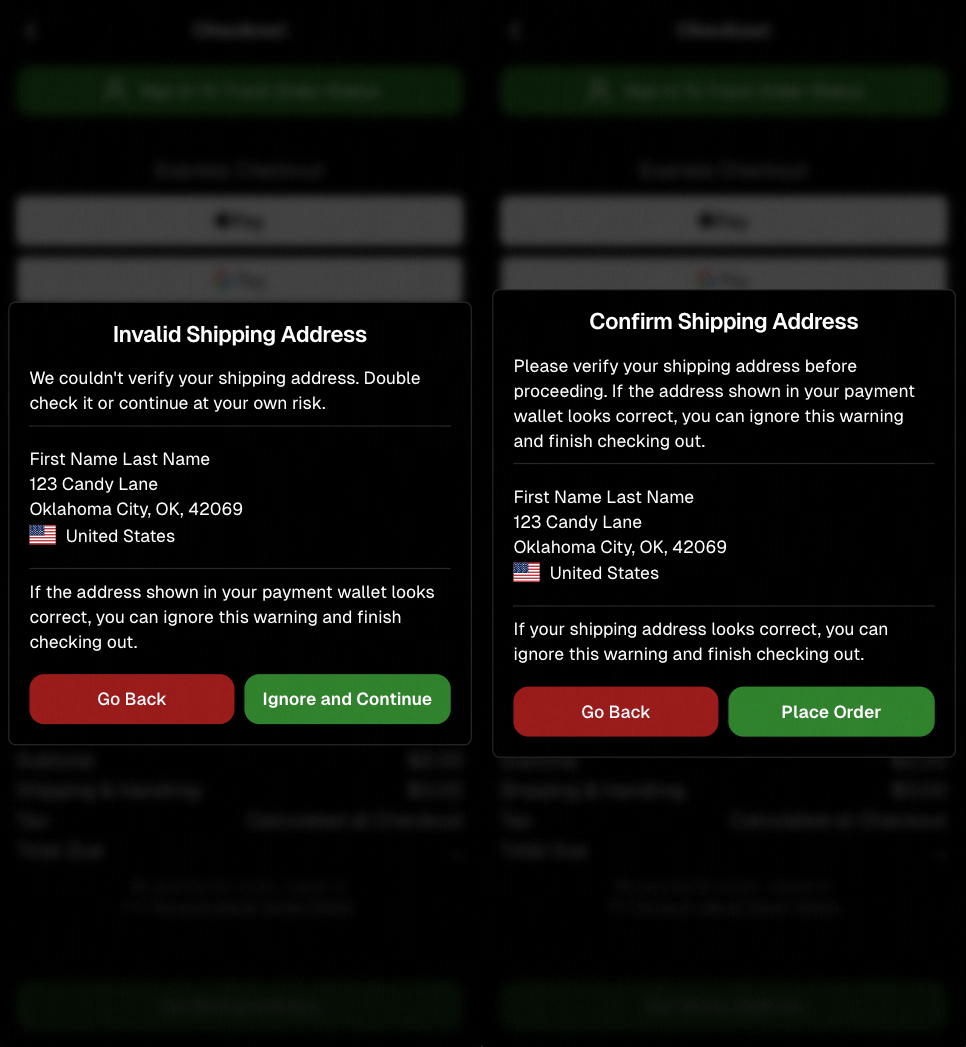
Confirmation popup now clearly displays shipping address confirmation.

🧠 Better UI + performance improvements

  • Improved local rendering (performance, memory usage, and task handling) — originally aimed to improve the retail experience on low-end devices, but it should make most devices feel faster!

  • Native “leave page” confirmation on supported browsers/devices (desktop + Samsung back button) when navigating away from an event page (refresh/back).
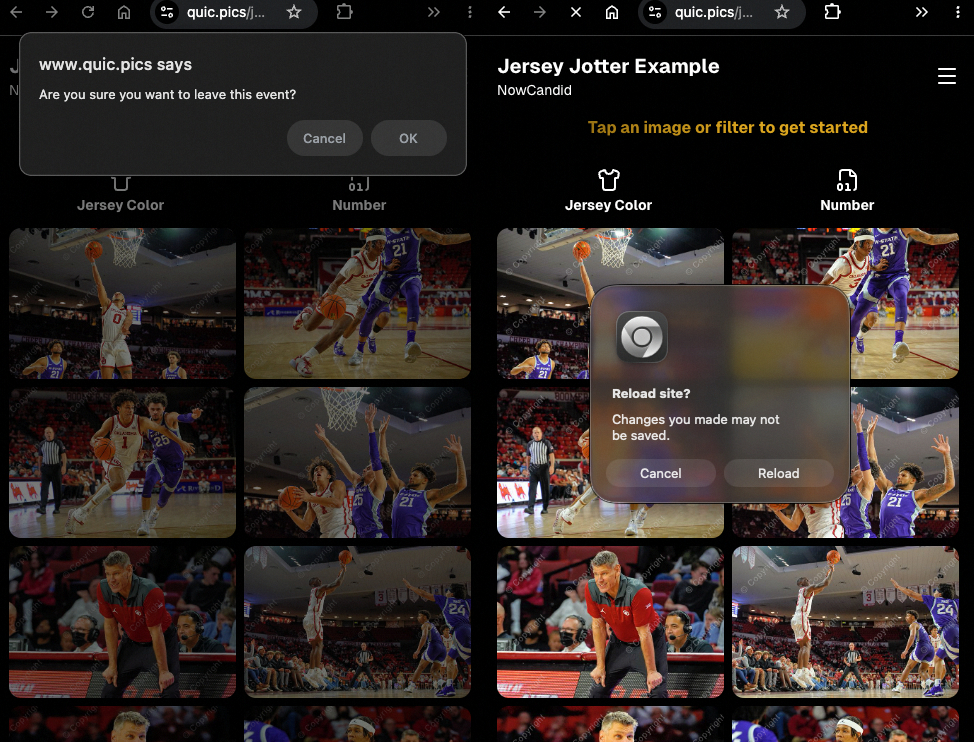
Leave page confirmation

🖼️ Clearer package download expectations + better pickers

  • Personal Gallery Downloads on store sheet and package editor now show “+X Images” in the configurator when there are more than 4 images—so customers don’t think they only get what’s previewed.
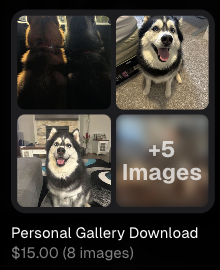
Personal Gallery Download "+X Images"

    • Personal Gallery Download products inside packages can now be clicked to preview contents.

    • Desktop product/package image pickers are now two columns (like mobile), allowing larger image preview during selection.
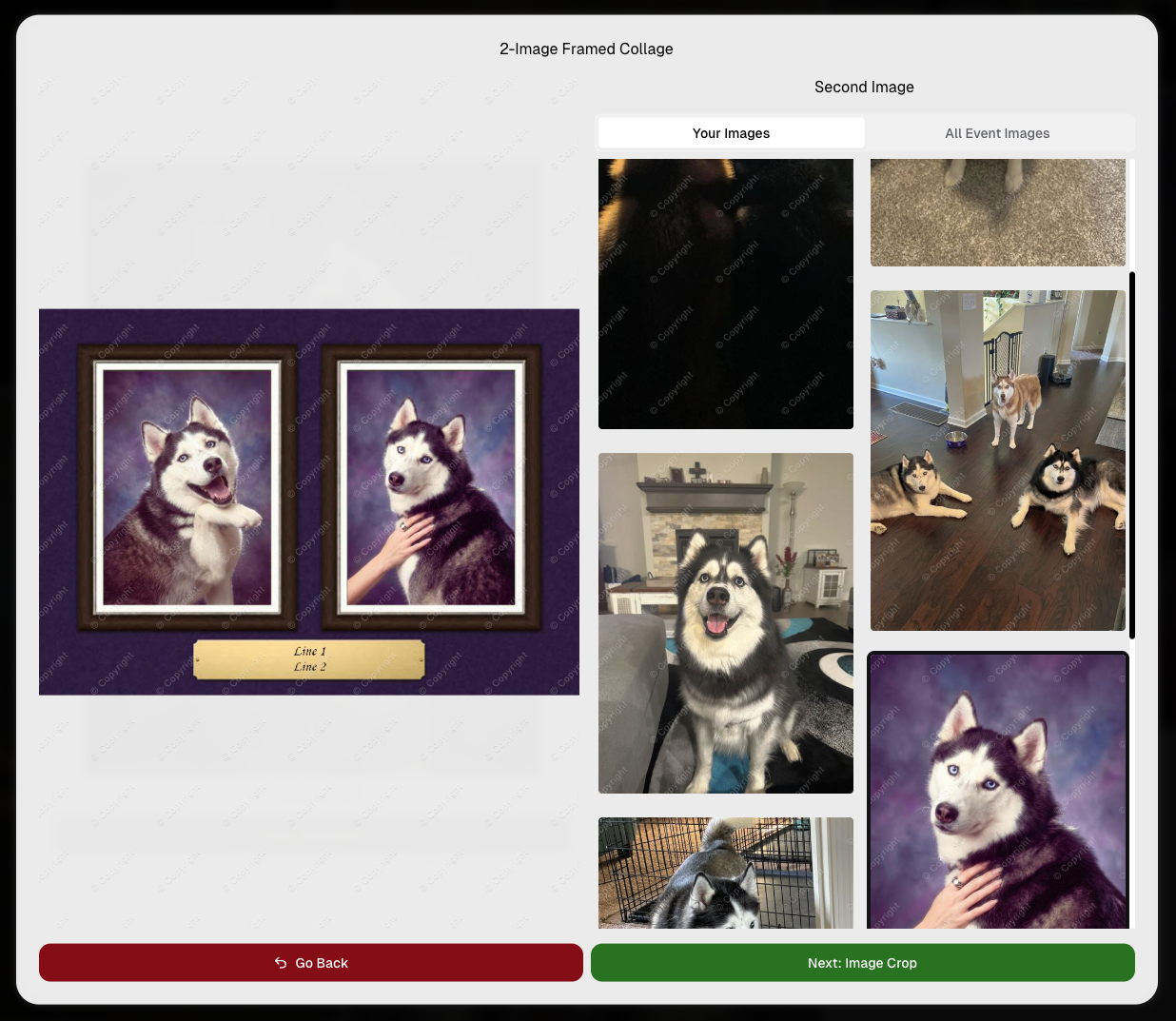
    Larger two column image previews

      • Image Filters landing popup now includes “Browse all photos without a filter” so customers who think they must pick a filter know they can also just browse!
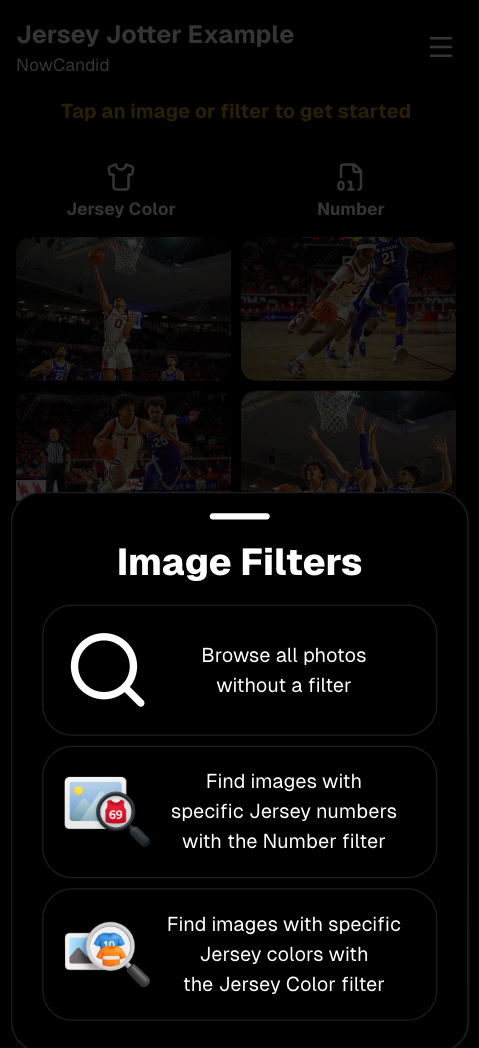
      Image Filters landing popup

      🧩 Retail fixes worth noting

      • Fixed a slashed discount amount showing on week 3 when there is no higher amount.
      • Fixed a GalleryGuard edge case that could close the retail site on some Android devices that support mobile context menus when long-pressing.
      • Fixed a race condition where a Group-by-Face gallery loaded from URL params could show default results instead of the filtered view.
      • Fixed an edge case where manually assigned images marked as group could behave like non-group images on retail.

      📱 Capture App OTA: 5.6.1 & 5.6.2 (iOS & Android)

      🌐 NEW: Network Speed Test (5.6.1)

      A new Network Speed Test button is available in Resources. Tap Run Test to check download speed, upload speed, and latency to NowCandid servers (so results may differ from Google/Ookla). It’s a quick test (downloads 5 MB, uploads 2 MB) and is useful for diagnosing weak or congested service during events.

      Mbps is a standard measurement for connection speeds, and 1 megabit per second (Mbps) is 0.125 Megabytes per second (MB/s). So 8 Mbps is 1 Megabyte per second, max. For example, with images that are 10 Megabytes in size, a speed of 8 Mbps would take a minimum of 10 seconds to upload. When speeds are very slow, image uploads may be impossible due to uploads timing out and restarting. In these cases, open the app when you have a stronger connection and all your images will start going up!
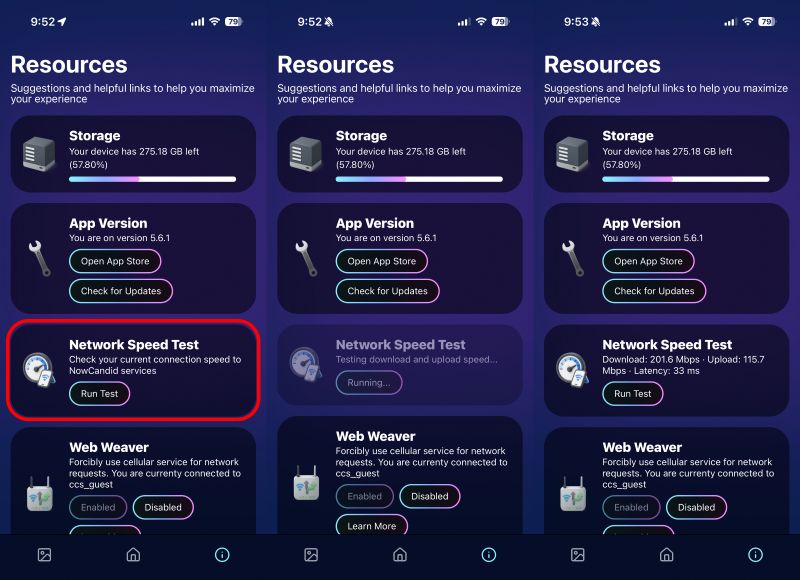
      Network Speed Test

      🎪 Photo Booth + Selfie Check-In Station UI upgrades (5.6.2)

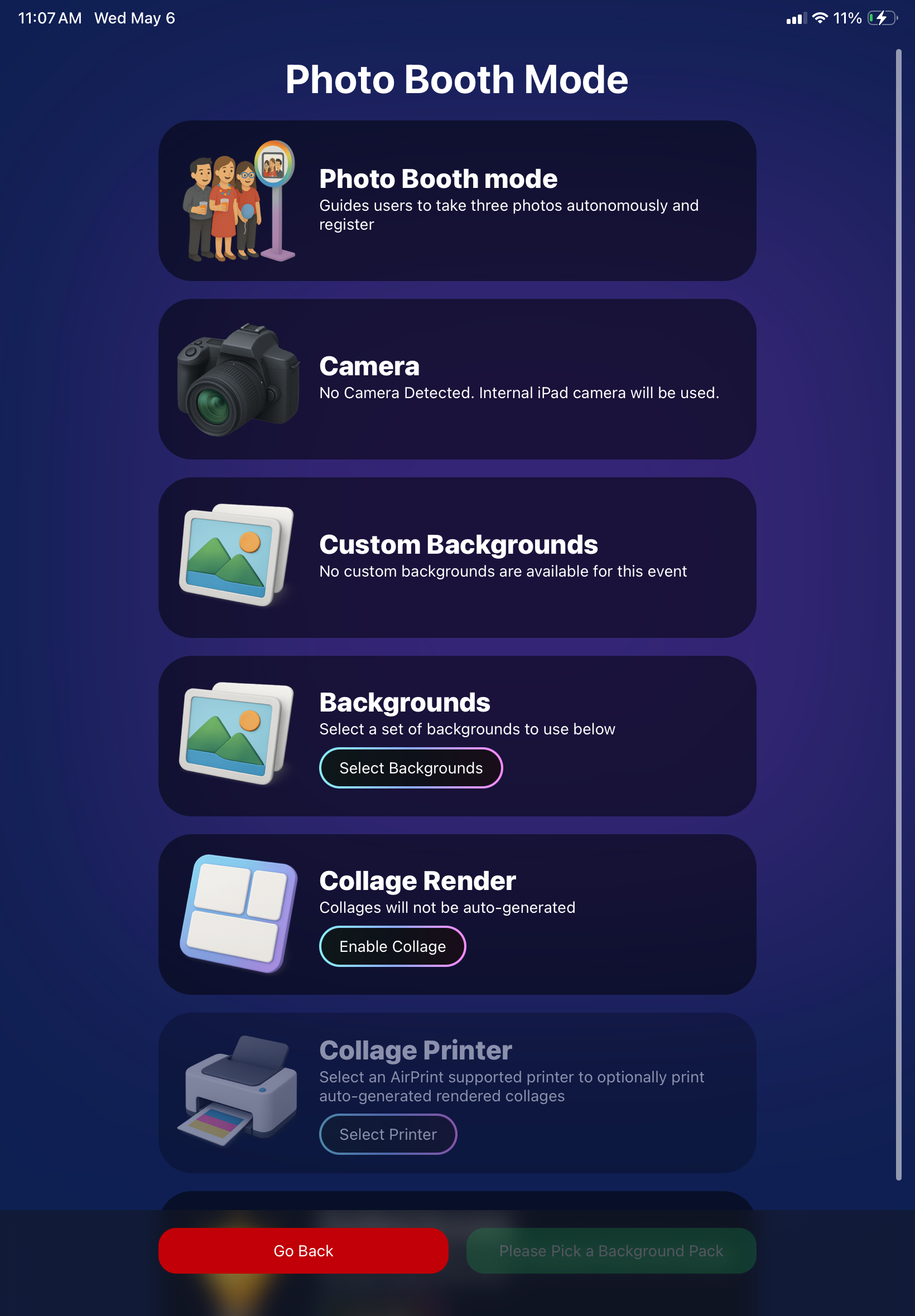
      • Photo Booth landing page updated to be more user-friendly (always-visible scrollbar, updated text, sticky go back/continue buttons, red/green emphasis, and a popup explaining why Continue is greyed out).
      • Selfie Check-In Station landing page updated with red/green Go Back / Begin buttons.
      • New dropdown icon beside Group Photo toggle (when an event has PhotoTags) to better display there are additional options to assign PhotoTags.
      • Fixed edge case cancel/continue behavior on Selfie Check-In Station when no contact info was entered.
      🧩 NEW: Lightroom Classic Plugin (Official)

      We’ve launched an official Lightroom Classic plugin to upload images to NowCandid events directly from Lightroom Classic.

      Key notes:

      • Lightroom Classic only
      • Same image rules apply (color profile, DPI, etc.)
      • Uses Capture App login
      • Only events within 60 days of event start date show in the selector
      • Image Details → Logs will show “Uploaded from NowCandid Lightroom Plugin”
      • Docs include guide/download/installation: https://app.nowcandid.com/docs/tools-more/lightroom
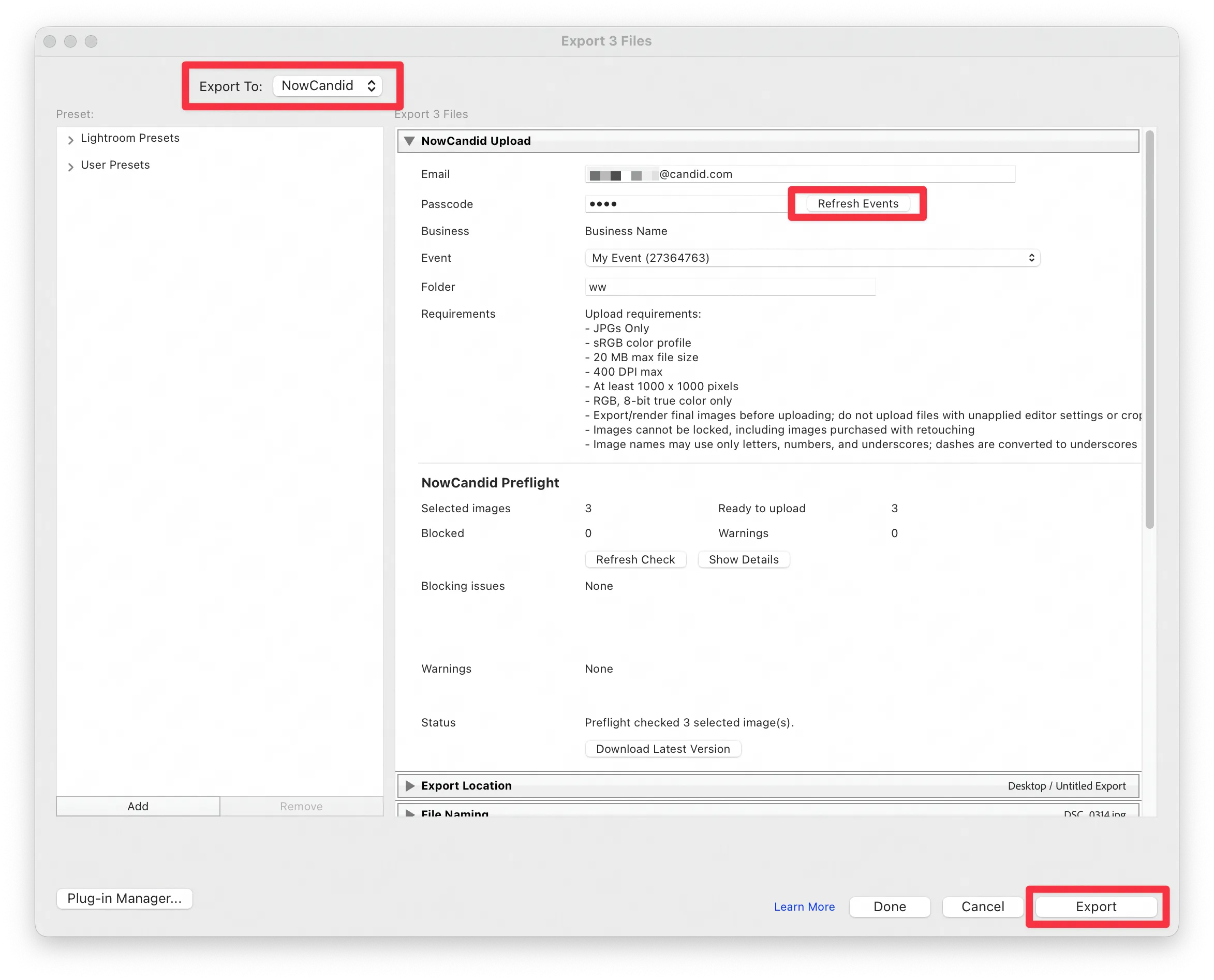
      Lightroom Classic Plugin

      Upload from NowCandid Lightroom Plugin

      🖥️ Dashboard: Upload & Roster Clarity + Small UX Wins

      • Event roster upload and PhotoRoster upload now warn about every unrecognized column, making it easier to spot misspellings (especially for optional columns).
      • Participant list page download now puts additional contacts into columns instead of rows.
      • Participant list download now puts merged contacts into their own row if they have different first/last names.
      • Image upload naming cleanup:
        • spaces/parentheses now automatically become underscores (e.g., Image (2)Image_2)
        • names ending in z now get a trailing underscore (e.g., ImagezImagez_)
      • Candy got even better at using the new Docs for responses.
      • Password reset now shows a clear “Your link has expired” screen (links expire after 24 hours).
      • Fixed participant filter inside another participant’s manual assign/unassign page not working properly.
      • Participant Details PhotoTag assignment UI: merged participants no longer incorrectly show PhotoTags as assigned.
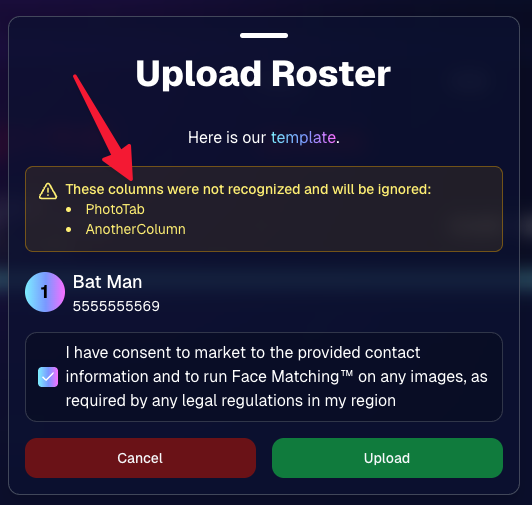
      Upload Roster now warns about every unrecognized column.

      📣 Marketing Fixes

      • Fixed edge cases where galleries that were only AI-edited images could cause follow-up email marketing issues and show as 0 images on Participant List.
      • Fixed Day0 marketing edge case not starting if gallery is just AI-edited images.
      • SMS gallery links now include “View photos:” before the gallery URL to reduce confusion where some users thought the gallery link was an unsubscribe link.

      That’s the week! 💫

      Between the Lightroom Classic plugin, the Capture App’s new Network Speed Test, and retail improvements that reduce confusion (and improve performance), this week was packed with practical wins you’ll feel right away.

      Keep it sparkly,

      Candy

      Related articles

      Big News: Introducing NowCandid’s All-New Web Dashboard! 🌟💻
      Feature Updates
      August 23, 2024

      Big News: Introducing NowCandid’s All-New Web Dashboard! 🌟💻

      9
       minutes read
      Hey there, amazing photographers!

      Candy here with the latest and greatest update in our “Big News” series. We’re thrilled to announce the launch of Web Dashboard 2.0—the final piece in our massive overhaul of the entire NowCandid platform this year.

      With this release, we’ve essentially delivered completely new versions of every aspect of NowCandid, including the Web Dashboard, Mobile Dashboard App, Capture & Upload App, and Retail Site. Welcome to a new era of NowCandid! 🎉

      Want to check it out yourself? Head to (app.nowcandid.com) and log in!

      A Whole New Experience 🚀

      With Web Dashboard 2.0, you’ll notice a fresh, intuitive interface and a host of new features designed to make managing your photography business easier and more efficient.

      Offer Creation is one of the biggest additions to the new Dashboard, but since we’ve already covered that in a previous blog post (click here to read that blog post), let’s dive into the other exciting updates! 🌐

      New Home Tab: Stay on Top of Everything 🏠

      Your new Home Tab provides an at-a-glance overview of recent activity in your account. You can quickly see orders, sales, and upcoming, active, or recent Events. We’ve also rebuilt the Sales & Events reports from the ground up.

      These reports now include more filter options and can be easily downloaded, giving you the data you need, when you need it.

      Expanded Event Management Tools 🎛️

      Event creation may feel familiar, but there are now way more tools at your disposal for managing Events. Let’s dive into each of these new features!

      Marketing History 📊

      Now you can view the full marketing history for each Event directly from the dashboard. This lets you track all your promotional efforts and ensure things are running smoothly as your Event progresses.

      Participant Management 👥

      Participants are now fully visible and editable in the dashboard. You can also access and share their personal gallery links directly from this section, making it easier to manage and support your clients.

      Roster Uploads 📋

      Got a list of participants? You can now upload rosters directly to your Event, streamlining the process of adding participants manually and enabling NowCandid's (Name Lookup Workflow)

      Full-Resolution Image Downloads 📸

      Need to pull an image for a customer or event organizer? You can now download your full-resolution images directly from the Manage Images section of the dashboard.

      Image Uploader Improvements 🖼️

      The image uploader now checks all images for compatibility before uploading them. This includes checking for correct file type, DPI, color profile, and more, helping you (and us!) avoid production and support issues before they arise.

      Custom Backgrounds 🌈

      Add a personal touch to your Events with our new Custom Backgrounds feature. You can upload up to 4 custom backgrounds per Event, allowing your clients to choose a backdrop that suits their style.

      Learn more in our (Custom Backgrounds blog post)

      Full Frame Overlays 🎨

      Our new Full Frame Overlay feature lets you apply full-frame graphics to your photos, giving them a unique, professional look.

      Explore how this can enhance your photos in our (Full Frame Overlay blog post)

      "Greek" Keyboard 🇬🇷

      Now you can use a Greek keyboard when adding text titles to your photos, offering more personalization to Text Overlays for your fraternity and sorority clients.

      Customizable QuicPics Texts ✉️

      The “Your images are arriving soon” text that gets sent via QuicPics is now customizable! Tailor your messaging to better suit the tone and style of your Event, or even promote an Event's sponsor!

      Event Management Portal: Selective Access for Photographers 🔑

      Introducing the new Event Management Portal! This tool allows you to provide selective access to your Events for lead photographers without giving them full access to your account.

      The portal uses the same email + passcode login as the Capture & Upload App and grants the user access to the following settings and features:

      • Image Viewing & Retail Image Visibility Settings
      • Manual Image Uploading
      • Participant Editing & Manual Participant Adding
      • All Gallery Access & Personal Galleries Access
      • LiveLoop URL Access
      • Image File Downloading
      • QR Code Access

      This is perfect for giving your photographers the tools they need without compromising the security of your entire account. The portal can be accessed at (www.quic.pics/portal), so it doesn’t even mention NowCandid—keeping things sleek and professional.

      Private Shareable Gallery URL 🌐

      Need to share Event photos with an organizer? We’ve got you covered with a new private shareable downloadable gallery URL.

      This makes it easy to provide event organizers with any photos they need, all in one convenient place, without transmitting hundreds of large image files via Dropbox, Google Drive, or similar services.

      New Image Upload Tester 🧪

      Worried about compatibility issues? The new image upload tester allows you to test a single image before even trying to upload it to your Event.

      It checks for issues like color profile, DPI, file size, file type, and incompatible characters in the file name—making sure everything runs smoothly.

      Rebuilt UI for Key Pages 🎨

      We’ve also rebuilt the Account Settings, Resources, and FaceMatch Import pages from the ground up with a fresh new UI. These updates ensure a more intuitive and efficient experience across the (dash)board!

      And More to Come… 🔮

      We’re not done yet, folks! There’s more exciting stuff on the way, so stay tuned for future updates.

      We can’t wait to see how you use our new Web Dashboard to take your photography business to the next level.

      As always, if you have any questions or need assistance, we’re here to help!

      Cheers and sparkles,


      Candy 🍬

      Big News: Introducing Custom Backgrounds for Your Events! 🎨✨
      Feature Updates
      August 22, 2024

      Big News: Introducing Custom Backgrounds for Your Events! 🎨✨

      4
       minutes read
      Hey there, fabulous photographers!

      Candy here with some exciting news in our "Big News" series. We’re thrilled to announce the latest addition to NowCandid: the Custom Background feature!

      This new option allows you to upload up to 4 custom backgrounds for your customers to choose from when they’re selecting their photos on the retail site. Let’s take a quick look at how this can elevate your photography offerings! 📸

      What are Custom Backgrounds? 🖼️

      Custom Backgrounds give you the flexibility to provide your clients with personalized background options tailored to the specific Event.

      Whether you’re photographing graduates and want school-specific backgrounds, or covering sports events with sport-specific designs, this feature has got you covered!

      • Up to 4 Custom Backgrounds: Upload up to 4 custom backgrounds for each Event, in addition to the default options.
      • Horizontal and Vertical Versions Required: Each background needs both a horizontal and vertical version to ensure your photos look perfect, no matter the orientation.

      Check out the screenshots below for a glimpse of the new Custom Backgrounds interface:

      How Does It Work? 🤔

      Using Custom Backgrounds is easy! Simply upload your backgrounds at the Event level when setting up your Event.

      If you decide not to use this feature, don’t worry—AI background generation and default backgrounds will still be available for your clients. This feature is entirely optional but provides a great way to add a personalized touch to your photos.

      • File Requirements:
        • JPG format
        • Around 300 DPI
        • SRGB color profile
        • 2x3 or 3x2 aspect ratio
        • Recommended dimensions: 2000x3000 or 3000x2000

      Here’s an example of a photo with a fun custom background applied:

      What’s Next? 🚀

      Currently, Custom Backgrounds are added at the Event level. But stay tuned—we’re exploring the possibility of adding backgrounds at the Account level in the future. This would make it even easier to offer consistent, branded options across all your Events.

      We’re so excited to see how you’ll use this new feature to enhance your photography and delight your clients.

      As always, if you have any questions or need assistance, we’re here to help!

      Cheers and sparkles,


      Candy 🍬

      Big News: Explore the New NowCandid Retail Site Features! 🌟
      Feature Updates
      August 21, 2024

      Big News: Explore the New NowCandid Retail Site Features! 🌟

      8
       minutes read
      Hey there, awesome photographers!

      Candy here, and I’m so excited to share some incredible updates that are live on the NowCandid retail site.

      We’ve been hard at work making your clients' shopping experience smoother, faster, and more enjoyable. Let’s dive into the fantastic new features that are sure to elevate client satisfaction and boost your sales! 📸✨

      Seamless Third-Party Logins 🔐

      We know how important it is for your customers to have quick and easy access to their galleries and order history. That’s why we’ve introduced third-party login options!

      Now, your clients can save their galleries and order history by logging in with their preferred platform—X/Twitter, Google, Apple, or Facebook. It’s all about convenience and keeping their memories just a click away!

      (retail theme: liquorice)

      Sleek and Modern UI 🎨

      The NowCandid retail site has undergone a major facelift! Our new interface is clean, modern, and minimalist, with a step-by-step ordering process that makes purchasing photos easier than ever.

      The site was built mobile-first to ensure the ideal mobile phone experience, recognizing that mobile traffic has become a huge chunk of retail web traffic in recent years, especially with the effectiveness of SMS marketing that NowCandid provides.

      Whether your customers are browsing on a computer or mobile device, the improved look ensures a seamless and enjoyable experience.

      (retail theme: liquorice - watermarks: off)

      Instant Product Rendering 🖼️

      Curious about how your clients' photos will look on different products? We’ve got you covered! As soon as they select a photo, it instantly renders on most products in our gallery. Plus, when adding certain products to their cart, customers can choose different colors and art styles, and input text fields—all of which will render as they make their choices.

      This means your clients can see exactly how their image will appear on prints, canvases, and more as they peruse the product list and customize their orders. This visual preview is sure to enhance their shopping experience!

      (retail theme: marshmallow - watermarks: off)

      AI Background Generator for BGR Images 🤖🎨

      Get creative with your background-removed (BGR) images using our new AI Background Generator! Now, your end customers can type in text prompts to generate fun and unique backgrounds for their photos.

      Whether they want a beach scene, a starry night, or something entirely imaginative, the AI will bring their vision to life. The possibilities are endless and sure to delight your clients!

      (retail theme: starburst - watermarks: off)

      Retouch All Switch ✨

      We know your clients want their photos to look their best, so we’ve added a “Retouch All” switch during checkout. With just a flip, they can apply light retouching to everything in their cart.

      This retouching includes slight blemish reduction, smoothing of complexion, red-eye removal, teeth whitening, and eye brightening. It’s the perfect way to ensure their prints are picture-perfect! While also generating you additional revenue.

      (retail theme: starburst - watermarks: off)

      Diamond Gloss Upsell 💎

      Looking to add a little extra shine to your clients' prints? Our new Diamond Gloss upsell option lets them do just that!

      For a few extra dollars, they can add a glossy coating to their prints, giving them a luxurious, high-quality finish that they’ll love.

      In the future, we will be adding more unique print upsells, stay tuned!

      (retail theme: cookie dough - watermarks: off)

      Improved Express Checkout 🚀

      Time is precious, and we want to make checking out as fast as possible for your photo subjects! With our improved express checkout UI, they can now breeze through their purchase with Apple Pay.

      And we’re not stopping there—Google Pay and PayPal express checkout options are coming soon, with more to follow in the future!

      (retail theme: starburst)

      Other Exciting Features 🌟

      We’ve packed in even more updates to enhance your clients' experience:

      • Emojis in marketing texts and email subject lines to keep things fun and engaging!
      • Automatic name pre-fill (when name is available) on applicable products for a personalized touch.
      • New, sleek designs for Selfie Check-In and Scan Card Check-In web pages.
      • Improved URL and shareability with our new primary retail URL: www.quic.pics
      • The Photo Synthesis gallery allows customers to view all their images from past events in one place via their account settings.
      • Nicer-looking receipts and custom sender addresses (your-business-name@quic.pics) for a polished presentation.
      • Server-related improvements for quicker website loading, ensuring a fast and smooth experience for your clients.

      These changes are designed to improve client satisfaction and increase your sales totals. We’re beyond excited about these enhancements, and we know your customers will love them!

      As always, if you have any questions or need help navigating these new features, we’re here to assist you.

      Thank you for being part of the NowCandid community!

      Cheers and sparkles,


      Candy 🍬

      Let’s get in touch

      If you’re a photographer looking to add NowCandid services to your wheelhouse – set up a call by clicking the button below.

      How to customize formatting for each rich text

      How to customize formatting for each rich text

      How to customize formatting for each rich text

      How to customize formatting for each rich text

      How to customize formatting for each rich text
      How to customize formatting for each rich text

      What’s a Rich Text element?

      The rich text element allows you to create and format headings, paragraphs, blockquotes, images, and video all in one place instead of having to add and format them individually. Just double-click and easily create content.

      A rich text element can be used with static or dynamic content. For static content, just drop it into any page and begin editing. For dynamic content, add a rich text field to any collection and then connect a rich text element to that field in the settings panel. Voila!

      Headings, paragraphs, blockquotes, figures, images, and figure captions can all be styled after a class is added to the rich text element using the "When inside of" nested selector system.

      • List One
      • List Two
      • List Three
      • List Four
      • List Five

      This is a link

      This is bold text