HomeNavigation arrowBlogNavigation arrow
Current page
Feature Updates

Weekly Recap: Capture App v5, Faster Candy Culler & New Retail Themes 🍬📸

Weekly Recap: Capture App v5, Faster Candy Culler & New Retail Themes 🍬📸
Hey photo friends! 👋

This week’s update is a big one. The new Capture App v5 for iOS has officially landed with major performance improvements, a refreshed UI, and some helpful workflow upgrades.

On top of that, Candy Culler just got significantly faster, retail got a couple new themes, and several tools across the Dashboard have been refined.

Let’s jump in.

📱 Capture App v5 (iOS) — Major Upgrade

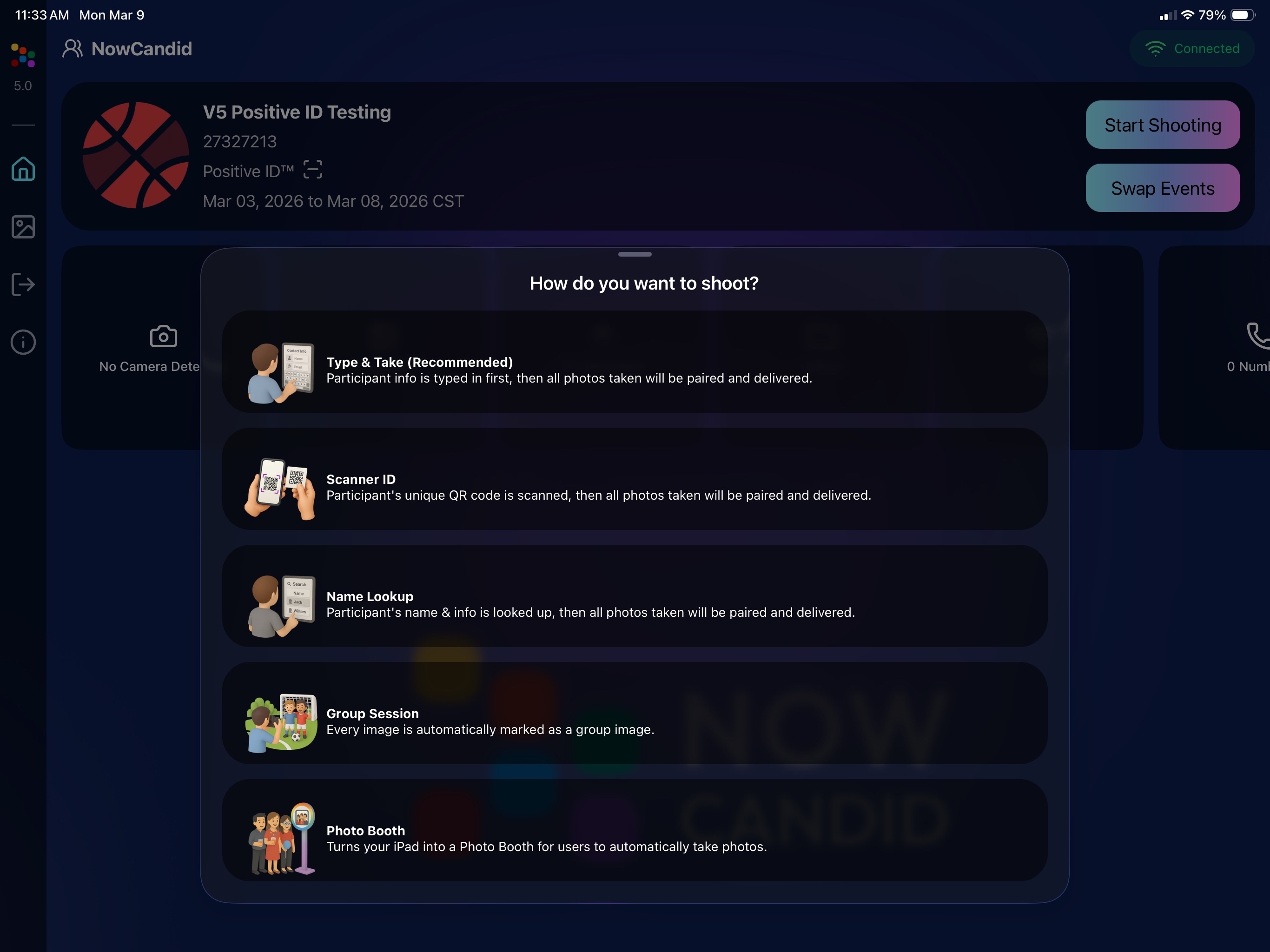
Capture App Version 5 brings a full UI refresh, major performance improvements, and several new quality-of-life tools for shooting events.

⚡ v5: Faster Uploads & Better Performance

A brand-new upload system significantly improves efficiency:

  • 📤 Uploads can be up to ~20–30% faster
  • 📦 Payload size reduced by ~25% thanks to image transfer improvements
  • 🔋 Lower CPU, battery, and memory usage during uploads
  • 📷 Much better memory usage with tethered cameras
  • 🧠 Improved overall memory performance across the app

These improvements should make long shooting sessions feel noticeably smoother.

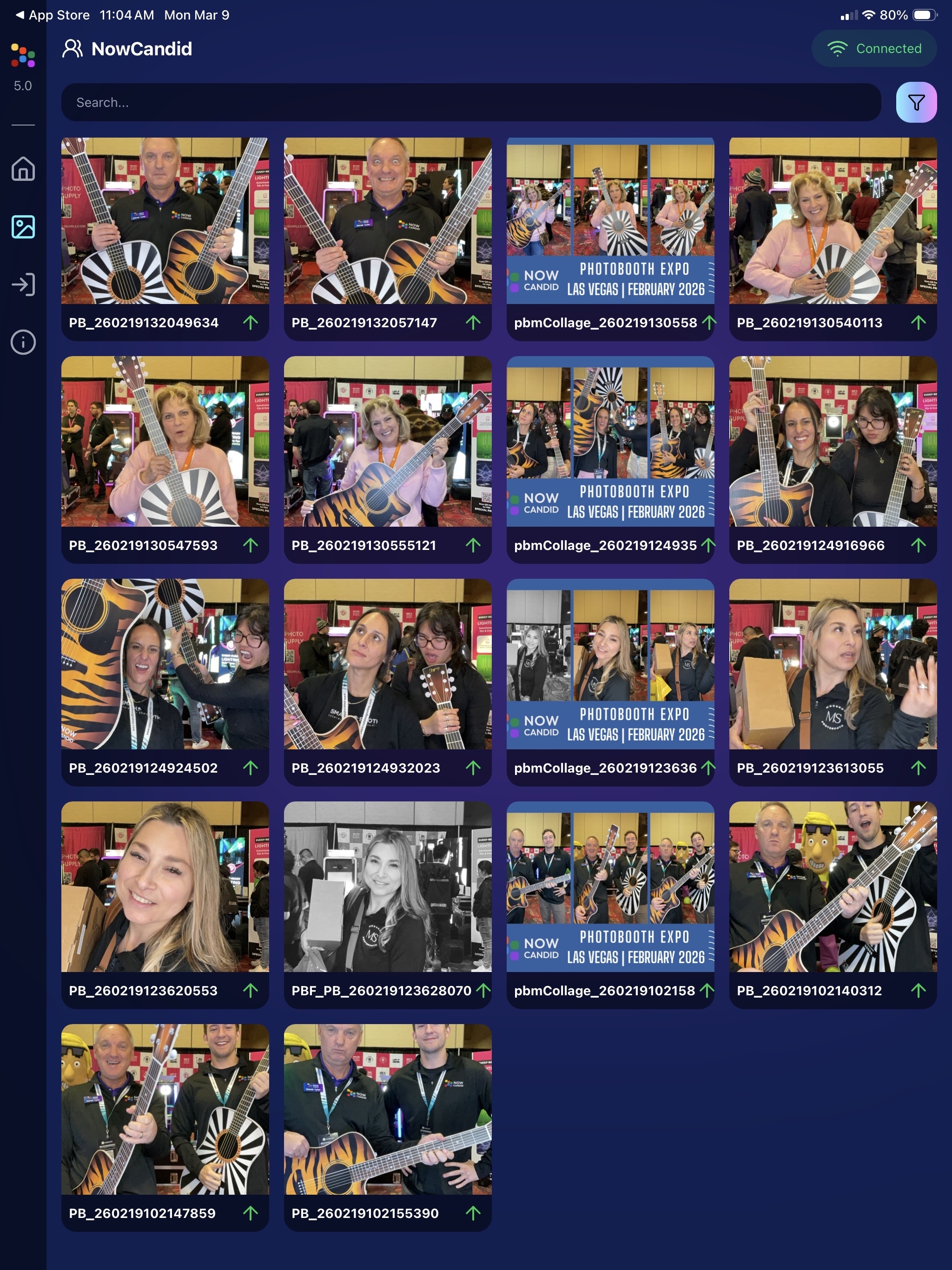
🖼️ v5: New Image Gallery & Filters

The in-app gallery has been redesigned with better filtering and navigation:

  • Image name search
  • Uploaded / Unuploaded status
  • Roll filtering
  • Event filtering

Filters are easy to remove with a single tap, similar to the Dashboard experience.

🔁 v5: Duplicate Photo Warning

The Capture App can now warn you about duplicate images during a shoot:

  • Works only within the current session
  • Does not upload or save duplicate data
  • Can be disabled from the Resources page if desired

This works independently from the Dashboard’s Candy Culler duplicate detection, giving you duplicate awareness both during capture and afterward.

🧰 v5: New Event Overview Info

The event overview page now includes helpful connection details:

  • 📡 Carrier name
  • 📶 Cellular generation (if available)
  • 📶 Current Wi-Fi network

This can help troubleshoot upload issues while shooting events.

🎨 v5: Photo Booth Background Packs

Photo Booth now supports downloadable background packs:

  • 🎄 Christmas
  • 🎃 Halloween
  • More to come!

The default pack is now a downloadable set as well, which keeps the main app much smaller and makes OTA updates faster.

🔧 v5: Additional Capture App Improvements

🌍 International phone numbers supported in Positive ID (were already supported in Tap-A-Face)

🧍 Full vertical images now fit on iPhone screens

🔄 Update checks run automatically when refreshing events

📧 Tap-a-Face email validation now matches Check-In pages

🔄 Upload status updates immediately after each upload

📲 Tablets can now use portrait orientation throughout the app

✨ v5: Complete UI Refresh

Version 5 introduces a polished new interface:

  • Modern sheet-based UI
  • Improved dark mode styling
  • Larger login and event selection screens
  • Updated phone number input interface
  • New image details sheet
  • Cleaner image gallery layout

New popup styling!

Vertical orientation for iPad! Yay!

Overall, the app feels faster, cleaner, and more modern.

🧠 Candy Culler: Now 5× Faster

Candy Culler processing has been dramatically upgraded.

Up to 5× more images can now be processed at once, bringing it in line with Jersey Jotter throughput.

This means faster detection for:

  • Duplicates
  • Blurry photos
  • Exposure issues
  • Closed eyes
  • Other culling checks

🍬 Candy Improvements

Candy continues getting faster and smarter:

  • ⚡ Faster Candy responses
  • 🔎 Faster Candy Navigation results
  • 🧠 Improved event search for newly created events
  • 🎛️ Refreshed Mini Candy UI

Pro tip: Press CMD + A / CTRL + A to toggle Mini Candy.

🧾 Dashboard Improvements

Several useful refinements were made to the Dashboard:

  • 📊 Fixed Faces Report chart showing empty data
  • 🧾 QR Code generator downloads now export at 1024px
  • 📑 Scan card PDFs now sort duplicate participants exactly like the Capture App
  • 🎨 Offer editor popups for adding products and packages are now wider with product category tabs
  • 📊 Event order list diamond-press counts now include quantities correctly
  • 🧭 QR Creator and Image Tester now appear in Sidebar Find

🎨 New Retail Themes

Candy's Note: We hope you enjoy the pupper pics!

🍵 Matcha Theme – a clean green storefront (great for spring or St. Patrick’s Day)
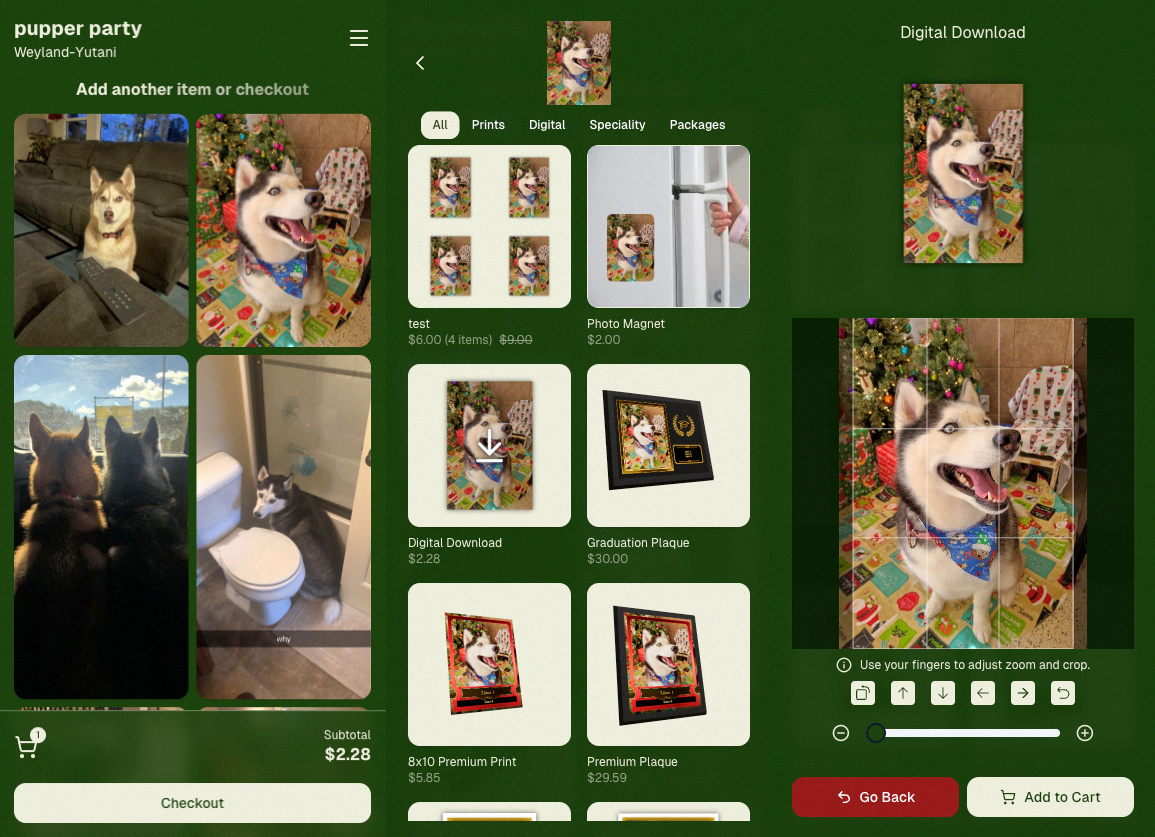
🍠 Ube Theme – a bold purple theme
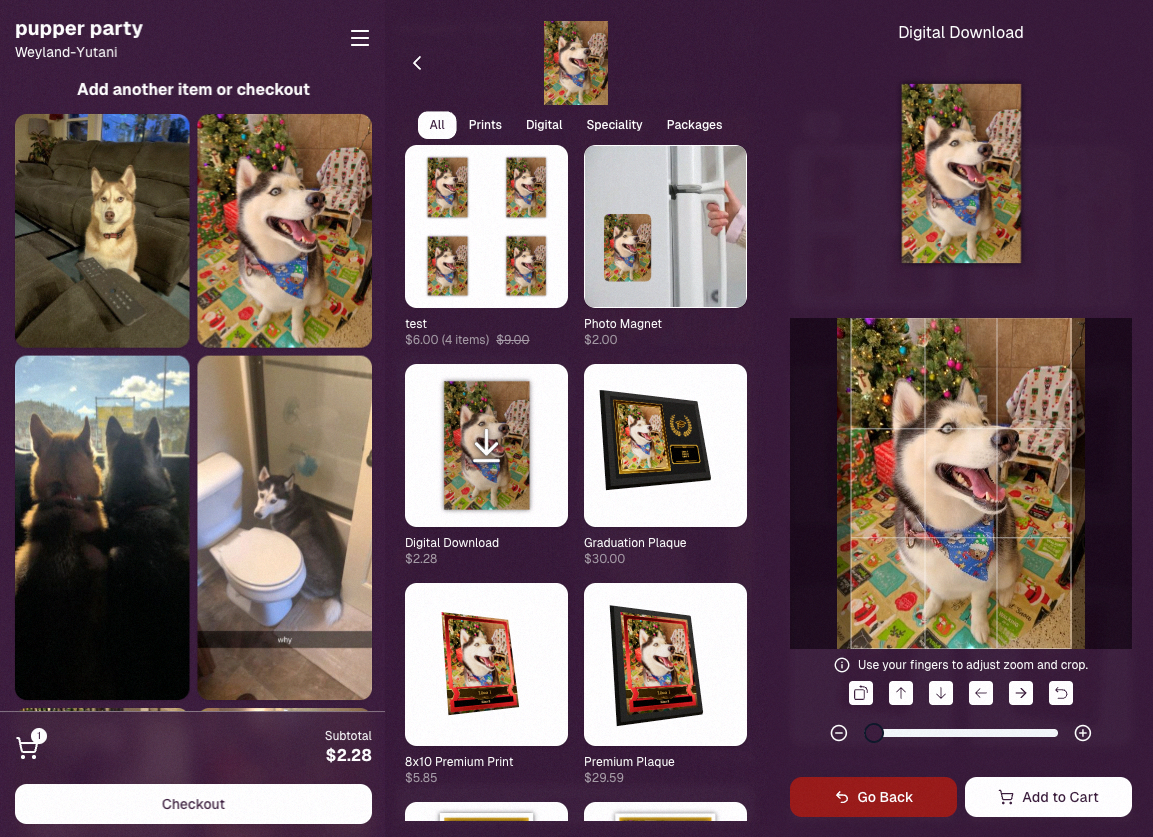
Bonus: Retail UI styling also received improvements for tabs, checkboxes, and order tracking.

📳 Haptics for Mobile Retail & Check-In

Mobile users will now feel subtle feedback interactions when using the site:

  • Tap feedback
  • Success feedback (add to cart, order placed)
  • Error feedback

This makes mobile ordering and check-in feel much more responsive, alive, and engaging!

🤳 Selfie Check-In Improvements

The Selfie Check-In site received improvements to the local face recognition model, making it more reliable and stable on more devices.

💰 QuicPics Adjustment

Good news for high-volume QuicPics users:

Selfie Check-Ins and PhotoRoster reference images no longer count as billable images.

That means QuicPics events that use those workflows will be slightly cheaper overall.

📥 Easier Downloads on iPhone

On iOS Chrome: Press-and-hold image downloads now open the iOS Share menu, making it much easier to save images. (iOS Safari already supported this behavior.)

🌐 New QuicPics Landing Page

The Quic.Pics site now has a proper landing page instead of only a login screen in case end customers stumble across it somehow.

Hopefully this helps it seem more legit while still remaining relatively white-label for your photographers out there!
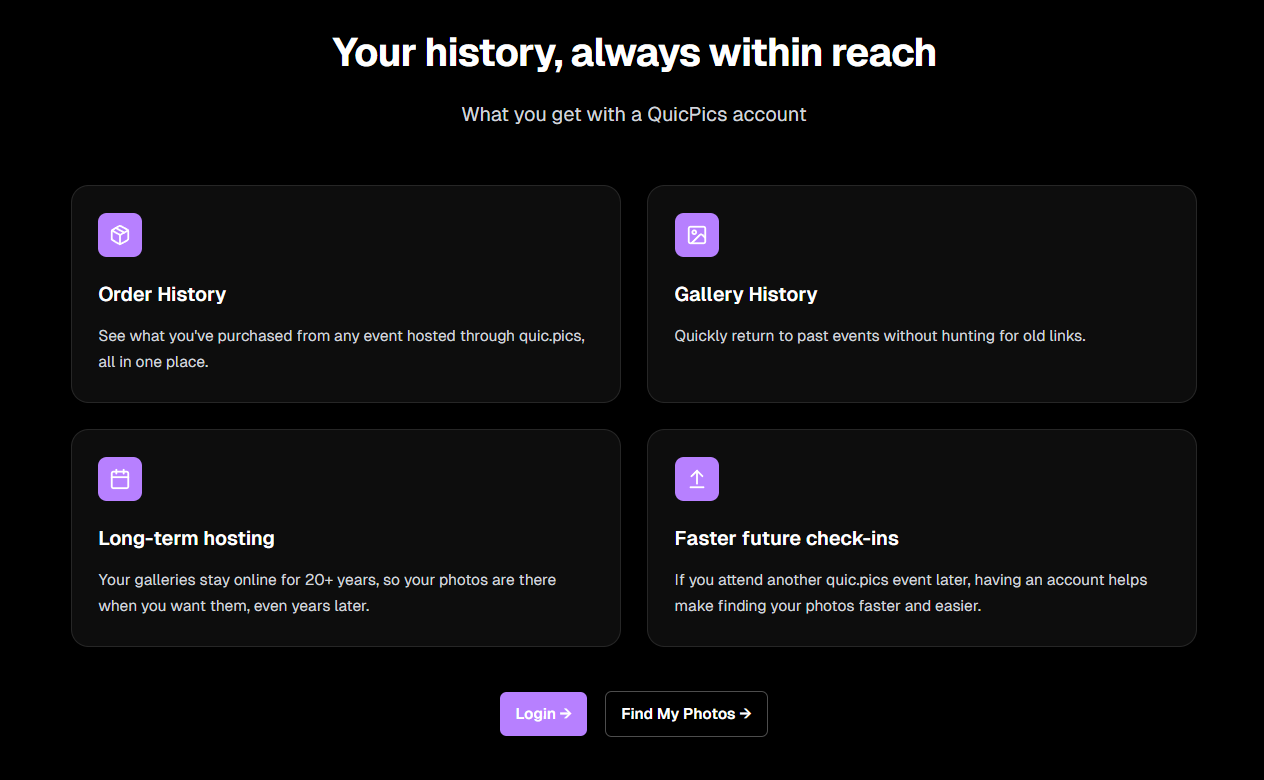
You can see it here: https://www.quic.pics

That’s the week!

Capture App v5 is a big upgrade, and combined with the faster Candy Culler and several Dashboard improvements, the entire workflow from capture → cull → sell just got smoother.

See you next week,

Candy 🍬

Related articles

Meet Candy: The Newest Addition to the NowCandid Family
Feature Updates
May 22, 2023

Meet Candy: The Newest Addition to the NowCandid Family

5
 minutes read

Hello NowCandid users!

We're excited to announce that Candy, our AI Chatbot Assistant, is now officially in open beta! As part of our ongoing commitment to making NowCandid the best photo sales software platform, we are constantly seeking new ways to enhance your user experience and overall efficiency. Candy is our latest step in that direction.

Candy is designed to be your personal assistant within NowCandid. She’s a dedicated, round-the-clock helper, designed to make your life easier. Whether you have a question about our workflows, need guidance on how to navigate our platform, or are looking for tips to maximize your photography sales, Candy is here to help.

As an AI-powered chatbot, Candy is always learning and evolving. She's quick, responsive, and doesn’t need coffee breaks! With her at your side, you'll have more time to focus on what you love—capturing those perfect moments.

But that's not all—Candy is in open beta because we want to make her the best she can be, and we need your help to do that. By interacting with Candy, you'll help us train her to become even more knowledgeable and efficient. Your questions, queries, and interactions will contribute to her learning process. It's a collaborative effort, and we're thrilled to have you be a part of it.

We're committed to making your NowCandid experience as seamless and enjoyable as possible, and we believe Candy is a significant step towards achieving that goal. We can't wait for you to meet her and see all the ways she can make your NowCandid journey easier.

So, dive in and start chatting with Candy! Remember, every question you ask her helps make her smarter. Let's shape the future of NowCandid together! https://www.nowcandid.com/candy

As always, we want to thank you for being a part of the NowCandid community. Your continued support and feedback are what drive us to keep innovating. We look forward to hearing about your experiences with Candy.

Happy snapping!

The NowCandid Team

Assemble Your Photography A-Team: Tips for Hiring and Training Photographers
Photography Tips
May 16, 2023

Assemble Your Photography A-Team: Tips for Hiring and Training Photographers

5
 minutes read

As the great philosopher Voltaire once said, "With great power comes great responsibility." Well, maybe it was actually Uncle Ben from Spider-Man, but the point still stands! As your photography business grows, you'll need to expand your team and delegate tasks. In this blog post, we'll share tips on hiring and training photographers to help you build your very own photography A-Team. And with the support of NowCandid, you'll be well on your way to a thriving photo business.

1. Define Your Ideal Photographer:
Before you start hiring, take the time to define the qualities and skills you're looking for in a photographer. Consider the specific niches your business covers, your brand identity, and the type of work environment you aim to create.

2. Scout for Talent:
Look for photographers through local photography clubs, online communities, social media, and job boards. Reach out to your network and ask for recommendations. When you can’t find photographers, find social, outgoing personalities, and train them to be photographers! Oftentimes, an outgoing person trained to be a photographer is an easier prospect than training a shy photographer to be outgoing.

3. Conduct Thorough Interviews:
During the interview process, ask questions that allow candidates to showcase their skills, experience, and personality. Review their portfolios, ask for references, and consider conducting a trial shoot to see how they perform in action.

4. Offer Competitive Compensation:
To attract top talent, offer competitive compensation packages that include fair wages, bonuses, and potential for growth within your company. If you compensate with base pay + a per image rate, be sure to paint the picture of what their pay would be if they were successful in taking a lot of pictures at an event!

5. Invest in Training and Development:
Once you've hired your team of photographers, invest in their ongoing training and development. Encourage them to attend workshops, webinars, and conferences to stay updated with industry trends and techniques. Use some of NowCandid's training resources, as it can help streamline the training! And don’t forget to always keep them connected with your business's core values.

6. Establish Clear Expectations:
Set clear expectations for your photographers regarding their roles, responsibilities, and performance metrics. Regularly review their progress and provide constructive feedback to help them grow and improve.

7. Foster a Positive Work Environment:
Create a supportive, collaborative work environment where your photographers feel valued and motivated. Encourage open communication, provide opportunities for team-building activities, and celebrate your team's successes.

Hiring and training photographers for your business is a crucial step in scaling your operations and ensuring long-term success. By defining your ideal photographer, scouting for talent, and investing in their development, you can build a strong, capable team that will help your business soar to new heights. Embrace your role as a leader, and assemble your photography A-Team with confidence!

Capturing the Champions of Tomorrow: A Guide to Youth Sports Photography Portrait Shoots and Team Photos
SportPics
May 3, 2023

Capturing the Champions of Tomorrow: A Guide to Youth Sports Photography Portrait Shoots and Team Photos

4
 minutes read

Youth sports photography is all about capturing the energy, passion, and camaraderie of young athletes as they embark on their journey to greatness. In this blog post, we'll share tips for getting started in youth sports portrait photography and team photos, and how NowCandid can help you achieve success in this exciting niche.

  1. Build Trust and Rapport with Athletes and Their Families:
    Young athletes may be nervous or shy in front of the camera, so it's essential to build trust and rapport with them and their families. Communicate openly, listen to their preferences, and share your enthusiasm for their achievements. Remember, your role as a photographer is to create a fun, positive experience for all involved.
  2. Choose the Right Location and Background:
    Select a location that showcases the sport's essence and complements the athletes' uniforms and team colors. Opt for natural settings such as fields or courts, or use a portable backdrop for a clean, professional look. Ensure the background is uncluttered and free from distractions to keep the focus on the young athletes.
  3. Master the Art of Posing and Composition:
    Like a superhero assembling their squad, guide your subjects into flattering and dynamic poses that showcase their personality and athleticism. Experiment with individual and group poses, ensuring each athlete's face and uniform are visible. Use a mix of traditional and creative compositions to create a diverse and visually engaging portfolio.
  4. Utilize Natural Light and Flash Techniques:
    Youth sports portrait photography often takes place outdoors, so make the most of natural light. Shoot during the golden hour for soft, warm lighting, and use a reflector to bounce light onto your subjects. For indoor shoots, invest in a portable flash kit to create well-lit, professional-looking images.
  5. Offer Customized Products and Packages:
    Offer a range of customizable products and packages to appeal to various clients and budgets. From prints and digital files to keychains and plaques, showcase your photos on a wide variety of products to provide a valuable service for your clients.
  6. Partner with NowCandid to Streamline Your Business:
    As Doc Brown from "Back to the Future" once said, "The future is whatever you make it, so make it a good one." NowCandid's powerful platform helps you make that good future for yourself. It can do a lot for youth sports photographers, like streamline their workflow, handle customer support, deal with all order fulfillment, and boost sales. By integrating NowCandid into your business, you can focus on capturing the champions of tomorrow while enjoying a seamless and efficient process from start to finish.

Youth sports portrait photography offers a unique opportunity to capture the passion and determination of young athletes as they strive for greatness. By following these tips and harnessing the power of NowCandid, you'll be well on your way to building a successful career in this exciting and rewarding niche. Now, go forth and capture the future legends of the sports world!

Let’s get in touch

If you’re a photographer looking to add NowCandid services to your wheelhouse – set up a call by clicking the button below.

How to customize formatting for each rich text

How to customize formatting for each rich text

How to customize formatting for each rich text

How to customize formatting for each rich text

How to customize formatting for each rich text

What’s a Rich Text element?

The rich text element allows you to create and format headings, paragraphs, blockquotes, images, and video all in one place instead of having to add and format them individually. Just double-click and easily create content.

A rich text element can be used with static or dynamic content. For static content, just drop it into any page and begin editing. For dynamic content, add a rich text field to any collection and then connect a rich text element to that field in the settings panel. Voila!

Headings, paragraphs, blockquotes, figures, images, and figure captions can all be styled after a class is added to the rich text element using the "When inside of" nested selector system.

  • List One
  • List Two
  • List Three
  • List Four
  • List Five

This is a link

This is bold text