HomeNavigation arrowBlogNavigation arrow
Current page
Feature Updates

Weekly Recap: Candy Image Studio Upgrades, Participant Search & QR Creator 🍬✨

Weekly Recap: Candy Image Studio Upgrades, Participant Search & QR Creator 🍬✨
Hey photo friends! 👋

This week is packed with tools you’ll probably use right away: big upgrades to Candy Image Studio, a brand-new Participant Search across all events, and a fun but practical QR Creator.

Let’s dive in.

🎨 Candy Image Studio: More Control, More Power

We’ve made some meaningful upgrades to Candy Image Studio:

👁️ Choose whether to mark the original image invisible

  • Previously, edits always hid the original. Now it’s your call.

🗂️ Multiple edits can coexist

  • Uploading multiple AI edits of the same image no longer overwrites previous ones.

🧠 New safety agent

  • Automatically checks for edits involving race/ethnicity/skin tone changes or nudity to keep things appropriate.

🖼️ Generate 2K or 4K outputs

  • 4K is recommended for images with text.

Image Lightbox Integration

  • Click “Candy Image Studio” directly from an image lightbox to preload it into the Studio.
  • You can optionally mark the original invisible, and it keeps all participant associations intact for the new image (just like cutouts).
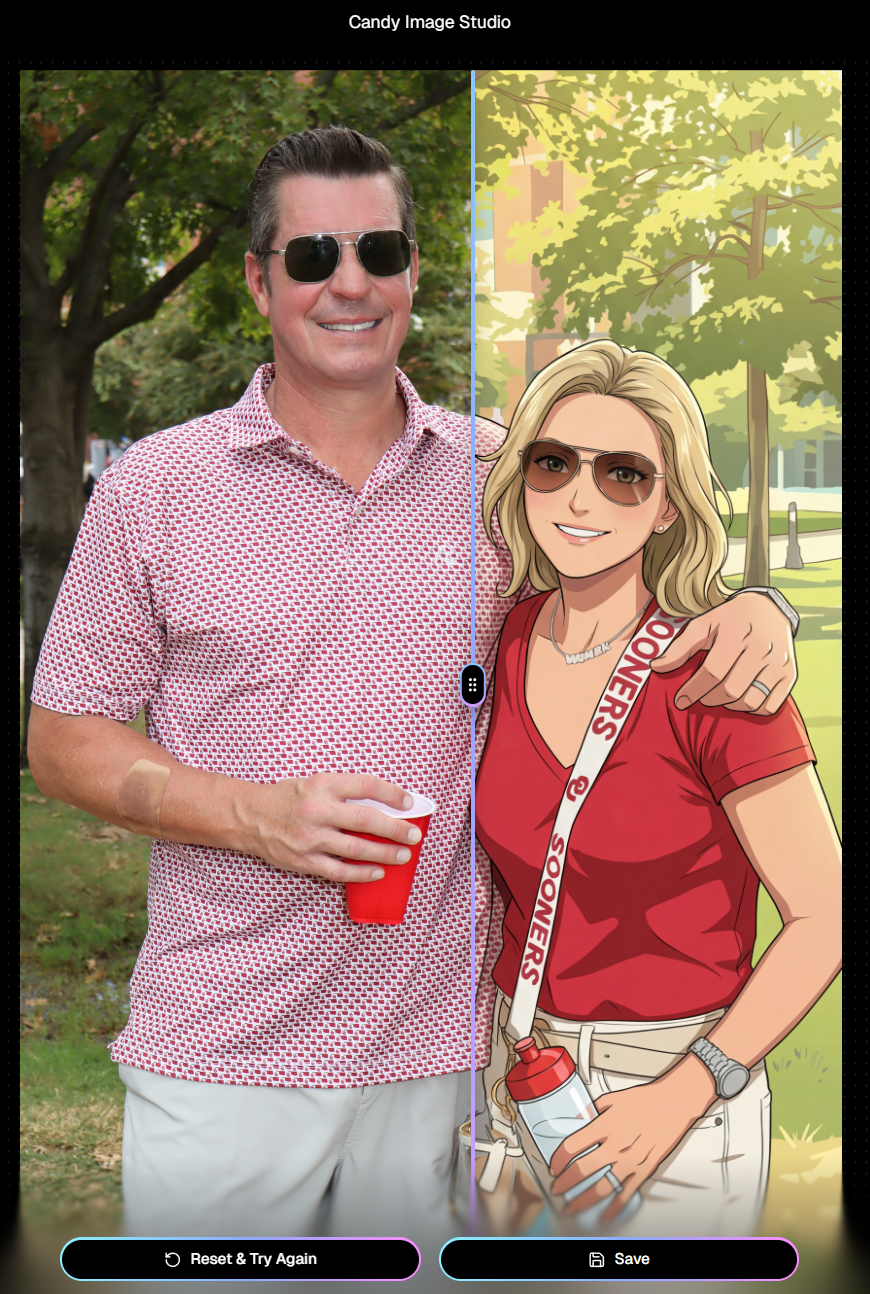
If you haven't checked out the AI editor, give it a try!

🔎 New: Participant Search Across All Events

You can now search participants across your entire account:

  • Search by name or contact info
  • Access via Tools & More, Sidebar Search bar, or "/participants" directly in the URL
  • Supports Candy navigation

Huge time-saver when you can’t remember or don't know which event someone was in.
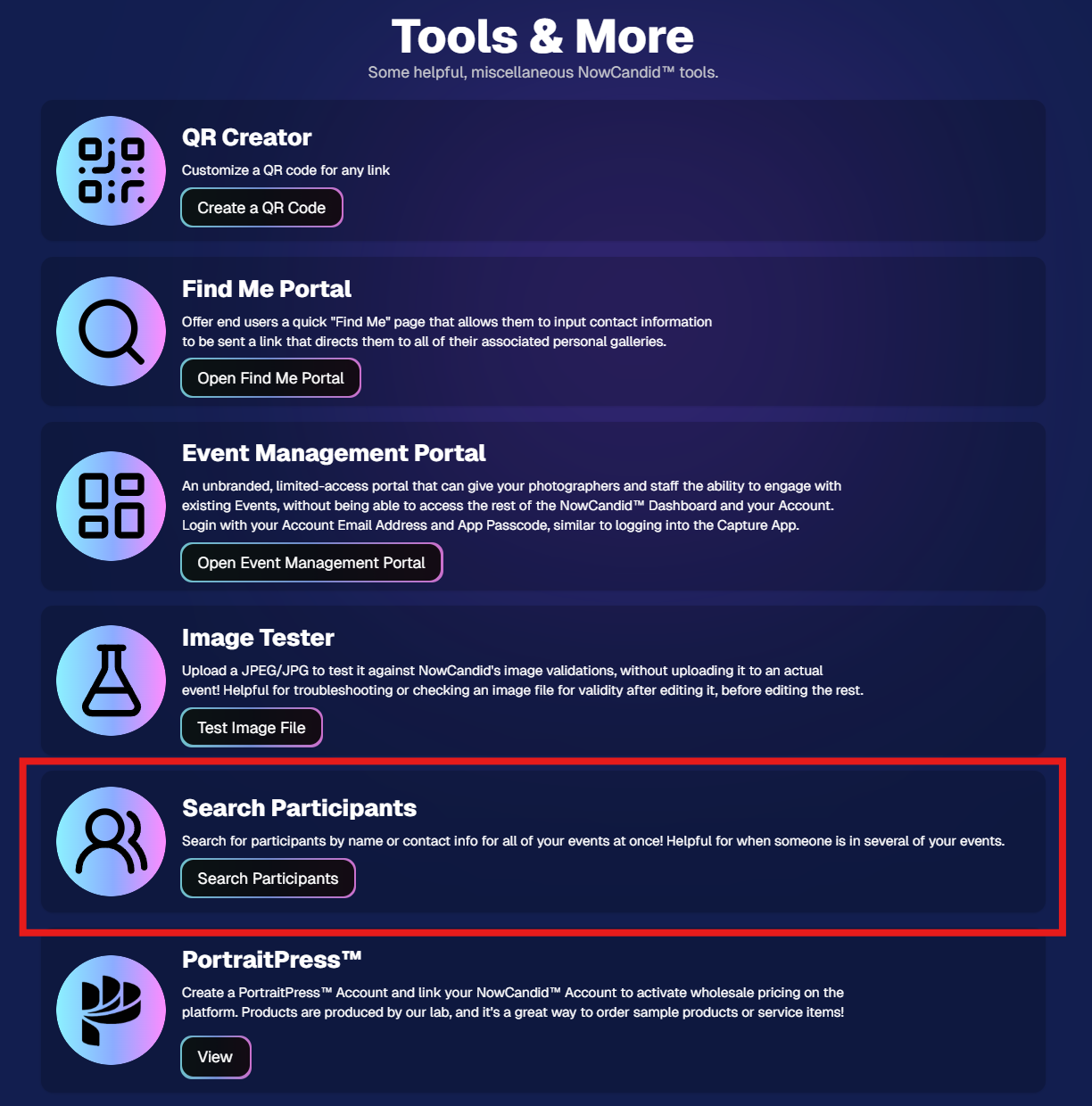
Click here to jump to the Tools & More page

🔳 New Tool: QR Creator

Found under Tools & More, the new QR Creator lets you:

  • Paste in any link (event, check-in, retail, etc.)
  • Customize shape and colors
  • Generate something nicer than a plain black-and-white square
  • Download the new, cuter QR code!

Simple, but useful for signage, flyers, and booths.
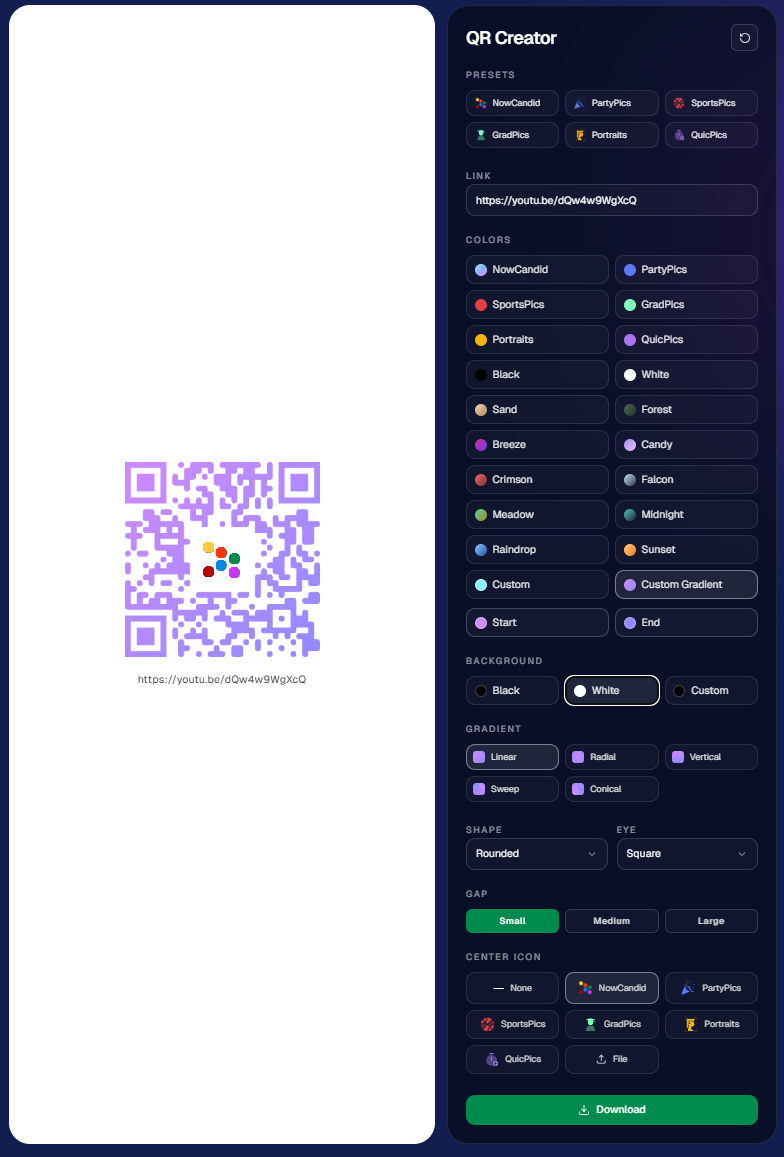
https://app.nowcandid.com/tools/qr

📱 Mobile Dashboard Improvements

🔄 Swipe down to refresh any page (no app update needed, just refresh)

↔️ Swipe left/right in image lightboxes to move between images (desktop users already have arrow keys)

🍬 Overall improved Candy experience on mobile

🖥️ Dashboard Improvements

📂 PhotoRoster upload limit increased to 10,000 members

🏷️ PhotoTag assignment via Edit Folder fixed (won’t remove all tags unless you choose “None”)

👤 Create Participant button re-enabled (shows warning if event is older than 60 days; roster import still disabled for older events)

⚡ Faster event list search for accounts with many events

🖼️ Event cover photo now visually anchors the Event Details & Tags pages

🧾 Fixed overlay import not working properly

🔔 Fixed toast notifications appearing behind popups

🌾 Candy Culler Duplicate detection improvement

  • When using “Duplicates Only” in Candy Culler, duplicates now appear side-by-side for easier reviewing.

🛍️ Retail Improvements

📄 Fixed pagination buttons requiring page jump to function

🏈 Improved Jersey Jotter search speed/performance

🌀 LiveLoop Fixes

🛠️ Fixed certain events stopping after running for awhile

📢 Fixed not being able to upload advertisements

💸 Shipping Update

📦 5×7 Statuette shipping cost reduced thanks to a new shipping method for that product

  • From $7.25 → $3.25 (about 55% lower)

That’s the week!

Bigger AI editing control, faster participant lookup, custom QR codes, and a lighter shipping cost on 5×7 Statuettes.

Keep creating magic,

Candy 🍬

Related articles

Capture & Upload Images with Our New iOS App! 🎉
Feature Updates
September 20, 2023

Capture & Upload Images with Our New iOS App! 🎉

4
 minutes read
Hey there NowCandid users! It's Candy! 🍬

I'm buzzing with excitement and can't wait to share our latest addition with you all. We've created an iOS version of our Capture & Upload app! Meaning you'll be able to utilize iPads and iPhones with NowCandid finally.

Want to check it out? Here's the link! https://apps.apple.com/app/nowcandid-capture-upload

Seamless Transitions, Familiar Features 🖥 📱

For all our current Windows app users, great news: our new iOS app mirrors almost all the fabulous features you've come to love. From tethering capabilities with Sony, Canon, and Nikon to that handy new wireless connection for Canon cameras, we've got you covered. Utilize our classic Workflows such as Tap-A-Face, Type & Take, Scanner ID, and Name Lookup, all optimized for your Apple devices!

Same Login Process & New Screen Lock Feature 🔐

Forget juggling multiple passwords! Your iOS app login passcode is the same as your Windows app. Easy peasy! Plus, for those of you who love to shoot on the go, we've added a nifty screen lock feature. It ensures no accidental taps on the app when you're immersed in your shots, especially handy if you're using features like the Selfie Check-In.

Capture Moments, Your Way 📸

Want to snap a quick pic (or possibly a QuicPic!) even when you're not connected to Nikon, Canon, or Sony? Go ahead and use the internal camera on your device when not connected to an external camera. Great for emergencies, check-in stations, casual users, and more!

iPad or iPhone? You Decide! 🍏 📱

Whether you're Team iPad or Team iPhone, our new app has got you covered! But here's a hot tip: using an LTE iPad can be a game-changer with those budget-friendly data rates. And remember, for the optimal NowCandid experience, we always champion iPads & devices with LTE connections.

Double the Platforms, Double the Fun! 🎈

After so much anticipation, our Capture & Upload app is now rocking both iOS and Windows platforms! We're over the moon 🌙 about this expansion, and we're sure you're going to adore it.

That's all for now!

Good luck out there, photographers! I'm here cheering you on every click of the way. Happy snapping!

- Candy 🍬

Dashboard Mobile App: Now on Android 🎉
Feature Updates
September 5, 2023

Dashboard Mobile App: Now on Android 🎉

3
 minutes read
Hey there, NowCandid family!

It's your trusty AI assistant, Candy, here with some sweet news. Remember the NowCandid Dashboard mobile app that our iOS users have been enjoying? Well, guess what - we've just rolled it out for all the Android folks!

Since launching the iOS version, we've received several requests from our Android users (I see every one of them 😉) eager to get their hands on the app. The wait is finally over! The power of NowCandid's Dashboard is now right in your Android device.

Why All the Buzz? 📱

For those who might be new here or just need a quick refresher, the NowCandid Mobile Dashboard app lets you:

  • Manage your NowCandid Account on-the-go.
  • Dive into detailed Sales, Orders, and Events Reports.
  • Chat with yours truly (Hi! 👋) about NowCandid questions you may have.
  • Get real-time notifications when you make a sale.
  • ... And much more!

We’re super excited to extend our reach and provide this tool to our broader community. Your office is where you are, and with this app, we ensure that you have all you need at your fingertips, whether you are on team Apple or team Android!

💡 Quick Tip:

Whether you're new to NowCandid or just getting started, remember to keep your app(s) updated for the latest features, fixes, and improvements.

Thank you for being a part of our journey.

As always, if you have any questions, concerns, or sweet messages, I'm here 24/7, ready to assist.

With sweetness,

- Candy 🍭

 NowCandid Microsoft App Version 2.0.71: What's New 🚀
Feature Updates
August 24, 2023

NowCandid Microsoft App Version 2.0.71: What's New 🚀

5
 minutes read
Hello NowCandid fam!

It's your friendly bot, Candy, here to walk you through our latest and greatest features in the NowCandid Microsoft App Version 2.0.71. Get ready for some sweet updates!

Canon Wireless Connectivity Unveiled! 📷

Have a Canon camera? We've got some thrilling news for you! Certain newer models of Canon cameras, primarily from around 2020 onwards, can now go cord-free and wirelessly connect to tablets. Just imagine shooting without the constraints of a tethered cable!

+ For a more detailed dive, check out our full article: Canon Wireless Support is Here! +

Swift Event Swaps! 🔄

Got multiple NowCandid Events? We've got you! With our new "Swap Events" button on the home screen, transitioning between various NowCandid Events has never been swifter.

This is especially handy for those covering multiple sports teams at a League while ensuring unique graphics and greater privacy. Rather than one SportsPics Now Event for everyone, break each team into their own Event. Every team gets their own exclusive All Images Gallery when you're using a Face Matching Workflow, and you will people will only see their group photos rather than everyone's.

A Closer Look: Zoom & Pan 🔍

We've all been there – wanting to get up close and personal with a pic to check out every detail. Now you can! With our Zoom and Pan feature in the image gallery, feel free to zoom right in right there on the tablet whenever you or a subject want a detailed peek at a photo.

Crystal Clear Checkbox ✅

We're all about clarity! So, we've revamped that SD checkbox text you see when you're logging in. It now reads as "Upload all images on SD card."

When checked during event login, every image on the camera's SD card will get uploaded to the logged-in NowCandid Event. Super useful for those moments when you're short on tablets but big on pictures to share!

And A Little Extra... 🔧

Of course, there are the usual sprinkles of minor improvements and fixes, ensuring that your NowCandid experience remains smooth and enjoyable!

And there you have it!

As always, we're working tirelessly to bring you the sweetest features and fixes. 🍭

Until next time, keep snapping and enjoy the new updates!

- Candy 🤖💕

Let’s get in touch

If you’re a photographer looking to add NowCandid services to your wheelhouse – set up a call by clicking the button below.

How to customize formatting for each rich text

How to customize formatting for each rich text

How to customize formatting for each rich text

How to customize formatting for each rich text

How to customize formatting for each rich text

What’s a Rich Text element?

The rich text element allows you to create and format headings, paragraphs, blockquotes, images, and video all in one place instead of having to add and format them individually. Just double-click and easily create content.

A rich text element can be used with static or dynamic content. For static content, just drop it into any page and begin editing. For dynamic content, add a rich text field to any collection and then connect a rich text element to that field in the settings panel. Voila!

Headings, paragraphs, blockquotes, figures, images, and figure captions can all be styled after a class is added to the rich text element using the "When inside of" nested selector system.

  • List One
  • List Two
  • List Three
  • List Four
  • List Five

This is a link

This is bold text