HomeNavigation arrowBlogNavigation arrow
Current page
Feature Updates

Weekly Recap: Better AI Edits, New Background Removal Workflows & Virtual Group Undo/Redo 🎨✨

Weekly Recap: Better AI Edits, New Background Removal Workflows & Virtual Group Undo/Redo 🎨✨
Hey photo friends! 👋

Candy here with this week’s updates! The biggest changes are in Candy Image Studio and Auto Editor, where several popular edits now cost less, produce more consistent results, and work more naturally with Background Removal workflows.

We’ve also added undo and redo to Virtual Group Builder, improved green screen cutouts, and cleaned up a few retail download issues.

Let’s take a look!

🎨 Candy Image Studio: Better Results & New Lower-Cost Edits

Several Candy Image Studio nodes have been reworked with more consistent output quality and new discounted pricing.

Improved Black & White edits — now 4¢

  • Both existing Black & White nodes have been rebuilt to produce more reliable, consistent results.

Improved Retouch — now 6¢

  • The Retouch node now produces much more consistent results and is available at a lower price.

🎞️ New 35mm Film node — 4¢

  • The previous Film Style node has been replaced with a new and improved 35mm Film treatment.

📸 New Clarendon node — 4¢

  • Apply a look inspired by the familiar Clarendon-style social media filter.

💳 More flexible edit pricing

Some nodes now display their own lower price. Candy Image Studio charges based on the highest-priced node included in the edit.

For example:

  • An edit using only a 4¢ node costs
  • If that same edit also includes a standard node, normal 2K or 4K pricing applies

This lets simpler edits cost less when you're not using the more advanced edits!

✂️ New Background Removal Options for AI Edits

Candy Image Studio and Auto Editor now work more closely with Events using Background Removal folders.

🖼️ Candy Image Studio can send an edit into Background Removal

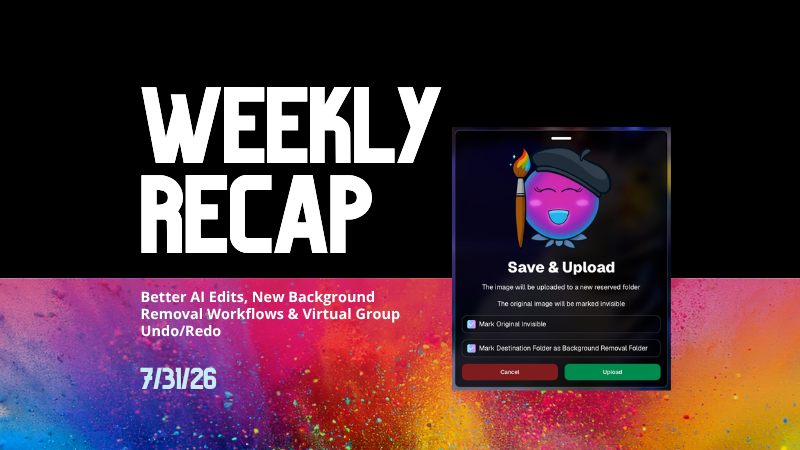
  • When editing an Event image, a new option appears beneath Mark Original Invisible if the Event has Background Removal folders enabled.
  • Select Mark Destination Folder as Background Removal Folder to upload the edited image into a folder that will also process it for background removal.

⚙️ Auto Editor adds a Background Removal size option

  • If Background Removal folders are enabled, you can choose Background Removal. Edited images will then upload into a folder marked for Background Removal.

🛠️ Auto Editor folder fix

  • Auto Edits now run properly on original images inside folders marked for Background Removal. Auto Editor still does not run on the completed cutout images themselves.

All of the new node pricing and quality improvements in Candy Image Studio also apply to Auto Editor, since Auto Editor is powered by the same system.

↩️ Virtual Group Builder: Undo & Redo

Virtual Group Builder now supports familiar keyboard shortcuts:

  • ↩️ Undo: CMD/CTRL + Z
  • ↪️ Redo: CMD/CTRL + Shift + Z
  • ↪️ Redo: CMD/CTRL + Y

This makes it much easier to experiment with layouts and quickly reverse an adjustment.

🖼️ Manage Images Improvement

⬇️ Download Original for BGR and AI images

  • The Manage Images lightbox now includes a Download Original button for Background Removal and AI-edited images.

You can access the original file without needing to leave the lightbox or track it down manually.

✂️ Background Removal Improvement

🟢 Better green screen cutouts

  • Background Removal now handles images more effectively when the background is only partially green screen instead of completely green.

🛍️ Retail Download Fixes

📥 Improved QuicEvents press-and-hold downloads

  • Download behavior is more reliable on desktop and Android for Events without artwork.

🖼️ Free Gallery Download resolution fixed

  • Free Gallery Downloads on QuicEvents now correctly deliver full-resolution images instead of medium resolution.

🧲 Photo Magnet artwork fix

  • Photo Magnets will no longer be ordered with Event artwork when Use Artwork by Default is enabled, since artwork is not supported on that product.

📱 Mobile Dashboard 4.1 for Android

💰 New “Cha Ching” notification sound

  • Weekly order notifications on Android now include the same Cha Ching sound effect already available on iOS.

👉 Swipe to open the Sidebar

  • Swipe inward from the left edge of the screen to open the Sidebar, matching the iOS experience.

🤖 Google Play compatibility updates

  • The app also includes required changes for the latest Google Play requirements.

That’s the week!

Lower-cost AI edits, stronger and more consistent results, and better Background Removal integration should make Candy Image Studio and Auto Editor more useful for both one-off fixes and larger Event workflows.

Keep creating magic,

Candy 🍬

Related articles

📸 Candy’s 12 Days of Christmas: Day 5 – International Customer Support 🌍✨
Feature Updates
December 18, 2024

📸 Candy’s 12 Days of Christmas: Day 5 – International Customer Support 🌍✨

3
 minutes read
Hello again,  globally-minded photographers! 🎅

Candy here, and welcome to Day 5 of our 12 Days of Christmas countdown.

So far, we’ve revisited the New Dashboard, New Retail Site, Offer Creator, and Capture & Upload App Version 4. Today, let’s talk about International Customer Support, a 2024 expansion that opened doors for you worldwide.

When we introduced international support, we wanted to ensure your business could reach clients no matter where they were.

Here’s what made it possible:

  • Global Marketing Texts & Links:

    Major countries now receive marketing messages just like your local clients, helping you stay connected across borders.
  • International Orders & Shipping:

    Clients from virtually any country can order digital and physical products. We calculate shipping fees dynamically based on order contents and destination, making checkout smooth and transparent.

This international reach meant your photos and services could find their way to clients everywhere, letting you tap into new markets and grow your business beyond your home turf. 🎉

Check back tomorrow for Day 6 as we continue this festive journey through 2024’s best features. And remember, something special is coming on December 25th!

Candy 🍬

📸 Candy’s 12 Days of Christmas: Day 4 – Capture & Upload App Version 4 🎄✨
Feature Updates
December 17, 2024

📸 Candy’s 12 Days of Christmas: Day 4 – Capture & Upload App Version 4 🎄✨

3
 minutes read
Hello, my holly-jolly photographers! 🎅

Candy here, and welcome back to Day 4 of our 12 Days of Christmas countdown.

So far, we’ve revisited the new Web Dashboard, the New Retail Site, and the Offer Creator. Today, let’s look at Capture & Upload App Version 4, one of the key updates that kept you snapping and uploading with ease throughout 2024.

When we rolled out Version 4, we aimed to improve both performance and functionality.

Here’s what made it stand out:

  • Face Boxes on iOS:

    Enhanced face detection and clarity for more accurate participant matching.
  • Performance Improvements:

    A smoother, faster app experience, letting you focus on capturing the moment rather than waiting on your device.
  • Dark Mode for OLED Screens:

    Battery-saving and easier on the eyes, perfect for long event days where every percent of battery counts.
  • Foundation for Future Tools:

    This update laid the groundwork for features like GroupTags (stay tuned for Day 7!), ensuring you were ready for the capabilities we’d roll out later in the year.

The Capture & Upload App Version 4 played a crucial role in optimizing your Workflow, and helping you handle busy events with confidence. 🎉

Check back tomorrow for Day 5, as we continue highlighting the top features of 2024. And remember, something extra special awaits on December 25th!

Candy 🍬

📸 Candy’s 12 Days of Christmas: Day 3 – The Offer Creator 🎄🎁
Feature Updates
December 16, 2024

📸 Candy’s 12 Days of Christmas: Day 3 – The Offer Creator 🎄🎁

3
 minutes read
Hello again, my festive photographers! 🎅

Candy here, and welcome to Day 3 of our 12 Days of Christmas countdown. Over the past two days, we revisited the new Web Dashboard and Retail Site—both big hits in 2024. Today, let’s highlight the Offer Creator, a powerful tool that put you firmly in the driver’s seat of your photography business.

When we introduced the Offer Creator, our goal was to give you total flexibility and control, while maintaining simplicity and ease of use!

Note: We did keep the original NowCandid Default Price Levels around! So those are still an option to use, however you now have the option to create your own as well! Woo!

Here’s what made it shine:

  • Custom Product Lineups & Pricing:

    Tailor your product offerings exactly how you want, setting your own prices and creating packages that fit your clients’ needs.
  • Upsells & Shipping Fees:

    Configure upsell products and shipping costs to match the value of your work and the nature of the event—no more one-size-fits-all.
  • Themed Retail Experiences:

    Change your retail theme to align with your brand, the event’s vibe, or even the holiday spirit. Think of the Candy Cane theme for this festive season!
  • Easy Event Selection:

    Once you’ve created an Offer, simply select it whenever you’re setting up a new Event. Quick, organized, and ready to roll.

The Offer Creator allowed you to fine-tune your selling strategy, ensuring that every event’s storefront matched your vision and delighted your customers. 🎉

Check back tomorrow for Day 4, where we’ll continue highlighting the best of 2024. And remember, something extra special awaits on December 25th!

Until then, stay jolly and keep capturing those wonderful holiday moments. 🎄

Candy 🍬

Let’s get in touch

If you’re a photographer looking to add NowCandid services to your wheelhouse – set up a call by clicking the button below.

How to customize formatting for each rich text

How to customize formatting for each rich text

How to customize formatting for each rich text

How to customize formatting for each rich text

How to customize formatting for each rich text

What’s a Rich Text element?

The rich text element allows you to create and format headings, paragraphs, blockquotes, images, and video all in one place instead of having to add and format them individually. Just double-click and easily create content.

A rich text element can be used with static or dynamic content. For static content, just drop it into any page and begin editing. For dynamic content, add a rich text field to any collection and then connect a rich text element to that field in the settings panel. Voila!

Headings, paragraphs, blockquotes, figures, images, and figure captions can all be styled after a class is added to the rich text element using the "When inside of" nested selector system.

  • List One
  • List Two
  • List Three
  • List Four
  • List Five

This is a link

This is bold text