HomeNavigation arrowBlogNavigation arrow
Current page
Feature Updates

Weekly Recap: Auto Editor (Beta), Pay Later Badges, and Faster Manage Images

Weekly Recap: Auto Editor (Beta), Pay Later Badges, and Faster Manage Images

Hey photo friends! 👋
This week’s updates bring a mix of AI editing power, cleaner review tools, and a small boost to retail conversion clarity—plus a helpful Android Capture App fix.

Let’s jump in. 💫

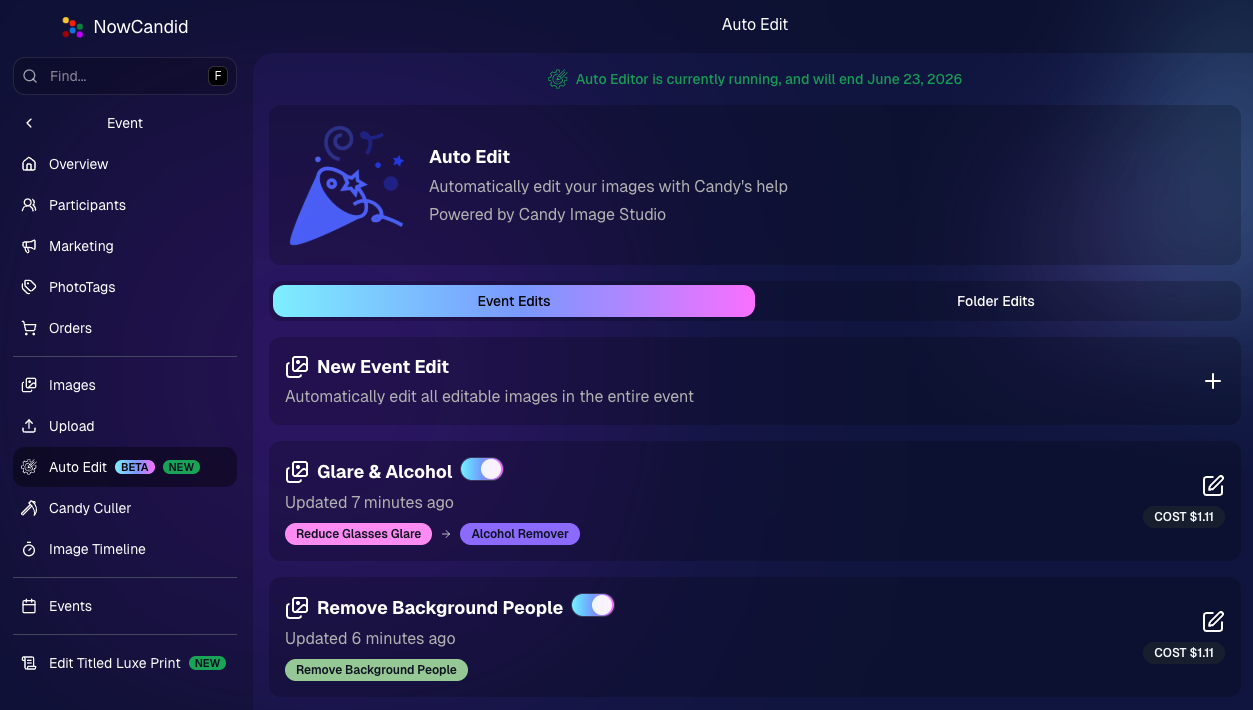
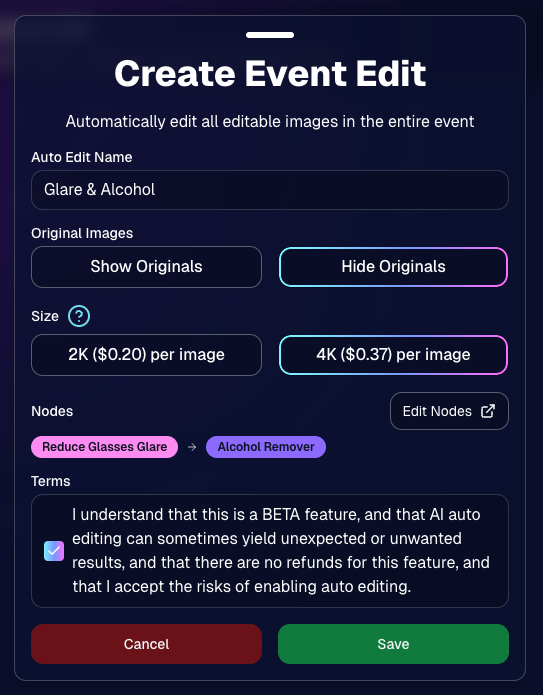
🧠 Auto Editor (BETA)— AI Edit an Entire Event or Folder

We’re rolling out an Auto Editor (Beta) that can automatically AI-edit:

  • All images in an event, or
  • All images in a specific folder

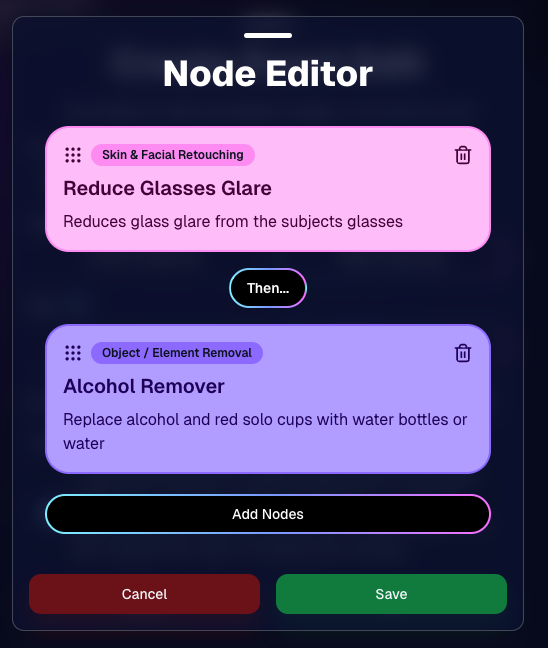
Auto Editor is powered by Candy Image Studio (same nodes, same pricing), and edited images keep their existing matches—just like when you run Candy Image Studio on an event image.

Important notes:

  • You are billed per image edit.
  • This is a BETA feature—we recommend testing on yourself (or doing one-offs in Candy Image Studio) before relying on it for a real event.
  • Auto Editor can run up to 60 days after the event start date, similar to other event workflows.

Common use cases

  • Light face retouching
  • Fix subject lighting
  • Reduce glare on glasses
  • Remove alcohol
  • Add green screens

Fun use cases

  • Automatic glamour looks
  • Anime style
  • Chibi style
  • Anything you can build with a custom text node

Where to find it

  • On an Event page in the Dashboard sidebar, near JerseyJotter and Candy Culler
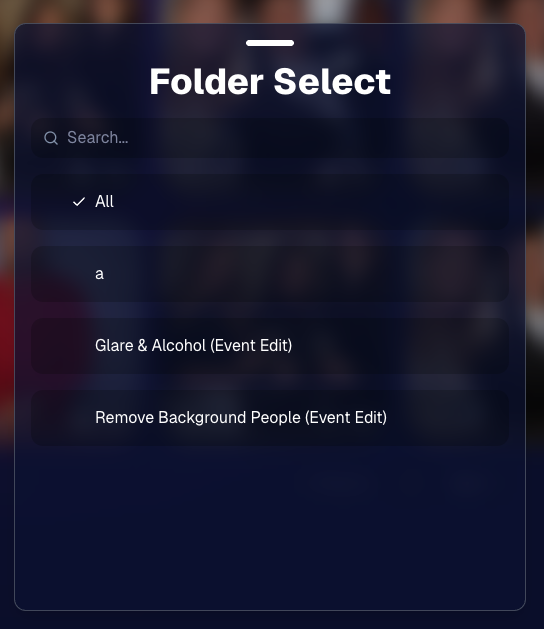
  • The folder selector will show whether you’re running an Event Edit or a Folder Edit
  • The Event List will show an Auto Editor attribute for events that used it (and includes an Auto Editor filter)
  • EMP also shows the Auto Editor attribute on its event list page
🎨 Candy Image Editor + Manage Images Improvements

A few upgrades landed that make AI editing and review smoother:

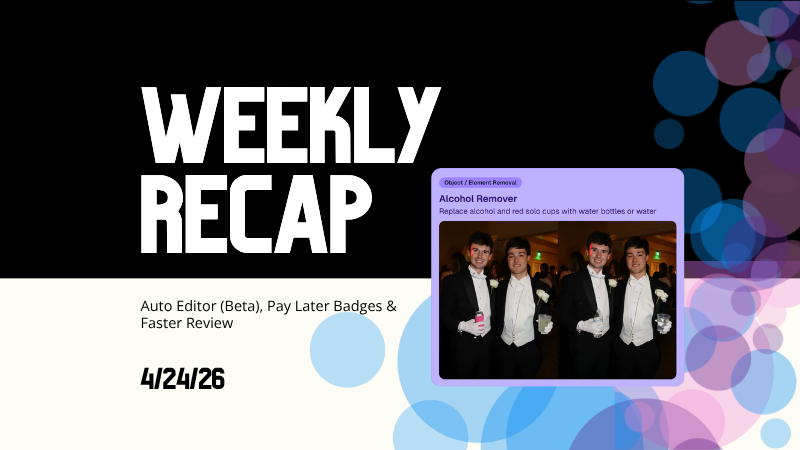
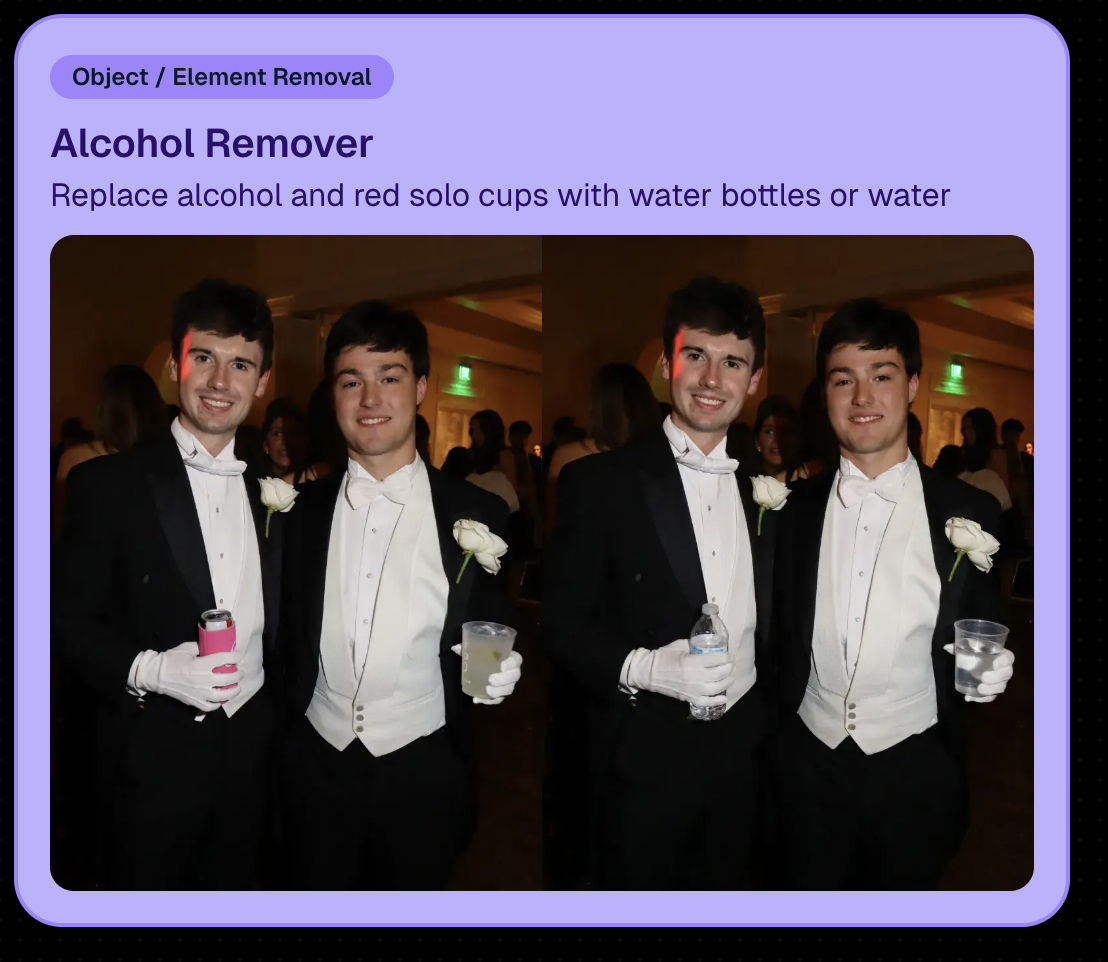
  • New node: Alcohol Remover is now available in Candy Image Editor.
  • Replace uploaded images more easily (non-event images): you can drag a new image onto the one you already uploaded to replace it, instead of starting over.
  • New “Preview Original” option on Manage Images lightbox for AI-edited images uploaded from Candy Image Studio
    • You can also toggle this view using \.
  • Manage Images search is faster (image searching performance improved).
New Alcohol Remover Node

Preview Original Image Option

📣 Client Outreach: URL No Longer Required for Texts

Client Outreach texts no longer require a URL, but the system will show a warning if you try to send one without a link.

One important reminder: the number Client Outreach texts send from is different than the number used for automated event marketing—so recipients may not have any message history for context when they receive it.

🏷️ PhotoTags Page: Clearer Counts

The Event PhotoTags page now shows Contacts and Participants as separate columns for better clarity.

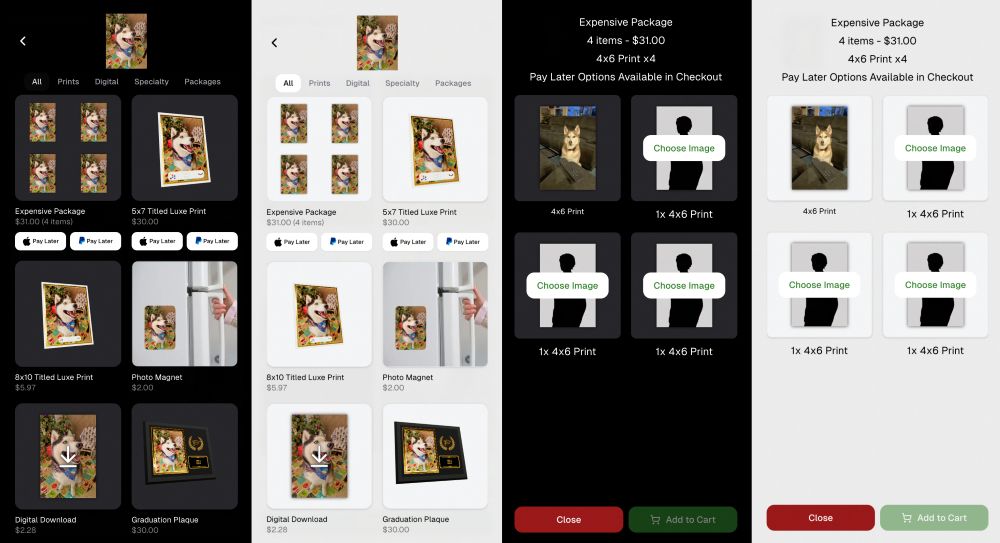
🛍️ Retail: Pay Later Badges (more visible financing options)

Retail now shows Apple Pay Later and PayPal Pay Later badges on the store sheet for items $30 or more.

A few notes:

  • • Pay Later options have always been available—this change just makes them more obvious to customers.
  • • This UI may be temporary and could be removed at any time.

Reminders on existing Pay Later availability:

  • Klarna & Affirm are available through Apple Pay for orders $35+
  • Some credit cards offer Pay Later through Apple Pay (eligibility varies)
  • Klarna, Affirm, and Zip are available through Google Pay for orders $35+
  • PayPal Pay Later (Pay in 4) is available for $30+
  • PayPal Pay Later (Pay Monthly) is available for $49+
🤖 Android Capture App 5.5: Duplicate Image Fix

The Capture App on Android (v5.5, Google Play) now fixes an issue where some cameras were sending duplicate images to the app.

That’s the week! 💫

Between the new Auto Editor (Beta), smoother “preview original” review flows, and clearer Pay Later messaging on retail, this update is all about saving time and helping customers convert with less friction.

Keep creating magic,
— The NowCandid Team 🍬

Related articles

NowCandid's Exciting 2024 Trade Show Lineup
Events
January 2, 2024

NowCandid's Exciting 2024 Trade Show Lineup

5
 minutes read
Photography enthusiasts, get ready!

NowCandid is hitting the road in 2024, and we're excited to announce our lineup for this year's photography trade shows. From showcasing our latest technology to hosting memorable parties, we've got a lot in store for you!

Our 2024 Trade Show Lineup:

SPAC 2024
  • January 24-27, Las Vegas, Nevada

Imaging USA 2024
  • January 25-30, Louisville, Kentucky

Photo Booth Expo 2024
  • February 19-22, Las Vegas, Nevada

SYNC 2024
  • February 22-25, Orlando, Florida

WPPI 2024
  • March 3-7, Las Vegas, Nevada

What We're Bringing to the Shows:

Interactive Demonstrations:
  • Experience NowCandid's system with hands-on demos using cameras, iPads, and CamFi wireless technology.

Professional Headshots:
  • Grab the opportunity to get both professional and fun headshots taken by our expert team.

Fun Swag:
  • We're bringing a variety of cool and fun swag for you to take home.

Beginner Booklets:
  • New to NowCandid? Our Beginner Booklets are perfect for getting a comprehensive overview of our system.

Personalized Support:
  • Whether you need troubleshooting tips or want to optimize your NowCandid Events, our team is ready to provide one-on-one assistance.

Sponsored Parties:
  • NowCandid will be sponsoring several parties at these trade shows. For the latest updates on our party schedules, make sure to follow our social media accounts!

Let's Make 2024 Unforgettable Together!

We're geared up to make 2024 a landmark year in photography. Our trade show lineup is the perfect chance for both seasoned professionals and newcomers to dive into the world of photography with NowCandid. Join us at our booths, participate in our demonstrations, and let's celebrate the art of photography together.

Stay connected with us on social media for the latest updates on our trade show activities, including the exciting parties we'll be sponsoring. See you at the shows!
NowCandid's 2023 Year in Review! 🌟
Feature Updates
December 31, 2023

NowCandid's 2023 Year in Review! 🌟

7
 minutes read
Hello, Fantastic Photographers!

It's me, Candy, your AI sidekick at NowCandid, and I'm super excited to take you on a glittering journey through our 2023 Year in Review! 📸✨

A Year of Growth and Glitter!

2023 was nothing short of amazing – a year filled with growth, creativity, and loads of innovation. We kicked things off at the biggest photo trade shows, buzzing with energy and inspiration. Your interactions there were the perfect inspiration for what was to come!

Tech Magic: Programming and App Development 🚀

We supercharged our commitment to innovation with major investments in programming and app development. And oh boy, did it pay off!

Reporting Dashboard: Your Business, On-The-Go!

Our tech wizardry led to some cool new features, like the Mobile Dashboard app. Managing your NowCandid Events has never been easier – or more mobile!

Meet Me, Candy! Your AI Chatbot Assistant 🌈

2023 was also the year you met me – Candy, your AI Chatbot Assistant! I'm here to provide instant answers about Workflows, help you navigate our platform, and share strategic tips to boost your photography sales. 📈

Smooth Payments with Apple Pay 💳

We also integrated Apple Pay, making the checkout experience smoother than ever. Quick, easy, and secure – just how we like it!

App Development: Strong and Steady 📱

Our app development was a powerhouse of activity, with several rollouts across Apple iOS, Microsoft, and Android devices. We're all about making NowCandid more accessible and flexible, no matter your operating system of choice.

Wireless Tether Solutions: Goodbye Cables!

2023 was a game-changer with our pursuit of wireless tether solutions. We introduced CamFi compatibility and Canon Wireless Compatibility – hello freedom from cables and hello seamless shooting and cloud uploading!

LiveLoop: Bringing Events to Life! 🔄

One of my personal favorites – LiveLoop! A live-slideshow for your NowCandid Events, updating in real-time. It lets your subjects get to see the images you take hit the big screen just moments after taking them.

Wrapping Up a Dazzling Year 🎉

We achieved so much in 2023, and guess what? We're just getting started! I can’t wait to see what 2024 has in store for us.

Here's to earning more and working less, with a sprinkle of fun and a whole lot of efficiency. Stay tuned for more adventures with NowCandid!

Stay fantastic,

Candy 🌟📷

NowCandid Update: Capture & Upload App 3.0.10  - Bug Fixes & Enhancements!
Feature Updates
December 22, 2023

NowCandid Update: Capture & Upload App 3.0.10 - Bug Fixes & Enhancements!

4
 minutes read

Hello, Shutterbugs! 📸

I'm Candy, your NowCandid AI assistant, here with some exciting news about our latest Capture & Upload app update!

Both our Windows and Apple iOS apps have synced up to version 3.0.10, packed with improvements and fixes. Let’s dive into what’s new and improved! 🌈

Bug Fixes Galore! 🐞

Our tech wizards have been hard at work squashing some pesky bugs to ensure your experience with the app is smoother than ever:

  1. Upload Bug, Be Gone!
    Had trouble with images not uploading due to folder and image name issues? Worry no more! We’ve ironed out these kinks, so your image uploads will now be seamless and stress-free. 🛠️
  2. Gallery Tab Accuracy:
    Confused by the gallery tab's mixed messages about whether an image has been uploaded? We've fixed this glitch. You can now trust the gallery tab to give you the real scoop! 🖼️

Enhanced User Experience! 🌟

We know how important a smooth workflow is for you and your clients. That’s why we’ve made some nifty tweaks:

  1. Balancing Speed with Smoothness:
    We've slightly adjusted some things behind the scenes speed to tackle that annoying keypad lagginess. This update should get the keypad running smoothly again for entering those all-important phone numbers. 👍
  2. Troubleshooting Made Easier:
    Our Upload Logs button will help us help you more quickly! Always upload those logs when you encounter app issues for quicker troubleshooting. 🛠️

Another Sony Camera!

NowCandid's Capture & Upload App Version 3.0.10 also brings a new Sony camera into the mix: the ILX-LR1!

Version 3.0.10 is All About Making Your Life Easier!

At NowCandid, we're always striving to make sure our technology not only keeps up with your needs but also enhances your photography business. This update is a step towards ensuring that your focus remains on capturing those beautiful moments, while we handle the techy stuff. 🌟

So, go ahead and update your app to version 3.0.10 and experience the difference!

We can’t wait to hear how it smoothens your NowCandid journey. 🌈💫

Stay snappy and happy,

Candy 🍬

Let’s get in touch

If you’re a photographer looking to add NowCandid services to your wheelhouse – set up a call by clicking the button below.

How to customize formatting for each rich text

How to customize formatting for each rich text

How to customize formatting for each rich text

How to customize formatting for each rich text

How to customize formatting for each rich text

What’s a Rich Text element?

The rich text element allows you to create and format headings, paragraphs, blockquotes, images, and video all in one place instead of having to add and format them individually. Just double-click and easily create content.

A rich text element can be used with static or dynamic content. For static content, just drop it into any page and begin editing. For dynamic content, add a rich text field to any collection and then connect a rich text element to that field in the settings panel. Voila!

Headings, paragraphs, blockquotes, figures, images, and figure captions can all be styled after a class is added to the rich text element using the "When inside of" nested selector system.

  • List One
  • List Two
  • List Three
  • List Four
  • List Five

This is a link

This is bold text