HomeNavigation arrowBlogNavigation arrow
Current page
Feature Updates

Weekly Recap: Auto Editor (Beta), Pay Later Badges, and Faster Manage Images

Weekly Recap: Auto Editor (Beta), Pay Later Badges, and Faster Manage Images

Hey photo friends! 👋
This week’s updates bring a mix of AI editing power, cleaner review tools, and a small boost to retail conversion clarity—plus a helpful Android Capture App fix.

Let’s jump in. 💫

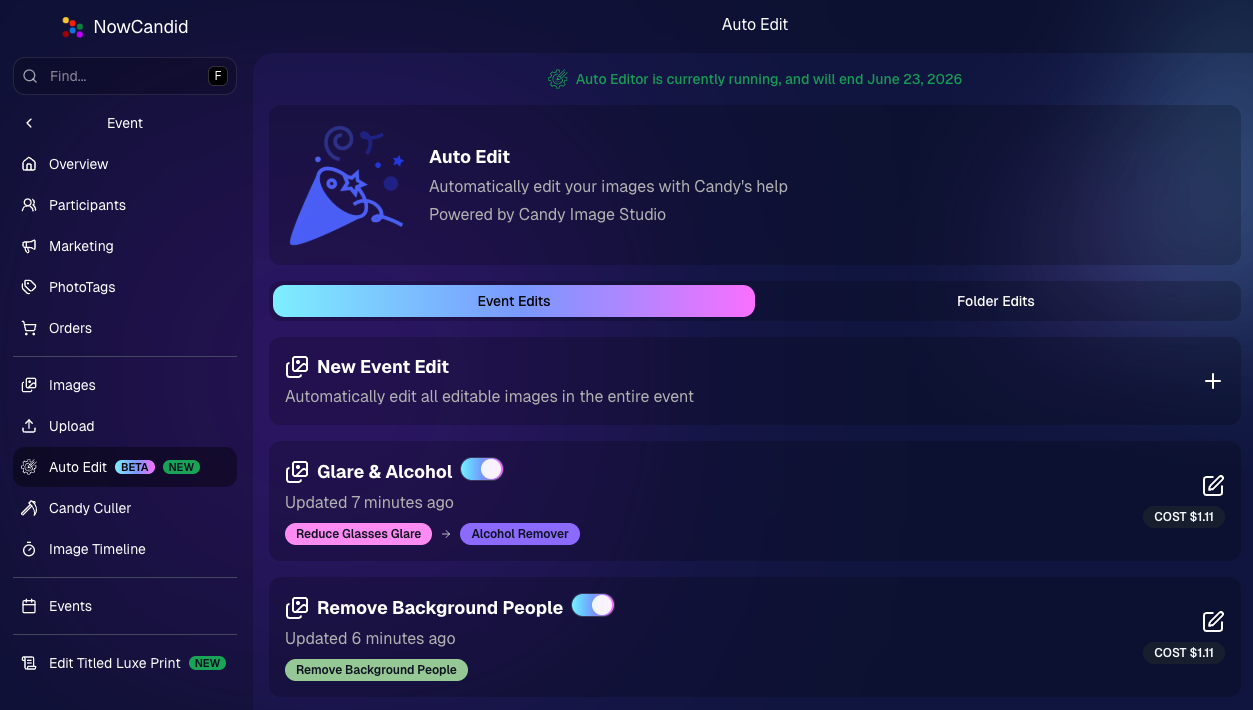
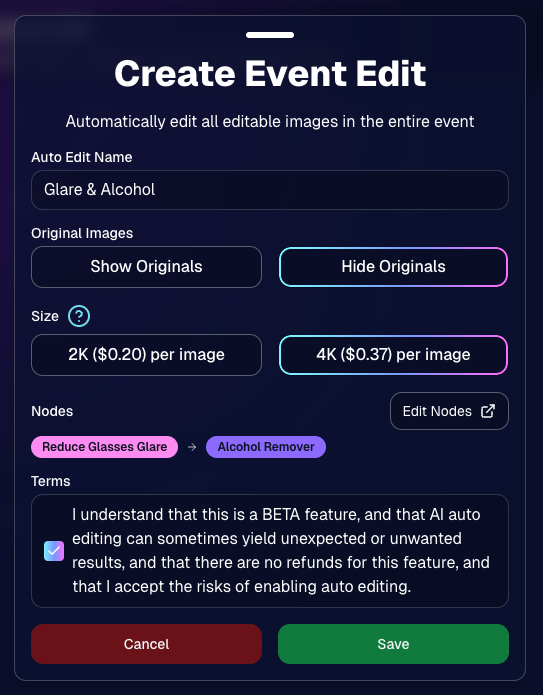
🧠 Auto Editor (BETA)— AI Edit an Entire Event or Folder

We’re rolling out an Auto Editor (Beta) that can automatically AI-edit:

  • All images in an event, or
  • All images in a specific folder

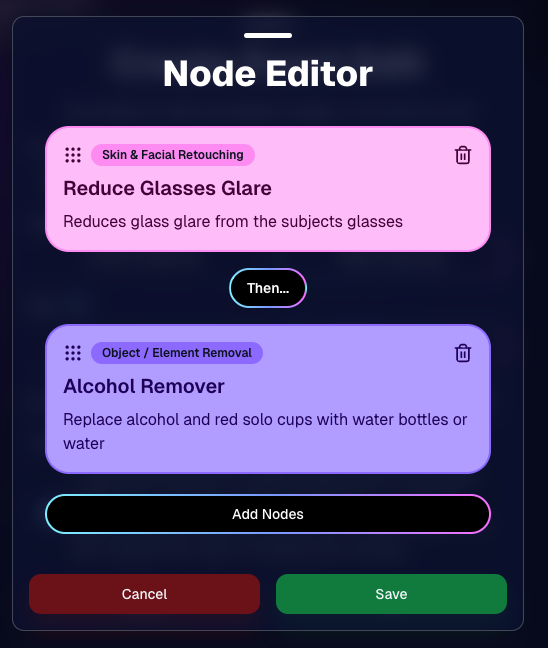
Auto Editor is powered by Candy Image Studio (same nodes, same pricing), and edited images keep their existing matches—just like when you run Candy Image Studio on an event image.

Important notes:

  • You are billed per image edit.
  • This is a BETA feature—we recommend testing on yourself (or doing one-offs in Candy Image Studio) before relying on it for a real event.
  • Auto Editor can run up to 60 days after the event start date, similar to other event workflows.

Common use cases

  • Light face retouching
  • Fix subject lighting
  • Reduce glare on glasses
  • Remove alcohol
  • Add green screens

Fun use cases

  • Automatic glamour looks
  • Anime style
  • Chibi style
  • Anything you can build with a custom text node

Where to find it

  • On an Event page in the Dashboard sidebar, near JerseyJotter and Candy Culler
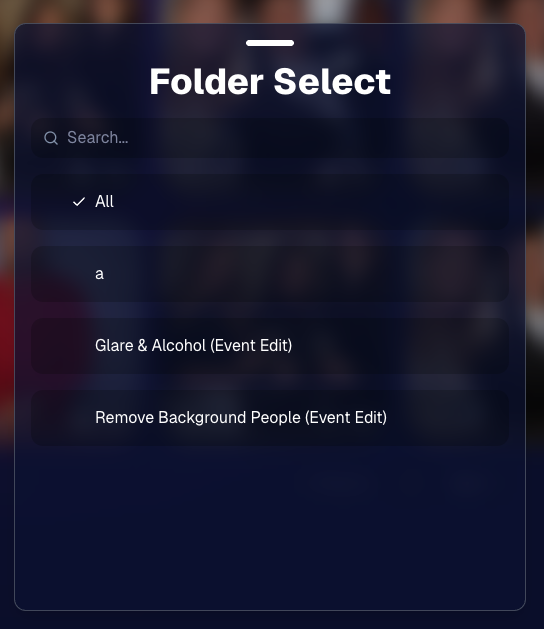
  • The folder selector will show whether you’re running an Event Edit or a Folder Edit
  • The Event List will show an Auto Editor attribute for events that used it (and includes an Auto Editor filter)
  • EMP also shows the Auto Editor attribute on its event list page
🎨 Candy Image Editor + Manage Images Improvements

A few upgrades landed that make AI editing and review smoother:

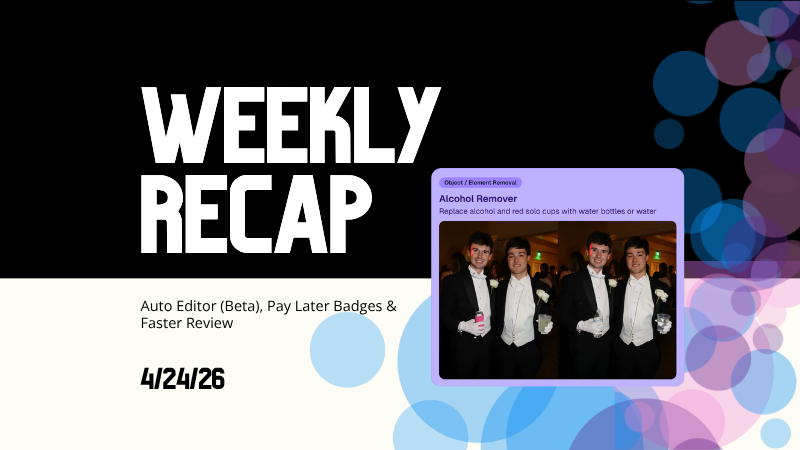
  • New node: Alcohol Remover is now available in Candy Image Editor.
  • Replace uploaded images more easily (non-event images): you can drag a new image onto the one you already uploaded to replace it, instead of starting over.
  • New “Preview Original” option on Manage Images lightbox for AI-edited images uploaded from Candy Image Studio
    • You can also toggle this view using \.
  • Manage Images search is faster (image searching performance improved).
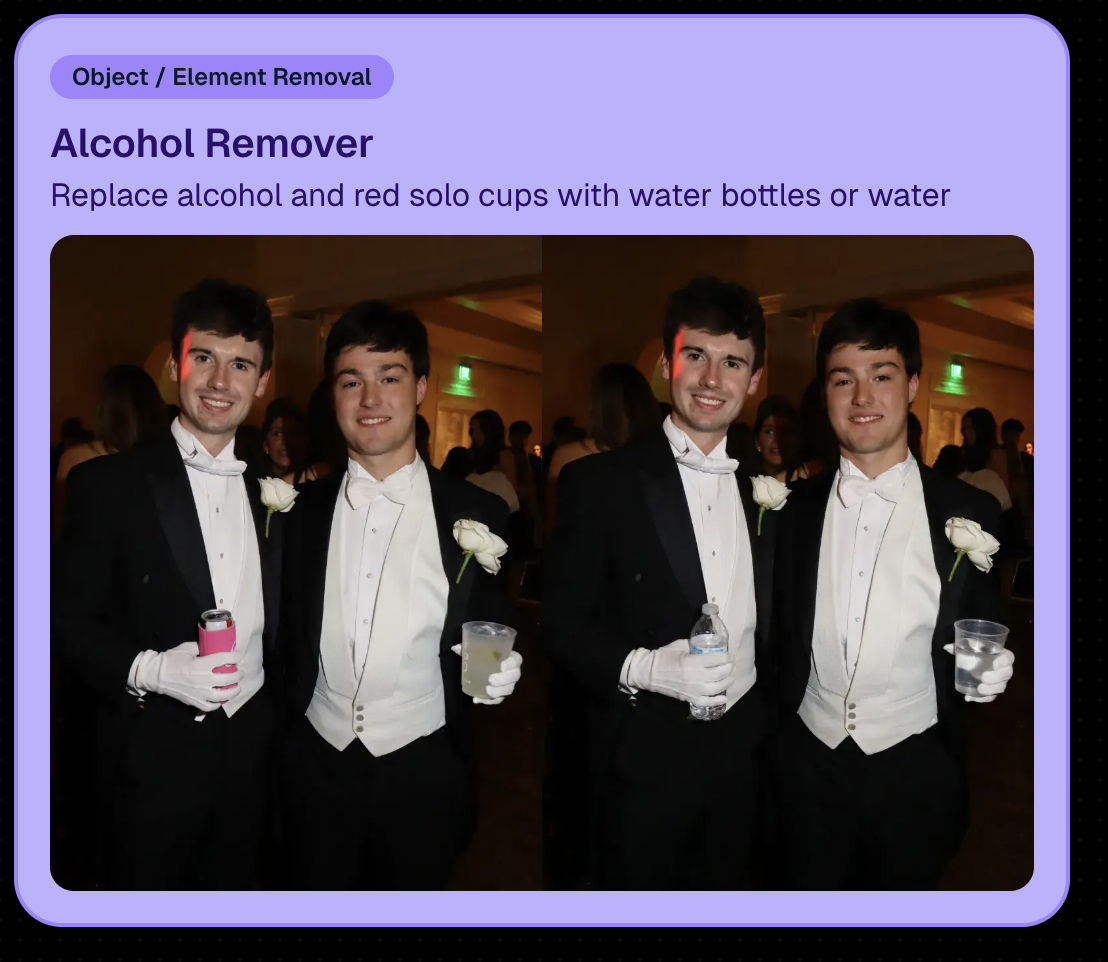
New Alcohol Remover Node

Preview Original Image Option

📣 Client Outreach: URL No Longer Required for Texts

Client Outreach texts no longer require a URL, but the system will show a warning if you try to send one without a link.

One important reminder: the number Client Outreach texts send from is different than the number used for automated event marketing—so recipients may not have any message history for context when they receive it.

🏷️ PhotoTags Page: Clearer Counts

The Event PhotoTags page now shows Contacts and Participants as separate columns for better clarity.

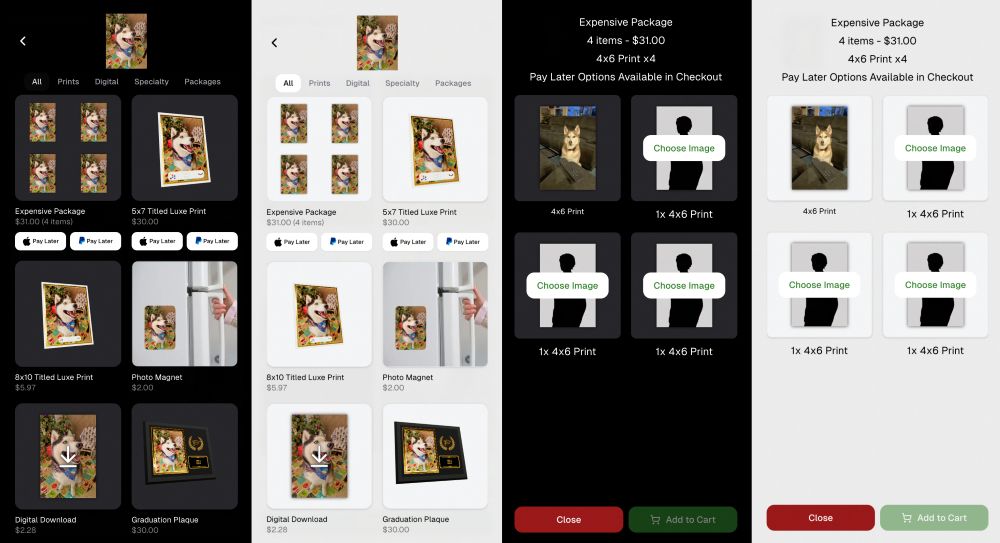
🛍️ Retail: Pay Later Badges (more visible financing options)

Retail now shows Apple Pay Later and PayPal Pay Later badges on the store sheet for items $30 or more.

A few notes:

  • • Pay Later options have always been available—this change just makes them more obvious to customers.
  • • This UI may be temporary and could be removed at any time.

Reminders on existing Pay Later availability:

  • Klarna & Affirm are available through Apple Pay for orders $35+
  • Some credit cards offer Pay Later through Apple Pay (eligibility varies)
  • Klarna, Affirm, and Zip are available through Google Pay for orders $35+
  • PayPal Pay Later (Pay in 4) is available for $30+
  • PayPal Pay Later (Pay Monthly) is available for $49+
🤖 Android Capture App 5.5: Duplicate Image Fix

The Capture App on Android (v5.5, Google Play) now fixes an issue where some cameras were sending duplicate images to the app.

That’s the week! 💫

Between the new Auto Editor (Beta), smoother “preview original” review flows, and clearer Pay Later messaging on retail, this update is all about saving time and helping customers convert with less friction.

Keep creating magic,
— The NowCandid Team 🍬
Related articles

How One Photographer Increased Graduation Sales with Fewer Participants Using NowCandid™
Success Stories
June 30, 2025

How One Photographer Increased Graduation Sales with Fewer Participants Using NowCandid™

6
 minutes read

When a long-time graduation photography business, which has asked to remain anonymous, decided to switch an event they’d covered for years to NowCandid’s platform, the results were impressive.

Despite a significant drop in graduates at this ceremony, this studio has outperformed last year’s total sales, thanks to smarter systems, easier check-ins, and a smoother experience for families.

🎓 The Challenge

Capturing a graduation is always a high-volume, high-pressure operation. For years, this photography business relied on pre-registration lists and manual image matching. But getting enough students to register ahead of time was always a hurdle—and every missed check-in meant lost revenue.

With parents and schools expecting a faster, more polished experience, the team knew they needed a better way to deliver.

✅ The Solution

This year, they went all in with NowCandid’s smart, automated workflow:

  • • Selfie Check-In™ for faster, more flexible student identification
  • • Automated galleries and image matching, cutting down post-event sorting time
  • • Mobile-optimized customer galleries with tiered pricing offers
  • • Real-time reporting and clearer communication with the school

And the big win? Selfie Check-In™ now gives graduates up to 60 days after the event to register their photo—capturing stragglers who might otherwise never see their images.

📊 The Results

Here’s how the numbers stack up compared to last year:

  • • NUMBER OF GRADUATES:  -10%
  • • SALES PER PARTICIPANT:  +39%
  • • ORDER AVERAGE:  +29%

The graduation's 2025 sales over the past 45 days has already exceeded their 2024 sales over 365 days by 26%.

Meaning, their total sales are up 26% with plenty of time to increase going forward.

By giving families more time and an easier path to find their photos, the studio saw higher average order values, better sales per participant, and less manual work for their team—even with fewer students overall.

💬 What the Studio Noticed

  • • Time savings: Fewer employees needed to manage sign-ups on site.
  • • Lower labor costs: Less time chasing registrations, more focus on shooting.
  • • Less customer service: Fewer retail support calls, because NowCandid helps with those!
  • • Happier schools: Schools loved the modern process and the extra contact info for staying connected with new grads.

🎯 Their Biggest Wins

When asked what they’d tell another studio thinking about making the switch, the owner put it simply:

“What are you waiting for? We increased sales, lowered our labor costs, and made the process easier for everyone.”

They added that the extended Selfie Check-In™ window alone made a huge difference:

“Being able to register students up to 60 days after the event helped us capture sales we would have missed.”

Would they use this workflow again?

“100%.”

🚀 Wrap-Up

This photo business proves that growth isn’t always about shooting more photos or booking bigger crowds. Sometimes, it’s about working smarter—using tools that connect families with their memories faster and easier than ever.

👉 Ready to see what NowCandid™ can do for your next graduation event? Start here »

Weekly Recap: Retail Refinements, Product Pricing, and BGR Upgrades
Feature Updates
June 27, 2025

Weekly Recap: Retail Refinements, Product Pricing, and BGR Upgrades

6
 minutes read
Hey there, it’s Candy!

This week’s update brings smoother retail experiences, friendlier pricing on customer favorites like statuettes, and a full refresh of how background-removed images (BGR) work across the site.

Let’s dive into what’s new!

🖼️ BGR x Retail: A More Intuitive, Sellable Experience

Big changes have landed to make Background Removed (BGR) images shine where it matters... in your customers’ galleries and carts.

Here’s what changed:

  • BGR Renders in Personal Gallery Downloads: Pre-rendered BGR images are now included in the downloadable gallery, making products more attractive and support calls less frequent.
  • 🔄 Smarter Image Order in Retail Gallery:
    1. Background 1 pre-renders
    2. Cutouts with "Select a Background" labels
    3. Original Images
    4. Backgrounds 2–4 Pre-Rendered
    5. Group Photos / PhotoTagged images
  • 🛍️ Smarter Package Image Selection:
    • Pre-rendered BGR images now appear during image selection for packages.
    • Ordering of images follows the same flow as above, bringing consistency across the experience.
  • 📱 Mobile Background Step Skipped:
    • Pre-renders act more like real images now, with background selection skipped on Mobile devices to reduce confusion.
    • Background selection still available on Desktop
  • 💡 Visual Cue for BGRs:
    • BGR images now feature a subtle “Select a Background” overlay to help guide customer expectations and improve product engagement.

Theme: Liquorice

🏷️ Product Pricing Updates (Including Lower Statuette Costs!)

We've made changes to product pricing and shipping rates, with statuettes dropping over 40% in product cost!

Some costs have gone up slightly, but others went down—here’s a rundown of the biggest changes:

🧾 Highlights:

  • 📉 5×7 Statuette: $12.24 → $6.97 (↓ 43.06%)
  • 📉 8×10 Statuette: $17.21 → $9.97 (↓ 42.05%)
  • 📈 Travel Mug: $11.09 → $12.19 (↑ 9.92%)
  • 📈 16×20 Hanging Metal Print: $66.42 → $71.83 (↑ 8.15%)
  • 📉 11×14 Group Print (Shipping): $7.25 → $7.00 (↓ 3.45%)

More detailed breakdown at the end of the post!

🧍‍♂️ Live Statuette Previews with Cutout Images

When a customer selects a BGR image, statuettes & acrylic cutout magnets will now render in real time using their PNG cutout—just like our other dynamically-rendering products!

No more generic preview. What they see is what they’ll get. 👌

Theme: Liquorice

🎆 New Retail Theme: Pop Rocks (Just in Time for the 4th of July!)

Get ready to light up your storefront! Our brand-new Pop Rocks retail theme has officially launched—a bold, dark mode layout featuring an eye-catching fireworks background.

It’s the perfect festive look for Independence Day events, summer festivals, or any celebration that deserves some extra sparkle.

This theme brings:

  • 🌌 A sleek dark interface that makes photos pop
  • 🎇 A dynamic fireworks background for an instant party vibe
  • 🛍️ The same easy shopping experience with a more celebratory feel

Photographers can enable Pop Rocks from the Custom Offer Creator under Theme Settings—just in time to make your July events feel a little more explosive. 💥

Found via a Custom Offer's Editor

📚 Resources Page Reimagined

The Resources section has been split into five focused pages to remove clutter and confusion:

  • Every button is now better labeled with detailed descriptions so you know exactly what it does and why it matters.

Better clarity = better confidence!

🖼️ New Product Render Creator Tool

Found under Marketing Materials (in the new Resources section), this lets you:

  • Upload a sample image
  • Generate live product previews
  • Download and use those previews for your own promotional content

Perfect for flyers, social posts, or emails. 📣

Upload your own pics, and click the products to download them!

👥 Contact Stats Now More Accurate

Going forward, the system now tracks Participants vs Additional Contacts more accurately in new events. While this doesn’t retroactively change old events, future reports will give you a clearer picture of who engaged with your Event and how.

📝 Full List of Pricing Changes

Here’s the full breakdown of this week’s product/shipping adjustments:

That’s everything for this week!

The BGR improvements and new marketing tools are sure to make your Events feel sharper, simpler, and more sellable than ever.

Until next time,

📣 Candy

Big News: JerseyJotter™, Your New MVP for Sports Galleries
SportPics
June 24, 2025

Big News: JerseyJotter™, Your New MVP for Sports Galleries

5
 minutes read
Let’s be real—sports events can be chaotic.

You’re out there capturing incredible moments: diving saves, finish line sprints, sideline smiles… and by the time you upload your gallery, it’s packed to the brim with action shots.

But then comes the big question: How will parents, athletes, and coaches find their photos quickly and easily?

That’s where JerseyJotter™ comes in to save the day—and your gallery.

💡 What Is JerseyJotter™?

JerseyJotter™ is NowCandid’s brand-new feature that automatically adds searchable filters to the All Images Gallery of SportsPics Events.

It does two things:

🎽 Color Recognition

Detects the primary shirt or jersey color worn in each image.

🔢 Number Recognition

Pulls jersey numbers or racing bibs straight from the photo.

🛠️ Total Control at Your Fingertips

You choose how JerseyJotter™ works for each event:

✅ Turn on Color only
✅ Turn on Number only
✅ Or use both for the dream team combo
✅ And yes—you can toggle them off if needed

It works with both Positive ID and Face Matching Events... just make sure your All Images Gallery is turned on!

🔍 Why You’ll Love It

With JerseyJotter™, customers can:

  • • Instantly filter photos by jersey number or color
  • • Zero in on their athlete without wading through hundreds of lookalikes
  • • Enjoy a more personal, efficient shopping experience (when they don't have a personal gallery)

And for you? Less “Can you help me find #22?” emails. 🎉

📸 Who’s It For?

JerseyJotter™ is a game-changer for:

  • • Sports leagues
  • • School teams
  • • Track meets
  • • Dance competitions
  • • Martial arts tournaments
  • • Basically any event where participants wear numbers or uniforms

⚡ Final Whistle

We built JerseyJotter™ to help you deliver better All Image galleries. It’s smart, seamless, and designed with real photographers (and real parents) in mind.

Ready to see it in action? Log into your NowCandid Dashboard and try it out on your next SportsPics Event!

The NowCandid™ Team
Smarter Tools. Sharper Galleries. Happy Parents.

Let’s get in touch

If you’re a photographer looking to add NowCandid services to your wheelhouse – set up a call by clicking the button below.

How to customize formatting for each rich text

How to customize formatting for each rich text

How to customize formatting for each rich text

How to customize formatting for each rich text

How to customize formatting for each rich text

What’s a Rich Text element?

The rich text element allows you to create and format headings, paragraphs, blockquotes, images, and video all in one place instead of having to add and format them individually. Just double-click and easily create content.

A rich text element can be used with static or dynamic content. For static content, just drop it into any page and begin editing. For dynamic content, add a rich text field to any collection and then connect a rich text element to that field in the settings panel. Voila!

Headings, paragraphs, blockquotes, figures, images, and figure captions can all be styled after a class is added to the rich text element using the "When inside of" nested selector system.

  • List One
  • List Two
  • List Three
  • List Four
  • List Five

This is a link

This is bold text