

Weekly Recap: Android Capture App Launch, PhotoTag Downloads & Upload Improvements 📸🍬
.png)
Hey photo friends! 👋
This week’s updates include something many of you have been waiting for: the first public release of the Capture App on Android. Alongside that launch, we’ve also improved PhotoRoster workflows, tightened up retail safeguards, and rolled out several capture app fixes across platforms.
Let’s take a look.
🤖 Capture App Now Available on Android (Beta)
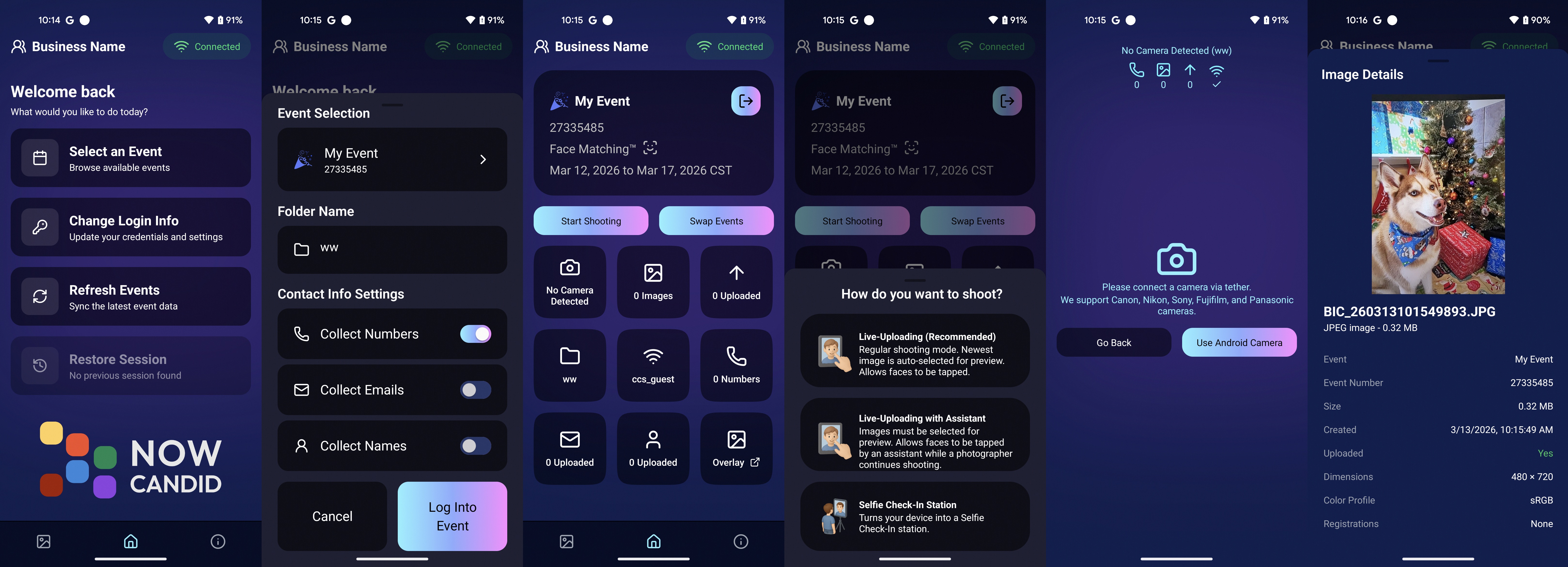
The first Android version of the Capture App (v5.0.1) is now available on Google Play.
IMPORTANT: This is very new! So it's in BETA at the moment. Meaning, if you want to use Android, we encourage you to try a test Event at your home or office and make sure your flow works with your particular equipment! If you run into any issues, let us know right away!
This release brings feature parity with the iOS app (with the exception of Photo Booth Mode and AirPrint, which currently are not planned for Android):
📷 Supports all of our capture workflows
⚡ Same improved upload system introduced in iOS v5
🔁 Camera-triggered auto-launch support
🎨 Android themed icon support
📱 Edge-to-edge Android UI support
If you’ve been wanting to run Capture on Android devices, the foundation is now here!
📱 Capture App Improvements
iOS – Version 5.0.1 (OTA)
A few fixes and small usability improvements landed this week:
🔎 Participant not found message when scanning cards
- Instead of defaulting to the first participant, the app now clearly shows when a scan doesn’t match anyone.
📊 Image gallery stats now update correctly during uploads.
📂 TKO popup now dismisses properly when setting a folder as TKO.
🖥 Windows Capture App – Version 4.21
⚡ New image upload API improves upload speed and reduces device resource usage
📡 Better behavior when signing into events with no connectivity
📂 Event selector now shows only active events when offline, matching iOS behavior
🏷️ Workflow Improvements
📥 Download PhotoTags directly from the PhotoTags page
- This makes it simple to reuse or share tags between events.
📂 PhotoRoster uploads increased
- Individual image uploads now support up to 5,000 images at once (previously 1,000).
🎨 Candy Image Studio Reliability Fix
Candy Image Studio uploads now behave more consistently.
Edited images will now reliably appear in all the same places as the original image, including:
- All galleries
- FreePics texts
- Personal galleries
Previously, images only appeared if they happened to match faces or were manually assigned.
🛍️ Retail Improvements
A couple improvements help prevent confusing edge cases for customers:
👥 Group products now properly enforce group images
- If someone tries selecting a non-group image for a group product, they’ll now see a clear error message.
🌍 New international shipping notice
- For non-US shipping addresses, customers now see a helpful reminder that customs or import fees may be charged by their country in addition to international shipping fees.
🖥️ Dashboard Improvements
Some smaller UI improvements landed this week:
✨ Toggle switches now animate smoothly instead of appearing choppy.
That’s the week!
The Android Capture App launch is a big step toward expanding device flexibility, and the PhotoTag downloads and PhotoRoster improvements should make event setup a little easier as well.
See you next week,
Candy 🍬

.svg)


