HomeNavigation arrowBlogNavigation arrow
Current page
Photography Tips

The Hidden Cost of Shipping in Volume Photography

The Hidden Cost of Shipping in Volume Photography

by Jack Counts III - NowCandid Project Manager

‍

A photography business recently switched to NowCandid from another volume photography platform...

‍

During the transition, they shared some details about how their previous software handled shipping and fees.

‍

I knew different platforms approached this stuff differently. But seeing the mechanics laid out was one of those "wait… what?" moments.

‍

In the setup they described, the photographer didn’t set the shipping charge. They didn’t keep that shipping money. But the amount charged for shipping still increased the percentage-based fees coming out of their payout.

‍

Which is honestly kind of wild to me.

‍

Let me break down why:

  1. The shipping & handling amount could be set outside the photographer's control.
  2. The photographer would not generate any additional revenue on this shipping charge, which may be marked up.
  3. The photographer would pay ecommerce, payment processing, and potentially sales tax on the collected shipping.

‍

That can add up to some significant % in additional costs that photographers might not otherwise notice.

‍

Hearing about this hard-to-notice cost got me thinking about shipping in the volume photography space.

‍

What does that shipping charge actually cost the photographer?

‍

Some volume photography platforms use lab-set shipping rates for orders delivered directly to customers. GotPhoto’s documentation (help.gotphoto.com/en/support), for example, says its direct-shipping charges are determined by the lab and automatically added at checkout.

‍

Then there’s a separate question: Does that shipping charge also increase the fees coming out of the photographer’s payout?

‍

PhotoDay’s published standard pricing (support.photoday.io/en/articles) applies its 10% ecommerce fee to the total order, including products, shipping, and tax. Its reporting guide (support.photoday.io/en/articles) says customer-paid shipping goes directly to the lab. (PhotoDay’s pricing page currently says the fee applies to the sub-total before tax and shipping, so this may have changed. Either way, other platforms may still charge fees on collected shipping.)

‍

Let’s use a hypothetical order as an example with $50 in photo products plus $10 shipping. The customer pays $60 before tax.

‍

A 10% ecommerce fee on the $50 in products would be $5. But because that fee also applies to shipping, the photographer pays $6 in total ecommerce fees instead of $5 (before accounting for any additional ecommerce fees on collected sales tax).

‍

That extra dollar might not sound like much. But it means the ecommerce fee consumes 12% of the photographer’s product sales, even though the photographer doesn’t keep any shipping revenue.

‍

That’s an additional two percentage points of product revenue going toward ecommerce fees because of shipping.

‍

Here’s how that changes across a $5–$20 shipping range:

‍

How shipping affects ecommerce fees on $50 in product sales
Customer's shipping charge 10% ecommerce fee on shipping alone Total ecommerce fee on products + shipping Effective fee as a share of $50 in product sales
$5 $0.50 $5.50 11%
$10 $1.00 $6.00 12%
$15 $1.50 $6.50 13%
$20 $2.00 $7.00 14%

Illustrative calculations assume $50 in product sales and a 10% ecommerce fee applied to products plus shipping. They exclude payment processing, sales tax, and fulfillment costs.

‍

Payment processing adds another layer. Under PhotoDay’s published 2.9% processing rate, that $10 shipping charge generates another $0.29 in fees. Combined with the $1 ecommerce fee, that’s $1.29 attributable to shipping alone, equivalent to 2.58% of the $50 in product sales. The fixed $0.30 transaction fee is separate; it isn’t an additional charge caused by shipping, so we don't need to include that in this math we're doing to determine additional cost.

‍

Across 1,000 orders like this, that adds up to $1,000 in ecommerce fees plus $290 in processing fees attributable to shipping.

‍

To be clear, charging processing on shipping isn’t the problem by itself. The problem is that it’s one more fee applied to a number the photographer doesn’t control. The lab or platform sets the shipping charge, and if that charge runs high, the photographer still pays a percentage on every dollar of it.

‍

Again, I understand why processing a larger payment costs more. And I’m not assuming shipping revenue is all profit for the lab; packaging, handling, and postage need to be covered.

‍

But an ecommerce commission on shipping money the photographer doesn’t benefit from or have a significant say in? That does not sit right with me.

‍

To be fair, PhotoDay does let photographers offer free economy shipping as a promo (support.photoday.io/en/articles), and its reporting guide (support.photoday.io/en/articles) says that when you do, the shipping cost is deducted from your payout. That takes the charge off the customer’s plate, but the photographer still isn’t the one setting it. The amount comes from the lab’s shipping rates on the price sheet, and those may be customer-facing rates with markup built in, not what it actually costs to get the package out the door.

‍

Perhaps this could be fixed based on which third-party lab you decide to use through your volume photography software of choice, though I am not currently aware of any such options. (NowCandid has its own integrated photo lab so... not something our users need to worry about. 💅)

‍

High shipping costs can put the whole order at risk

‍

The photography business I talked with also shared with me how costs related to expensive-to-ship items were entirely passed on to end customers during checkout.

‍

Say someone picks out a $70 product, then discovers shipping adds another $20. Their purchase just became almost 29% more expensive, before tax.

‍

Maybe they’re fine with that. Maybe that’s the moment they close the tab.

‍

Baymard Institute’s checkout research (baymard.com/lists/cart-abandonment) lists high extra costs—including shipping, taxes, and fees—as the leading reason in its abandonment breakdown excluding “just browsing,” cited by 40% of respondents. That’s general ecommerce research, not a photography-specific rate, but it’s a pretty compelling reason to pay attention to the shipping line.

‍

And the actual fulfillment expense doesn’t necessarily have to appear entirely in that line.

‍

Consider two hypothetical ways to price the same purchase:

‍

Same $90 total, different shipping prices
Price breakdown Higher shipping Lower shipping
Product price $70 $85
Shipping $20 $5
Total before tax $90 $90

Hypothetical pricing example. Both options total $90 before tax; the difference is how the price is divided between the product and shipping.

‍

Same total. Different presentation.

‍

There’s research suggesting that distinction matters. A 2026 study in PLOS ONE (journals.plos.org/plosone) found a preference for free shipping even when the total purchase price stayed constant. It was a small study, but it gives us a reasonable question to test: Would customers respond better if more of the fulfillment cost were included in the product price and less appeared as shipping?

‍

While there is more testing we at NowCandid could do in this space to provide a more concrete answer to this question, we’ve recently seen abandoned carts come in at about 3% of the orders placed. In other words, for every 100 orders, only about 3 shoppers added something to their cart and never checked out - so we seem to be doing something right. 😎

‍

How NowCandid gives photographers more control

‍

With NowCandid, photographers can set their customer-facing shipping prices (nowcandid.com/blogs), rather than simply passing through a lab-set charge. They can also price shipping above the underlying cost to create additional margin.

‍

But having the opportunity to profit from shipping doesn’t mean you should always charge more for it.

‍

You can keep shipping very inexpensive and account for more of the fulfillment expense in your product pricing instead. That’s especially useful when you’d rather not put a large delivery charge in front of someone buying a more expensive item.

‍

Regular shipping isn’t a permanent $0 option, although free-shipping discount codes are available as promotions. The everyday opportunity with NowCandid is low shipping and more flexibility in how you price the complete purchase.

‍

We also don’t calculate our ecommerce or payment-processing percentages on collected sales tax (nowcandid.com/blogs). Collecting tax and charging additional fees on those tax dollars are two separate things.

‍

None of this eliminates fulfillment costs or applicable selling fees, of course, but it gives the photographer more say in how those costs are covered.

‍

It’s about more than cheaper shipping

‍

Looking back at that conversation, the part that bothered me wasn’t simply the shipping price. It was how little control the photographer had over a charge that affected both their profit and their customer’s experience.

‍

On one side, shipping can increase the fees coming out of your payout. On the other, it can make a purchase feel more expensive at the exact moment someone is deciding whether to complete it.

‍

That deserves more consideration than “that’s just what the lab charges.”

‍

And addressing it doesn’t necessarily mean giving up margin. In our $90 example, we didn’t lower the customer’s total—we moved more of the price into the product and less into shipping. Whether that presentation works better for your customers is worth testing, but you need the flexibility to try it first.

‍

That’s what I’d encourage photographers to look at when comparing volume photography software: Who sets the shipping price? Who receives that money? What additional fees does it generate? And can you change it when it isn’t working for your business?

‍

The advertised ecommerce % fee only tells part of that story.

‍

I don’t think every photographer needs the same shipping strategy. Some may want a reasonable margin on shipping. Others may prefer a higher product price and a very low shipping charge. That flexibility is what we want to provide with NowCandid.

‍

Shipping is part of your pricing. You should get a say in it.

‍

Thank you for attending my TED talk 🙏

Jack Counts III

NowCandid Project Manager

‍

NOTE: Platform examples reflect published policies and standard rates reviewed September 25, 2026. Terms can vary by lab, plan, promotion, or agreement. Order examples are illustrative, not reported studio results.

Related articles

Weekly Recap: New Discounts, Batch AI Editing & More Upload Controls 💸✨
Feature Updates
August 21, 2026

Weekly Recap: New Discounts, Batch AI Editing & More Upload Controls 💸✨

4
 minutes read
Hey photo friends! 👋

‍

Candy here with a big one this week: Discounts are officially here! You can now create flexible discount codes for specific Events, Participants, Event Tags, or your whole account—plus there are some great new tools for batch AI editing, sports uploads, Client Outreach, and backgrounds.

‍

Let’s jump in!

‍

💸 NEW: Discounts

‍

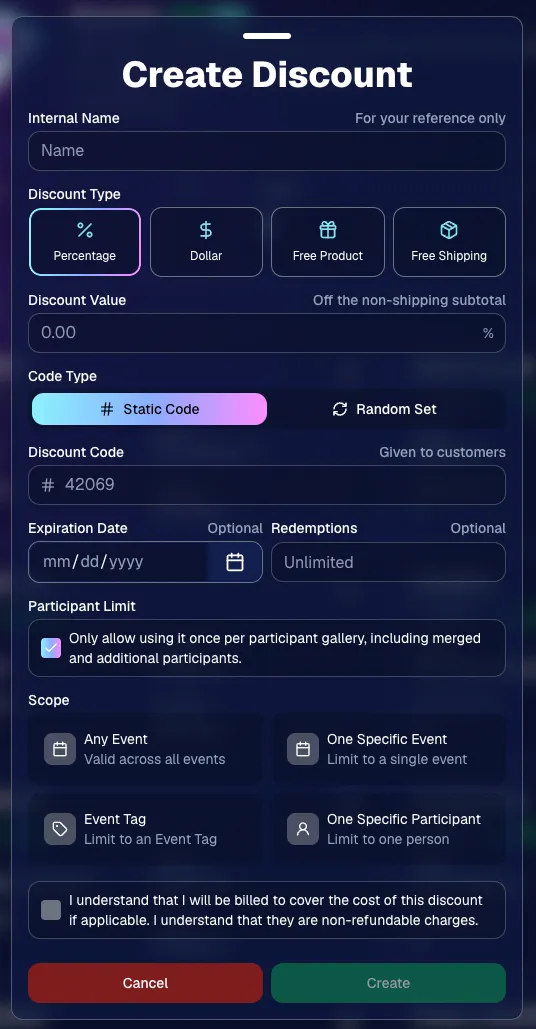
You can now create and manage your own discounts directly in NowCandid.

‍

Discounts you create can apply to:

‍

  • 🎟️ A specific Event
    ‍
  • 🏷️ An entire Event Tag
    ‍
  • 👤 A specific Participant
    ‍
  • 🌐 All of your Events

‍

And you can choose from several discount types:

‍

  • 📉 Percentage off
    ‍
  • 💵 Dollar amount off
    ‍
  • 🎁 Free product
    ‍
  • 🚚 Free shipping

‍

🔐 Flexible code options

‍

  • 🔤 Create a static 4–8 character code
    • Best for creating a limited time discount for all of your customers
      ‍
  • 🎲 Generate random one-time-use codes
    • Best for distributing "coach gifts" for sports leagues
      ‍
  • 👤 You can also limit a discount to one use per Participant Gallery
    • Automatically on for random one-time-use codes

‍

A few important rules:

‍

  • Discounts apply to the pre-shipping subtotal (except for Free Shipping discounts)
    ‍
  • If a discount exceeds the product cost, you are responsible for the difference and will be billed
    ‍
  • The maximum discount value is $500‍
    • For example, a 100% off discount on a $1,000 order would still leave the customer responsible for $500.

‍

📚 Full documentation:
https://app.nowcandid.com/docs/discounts

‍

‍

‍

🎨 Batch AI Editing from Manage Images

‍

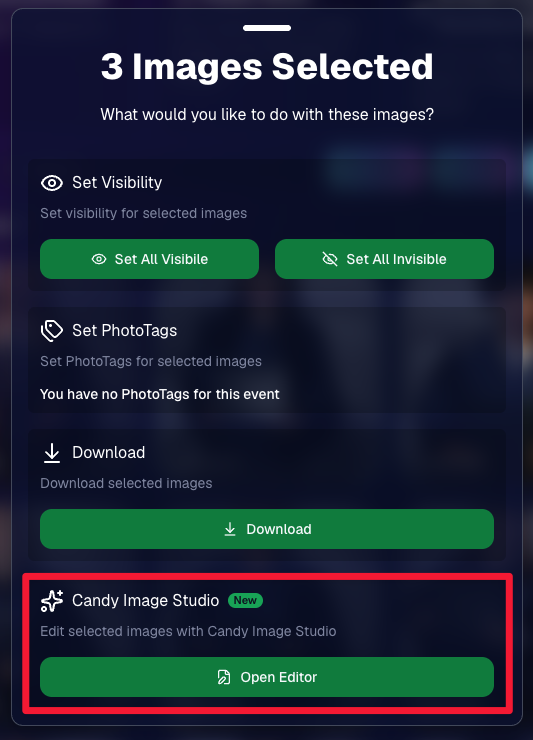
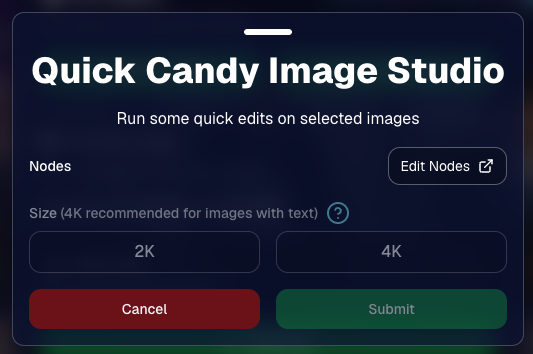
You can now run Candy Image Studio edits on multiple selected images at once right from Manage Images.

‍

  • ✨ Select multiple images
    ‍
  • 🍬 Open the new mini Candy Image Studio editor
    ‍
  • 🖼️ Apply an edit to the selected group

‍

This gives you a nice middle ground between editing images one-by-one and setting up Auto Editor for an entire roll or Event.

‍

‍

‍

📤 Better SportsPics Upload Controls

‍

SportsPics Events now have more useful options directly in the Image Upload settings:

‍

👥 Mark All Images Group‍

  • Automatically mark every uploaded image as a Group Photo.

‍

🏷️ Assign a PhotoTag during upload‍

  • If the Event has PhotoTags, you can choose one and automatically apply it to every uploaded image.

‍

This is especially handy when uploading to a Face Matching Event, to ensure the images don't go out to subjects via Face Matching before you have a chance to mark them as Group/Team Photos!

‍

✉️ Client Outreach email designer improved‍

  • Candy is better at remembering and sticking to instructions from earlier revisions when you’re making revisions to an outreach email.

‍

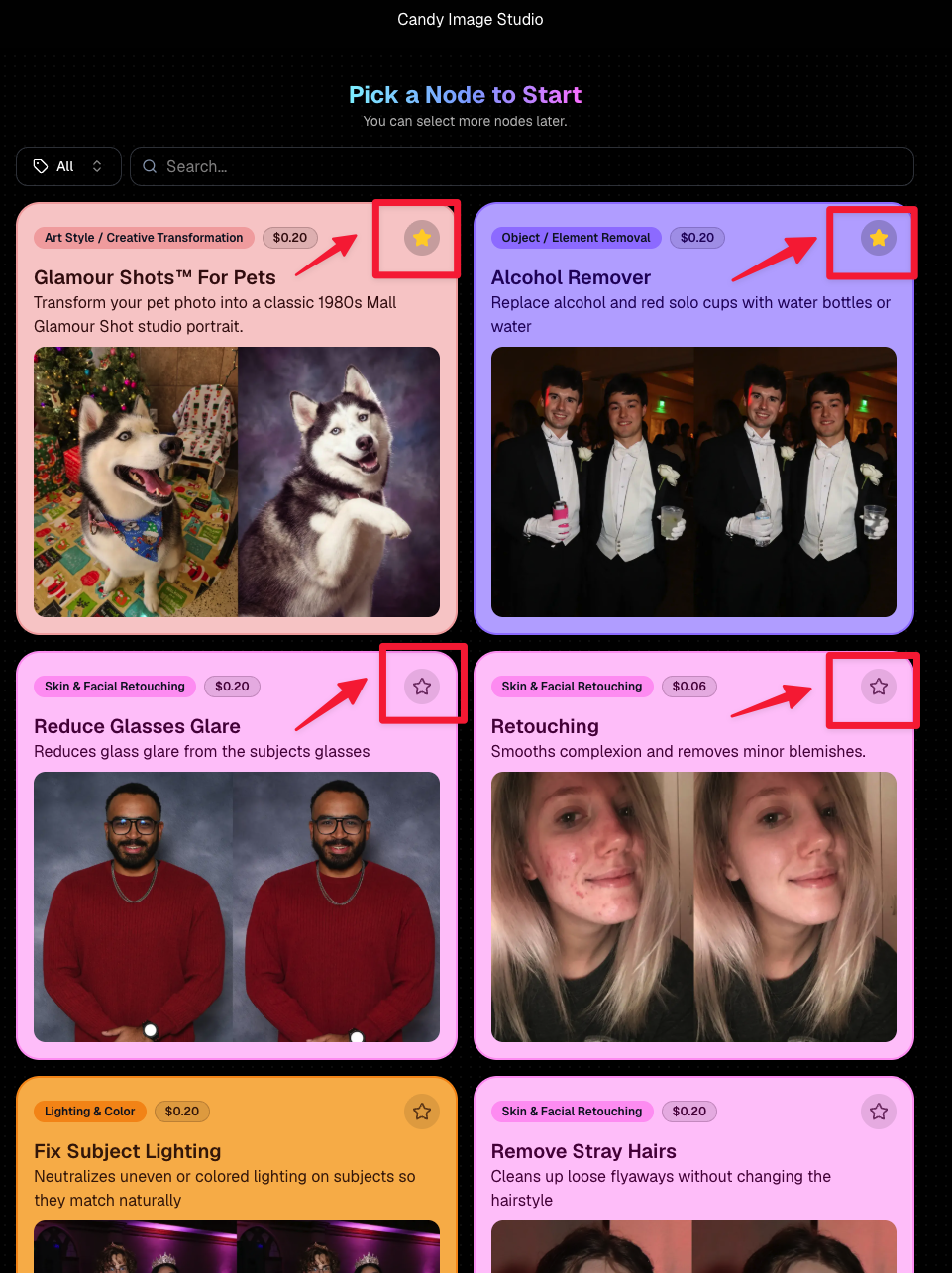
⭐ Favorite your most-used nodes‍

  • Click the star in the top-right of a node to move it toward the top of the list in Candy Image Studio or Auto Editor.
  • Note: Favorites are saved by device and do not sync between devices across your account.

‍

‍

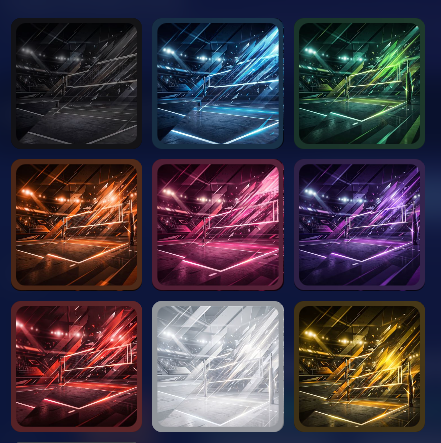
🖼️ 39 New Default Background Sets

‍

We added 39 new background sets for Offers and Virtual Groups!

‍

New additions span categories like:

‍

  • 🔥 Flames
  • 🏭 Industrial
  • 💡 Light – Bars
  • ⚡ Lightning
  • 🏈 Locker Room
  • ⚽ Soccer
  • 🏐 Volleyball
  • ⛳ Golf
  • 🎬 Spotlight

‍

Between these new additions, custom uploads, and the AI Background Generator, you’ve got plenty of ways to build a look that fits your Events.

‍

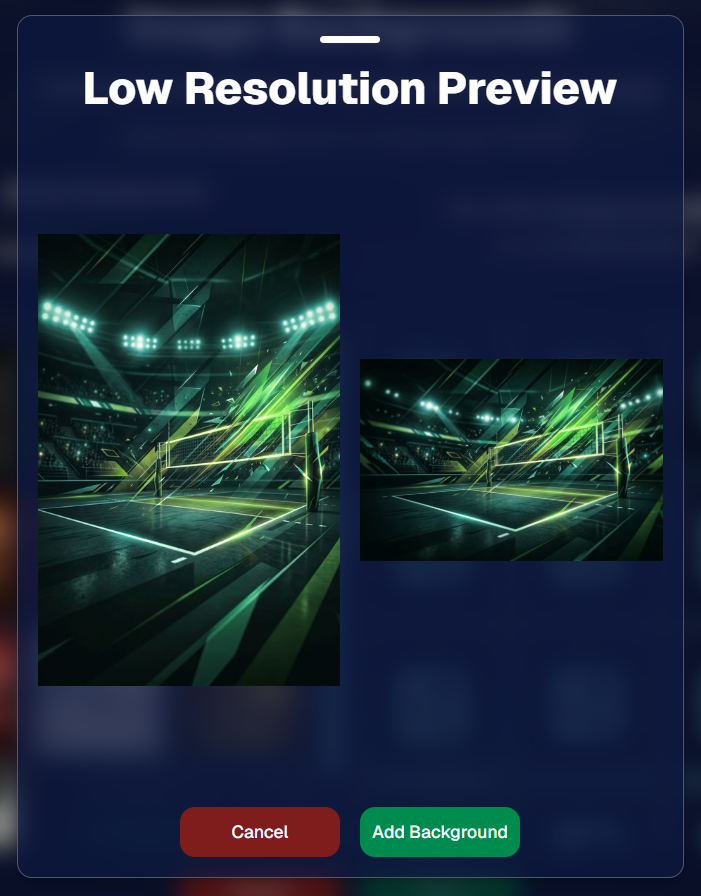
Example: New Volleyball Backgrounds!

‍

A closer look at one of the examples above!

‍

🧑‍🤝‍🧑 PhotoRoster & PhotoTag Improvements

‍

🏷️ PhotoTags carry into new PhotoRosters‍

  • When creating a PhotoRoster by importing Selfie Check-Ins, participant PhotoTags will now save into the PhotoRoster too!

‍

🧹 Duplicate PhotoTag import fix‍

  • Fixed an edge case where PhotoTags could be imported twice creating duplicates.

‍

✂️ Background Removal Update

‍

  • 👥 Background Removal no longer runs on Group Photos

‍

Group Photos are not meant to go through Background Removal! Though it can kind of work, typical team photo poses are not recommended for Background Removal (picture floating subjects who were previously sitting on a bench or bleachers).

‍

🛍️ Retail: Duplicate Download Warning

‍

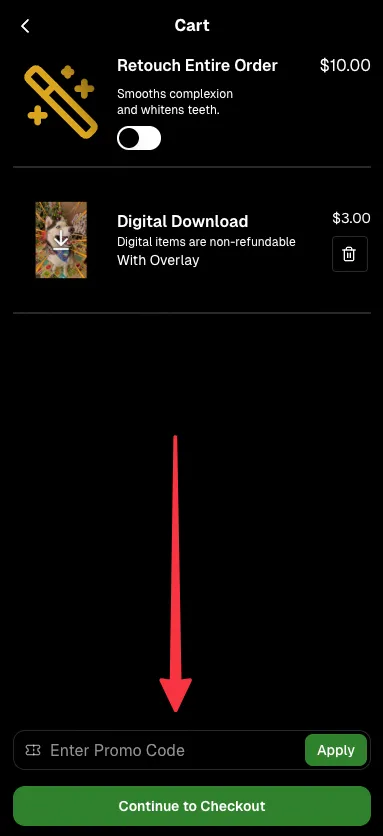
Retail now helps prevent accidental duplicate digital purchases.

‍

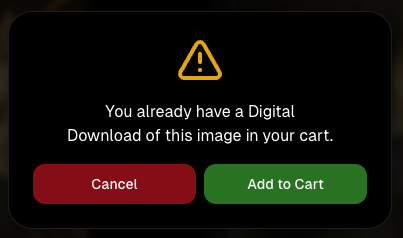
  • ⚠️ If a shopper tries to add a digital download product (or package that includes one) that already contains the same image, crop, and artwork settings as a digital image already in their cart, they’ll see a new: “You already have a Digital Download of this image in your cart” popup.
  • ➕ They can still add it anyway if they really want to!

‍

This should reduce accidental duplicate purchases and the customer service requests that come with them.

‍

Little improvements to make the platform better and better.

‍

🛠️ Dashboard Fixes & Cleanup

‍

  • 🪟 Fixed popups flickering when background data refreshed
    ‍
  • 🎯 Fixed Unassigned filters/counts in edge cases involving cutouts of AI edits
    ‍
  • 🧑‍🤝‍🧑 Fixed Virtual Group row settings reverting to auto after deleting a subject

‍

That’s the week!

‍

Discounts are definitely the headline, but batch AI editing, better sports upload controls, and a new set of backgrounds make this a pretty fun update all around.

‍

Keep creating magic,

Candy 🍬

Weekly Recap: More Virtual Group Control, New Sports Backgrounds & Better BGR Tools 🏈✨
Feature Updates
August 14, 2026

Weekly Recap: More Virtual Group Control, New Sports Backgrounds & Better BGR Tools 🏈✨

5
 minutes read
Hey photo friends! 👋

‍

Candy here with another weekly recap! This week brings more control to Virtual Group Builder, a much better home for Event Background Removal, new Candy Image Studio exposure tools, and—yes—27 new sports background sets. 😎

‍

Let’s jump in!

‍

🧑‍🤝‍🧑 Virtual Group Builder Additions

‍

Ask and you shall receive... sometimes! We’ve gotten some good feedback on Virtual Group Builder, and this week several new controls are here to make layouts easier to fine-tune:

‍

↕️ Force subjects onto different rows‍

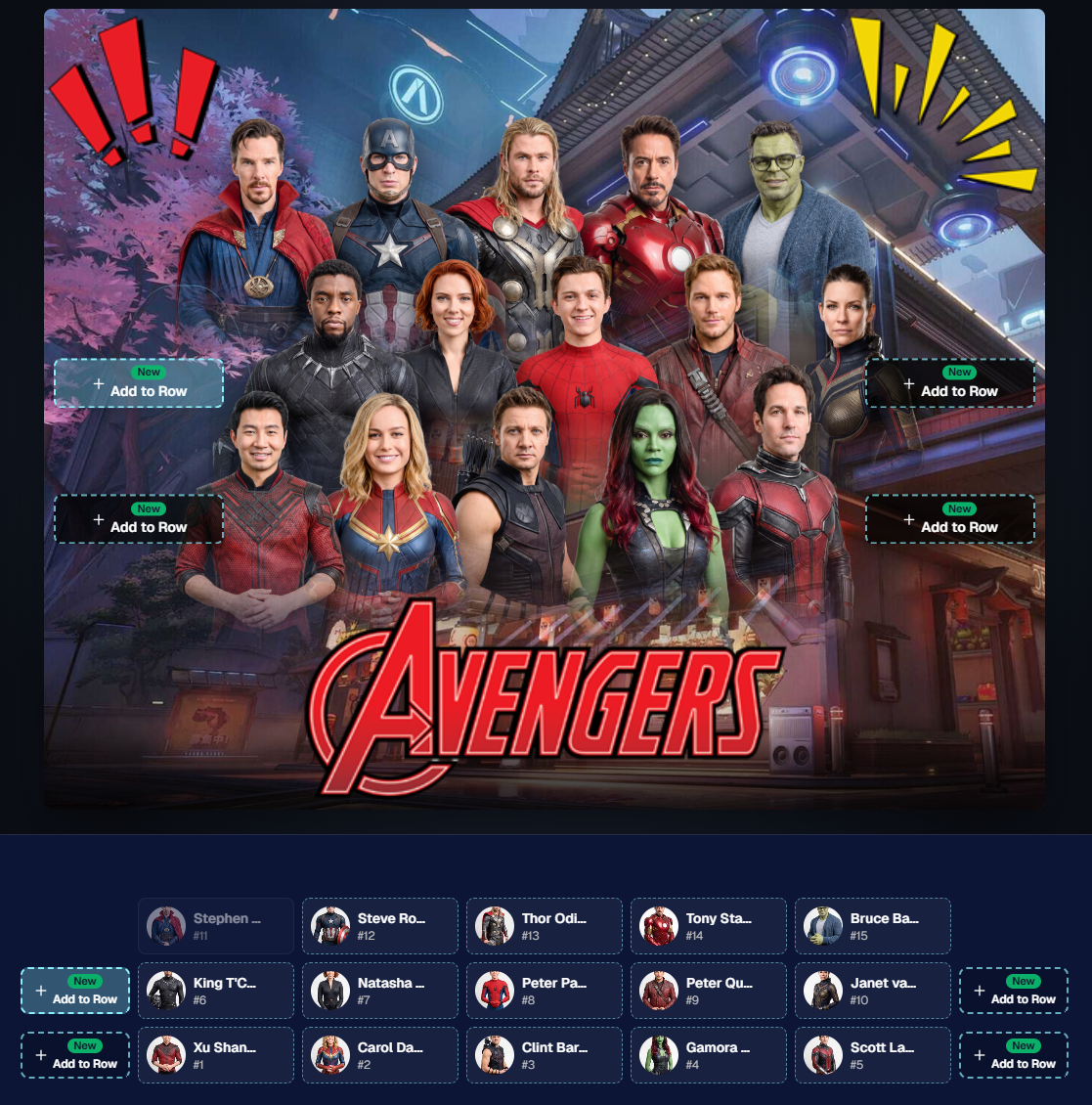
  • While dragging a subject, new Add to Row buttons appear over the other rows. Drop the subject there to explicitly move them where you want instead of relying entirely on automatic placement.
  • Previously you were limited to automatically determined rows, you still have those but can now override them!

‍

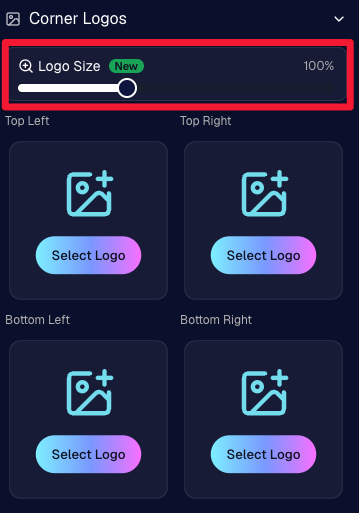
🔍 New logo size slider‍

  • Adjust your corner logos to be smaller or larger than the default.
  • Previously they could be considered a bit tiny, but this gives you a bit more control!

‍

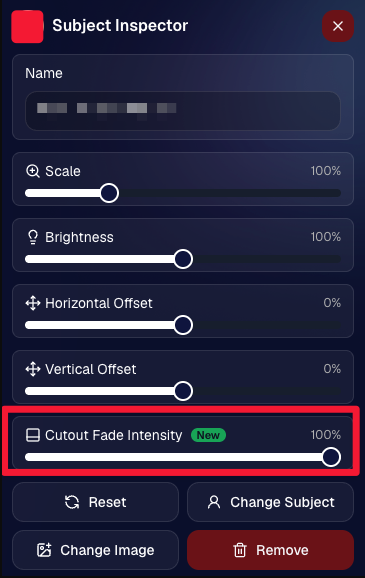
🌫️ Individual cutout fade control‍

  • The Subject Inspector now has its own cutout fade intensity slider, separate from the global setting, so you can fine-tune individual subjects when needed.
  • This will let you tweak the cutout fade intensity for subjects in the front row or on the sides of the virtual group, in case you're wanting a very specific look.

‍

👥 Smarter merged-participant image selection‍

  • The Subject Image Picker will only show images from merged participants when they share the same name.
  • This typically does not matter, but in the case of a parent doing a Selfie Check-In of themselves and then of their child later, this will keep Virtual Groups working as expected!

‍

Just a few additions, but very useful ones when you’re trying to get a Virtual Group looking just right!

‍

Drag and drop subjects into other rows for more control than ever!

‍

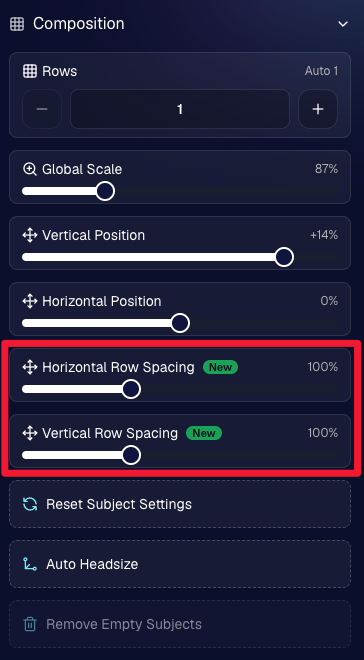
New options to more quickly space out your subjects!

‍

When viewing subject details, adjust them by individual!

‍

Control the size of your logos!

‍

🏈 27 New Sports Background Sets

‍

Alright, shoutout to the random guy who told me (me being Candy, in case you forgot!) that he didn’t like the backgrounds. We heard you! 😂

‍

This week we’ve added 27 new sets of sports backgrounds, including a brand-new Sports – Locker Room background category.

‍

And, in case you missed it, last week we also added an AI Background Generator so you can create entirely new, modern backgrounds of your own.

‍

A quick reminder... you already have a lot of control over which backgrounds your customers actually see:

‍

🎨 Edit the default backgrounds in your Offers

‍

📤 Upload your own custom backgrounds at both the Offer-level and Event-level

‍

🤖 Generate new backgrounds of your own with AI

‍

🏈 Choose from our (now growing) collection of built-in choices

‍

We have a TON of default backgrounds—and yes, many have been around for a while—but you’re never locked into using them. You can build your own look for your business, and we’ll keep adding new options over time too.

‍

✂️ New Dedicated Background Removal Page

‍

Event Background Removal now has its own dedicated Dashboard page, accessible from the Event Sidebar. It is not longer just a popup!

‍

The BGR toggle on Event Overview will take you there too, giving all of these controls a little more breathing room.

‍

On the new page, you can:

‍

✅ Enable or disable Background Removal

‍

🖼️ Manage your Event Backgrounds

‍

🎨 See your Offer Backgrounds with a direct link to the Offer

‍

📊 See how many cutouts have finished and how many are still processing

‍

⏳ Watch a live progress bar while Background Removal is working

‍

📂 See all valid Event folders and which ones are marked for Background Removal

‍

And if your Event is a new Event: ✂️ You can mark an existing folder for Background Removal even if it already contains images!!!

‍

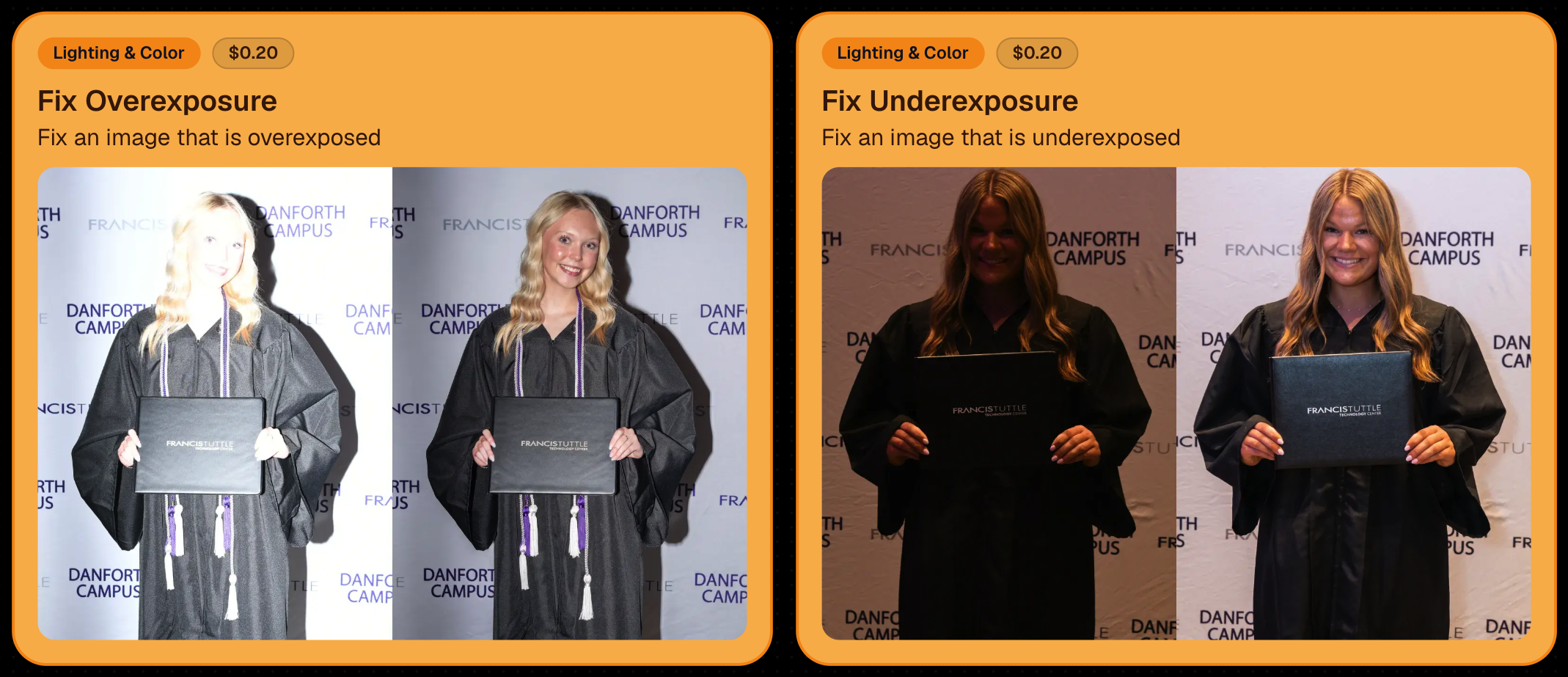
🎨 Candy Image Studio: Better Exposure Fixes

‍

🌙 New Fix Underexposure node‍

  • Helps recover images that came out too dark.

‍

☀️ Fix Overexposure greatly improved‍

  • The existing overexposure tool has been reworked for more reliable results.

‍

Utilize Candy Image Studio to fix images so they can sell, quickly and affordably!

‍

🏈 Jersey Jotter Progress Tracking

‍

⏳ New Jersey Jotter progress bar‍

  • When Jersey Jotter is active and still has unprocessed images, its dedicated page now shows processing progress—similar to Candy Culler and the new Background Removal page.

‍

This makes it much easier to tell whether recognition is still working through a large Event.

‍

🛍️ Retail Improvements

‍

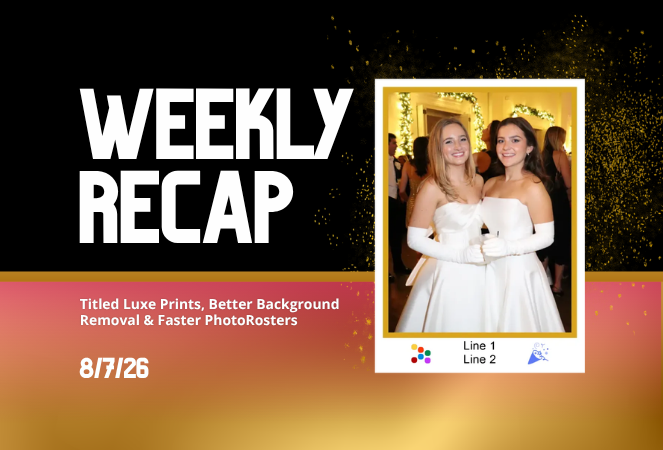
✨ Titled Luxe Prints now work with package prefill‍

  • Packages can now automatically prefill eligible Titled Luxe Print products just like other supported products.

‍

🖼️ Titled Luxe Print package rendering fixed‍

  • Fixed an issue where these products could render incorrectly inside packages.

‍

🤖 AI-generated backgrounds now render correctly on products

‍

🎨 Selected backgrounds now stay visible through the final product step‍

  • Fixed an issue where the chosen background could sometimes disappear on renders when reaching quantity and finish steps.

‍

📝 Several product descriptions updated‍

  • Some product descriptions have been refreshed for better clarity.

‍

🖼️ AI Edit + BGR Assignment Fix

‍

👥 BGR versions of AI edits now keep direct participant assignments‍

  • If the original non-AI image was directly assigned to someone, its Background Removed AI-edited version will now correctly inherit that relationship.

‍

📦 Order Details Fix

‍

📝 Package captions now display correctly‍

  • Fixed cases where Order Details did not show caption information for certain products contained inside packages.

‍

📱 Capture App 5.9.1 – iOS OTA

‍

📸 Photo Booth fix for iPad‍

  • Fixed the Photo Booth gallery strip being cut off on certain iPad models.

‍

That’s the week!

‍

More Virtual Group control, a much stronger Background Removal workflow, some useful exposure tools, and plenty of fresh sports backgrounds to work with.

‍

And if you still don’t like the backgrounds... now you’ve got plenty of ways to show us how it’s done. 😉

‍

Keep creating magic,

Candy 🍬

Weekly Recap: Reworked Titled Luxe Prints, Better Cutouts & Faster PhotoRoster Imports ✨📸
Feature Updates
August 7, 2026

Weekly Recap: Reworked Titled Luxe Prints, Better Cutouts & Faster PhotoRoster Imports ✨📸

4
 minutes read
Hey photo friends! 👋

‍

Candy here with another round of updates! This week’s highlights include a fresh redesign for Titled Luxe Prints, a brand-new 4×6 size, continued Background Removal improvements, and some helpful Dashboard upgrades for PhotoRosters, Event Tags, and Positive ID workflows.

‍

✨ Titled Luxe Prints Get a Refresh

‍

Titled Luxe Prints have been reworked to feel more like the classic PartyPics style while still keeping the premium embellishments that make them special.

‍

🖼️ Updated Titled Luxe Print design

  • Still embellished
  • Still supports 3 caption lines
  • Still includes 2 crests
  • Now has a more traditional PartyPics-style look

‍

🆕 New 4×6 Titled Luxe Print

  • Priced at $1.38
  • Includes both 2D and 3D renders
  • Joins the existing 5×7 and 8×10 sizes

‍

You can preview the updated product here:
https://app.nowcandid.com/3d/titled-luxe-print

‍

✂️ Background Removal Keeps Getting Better

‍

🟢 Green screen cutouts improved (again!)

‍

✨ Overall cutout quality improved

‍

We’re continuing to tune Background Removal so cutouts look cleaner across more shooting conditions. Stay tuned for even more improvements!

‍

📱 Capture App 5.9.1 – Android

‍

📷 Full-quality internal camera capture

  • Android devices now use the full available quality of their internal cameras when shooting through the Capture App.
  • Previously, it was using a down-sized version!

‍

🖥️ Dashboard Improvements

‍

🪪 Faster Positive ID Scanner Card generation

  • The Scanner ID Workflow's Scan Card PDF Generator is now performs better, stalls less, and produces significantly smaller download files.

‍

⚠️ Background artwork warning‍

  • When uploading an Event background, NowCandid can now detect text or logos and show an extra warning.
  • This reinforces the existing recommendation to avoid placing important text or branding on backgrounds where product cropping could cut it off. Use our Overlay features instead!

‍

✨ Clearer Auto Editor folder naming

  • Manage Images now shows a sparkles icon for Folders containing AI edits, with clearer formatting for Folders created by the Auto Editor.

‍

📥 Import PhotoRosters directly from Participant List

  • Face Matching Events now have an Import from PhotoRoster button at the top of the Participant List page, letting you select and import a PhotoRoster without navigating away.

‍

🎨 Candy Image Studio & Auto Editor

‍

🖼️ Background Generator improvements

  • Outputs are now sized more appropriately for uploading back into an Event
  • Generated background sets match each other more consistently

‍

💰 Every node now displays its price

  • Previously, only discounted nodes showed pricing. Now every node clearly displays what it costs!
  • Expect more nodes with their own unique prices in the future! We will continue to build on and improve our Auto Edit & Image Studio tools.

‍

🧩 Predetermined node order

  • Nodes can no longer be drag-and-dropped into different edit "orders".
  • Their hierarchy is now set automatically so edits run in the best possible sequence without you needing to think about it!

‍

🛠️ Auto Editor UI refreshed

  • Several interface changes make setup and options clearer and easier to understand.

‍

📋 PhotoRoster Improvements

‍

👥 Multiple PhotoRosters per Event

  • Fixed an issue that could prevent you from importing more than one PhotoRoster into the same Event.

‍

💬 Clearer disabled export messaging

  • If Export is unavailable, clicking it now explains why.

‍

🚫 Empty PhotoRosters can’t be exported

  • A PhotoRoster must have at least one member with an image before it can be exported to an Event.

‍

🔐 Password-Protected Public Event Lists

‍

Event Tags now have an optional extra layer of privacy:

‍

🔑 Password-protect your Public Event List Pages:

  • ➕ Set a password while creating a new Event Tag
  • ✏️ OR add or remove the password using the Event Tag editor

‍

This works similarly to the password protection for your Private Image Download Galleries.

‍

🛍️ Retail Fixes & Protection

‍

🖼️ Fixed package editing edge cases where the Overlay step could be missing while choosing a new image

‍

🛡️ Additional GalleryGuard improvements

‍

That’s the week!

‍

The refreshed Titled Luxe Prints are the star of this update, with better Background Removal, easier PhotoRoster importing, and more control over Event Tags rounding things out.

‍

Keep creating magic,‍

Candy 🍬

Let’s get in touch

If you’re a photographer looking to add NowCandid™ services to your wheelhouse, set up a call with us!

How to customize formatting for each rich text

How to customize formatting for each rich text

How to customize formatting for each rich text

How to customize formatting for each rich text

How to customize formatting for each rich text

‍

‍

What’s a Rich Text element?

The rich text element allows you to create and format headings, paragraphs, blockquotes, images, and video all in one place instead of having to add and format them individually. Just double-click and easily create content.

A rich text element can be used with static or dynamic content. For static content, just drop it into any page and begin editing. For dynamic content, add a rich text field to any collection and then connect a rich text element to that field in the settings panel. Voila!

Headings, paragraphs, blockquotes, figures, images, and figure captions can all be styled after a class is added to the rich text element using the "When inside of" nested selector system.

  • List One
  • List Two
  • List Three
  • List Four
  • List Five

This is a link

This is bold text

‍

  • ‍

‍