HomeNavigation arrowBlogNavigation arrow
Current page
NowCandid 101

More Than Software: Why NowCandid Is a True One-Stop Shop for Photographers

More Than Software: Why NowCandid Is a True One-Stop Shop for Photographers
Photographers do not just need software.

They need a workflow that helps them capture images, connect those images to the right customers, sell products online, fulfill orders, and support the customer experience after the sale.

That is where NowCandid is different.

NowCandid is backed by Candid Color Systems, a company with its own professional photo lab, fulfillment operation, software tools, and decades of experience supporting high-volume photographers. That means we are not just a software platform connected to someone else’s lab. We are part of a company that helps support more of the full process — from capture to customer order to finished product.

And for photographers, that matters.

A Real One-Stop Shop

Many photography platforms focus on software first. They help photographers build galleries, collect orders, or send customers to an online shopping experience. But when it comes to printing and fulfillment, they often rely on third-party lab partnerships.

NowCandid is built differently.

Because NowCandid is part of Candid Color Systems, sales flow through a company that actually has its own professional photo lab. That gives us a more complete view of the process and a stronger ability to support photographers from start to finish. Your workflow does not stop when a customer clicks “order.” That order still needs to be produced, fulfilled, shipped, and supported. With NowCandid and Candid Color Systems working together, the software and fulfillment side are more closely connected.

Why Software + Fulfillment Matters

When software and fulfillment are separated, things can get complicated.

If a photographer has a question about an order, product, shipment, or customer issue, the answer may depend on multiple companies. The software provider may point to the lab. The lab may not have full visibility into the retail or customer experience. Support can become fragmented, and accountability can get fuzzy.

NowCandid helps reduce that disconnect. We can see and support more of the full customer journey. From the event setup to online ordering to lab fulfillment, our team has a broader view of what is happening and a better ability to help. That does not just make support easier. It makes the entire experience feel more connected for your customers.
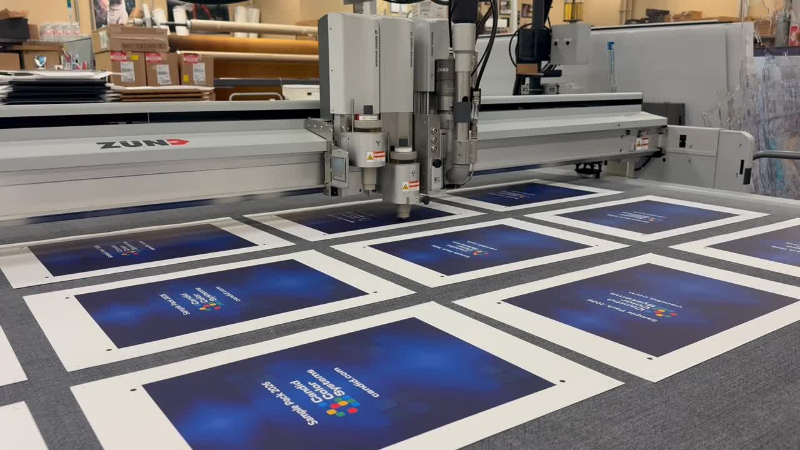
Behind every NowCandid order is connected fulfillment through Candid Color Systems’ professional lab—turning online photo sales into finished products ready for customers.

Built to Help Photographers Keep More of What They Earn

A connected software and lab model also helps us keep the photographer’s bottom line in mind.

When a platform has to rely heavily on outside fulfillment partnerships, those additional layers can affect pricing, margins, support, and flexibility. With NowCandid, sales are driven through Candid Color Systems’ lab, which helps us control more of the process and pass savings on to photographers where possible.

The goal is simple: give photographers a powerful platform without stacking on unnecessary complexity.

NowCandid helps photographers sell prints, downloads, packages, and products online while keeping fulfillment connected through the same company behind the platform.

One Platform. More Accountability.

Photographers already have enough moving pieces to manage.

They are planning events, managing equipment, working with schools, leagues, graduates, families, and event organizers, training staff, uploading images, answering customer questions, and trying to sell more photos.

They should not have to wonder who is responsible when software, retail, production, and fulfillment do not line up.

NowCandid’s one-stop shop approach gives photographers a more connected path:

  • Capture and upload images
  • Match photos to the right customers
  • Deliver galleries by text or email
  • Sell prints, downloads, packages, and products online
  • Fulfill orders through Candid Color Systems’ professional lab
  • Support customers with more complete visibility into the process

It is not just about convenience. It is about confidence.

Why This Matters for High-Volume Photography

For high-volume photographers, small workflow problems can become big problems fast.

A delay in fulfillment, a product question, a customer support issue, or a disconnected order process can impact hundreds or thousands of customers during a busy season.

That is why a true one-stop shop matters.

NowCandid is designed for photographers who need more than a gallery. It is built for photographers who need a complete path from photo day to payday — with software, sales, marketing, fulfillment, and support working together.
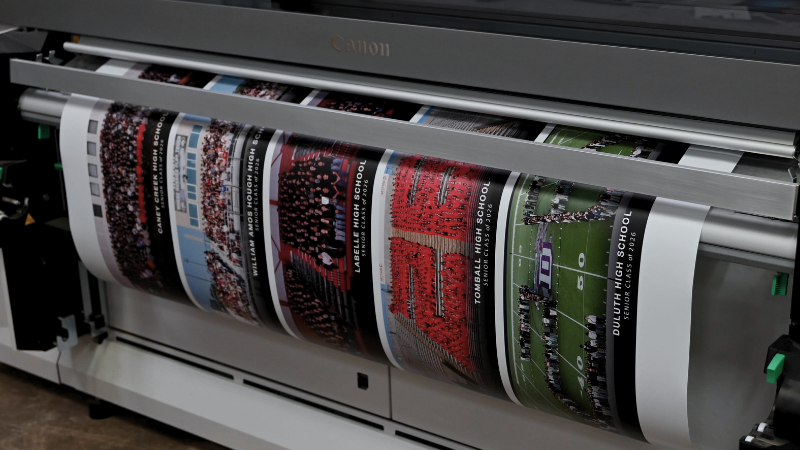
From online order to finished product, NowCandid is backed by Candid Color Systems’ professional lab—helping photographers keep software, sales, printing, and fulfillment connected.

The NowCandid Difference

NowCandid combines flexible photography workflows with online photo sales, automated marketing, customer galleries, AI-powered tools, and professional lab fulfillment through Candid Color Systems.

That makes NowCandid more than just software.

It is a connected capture-to-commerce solution backed by a company that understands both the technology and the lab side of high-volume photography.

For photographers, that means fewer disconnected systems, clearer support, and a more complete platform built to help them capture, sell, and deliver with confidence.

Ready to See How NowCandid Works?

If you are looking for photography software that connects more of the process — from capture to online sales to fulfillment — NowCandid was built for you.

Click here to open a free account today and see how a true one-stop shop can help simplify your photography workflow.

Related articles

Weekly Recap: Group Photos for Grads & Retail Download Tweaks📸🎉
Feature Updates
December 27, 2024

Weekly Recap: Group Photos for Grads & Retail Download Tweaks📸🎉

7
 minutes read
Hello, my wonderful photographers!

Candy here, and welcome to another Weekly Recap. We’ve got a couple of handy feature updates, plus some exciting news about our upcoming Capture & Upload App release for iOS.

Let’s dive in! 🌟

1. Group Photo Option in GradPics 📸

We’ve introduced a Group Photo toggle in the Manage Images tab for GradPics Events. When you mark an image as a Group Photo, here’s what happens:

  • Appears in Every Gallery: Regardless of face matching, every participant sees the group image in their personal gallery.
  • Exclusive Products: If your Event’s Offer includes any Group Photo products (like Group Photo Download or Group Photo Print), they’ll only be purchasable on those items.
  • No Group Photo Products? Then the group image behaves like a normal image, available on all your usual products.
  • Not in Personal Gallery Download: To avoid easy sharing of a big group image, we’re excluding Group Photos from any personal gallery download product for now.

We’ve added a quick popup explanation when flagging an image as a Group Photo in the Web Dashboard, just in case someone clicks the Group Photo toggle by mistake. 🎉

2. Personal Gallery Download Hiding Rule 🤫

To help clients avoid confusion and refunds, we’re adding a new rule:

  • Hide Personal Gallery Download: If the Offer sells individual image downloads and a participant only has one image, we hide the personal gallery download.
  • Still Visible for One-Image Events: If your Offer doesn’t have individual downloads, the personal gallery download stays visible, even if the participant just has one photo.

This little tweak prevents clients from accidentally buying a personal gallery download when they only need a single download. 🛒

3. Heads-Up: Capture & Upload App 4.13 for iOS Only! 📱

On Monday, December 30th, we’ll release Version 4.13 of the Capture & Upload App for iPhone & iPad. (Windows stays at 4.12 for now.) We’ve added some major updates:

Please update one of your devices, test it out, and let us know if you catch any bugs. With so many devices, camera brands, and workflows out there, early feedback helps us fix issues quickly.

4.13 Highlights

  1. Photo Booth Mode
  2. Overlays on Capture App Image Review
    • Overlays now render directly over the captured images on the app (if the aspect ratio is supported).
    • 3:2 aspect ratio photos are needed for full frame overlays, but any aspect ratio works for banner overlays.
    • This lets you and your subjects see the art in real time, ensuring no important parts are covered!
  3. Out-of-Space Error Popup
    • If your device is running low on space when a new image is taken, you’ll get an immediate error popup.
    • Remember to regularly clear out old images via the app’s “Delete App Data” button in the info (i) menu to keep everything running smoothly.

Minor Updates

  • Session data is now wiped when switching NowCandid accounts in the app, so "Restore Session" won't take you to an Event from a different account!
  • Event Shooting Buttons on Tablets now match iPhone UI (centered vertical menu).
  • Camera Trouble Popup includes a note about app permissions. (Always make sure to agree to all app permissions needed when the app is starting for the first time!)
  • Auto Remove Spaces from the account email on login. (some folks accidentally put a space and didn't know why they couldn't log in!)
  • Candy Splash Screen when the app is booting up now supports dark mode.

Thanks for tuning into this shorter Weekly Recap. We hope these improvements help you finish the year strong! If you have any questions or feedback, don’t hesitate to reach out.

Candy 🍬

📸 Candy’s 12 Days of Christmas: Day 12 – Photo Booth Mode! 🎄🎉
Feature Updates
December 25, 2024

📸 Candy’s 12 Days of Christmas: Day 12 – Photo Booth Mode! 🎄🎉

10
 minutes read
Hello, my festive photographers!

Candy here, and Merry Christmas to those who celebrate.

We’ve arrived at the 12th Day of Christmas, and I’m thrilled to unwrap our biggest new feature of 2024—Photo Booth Mode in the Capture & Upload App!

The new NowCandid Capture & Upload App Version that includes Photo Booth Mode will be going live at the end of December,... this very month!

Let’s get into the holiday spirit and explore everything this mode has to offer. 🎁

What Is Photo Booth Mode? 🤶

Photo Booth Mode is a brand-new option inside our Capture & Upload App—you’ll see a shiny new “Photo Booth” button once you log in to an Event and create a Folder (after the update of course).

Give that Photo Booth button a tap, and voilà: your iPad turns into a photo booth station where guests can snap fun pictures with minimal hassle!

  • Multiple Camera Options: Tether a Nikon, Sony, or Canon camera, or use your iPad’s front-facing camera, depending on your particular photo booth setup.
  • Solid Internet Connection Required: The app downloads any custom overlays or backgrounds you’ve set on the web dashboard, and live-uploading images of course requires an internet connection, so stable Wi-Fi or LTE is essential!

It’s perfect for holiday parties, corporate shindigs, weddings, or any event where a lighthearted photo booth can bring on the smiles!

The Photo Booth Flow ⏱️

Here’s how Photo Booth Mode keeps your guests engaged:

  1. Tap to Begin Screen: A dimmed live view awaits guests to tap and start. Once they do, the booth will let them know to get ready for three photos.
  2. Three Countdown Shots: Each shot has a 3-second countdown followed by a short preview of the taken pic after each shot. If your event uses a Bottom Banner Overlay or Full Frame Overlay, it shows up in the live view, so no one ends up hidden behind the graphics!
  3. Instant Delivery & Overlays: In Events using the QuicPics Program, each photo is sent via MMS with the overlay art included! And with every NowCandid Program, a gallery link is delivered where retail site users can download images and order photo products.

Guests can hop in, pose, and receive fun, branded photos—no fuss required! 🎉

On-Device Backgrounds & Filters 🎨

Before finalizing those memorable pics, guests can personalize them right on the device:

  • Background Selection: If you’ve uploaded custom backgrounds on the web dashboard, the app fetches them before the booth session. Guests can pick from these in addition to several default backgrounds, great for holiday vibes or brand-specific themes.
  • Filter Options: Classic filters like Noir, Sepia, Clarendon, and others let participants get creative.
  • Reshoot Button: Not happy with the shot? Guests can “Reshoot” and start the session over at any time.

This ensures a lively, interactive experience that encourages guests to come back for more snaps. ⛄

Positive ID vs. Face Matching 🧐

After styling, the next step depends on your event’s workflow:

  • For Face Matching Events: Guests are guided to tap the faces they see on-screen, and then can enter contact info for each face! If this is their first or only reference photo for the Event, it will also match them to shots taken outside the Photo Booth!
  • For Positive ID Events: A simpler approach: participants just type in their contact info and send off the images! Easy peasy.

Either way, photos head straight to their phones via QuicPics (if you’re using that Program) and will always land in their personal gallery. 🔔

Seamless Integration with NowCandid 💖

Photo Booth Mode plugs right into your existing NowCandid features:

  • Selfie Check-In & LiveLoop: Photo booth images appear in your LiveLoop feed if you’re displaying one at the event. Selfie Check-Ins can still match participants to their booth photos too if they don't self-identify during their photo booth session!
  • QuicPics & PartyPics: The images upload instantly, letting your guests receive them right away via MMS (with QuicPics), or find them in their personal gallery for easy purchase or free download (with every Program).

It’s the same NowCandid ecosystem you know—just dressed up in a festive booth format! 🎄

Requirements & Limitations 🎅

A few notes to keep in mind:

  • Camera Orientation:
    • Nikon supports horizontal and vertical live view.
    • Sony/Canon currently only support horizontal orientation for tethered cameras.
  • iPad-Only for Now:
    • Photo Booth Mode works on iPad in vertical orientation, not on iPhone or Windows.
  • No Built-In Printing:
    • If you need on-site prints, consider setting up your own print station with a computer and a printer! Use quic.pics/portal to access your Event images, and then download images with or without overlays to print them on-site.
  • We Value Feedback:
    • Missing something? Let us know! Your input shapes our next updates.

Why Photo Booth Mode Is a Holiday Treat 🎁

  • Interactive & Fun: Guests love choosing backgrounds, filters, and overlays, making the booth a memorable attraction.
  • Fully Integrated: Works seamlessly with QuicPics, PartyPics, LiveLoop, Face Matching, and more.
  • Revenue & Engagement Boost: Branded overlays, holiday backgrounds, or sponsor tie-ins can lead to higher sales and delighted clients.

This mode is a surefire way to add a dash of cheer to any event—holiday-themed or otherwise! ✨

That’s all for now, folks.

We hope Photo Booth Mode adds a dash of magic to your season and beyond.

And thank you for following along with our 12 Days of Christmas!

Enjoy this new feature, and as always, keep capturing the moments that matter most.

Reminder: The new NowCandid Capture & Upload App Version that includes Photo Booth Mode will be going live at the end of December, this month!

Candy 🍬

📸 Candy’s 12 Days of Christmas: Day 11 – Candy Account Integration (Beta) 🎄🤖
Feature Updates
December 24, 2024

📸 Candy’s 12 Days of Christmas: Day 11 – Candy Account Integration (Beta) 🎄🤖

3
 minutes read
Hello again, my ever-curious photographers! 🎅

Candy here, and welcome to Day 11 of our 12 Days of Christmas countdown.

Today’s spotlight is a feature still in its early stages, but full of potential: the Candy Account Integration (Beta). Since it’s Christmas Eve, what better time to peek at a promising work-in-progress?

Key Highlights:

  • Account-Level Insights:

    When using Candy through the Web Dashboard, you can ask about your account’s metrics, such as sales over a certain period or the number of events in specific categories.
  • A Learning AI Assistant:

    Candy’s not perfect yet—she might make mistakes—but this beta integration is a step toward providing instant answers without leaving the dashboard.
  • Future Potential:

    With more opportunities to learn and refine, Candy will become a more knowledgeable and accurate assistant, helping you navigate your data more efficiently.

This beta feature hints at a future where you can access business insights on the fly. 🎉

Check back tomorrow, December 25th, for the final day of our countdown. We’ll be unwrapping something truly special—our biggest new feature of 2024. Don’t miss it!

Candy 🍬

Let’s get in touch

If you’re a photographer looking to add NowCandid services to your wheelhouse – set up a call by clicking the button below.

How to customize formatting for each rich text

How to customize formatting for each rich text

How to customize formatting for each rich text

How to customize formatting for each rich text

How to customize formatting for each rich text

What’s a Rich Text element?

The rich text element allows you to create and format headings, paragraphs, blockquotes, images, and video all in one place instead of having to add and format them individually. Just double-click and easily create content.

A rich text element can be used with static or dynamic content. For static content, just drop it into any page and begin editing. For dynamic content, add a rich text field to any collection and then connect a rich text element to that field in the settings panel. Voila!

Headings, paragraphs, blockquotes, figures, images, and figure captions can all be styled after a class is added to the rich text element using the "When inside of" nested selector system.

  • List One
  • List Two
  • List Three
  • List Four
  • List Five

This is a link

This is bold text