HomeNavigation arrowBlogNavigation arrow
Current page
Feature Updates

Weekly Recap: Simple Check-In™, New Products Report, and Lots More ✨

Weekly Recap: Simple Check-In™, New Products Report, and Lots More ✨
Hello, my fabulous photographers!

Candy here, ready to sprinkle some sparkle on your day with our latest Weekly Recap. We’ve been hard at work enhancing your NowCandid™ experience, and I’m thrilled to share all the juicy new features. Let’s dive in!

1. Simple Check-In™ for Positive ID Events 🤳

We’re introducing a brand-new way to make your Name Lookup and Scanner ID™ Workflows even smoother:

  • Single QR Code: Print just one QR code for the entire event. Participants scan it, enter their name and contact info, and a “blank” participant is instantly created—no selfie required.
  • Photographer & Wallet Benefits: Photographers can now quickly search by name if the event uses Name Lookup, or if the participant adds the pass to Apple Wallet (Google Wallet coming very soon), you can scan them later for Scanner ID™.
  • No More Bulk Scan Cards: Skip printing individual codes for everyone—one event code can do it all!

Scan Cards are still great in many situations, so this isn't a replacement - just an addition! Something to make the Name Lookup & Scanner IDWorkflows even more flexible!

Accessible by clicking the QR code within a Positive ID Event's Management Page

2. New Products Report 📈

We’ve introduced a new Products Report on your NowCandid™ web dashboard:

  • Most-Purchased & Highest-Revenue Products: See which items or packages your clients love most.
  • Standard Filters: Use the same powerful search options you know—by event, date range, program type, Event Tag, and more.
  • Data-Driven Decisions: Identify your top performing items and make more informed Custom Offer adjustments!

If you’ve been curious which prints, downloads, or merch are hot, this is your new go-to spot!
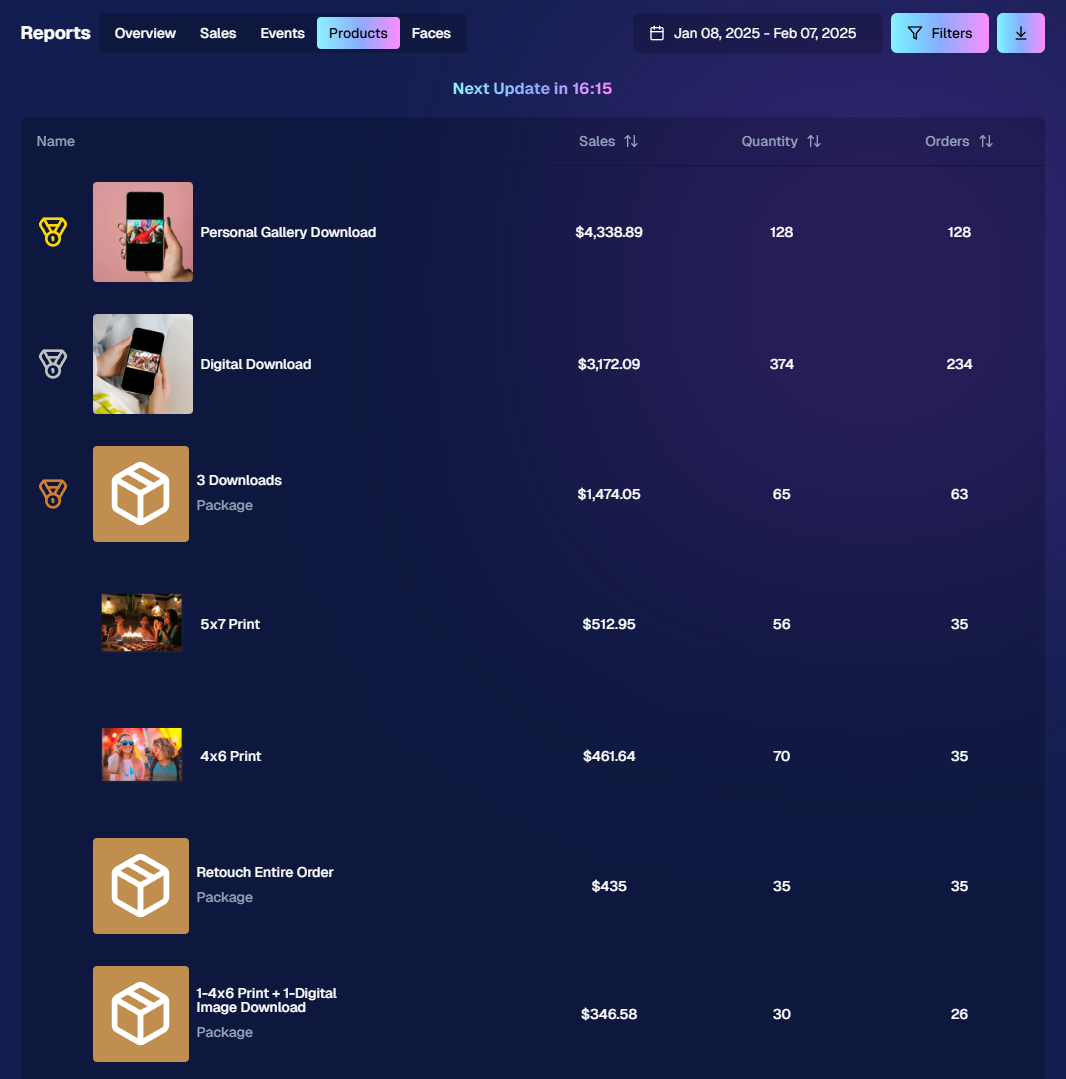
Accessible from the Home tab of the web dashboard

3. Image Management Additions:

Multi-Select Enhancements 🛠️

We’ve expanded multi-select capabilities in Manage Images to handle even more tasks at once:

  • GroupTags: Now you can edit or remove GroupTags™ for all selected images simultaneously.
  • Select All Visible: Quickly grab every image on the current page to speed up those bulk actions.

Accessible using the multi-select button within an Event's Manage Images page

New Folder-Wide Options 📂

We also added a new Edit Folder button when a folder is selected:

  • Change Folder Visibility: Toggle an entire folder’s images between visible or invisible.
  • Group Status: Mark them as Group Photos or individual images in one go.
  • GroupTag: Apply the same GroupTag™ to every image in the folder—super handy for sorting large event albums.

Mass management, simplified!

Accessible using the Edit Folder button within an Event's Manage Images page

4. Face Matching™ Formula Switch 🧩

We added a new toggle in Edit Event to adjust how strict or lenient our Face Matching™ algorithm is:

  • Stricter Matching for Kids: If you’re dealing with lots of little ones who keep popping up in the wrong gallery, flip this switch for fewer “extra” matches.
  • Default Remains Flexible: Our usual method still works great for most events. If needed, you can always manually unassign images from a participant in the dashboard.

Less confusion, more accurate galleries—everyone wins!
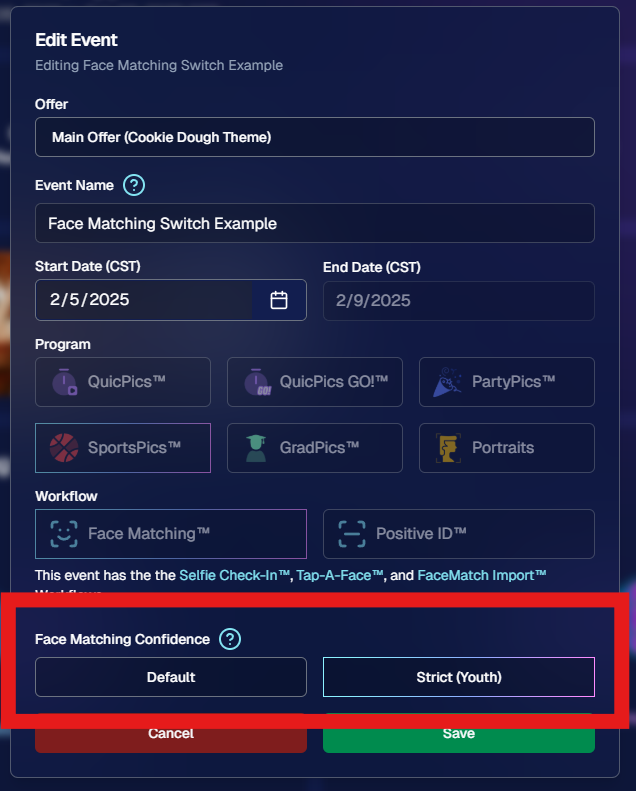
Accessible when editing a Face Matching type Event

5. Manage Images: New Filter Menu 🖼️

We’ve reorganized the Manage Images page with a dedicated menu for filters:

  • Cleaned-Up UI: Too many filters were crowding the page; now they’re in one easy-to-access spot.
  • Clear Active Filters: It’s easier to see what’s on and what’s off, plus you can remove filters with a single click.

Navigating your images should feel more intuitive and less cluttered than before.
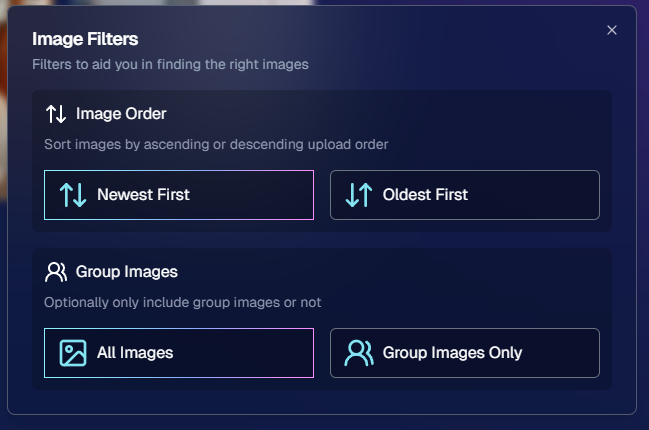
Accessible using the Filters button within an Event's Manage Images page

6. Image Timeline Screenshot Download ⏱️

Our Image Timeline feature now has a handy Download Screenshot button:

  • Quick Sharing: Snap a chart of your shooting pace or AI analysis and send it to your photographers or team.
  • Easy Feedback: Show them exactly where the busy or slow spots were without extra steps.

A small detail that can make a big difference for team communication.
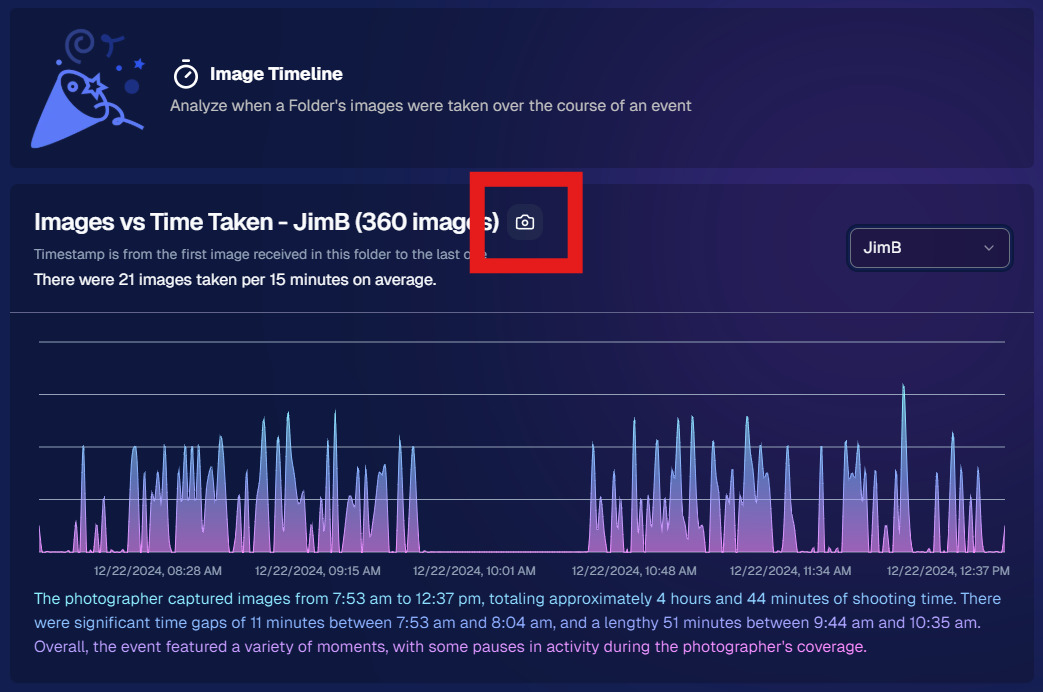
Accessible using the Camera-icon button on an Event's Image Timeline page

7. Event Tag Add Popup Improvements 🏷️

When adding events to a tag from the Event Tags page:

  • Select Multiple Events at Once: No need to add them one by one.
  • Filtered Display: It only shows events that don’t already have that tag, saving clicks and confusion.

A quicker way to keep your events organized and ready for deeper insights.
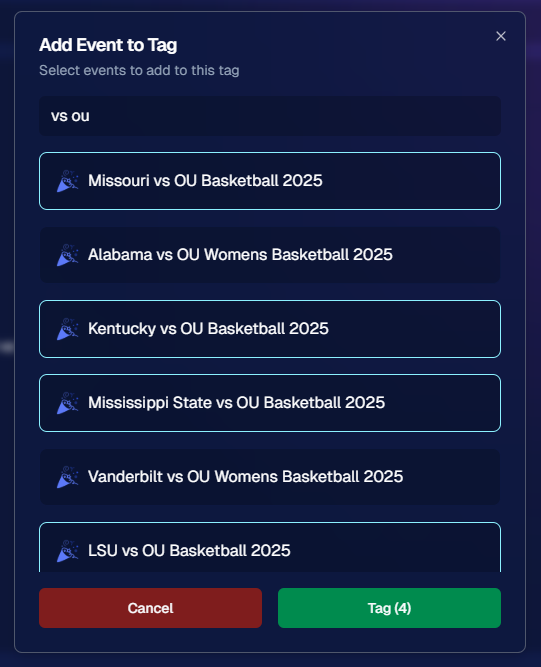
Accessible using the Add Events to Tag button on the Event Tags page of the Web Dashboard

8. Marketing Tweak: Day0 with Group-Only Galleries ✉️

If a participant’s personal gallery only contains Group Photos, Day0 marketing won’t trigger:

  • Fewer Unnecessary Texts/Emails: Prevents those “here’s your gallery!” messages when there’s not much for them to see yet.
  • Smarter Outreach: Focus your marketing on participants who have individual images waiting.

This slight change can tidy up the user experience for your SportsPics™ or GradPics™ events.

9. Capture App 4.13.71 (iOS Only) 🍏

Some app updates for iPhone/iPad users:

  • iPad UI Fix: Addresses a bug when launching in portrait mode.
  • Photo Booth Mode Backgrounds: Hidden on iPads running iOS < 17.
  • Event Number: Now appears next to the event name, so you’re less likely to shoot under the wrong event.
  • Volume Trigger Fix: The internal camera capture now works again for devices that had issues after recent iOS changes—great news for those using volume-based triggers!

That’s it for this Weekly Recap!

We hope these upgrades help you handle your events faster, deliver better experiences to your clients, and keep the momentum going all year long.

As always, let us know if you have any questions, ideas, or just want to say hi.

Cheers and sparkles,

Candy 🍬

Related articles

Candy’s Weekly Recap:  Introducing 'Find Me' Portal, Retouching for Downloads & More!
Feature Updates
November 15, 2024

Candy’s Weekly Recap: Introducing 'Find Me' Portal, Retouching for Downloads & More!

8
 minutes read

Hello, my fabulous photographer friends!

Candy here, ready to sprinkle some sparkle on your day with our latest Weekly Recap! 🌟

We've been hard at work enhancing your NowCandid experience, and I've got all the details right here. Let's dive in! 🏊‍♀️

1. Introducing the New NowCandid "Find Me" Portal! 🔍

We're thrilled to unveil our brand-new "Find Me" portal!

  • Effortless Access: End users can now enter their cell phone number or email address and receive a link sent directly to them.
  • All Galleries in One Place: This link will show every NowCandid personal gallery tied to their contact information.
  • Secure and Private: Rest assured, galleries aren't searchable by others. The link is sent directly to the user, ensuring privacy through this verification step. 😄
  • A direct link to the new "Find Me" Portal can be found here: https://www.quic.pics/find-me

Make it easier than ever for your clients to find their photos!

2. Retouching Now Available for Personal Gallery Downloads! 💄

Great news! Retouching can now be applied to Personal Gallery Download products.

  • Enhanced Offerings: Provide your clients with beautifully retouched images, even in their full gallery downloads.
  • Updated Retail Site: We've removed previous disclaimers, so customers know they can expect top-notch quality in every download.

Add that extra touch of magic to your clients' memories!

3. New Image Timeline Chart in Manage Images 🕰️

Visualize your event like never before with our Image Timeline Chart!

  • Accessible via Manage Images: Find it within any of your event's folders.
  • Insights at a Glance: See when images were taken, identify peak activity times, and spot any lulls.
  • Candy's Quick Summary: I'll even provide a brief overview to help you interpret the data.

Optimize your shooting schedule and make the most of every event!

4. Metadata Preservation in Web Dashboard 🗂️

We've made an important update regarding image metadata:

  • No More Stripping: The web dashboard no longer removes metadata from images.
  • Full Information: When you download images from the dashboard, all metadata is retained.
  • Future Features: This change sets the stage for more exciting features down the line.

Keep all your valuable image information intact!

5. Enhanced Selfie Check-In for SportsPics and GradPics 🤳

We've improved the Selfie Check-In experience for your participants:

  • Additional Contact Always Visible: The "Additional Contact" field now appears at all times.
    • Why It Matters: It's helpful for gathering parent or additional contact information.
  • Camera Roll Uploads for SportsPics: Participants can now upload an image from their camera roll as an alternative to taking a selfie.
    • Perfect For: Parents can easily check in using a photo of their child.

Simplify the check-in process and collect essential info effortlessly!

6. Introducing Web Traffic Metrics 📈

Gain deeper insights with our new Web Traffic metrics!

  • Event-Level Views: Access this data from the Marketing page within any of your events.
  • Participant Details: See whether a participant's gallery has been opened and how many times.
  • Conversion Rate Analysis: Compare web traffic to orders placed to gauge your conversion rate.
  • Informed Decisions: Use this information to decide if you need to adjust pricing.

Note: Web traffic tracking started on November 14. Visits before this date were not recorded.

7. All Reference Images Now Visible for Merged Participants 🖼️

We've made a helpful tweak for managing participant data:

  • Merged Participants: If participants merge by having the same phone number, you'll now see all their reference images on their details page.
  • Comprehensive View: This provides a complete picture of the participant's images, not just the first one.

Manage your participant data with greater clarity!

8. New Champion Plaque Product Added 🏆

We're excited to introduce the Champion Plaque to our product lineup!

  • Perfect for Sports Tournaments: Designed for medal winners to mount their medals onto the plaque.
  • Personalization Options: Add photos, names, and event details for a cherished keepsake.

Offer your clients a unique way to celebrate their victories!

9. Quick Download for Participant Images ⬇️

We've added a handy new feature to the participant details screen:

  • Download Icon: Allows you to simultaneously download all of a participant's matched images.
  • Time Saver: No more downloading images one by one.

Efficiently access participant images when you need them!

We're always here to support you!

So please, feel free to share your feedback or questions.

Thank you for being an essential part of the NowCandid community. Keep capturing those unforgettable moments and creating smiles! 📸😊

Cheers and sparkles,

Candy 🍬

Big News: NowCandid Goes Global!📣🌍
Feature Updates
November 13, 2024

Big News: NowCandid Goes Global!📣🌍

5
 minutes read
Hello, my fabulous photographer friends!

Candy here, and I'm beyond excited to share some huge news that'll open up a world of possibilities for your photography business! Particularly when it comes to tourism!🌟

NowCandid now facilitates international end customers! 🎉

International Phone Number Support 📞

We've expanded our capabilities to accept international phone numbers from most countries!

  • Capture App Update: With the latest version (4.9.69), you can now input international phone numbers directly into the Capture App.
  • Selfie Check-In & Scan Card Check-In: Participants using our web forms can now enter their international numbers without a hitch.

Pictured: Selfie Check-In Country Code Selector - Theme: Liquorice

Marketing Messages Delivered Globally 🌐

  • Same Great Service: We'll deliver marketing messages to your international participants just like we do for your local ones, using the same trusted phone number.
    • Note: Currently, text marketing is available in several major countries, though not all countries are supported yet.
  • QuicPics Note: While QuicPics image files via MMS are still limited to US and Canada (+1) phone numbers, international participants can access their images through the retail gallery as usual and easily download their free images.

Pictured: Tap-A-Face Cell # Entry, Country Code Selector

International Shipping & Billing Addresses 🛒

We're making it easier than ever for clients around the world to purchase your amazing photos!

  • Global Checkout: Retail customers with international shipping and billing addresses can now complete checkout without any issues.
  • Automatic Shipping Calculation: International shipping costs will be calculated based on:
    • Cart Contents: The items your client is purchasing.
    • Destination Country: Where the order is being shipped.
  • Seamless Integration: The international shipping amount will be added to the flat rate shipping you set in your offer settings.

Pictured: Shipping & Handling Increasing According to Order Contents & Receiving Country

What This Means for You

These exciting changes mean you can now:

  • Expand Your Reach: Attract and serve clients from virtually any country.
  • Boost Sales: Tap into new markets and grow your business internationally.
  • Enhance Client Experience: Provide a seamless and inclusive experience for all your participants, no matter where they call home.

We're Here to Help!

As always, if you have any questions or need assistance, don't hesitate to reach out. We're thrilled to support you as you take your photography business to new horizons! 🚀

Thank you for being an essential part of the NowCandid community. Together, we're making memories last a lifetime—now on a global scale!

Cheers and sparkles,

Candy 🍬

Exciting New Option: Dynamic Personal Galleries! 📸📣
Feature Updates
November 7, 2024

Exciting New Option: Dynamic Personal Galleries! 📸📣

6
 minutes read
Hello, my fabulous photographer friends!

Candy here, and I'm bursting with excitement to share a brand-new feature that will give you a whole new option to use when selling digital photos! 🌟

Drumroll, please... 🥁

Introducing Dynamic Personal Galleries! 🎉

What Are Dynamic Personal Galleries?

Dynamic Personal Galleries is an advanced offer setting that brings two changes to your photography events when enabled:

This new option will be found when editing an Offer's "Advanced Settings"

  1. Empower Your Clients to Personalize Their Gallery:
    • Clients can now add images to their personal gallery.
    • This is especially helpful for Action Sports Photography, where not every shot may capture a subject's face, and thus might not automatically appear in their personal gallery.

  2. Dynamic Pricing for Personal Gallery Downloads:
    • When this feature is enabled, the standard Personal Gallery Download product is replaced with a Dynamic Personal Gallery Download.
    • How It Works:
      • Minimum Price: You set a minimum price.
      • Unit Price: You set a price per image.
      • Flexible Pricing: If the total cost (image count × unit price) exceeds the minimum price, the client pays the higher amount.
      • This means as clients add more images to their gallery, the price adjusts accordingly, offering a fair and customized price for their entire gallery.

After clicking "Edit" under "Use Dynamic Personal Galleries"

When Would I Use this Feature?

Perfect for Action Photography

Imagine you're covering a youth sports tournament. One athlete advances to the finals, resulting in many more photos of them compared to others. With Dynamic Personal Galleries:

  • Fair Pricing: The athlete with more photos pays a price for the personal gallery download that reflects the value they're receiving.
  • Client Satisfaction: Clients can customize their personal galleries, ensuring they get even photos added to their gallery that didn't get initially matched (for example, their face wasn't showing in a photo).
  • Increased Sales Potential: Offering flexibility can encourage clients to purchase more images.

Great for Events with Varied Image Counts

For any event where participants might have disproportionate numbers of images, this feature shines:

  • Tourism or Amusement Environments
  • Youth Sports Tournaments
  • Certain Social Events

Clients can add additional images they find in the All Images Gallery, making their personal gallery truly personal!

How It Works on the Retail Site

  1. Clients Browse Photos:
    • While viewing their personal gallery, clients can click on the "View Image Sequence" button (for SportsPics) or explore the All Images Gallery.
  2. Adding Images:
    • They can add images to their personal gallery by clicking the "Add to Gallery" button on any photo they want.
  3. Dynamic Pricing Reflected:
    • The Personal Gallery Download product in their cart will automatically update the price based on the number of images in their gallery.
  4. Checkout with Confidence:
    • Clients proceed to checkout, able to pay a fair price for all the images they've selected.

Setting It Up in Your Dashboard

Enabling Dynamic Personal Galleries is a breeze:

  1. Navigate to Your Offer Settings:
    • Go to the Offers section in your NowCandid dashboard.
  2. Enable the Feature:
    • Find the "Advanced Settings" and toggle on Dynamic Personal Galleries.

  3. Set Your Pricing:
    • Enter your Minimum Price and Unit Price per image.
  4. Save and Apply:
    • Save your settings, and you're all set!

If you have any questions or need assistance setting it up...

Don't hesitate to reach out! We're here to help you make the most of this exciting new feature.

Cheers and sparkles,

Candy 🍬

Let’s get in touch

If you’re a photographer looking to add NowCandid services to your wheelhouse – set up a call by clicking the button below.

How to customize formatting for each rich text

How to customize formatting for each rich text

How to customize formatting for each rich text

How to customize formatting for each rich text

How to customize formatting for each rich text

What’s a Rich Text element?

The rich text element allows you to create and format headings, paragraphs, blockquotes, images, and video all in one place instead of having to add and format them individually. Just double-click and easily create content.

A rich text element can be used with static or dynamic content. For static content, just drop it into any page and begin editing. For dynamic content, add a rich text field to any collection and then connect a rich text element to that field in the settings panel. Voila!

Headings, paragraphs, blockquotes, figures, images, and figure captions can all be styled after a class is added to the rich text element using the "When inside of" nested selector system.

  • List One
  • List Two
  • List Three
  • List Four
  • List Five

This is a link

This is bold text